
ProjectManager
by ProjectManager • Founded 2008
What is ProjectManager?
Get Best Quote for ProjectManager
Connect with SaaSrat experts to get the best quote for your business.
You're all set!
A specialist for ProjectManager will reach out within 1 business day.
ProjectManager Features
Task management
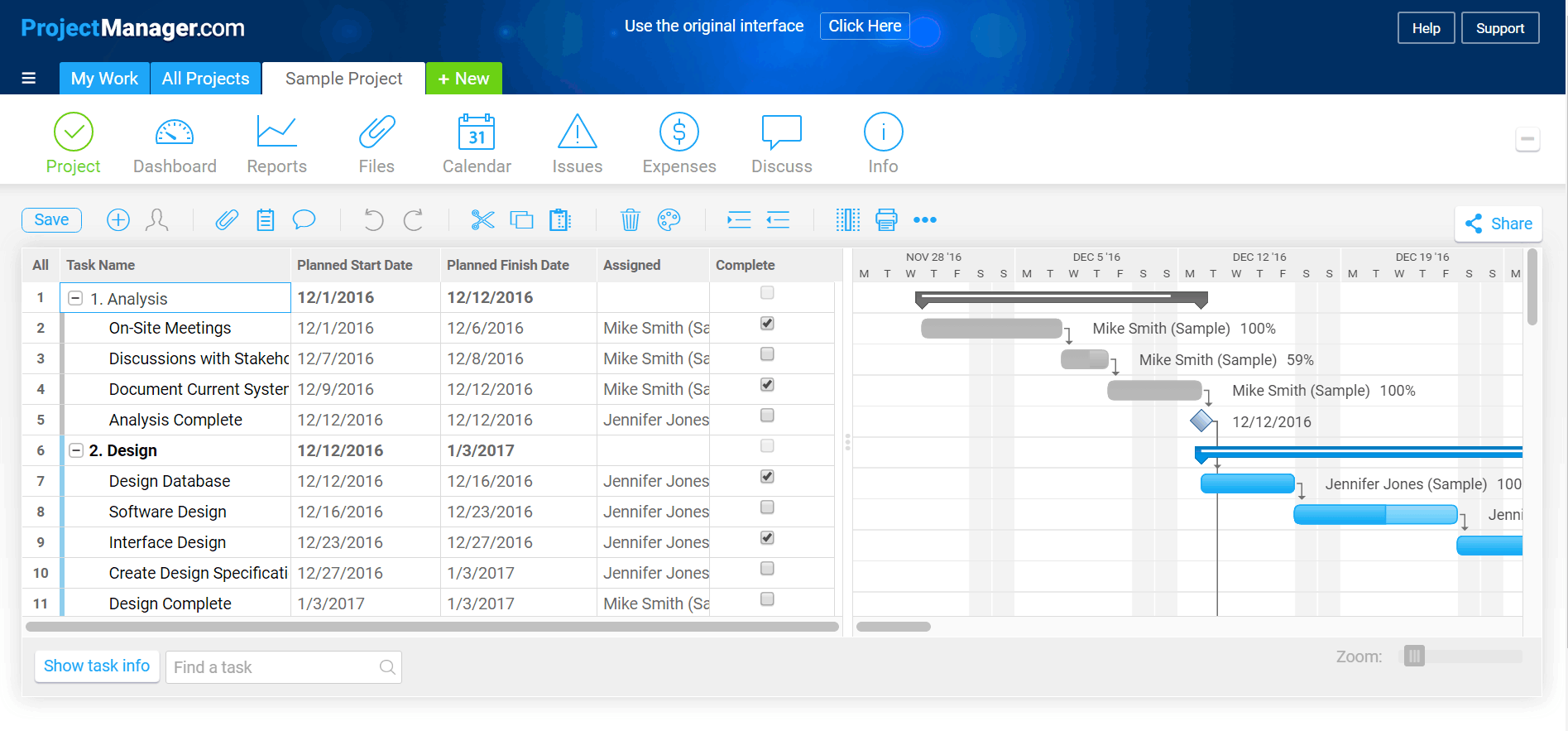
Gantt charts
Time tracking
Resource management
Project planning
Collaboration tools
View All 35 Features
ProjectManager Pricing Plans
Team
- Effective project management with planning and tracking
- Up to 5 users minimum
- Unlimited free guest licenses
- Gantt, Sheet, Board, and Calendar views
- Project import and export
- Project dashboard
- Real-time reports
- Copy projects
- My Summary and Team Summary
- iOS and Android mobile apps
- SSO with Google authentication
- API access
Business
- Team +
- Resource management and workload planning
- Time tracking
- Expenses and budgets
- AI Project Insights
- Portfolio Summary Dashboard
- RAID log exclusive
- Workflow automation exclusive
- Version control exclusive
- Task and project history
- Integrations
- Two-Factor Authentication (2FA)
- Microsoft and Google SSO
- API access
Enterprise
- Business +
- Advanced features
- Customer security and audit
- Customizable plan offering
- Volume-based pricing
- Native integration with all major collaboration tools
- Custom permissions and configure custom collaborator roles
- Dedicated CSM
- Audit logs
- Account exports
- Custom domain
- Workflow automation (10 rules per workflow exclusive)
- Priority support
- Personalized training
- Unlimited file storage
- Account access logs
- Unlimited projects
ProjectManager Resources
ProjectManager Screenshots
Description
ProjectManager Field Guide
| Best fit for | Mid-market teams, professional services organizations, manufacturing operations, and project-heavy enterprises (10-5,000+ employees) that need a full-featured project and resource management platform with Gantt charts, kanban boards, list views, calendars, time tracking, resource workload management, and portfolio reporting on one platform rather than stitching together separate scheduling, time tracking, and PM tools |
|---|---|
| Industries | Professional services and consulting, IT services and managed service providers, construction and engineering, manufacturing operations, marketing and advertising agencies, healthcare administration, education and training organizations, government and public sector, energy and utilities, transportation and logistics |
| Core capability | Gantt charts with critical path and dependencies, kanban boards, list views, calendar views, sheet view, dashboards, real-time data and reporting, project management plus collaboration, resource allocation and workload management, timesheets and time tracking, expense tracking and budgets, project intake forms and request management, portfolio dashboards, OKR alignment, workflow automation (Business tier exclusive), task automation rules, custom fields, custom roles, native integrations with Microsoft Office 365, Google Workspace, Salesforce, Slack, Zapier, Jira, GitHub, Quickbooks, plus 1,000+ via Zapier and the REST API, SSO, two-factor authentication |
| Pricing | Team at $15 per user per month (billed annually) for effective project management with planning and tracking, up to 5 users minimum, unlimited free guest licenses, Gantt sheet board and calendar views, project import and export, project dashboard, real-time reports, copy projects, my summary and team summary, iOS and Android mobile apps, and SSO with Google authentication. Business at $28 per user per month (billed annually) best value, with everything in Team plus resource management and workload planning, time tracking, expenses and budgets, AI Project Insights, portfolio dashboard, portfolio summary dashboard, RAID log exclusive, workflow automation exclusive, version control exclusive, task and project history, integrations, two-factor authentication, Microsoft and Google SSO, API access. Enterprise (Custom Quote) with everything in Business plus advanced features, customer security and audit, customizable plan offering, volume-based pricing, native integration with all major collaboration tools, custom permissions and configure custom collaborator roles, dedicated customer success manager, audit logs, account exports, custom domain, workflow automation (10 rules per workflow exclusive), priority support, personalized training, unlimited file storage, account access logs, unlimited projects. 30-day free trial. Verified at projectmanager.com/pricing on 2026-06-06. |
| Differentiator | The deepest combination of Gantt-first project management plus resource workload management plus time tracking plus portfolio reporting on one platform for mid-market and enterprise. Where most PM tools force trade-offs (Gantt OR kanban-first, PM OR resource scheduling, project work OR time tracking), ProjectManager unifies the full project delivery lifecycle. Native AI Project Insights at Business tier and dedicated Customer Success Manager at Enterprise round out the procurement signals. |
| Headquarters | Austin, Texas, USA. ProjectManager is a privately held SaaS company that has served mid-market and enterprise project teams for over a decade. Distributed engineering and customer-success organization with operations across North America and a global enterprise customer base across professional services, manufacturing, construction, and government. |
| Customers | Used by Liberty Mutual, FedEx, Siemens, Worley, McDonald's, Husband, Sysco, Daefa, and thousands of professional services firms, manufacturing operations, construction companies, IT services teams, and government agencies. Strong adoption among organizations consolidating fragmented scheduling, time tracking, and PM tools onto one platform. |
| Mobile | Native iOS and Android mobile apps with full project, task, Gantt, time tracking, and dashboard functionality. Mobile-responsive web for additional flexibility. Distributed teams and field workers operating across multiple sites get full mobile productivity for status updates, time entry, and approvals. |
Where ProjectManager Wins
Gantt PLUS kanban PLUS list PLUS calendar PLUS sheet on the same data. Project planners work in Gantt, teams update in kanban, executives review in dashboards, and individual contributors track in list views - all on the same underlying records. Most PM tools force one primary view; ProjectManager handles the full mix natively for organizations running mixed planning and execution styles.
Resource workload management built in. Business tier ships resource allocation and workload management showing who is overbooked, who has capacity, and where bottlenecks form. Operations leaders running multi-project resource matrices stop exporting to spreadsheets or running separate resource planners (Float, Resource Guru, Saviom).
Time tracking and expense management integrated. Business tier ships timesheets and time tracking alongside expense tracking and budgets. Professional services firms billing clients hourly stop running separate Toggl plus Harvest subscriptions. Time-to-budget visibility happens on the same platform as project planning.
AI Project Insights at Business tier. AI-driven project health insights, risk identification, and capacity analysis ship in the Business tier. Project managers running 20+ active projects get pattern recognition across the portfolio that manual review cannot match at scale.
Portfolio dashboards and OKR alignment. Business tier ships portfolio dashboards aggregating multiple projects into executive-level views. Enterprise tier extends this with custom dashboards and OKR alignment. Operations leaders running formal strategy execution get cross-project visibility natively.
Workflow automation at Business tier. Business tier ships workflow automation with conditional logic, status changes, assignments, and notifications. Enterprise tier adds 10 rules per workflow. Most PM tools require external Zapier for serious automation. ProjectManager ships it natively at Business tier.
1,000+ integrations via native plus Zapier. Native integrations cover Microsoft Office 365, Google Workspace, Salesforce, Slack, Jira, GitHub, Quickbooks, plus broader coverage via Zapier and REST API. Enterprise stack integration is functional for mid-market and enterprise organizations.
Where ProjectManager Falls Short
Per-user pricing higher than SMB alternatives. Team at $15 per user per month and Business at $28 per user per month is competitive at mid-market and enterprise scale but higher than SMB-targeted alternatives. Organizations under 25 employees with simple PM needs may find Asana Starter, Monday Basic, or flat-fee alternatives like ProofHub cheaper for actual usage.
Setup complexity reflects feature depth. The Gantt-plus-kanban-plus-resource-plus-time-tracking combination requires thoughtful initial configuration. Smaller organizations that want a plug-and-play workspace may find ProjectManager asks too many configuration decisions upfront. Implementation services are recommended for larger deployments.
UI feels enterprise-traditional vs newer-wave platforms. ProjectManager's interface reflects its enterprise heritage. Younger workforces that grew up on Notion or Linear may find the visual design utilitarian. The depth comes with traditional aesthetics.
Brand recognition varies by region. Strong adoption in North American professional services and manufacturing procurement. Less recognized in European procurement evaluations where Asana, Monday, and regional alternatives dominate shortlists.
AI features lighter than aggressive AI-first competitors. AI Project Insights ships at Business tier but the AI depth is lighter than Monday AI Studio, Asana AI Studio, or ClickUp Brain in autonomous workflow execution. Teams prioritizing AI-first work management should compare AI depth carefully.
Who Should Use ProjectManager?
ProjectManager is the right call when a mid-market team, professional services organization, manufacturing operation, or project-heavy enterprise (10-5,000+ employees) needs a full-featured project and resource management platform with Gantt charts, kanban boards, list views, calendars, time tracking, resource workload management, and portfolio reporting on one platform rather than stitching together separate scheduling, time tracking, and PM tools. Within the Project Management category at SaaSRat, the strongest fits are professional services and consulting, IT services and managed service providers, construction and engineering, manufacturing operations, marketing and advertising agencies, healthcare administration, education and training organizations, government and public sector, energy and utilities, and transportation and logistics.
ProjectManager is the wrong call for SMB organizations under 25 employees with simple PM needs (evaluate Asana or flat-fee alternatives like ProofHub), for software engineering scrum (evaluate Jira, Linear, or Shortcut), for documentation-led knowledge work (evaluate Notion), for AI-first work management (evaluate ClickUp or Monday), and for personal task management (evaluate Todoist).
ProjectManager Alternatives
Asana - cross-functional work management with portfolio depth and AI Studio.
Monday - visual board-first work OS with stronger no-code automation builder.
Smartsheet - spreadsheet-DNA enterprise PMO with strong US enterprise brand.
ClickUp - all-in-one work management with stronger AI investment.
Microsoft Project / Project for the Web - Microsoft 365 ecosystem PM with deep Copilot AI.
Wrike - enterprise work management with built-in proofing and resource management.
Planview AdaptiveWork - enterprise PPM at Fortune 500 scale.
What Reddit and LinkedIn Reviewers Say
Discussions on r/projectmanagement and r/construction surface a recurring pattern. Mid-market and enterprise project teams consolidating Gantt scheduling, time tracking, resource management, and portfolio reporting rate ProjectManager highly for the consolidated workflow on one platform. Buyers cite the same-data multi-view system (Gantt, kanban, list, calendar, sheet) and resource workload management as the differentiators vs Asana or Monday with add-ons.
LinkedIn discussions among PMO directors, professional services operations leaders, and construction project managers highlight ProjectManager's role in eliminating the Gantt-tool-plus-PM-tool fragmentation. AI Project Insights at Business tier is consistently named the emerging differentiator for 2025-2026 budget cycles.
Final Take on ProjectManager
ProjectManager is the right call when a mid-market team, professional services organization, manufacturing operation, or project-heavy enterprise needs a full-featured project and resource management platform with Gantt charts, kanban boards, list views, calendars, time tracking, resource workload management, and portfolio reporting on one platform. Professional services and consulting, IT services and managed service providers, construction and engineering, manufacturing operations, marketing and advertising agencies, healthcare administration, education and training organizations, government and public sector, energy and utilities, and transportation and logistics get the natural fit. The same-data multi-view system, resource workload management built in, time tracking and expense management integrated, AI Project Insights at Business tier, portfolio dashboards and OKR alignment, workflow automation at Business tier, and 1,000+ integrations via native plus Zapier combination delivers value generic PM tools cannot match for full project delivery lifecycle organizations.
For cross-functional portfolio with AI Studio, Asana. For visual board automation, Monday. For spreadsheet-DNA PMO, Smartsheet. For AI-first all-in-one, ClickUp. For Microsoft 365 PM, Microsoft Project. For enterprise with proofing, Wrike. For Fortune 500 PPM, Planview. ProjectManager is the consolidated Gantt-plus-resource-plus-time-tracking pick for mid-market and enterprise project delivery organizations.
Adjacent reading: ProjectManager buyers comparing for cross-functional workflows also evaluate task management tools for individual contributor focus and Everhour for time tracking inside existing PM tools alongside ProjectManager.
Implementation considerations: Small teams under 25 users adopt ProjectManager in 2-4 weeks. Mid-market deployments (50-500 users) run 4-12 weeks including project template design, custom workflow setup, resource pool configuration, time tracking rules, expense tracking setup, portfolio dashboard design, integration setup (Microsoft 365, Google Workspace, Salesforce, Slack, Jira, GitHub, Quickbooks), SSO setup, and team training. Enterprise deployments at 1,000+ users routinely run 12-26 weeks including multi-business-unit rollout, custom permissions design, audit logging setup, OKR alignment buildouts, AI workflow rollout, and partner-led implementation. Dedicated Customer Success Manager included at Enterprise tier.
Buyer evaluation tips: Start with the 30-day free trial running a real production project with mixed views (Gantt for planning, kanban for execution, dashboard for reporting). Team at $15 per user per month annual is the right tier for small teams that need core PM with planning and tracking. Business at $28 per user per month annual is best value for teams needing resource management, time tracking, expenses and budgets, AI Project Insights, portfolio dashboards, and workflow automation. Enterprise pricing aligns with custom needs - request a quote with your actual user count, integration list, governance requirements, and SSO needs. Annual billing provides up to 25% off versus monthly. Calculate total cost vs consolidating separate Gantt-tool plus PM-tool plus time-tracking plus resource-scheduling subscriptions.
Verified on 2026-06-06 by the SaaSRat Editorial Team. Vendor facts cross-checked against projectmanager.com, projectmanager.com/pricing, and current 2025-2026 vendor disclosures. About our methodology.
Frequently Asked Questions
How much does ProjectManager cost in 2026?
ProjectManager vs Asana vs Monday vs Smartsheet?
Does ProjectManager have Gantt charts?
Does ProjectManager include resource management?
Where is ProjectManager based?
Does ProjectManager have AI features?
Does ProjectManager integrate with Microsoft 365 and Salesforce?
Does ProjectManager include time tracking?
Does ProjectManager have workflow automation?
How long does a ProjectManager implementation typically take?
Find Your Perfect Software
See how it can transform your workflow
- Personalized for your needs Tailored recommendations based on your unique requirements.
- Save time & resources Streamline your workflow and boost team productivity.
- Trusted by thousands Join 10,000+ businesses already growing with SaaSrat.
You're all set! 🎉
A specialist for will reach out within 1 business day with tailored recommendations for your needs.