
What is ClickUp?
Get Best Quote for ClickUp
Connect with SaaSrat experts to get the best quote for your business.
You're all set!
A specialist for ClickUp will reach out within 1 business day.
ClickUp Features
Tasks subtasks and 15+ view types (List Board Calendar Gantt Timeline Mind Map etc)
Native docs and wiki with collaborative editing
Whiteboards for visual collaboration
Native chat for team communication
Goals and OKRs with metric tracking
Time tracking and timesheets
View All 15 Features
ClickUp Pricing Plans
Free Forever
- 60MB storage, unlimited tasks, Kanban boards, basic custom fields, 24/7 support. For solo users and small teams evaluating the platform.
Unlimited (annual)
- $7/user/month billed yearly. Everything in Free Forever plus unlimited storage, integrations, Gantt charts, native time tracking, goals management. For small teams needing project structure beyond Kanban.
Business (annual)
- Most popular tier. $12/user/month billed yearly. Adds unlimited dashboards, webhooks, automations (5K/month), mind mapping, and advanced reporting. For mid-market with project portfolio needs.
Enterprise
- Quote-based. Enterprise permissions, SAML SSO, SCIM provisioning, 250K automations monthly, HIPAA compliance, dedicated customer success manager, audit logs, multi-region data residency.
ClickUp Brain (add-on)
- $9/user/month add-on. AI assistance within workspaces: summarize tasks, draft replies, generate documentation, transcribe audio, answer questions about workspace data.
Everything AI (add-on)
- $28/user/month add-on. Cross-workspace AI with semantic search and cross-workspace question answering. For organizations running multiple ClickUp workspaces wanting unified AI.
ClickUp Screenshots
Description
What is ClickUp?
ClickUp is the all-in-one work management platform built by Mango Technologies Inc., founded in 2017 in San Diego, California. The product positions itself as "one app to replace them all," combining tasks, docs, whiteboards, chat, goals, time tracking, and AI in a single tool rather than stitching together separate Asana, Notion, Miro, Slack, and time-tracking subscriptions.
The strongest pricing differentiator is feature density per dollar. ClickUp Unlimited at $7/user/month annual includes capabilities that competitors gate to higher tiers: unlimited storage, integrations, Gantt charts, native time tracking, and goals management. Business at $12/user/month annual unlocks unlimited dashboards, mind mapping, advanced automations, and reporting.
Who ClickUp is built for
ClickUp fits cross-functional teams (10 to 5,000+ users) wanting to consolidate work tools. Product and engineering teams use it for backlogs and sprint boards. Marketing teams use it for campaign planning. Operations teams use it for SOPs and process tracking. HR uses it for onboarding and people ops. Agencies use it for client project management.
The strongest fit is growing companies (50-500 employees) that have hit the price wall on Asana or Monday and want similar feature depth at lower cost. Companies running multiple disconnected tools (Asana + Notion + Miro + Toggl) often consolidate to ClickUp for the cost saving and integration benefit.
It is less of a fit for engineering teams running formal Scrum at scale (Jira fits better with engineering-specific depth), for upmarket enterprise wanting polished UI and dedicated CSMs (Asana fits better), or for teams wanting a single-purpose simple tool (Trello, Linear, Basecamp are simpler).
ClickUp pricing plans
| Plan | Price (annual) | Best for |
|---|---|---|
| Free Forever | $0 | Solo and small teams, 60MB storage |
| Unlimited | $7 user/mo | Small teams, Gantt and time tracking |
| Business | $12 user/mo | Mid-market with dashboards and automations |
| Enterprise | Quote-based | HIPAA, SSO, 250K automations |
| Brain AI add-on | $9 user/mo | AI features across the platform |
| Everything AI add-on | $28 user/mo | Cross-workspace AI |
Free Forever covers solo users and small teams with unlimited tasks, Kanban boards, basic custom fields, and 24/7 support. The 60MB storage limit is the main constraint; teams quickly outgrow it. Unlimited at $7/user/month annual removes storage limits and adds integrations, Gantt charts, native time tracking, and goals.
Business at $12/user/month annual is the most-popular paid tier. It adds unlimited dashboards, webhooks, automations (5K/month), mind mapping, and advanced reporting. Enterprise is quote-based and adds enterprise permissions, SAML SSO, 250K automations monthly, HIPAA compliance, and dedicated customer success.
AI features sit as separate add-ons: ClickUp Brain at $9/user/month for AI assistance within workspaces, Everything AI at $28/user/month for cross-workspace AI. Pricing AI as add-ons rather than bundling is a notable approach versus competitors that include or bundle AI at higher tiers.
ClickUp core capabilities
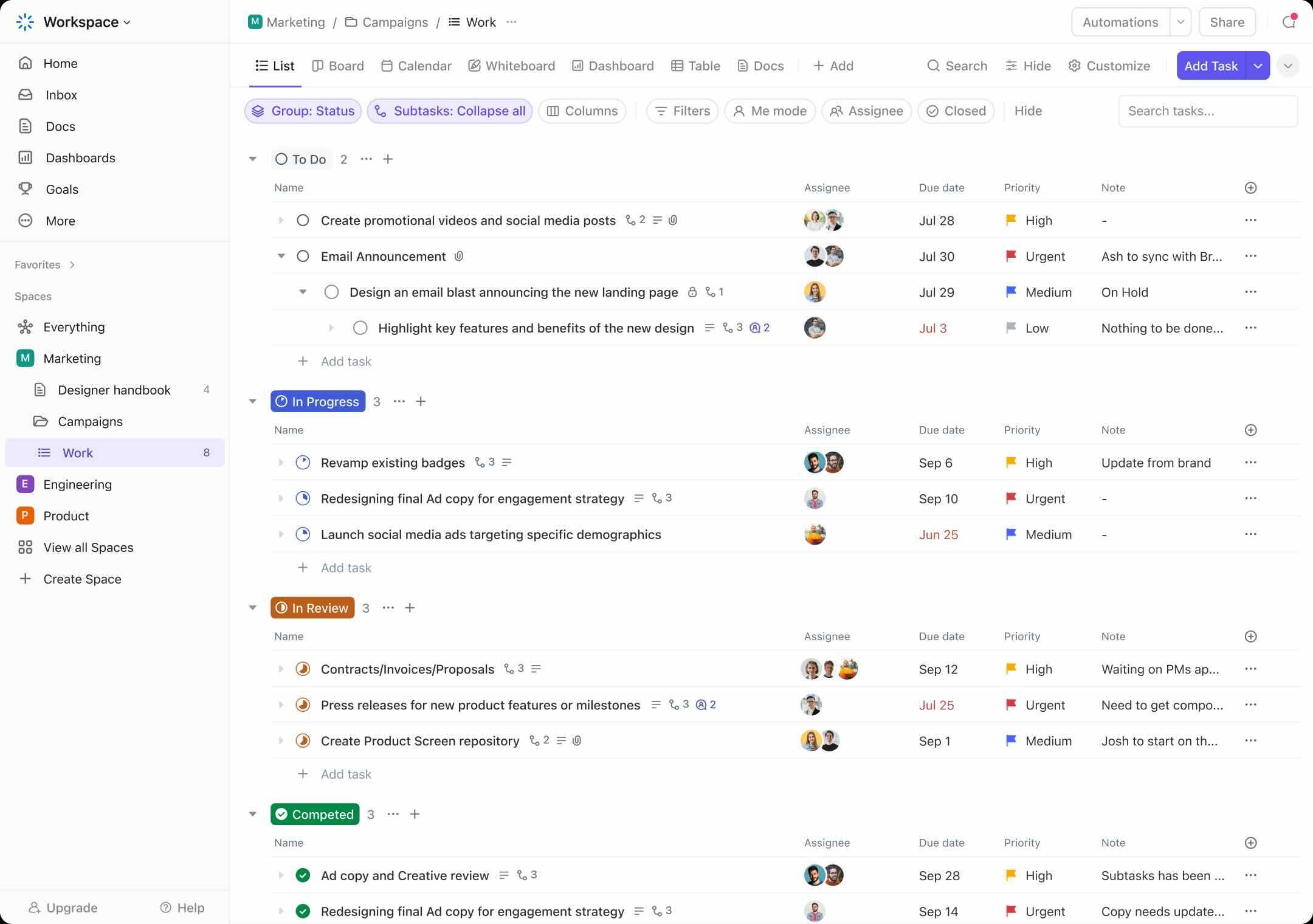
Tasks are the spine with extensive customization: subtasks, custom fields, statuses, priorities, time estimates, dependencies, recurring task generation, and conversation history per task. Each task can have 15+ different views: List, Board, Calendar, Gantt, Timeline, Mind Map, Activity, Workload, Whiteboard, Map, Embed, Doc, Chat, Form, and Box.
Spaces and Folders organize work above the task level. A typical setup: workspace at the top, spaces per team or function (Engineering, Marketing, Sales), folders per project or program, and tasks within. Permissions can apply at any level.
Docs and whiteboards
ClickUp Docs is a native wiki and document editor with collaborative real-time editing, version history, comments, and task embedding. Whiteboards are visual collaboration canvases for brainstorming, diagramming, and process mapping. Both products replace separate Notion and Miro subscriptions for teams consolidating tools.
The docs and whiteboards features are competent but not deepest in class. Notion goes deeper on docs; Miro goes deeper on whiteboards. The trade-off is integration: ClickUp docs link to tasks, tasks to docs, whiteboards to projects, in ways that separate tools cannot match.
Native chat
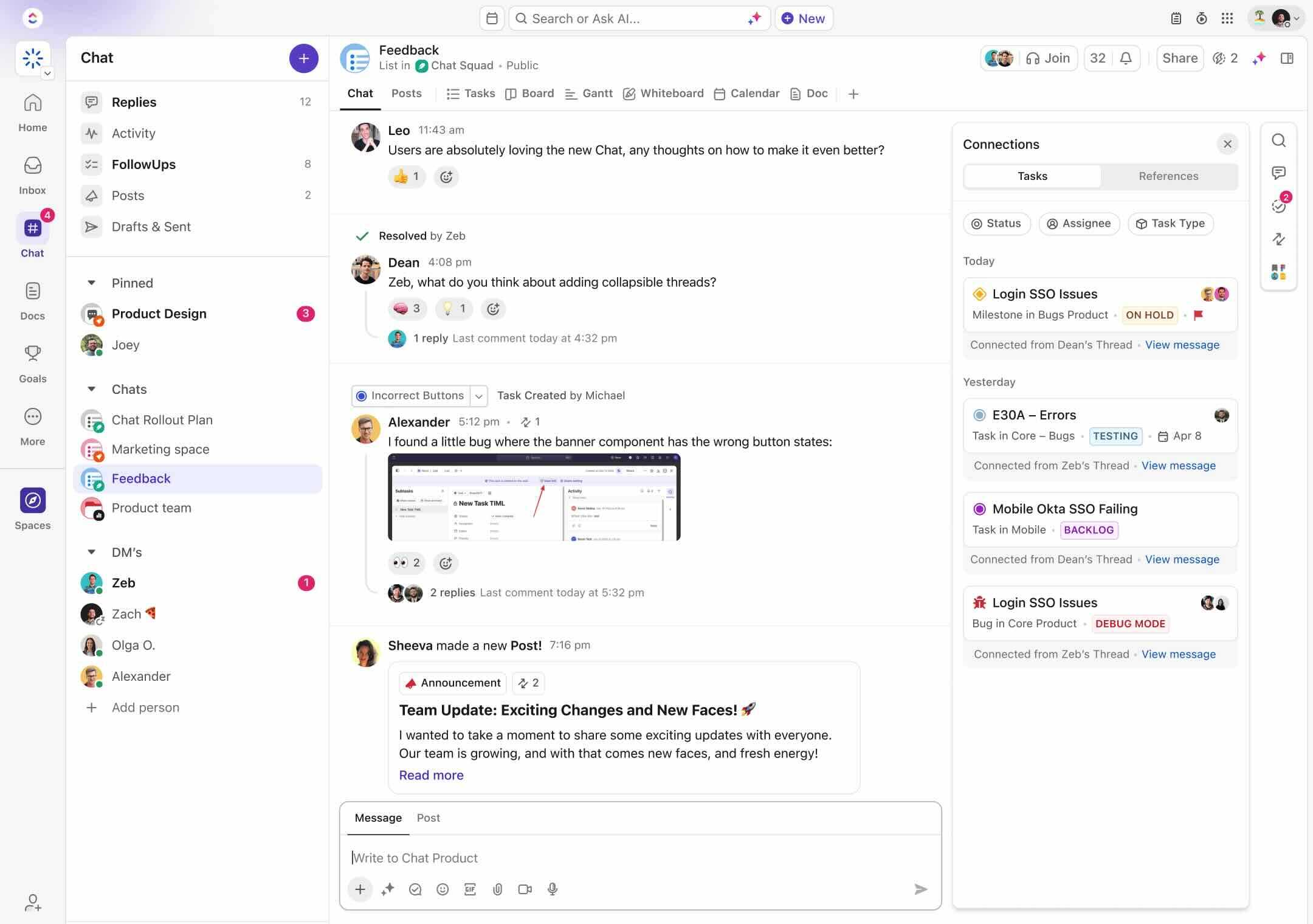
ClickUp Chat is native team communication inside ClickUp, with channels, direct messages, file sharing, and task-linked threads. For teams replacing Slack, this consolidates the conversation-and-work workflow into one tool. For teams already deeply on Slack, ClickUp Chat is generally redundant.
Goals and OKRs
Goals track strategic objectives with metric targets and progress tracking. Each goal can have multiple targets (numerical, monetary, true/false, list-based) that update automatically as underlying tasks complete. Goals can roll up across spaces, providing a portfolio view of strategic work.
ClickUp Brain and Everything AI
ClickUp Brain (add-on at $9/user/month) provides AI assistance within workspaces: summarize tasks, draft replies, generate documentation, transcribe audio recordings, and answer questions about workspace data. Everything AI ($28/user/month) extends AI across workspaces with semantic search and cross-workspace question answering.
The AI features are useful but conservative versus AI-first products. The add-on pricing approach means teams that do not need AI do not pay for it; teams that do need it pay separately for the capability.
Time tracking and time sheets
Native time tracking starts on Unlimited tier and provides timer, manual entry, billable hours, and timesheet aggregation by week. Approved time feeds project budget reporting (Business tier and up).
For agencies and consultancies billing by the hour, ClickUp's native time tracking eliminates separate Harvest or Toggl subscriptions. The depth is adequate for SMB billing; not as deep as Harvest for complex client billing.
Automations
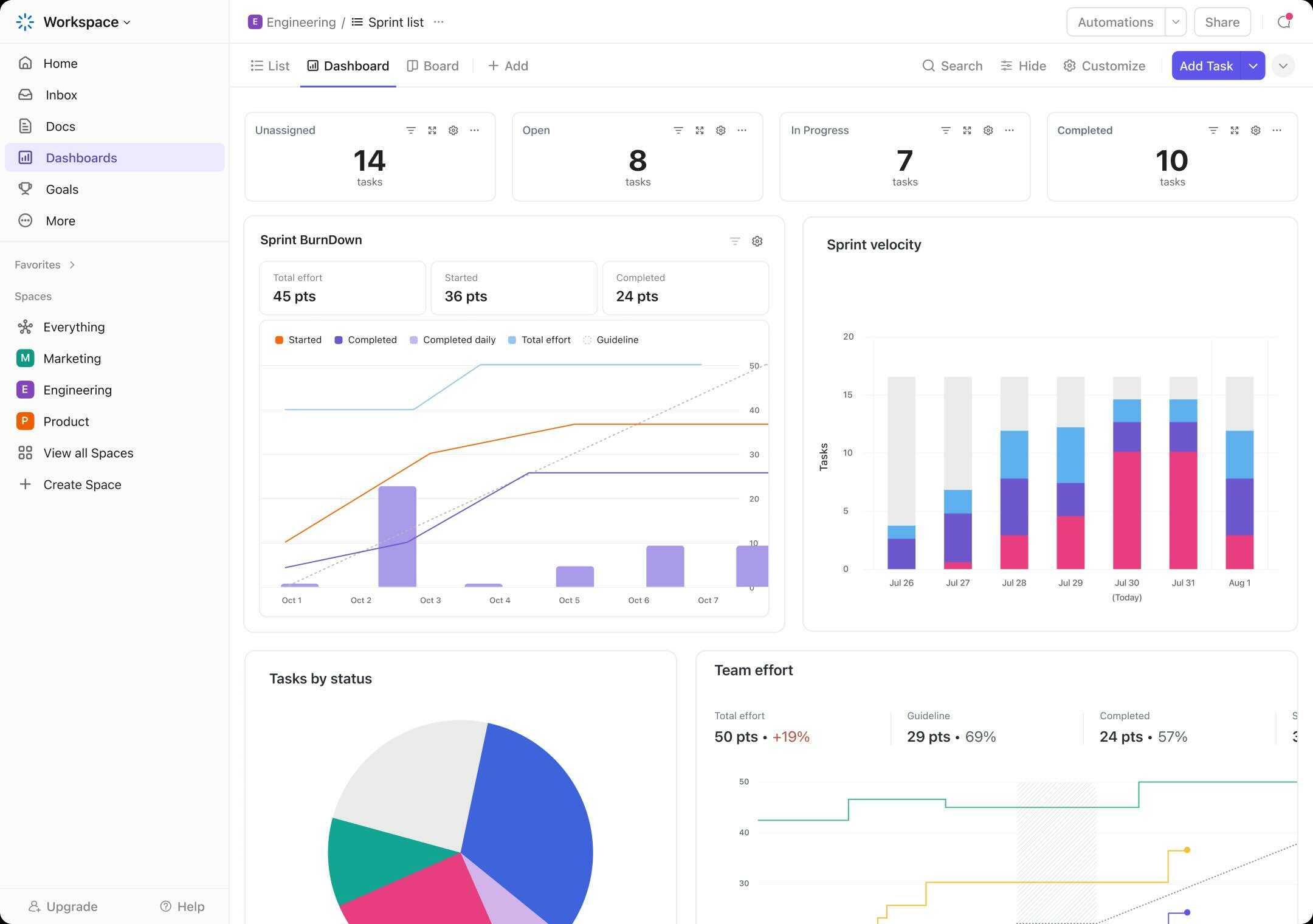
Automations fire on triggers (task created, status changed, due date approaching) with actions (assign to user, change status, send email, post to Slack). Free tier gets none, Unlimited 100/month, Business 5K/month, Business Plus 25K/month, Enterprise 250K/month. The Business tier limit covers most mid-market needs; Enterprise scale handles automation-heavy workflows.
Integrations
1000+ native integrations cover Slack, Microsoft Teams, Google Workspace, Microsoft 365, Salesforce, HubSpot, GitHub, GitLab, BitBucket, Jira, Trello, Asana (for migration), Notion, Figma, Miro, Calendly, Zoom, Loom, Zapier, Make, and many more. Public API and webhooks handle custom integrations.
Mobile and offline
iOS and Android apps cover the full task experience with offline support: create tasks, edit, comment, and update status offline with sync when reconnected. Apple Watch app pins selected tasks for quick access. Mobile experience is functional but the desktop is the primary work surface.
Security and compliance
ClickUp holds SOC 2 Type II, ISO 27001, and GDPR compliance. Enterprise adds HIPAA-compliant deployment, SAML SSO, SCIM provisioning, audit logs, and dedicated account management. Cloud hosting uses AWS US infrastructure with EU and other regions available on Enterprise.
ClickUp vs Asana
Asana is the global work management leader with cleaner UI and stronger native reporting. ClickUp packs more features at lower price per user. Pick Asana for cross-functional work management with polished UI and dedicated CSM model. Pick ClickUp for budget-conscious teams wanting comparable depth at lower cost.
ClickUp vs Monday
Monday is the visually configurable Work OS with broad use case flexibility. ClickUp is more opinionated with native docs, whiteboards, chat, and goals built in. Monday flexes wider; ClickUp goes deeper across more native features. Pick Monday for visual configuration depth. Pick ClickUp for all-in-one feature breadth at lower cost.
ClickUp vs Notion
Notion is the docs-and-databases-first platform with strong wiki and knowledge management. ClickUp is tasks-first with docs added. Pick Notion for knowledge-management-first teams with light project management. Pick ClickUp for project-management-first teams wanting docs and whiteboards bundled.
ClickUp vs Jira
Jira is the engineering-focused agile project management leader with the largest plugin ecosystem. ClickUp is broader work management across teams. Engineering-only teams running formal Scrum at scale stay with Jira. Cross-functional teams mixing engineering with marketing, ops, and product often pick ClickUp.
ClickUp vs Wrike and Smartsheet
Wrike is the mid-market PPM with capacity planning and resource leveling. Smartsheet is spreadsheet-first work execution. ClickUp competes with both at SMB and mid-market with broader native feature set. Pick Wrike for resource-heavy mid-market PPM. Pick Smartsheet for spreadsheet-style execution. Pick ClickUp for all-in-one work management.
Buyer pitfalls to avoid
Three patterns hurt ClickUp rollouts. First, picking Unlimited when Business is needed: dashboards, mind maps, and advanced automations are Business-tier; teams that need them face a tier change. Most paid customers land on Business.
Second, over-customizing: ClickUp's flexibility creates the trap of building intricate custom workflows that nobody maintains. Start with sensible defaults; add customization only when needed.
Third, ignoring AI add-on cost: ClickUp Brain at $9/user/month adds 130% to the Unlimited tier price. Teams that want AI bundled should compare against Asana, Monday, or HubSpot where AI is included at lower per-user equivalent cost.
Implementation and time to value
Solo users: productive same day. Small teams (5-25): 1-2 weeks for workspace setup, custom field configuration, and team onboarding. Mid-market deployments (100-500 users): 4-8 weeks for cross-team standardization, integration setup, and change management. Enterprise (1,000+ users): 12-24 weeks for SSO, HIPAA configuration, custom automation, and dedicated success engagement.
Customer support
All plans include 24/7 chat support. Business and Enterprise add priority response. Enterprise includes dedicated customer success management. The ClickUp Help Center is well-stocked and the ClickUp Community is active across user types.
The Bottom Line on ClickUp
ClickUp is the right call for growing companies (50-500 employees) consolidating multiple work tools (Asana plus Notion plus Miro plus Slack plus Toggl) into one platform at lower per-user cost, with strong feature density at each tier.
Standout strengths: 15+ view types per task, native docs and whiteboards and chat and goals built in, time tracking included on Unlimited, automations scaling from 100 to 250K per month, 1,000+ integrations, ClickUp Brain and Everything AI as opt-in add-ons rather than mandatory bundle, free tier with unlimited tasks.
Pricing fits cost-conscious teams: Free Forever, Unlimited $7/user/month annual, Business $12/user/month annual (most popular), Enterprise quote-based. AI add-ons: Brain $9/user/month, Everything AI $28/user/month. Annual billing required for headline pricing; monthly available at higher rates.
Trade-offs to weigh: UI density can be overwhelming for users coming from simpler tools (Trello, Linear). Free tier 60MB storage limit reached quickly. AI features cost extra (130% premium on Unlimited if adding Brain). Docs and whiteboards are competent but not deepest in class. Brand presence in upper enterprise smaller than Asana or Workday.
Alternatives worth comparing: Asana for cross-functional work management with polished UI, Monday for visually configurable Work OS, Notion for docs-and-databases-first knowledge management, Jira for engineering agile at scale, Wrike for mid-market PPM, Smartsheet for spreadsheet-first execution, Linear for engineering-focused simplicity, Basecamp for opinionated simple project management. Pricing and capabilities verified on clickup.com/pricing on 2026-06-27.
Frequently Asked Questions
Is there a free plan or free trial for ClickUp?
How much does ClickUp cost?
What does ClickUp integrate with?
Who is ClickUp best for?
What are the best alternatives to ClickUp?
Is ClickUp GDPR / SOC 2 compliant?
Does ClickUp have a mobile app?
What do real users say about ClickUp?
How does ClickUp compare to its top competitor?
Does ClickUp offer customer support?
Find Your Perfect Software
See how it can transform your workflow
- Personalized for your needs Tailored recommendations based on your unique requirements.
- Save time & resources Streamline your workflow and boost team productivity.
- Trusted by thousands Join 10,000+ businesses already growing with SaaSrat.
You're all set! 🎉
A specialist for will reach out within 1 business day with tailored recommendations for your needs.