
Wrike
by Wrike Inc
What is Wrike?
Get Best Quote for Wrike
Connect with SaaSrat experts to get the best quote for your business.
You're all set!
A specialist for Wrike will reach out within 1 business day.
Wrike Features
Task management
Gantt chart
Time tracking
Collaboration tools
Custom workflows
Resource management
View All 161 Features
Wrike Pricing Plans
Free
- Web, desktop, and mobile apps
- Project & task management
- Board view
- Table view
- Active task limitations apply
Team
- Everything in Free plan plus:
- Unlimited projects
- Unlimited tasks and subtasks
- Unlimited custom fields
- Unlimited request forms
- 20 free collaborators
- Interactive Gantt charts
- Automations (50 actions/user/month)
- Custom workflows
- Analytics view
- Calendar view
- Dashboards
- Use case templates
- Google and Microsoft SSO
- External requester collaboration
- Integrations & open API
- 2 GB storage per user
Business
- Everything in Team plan plus:
- Folder structure & nested projects
- Cross-tagging
- Project Blueprints
- Custom item types
- Automations (200 actions/user/month)
- Approvals & guest approvals
- File & video proofing (30+ file formats)
- Resource management, workloads & time tracking
- Reports and Unlimited Dashboards
- User groups & permissions
- DAM Integrations and Cloud Content Connector
- Adobe Creative Cloud extensions
- 5 GB storage per user
Wrike Resources
Wrike Screenshots
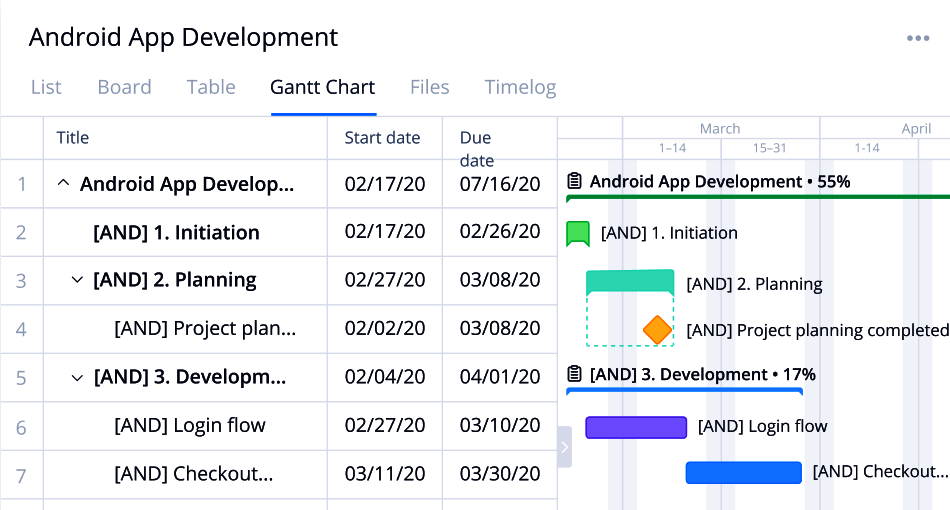
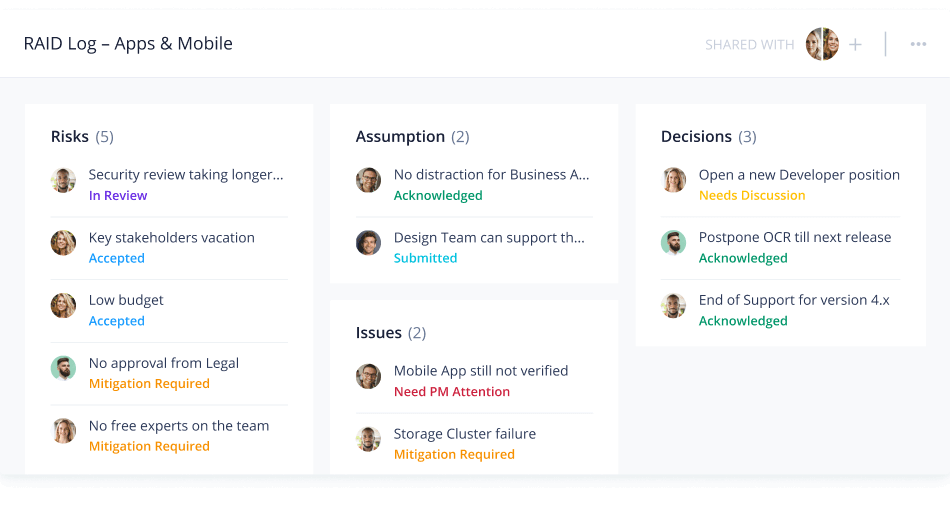
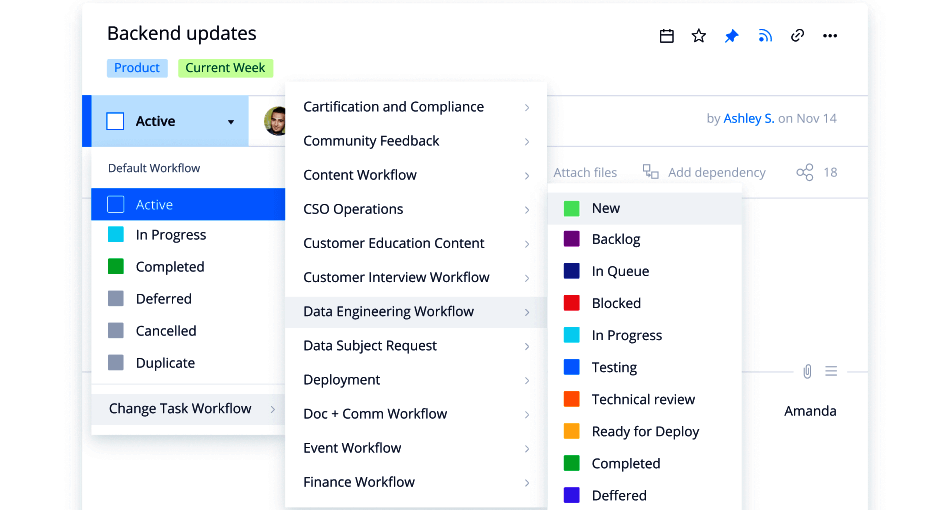
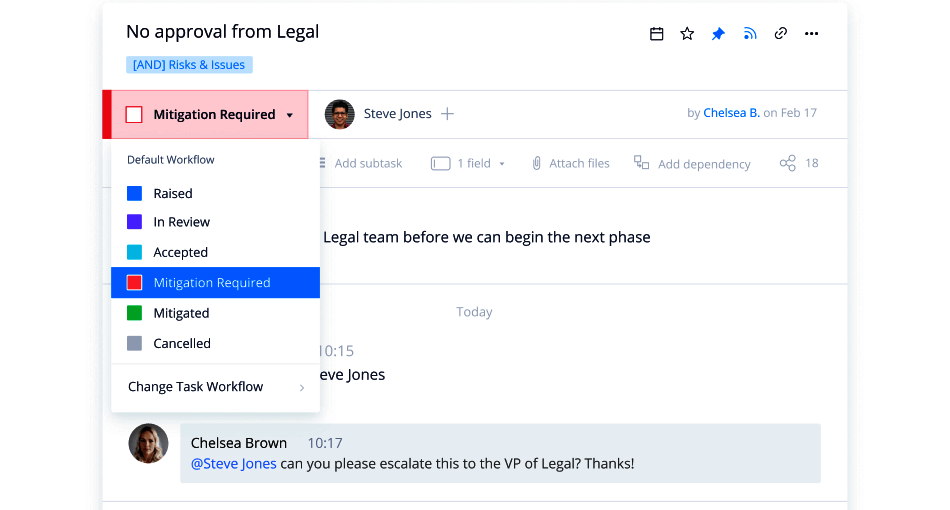
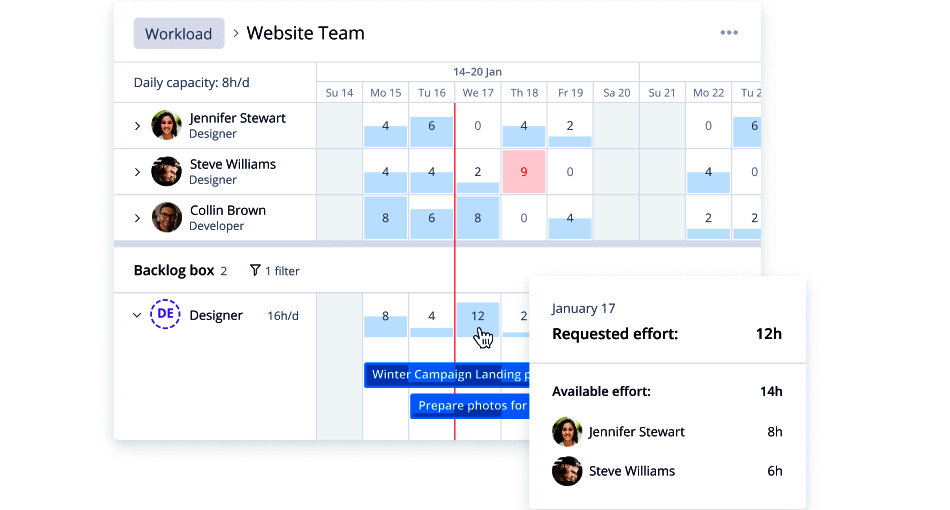
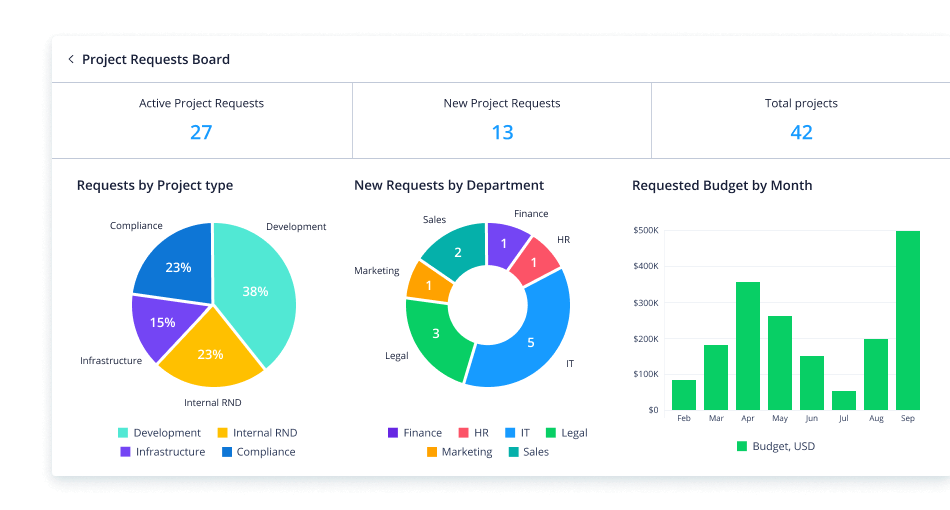
Description
Wrike Field Guide
| Best fit for | Mid-market and enterprise creative, marketing, agency, and professional services teams (50-10,000+ employees) wanting work management with deep proofing, request intake, and resource management |
|---|---|
| Industries | Marketing agencies, creative production teams, professional services, IT operations, manufacturing operations, healthcare administration, life sciences, financial services PMO, technology vendors, education |
| Core capability | Tasks, projects, custom workflows, Gantt charts, kanban boards, time tracking, resource management, dynamic request forms with conditional logic, native proofing and approval workflows for creative assets, Wrike AI for work prediction and smart automation, real-time collaboration, 400+ integrations including Adobe Creative Cloud, Salesforce, Microsoft 365, Slack, Tableau |
| Pricing | Free (limited features, up to 5 users), Team $10/user/mo billed annually (2-25 users), Business $24.80/user/mo billed annually (5-200 users), Enterprise quote-based (5+ users), Pinnacle quote-based (5+ users with advanced analytics and resource bookings). Verified at wrike.com/price on 2026-06-04. |
| Differentiator | The deepest creative and marketing work management platform. Native proofing and approval workflows for creative assets (PDF markup, video annotation, version comparison) and dynamic request intake forms with conditional logic make Wrike the standard for in-house creative teams and marketing agencies. Owned by Symphony Technology Group (private equity) since 2024. |
| Headquarters | San Jose, California, USA. Founded 2006 by Andrew Filev. Acquired by Citrix in 2021 for $2.25 billion; spun out to Symphony Technology Group in 2022; private-equity owned through 2026. Offices in San Jose, Prague, Costa Rica, Tallinn, Tokyo, and Sydney. |
| Customers | 20,000+ customers across 140+ countries; named customers include Hootsuite, Siemens, Hawaiian Airlines, Walmart, Estee Lauder, Verizon, T-Mobile, Mars, Snowflake, and L'Oreal. |
| Mobile | iOS and Android native apps with offline editing, task creation, and approval routing from mobile. |
Where Wrike Wins
Native proofing and approval workflows for creative assets. Wrike has shipped native proofing since 2017 - PDF markup, image markup, video annotation, version comparison side-by-side - all inside the Wrike interface. Creative teams skip separate tools like Ziflow or Filestage. In-house creative agencies running 100+ asset approvals per week measure the time savings in hours per week per creative.
Dynamic request intake forms. Request forms with conditional logic (show field X only if Y is selected) route incoming work to the right team with the right context attached. Marketing operations teams handling design requests, IT teams handling change requests, and HR teams handling new-hire requests all use Wrike forms as their primary intake mechanism.
Adobe Creative Cloud integration depth. Wrike for Adobe Creative Cloud extension lets designers view tasks, upload deliverables, and respond to feedback directly inside Photoshop, Illustrator, InDesign, and Premiere Pro. The deepest Adobe integration among work management platforms. Creative teams stay in their tools while operations teams stay in Wrike.
Resource management and capacity planning. Native resource bookings with utilization views, capacity forecasting, and skills-based assignment routing. Agencies and professional services firms running billable resource utilization tracking get capability that Asana and Monday still rely on integrations for.
Wrike AI (Work Intelligence). Predicts at-risk projects, suggests automations, drafts task descriptions, summarizes long threads, and routes incoming requests to the right owner. Bundled at Business and higher tiers. A direct competitive response to Asana AI Studio and Monday AI.
20,000+ enterprise customer base. Customer concentration with Fortune 1000 marketing, agencies, and professional services. Named references include Hootsuite, Siemens, Hawaiian Airlines, Walmart, Estee Lauder, Verizon, T-Mobile, Mars, and L'Oreal. Enterprise procurement teams running formal vendor-risk reviews get strong reference availability.
Where Wrike Falls Short
Steep learning curve. Wrike's customization power comes with complexity - request forms, custom workflows, custom item types, blueprints, automation rules all require admin expertise. Mid-market deployments without a Wrike admin underuse the platform within 12 months. Younger teams that grew up on simpler tools find Wrike heavier than expected.
UI feels traditional vs Monday and Asana. Wrike has invested heavily in UI modernization through 2024-2025 but still feels more enterprise-utilitarian than the newer-wave visual tools. Creative teams adopt despite the UI; marketing-led startups often pick lighter alternatives.
Pricing escalates above Team tier. $10 Team is competitive; $24.80 Business is similar to Asana Advanced; Enterprise and Pinnacle pricing for 100+ users routinely lands above modern PM alternatives. Tight-budget agencies should price the actual user mix carefully.
Private equity ownership uncertainty. Citrix sold to STG in 2022; STG continues to own Wrike as a portfolio asset through 2026. Risk-averse procurement teams comparing against public-company Asana (NYSE: ASAN) or Atlassian (NASDAQ: TEAM) weigh ownership governance.
Not engineer-native. Wrike handles technology team work but is not built for scrum or kanban with code-aware integrations. Software engineering teams pick Jira, Linear, or Shortcut.
Who Should Use Wrike?
Wrike fits when a mid-market or enterprise creative, marketing, agency, or professional services team (50-10,000+ employees) wants work management with deep native proofing, dynamic request intake, resource management, and Adobe Creative Cloud integration depth. Within the Project Management category at SaaSRat, strongest fits are marketing agencies, in-house creative teams, professional services firms running billable utilization tracking, IT operations, manufacturing operations, healthcare administration, life sciences, and financial services PMO teams.
Wrike is the wrong call for software engineering teams running scrum or kanban (evaluate Jira or Linear), for startups wanting modern UI and all-in-one workspace (evaluate Notion or ClickUp), for marketing-led teams that prefer visual board-first work OS (evaluate Monday), and for finance and operations teams transitioning from Excel (evaluate Smartsheet).
Wrike Alternatives
Asana - mature cross-functional work management with portfolio reporting; lighter on creative-specific features.
Monday - visual board-first work OS with stronger no-code automation.
Smartsheet - spreadsheet-DNA enterprise PMO alternative.
ClickUp - all-in-one work platform with proofing features at lower price.
Workfront - Adobe enterprise work management; deeper Adobe Creative Cloud integration but heavier implementation.
Teamwork - agency-focused alternative with built-in time tracking and client portals.
Mavenlink (Kantata) - professional services automation alternative for billable services firms.
What G2 and Capterra Reviewers Say
G2 reviewers rate Wrike consistently for proofing depth and request form flexibility, citing creative team workflow as the strongest differentiator. Capterra reviews reflect similar themes from marketing agency, creative team, and professional services customer base.
Discussions on r/projectmanagement surface the learning-curve concern and the UI modernization comparison. Buyers picking Wrike cite proofing + request forms + Adobe integration; buyers picking Asana cite cross-functional depth; buyers picking Monday cite visual workflow building.
Final Take on Wrike
Wrike is the right call when a mid-market or enterprise creative, marketing, agency, or professional services team wants work management with deep native proofing, dynamic request intake forms, resource management, and Adobe Creative Cloud integration depth. Marketing agencies, in-house creative teams, professional services firms, IT operations, manufacturing operations, healthcare administration, life sciences, and financial services PMO teams get the cleanest fit. The 20,000+ enterprise customer base, native proofing for creative assets, dynamic request forms with conditional logic, Wrike AI Work Intelligence, and Adobe Creative Cloud depth together exceed what generic PM tools can match for creative-led organizations.
For cross-functional non-creative, Asana. For visual board-first, Monday. For spreadsheet-DNA PMO, Smartsheet. For all-in-one at lower price, ClickUp. For Adobe enterprise with deeper Adobe integration, Workfront. For agency-focused with billing, Teamwork. For professional services automation, Mavenlink (Kantata). Wrike owns the creative and marketing work management lane.
Adjacent reading: Creative and marketing buyers comparing Wrike also evaluate task management tools, Airtable for data-first creative ops, and Coda for doc-database hybrid workflows.
Implementation considerations: Small teams under 25 users adopt Wrike in 3-6 weeks including custom workflow setup. Mid-market deployments (100-1,000 users) run 6-16 weeks including request form design, blueprint library, custom item type configuration, proofing workflow setup, Adobe Creative Cloud integration, and admin training. Enterprise deployments at Fortune 500 marketing operations routinely run 4-8 months including governance setup and change management.
Buyer evaluation tips: Price Business tier from day one if request forms with conditional logic matter (they only unlock at Business+). Wrike AI Work Intelligence is bundled at Business+ - no separate AI add-on cost. Negotiate proofing seats separately if heavy creative team usage. Pilot with one creative or marketing operations team for 60 days before scaling. Lock in pricing for 2-3 years given the private-equity ownership.
Verified on 2026-06-04 by the SaaSRat Editorial Team. Vendor facts cross-checked against wrike.com, wrike.com/price, and current 2025-2026 vendor disclosures. About our methodology.
Frequently Asked Questions
How much does Wrike cost in 2026?
Wrike vs Asana vs Monday for creative teams?
Does Wrike have native proofing for creative assets?
What is Wrike AI (Work Intelligence)?
Who owns Wrike?
Does Wrike have request intake forms?
Does Wrike integrate with Adobe Creative Cloud?
Does Wrike support resource management?
How long does a Wrike implementation typically take?
Does Wrike have a mobile app?
Find Your Perfect Software
See how it can transform your workflow
- Personalized for your needs Tailored recommendations based on your unique requirements.
- Save time & resources Streamline your workflow and boost team productivity.
- Trusted by thousands Join 10,000+ businesses already growing with SaaSrat.
You're all set! 🎉
A specialist for will reach out within 1 business day with tailored recommendations for your needs.