

Everhour
by Everhour
What is Everhour?
Get Best Quote for Everhour
Connect with SaaSrat experts to get the best quote for your business.
You're all set!
A specialist for Everhour will reach out within 1 business day.
Everhour Features
Time tracking
Timesheets
Project management
Task management
Budgeting
Invoicing
View All 57 Features
Everhour Pricing Plans
Free
- Up to 5 users
- All features, except integrations
- Second-priority support
Solo
- 1 user
- All features
- Email/Chat support
- 14 day free trial
Team
- Unlimited users
- All features
- Pay monthly or annually (save 30%)
- Email/Chat support
- 14 day free trial
Everhour Resources
Everhour Screenshots
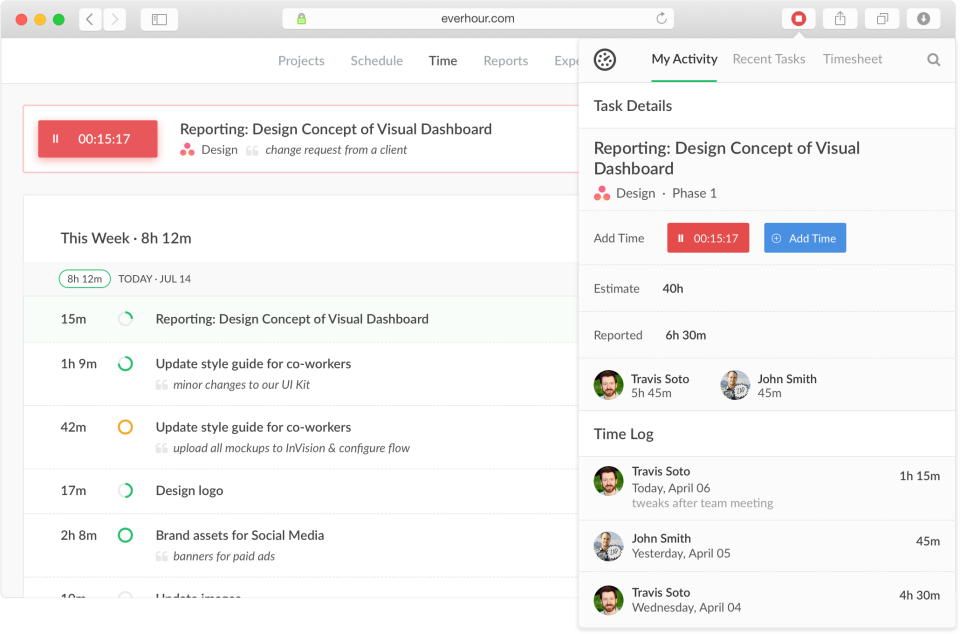
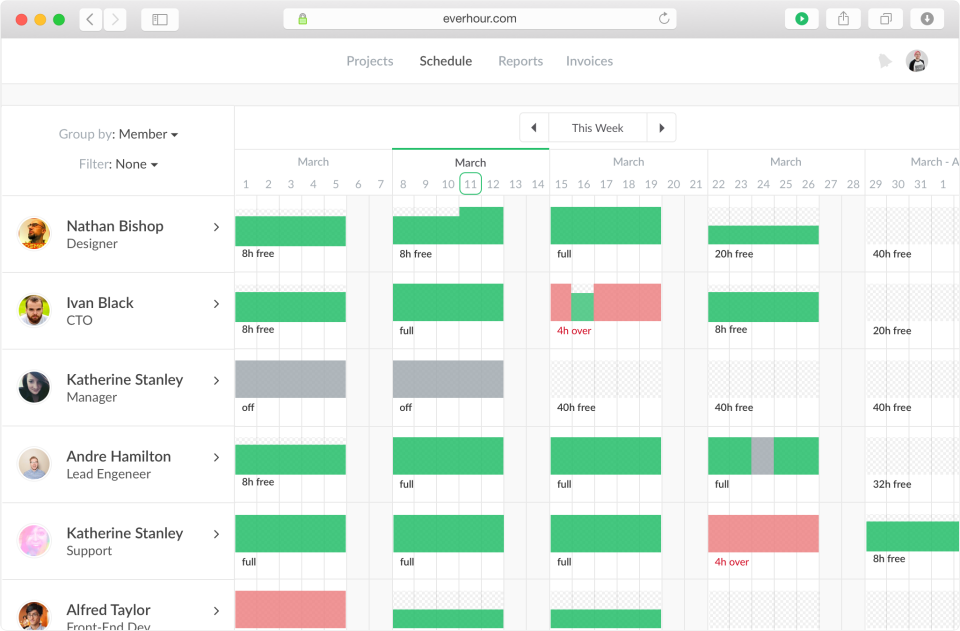
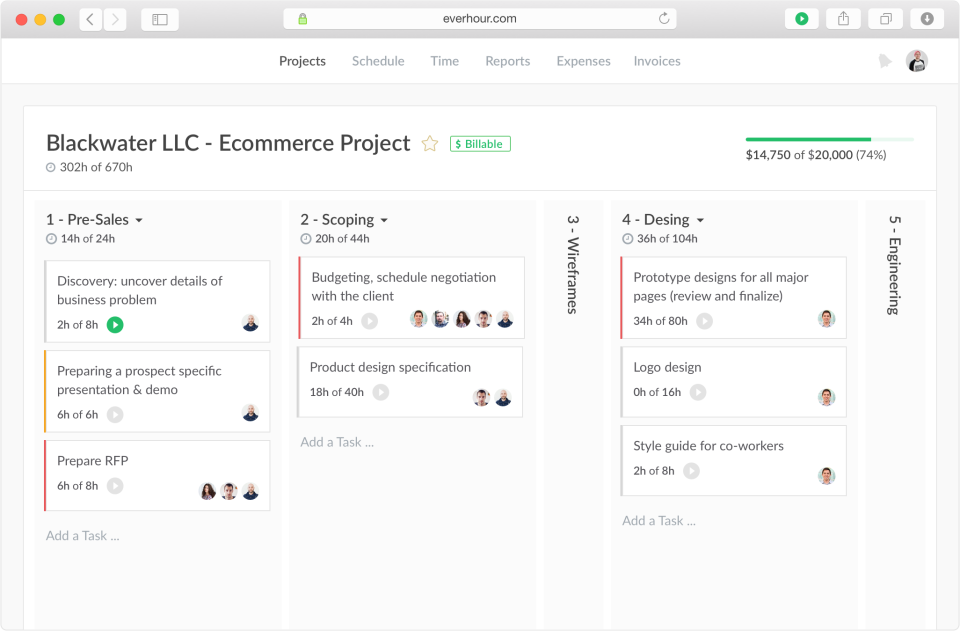
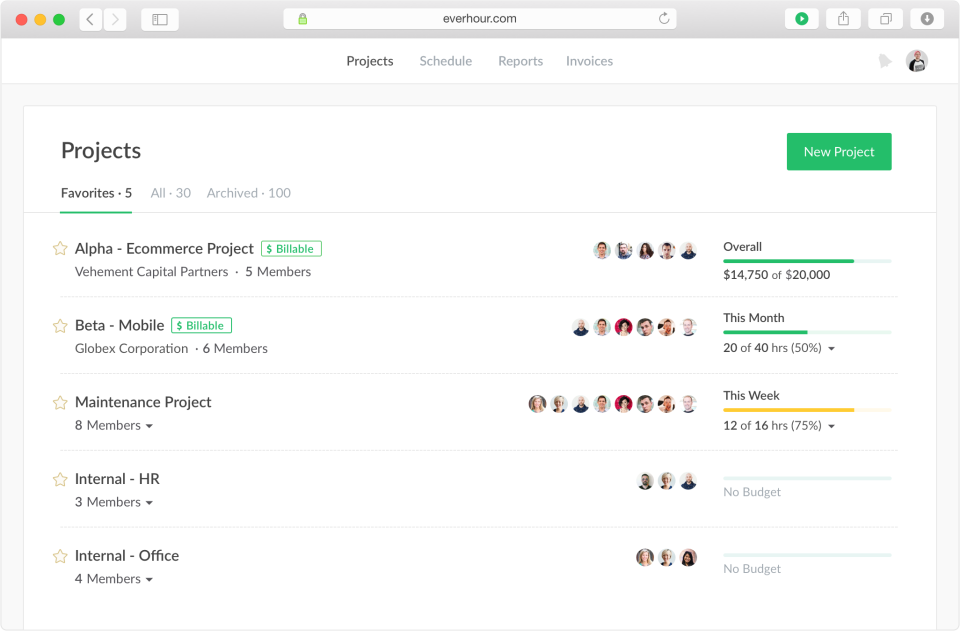
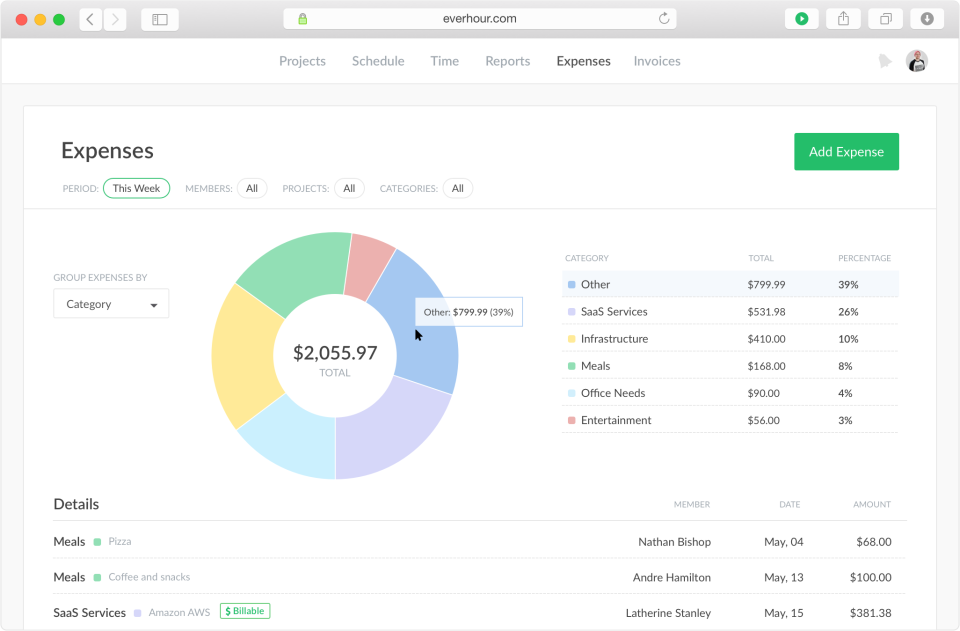
Description
Everhour Field Guide
| Best fit for | Agencies, consulting firms, and professional services teams that already run project management in Asana, ClickUp, Monday, Jira, Trello, Basecamp, or Notion and need native time tracking, billable rates, project budgets, and threshold alerts embedded directly inside those existing tools without copying data between platforms |
|---|---|
| Industries | Marketing and design agencies, web and mobile development shops, consulting firms, freelancer collectives, IT services, accounting and bookkeeping firms, legal practices, real estate teams, small SaaS companies tracking engineering time |
| Core capability | Native time tracking embedded inside Asana, ClickUp, Monday, Jira, Trello, Basecamp, Notion, GitHub, and GitLab via browser extension and integrations, billable rates per project and per user, project budgets (hours or money), budget threshold alerts, expense tracking, invoicing, timesheet approval workflows, screenshots and idle detection for remote teams, custom reports, Everhour API, integrations with QuickBooks, Xero, Slack, and Google Calendar |
| Pricing | Free for personal use (single user, limited features). Team plan starts at five user minimum at a per-user monthly rate billed annually with full PM tool integrations, billable rates, budgets, reports, invoicing, and screenshots. Custom plan for organizations needing volume discounts. Verified at everhour.com/pricing on 2026-06-04 - exact tier prices visible on the live pricing page. |
| Differentiator | The deepest native time-tracking integration with major project management tools. Designers stay in Asana, engineers stay in Jira, marketers stay in Monday, while time tracking and billable hours surface in the same interface without context-switching. Most other time trackers add a separate timer app; Everhour embeds timer buttons directly onto Asana task cards, Jira issues, Monday items, and Trello cards. |
| Headquarters | Saint Petersburg, Russia (engineering core) with remote distributed customer success and support across multiple time zones. Privately held, bootstrapped, no outside venture funding. Founded by Aleksei Krivoshein. The Russia-origin and bootstrap-funding history shape the product's pricing pragmatism and feature focus. |
| Customers | Used by agencies, consulting firms, and professional services teams running billable hours. Named customers visible on the vendor site include Buffer, Code School, and a long roster of marketing agencies and software consulting firms. |
| Mobile | iOS and Android native apps with start and stop timer, offline time entries, project switching, and timesheet review from mobile. |
Where Everhour Wins
Native embedded time tracking inside Asana, ClickUp, Monday, Jira, Trello, Basecamp, Notion, and GitHub. The integration depth is unmatched among time-tracking tools. Designers and engineers see timer buttons directly on their existing task cards and issues. No context switch to a separate timer app, no manual transcription of hours to a billing tool, no copying data between platforms. Agencies running multiple client teams on different PM tools (one client on Asana, another on Monday, a third on Jira) get unified time data without forcing PM-tool standardization.
Project budgets with threshold alerts. Set a project budget in hours or money. Everhour tracks actual hours and money against the budget and sends alerts at 50%, 75%, 90%, and over-budget thresholds. Agencies running fixed-fee engagements get early warning when projects are running hot - the single most important operational signal in services billing.
Billable rates per project and per user. Different rates for different clients, different rates for senior vs junior team members, different rates for different work types (design vs development vs strategy). Invoices generate from actual tracked time at the right rate without manual rate-lookup work.
Invoicing with QuickBooks and Xero integration. Tracked time and expenses generate invoices, push to QuickBooks Online, QuickBooks Desktop, or Xero, and reconcile against accounting. Small agencies and consultancies skip a separate invoicing tool.
Screenshots and idle detection for remote teams. Optional periodic screenshots and idle detection support remote services teams running billable client work where time-verification matters. Privacy-conscious teams can disable both per project or per user.
Bootstrap-funded pragmatism. Everhour has been bootstrapped from day one - no venture-board pressure to expand into adjacent categories, no growth-at-all-costs feature treadmill. The product stays focused on time tracking embedded in PM tools and gets incrementally better year over year. Long-tenured agency customers cite this stability as a buying signal.
Where Everhour Falls Short
Five-user minimum on paid plans. The Team plan requires a 5-user minimum even if the team is only 2-3 people. Very small agencies and freelancer collectives face a minimum spend they cannot reduce. Solo freelancers should stay on the Free tier or evaluate alternatives like Toggl Track or Harvest.
Not a standalone PM tool. Everhour is built to embed inside PM tools, not to replace them. Teams without an existing PM tool need to adopt one (Asana, ClickUp, Monday, Jira, Trello, Basecamp, Notion) before Everhour delivers full value. Treating Everhour as a PM substitute is the most common evaluation mistake.
Russia-origin operational considerations. Engineering is based in Saint Petersburg, Russia. Procurement teams in regulated industries, government contractors, and organizations with strict sanctions-compliance requirements should evaluate the operational implications. The vendor has been transparent about location and continues to serve global customers, but specific procurement rules vary.
Mobile app is functional but lighter than desktop. Mobile handles timer start and stop, offline entries, and timesheet review. Heavy reporting, billing setup, budget configuration, and invoicing remain desktop work. Field-heavy services teams that need mobile-first reporting will find the desktop dependency a friction point.
Reporting depth is good but not strongest. Everhour ships solid standard reports (project hours, billable vs non-billable, budget burn, team utilization). Custom BI-grade reporting requires exporting to a separate tool. Larger services firms running formal financial analysis routinely export Everhour data to Airtable, Tableau, or Power BI.
Who Should Use Everhour?
Everhour is the right pick when an agency, consulting firm, or professional services team already runs project management in Asana, ClickUp, Monday, Jira, Trello, Basecamp, or Notion and needs native embedded time tracking, billable rates, project budgets, and threshold alerts inside those existing tools without copying data between platforms. Within the Project Management category at SaaSRat, the strongest pairing is Everhour layered on top of one of the major PM tools - it is not a PM substitute.
Everhour is the wrong call for teams without an existing PM tool that want a single time-tracking-only solution (evaluate Toggl Track or Harvest), for solo freelancers blocked by the 5-user minimum (use the Free tier or evaluate alternatives), for organizations with strict sanctions-compliance procurement rules around Russia-origin vendors (evaluate the operational implications), for teams needing strongest custom reporting (export to Tableau or Power BI), and for organizations wanting a fully bundled PSA (evaluate Kantata or Workamajig).
Everhour Alternatives
Harvest - standalone time tracker with QuickBooks/Xero integration, no PM-embed depth.
Toggl Track - standalone time tracker with strong reporting and Pomodoro features.
Paymo - agency-focused PM with built-in time tracking and invoicing.
Teamwork - agency PM with built-in time tracking and client portals.
Clockify - free time tracker with paid premium tier; lighter PM integration.
TimeCamp - time tracking with automatic time capture and invoicing.
Hubstaff - time tracking with screenshots, GPS, and team monitoring.
What Reddit and LinkedIn Reviewers Say
Discussions on r/Entrepreneur and r/agency surface a consistent pattern. Buyers picking Everhour cite the deep PM-tool integration that eliminates context switching, the project budgets with threshold alerts, and the QuickBooks and Xero invoicing flow. Buyers picking Harvest or Toggl Track cite standalone simplicity when they do not need PM embedding. Solo freelancers cite the 5-user minimum as the blocker that pushed them to alternatives.
LinkedIn discussions among agency operators and consulting firm managers highlight Everhour as the dominant pick when the team is already on Asana or Monday or ClickUp and wants billable time inside those tools. The bootstrap-funded stability is consistently cited as a differentiator against venture-funded competitors that pivot their roadmap every two years.
Final Take on Everhour
Everhour fits when an agency, consulting firm, or professional services team already runs project management in Asana, ClickUp, Monday, Jira, Trello, Basecamp, or Notion and needs native embedded time tracking, billable rates, project budgets, and threshold alerts inside those existing tools. Marketing and design agencies, web and mobile development shops, consulting firms, freelancer collectives, IT services, accounting and bookkeeping firms, legal practices, real estate teams, and small SaaS companies tracking engineering time get the strongest match. The deep PM-tool integration depth, project budgets with threshold alerts, billable rates per project and user, QuickBooks and Xero invoicing flow, and bootstrap-funded stability together exceed what standalone time-tracking tools can deliver for teams that want time tracking embedded in their existing workflow.
For standalone time tracker with accounting integration, Harvest. For standalone with Pomodoro, Toggl Track. For agency PM with built-in time, Paymo. For agency PM with client portals, Teamwork. For free with paid premium, Clockify. For automatic time capture, TimeCamp. For monitoring-heavy remote teams, Hubstaff. Everhour is the standard for time tracking embedded in PM tools for agencies and consultancies.
Adjacent reading: Agency buyers comparing Everhour also evaluate task management tools for the underlying PM layer, Float for resource scheduling alongside Everhour time tracking, and Kantata (formerly Mavenlink) for full PSA-grade solutions.
Implementation considerations: Small agencies under 25 users adopt Everhour in 1-2 weeks. Mid-market deployments (50-200 users) run 3-6 weeks including PM-tool integration setup, billable rate configuration, project budget templates, invoicing setup, QuickBooks or Xero connection, and team training. The most important configuration step is rate-card design - get the per-project and per-user rate hierarchy right upfront to avoid invoice rework later.
Buyer evaluation tips: Start with the Free tier for single-user validation, then move to Team plan once the team scales past 5 users. Negotiate annual pricing for material savings vs monthly. Confirm the specific PM tool integration depth before committing - Asana, ClickUp, Monday, Jira, Trello, Basecamp, and Notion get deep native integration; other tools route through the API or browser extension with shallower workflows. For solo freelancers, the 5-user minimum is the blocker - evaluate Harvest or Toggl Track instead.
Verified on 2026-06-04 by the SaaSRat Editorial Team. Vendor facts cross-checked against everhour.com, everhour.com/pricing, and current 2025-2026 vendor disclosures. About our methodology.
Frequently Asked Questions
How much does Everhour cost in 2026?
Everhour vs Harvest vs Toggl Track?
What PM tools does Everhour integrate with?
Does Everhour have project budgets?
Does Everhour generate invoices and integrate with QuickBooks?
Where is Everhour based?
Does Everhour offer screenshots and idle detection?
Is Everhour suitable for solo freelancers?
How long does an Everhour implementation typically take?
Can Everhour replace a project management tool?
Find Your Perfect Software
See how it can transform your workflow
- Personalized for your needs Tailored recommendations based on your unique requirements.
- Save time & resources Streamline your workflow and boost team productivity.
- Trusted by thousands Join 10,000+ businesses already growing with SaaSrat.
You're all set! 🎉
A specialist for will reach out within 1 business day with tailored recommendations for your needs.