

Jira Software
by Atlassian
What is Jira Software?
Get Best Quote for Jira Software
Connect with SaaSrat experts to get the best quote for your business.
You're all set!
A specialist for Jira Software will reach out within 1 business day.
Jira Software Features
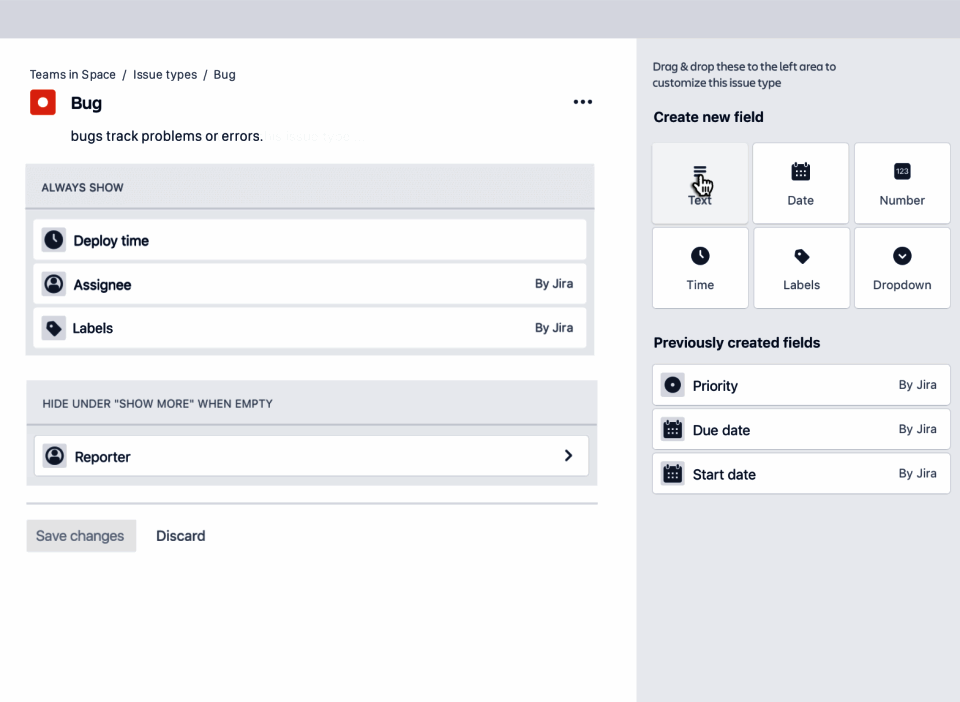
Customizable issue types and workflows
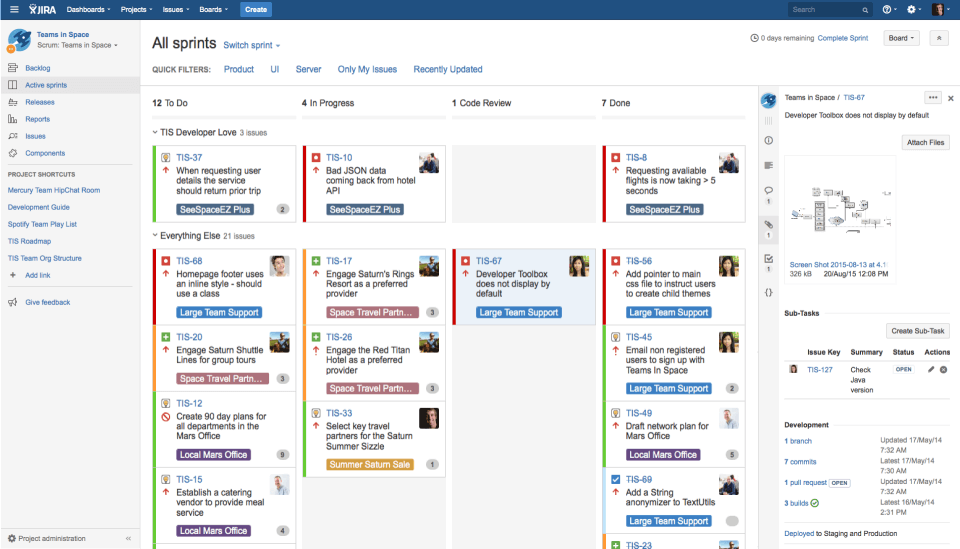
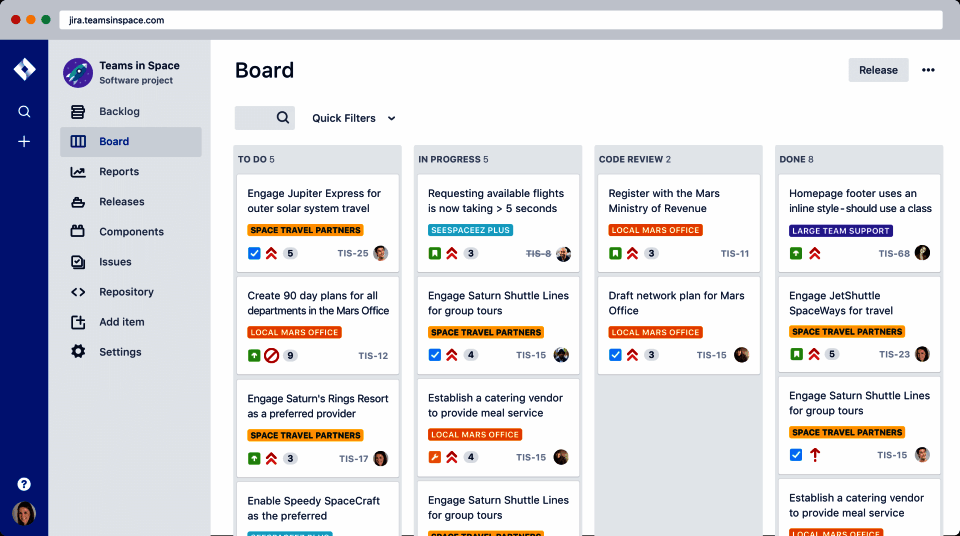
Scrum and Kanban agile boards
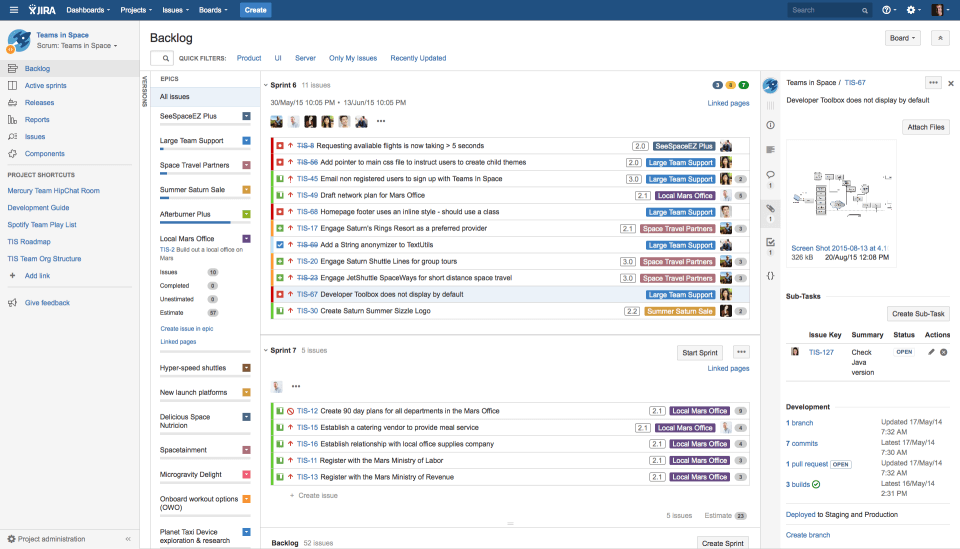
Backlog grooming and sprint planning
Native Confluence and Bitbucket integration
JQL (Jira Query Language) for advanced search
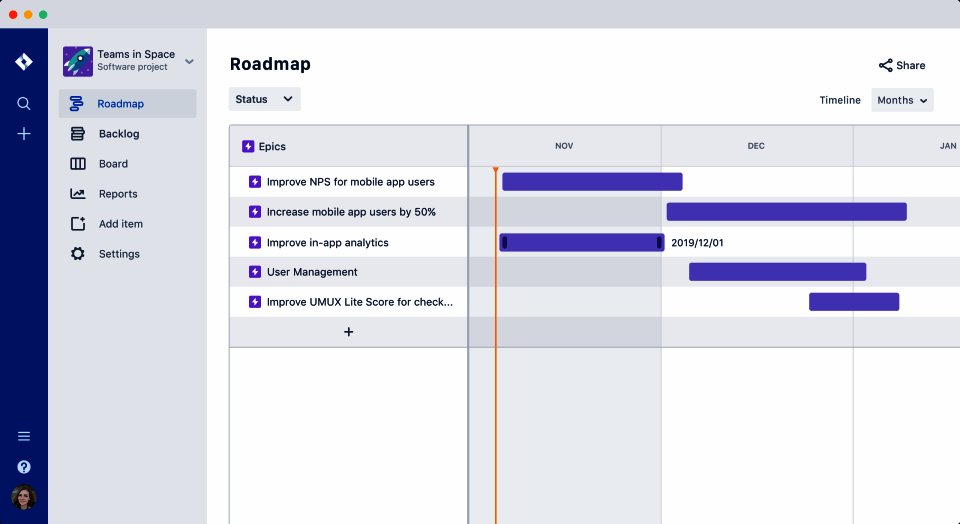
Roadmaps with cross-team dependencies
View All 13 Features
Jira Software Pricing Plans
Free
- Up to 10 users at no cost
- Unlimited project boards and backlog
- 2GB file storage
- Community support only
- Atlassian Intelligence trial limits
- Verified at atlassian.com/software/jira/pricing on 2026-06-30
Standard
- Up to 50,000 users
- Project roles and audit logs
- 250GB file storage
- 9x5 regional business hours support
- Standard automation execution limits
- Verified at atlassian.com/software/jira/pricing on 2026-06-30
Premium
- Advanced Roadmaps with cross-team dependencies
- Sandbox and release tracks for safer changes
- 99.9% uptime SLA
- 24/7 Premium support
- Unlimited storage
- Verified at atlassian.com/software/jira/pricing on 2026-06-30
Enterprise
- Unlimited automation executions
- SCIM provisioning and Atlassian Access controls
- Data residency in US, EU, Australia, Asia
- 99.95% uptime SLA with named CSM
- Bring-your-own-key encryption
- Verified at atlassian.com/enterprise on 2026-06-30
Jira Software Resources
Jira Software Screenshots
Description
Jira at a Glance
| Best fit for | Engineering teams, product managers, IT service teams (with Jira Service Management), compliance-heavy orgs |
|---|---|
| Industries | Software, financial services, telecommunications, healthcare IT, government, manufacturing IT |
| Core platform | Issues, Boards (scrum/kanban), Backlog, Roadmaps, JQL, Automation, Apps Marketplace, Atlassian Intelligence |
| Pricing model | Per-user monthly (Free up to 10, Standard $8.60, Premium $17, Enterprise quote) |
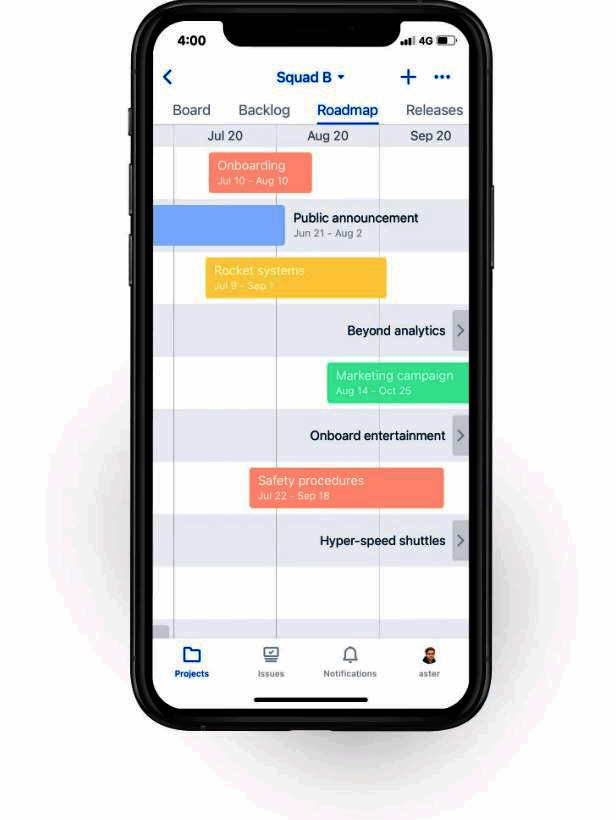
| Mobile apps | iOS and Android (Jira Cloud mobile app) |
| Compliance | SOC 2 Type II, ISO 27001, ISO 27018, GDPR, CCPA, HIPAA on Enterprise |
| Named customers | Cisco, Spotify, NASA, Volkswagen, Cloudflare (shown on atlassian.com) |
| Parent company | Atlassian Corporation (publicly listed) |
| Headquarters | Sydney, Australia and San Francisco, California |
Jira Pros and Cons in 2026
Where Jira Stands Out
Customization depth has no direct competitor. Workflows, issue types, fields, and screens bend to any process without forcing a template, which fits orgs with mature engineering processes.
Atlassian ecosystem integration is unmatched. Confluence pages link to issues that link to Bitbucket pull requests and Compass services, with one identity graph across all of them.
JQL is the deepest issue-tracking query language in the category. Saved filters, dashboards, automation rules, and reports all run on JQL, which gives technical teams unmatched data leverage.
Atlassian Intelligence ships AI across the workflow. Drafts issue descriptions, summarizes comment threads, suggests automation rules, and translates JQL to natural language with permission-aware outputs.
Where Jira Falls Short
Learning curve is steep, especially for non-engineering teams. Marketing, sales, and CS users often resist Jira for non-engineering work and gravitate to lighter alternatives.
Performance on very large instances lags. Thousands of issues plus complex automation can stall on cloud instances during peak load.
Customization that is a strength becomes maintenance debt. Workflow sprawl, unused fields, and outdated automation rules slow onboarding for new admins after a few years.
Pricing tiers stack up with add-ons. Atlassian Access (SSO across Atlassian products), Premium for advanced roadmaps, and Apps Marketplace subscriptions can add 40-80% on top of base Jira.
Who Should Use Jira?
Jira is the right pick for engineering teams running scrum or kanban with backlog/sprint/reporting needs, product managers coordinating cross-team roadmaps with dependency tracking, IT teams running Jira Service Management for help desk and change management, and compliance-heavy orgs needing audit logs, SSO, and granular permissions. In the project management and task management categories, Jira is the best fit for engineering-led work tracking.
It is the wrong fit for small teams under 15 engineers (Linear is faster), cross-functional teams that resist engineering-style tracking (Asana or ClickUp fit), and orgs without an Atlassian admin to govern field/workflow sprawl. Those buyers should compare monday.com, Trello, or Notion.
Jira Product Suite in 2026
Issues and Workflows
Custom fields, screens, and resolutions per project. Workflow transitions can require fields, trigger automation, or post messages to Slack/Teams. Statuses configurable per workflow with category mapping for reporting.
Boards and Backlog
Scrum boards with sprint planning, story points, and velocity. Kanban boards with WIP limits and cumulative-flow diagrams. Backlog ranks issues with drag-and-drop, scoped by JQL.
Roadmaps
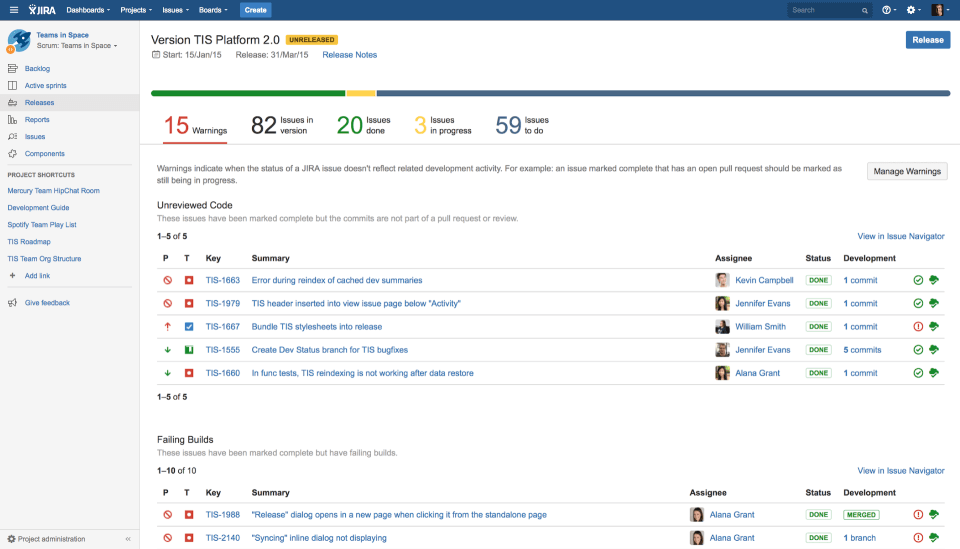
Premium roadmaps show epics across teams with timeline dependencies. Release-tracks feature manages multi-version planning and progress against committed dates.
Automation and JQL
Triggers on issue events (created, updated, transitioned). Actions include transition, assign, comment, webhook. JQL powers saved filters, dashboards, and natural-language query translation.
Atlassian Intelligence
AI surface across the workflow. Drafts issue descriptions, summarizes comment threads, generates JQL from natural language, and suggests automation rules. Permission-aware: never surfaces content the user cannot already access.
Apps Marketplace
5,000+ apps for time tracking, test management, portfolio reporting, structure, and dozens of other categories. Most apps work via Forge platform with revenue share to Atlassian.
How Much Does Jira Cost in 2026?
Four tiers, all on Atlassian Cloud. Free supports up to 10 users at $0 with 2GB storage and community support. Standard at $8.60 per user per month adds project roles, audit logs, and 250GB storage. Premium at $17 per user per month adds advanced roadmaps, sandbox, release tracks, and 24/7 support. Enterprise is quote-based with unlimited automation, SCIM, data residency, and a dedicated CSM.
What Drives the Cost
- User count tier: Free up to 10; paid tiers per active user. Audit quarterly to remove inactive users.
- Premium for advanced roadmaps: Standard cannot cross-team roadmap; Premium is the trigger.
- Apps Marketplace stack: Time tracking, structure, ScriptRunner, and others add $50-$500 per user per year.
- Atlassian Access: Cross-Atlassian SSO billed separately per user.
How to Get a Useful Quote
Inventory user count by product (Jira, Confluence, Bitbucket, Compass) and price the Atlassian Cloud Enterprise bundle. Benchmark against monday.com, Trello, and Linear before signing. Multi-year Enterprise commitments unlock 15-25% discounts on per-user rates.
Hidden Costs and Contract Gotchas to Watch For
- Apps Marketplace fees compound. Most production Jira instances run 5-15 paid apps. Forecast annually.
- Atlassian Access (SSO) bills separately. Per-user fee on top of Jira; budget accordingly.
- Premium roadmaps unlock at the Premium tier only. Mid-market teams discover this when planning cross-team dependencies.
- Data residency requires Enterprise. EU and APAC residency commitments cannot ship on Premium.
- Cloud migrations from Server/Data Center can require partner help. Plan 8-16 weeks for medium-large migrations.
Jira Alternatives Worth Comparing
Linear wins on speed, modern UX, and opinionated workflow for small software teams under 50 engineers.
Asana wins on cross-functional simplicity and on non-engineering team adoption.
monday.com wins on visual customization for marketing and ops teams. Lighter dev tooling than Jira.
ClickUp wins on feature breadth and price-per-seat. Lighter governance and slower performance at enterprise scale.
Azure DevOps wins for Microsoft-shop engineering teams needing repos, pipelines, and tracking in one license.
Trello wins for simple kanban without engineering metadata. Cheaper at small team sizes.
What Real Buyers Report About Jira
Reviewers on independent platforms (SoftwareAdvice, SelectHub) and engineering communities (Reddit r/jira, Hacker News, Atlassian Community) consistently call out three patterns. Customizability and JQL are the lock-in factors for technical teams. Atlassian ecosystem integration (Confluence, Bitbucket, Compass) keeps Jira at the center of software delivery for most mid-market and enterprise teams. Atlassian Intelligence is reducing the JQL learning curve through natural-language query translation.
The common critiques cluster around three points. Steep learning curve for non-engineering users drives them to lighter tools. Performance on very large instances triggers the most operational complaints. Apps Marketplace fee stacking surprises finance teams at renewal. For engineering and product orgs that need the deepest customization and the Atlassian stack, Jira consistently rates as the architectural default despite those friction points.
Bottom Line: Is Jira Right for You?
Jira is the right call for engineering and product teams that want deep customization, agile workflows, and tight Atlassian integration. The platform earns its place at the center of software delivery for most mid-market and enterprise teams that have a Jira admin to govern field and workflow sprawl.
For small teams under 15 engineers, Linear fits better. For cross-functional teams that resist engineering-style tracking, Asana or ClickUp are easier wins. For organizations already touching Confluence or Bitbucket, Jira is the shortest path to a unified work-tracking, knowledge, and source-control graph.
Verified on 2026-06-30 by the SaaSRat Editorial Team. Vendor facts cross-checked against atlassian.com/software/jira (pricing, AI, enterprise pages), independent review aggregators, engineering community threads, and current 2025-2026 press cycles. About our methodology.
Frequently Asked Questions
What is Jira used for?
How much does Jira cost?
Is Jira free?
What is JQL?
Is Jira better than Linear?
Does Jira support agile?
Can Jira be customized?
How long does Jira take to set up?
Does Jira integrate with GitHub?
Is Jira HIPAA compliant?
Find Your Perfect Software
See how it can transform your workflow
- Personalized for your needs Tailored recommendations based on your unique requirements.
- Save time & resources Streamline your workflow and boost team productivity.
- Trusted by thousands Join 10,000+ businesses already growing with SaaSrat.
You're all set! 🎉
A specialist for will reach out within 1 business day with tailored recommendations for your needs.