

Amazon QuickSight
by Amazon
What is Amazon QuickSight?
Get Best Quote for Amazon QuickSight
Connect with SaaSrat experts to get the best quote for your business.
You're all set!
A specialist for Amazon QuickSight will reach out within 1 business day.
Amazon QuickSight Features
Serverless BI service
SPICE in-memory engine
Standard plus Enterprise edition
Capacity-based reader pricing
Amazon Q in QuickSight (generative AI)
Natural-language query
View All 35 Features
Amazon QuickSight Pricing Plans
Standard Author
- USD 9 per user per month annual
- Standard edition only
- Basic dashboard authoring
- SPICE storage included up to limits
- No SAML SSO
Enterprise Reader
- USD 3 per user per month annual
- Read-only access
- Up to 30 sessions per user per month
- Capacity pricing optional (USD 250 per 500 sessions)
Enterprise Reader Pro
- USD 20 per user per month annual
- Amazon Q access
- Unlimited sessions
- Account infrastructure USD 250 per month required
Enterprise Author
- USD 24 per user per month annual
- Full dashboard authoring
- Enterprise edition
- SAML SSO
- VPC connections
- Row-level security
Enterprise Author Pro
- USD 40 per user per month annual
- Amazon Q in QuickSight
- All Enterprise Author features
- Account infrastructure USD 250 per month required
Amazon QuickSight Resources
Amazon QuickSight Screenshots
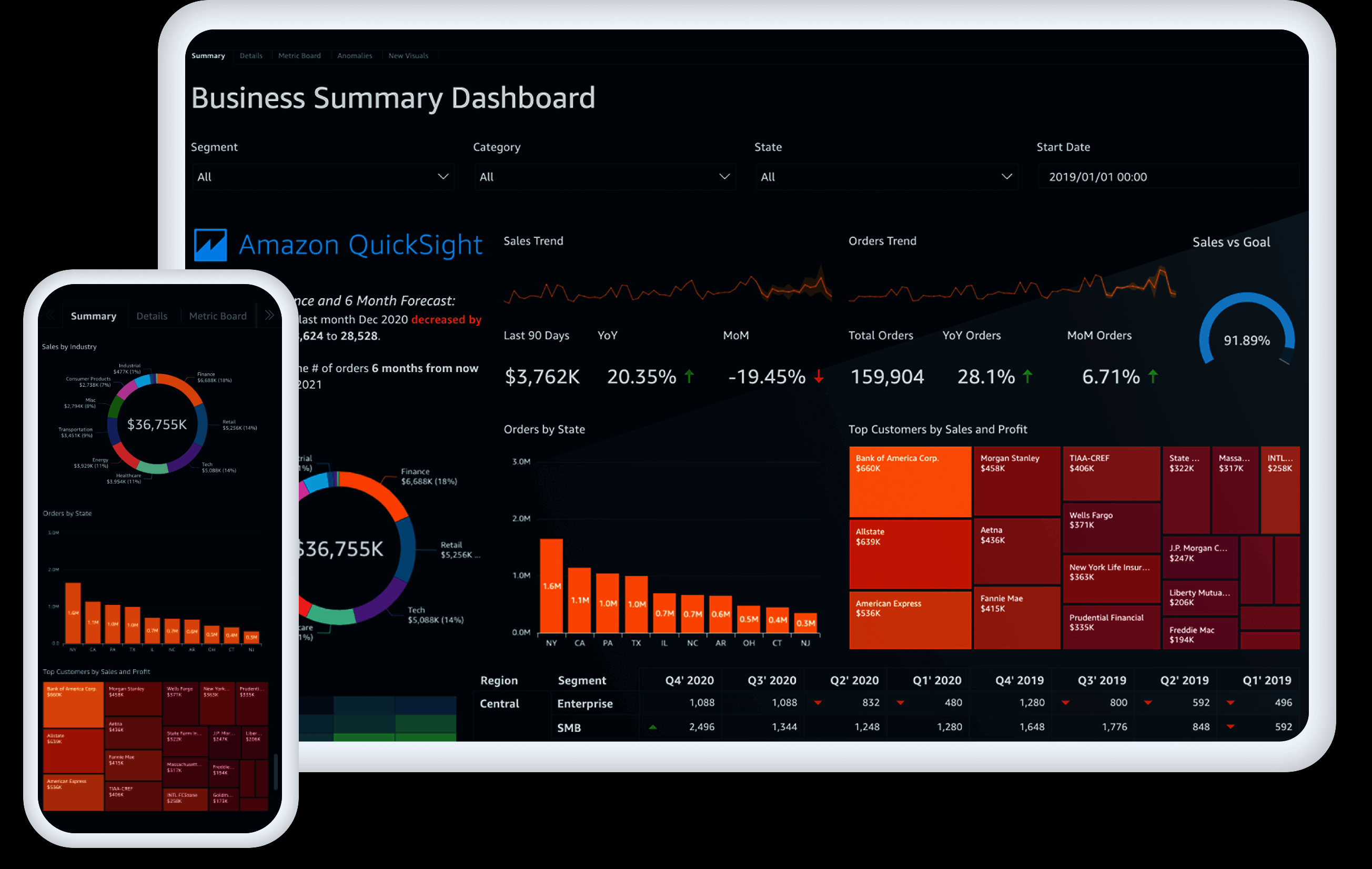
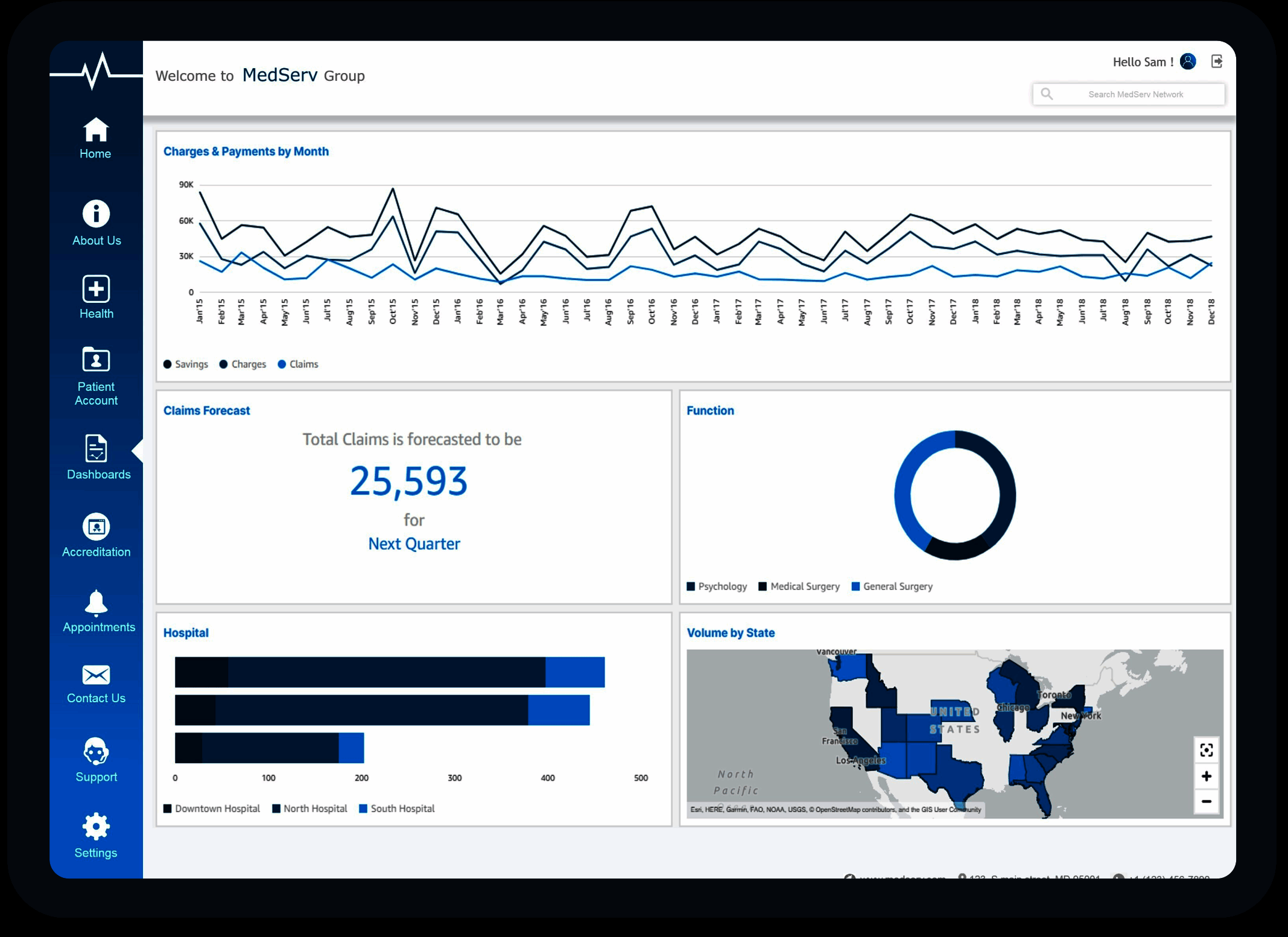
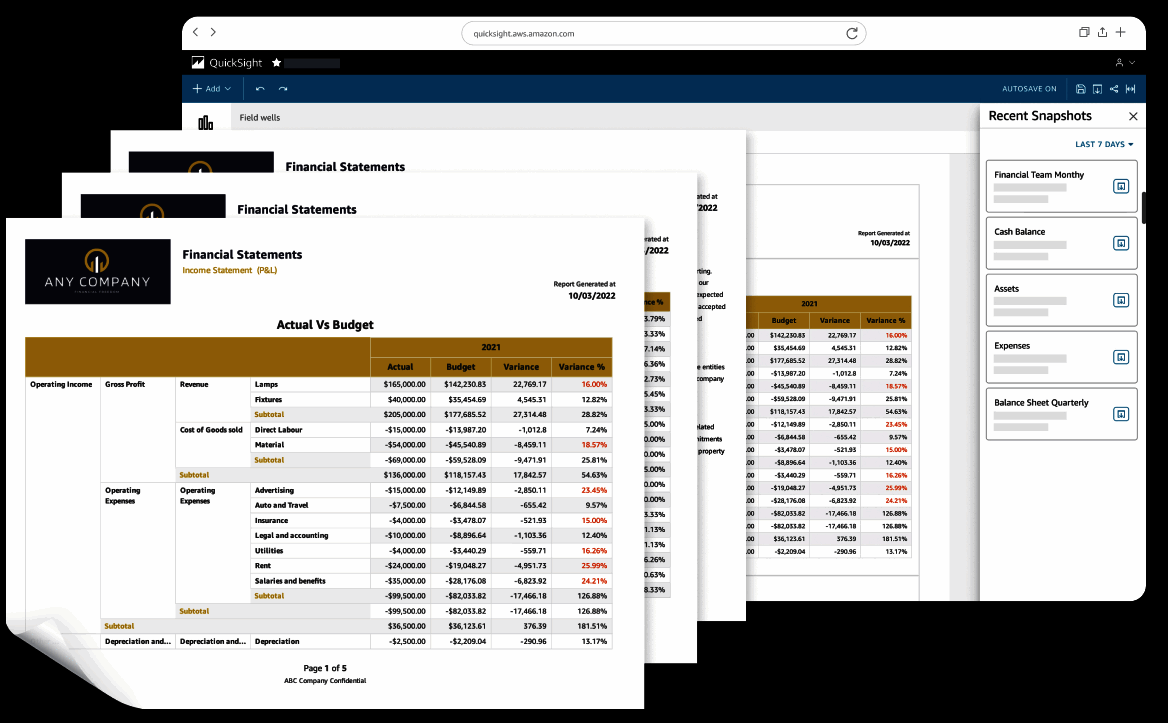
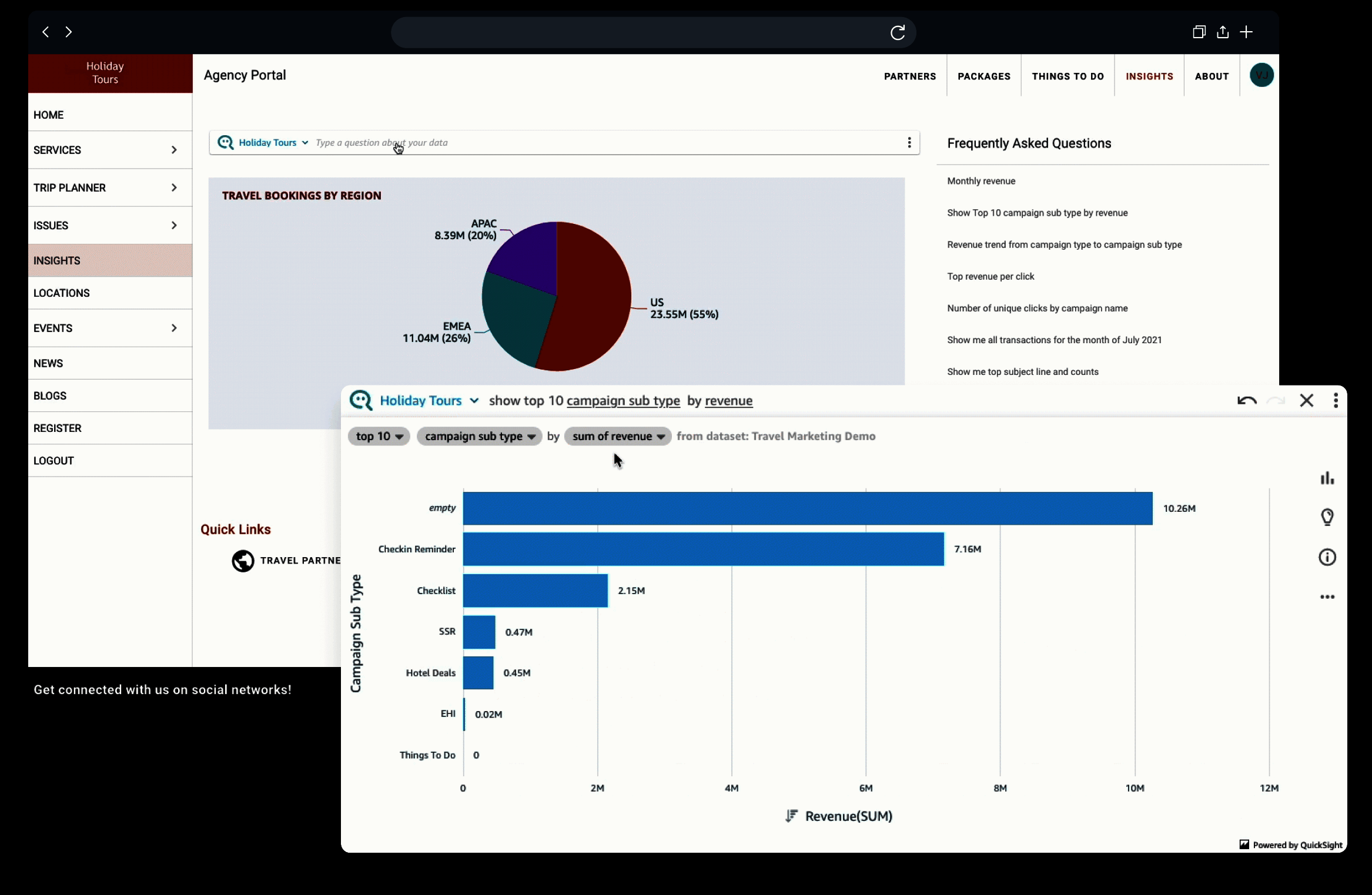
Description
Amazon QuickSight at a Glance
Amazon QuickSight is AWS's homegrown business intelligence service. It went GA in November 2016 and now sits inside the AWS Analytics family next to Athena, Redshift, EMR, and OpenSearch. If your data already lives in S3, Redshift, RDS, or Aurora, QuickSight is the BI tool with the shortest path from query to dashboard, because authentication, networking, and billing all run through your existing AWS account.
The product is structured around two things: SPICE (its in-memory engine) and a per-session reader model that charges by usage rather than by named seat. Authors pay a monthly subscription, but viewers can be billed only when they open a dashboard. That economic model is the biggest reason teams pick QuickSight over Tableau or Microsoft Power BI for embedded and customer-facing analytics.
PeerSpot mindshare in March 2026 put QuickSight at 3.7%, behind Power BI (9.3%) and Tableau (6.7%). Inside AWS-first shops it is often the default. G2 rates it 4.0/5 across 157 reviews; Capterra puts it at 4.3/5.
Pros and Cons
Pros
- Pay-per-session reader pricing starts at $0.30 per session and caps at $5 per reader per month, which beats per-seat BI when usage is bursty.
- Tight, native plumbing into Athena, Redshift, S3, Aurora, RDS, OpenSearch, and Timestream. No connector tax, no extra IAM dance.
- SPICE handles billions of rows without a separate warehouse; 10GB is included per Author.
- Amazon Q in QuickSight adds natural-language Q&A, executive summaries, and generative data stories on top of any dashboard.
- Compliance inherits from AWS: FedRAMP, HIPAA eligible, PCI DSS, ISO 27001, SOC 1/2/3.
- QuickSight spend can roll into the AWS Enterprise Discount Program (EDP) commitment.
Cons
- Visualization library is thinner than Tableau or QlikView. Custom visuals are limited.
- UI is less polished than Power BI or Sigma Computing, and the authoring workflow has a learning curve.
- Scheduled refresh has a 30-minute minimum interval on Enterprise; near-real-time use cases need direct query, which loses SPICE speed.
- AWS Premium Support tickets for QuickSight are often slow and bounced between teams. Reviewers flag this regularly.
- Author Pro is now $40/user/month, not the older $18 figure that still floats around the internet. Pricing for the Q AI tier climbed sharply in 2024-2025.
Who Should Use Amazon QuickSight
QuickSight fits four buyer profiles cleanly.
AWS-native data teams. If Redshift, Athena, and S3 are already the warehouse, QuickSight removes a vendor, a contract, and an IAM headache. Permissions flow through AWS Lake Formation, VPC endpoints work out of the box, and billing lands on the same AWS invoice.
SaaS companies embedding analytics in their product. Per-session pricing lets you push dashboards to thousands of end customers without paying per named user. Embedded auth works through Cognito or a custom JWT flow.
Public sector and regulated industries. FedRAMP High and GovCloud availability make QuickSight viable for U.S. federal, defense, and HIPAA-bound healthcare workloads where Looker Studio or Metabase cloud cannot land.
Teams that want generative BI without a separate AI license. Amazon Q in QuickSight bundles NL Q&A, exec summaries, what-if scenarios, and data stories. Power BI Copilot and Tableau Pulse cover similar ground, but Q ships inside the same console.
Skip QuickSight if your warehouse is Snowflake-only and you want best-in-class visuals, or if your analyst team is already deep on Tableau or Qlik. The switching pain is rarely worth the savings unless AWS spend is large.
QuickSight Product Suite
QuickSight has two editions, and most real buyers end up on Enterprise.
Standard Edition. $9/user/month on annual, $12 monthly. Single-region, IAM-based auth, 10GB SPICE per author. This tier is fine for an internal AWS team of fewer than 20 analysts. Most companies outgrow it within a year.
Enterprise Edition. Required for SSO, row-level security, VPC connectivity, alerts, dashboard email, embedded analytics, paginated reports, and Amazon Q. Pricing splits into Reader, Reader Pro, Author, and Author Pro tiers (covered below).
Inside Enterprise you also choose how viewers are billed: per-user ($3 Reader, $20 Reader Pro) or per-session capacity ($250/month for 500 sessions, $0.50 per additional). Most embedded use cases land on capacity pricing; internal-dashboard use cases land on per-user.
How Much Does Amazon QuickSight Cost
QuickSight pricing is published on aws.amazon.com/quicksight/pricing. Here are the current 2026 rates.
| Plan | Price | What's Included |
|---|---|---|
| Standard Author | $9/user/mo annual ($12 monthly) | Build dashboards, 10GB SPICE, single AWS account |
| Enterprise Reader | $3/user/mo (cap $5) | View dashboards, schedule emails, mobile app access |
| Enterprise Reader Pro | $20/user/mo | Reader plus Amazon Q natural-language Q&A and exec summaries |
| Enterprise Author | $24/user/mo | Build, share, embed, 10GB SPICE, alerts, RLS |
| Enterprise Author Pro | $40/user/mo | Author plus full Amazon Q authoring, generative dashboards, data stories |
| Reader Capacity Pricing | $250/mo for 500 sessions, $0.50 per extra; annual $20,000 to $258,000/yr | Per-session billing for embedded and customer-facing dashboards |
| Amazon Q Capacity | $250/mo for 500 questions; annual $18,000 to $120,000/yr | NL Q&A volume across the account |
| Paginated Reports | $500/mo for 500 report units; $24,000/yr for 4,000 monthly | Pixel-perfect PDF and Excel exports |
| SPICE Storage | $0.38/GB/mo above the 10GB free per Author | In-memory dataset storage |
| Account Infra Fee | $250/mo per account if Pro users or Q is enabled | Flat fee, applies once per AWS account |
Hidden Costs and Contract Gotchas
QuickSight is cheap on the sticker, expensive in the footnotes. Things to watch:
- The $250/month account infra fee kicks in the moment you turn on any Pro user or any Q feature. It is per AWS account, not per user, so multi-account orgs pay it multiple times.
- Reader Pro and Author Pro are both required if you want full Q in QuickSight. Jumping a 30-author team from $24 to $40 per author adds $5,760/year before any Q capacity charges.
- SPICE storage past the included 10GB at $0.38/GB/month adds up fast when you start materializing wide marketing or product analytics tables.
- Paginated reports are sold separately at $500/month for 500 units. Finance, ops, and regulated reporting teams almost always need this.
- Capacity pricing tiers do not roll over. Unused sessions in month one are gone in month two. Right-size carefully or you will overpay the annual commitment.
- 30-minute minimum refresh means dashboards billed as "live" actually lag. For sub-minute freshness you must use direct query, which sacrifices SPICE speed.
- EDP commit can absorb QuickSight spend, which is a real advantage if you already have a multi-million-dollar AWS commitment. Negotiate the bundle, not the standalone price.
Implementation Plan: Rolling Out QuickSight
A realistic rollout for a 50 to 200 person company runs 6 to 10 weeks.
Weeks 1 to 2: Foundations. Enable QuickSight Enterprise in the right AWS account. Decide single-account or multi-account. Wire SSO (IAM Identity Center or external IdP). Set up VPC endpoints to your warehouse if data does not traverse the public internet.
Weeks 3 to 4: Data layer. Build SPICE datasets for the top 10 dashboards. Decide which sources stay direct-query (Redshift Spectrum, Snowflake) and which get imported. Set incremental refresh schedules and confirm 30-minute floor is acceptable.
Weeks 5 to 6: First dashboards. Migrate or build the executive dashboard, the revenue dashboard, and the operational dashboard. Apply row-level security via tagging. Test the mobile app on iOS and Android.
Weeks 7 to 8: Q and embedded. If you bought Pro tiers, train authors on Q topics. For embedded use cases, build the JWT or Cognito flow and ship to a staging customer environment.
Weeks 9 to 10: Cutover and training. Run parallel for two weeks against the old tool (Tableau, Power BI, Holistics, whatever it is). Train end users on Reader UI. Hand off ownership to a data-platform owner.
QuickSight Alternatives
Honest comparison matters here, because QuickSight is rarely best-in-class on any single axis except AWS integration.
- Microsoft Power BI: cheaper at $14/user/month Pro, deeper visuals, better Excel/M365 integration. The default if you live in Azure or Office 365.
- Tableau: stronger visual analytics, much larger community, higher price. Better for analyst-heavy organisations.
- Looker Studio: free tier, tight with BigQuery and Google Ads. Weaker on governance and scale.
- Metabase: open-source, fast to deploy, popular with startups. Lacks paginated reports and enterprise scale features.
- Sigma Computing: spreadsheet-style BI on the warehouse, strong with Snowflake. Pricier than QuickSight.
- Domo: data-app focus, all-in-one ETL plus BI, expensive.
- Zoho Analytics: cheapest entry point in the category, best for SMB teams already on the Zoho stack.
- QlikView and Sisense: associative engine and embedded analytics respectively, both stronger than QuickSight on specific use cases.
- IBM Cognos Analytics and MicroStrategy: enterprise legacy BI, heavier governance, slower to deploy.
- Redash: SQL-first, lightweight, free open-source option for engineering teams.
The full business intelligence software category page on SaaSRat compares all of these side by side.
What Real Buyers Report
Conversations across r/aws, r/dataengineering, and Hacker News surface a consistent picture. AWS-native teams love the integration and the per-session billing. They tolerate the visual limitations. They complain about the authoring UI being less ergonomic than Power BI and Tableau, and they complain about support response time when something breaks.
Embedded analytics is the standout use case. Multiple SaaS founders report cutting their customer-facing BI bill by 50 to 80% versus Tableau OEM or Looker embedded, simply by moving to QuickSight capacity pricing.
The most common regret: buying Pro tiers and Q capacity before validating that natural-language Q&A actually changes user behaviour. Q is genuinely useful, but the cost step from Author to Author Pro is real and the ROI proof is thin.
What G2/Capterra/PeerSpot Reviewers Actually Say About QuickSight
G2 reviewers (4.0/5, 157 reviews) consistently praise the AWS integration, the speed of SPICE on large datasets, and the predictable pricing. Repeated criticisms: limited chart types, the authoring UI feels dated, and Q is impressive in demos but inconsistent in production.
Capterra (4.3/5) breaks down to 4.2 ease of use, 4.3 features, 4.3 value. Reviewers in finance and retail call out the embedded use case as the strongest reason to choose QuickSight over alternatives.
PeerSpot reviewers are blunter: QuickSight is "good enough" for AWS shops and frustrating for everyone else. Mindshare of 3.7% in March 2026 reflects that. It is a specialist tool, not the safe enterprise default.
Bottom Line
Amazon QuickSight is the right BI tool for AWS-native teams, embedded analytics in SaaS products, and regulated workloads that need FedRAMP and HIPAA inheritance from AWS. It is not the right BI tool if you want best-in-class visuals, a polished authoring UI, or fast support response.
Buy it if your data lives in S3, Athena, or Redshift and your viewer population is large and bursty. Skip it if your team is already productive on Tableau, Power BI, or Sigma, and your AWS spend is small. And if you are buying Pro tiers, negotiate Q capacity and paginated reports into your AWS EDP commit rather than paying list. The published price is rarely the price AWS actually charges.
Frequently Asked Questions
How much does Amazon QuickSight cost in 2026?
How does QuickSight serverless model save money?
How does QuickSight compare to Power BI?
Is Amazon QuickSight HIPAA and FedRAMP compliant?
Does QuickSight have a mobile app?
What is Amazon Q in QuickSight?
What data sources does QuickSight support?
How long does QuickSight take to deploy?
Can QuickSight embed dashboards in customer-facing apps?
Does QuickSight have named customer references on the vendor site?
Find Your Perfect Software
See how it can transform your workflow
- Personalized for your needs Tailored recommendations based on your unique requirements.
- Save time & resources Streamline your workflow and boost team productivity.
- Trusted by thousands Join 10,000+ businesses already growing with SaaSrat.
You're all set! 🎉
A specialist for will reach out within 1 business day with tailored recommendations for your needs.