

IBM Cognos Analytics
by IBM • Founded 1911
What is IBM Cognos Analytics?
Get Best Quote for IBM Cognos Analytics
Connect with SaaSrat experts to get the best quote for your business.
You're all set!
A specialist for IBM Cognos Analytics will reach out within 1 business day.
IBM Cognos Analytics Features
Cognos Analytics 12
AI Assistant (Cognos AI)
Watsonx.ai integration
Reports plus dashboards plus stories
Data modules plus data sets
200 plus native connectors
View All 28 Features
IBM Cognos Analytics Pricing Plans
Standard
- USD 10.60 per user per month
- Cognos Analytics on Cloud
- Dashboards plus reports
- Self-service exploration
- Limited AI features
Premium
- USD 42.40 per user per month
- All Standard features
- Cognos AI Assistant
- watsonx.ai integration
- Advanced exploration plus forecasting
- Embedded analytics
Enterprise (Custom)
- Custom-quoted via IBM Enterprise Agreement
- Unlimited users with discount
- On-prem PVU licensing available
- Planning Analytics bundle
- Cloud Pak for Data option
IBM Cognos Analytics Resources
IBM Cognos Analytics Screenshots
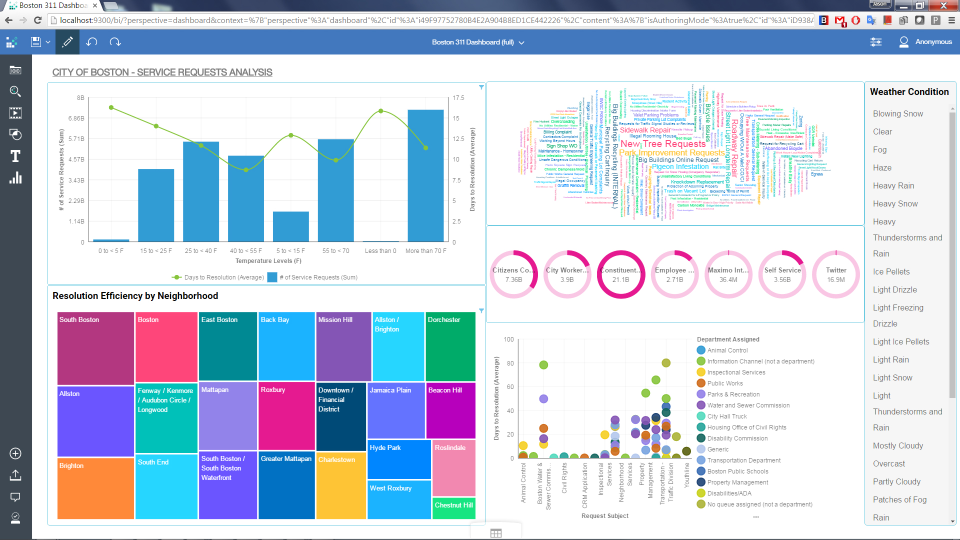
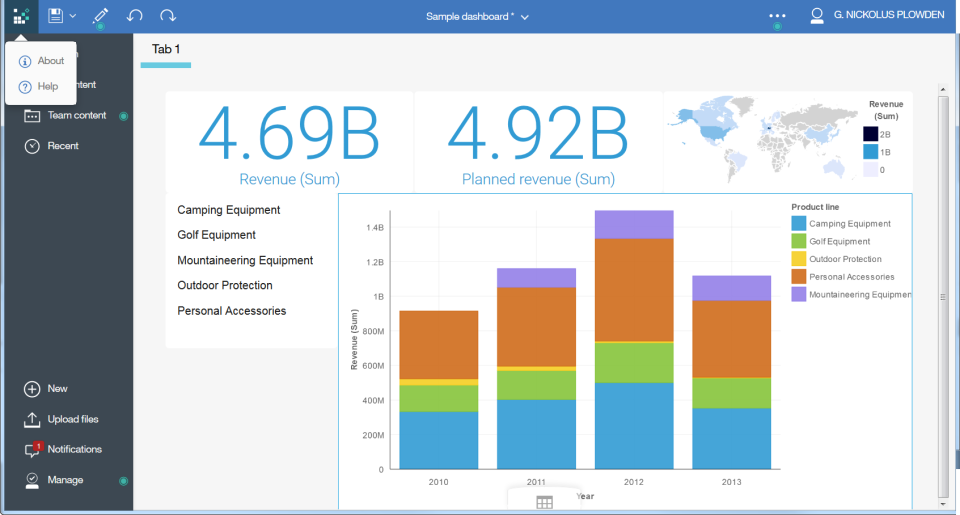
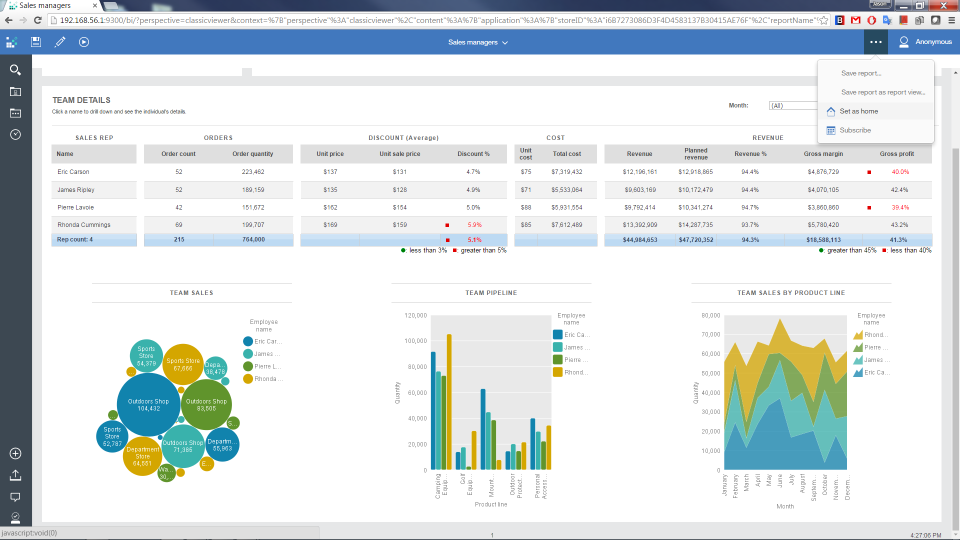
Description
IBM Cognos Analytics at a Glance
IBM Cognos Analytics is an enterprise business intelligence and reporting platform that combines pixel-perfect financial reports, governed dashboards, ad-hoc analysis, and AI-infused query assistance. The product traces its roots to a 1969 Ottawa-based company that IBM acquired in 2008 for roughly $5 billion. The current release, Cognos Analytics 12, ships an AI Assistant powered by IBM watsonx.ai, natural-language query, and narrative insights, while keeping the same Report Studio engine that finance and healthcare teams have used for two decades.
The platform sits at the heavy end of the business intelligence category. It is built for organizations that need governed, audited, scheduled reports across thousands of users, often inside an existing IBM stack (Db2, Planning Analytics, watsonx). Cognos is sold by IBM Corp from Armonk, New York, and runs on IBM Cloud, on-premise, or hybrid.
Who Should Use IBM Cognos Analytics
Cognos fits a specific buyer profile, and it is worth being direct about it before discussing features. According to enterprise tech mindshare tracking, Cognos held 1.3% of BI mindshare in January 2026, down from 3.6%, while Microsoft Power BI held 9.4%. The platform is in a declining trajectory among new BI buyers, but it remains entrenched where governance, scale, and IBM ecosystem integration matter more than self-service charm.
The product makes sense for:
- Regulated enterprises in banking, insurance, healthcare, government, and pharma that need SOC 1/2/3, HIPAA BAA, FedRAMP, FISMA, ISO 27001/27017/27018, and GDPR coverage in one BI tool.
- IBM-stack organizations running Db2, IBM Planning Analytics (TM1), or watsonx.ai. Cognos plugs into these without extra connectors.
- Finance and operations teams producing scheduled, pixel-perfect statutory or board reports, including bursting reports to thousands of recipients.
- Large user counts (1,000+) where the per-user economics of Cognos Premium beats Power BI Premium Per Capacity or Tableau Server at scale.
It is a poor fit for small teams, startups, agencies, or marketing-led BI where speed of self-service dashboarding wins. Those buyers should look at Microsoft Power BI, Tableau, Looker Studio, or Metabase.
How Much Does IBM Cognos Analytics Cost
IBM publishes Cognos Analytics pricing on its website, and the same three tiers show up across G2, TrustRadius, Capterra, and ITQlick aggregator listings. List pricing is per user per month, billed annually.
| Plan | List price | Best for | Notes |
|---|---|---|---|
| Standard | $10.60 / user / month | SMB and departmental rollouts | Cloud-hosted, capped feature set, no Premium add-ons |
| Premium | $42.40 / user / month | Mid-market to enterprise, up to 200 users | IBM-managed cloud, full feature set, AI Assistant |
| Enterprise | Contact Sales | 1,000+ users, on-prem or hybrid | Custom, unlimited users, watsonx integration, dedicated support |
Two real-world cost notes that buyers report on G2 and Reddit threads:
- Negotiation room. IBM enterprise sales typically gives 15% to 30% off list for multi-year commitments or bundled IBM Cloud spend.
- Implementation cost. Partner-led implementation, training, and report migration usually adds 30% to 60% on top of license cost in year one. Cognos is not a tool you install on Friday and roll out on Monday.
For a budget comparison point, Zoho Analytics starts at $30 per month for 2 users and Amazon QuickSight starts at $4 per user per month for readers. Cognos sits closer to MicroStrategy and Sisense on the price ladder.
Hidden Costs and Contract Gotchas
Cognos list pricing is the smaller half of the real bill. Watch these line items before you sign:
- Partner implementation fees. IBM rarely deploys Cognos directly. Expect a partner (Avnet, Lodestar, Aramar, or similar) to quote 30% to 60% of year-one license cost for installation, security setup, and report migration.
- Training and certification. Report Studio is dense enough that most teams budget two to four weeks of formal training per author. IBM-authorized training runs $2,000 to $4,500 per seat.
- IBM Cloud egress. If you host on IBM Cloud and pull data from AWS or Azure, cross-cloud egress is billed separately and can add hundreds per month at scale.
- Premium add-ons. watsonx.ai consumption, IBM Planning Analytics seats, and Cloud Pak for Data licenses are priced outside the BI line.
- Three-year auto-renewal. Cognos enterprise contracts often default to three-year terms with mid-cycle uplifts of 5% to 10%. Negotiate the uplift cap before signing.
Implementation Plan: Rolling Out IBM Cognos Analytics
A realistic Cognos rollout for a mid-size enterprise runs 12 to 20 weeks. The phases most partners follow:
- Weeks 1 to 3: discovery and architecture. Inventory data sources, define security model, decide between IBM Cloud, on-prem, or hybrid.
- Weeks 4 to 6: install and SSO. Stand up the environment, wire AD/LDAP/SAML, configure capacity, and test backup.
- Weeks 7 to 10: data modules and connectors. Build governed semantic models on top of Db2, Snowflake, or whichever warehouse holds the data of record.
- Weeks 11 to 16: report migration and dashboard build. Port legacy reports, build new dashboards, configure bursting and scheduling.
- Weeks 17 to 20: UAT, training, and go-live. Train report authors and consumers, run user acceptance, then phase users into production.
The teams that succeed assign a dedicated Cognos administrator from day one and refuse to skip the data-modeling phase. The teams that fail try to lift-and-shift reports without rebuilding the semantic layer.
IBM Cognos Analytics Product Suite
Cognos Analytics 12 ships five capability groups inside one platform.
AI Assistant and watsonx integration
Version 12 added an AI Assistant that accepts plain-English questions, returns visualizations, and writes narrative summaries of what the chart shows. The Assistant runs on IBM watsonx.ai foundation models, which means the same governance and data-residency rules that apply to watsonx apply to your BI queries. IBM also exposes an embeddable Assistant API so the same NL query bar can sit inside your own customer-facing app. Reporting agents can be configured to monitor metrics and push alerts when thresholds break.
Reporting and dashboards
Report Studio is the workhorse. It produces pixel-perfect PDF, Excel, and HTML reports, supports bursting (one report, thousands of personalized outputs), and handles scheduling, distribution, and version control. Dashboards are interactive, drillable, and can be embedded in SharePoint, Slack, MS Teams, or any web portal. The dashboard builder is now drag-and-drop, though Report Studio itself remains a separate, more technical authoring surface.
Data modeling and exploration
The Data Modules feature lets analysts build governed semantic models without IT. Explorations is a guided-analytics surface that suggests relationships, outliers, and drivers across a dataset. For heavy modeling, Cognos pairs with IBM Planning Analytics (TM1) for OLAP cubes and forecasting.
Mobile
The IBM Cognos Analytics mobile app is available on iOS and Android. It renders dashboards, supports offline viewing of cached content, and respects the same row-level security as desktop.
Languages and localization
The UI is translated into 20+ languages including English, Spanish, French, German, Italian, Brazilian Portuguese, Japanese, Simplified and Traditional Chinese, Korean, Russian, Dutch, Polish, Arabic, Czech, Danish, Finnish, Norwegian, Swedish, Hungarian, and Turkish.
Integrations
Cognos connects to more than 200 data sources via JDBC, ODBC, and native packs. The integrations that matter most to buyers:
- IBM stack: Db2, Planning Analytics (TM1), watsonx.ai, watsonx.data, Cloud Pak for Data.
- Cloud data warehouses: Snowflake, AWS Redshift, Google BigQuery, Azure Synapse.
- Enterprise apps: Salesforce, SAP BW, SAP HANA, SAP ECC, Oracle E-Business Suite, Workday.
- Databases: MS SQL Server, Oracle, Teradata, PostgreSQL, MySQL, MongoDB.
- Collaboration: Slack, Microsoft Teams, email distribution lists.
For comparison, Sigma Computing and Holistics are warehouse-native and assume Snowflake or BigQuery as the source of truth. Cognos works the same way regardless of where data lives, which is part of why it survives in heterogeneous IBM-Oracle-SAP shops.
Security and compliance
This is one of the strongest reasons buyers stay with Cognos. Under IBM Cloud, the platform carries:
- SOC 1, SOC 2, and SOC 3 reports
- ISO 27001, ISO 27017 (cloud), ISO 27018 (PII in cloud)
- HIPAA with signed BAA for healthcare customers
- FedRAMP and FISMA for US federal agencies
- GDPR with EU data residency options
Row-level security, object-level permissions, AD/LDAP/SAML SSO, and audit logging are all native. Few BI vendors carry FedRAMP, which is why Cognos still wins US federal and defense BI deals where Domo or QlikView can't bid.
What Real Buyers Report
IBM publishes named Cognos case studies on its site. A sample:
- Nukissiorfiit, the national energy utility of Greenland, runs reporting on Cognos.
- Elkjop, the largest consumer electronics retailer in the Nordics, has been a Cognos customer since 1999.
- Swisscom runs roughly 2,150 users on Cognos paired with IBM Planning Analytics.
- University of Florida uses Cognos for institutional reporting.
- Ausolan, a Spanish catering group, runs operational reporting on the platform.
- Destiny Corporation is a long-standing Cognos partner and customer.
The pattern is consistent: large, multi-country, multi-system organizations where the cost of switching off Cognos exceeds the cost of keeping it.
Pros and Cons of IBM Cognos Analytics
What users like
From G2, Capterra, TrustRadius, and Gartner Peer Insights:
- Complex reporting depth. One Capterra reviewer wrote: "complex reports can be achieved with IBM Cognos Report Studio... great for setting up scheduled reports."
- Scheduled distribution. Report bursting and scheduling are best-in-class.
- IBM ecosystem fit. If you already pay for Db2, watsonx, or Planning Analytics, Cognos drops in without integration work.
- Governance. Object-level security, audit trails, and version control reassure compliance and audit teams.
- Stability. The platform has been in market for 25+ years. It does not break in odd ways.
What users complain about
Honest reading of public reviews:
- Steep learning curve. Report Studio is powerful and dense. New analysts need weeks of training before they ship governed reports.
- Dated UI. Even after the v11 and v12 refreshes, the interface feels heavier than Power BI or Tableau. Some screens still look like 2015.
- High total cost. Between licenses, implementation partners, and IBM Cloud spend, three-year TCO often runs 3x to 5x the license-only quote.
- Slow innovation pace. Compared with Power BI's monthly cadence, Cognos ships big features once or twice a year.
- Mindshare decline. Cognos sits at 1.3% BI mindshare versus Power BI at 9.4% as of January 2026. Hiring Cognos developers is harder year over year.
IBM Cognos Analytics Alternatives
Quick read on where Cognos lands against the field:
- Versus Microsoft Power BI, Cognos wins on governed pixel-perfect reporting and FedRAMP, loses on price and self-service speed.
- Versus Tableau, Cognos wins on enterprise reporting and IBM-stack integration, loses on visualization polish and community size.
- Versus MicroStrategy, the two are closest peers. Both target governed enterprise BI. Cognos has watsonx, MicroStrategy has HyperIntelligence.
- Versus Sisense and Domo, Cognos is heavier and older, but cheaper at very large user counts.
- Versus QlikView, Cognos has a more modern AI story (watsonx), but Qlik has a stronger associative engine for ad-hoc analysis.
Bottom Line
IBM Cognos Analytics is the right choice if you are a 1,000+ user enterprise inside the IBM stack, you produce regulated or scheduled reports, and you need FedRAMP or HIPAA in your BI layer. The watsonx-powered AI Assistant in v12 keeps the platform competitive on natural-language query, and the governance story is hard to match. If you are a small or mid-market team that values self-service speed, dashboard polish, or a modern UI, Cognos will feel slow and expensive, and Power BI, Tableau, or Metabase will serve you better. Treat list pricing as a starting point, expect 15% to 30% off in negotiation, and budget another 30% to 60% on top of license for partner implementation in year one.
Frequently Asked Questions
How much does IBM Cognos Analytics cost in 2026?
How does Cognos compare to Microsoft Power BI?
Is IBM Cognos HIPAA and FedRAMP compliant?
Does Cognos have a mobile app?
What is the watsonx.ai integration in Cognos?
What data sources does Cognos support?
How long does Cognos take to deploy at enterprise scale?
Is Cognos being deprecated or replaced?
Can Cognos run on-premises?
How does Cognos pricing get negotiated with IBM?
Find Your Perfect Software
See how it can transform your workflow
- Personalized for your needs Tailored recommendations based on your unique requirements.
- Save time & resources Streamline your workflow and boost team productivity.
- Trusted by thousands Join 10,000+ businesses already growing with SaaSrat.
You're all set! 🎉
A specialist for will reach out within 1 business day with tailored recommendations for your needs.