

Looker Studio
by Looker Data Sciences, Inc
What is Looker Studio?
Get Best Quote for Looker Studio
Connect with SaaSrat experts to get the best quote for your business.
You're all set!
A specialist for Looker Studio will reach out within 1 business day.
Looker Studio Features
Free dashboards
Unlimited reports and data sources
Drag-and-drop chart builder
Calculated fields
Native Google connectors (GA4
BigQuery
View All 31 Features
Looker Studio Pricing Plans
Looker Studio (Free)
- Free for all users
- Unlimited reports and data sources
- Drag-and-drop chart builder
- Calculated fields
- All core charting and sharing
- Native Google ecosystem connectors
Looker Studio Pro
- USD 9 per user per Google Cloud project per month annual
- 30-day free trial
- Organisation ownership
- Team workspaces
- 200 scheduled deliveries per report
- Slack plus Chat integration
- Gemini AI
- Looker mobile app access
- 99.9 percent uptime SLA
Cloud Customer Care Support Plans
- Bronze, Silver, Gold, Platinum tiers
- Priced separately from Pro subscription
- Required for SLA-backed response times
Looker Studio Resources
Looker Studio Screenshots
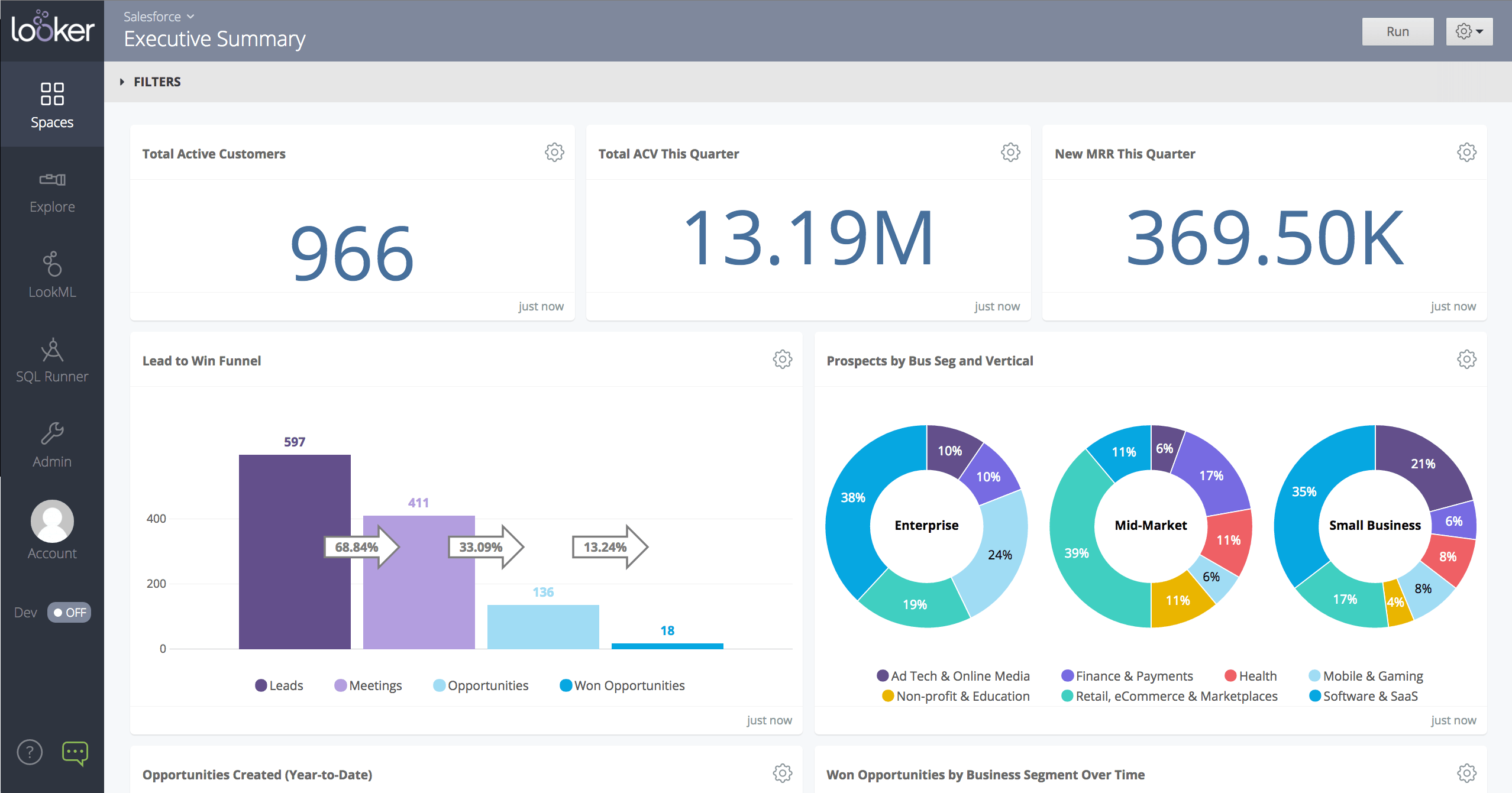
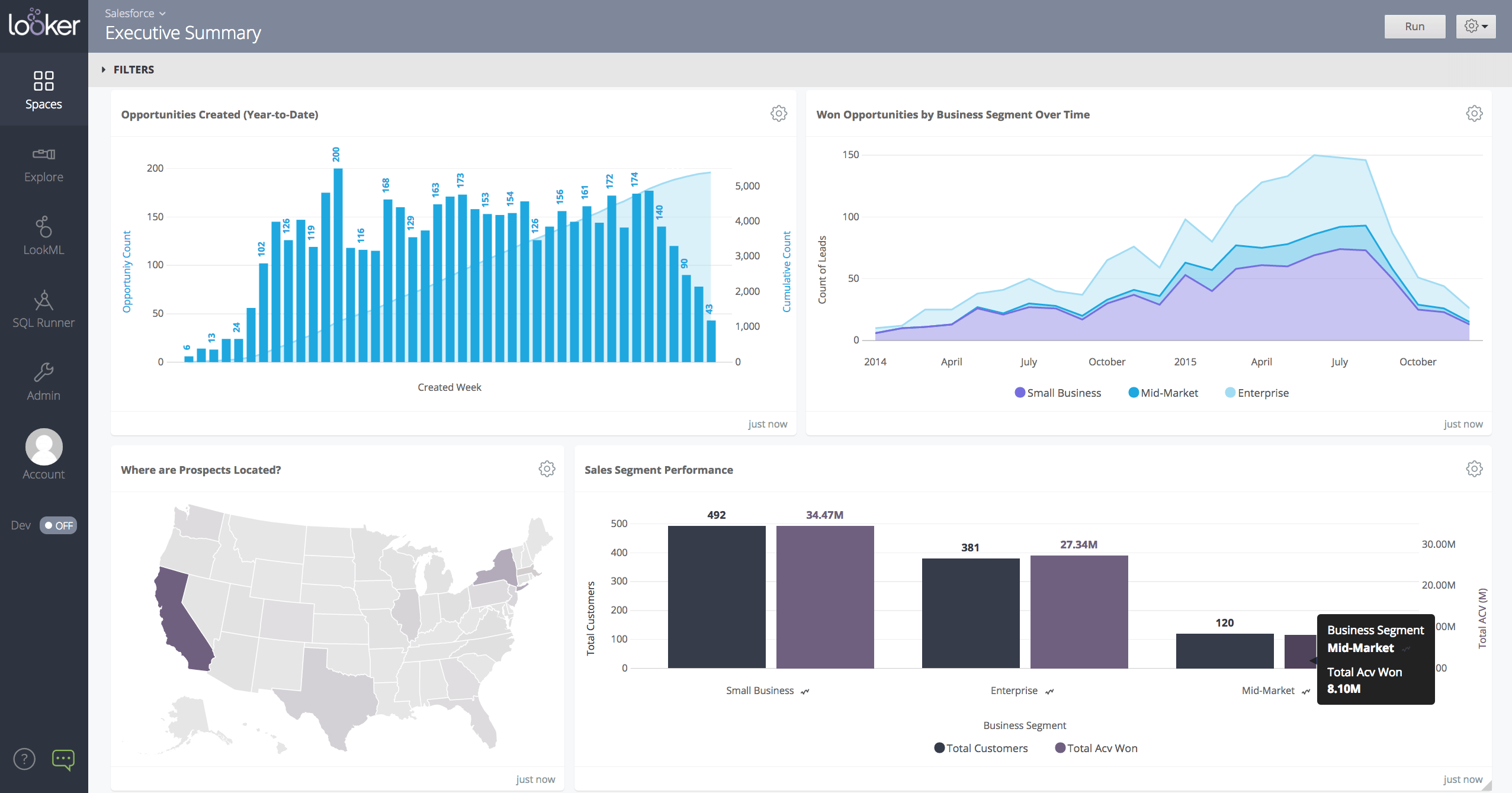
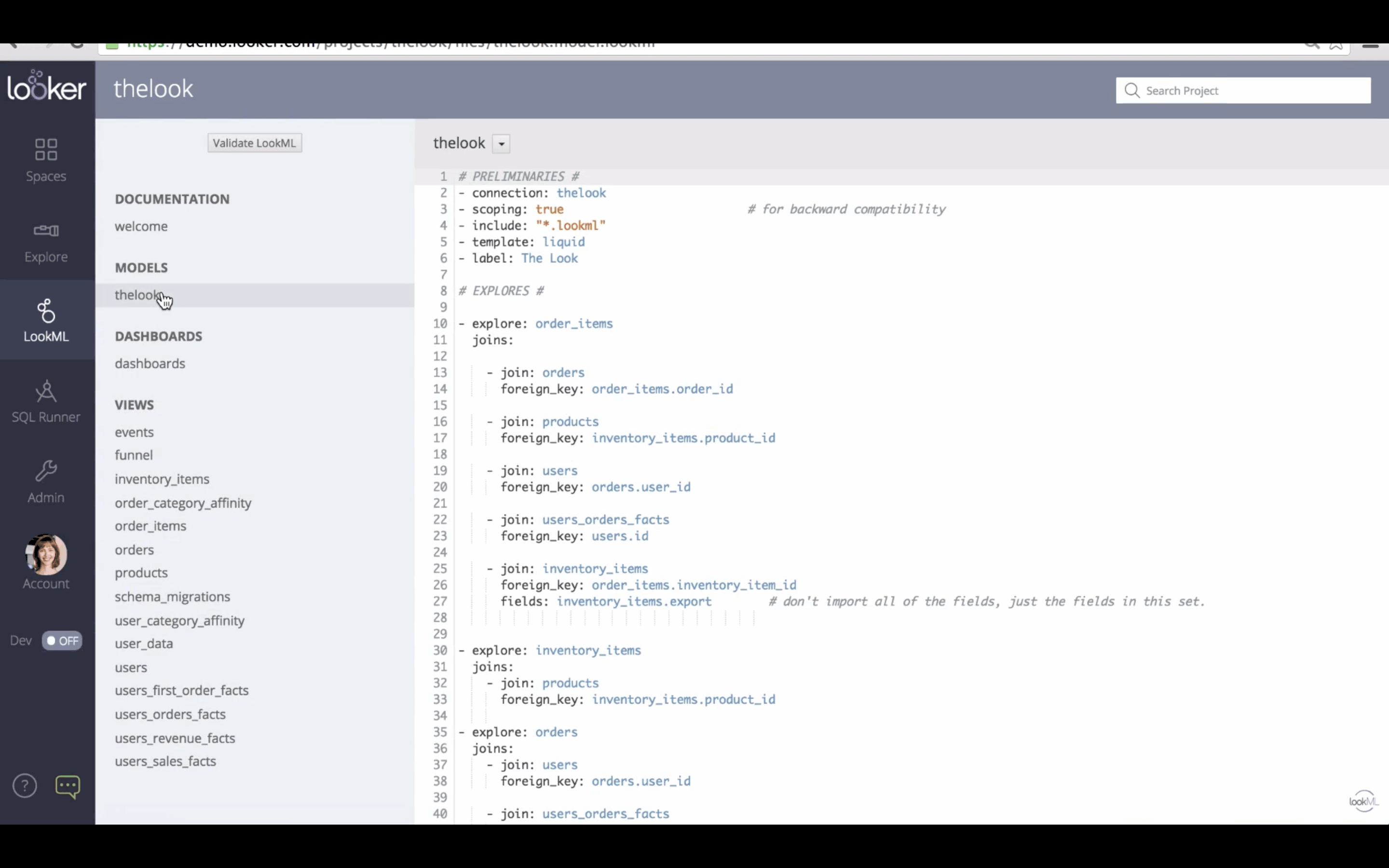
Description
Looker Studio at a Glance
| Best fit for | SMB to enterprise teams running on Google Workspace plus Google Marketing Platform (GA4, Ads, Search Console, BigQuery) that want free drag-and-drop dashboards plus optional Pro tier for organisation ownership and Gemini AI |
|---|---|
| Pricing model | Free tier (Looker Studio) plus Pro at USD 9 per user per Google Cloud project per month, billed annually with 30-day trial. Note the per-project (not per-org) billing model. |
| Core platform | Web-based drag-and-drop reporting with 800 plus partner data connectors, Gemini AI formula assistance, scheduled deliveries, team workspaces, and embedded reports |
| Free trial | Looker Studio free for all users; Pro has 30 day free trial |
| Brand history | Launched as Google Data Studio in 2016, rebranded to Looker Studio in October 2022 after Google's Looker acquisition, and rebranded back to Data Studio on April 11, 2026 to reduce confusion with the enterprise Looker product |
| Native integrations | Google Analytics, BigQuery, Google Sheets, Google Ads, Search Console, YouTube Analytics, Campaign Manager, plus 800 plus partner-built connectors. Distinct from Looker (enterprise BI with LookML semantic layer) |
| Compliance | Covered under the Google Cloud compliance umbrella including SOC 2 Type II referenced in Google Cloud documentation |
| Languages | Multiple languages supported through Google Cloud localisation; exact count not vendor-displayed at the product-page level |
| Mobile experience | Web-based with mobile-responsive design for free tier; Pro tier includes access to the Looker mobile app for iOS and Android |
Pros and Cons of Looker Studio
Where Looker Studio wins:
- Free tier is genuinely production-grade. Hundreds of millions of dashboards run on the free version, with no seat fees, no row caps, and no expiry. The bar is meaningfully lower than every paid BI tool listed in this category.
- Google ecosystem integration is unmatched. GA4, BigQuery, Google Sheets, Google Ads, Search Console, YouTube Analytics, and Campaign Manager connect natively with no third-party connector required.
- 800 plus partner connectors extend reach to non-Google sources (Salesforce, HubSpot, Stripe, Shopify, MySQL, Postgres) without vendor-side engineering investment.
- Pro tier delivers organisation ownership, Slack and Google Chat delivery, 200 scheduled deliveries per report, Gemini AI formula assistance, 99.9 percent uptime SLA, and Cloud Customer Care support.
- Embedded reporting is straightforward through iframe and direct link sharing, with branded report templates for agencies and consultancies.
Where Looker Studio falls short:
- Performance degrades on large datasets. Buyer reports across business intelligence software review sites consistently flag slow load times with 5 million plus rows or complex joins, especially on extracted (not direct-query) datasets.
- Pro pricing is billed per Google Cloud project, not per organisation. Agencies and consultancies managing reports across many GCP projects can find total cost climbs faster than expected.
- Limited for advanced data modelling. There is no LookML equivalent in Data Studio; teams that need a centralised semantic layer should evaluate enterprise Looker, Microsoft Power BI, or Holistics.
- Some partner connectors are unreliable. Free-tier connectors built by community vendors vary in uptime and refresh consistency; production-critical reports often shift to paid Supermetrics, Funnel, or Improvado connectors.
- The April 2026 rebrand back to Data Studio adds friction. Marketing materials, blog posts, and customer references still refer to "Looker Studio" while the product name has changed. Plan for some buyer confusion during procurement and team training.
Who Should Use Looker Studio
Looker Studio (Data Studio) is the right pick for teams running on Google Workspace plus Google Marketing Platform that want free drag-and-drop dashboards covering web analytics, paid media, and SaaS performance reporting. Best fit for marketing teams, agencies, SMB founders, and product analysts of 5 to 5,000 employees pulling from GA4, BigQuery, Sheets, Ads, Search Console, and partner sources.
Skip Looker Studio if you need an enterprise semantic layer (use enterprise Looker with LookML or Microsoft Power BI with Fabric), if you need very high concurrency and very large datasets (try Tableau, Domo, or Sisense), if you need HIPAA or FedRAMP attestation for Data Studio specifically (the free tier inherits Google Cloud's broader compliance but Data Studio-specific attestation is thin), or if you operate primarily outside the Google ecosystem.
Looker Studio Product Suite
Looker Studio ships as a free-tier reporting platform with an optional paid Pro tier inside Google Cloud. Core capabilities buyers care about:
- Free dashboards with unlimited reports, unlimited data sources, drag-and-drop chart builder, calculated fields, and parameter controls.
- Native Google connectors for GA4, BigQuery, Google Sheets, Google Ads, Search Console, YouTube Analytics, Campaign Manager, Display and Video 360, and Search Ads 360.
- 800 plus partner connectors covering Salesforce, HubSpot, Stripe, Shopify, Facebook Ads, MySQL, Postgres, and many SaaS plus database sources.
- Looker Studio Pro at USD 9 per user per project per month for organisation ownership of reports and data sources, team workspaces, and centralised governance.
- Up to 200 scheduled deliveries per report with Google Chat and Slack integration on Pro.
- Personal report links for password-protected report sharing without account requirements.
- Gemini in Data Studio for AI formula assistance, narrative insights, and conversational analytics queries on Pro.
- Looker mobile app access for iOS and Android, included with Pro subscription.
- 99.9 percent uptime SLA on Pro tier with Cloud Customer Care support (separate support plan required).
- Embedded reporting through iframe and direct sharing for agencies, consultancies, and SaaS dashboard distribution.
How Much Does Looker Studio Cost
Looker Studio publishes pricing transparently. Verified tiers as of 2026:
- Looker Studio (Free): USD 0. Unlimited reports, unlimited data sources, drag-and-drop builder. All core charting, filtering, and sharing functionality.
- Looker Studio Pro: USD 9 per user per Google Cloud project per month, billed annually. Adds organisation ownership, team workspaces, 200 scheduled deliveries per report, Slack and Chat integration, Gemini AI, personal report links, Looker mobile app, 99.9 percent uptime SLA. 30-day free trial.
- Per-project billing: Pro subscription is tied to a specific Google Cloud project. Organisations managing reports across many projects pay separately per project.
- Support: Cloud Customer Care support plans are separate from Pro subscription. Bronze, Silver, Gold, and Platinum tiers price separately.
There is no consumption fee for Looker Studio itself, but Pro queries against BigQuery, Snowflake, or other warehouses inherit the underlying query costs. Plan warehouse spend carefully for high-concurrency dashboards.
Hidden Costs and Contract Gotchas
Looker Studio contracts have meaningful all-in cost beyond the headline subscription. Buyers should budget for:
- Per-project Pro billing. Agencies and consultancies managing client work across multiple GCP projects pay Pro per project. Build the per-client cost into client retainers.
- BigQuery query costs when free-tier reports become heavily used. A popular free Data Studio dashboard hitting BigQuery hourly can spike to USD 500 plus per month in query fees.
- Paid partner connectors for production-grade reliability. Free community connectors are fine for ad-hoc work; mission-critical reports typically shift to Supermetrics or similar (USD 20 to USD 200 per month).
- Cloud Customer Care support plans if you need SLA-backed support. Free tier and Pro do not include guaranteed response times without a separate Care plan.
- Training and template development for marketing and ops teams unfamiliar with calculated fields and blended data sources.
- Migration friction if you outgrow Data Studio and move to enterprise BI. Native Looker Studio reports do not export cleanly to Tableau or Power BI.
Implementation Plan: Rolling Out Looker Studio
Looker Studio deployments are the fastest among major BI platforms. Free tier setup is minutes; production-grade rollout with Pro features runs 1 to 3 weeks.
- Free tier setup: Sign in with a Google account, connect GA4 or BigQuery, drag-and-drop a first report. Production-ready in hours.
- Pro setup: Provision a Google Cloud project, enable Looker Studio Pro API, assign organisation ownership, set up team workspaces. Plan for 1 to 3 days.
- Data source governance: Centralise blended data sources at the workspace level to avoid orphaned report-owner accounts when team members leave.
- BigQuery cost controls: Set up partition pruning, materialised views, and BI Engine reservations for high-traffic dashboards.
- Connector consolidation: Decide which sources use native connectors vs. paid partner connectors. Audit refresh schedules quarterly to avoid runaway query costs.
Pilot one team or one client engagement for 14 days before standardising across the organisation. Validate BigQuery cost impact at scale before scaling to 50 plus active users.
Looker Studio Alternatives
Looker Studio competes in the free and low-cost BI segment with adjacencies into enterprise BI for Google Cloud shops. Common alternatives buyers shortlist:
- Enterprise Looker for organisations needing LookML semantic layer, governed metrics, and embedded analytics at scale.
- Microsoft Power BI for Microsoft 365 shops at USD 14 per user per month Pro.
- Tableau for visualisation-first analyst teams.
- Amazon QuickSight for AWS-native shops at USD 9 to USD 40 per user per month.
- Zoho Analytics for SMB teams wanting bundled cross-functional analytics.
- Metabase for SQL-first teams sitting on a cloud data warehouse.
- Holistics for as-code semantic-layer BI.
- Klipfolio for marketing dashboards with 130 plus prebuilt connectors.
Compare prices, features, and reviews across the full business intelligence software category to see how Looker Studio lines up against free, mid-market, and enterprise BI competitors.
What Real Buyers Report
Marketing leaders, agencies, and SMB founders evaluating Looker Studio in 2026 commonly highlight three patterns in customer reviews and forum threads:
- Free tier kills the BI tool budget conversation for marketing teams. Agencies and SMB marketing leads report saving USD 5,000 to USD 50,000 per year versus comparable paid BI platforms, especially when reporting needs are scoped to Google ecosystem sources.
- Pro tier per-project billing surprises agencies. Consultancies managing dashboards across 30 plus GCP projects find Pro costs scale faster than expected. Negotiate enterprise agreements or consolidate project structure during procurement.
- Performance hits the ceiling around 5 to 10 million rows. Beyond that, teams shift to direct-query BigQuery or move heavy dashboards to Power BI, Tableau, or enterprise Looker.
Common complaints in 2025 to 2026 reviews: slow load times on large datasets, limited semantic modelling versus enterprise BI, per-project Pro billing, partner connector reliability variance, and the April 2026 brand reversal back to "Data Studio" causing internal team training friction.
What G2 and Capterra Reviewers Actually Say About Looker Studio
Reviewer themes on G2 and Whatagraph's 2025 review aggregations consistently include "free tool that connects directly to Google Sheets and Ads, saves hours of manual reporting with drag-and-drop features." Roughly 38 percent of recent reviewers (5 of 13 in one Whatagraph sample) flag slow dashboard load times with larger datasets and "limited for advanced data modeling and complex calculations." Pricing leaks from buyer disclosure confirm Pro at USD 9 per user per project per month with annual billing and 30-day trial. The Looker (enterprise) vs Looker Studio (free) distinction remains a procurement confusion point; the April 2026 rebrand to Data Studio is Google's response. For free Google-stack dashboards, Looker Studio remains the dominant choice in 2026.
Bottom Line
Looker Studio (now Data Studio again as of April 11, 2026) is the right pick for marketing teams, agencies, and SMB founders running on Google Workspace plus Google Marketing Platform that want free drag-and-drop dashboards. The free tier is production-grade for most teams under 5 million rows, with Pro at USD 9 per user per project per month adding organisation ownership, Gemini AI, and 99.9 percent SLA when needed. The 800 plus partner connectors plus native GA4 and BigQuery integration make it the default choice for Google-ecosystem reporting. Skip Looker Studio if you need enterprise semantic layer, very high concurrency, or HIPAA and FedRAMP attestation specifically for the Data Studio product. Plan BigQuery query cost controls and audit partner connector reliability before scaling beyond 50 active users.
Frequently Asked Questions
How much does Looker Studio cost?
Is Looker Studio the same as Looker?
Why did Looker Studio rebrand back to Data Studio in 2026?
How does Looker Studio compare to Power BI?
Does Looker Studio Pro per-project pricing matter?
What data sources does Looker Studio support?
Is Looker Studio HIPAA compliant?
Does Looker Studio scale to large datasets?
Can agencies white-label Looker Studio dashboards?
How does Gemini in Data Studio work?
Find Your Perfect Software
See how it can transform your workflow
- Personalized for your needs Tailored recommendations based on your unique requirements.
- Save time & resources Streamline your workflow and boost team productivity.
- Trusted by thousands Join 10,000+ businesses already growing with SaaSrat.
You're all set! 🎉
A specialist for will reach out within 1 business day with tailored recommendations for your needs.