

Tableau
by Tableau
What is Tableau?
Get Best Quote for Tableau
Connect with SaaSrat experts to get the best quote for your business.
You're all set!
A specialist for Tableau will reach out within 1 business day.
Tableau Features
Tableau Desktop
Tableau Cloud (formerly Tableau Online)
Tableau Server (self-hosted)
Tableau Prep Builder plus Conductor
VizQL query language
Drag-and-drop visualisation
View All 28 Features
Tableau Pricing Plans
Tableau Cloud Viewer
- USD 15 per user per month billed annually
- Read-only dashboard access
- Subscriptions plus alerts
- Mobile app access
- Most cost-effective for read-only viewers
Tableau Cloud Explorer
- USD 42 per user per month billed annually
- Web Authoring
- Ask Data
- Pulse alerts
- Cannot publish new data sources
Tableau Cloud Creator
- USD 75 per user per month billed annually
- Tableau Desktop license
- Tableau Prep Builder
- Web Authoring
- Publish data sources plus dashboards
- All AI features
Tableau Server (Self-Hosted)
- Self-hosted on Windows or Linux
- Per-user pricing similar to Cloud
- Customer manages infrastructure
- FedRAMP-authorized infra possible
- Annual subscription
Embedded Analytics
- OEM pricing for SaaS vendors
- White-label customisation
- Multi-tenant data partitioning
- Negotiate per active embed user or session
Tableau Resources
Tableau Screenshots
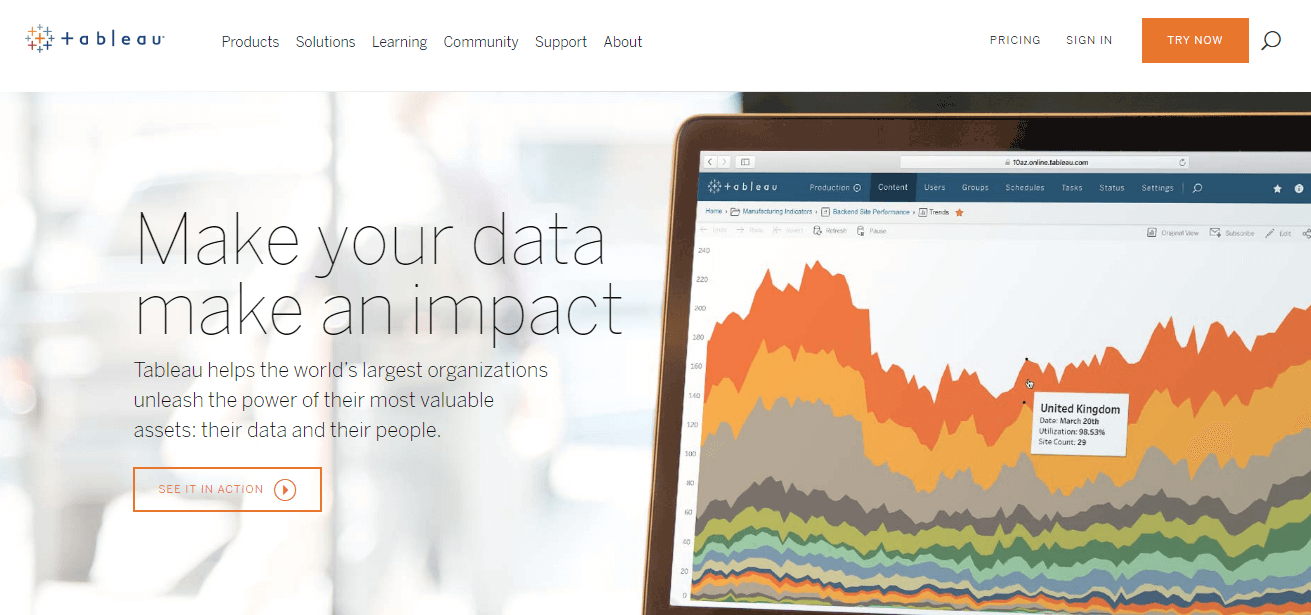

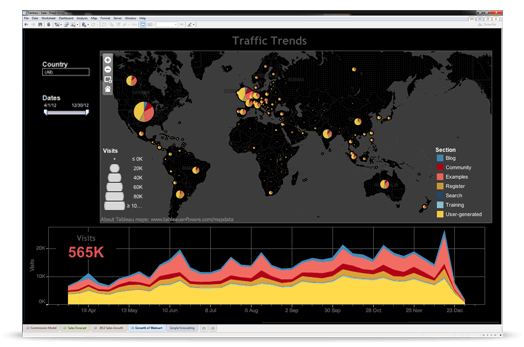
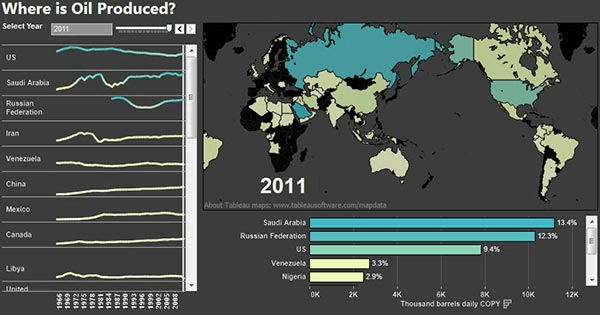

Description
Tableau at a Glance
Tableau is the business intelligence platform most analysts learned visualisation on, and it still sets the bar for what a polished dashboard looks like. Founded in January 2003 by Stanford researchers Pat Hanrahan, Christian Chabot, and Chris Stolte, the company built its reputation on VizQL, a visual query language that turned drag-and-drop interactions into database queries. Headquarters moved from Mountain View to Seattle in 2004, and Salesforce acquired the business on August 1 2019 in a stock deal worth roughly $15.7 billion.
Six years into Salesforce ownership, Tableau remains a separate product line with its own pricing page, its own release cadence, and its own AI add-on (Tableau+). It is no longer the cheapest seat on the market, and Microsoft Power BI has eaten share at the SMB end. But for organisations that care more about visual fidelity, governed self-service, and a deep analyst talent pool than about per-seat economics, Tableau is still the default answer.
| Attribute | Detail |
|---|---|
| Founded | January 2003 (Mountain View, then Seattle in 2004) |
| Headquarters | Seattle, Washington |
| Owner | Salesforce (acquired August 1 2019, ~$15.7B) |
| Starting price | $15/user/month (Viewer, billed annually) |
| Creator seat | $75/user/month, billed annually |
| Capterra rating | 4.6/5 across 2,353 reviews |
| Best for | Mid-market and enterprise analyst teams needing governed self-service BI |
| Mobile | iOS + Android (Tableau Mobile) |
Pros and Cons
Pros. Visualisation quality is the headline strength. Calculated fields, level-of-detail expressions, and dashboard actions give analysts more design freedom than most peers. The desktop authoring tool still feels faster than browser-only builders like Looker Studio or Metabase. Native connectors cover Snowflake, Amazon Redshift, BigQuery, and the wider Salesforce Data Cloud stack, which matters if your warehouse is already on one of those platforms. The analyst community is huge, which makes hiring and training cheaper than for niche tools.
Cons. Pricing is the obvious sore point. A 100-user mix on Tableau Cloud comes out roughly 50% more expensive per year than the same mix on Microsoft Power BI. Row-level security setup is fiddlier than Power BI's. Tableau Prep (the ETL tool) sits behind the Creator licence, so cleaning data costs the same as authoring dashboards. And while Salesforce has stopped short of forcing Tableau into the CRM stack, roadmap priorities now visibly favour Salesforce-adjacent use cases like Tableau Pulse on Data Cloud.
Who Should Use Tableau
Tableau fits four buyer profiles best. First, mid-market and enterprise teams that already have a dedicated BI or analytics function with at least one full-time analyst. Second, organisations where dashboard design quality is part of the deliverable, like consulting firms, marketing analytics teams, and customer-facing reporting in regulated industries. Third, Salesforce shops that want tight integration with Data Cloud, Sales Cloud, and Service Cloud reporting. Fourth, teams hiring from the analyst job market who want a tool with a deep candidate pool.
Skip Tableau if your team is fewer than 10 users and price is the main constraint. Metabase open-source or Looker Studio will get you to 80% of the value at 0% of the cost. Skip it also if you live inside Microsoft 365 with Fabric entitlements; Power BI will be cheaper and politically easier.
Tableau Product Suite
Tableau is sold as a tiered licence model rather than a per-module catalogue. The three core seat types are Creator, Explorer, and Viewer, with Tableau Cloud and Tableau Server as deployment options.
- Tableau Cloud. Salesforce-hosted SaaS deployment, the default for new buyers.
- Tableau Server. Self-hosted on customer infrastructure, including AWS, Azure, and on-premises Linux or Windows.
- Tableau Desktop. Windows or macOS authoring app, bundled with the Creator licence.
- Tableau Prep. Visual ETL and data preparation, also bundled with Creator.
- Tableau Pulse. AI-generated metric digests, part of the Tableau+ add-on.
- Einstein Copilot for Tableau. Natural-language dashboard authoring, also inside Tableau+.
- Tableau Mobile. iOS and Android apps for dashboard consumption.
How Much Does Tableau Cost
Tableau publishes Tableau Cloud Standard pricing on its public pricing page, all billed annually:
| Tier | Price (USD) | What you get |
|---|---|---|
| Viewer | $15/user/month | Read-only dashboard access |
| Explorer | $42/user/month | Web authoring, self-service exploration |
| Creator | $75/user/month | Tableau Desktop + Prep + full authoring |
| Tableau+ | Contact Sales | AI add-on layer (Pulse + Einstein Copilot) |
An Enterprise edition exists with quoted seats of $115 Creator, $70 Explorer, and $35 Viewer, but those figures are third-party reported only and Tableau does not publish them directly. Treat any Enterprise quote as a starting point for negotiation, not a fixed list price.
A realistic 100-user mix (5 Creators, 25 Explorers, 70 Viewers) lands around $25,200 per year on Tableau Cloud Standard. The same headcount on Power BI Pro and Premium per User works out closer to $16,800 per year, which is the 50% gap buyers routinely flag.
Hidden Costs and Contract Gotchas
Three line items catch first-time Tableau buyers off guard.
Creator licence inflation. Any user who needs to publish a workbook, build a dashboard, or run Tableau Prep needs a Creator seat at $75/month. Teams often start with two or three Creators and find themselves at eight within a year because Explorer's web authoring is more limited than the sales pitch suggests.
Tableau+ pricing opacity. The AI add-on is gated behind sales conversations. Customers report Tableau+ quotes ranging from a 30% to 60% uplift on the base Creator price depending on volume.
Embedded analytics minimums. If you want to embed Tableau into a customer-facing product, the Embedded Analytics licence has volume minimums that start in the low six figures for production deployments. Sisense and Sigma Computing are often cheaper for embedded use cases.
Also watch the renewal mechanics. Salesforce has applied its standard annual uplift policy to Tableau renewals since 2022, with typical increases of 5% to 8% per year unless you push back at signature.
Implementation Plan: Rolling Out Tableau
A realistic Tableau rollout for a 100-seat organisation runs eight to twelve weeks if you already have a cloud data warehouse in place.
Weeks 1 to 2. Provision Tableau Cloud site, configure SSO via Okta or Azure AD, and set up data source connections to your warehouse. Decide on a project structure (sandbox, certified, retired) before publishing anything.
Weeks 3 to 4. Define row-level security model. This is the step that derails rollouts. Tableau row-level security needs an entitlements table joined to the user identity, and getting that right takes longer than the documentation suggests.
Weeks 5 to 8. Build the first 5 to 10 certified dashboards with the Creator team. Run two training cohorts: a half-day Viewer session for consumers and a two-day Explorer or Creator session for authors.
Weeks 9 to 12. Open self-service publishing to Explorers, monitor adoption, and retire any legacy reporting being replaced. Plan a 90-day post-launch review on licence mix; you will almost always need to rebalance.
Tableau Alternatives
The shortlist most buyers compare Tableau against in 2026:
- Microsoft Power BI. The default alternative for Microsoft-heavy shops. Cheaper, weaker on visualisation polish.
- Looker Studio. Free tier makes it the obvious starting point for Google Workspace teams.
- Metabase. Open-source option for engineering-led teams who want to self-host.
- QlikView and Qlik Sense. Strong associative engine, smaller analyst community.
- Domo. Better executive distribution features, weaker analyst authoring.
- Sigma Computing. Spreadsheet-style interface on top of cloud warehouses; gaining share with finance teams.
- Sisense. Better for embedded analytics use cases.
- Holistics. Modelling-layer-first approach, popular with analytics engineering teams.
- Zoho Analytics. Cheapest seat on the list, fits Zoho One subscribers.
- Amazon QuickSight. Pay-per-session pricing fits read-mostly audiences.
- IBM Cognos Analytics and MicroStrategy. Legacy enterprise BI; rarely a new-purchase shortlist anymore.
For the wider market view, see the business intelligence category page.
What Real Buyers Report
Public customer references include Nissan, Henkel, Wells Fargo, Kwantum, Providence St. Joseph Health, and MoneySQ. Tableau Cloud carries SOC 2/3, ISO 27001/27017/27018, HIPAA, PCI DSS 4.0, TISAX (added June 17 2022), and GDPR coverage. Note that Tableau Cloud is not FedRAMP authorized as of mid-2024, so US federal agency workloads need either Tableau Server on a FedRAMP-authorized cloud or an alternative tool.
Buyers in healthcare and finance consistently rate the security posture as enterprise-ready. Buyers in fast-moving consumer goods and retail tend to praise the visualisation depth but flag the licence cost as the recurring procurement battle.
What G2/Capterra Reviewers Actually Say About Tableau
Tableau holds a Capterra rating of 4.6 out of 5 across 2,353 reviews, which is one of the largest review samples in the BI category. The positive themes are consistent: visualisation flexibility, dashboard interactivity, and the depth of the analyst community. The negative themes are equally consistent: cost relative to Power BI, learning curve for non-analysts, and slower performance on very large extracts compared to in-memory tools like Qlik.
The cost gap is the single biggest churn driver. Buyer comparisons of a typical 100-user mix put Tableau Cloud Standard at roughly $25,200 per year versus about $16,800 per year for Power BI, a ~50% premium. Enlyft's 2025 tracking shows about 75 organisations switching from Tableau to Power BI for every 38 going the other way, which is consistent with what procurement teams report when renewal time hits.
Reviewers who stay with Tableau cite three reasons most often: the talent pool, the visualisation quality, and existing investment in Tableau-trained analysts. Reviewers who leave cite price first, Microsoft ecosystem integration second.
Bottom Line
Tableau is still the visualisation benchmark in BI, and for analyst-heavy mid-market and enterprise teams it earns its premium. The product is mature, the security posture is enterprise-grade, and the analyst community keeps hiring costs lower than for niche tools. The honest caveat is price: at a 50% premium to Power BI for a typical 100-user mix, Tableau needs to win on dashboard quality, governance, or Salesforce integration to justify the gap. If you have a dedicated analytics function and visualisation polish matters, buy Tableau. If you are a Microsoft shop with Fabric entitlements or an SMB with no dedicated analyst, look at Power BI or Looker Studio first. For the broader shortlist, the business intelligence category page tracks the full market.
Frequently Asked Questions
How much does Tableau cost in 2026?
How does Tableau compare to Power BI?
Is Tableau still independent after Salesforce acquisition?
Is Tableau HIPAA and FedRAMP compliant?
Does Tableau have a mobile app?
What data sources does Tableau support?
What is Tableau Pulse?
How does Einstein Copilot for Tableau work?
How long does Tableau take to deploy at enterprise scale?
Can Tableau run on-premises?
Find Your Perfect Software
See how it can transform your workflow
- Personalized for your needs Tailored recommendations based on your unique requirements.
- Save time & resources Streamline your workflow and boost team productivity.
- Trusted by thousands Join 10,000+ businesses already growing with SaaSrat.
You're all set! 🎉
A specialist for will reach out within 1 business day with tailored recommendations for your needs.