

QuickBooks Payroll
by QuickBooks Time
What is QuickBooks Payroll?
Get Best Quote for QuickBooks Payroll
Connect with SaaSrat experts to get the best quote for your business.
You're all set!
A specialist for QuickBooks Payroll will reach out within 1 business day.
QuickBooks Payroll Features
Time tracking
Mobile time tracking
Gps tracking
Employee scheduling
Timesheet approvals
Payroll integration
View All 39 Features
QuickBooks Payroll Pricing Plans
Payroll Core
- Full-service 50-state US payroll
- Federal, state, and local tax filing
- Next-day direct deposit
- Auto-payroll
- Health benefits administration through partners
- 1099 e-file and pay
- Workers comp pay-as-you-go
Payroll Premium
- Everything in Payroll Core
- Same-day direct deposit
- QuickBooks Time time tracking
- HR Support Center
- Expert review during setup
- Mobile time tracking with GPS
Payroll Elite
- Everything in Payroll Premium
- Tax penalty protection up to $25,000
- Personal HR advisor
- Project tracking
- 24/7 expert product support
- Premium time tracking with custom fields
QuickBooks Payroll Resources
QuickBooks Payroll Screenshots
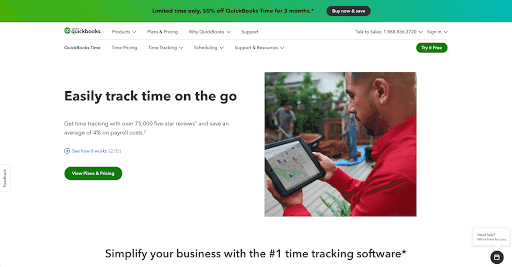
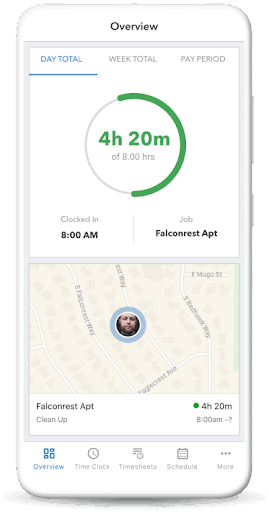
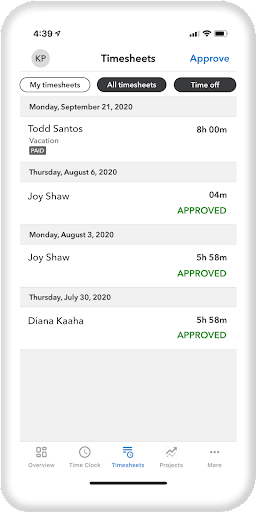
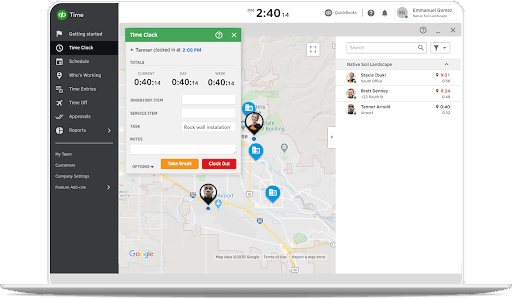
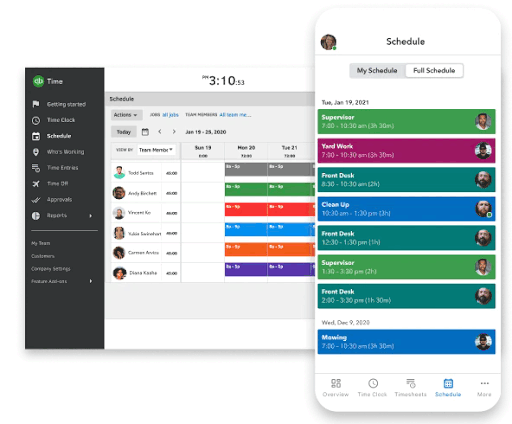
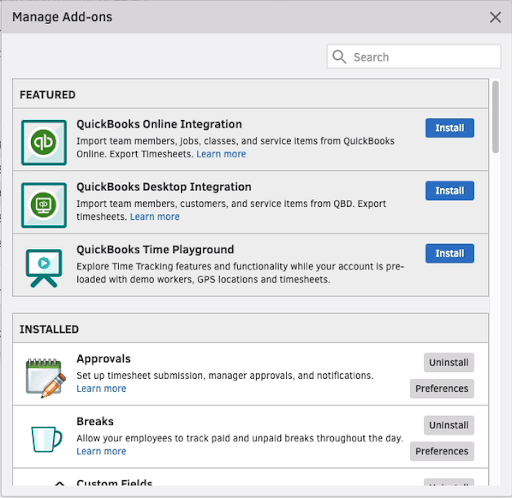
Description
QuickBooks Payroll at a Glance
| Best fit for | small businesses using QuickBooks Online wanting tightly integrated payroll-to-accounting workflows |
|---|---|
| Industries | Professional services, retail, restaurants, healthcare, construction, nonprofits, accountants, bookkeepers |
| Core platform | Cloud payroll integrated with QuickBooks Online, QuickBooks Time, and Intuit ecosystem |
| Pricing model | Tier-based monthly base + per-employee fee, separate from QuickBooks Online subscription |
| Indicative pricing | Payroll Core from $50 base + $6 per employee; Premium from $85 + $9; Elite from $130 + $11 per month (vendor-published on quickbooks.intuit.com/payroll/pricing) |
| Mobile apps | iOS and Android (QuickBooks Workforce app for employees, QuickBooks app for owners) |
| Trust signals | SOC 2 Type II, Intuit Inc parent (NASDAQ: INTU), used by millions of small businesses |
| Vendor headquarters | Mountain View, CA, USA (Intuit Inc) |
| Compliance | All US federal, state, and local payroll tax filing; ACA reporting; multi-state |
| Geographic focus | United States (50 states + DC) |
QuickBooks Payroll Pros and Cons in 2026
Where QuickBooks Payroll Stands Out
- Native QuickBooks Online integration: payroll data flows directly to QuickBooks general ledger without manual reconciliation
- QuickBooks Time integration: time tracking, GPS clock-in, and timesheets included on Premium and Elite tiers
- Tax penalty protection: Elite tier includes tax penalty protection up to $25,000 if Intuit makes a filing error
- Accountant ecosystem: tightest integration with accountant workflows for tax preparation and bookkeeping
- HR Support: Premium and Elite tiers include HR support center with templates, advice, and compliance guidance
Where QuickBooks Payroll Falls Short
- Pricing is higher than competitors (Gusto, OnPay, Patriot Payroll) for comparable feature sets
- Best fit only for businesses using QuickBooks Online; standalone payroll-only customers miss the integration advantage
- Customer support quality has varied; smaller customers occasionally report longer queue times
- US-only platform; no native multi-country payroll
Who Should Use QuickBooks Payroll?
Small businesses using QuickBooks Online (1 to 50 employees) wanting tightly integrated payroll-to-accounting workflows. Particularly strong fit for accountant-led businesses, bookkeepers, and owners who manage finances in QuickBooks Online. Buyers without QuickBooks Online may prefer Gusto, OnPay, or Patriot Payroll for cheaper standalone payroll. Larger mid-market businesses should consider Paycor, Paylocity, or Rippling.
QuickBooks Payroll Product Suite in 2026
QuickBooks Payroll Modules
- Payroll Core: 50-state US payroll, full-service tax filing, direct deposit, next-day deposit option
- QuickBooks Online Integration: native general ledger sync, automatic categorization, financial reports
- QuickBooks Time: time tracking, GPS clock-in, timesheets, project tracking (Premium and Elite)
- HR Support Center: HR templates, compliance guidance, employee handbook builder (Premium and Elite)
- Tax Penalty Protection: up to $25,000 protection if Intuit makes a filing error (Elite tier)
- Same-Day Direct Deposit: faster payroll processing (Premium and Elite)
- Workers Comp Administration: pay-as-you-go workers comp through AP Intego partners
- Personal HR Advisor: dedicated HR advisor access (Elite tier)
QuickBooks Payroll Customer Support and Intuit Ecosystem
QuickBooks Payroll customer support combines online resources, chat, email, and phone support during business hours, with priority support and dedicated HR advisor access on Elite tier. The Intuit ecosystem advantage includes one Intuit account for QuickBooks Online accounting, QuickBooks Payroll, QuickBooks Time, QuickBooks Workforce employee app, and Mailchimp marketing. The accountant ecosystem (QuickBooks ProAdvisors) provides additional support through certified Intuit accounting professionals.
How Much Does QuickBooks Payroll Cost in 2026?
QuickBooks Payroll uses tier-based pricing structured as monthly base fee plus per-employee fee across three plans: Payroll Core, Payroll Premium, and Payroll Elite. The vendor pricing page on quickbooks.intuit.com/payroll/pricing is the source of truth. Note: QuickBooks Online accounting subscription is separate and required for full integration value.
QuickBooks Payroll 2026 Pricing Tiers
- Payroll Core - From $50 per month base + $6 per employee per month (full-service payroll, next-day deposit, automatic tax filing)
- Payroll Premium - From $85 per month base + $9 per employee per month (adds same-day deposit, QuickBooks Time, HR Support Center, expert review)
- Payroll Elite - From $130 per month base + $11 per employee per month (adds tax penalty protection up to $25,000, personal HR advisor, project tracking, premium time tracking)
Hidden Costs and Contract Gotchas to Watch For
- Per-employee fees apply on top of tier base; budget for headcount growth as a recurring cost
- QuickBooks Online subscription is separate from QuickBooks Payroll; both are required for full integration value
- Add-on services (1099 e-filings beyond standard count, additional state tax filings) may carry separate fees
- Health benefits premiums paid to carriers separately; QuickBooks manages enrollment but does not subsidize
QuickBooks Payroll Implementation Path
QuickBooks Payroll implementation for existing QuickBooks Online customers is largely self-service with a guided onboarding wizard that imports company data from QuickBooks. Most small businesses launch payroll within 1 to 2 weeks. Standalone payroll-only customers typically take 2 to 3 weeks. Migration assistance is available for buyers switching from Gusto, Paychex, ADP, or other providers, with QuickBooks ProAdvisors helping with data conversion.
QuickBooks Payroll vs the Alternatives
QuickBooks Payroll versus Gusto: Gusto is stronger on standalone payroll, HR, and benefits depth at lower cost. QuickBooks Payroll is stronger for businesses using QuickBooks Online for the accounting integration. QuickBooks Payroll versus OnPay: OnPay is cheaper at $49 base + $6 per employee. QuickBooks Payroll is stronger for QuickBooks Online users and adds tax penalty protection on Elite. QuickBooks Payroll versus Square Payroll: Square Payroll is cheaper and integrates with Square POS. QuickBooks Payroll is stronger for accounting-led businesses using QuickBooks Online. QuickBooks Payroll versus Patriot Payroll: Patriot Payroll is much cheaper for basic payroll. QuickBooks Payroll is stronger on integration depth and tax penalty protection.
What Real Buyers Report About QuickBooks Payroll
Small business owners using QuickBooks Online consistently rate QuickBooks Payroll highly for the depth of QuickBooks integration, accuracy of full-service tax filing, and the value of tax penalty protection on Elite tier. Common positive themes include responsive QuickBooks accountant ecosystem support, useful QuickBooks help resources, and the convenience of one Intuit account for accounting and payroll. Critical themes include higher pricing than competitors, customer support quality varying, and the value diminishing for businesses not using QuickBooks Online. Buyers running 1 to 50 employees with QuickBooks Online tend to rate QuickBooks Payroll above standalone alternatives for the accounting integration advantage.
QuickBooks Payroll in the Accounting-Led SMB Payroll Landscape
QuickBooks Payroll competes with several SMB payroll vendors. For comparison context, see Gusto, OnPay, Patriot Payroll, Square Payroll, and ADP RUN as alternatives. For PEO services, see Justworks, TriNet, and Insperity. For mid-market upgrades, look at Paycor, Paylocity, and Rippling. For workforce time tracking integration, see Deputy and Connecteam. Browse the payroll software category for additional options.
QuickBooks ProAdvisor Ecosystem and Tax Penalty Protection
The QuickBooks ProAdvisor accountant ecosystem genuinely adds value beyond the QuickBooks Payroll software. ProAdvisors are certified Intuit accounting professionals who provide specialized expertise on QuickBooks Online and QuickBooks Payroll setup, troubleshooting, and tax preparation. The Tax Penalty Protection on Elite tier (up to $25,000 if Intuit makes a filing error) is unique versus competitors and provides meaningful peace of mind for accounting-led small businesses. Buyers using QuickBooks Online for accounting often choose QuickBooks Payroll over Gusto or OnPay specifically because the ProAdvisor ecosystem and Tax Penalty Protection together justify the higher price point.
Bottom Line: Is QuickBooks Payroll Right for You?
QuickBooks Payroll is the right choice for small businesses using QuickBooks Online wanting tightly integrated payroll-to-accounting workflows with optional tax penalty protection. The QuickBooks Online integration depth is the primary value proposition, and the Elite tier tax penalty protection up to $25,000 is unique versus competitors. The QuickBooks ProAdvisor accountant ecosystem provides additional support that standalone payroll providers cannot match. The tradeoffs are higher pricing than Gusto, OnPay, or Patriot Payroll, US-only operations, and value diminishing for businesses not using QuickBooks Online. For 1 to 50 employee QuickBooks Online users, QuickBooks Payroll typically deserves shortlist consideration alongside Gusto and OnPay.
Frequently Asked Questions
How much does QuickBooks Payroll cost in 2026?
What is the difference between QuickBooks Payroll tiers?
Does QuickBooks Payroll integrate with QuickBooks Online?
How does QuickBooks Payroll compare to Gusto?
Does QuickBooks Payroll handle multi-state payroll?
What is tax penalty protection?
Is QuickBooks Payroll available outside the United States?
How long does QuickBooks Payroll implementation take?
Is QuickBooks Payroll SOC 2 compliant?
What is QuickBooks Workforce?
Find Your Perfect Software
See how it can transform your workflow
- Personalized for your needs Tailored recommendations based on your unique requirements.
- Save time & resources Streamline your workflow and boost team productivity.
- Trusted by thousands Join 10,000+ businesses already growing with SaaSrat.
You're all set! 🎉
A specialist for will reach out within 1 business day with tailored recommendations for your needs.