
ConceptDraw
by CS Odessa • Founded 1993
What is ConceptDraw?
Get Best Quote for ConceptDraw
Connect with SaaSrat experts to get the best quote for your business.
You're all set!
A specialist for ConceptDraw will reach out within 1 business day.
ConceptDraw Features
Gantt chart
Resource management
Task management
Project dashboard
Critical path management
Budget management
View All 34 Features
ConceptDraw Pricing Plans
ConceptDraw OFFICE 11 Lifetime
- Lifetime license for personal or commercial use
- Bundles DIAGRAM (50+ solution libraries)
- MINDMAP (brainstorming and presentation tools)
- PROJECT (Gantt charts, resource management, multi-project tracking)
- Cross-application integration with shared data
- Native macOS and Windows desktop apps
- 12,000+ templates and examples
- RapidDraw technology
- Export to Microsoft Office and PDF
Maintenance Assurance Plan
- Optional ongoing updates plan
- Access to new versions and features
- Priority support
- Volume and educational licensing discounts available
- For organizations needing continuous product updates
ConceptDraw Resources
ConceptDraw Screenshots
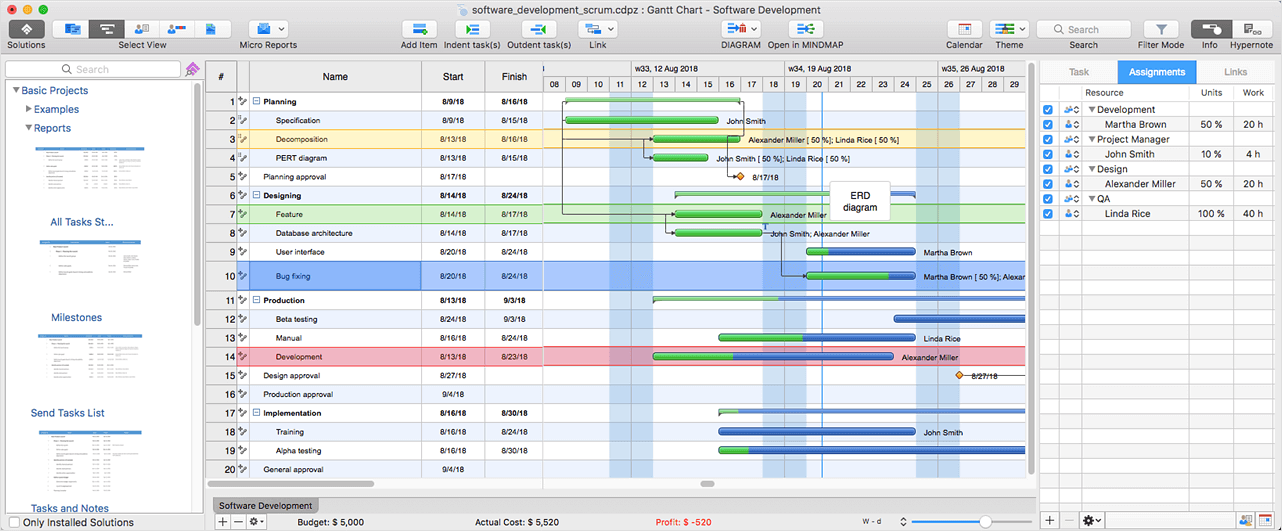
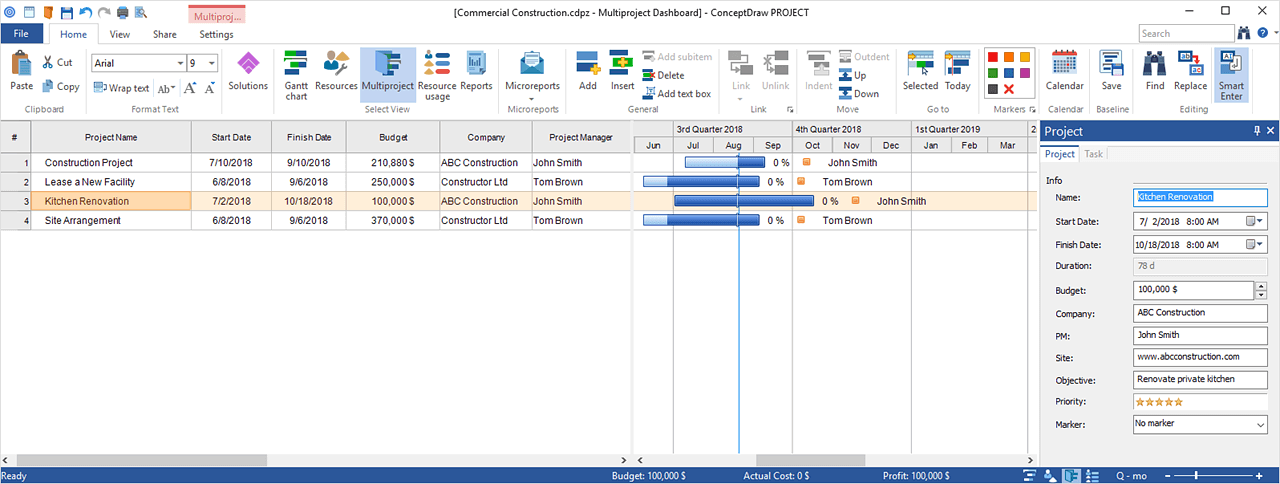
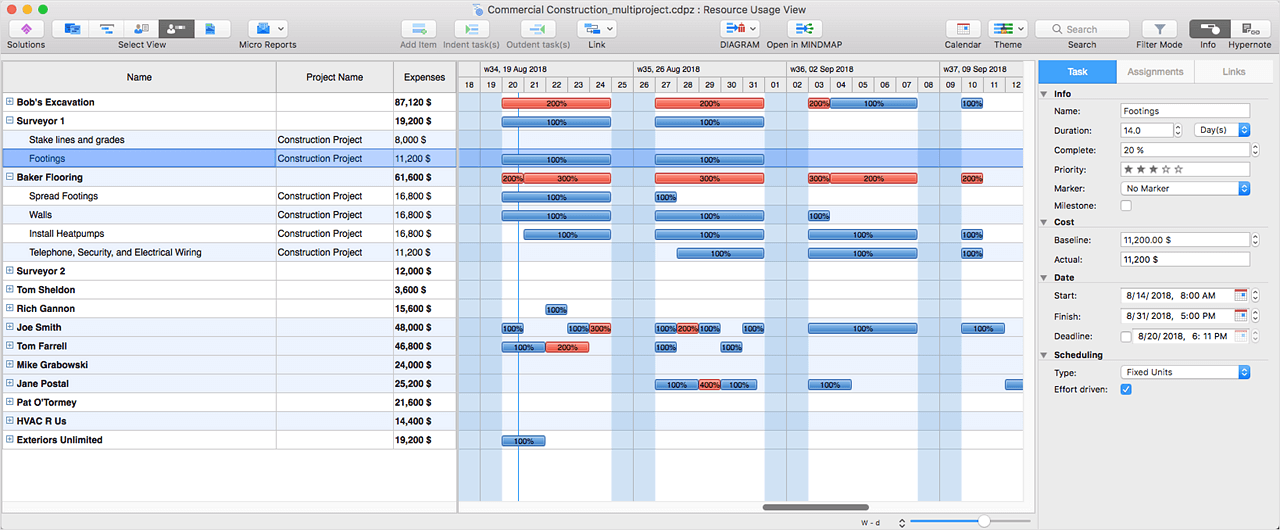
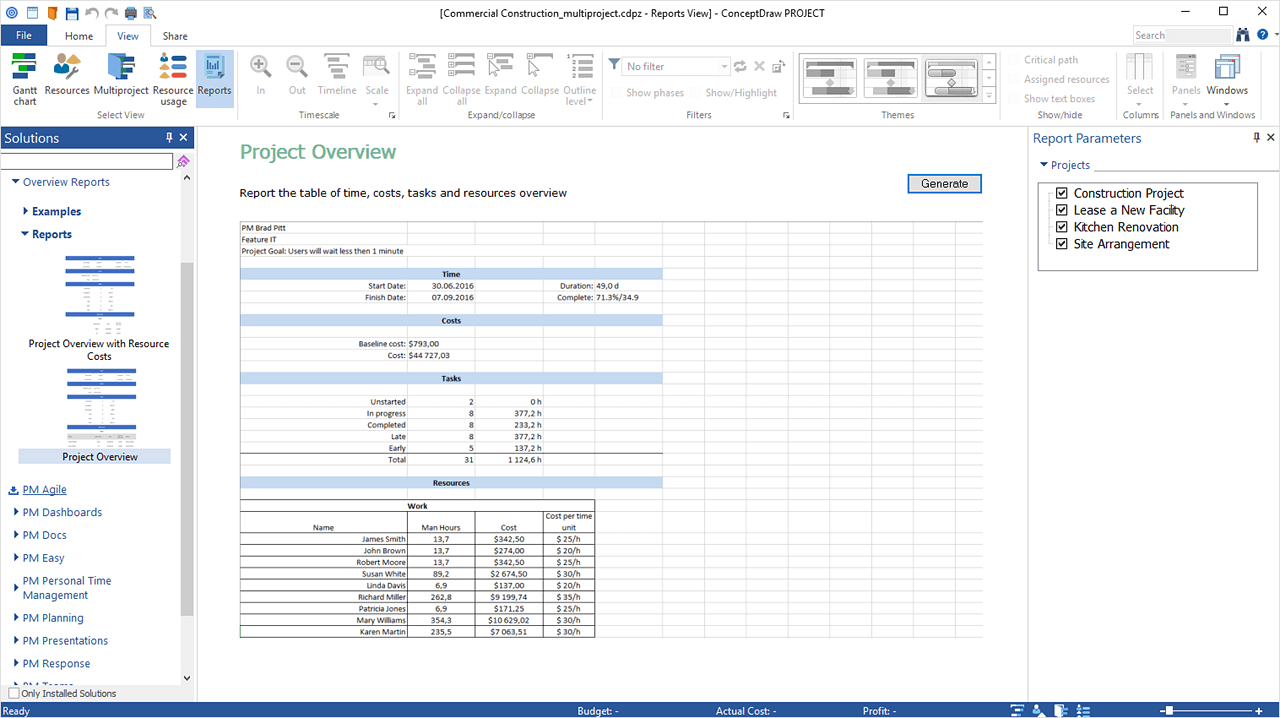
Description
ConceptDraw Field Guide
| Best fit for | Business analysts, project managers, technical illustrators, IT architects, and operations teams (1-1,000+ users) that need mind mapping, business diagramming, and project management on integrated desktop applications with one-time lifetime licensing rather than recurring SaaS subscriptions |
|---|---|
| Industries | Business analysis and consulting, technical illustration and engineering, IT services and infrastructure architecture, professional services firms, education and training organizations, healthcare administration, manufacturing operations, government and public sector, financial services, marketing operations |
| Core capability | ConceptDraw OFFICE bundle includes ConceptDraw DIAGRAM (business diagramming with 50+ solution libraries), ConceptDraw MINDMAP (mind mapping with brainstorming and presentation tools), and ConceptDraw PROJECT (project management with Gantt charts, resource management, multi-project tracking). Cross-application integration with shared data, one-time lifetime licensing, native macOS and Windows desktop apps, ConceptDraw STORE for solution add-ons, 12,000+ templates and examples, RapidDraw technology, export to Microsoft Office, PDF, and other formats |
| Pricing | ConceptDraw OFFICE 11 lifetime license at $299 per user (one-time purchase for personal or commercial use) bundling DIAGRAM, MINDMAP, and PROJECT applications with cross-application integration. Individual application licenses also available. Maintenance Assurance Plan available as optional add-on for ongoing updates. Volume and educational licensing discounts available for larger deployments. Verified at conceptdraw.com on 2026-06-06. |
| Differentiator | The deepest combination of mind mapping, business diagramming, and project management on integrated desktop applications with one-time lifetime licensing in the category. Where most modern PM tools force recurring SaaS subscriptions, ConceptDraw OFFICE bundles three integrated desktop apps at $299 lifetime - organizations with CapEx procurement preferences or data sovereignty requirements get a fully owned software stack without recurring fees. |
| Headquarters | ConceptDraw is developed by CS Odessa, a privately held software company that has served business diagramming, mind mapping, and project management software users since 1993. Distributed engineering and customer-success organization with operations across multiple countries and a global customer base spanning Fortune 500 enterprises, government agencies, universities, and SMB operations. |
| Customers | Used by Fortune 500 enterprises, government agencies, universities, technical consultancies, business analysts, and SMB operations worldwide. Strong adoption among professionals who need diagramming plus mind mapping plus project management on integrated desktop applications and organizations preferring one-time lifetime licensing over recurring SaaS subscriptions. |
| Mobile | ConceptDraw OFFICE is a desktop application suite for macOS and Windows. Mobile companion features available via cloud sync. The platform's design center is desktop power-user productivity rather than mobile-first workflows. |
Where ConceptDraw Wins
One-time lifetime licensing at $299. ConceptDraw OFFICE 11 lifetime license bundles DIAGRAM, MINDMAP, and PROJECT applications for $299 per user one-time. Most PM and diagramming tools (Visio, Lucidchart, MindMeister, Microsoft Project) require recurring SaaS subscriptions. Organizations with CapEx procurement preferences or 3+ year deployments get total cost savings vs equivalent SaaS subscriptions.
Three integrated desktop applications. ConceptDraw DIAGRAM (business diagramming), MINDMAP (mind mapping), and PROJECT (project management) share data across applications. Operations teams running diagramming plus ideation plus PM workflows stop switching between separate apps. The integration is the differentiator over standalone tools.
50+ solution libraries for ConceptDraw DIAGRAM. Solution libraries cover network diagrams, organizational charts, flowcharts, mind maps, business process diagrams, technical illustrations, and 50+ more verticals. Business analysts and technical illustrators get specialized templates that generic diagramming tools require add-on libraries to provide.
12,000+ templates and examples. The ConceptDraw STORE ships 12,000+ templates and examples across business, technical, marketing, education, and operations use cases. Teams that need diagramming plus mind mapping plus PM templates get a deep starting library rather than building from scratch.
RapidDraw technology for fast diagramming. RapidDraw technology accelerates diagram creation with click-and-go drawing patterns. Business analysts producing many diagrams per week get materially faster turnaround than mouse-heavy traditional diagramming.
Native macOS and Windows desktop apps. Full-featured native desktop apps for both platforms rather than web-only or platform-limited alternatives. Professionals working on both macOS and Windows get consistent experience and feature parity.
Long-tenured vendor since 1993. CS Odessa has developed ConceptDraw since 1993. Long-tenured stability without venture-funded growth-stage pivots. Customers running ConceptDraw for 10+ years cite consistent product evolution as a buying signal.
Where ConceptDraw Falls Short
Desktop applications vs cloud-first SaaS. ConceptDraw OFFICE is desktop software requiring installation on each user's machine. Modern teams running cloud-first IT infrastructure with browser-only access policies find this approach friction. Cloud sync mitigates some limitations but the core experience is desktop.
Real-time collaboration lighter than cloud-first alternatives. Cloud-first diagramming tools (Notion, Lucidchart, Miro) ship real-time multi-user collaboration as a core feature. ConceptDraw's collaboration is asynchronous via cloud sync rather than real-time co-editing in a browser.
UI feels traditional vs newer-wave platforms. ConceptDraw's interface reflects three decades of desktop application development. Younger workforces that grew up on Figma, Notion, or modern web apps may find the visual design utilitarian compared to modern alternatives.
AI features lighter than aggressive AI-first competitors. Modern PM tools (Monday AI, Asana AI Studio, ClickUp Brain) ship aggressive AI features. ConceptDraw has been more conservative on AI roadmap. Teams prioritizing AI-driven workflow drafting should compare AI depth carefully.
Smaller integration marketplace than SaaS PM platforms. ConceptDraw integrates with Microsoft Office (Word, Excel, PowerPoint) and exports to common formats but the integration ecosystem is smaller than Asana 270+ or Jira 3,000+ Marketplace apps. Niche integrations route through manual export/import workflows.
Who Should Use ConceptDraw?
ConceptDraw is the right call when a business analyst, project manager, technical illustrator, IT architect, or operations team (1-1,000+ users) needs mind mapping, business diagramming, and project management on integrated desktop applications with one-time lifetime licensing rather than recurring SaaS subscriptions. Within the Project Management category at SaaSRat and the broader business productivity workspace, the strongest fits are business analysis and consulting, technical illustration and engineering, IT services and infrastructure architecture, professional services firms, education and training organizations, healthcare administration, manufacturing operations, government and public sector, financial services, and marketing operations.
ConceptDraw is the wrong call for cloud-first real-time collaboration workflows (evaluate Notion, Lucidchart, or Miro), for general cross-functional SaaS PM (evaluate Asana, Monday, or ClickUp), for software engineering scrum (evaluate Jira or Linear), and for personal task management (evaluate Todoist).
ConceptDraw Alternatives
Microsoft Visio - Microsoft 365 ecosystem diagramming with Office integration.
Lucidchart - cloud-first diagramming with real-time collaboration and integrations.
MindMeister - cloud-first mind mapping with collaboration.
Miro - collaborative whiteboard with diagramming and mind mapping templates.
OmniGraffle - macOS-only diagramming with one-time licensing.
Microsoft Project - Microsoft 365 ecosystem PM for Project-anchored teams.
XMind - mind mapping with one-time licensing option alongside subscription.
What Reddit and LinkedIn Reviewers Say
Discussions on r/businessanalysis and r/projectmanagement rate ConceptDraw highly for the one-time lifetime licensing and the three integrated desktop applications. Buyers cite the 12,000+ template library and 50+ solution libraries as the differentiators for business analysts producing many diagrams per week.
LinkedIn discussions among IT architects, business analysts, and technical consultants highlight ConceptDraw's role as the desktop power-user alternative to cloud-first diagramming. The one-time licensing economics at 3+ year deployments are consistently named the buying signal for CapEx-procurement organizations.
Final Take on ConceptDraw
ConceptDraw is the right call when a business analyst, project manager, technical illustrator, IT architect, or operations team needs mind mapping, business diagramming, and project management on integrated desktop applications with one-time lifetime licensing. Business analysis and consulting, technical illustration and engineering, IT services and infrastructure architecture, professional services firms, education and training organizations, healthcare administration, manufacturing operations, government and public sector, financial services, and marketing operations get the natural fit. The one-time lifetime licensing at $299, three integrated desktop applications (DIAGRAM, MINDMAP, PROJECT), 50+ solution libraries, 12,000+ templates and examples, RapidDraw technology, native macOS and Windows desktop apps, and long-tenured vendor since 1993 combination delivers value cloud-first SaaS PM tools cannot match for CapEx procurement and desktop power-user workflows.
For Microsoft 365 ecosystem diagramming, Visio. For cloud-first collaboration diagramming, Lucidchart. For cloud mind mapping, MindMeister. For collaborative whiteboard with templates, Miro. For macOS-only diagramming, OmniGraffle. For Microsoft 365 PM, Microsoft Project. For mind mapping with one-time licensing, XMind. ConceptDraw is the integrated desktop diagramming-plus-mindmap-plus-PM pick for business analysts and CapEx-procurement organizations.
Adjacent reading: ConceptDraw buyers comparing for cloud-first workflows also evaluate task management tools for individual contributor focus and Notion for documentation-led knowledge work alongside ConceptDraw diagramming.
Implementation considerations: Individual users install ConceptDraw OFFICE in under an hour. Small teams (5-25 users) deploy in 1-2 weeks including license distribution, template library setup, and team training. Mid-market deployments (50-500 users) run 2-6 weeks including volume license distribution, shared template library setup, Microsoft Office integration configuration, and team training. Enterprise deployments at 1,000+ users include IT-managed software distribution, Maintenance Assurance Plan setup, and partner-led training.
Buyer evaluation tips: Start with the free trial of ConceptDraw OFFICE 11 to validate diagramming, mind mapping, and project management workflows on macOS or Windows. Lifetime license at $299 per user is the right purchase for individual users or small teams committed to 3+ year deployments. Volume and educational licensing discounts available for larger deployments. Maintenance Assurance Plan adds ongoing updates as optional add-on. Calculate total cost vs equivalent SaaS subscriptions (Visio at $5-$15 per user per month, Lucidchart at $7.95 per user per month) - lifetime ConceptDraw pays back in 2-4 years for most deployments.
Verified on 2026-06-06 by the SaaSRat Editorial Team. Vendor facts cross-checked against conceptdraw.com and current 2025-2026 vendor disclosures. About our methodology.
Frequently Asked Questions
How much does ConceptDraw cost in 2026?
ConceptDraw vs Visio vs Lucidchart vs Miro?
What is ConceptDraw OFFICE?
Does ConceptDraw have a Mac version?
Where is ConceptDraw based?
Is ConceptDraw a one-time purchase?
How many templates does ConceptDraw include?
Does ConceptDraw export to Microsoft Office?
Does ConceptDraw support real-time collaboration?
How long does a ConceptDraw implementation typically take?
Find Your Perfect Software
See how it can transform your workflow
- Personalized for your needs Tailored recommendations based on your unique requirements.
- Save time & resources Streamline your workflow and boost team productivity.
- Trusted by thousands Join 10,000+ businesses already growing with SaaSrat.
You're all set! 🎉
A specialist for will reach out within 1 business day with tailored recommendations for your needs.