

TaskJuggler
by Chris Schlaeger
What is TaskJuggler?
Get Best Quote for TaskJuggler
Connect with SaaSrat experts to get the best quote for your business.
You're all set!
A specialist for TaskJuggler will reach out within 1 business day.
TaskJuggler Features
Project planning
Resource management
Task scheduling
Cost management
Risk management
Time tracking
View All 27 Features
TaskJuggler Pricing Plans
Open Source (GPL v2)
- Free open-source command-line tool
- Linux/macOS/Windows support (Ruby-based)
- Text-based project planning with TJP syntax
- Deep scheduling logic with dependency resolution
- Resource allocation with skills and availability
- Multi-currency budget tracking
- Version-control-friendly project files (Git/Subversion-compatible)
- HTML and CSV reporting
- GNU GPL v2 licensing
- Community-supported via documentation and GitHub
TaskJuggler Screenshots
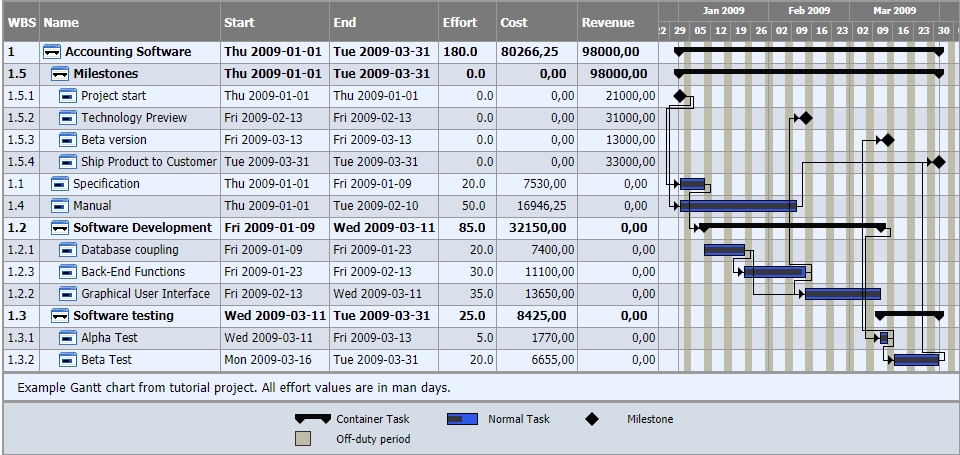
Description
TaskJuggler Field Guide
| Best fit for | Project planners, engineers, and technical project managers (1-100 users) comfortable with text-based syntax and command-line workflows who want a free open-source project planning tool with deep scheduling logic, resource allocation, multi-currency budgeting, and version-control-friendly project files for engineering and research projects |
|---|---|
| Industries | Software engineering project planning, academic research, university project management, engineering consultancies, open-source community project planning, government technical projects, defense and aerospace project planning, IT infrastructure planning, scientific research organizations, technical consulting |
| Core capability | Text-based project planning with TaskJuggler programming language (TJP) syntax, Gantt chart generation from text files, resource allocation with skills and availability, multi-currency budget tracking, automatic scheduling with dependency resolution, what-if scenario analysis, status reporting in HTML and CSV, version-control-friendly project files (Git/Subversion compatible), Linux/macOS/Windows support (Ruby-based), multi-project support, calendar customization, GNU GPL v2 open-source licensing |
| Pricing | TaskJuggler is free open-source software licensed under GNU GPL v2 with no licensing cost. Total cost of ownership covers internal time for installation, learning the TaskJuggler programming language (TJP), and ongoing use. Community-supported via documentation, mailing list, and GitHub. Verified at taskjuggler.org on 2026-06-06. |
| Differentiator | Text-based project planning with deep scheduling logic and version-control-friendly project files. Where most PM tools use GUI-based scheduling that resists Git workflows, TaskJuggler stores project plans as text files (.tjp) compatible with Git, Subversion, and Mercurial. Engineering teams running version-controlled project plans get the only PM tool that fits engineering workflows natively rather than requiring export workarounds. |
| Headquarters | TaskJuggler is an open-source community project maintained by Chris Schlaeger and contributors worldwide. There is no commercial vendor headquarters. The project is hosted on taskjuggler.org with community-led development. Development originated in Germany with global contributor base. |
| Customers | Used by software engineering teams, academic researchers, university project planners, engineering consultancies, open-source community organizers, government technical project teams, defense and aerospace project planners, IT infrastructure planners, scientific research organizations, and technical consultants. Strong adoption in engineering and research communities preferring text-based version-controlled workflows. |
| Mobile | TaskJuggler is a command-line and desktop tool for Linux, macOS, and Windows. No mobile apps. Project plans render as HTML reports viewable on any device with a web browser. The platform's design center is text-based power-user project planning rather than mobile-first workflows. |
Where TaskJuggler Wins
Free open-source with no licensing cost. TaskJuggler is GPL v2 open-source software with no recurring fees. Engineering teams, academic researchers, and budget-conscious organizations get deep project planning at zero cost. Total cost of ownership covers only internal time for learning the syntax and using the tool.
Text-based project files for version control. TaskJuggler stores project plans as .tjp text files compatible with Git, Subversion, Mercurial, and other version control systems. Engineering teams running version-controlled project plans get the only PM tool that fits engineering workflows natively rather than requiring export workarounds.
Deep scheduling logic with dependency resolution. Automatic scheduling with complex dependency types, resource allocation by skills and availability, multi-currency budget tracking, and what-if scenario analysis. Project planners running technical projects with complex constraints get scheduling depth that GUI-based PM tools cannot match.
Cross-platform support. Ruby-based application runs on Linux, macOS, and Windows. Engineering teams on any operating system get consistent project planning experience.
HTML and CSV reporting. Status reports generate as HTML and CSV automatically. Stakeholders without TaskJuggler access view project status in any web browser. Integration with continuous integration pipelines lets teams auto-generate status reports on schedule changes.
Long-tenured open-source project. TaskJuggler has been in active development since the early 2000s. Consistent releases without venture-funded growth-stage pivots. Engineering communities running TaskJuggler for 10+ years get long-term stability.
Multi-currency budgeting. Native multi-currency support for international engineering and research projects. Global engineering organizations with multi-region project budgets get currency tracking without external accounting tools.
Where TaskJuggler Falls Short
Steep learning curve. TaskJuggler requires learning the TaskJuggler programming language (TJP) syntax. Project managers without technical comfort with text-based languages and command-line workflows find the on-ramp steep. GUI-based alternatives are easier for non-technical project managers.
No GUI for project editing. Project files are edited as text in any code editor. Visual project editing requires generating HTML reports after each change. Modern GUI-based PM tools (Asana, Monday) offer drag-and-drop editing.
No real-time collaboration. Single-user text-based files. Multi-user collaboration requires version control workflows (Git/Subversion). Cloud-first PM tools (Asana, Monday) ship real-time multi-user collaboration as a core feature.
No native marketplace integrations. TaskJuggler is command-line and file-based. Integrations require external scripts. Teams that need broad SaaS integration should evaluate cloud-first alternatives.
Brand recognition concentrated in technical communities. TaskJuggler is well-known in engineering and academic communities but unfamiliar in mainstream PM procurement. Non-technical project managers may not encounter it in their typical PM evaluations.
Who Should Use TaskJuggler?
TaskJuggler is the right call when a project planner, engineer, or technical project manager (1-100 users) is comfortable with text-based syntax and command-line workflows and wants a free open-source project planning tool with deep scheduling logic, resource allocation, multi-currency budgeting, and version-control-friendly project files. Within the Project Management category at SaaSRat, the strongest fits are software engineering project planning, academic research, university project management, engineering consultancies, open-source community project planning, government technical projects, defense and aerospace project planning, IT infrastructure planning, scientific research organizations, and technical consulting.
TaskJuggler is the wrong call for non-technical project managers (evaluate Asana, Monday, or ClickUp), for cloud-first real-time collaboration (evaluate cloud-first PM platforms), for general cross-functional PM (evaluate Asana, Monday, or ClickUp), for enterprise PPM at Fortune 500 scale (evaluate Planview or Smartsheet), and for personal task management (evaluate Todoist).
TaskJuggler Alternatives
GanttProject - free open-source Gantt chart desktop application with GUI editing.
OpenProject - open-source PM with stronger commercial support and GUI workflows.
ProjectLibre - free open-source Microsoft Project alternative.
Redmine - open-source self-hosted issue tracker with Gantt scheduling plugins.
Microsoft Project / Project for the Web - Microsoft 365 ecosystem PM.
Smartsheet - spreadsheet-DNA enterprise PMO.
Plan-B Project Planning - text-based project planning with similar version-control workflows.
What Reddit and LinkedIn Reviewers Say
Discussions on r/projectmanagement and r/opensource rate TaskJuggler highly among engineering and research communities for the text-based version-controlled workflow and deep scheduling logic. Buyers cite the Git-compatible project files and complex dependency resolution as the differentiators vs GUI-based alternatives.
LinkedIn discussions among engineering project managers and academic research leaders highlight TaskJuggler's role as the engineering-workflow-native PM tool. The long-tenured open-source stability is consistently named the buying signal for technical communities avoiding subscription lock-in.
Final Take on TaskJuggler
TaskJuggler is the right call when a project planner, engineer, or technical project manager is comfortable with text-based syntax and command-line workflows. Software engineering project planning, academic research, university project management, engineering consultancies, open-source community project planning, government technical projects, defense and aerospace project planning, IT infrastructure planning, scientific research organizations, and technical consulting get the natural fit. The free open-source with no licensing cost, text-based project files for version control, deep scheduling logic with dependency resolution, cross-platform support, HTML and CSV reporting, long-tenured open-source project stability, and multi-currency budgeting combination delivers value GUI-based PM tools cannot match for engineering and research workflows preferring text-based version control.
For free open-source Gantt with GUI editing, GanttProject. For open-source with commercial support, OpenProject. For free MS Project alternative, ProjectLibre. For open-source self-hosted issue tracker with Gantt, Redmine. For Microsoft 365 ecosystem PM, Microsoft Project. For enterprise PPM, Smartsheet. For similar text-based planning, Plan-B Project Planning. TaskJuggler is the text-based version-controlled project planning pick for engineering and research communities.
Adjacent reading: TaskJuggler buyers comparing for GUI-based workflows also evaluate task management tools for individual contributor focus and GanttProject for free open-source Gantt with GUI editing.
Implementation considerations: Individual technical users install TaskJuggler in under an hour. Learning the TaskJuggler programming language (TJP) syntax takes 1-2 weeks for proficiency. Small engineering teams (5-25 users) adopt TaskJuggler in 2-6 weeks including syntax training, project file convention setup, version control integration (Git/Subversion), HTML report template design, and team onboarding. The most important configuration step is the project file template - establish naming conventions, syntax patterns, and report structures upfront to support consistent project planning across the team.
Buyer evaluation tips: Download TaskJuggler for free from taskjuggler.org to evaluate. The command-line tool requires no payment and runs on Linux, macOS, and Windows (Ruby-based). Evaluate the syntax learning curve before committing - non-technical project managers find the on-ramp steep. For engineering teams already running version-controlled workflows, TaskJuggler is the natural fit. For GUI-preferring project managers, evaluate GanttProject, ProjectLibre, or modern SaaS alternatives instead.
Verified on 2026-06-06 by the SaaSRat Editorial Team. Vendor facts cross-checked against taskjuggler.org and current 2025-2026 vendor disclosures. About our methodology.
Frequently Asked Questions
How much does TaskJuggler cost in 2026?
TaskJuggler vs GanttProject vs OpenProject vs Microsoft Project?
Is TaskJuggler really free?
What is the TaskJuggler programming language?
Where is TaskJuggler based?
Does TaskJuggler work with Git?
Does TaskJuggler have a GUI?
Does TaskJuggler run on Windows?
What is TaskJuggler good for?
How long does a TaskJuggler implementation typically take?
Find Your Perfect Software
See how it can transform your workflow
- Personalized for your needs Tailored recommendations based on your unique requirements.
- Save time & resources Streamline your workflow and boost team productivity.
- Trusted by thousands Join 10,000+ businesses already growing with SaaSrat.
You're all set! 🎉
A specialist for will reach out within 1 business day with tailored recommendations for your needs.