

OfficeTools
by AbacusNext
What is OfficeTools?
Get Best Quote for OfficeTools
Connect with SaaSrat experts to get the best quote for your business.
You're all set!
A specialist for OfficeTools will reach out within 1 business day.
OfficeTools Features
Unlimited client contact records with custom fields
Time tracking and billable hour capture
Practice billing with invoice templates
Calendar and appointment scheduling for staff
Client portal with secure document upload and download
QuickBooks Desktop and Online sync
View All 12 Features
OfficeTools Pricing Plans
WorkSpace (Custom Quote)
- Vendor-quoted plan
- Per-user, per-month, annual or multi-year contract
- Field quotes generally $50-$90/user/mo with volume discounts
- AbacusNext private cloud hosting priced separately
- Implementation typically 4-8 weeks
OfficeTools Resources
OfficeTools Screenshots
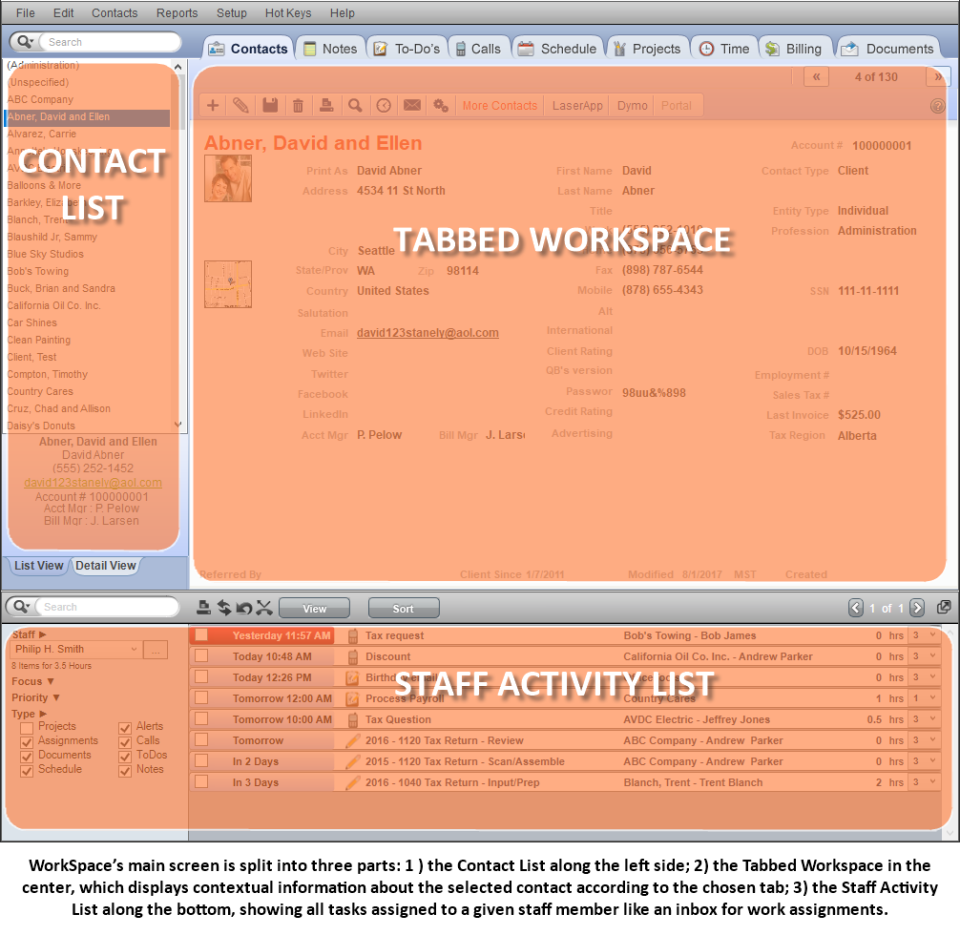
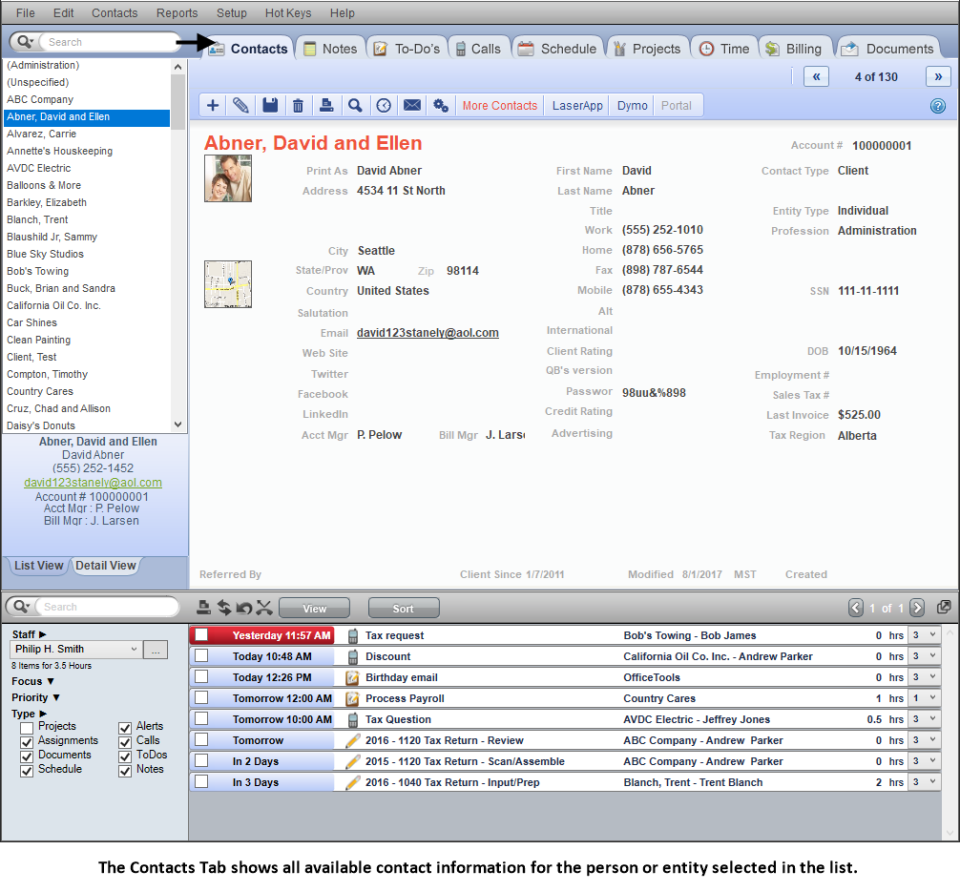
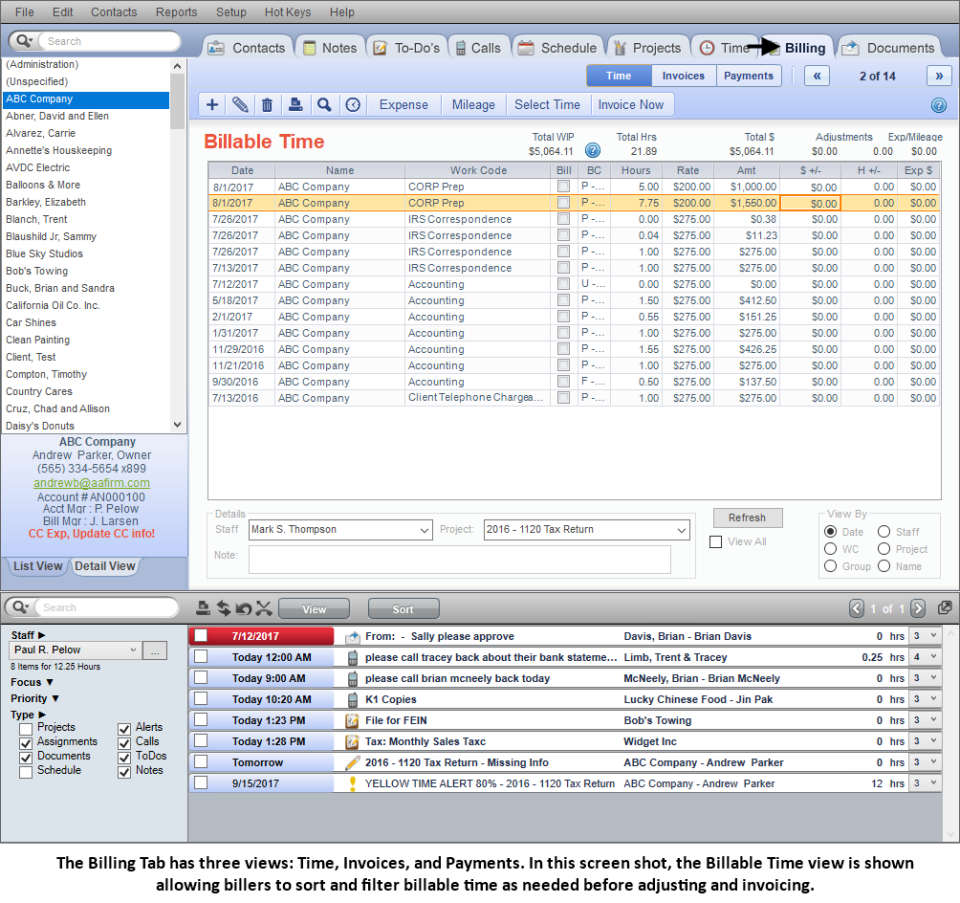
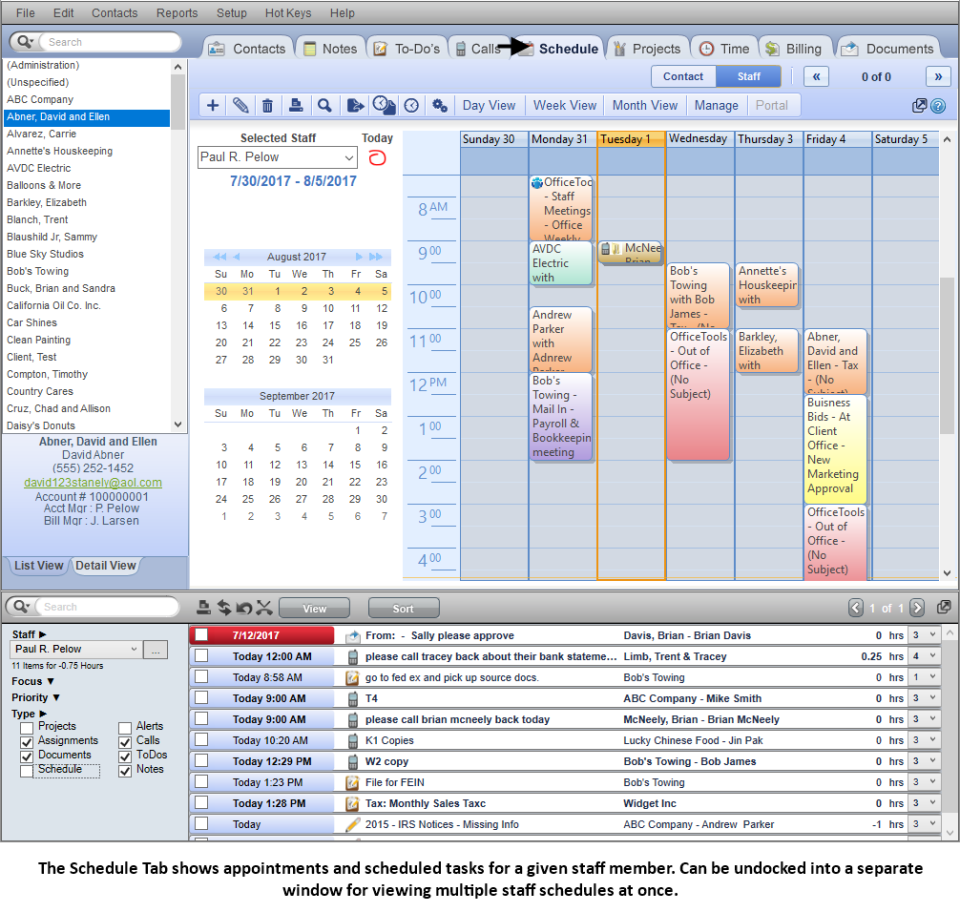
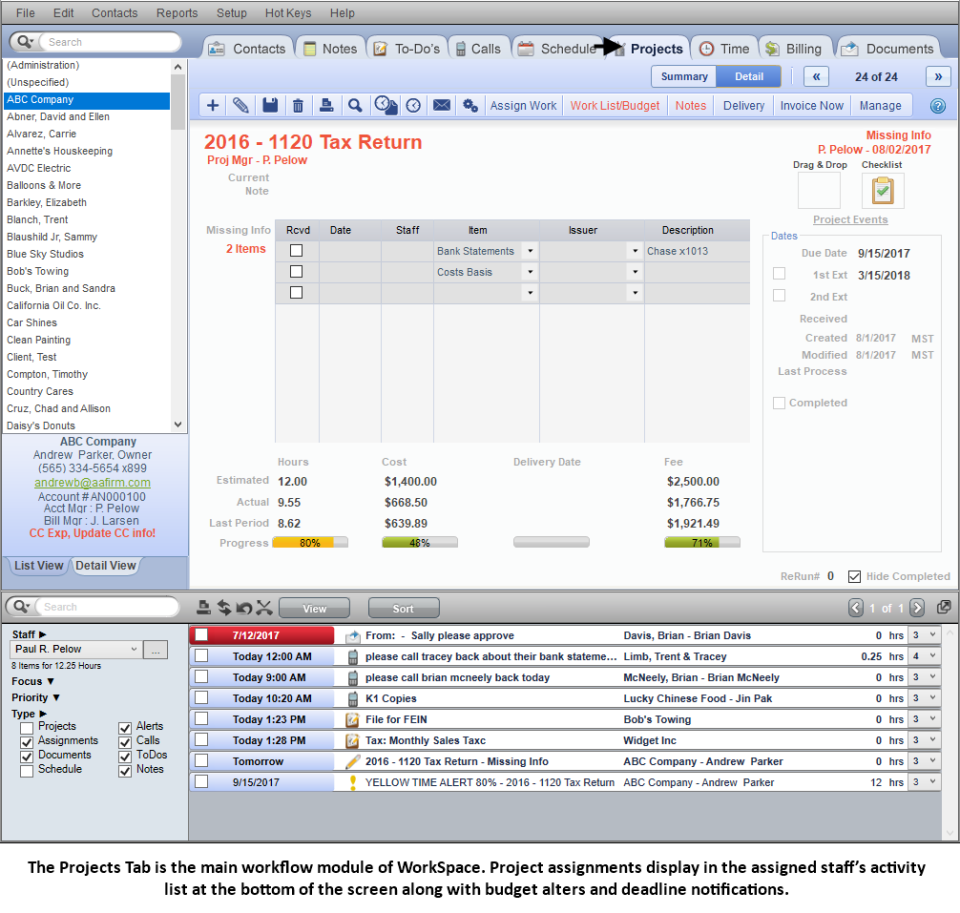
Description
Who OfficeTools Is Right For
OfficeTools fits established CPA, EA, and bookkeeping firms with 3 to 50 staff who already use QuickBooks Desktop or Online plus Lacerte for tax prep, and need an integrated practice management layer for billable time tracking, project workflow, client portal, and invoicing. The buyer is usually a managing partner or operations lead who wants one tool that survives tax season at scale. It is a poor fit for solo accountants (the price-and-complexity stack is too tall) and for cloud-first firms running Xero plus Drake - that ecosystem points toward Karbon, Canopy, or TaxDome.
OfficeTools 2026 Pricing
| Plan | Price | Best For |
|---|---|---|
| OfficeTools WorkSpace | Custom quote (call 800-726-3339) | All CPA and bookkeeping firms |
Public list pricing was retired when AbacusNext (now CARET) rolled OfficeTools into its practice-management portfolio. Field rep quotes generally run $50 to $90 per user per month after volume discounts, with implementation fees on top. Multi-year contracts get larger discounts; ask for the firm-size, integration scope, and APX payment-rail line items broken out.
Fees and Limits to Watch For
- Per-user pricing compounds quickly for 20+ staff firms; negotiate volume tiers and multi-year discounts.
- Abacus Payment Exchange (APX) processing fees apply for online invoice payments - separate from the practice management subscription.
- Lacerte and QuickBooks Desktop syncs require local-network installs; cloud-only firms need additional hosting or remote desktop service from AbacusNext.
- Implementation typically runs four to eight weeks including data migration from legacy practice tools.
- Renewal escalators are common in AbacusNext contracts; cap them at signing.
Integrations
- Tax - Lacerte (Intuit), ProSeries (Intuit), CCH Axcess Tax integration.
- Accounting - QuickBooks Desktop and QuickBooks Online; Sage Intacct for larger firms.
- Document management - File Center, native document storage, Canon scanner integration.
- Email and calendar - Microsoft Exchange, Outlook, Google Workspace calendar sync.
- Payments - Abacus Payment Exchange (APX) for ACH and card payments on invoices.
Security and Compliance Posture
OfficeTools operates under the broader CARET / AbacusNext security program with SOC 2 Type II and PCI DSS Level 1 compliance for the payment rails. Data hosted on the AbacusNext private cloud follows IRS Publication 4557 guidelines for tax-preparer data safeguards. Two-factor authentication, role-based access control, and audit logs are included. Firms with on-premise QuickBooks Desktop installs run the OfficeTools client on their own network; CARET publishes a hardening guide for that footprint.
Customer Support and SLA
Phone, email, and screen-share support is included on every contract, with US, UK, and Canadian support hours covered. Implementation kickoff includes a dedicated onboarding manager for the first 60 days. Tax-season priority queues open every January and run through April. There is no published 99.x SLA on standard contracts; enterprise tier contracts include uptime commitments and a named CSM.
Eligibility, Deployment Options, and Licensing
OfficeTools is offered as cloud-hosted on AbacusNext private cloud or as a hybrid install with QuickBooks Desktop and Lacerte running on the firm's own network. Pure cloud-only deployments need AbacusNext private hosting or a third-party Citrix/RDP host for the Intuit components. Licensing is per-user, per-month, on annual or multi-year contracts. Switching between cloud and hybrid mid-term is possible with a contract amendment.
Mobile App and Client Portal
There is no native iOS or Android mobile app for staff. The web client portal is responsive and lets your clients upload documents, sign engagement letters, view invoices, and pay through APX from a phone. Staff-side time tracking and project work are best done on desktop.
Pros and Cons
- Pros: deepest Lacerte and QuickBooks Desktop integration in the practice management category, 25+ years of CPA-firm specialisation, secure document management aligned with IRS 4557, professional onboarding for mid-firm migrations.
- Cons: custom-quote-only pricing slows shortlist research, hybrid deployment with Lacerte adds operational complexity, mobile experience lags newer cloud-first competitors, AbacusNext renewal pricing is opaque.
2026 Updates
The 2026 release focused on a refreshed web client portal, deeper Lacerte 2025 tax year sync, AbacusNext private cloud upgrades to current Windows Server LTSC, and an AI-assisted document classification layer for incoming client uploads. APX payment rails added new same-day ACH and improved chargeback handling. The CARET roadmap also signals tighter cross-product workflow with sister brand Smokeball (legal practice management) for firms running both legal and accounting workflows.
What Real Buyers Say
Practice owners on the r/Accounting subreddit and CPA-focused LinkedIn groups describe OfficeTools as "the steady workhorse" - chosen by firms who already invested years in QuickBooks Desktop and Lacerte and do not want to rebuild on a Karbon or TaxDome stack. The recurring complaint is the cost and the speed of CARET renewals; the recurring praise is reliability through tax season.
OfficeTools Alternatives
| Product | Best Fit | Starting Price |
|---|---|---|
| Karbon | Cloud-first firms wanting modern workflow + email integration | $59/user/month |
| Canopy | Firms wanting all-in-one client mgmt + tax resolution | $40/user/month |
| TaxDome | Cloud firms wanting flat-fee unlimited users | $50/user/month |
| Practice CS (Thomson Reuters) | Larger Thomson Reuters CS Professional shops | Custom quote |
| Jetpack Workflow | Smaller firms wanting basic workflow without billing | $30/user/month |
Field Guide
| Headquarters | San Diego, California (CARET / AbacusNext HQ) |
| Founded | 1999 |
| Parent | CARET (formerly AbacusNext), acquired OfficeTools 2017 |
| Sister brands | AbacusNext, Smokeball, Amicus Attorney, ResultsCRM |
| Target firms | US, UK, Canadian CPA, EA, and bookkeeping practices, 3-50 staff |
| Deployment | Cloud (AbacusNext private cloud) or hybrid with on-premise QuickBooks Desktop and Lacerte |
How to Get Started With OfficeTools
- Schedule a demo from the OfficeTools website or call 800-726-3339.
- Share firm size, current practice management tool, and tax-prep stack (Lacerte, ProSeries, CCH).
- Sign the order form including APX payment processing line items if you want online payments.
- Run a 60-day onboarding: data migration, QuickBooks and Lacerte connector setup, staff training, client portal branding.
- Go live before tax season starts; run a parallel month if migrating from a competing practice tool.
How to Cancel or Pause OfficeTools
Standard contracts are annual or multi-year. To cancel, provide written notice 60 to 90 days before renewal per the CARET MSA. Data export of clients, invoices, time records, and document storage is included on cancellation. There is no off-the-shelf pause SKU; reduced-volume tiers may be available at renewal time for firms downsizing.
Eligibility Checklist
- You run a CPA, EA, or bookkeeping firm in the US, UK, or Canada.
- You use QuickBooks Desktop or Online plus Lacerte, ProSeries, or CCH for tax.
- You have at least 3 staff who need shared time tracking and project workflow.
- You want a secure client portal aligned with IRS Publication 4557.
- You can commit to an annual or multi-year contract.
Pricing FAQ
- Why no public pricing? CARET prices each firm by user count, integration scope, deployment model, and payment-rail volume.
- Is hosting included? AbacusNext private cloud hosting is a separate line item; on-premise installs run on your own network.
- Are tax-software licenses included? No. Lacerte, ProSeries, and CCH licenses come from Intuit or Thomson Reuters separately.
- Can I downgrade mid-term? Generally no; reduced-user counts are negotiated at renewal.
Bottom Line
If your CPA or bookkeeping firm runs on QuickBooks Desktop and Lacerte and you want a practice management platform from a vendor that survived two decades of accounting-software consolidation, OfficeTools - under CARET - is the safe choice in 2026. The trade-off is custom-quote pricing, AbacusNext renewal economics, and a mobile experience that lags Karbon or TaxDome. Shortlist OfficeTools against Karbon (cloud-first, email-native), TaxDome (flat-fee unlimited users), and Canopy (all-in-one client management) and let your tax stack decide. For broader market context, see the related SaaSRat blog guide. Verified on 2026-06-22. Vendor information verified from the official OfficeTools website.
Frequently Asked Questions
Is there a free plan or free trial for OfficeTools?
How much does OfficeTools cost?
What does OfficeTools integrate with?
Who is OfficeTools best for?
What are the best alternatives to OfficeTools?
Is OfficeTools GDPR / SOC 2 compliant?
Does OfficeTools have a mobile app?
What do real users say about OfficeTools?
How does OfficeTools compare to its top competitor?
Does OfficeTools offer customer support?
Find Your Perfect Software
See how it can transform your workflow
- Personalized for your needs Tailored recommendations based on your unique requirements.
- Save time & resources Streamline your workflow and boost team productivity.
- Trusted by thousands Join 10,000+ businesses already growing with SaaSrat.
You're all set! 🎉
A specialist for will reach out within 1 business day with tailored recommendations for your needs.