
FastTrack Schedule
by AEC Software, Inc
What is FastTrack Schedule?
Get Best Quote for FastTrack Schedule
Connect with SaaSrat experts to get the best quote for your business.
You're all set!
A specialist for FastTrack Schedule will reach out within 1 business day.
FastTrack Schedule Features
Task management
Resource management
Gantt charts
Critical path analysis
Baseline comparison
Customizable reports
View All 20 Features
FastTrack Schedule Resources
FastTrack Schedule Screenshots
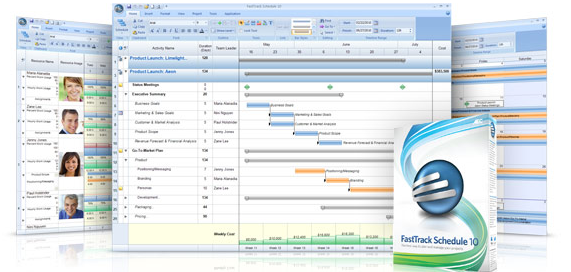
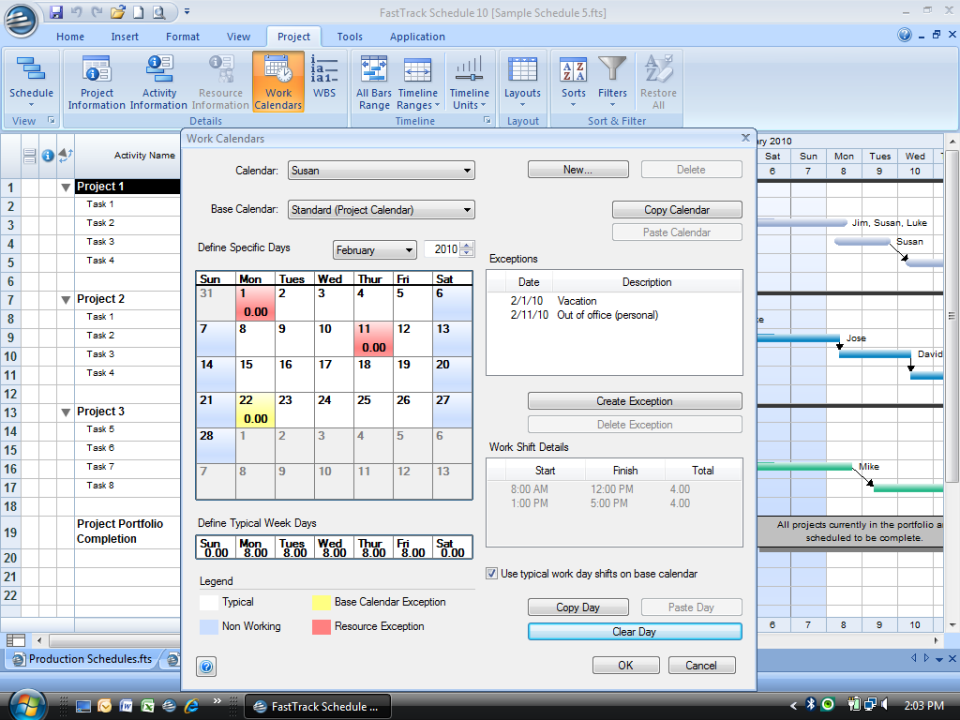
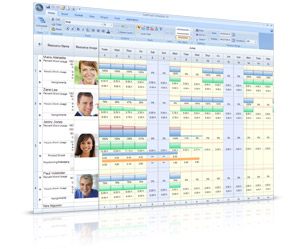
Description
FastTrack Schedule at a Glance
| Best for | Project management teams on Windows and Mac needing easy-to-use software that keeps teams in sync, costs under control, and deadlines in sight across small business and large organization scale |
|---|---|
| Deployment | Native Windows and native Mac desktop deployment; supports Windows 11/10 and macOS Sonoma/Sequoia/Tahoe |
| Starting price | Free for 21 days with no credit card required; paid pricing via the Pricing page |
| Key strengths | Cross-platform native Windows and Mac, easy-to-use interface, 21-day free trial no credit card, AEC Software heritage, small business to large organization scale |
| Not ideal for | Enterprise PPM needing full portfolio governance depth, or teams wanting cloud-only project management without desktop deployment |
FastTrack Schedule Overview
FastTrack Schedule is easy-to-use project management software from AEC Software. The core promise: Every project, on schedule.
The platform keeps teams in sync, costs under control, and deadlines in sight , three operational outcomes that project management directly delivers on Windows and Mac.
Cross-platform coverage across Windows and Mac is a specific FastTrack Schedule differentiator. Many project management tools are Windows-only or web-only; FastTrack Schedule provides native Windows and native Mac versions.
The 21-day free trial with no credit card required removes procurement friction. Teams evaluate on real project delivery before committing to payment information.
Trusted by small businesses and large organizations every day captures the customer profile range. FastTrack Schedule serves both smaller teams and larger organizations rather than being locked to one scale.
Capabilities and Named Features
The FastTrack Schedule thesis is that project management teams need software that actually gets used, and easy-to-use cross-platform desktop software delivers real adoption where enterprise PPM platforms often fail due to complexity.
The Every project, on schedule promise captures the operational outcome that matters. Rather than being scheduling software that produces schedules regardless of whether they get followed, FastTrack Schedule targets actual on-schedule delivery.
Three specific outcomes frame the platform value: keep teams in sync (team collaboration), costs under control (project financial management), and deadlines in sight (schedule visibility).
Cross-platform native Windows and Mac coverage is a specific differentiator. Project management teams often include both Windows and Mac users, and requiring one platform creates workflow friction.
The 21-day free trial with no credit card required removes procurement friction that hurts adoption of project management software. Most PM platforms require credit card entry upfront for trials.
AEC Software heritage provides vendor stability. AEC Software has been developing FastTrack Schedule for years, and the platform has adapted through multiple project management technology cycles.
Trusted by small businesses and large organizations every day reflects real customer diversity. FastTrack Schedule serves both smaller teams and larger organizations without requiring different platform tiers.
Named feature list
- Cross-platform project management
- Native Windows version
- Native Mac version
- Windows 11 support
- Windows 10 support
- macOS Sonoma support
- macOS Sequoia support
- macOS Tahoe support
- Easy-to-use interface
- Team sync
- Cost control
- Deadline visibility
- 21-day free trial
- No credit card required
- Small business scale
- Large organization scale
- AEC Software heritage
- Every project on schedule promise
- Windows and Mac Tours
- Pricing page transparency
Pricing and Plans
FastTrack Schedule publishes pricing via the Pricing page on aecsoftware.com.
Free trial is 21 days with no credit card required as the primary evaluation entry point.
Both Windows and Mac versions are available with pricing per license.
| Tier | Price | What is included |
|---|---|---|
| Free Trial | Free (21 days) | 21-day free trial with no credit card required for both Windows and Mac versions |
| Windows Version | Vendor Published | Native Windows license for Windows 11 and Windows 10 |
| Mac Version | Vendor Published | Native Mac license for macOS Sonoma, Sequoia, Tahoe and beyond |
| Cross-Platform Team | Vendor Published | Multi-user pricing for teams deploying across Windows and Mac |
| Support | Vendor Published | Support pricing for customers needing ongoing vendor assistance |
Pros
- Cross-platform native Windows and Mac coverage removes the workflow friction that requiring one platform creates for project management teams with mixed Windows and Mac users.
- Easy-to-use interface delivers real adoption where enterprise PPM platforms often fail due to complexity that hurts staff engagement.
- 21-day free trial with no credit card required removes procurement friction; teams evaluate on real project delivery before committing to payment information.
Cons and Trade-offs
- Not designed for enterprise PPM needing full portfolio governance depth; enterprise PPM platforms like Planisware or Planview fit that scope.
- Teams wanting cloud-only project management without desktop deployment should evaluate cloud-native alternatives.
- Desktop deployment differs from modern cloud-first collaboration platforms; teams valuing cloud-first workflow should evaluate cloud alternatives.
FastTrack Schedule vs Alternatives
| Capability | FastTrack Schedule | Microsoft Project | Smartsheet |
|---|---|---|---|
| Core focus | Cross-platform easy-to-use project management | Traditional Windows project scheduling | Cloud work management |
| Native Mac version | Yes | Not Windows-only | Cloud (Mac browser) |
| Native Windows version | Yes | Native Microsoft ecosystem | Cloud (Windows browser) |
| 21-day free trial no credit card | Yes | Microsoft trial patterns | Smartsheet trial patterns |
| Best fit | Windows plus Mac teams wanting easy-to-use software | Microsoft ecosystem scheduling | Cloud-first work management |
Who Should Choose FastTrack Schedule
Project management teams on Windows and Mac needing easy-to-use software that keeps teams in sync, costs under control, and deadlines in sight across small business and large organization scale.
Cross-platform teams with both Windows and Mac users benefit directly from the native platform coverage that Windows-only project management software cannot provide.
Not appropriate for enterprise PPM needing full portfolio governance depth, or teams wanting cloud-only project management without desktop deployment.
Named Alternatives to FastTrack Schedule
- Microsoft Project. Traditional Windows project scheduling category incumbent. Chosen when the buyer wants Microsoft ecosystem scheduling with Project Online cloud.
- Smartsheet. Cloud work management with project scheduling. A better fit for teams wanting cloud-first Smartsheet ecosystem breadth.
- Wrike. Cloud work management with portfolio scheduling. Preferred for teams wanting Wrike ecosystem.
- Milestones Professional. Presentation-ready project schedules. Chosen when the buyer wants presentation-quality output rather than daily scheduling.
- OmniPlan. Mac-native project management from OmniGroup. A better fit for Mac-only teams wanting OmniGroup ecosystem.
Implementation and Deployment
FastTrack Schedule deployments are essentially instant. Download the 21-day free trial with no credit card required, install on Windows or Mac, and start managing projects.
Standard setup runs 1-2 weeks for project management teams doing a full rollout: individual license installations across Windows and Mac users, project template setup, team collaboration configuration, cost tracking setup, and pilot with a live project.
Cross-platform team deployments involve licensing users on both Windows and Mac with shared project files across platforms.
Larger organization deployments phase in additional users and layer on multi-user pricing.
What Real Buyers Say About FastTrack Schedule
Operator discussions on Reddit r/projectmanagement software discussions and Reddit r/mac project management threads surface the following themes.
Project managers on LinkedIn project management communities discuss FastTrack Schedule as the natural choice when they need cross-platform Windows and Mac project management without the complexity of enterprise PPM platforms.
The native Mac version is frequently cited as decisive for teams with Mac users; requiring Windows-only project management creates workflow friction that FastTrack Schedule removes.
Operator discussions in project management communities highlight the 21-day free trial with no credit card required as removing procurement friction that hurts adoption of PM software requiring credit card upfront.
Common critique from enterprise PPM buyers: FastTrack Schedule is project-management-focused; enterprise portfolio governance requires broader PPM platforms like Planisware or Planview.
The AEC Software vendor heritage is repeatedly praised for platform stability; project management teams value tools from vendors that have survived multiple technology cycles.
Small business project managers frequently discuss FastTrack Schedule as delivering enterprise-quality features at accessible pricing rather than requiring enterprise PM budget.
Project managers with mixed Windows and Mac teams specifically praise the native platform coverage; requiring Windows-only project management historically forced Mac users into workarounds that hurt team collaboration.
The 21-day free trial with no credit card is repeatedly discussed as decisive against enterprise PPM platforms requiring credit card upfront; teams evaluate on real project delivery before committing to payment information.
AEC Software vendor heritage is frequently cited as reducing procurement risk; project management teams value platforms from vendors that have survived multiple project management technology cycles rather than newer entrants lacking track records.
Vendor references: FastTrack Schedule cross-platform project management overview, FastTrack Schedule product catalog, FastTrack Schedule pricing.
Related FastTrack Schedule Comparisons and Categories on SaaSRat
Explore related products and categories on SaaSRat to compare FastTrack Schedule against alternatives.
- Project Management on SaaSRat
- Scheduling Software on SaaSRat
- Team Collaboration on SaaSRat
- Microsoft Project: traditional scheduling
- Smartsheet: cloud work management
- Wrike: cloud work management
- Milestones Professional: presentation schedules
- OmniPlan: Mac-native project management
The Bottom Line on FastTrack Schedule
FastTrack Schedule is a strong fit for project management teams on Windows and Mac needing easy-to-use software that keeps teams in sync, costs under control, and deadlines in sight.
Cross-platform native Windows and Mac coverage removes workflow friction that Windows-only PM software creates.
21-day free trial with no credit card required plus easy-to-use interface deliver the procurement and adoption friction reduction that hurts enterprise PPM adoption.
Enterprise PPM needing full portfolio governance depth should evaluate Planisware or Planview.
Teams wanting cloud-only project management should evaluate cloud-native alternatives.
Verified on 2026-08-04 against vendor website.
Frequently Asked Questions
What is FastTrack Schedule?
Who is FastTrack Schedule best for?
How does FastTrack Schedule pricing work?
Does FastTrack Schedule work on Mac?
Does FastTrack Schedule work on Windows?
Do I need a credit card for the trial?
What are the three FastTrack Schedule outcomes?
How does FastTrack Schedule compare to Microsoft Project?
Who is AEC Software?
Does FastTrack Schedule support small businesses?
Find Your Perfect Software
See how it can transform your workflow
- Personalized for your needs Tailored recommendations based on your unique requirements.
- Save time & resources Streamline your workflow and boost team productivity.
- Trusted by thousands Join 10,000+ businesses already growing with SaaSrat.
You're all set! 🎉
A specialist for will reach out within 1 business day with tailored recommendations for your needs.