

Milestones Professional
by KIDASA Software
What is Milestones Professional?
Get Best Quote for Milestones Professional
Connect with SaaSrat experts to get the best quote for your business.
You're all set!
A specialist for Milestones Professional will reach out within 1 business day.
Milestones Professional Features
Gantt charts
Task management
Resource allocation
Milestone tracking
Project templates
Time tracking
View All 20 Features
Milestones Professional Resources
Milestones Professional Screenshots
Description
Milestones Professional at a Glance
| Best for | Project managers, coordinators, and PMOs needing to create presentation-ready project schedules from scratch or by importing data from Microsoft Project, Oracle Primavera, or Excel |
|---|---|
| Deployment | Desktop project scheduling software with import capability from major scheduling platforms |
| Starting price | Buy through the vendor Buy page; free trial via Downloads; pricing published per license |
| Key strengths | Presentation-ready output focus, imports from Microsoft Project/Oracle Primavera/Excel, faster and more efficient scheduling communication, KIDASA Software heritage, executive-friendly presentation quality |
| Not ideal for | Enterprise PPM needing full portfolio governance depth, or teams wanting only task management without project scheduling communication focus |
Milestones Professional Overview
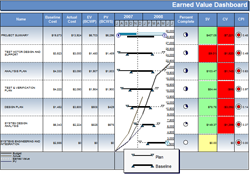
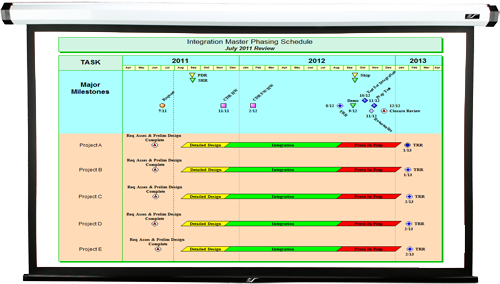
Milestones Professional from KIDASA Software is a powerful tool for creating presentation-ready project schedules. The specific value proposition is presentation-quality output that executives, stakeholders, and clients actually want to see.
The platform serves two workflow patterns: creating schedules from scratch, and importing data from software like Microsoft Project, Oracle Primavera, or Excel. Rather than forcing project managers to abandon existing scheduling tools, Milestones Professional consumes their output.
Designed for anyone involved in project scheduling or management captures the target user profile. The platform is not limited to specialized scheduling professionals; project managers, coordinators, and executives all benefit from presentation-ready output.
Simplifies planning, organizing, communicating, and tracking projects across the project lifecycle. Rather than just being a scheduling tool, Milestones Professional addresses the specific communication problem where scheduled data needs to reach non-scheduling stakeholders in accessible format.
Making the entire process faster and more efficient captures the operational outcome. Project scheduling communication historically required significant manual effort to translate scheduling tool output into stakeholder-friendly presentations; Milestones Professional automates that translation.
Capabilities and Named Features
The Milestones Professional thesis is that project scheduling tools produce data that scheduling professionals understand but executives and non-scheduling stakeholders find inaccessible, and presentation-ready schedule creation delivers the specific communication capability project teams actually need.
The presentation-ready output focus differentiates Milestones Professional from general scheduling tools. Rather than producing schedules for schedulers, Milestones Professional produces schedules for stakeholders.
Creating from scratch supports project managers who want to plan directly in Milestones Professional using its scheduling capabilities.
Importing from Microsoft Project, Oracle Primavera, or Excel supports the more common workflow where project data already exists in these platforms. Rather than requiring users to abandon their existing tools, Milestones Professional consumes their output and produces presentation-ready visualizations.
The Microsoft Project import is particularly important; Microsoft Project remains the dominant scheduling tool at many organizations, but its native output is not stakeholder-friendly.
The Oracle Primavera import serves enterprise construction, engineering, and infrastructure projects where Primavera is dominant but its output faces the same communication problem.
The Excel import supports the reality that many project schedules live in Excel spreadsheets rather than dedicated scheduling tools. Milestones Professional bridges those Excel schedules into presentation-ready visualizations.
The KIDASA Software vendor heritage provides platform stability. KIDASA has been developing Milestones Professional for years, and the platform has adapted through multiple project management technology cycles.
Named feature list
- Presentation-ready project schedules
- Create from scratch
- Import from Microsoft Project
- Import from Oracle Primavera
- Import from Excel
- Project scheduling
- Executive communication focus
- Stakeholder-friendly output
- Planning support
- Organizing capabilities
- Communicating features
- Tracking functionality
- Faster scheduling process
- More efficient project management
- KIDASA Software heritage
- Desktop deployment
- Buy Now purchasing
- Free trial via Downloads
- Support resources
- Multi-audience scheduling output
Pricing and Plans
Milestones Professional publishes pricing per license via the Buy page on kidasa.com.
Free trial is available via Downloads for prospective buyers evaluating the software before purchase.
The purchase model is per-license rather than SaaS subscription, differentiating from cloud PPM platforms with per-user monthly pricing.
| Tier | Price | What is included |
|---|---|---|
| Buy Now | Vendor Published | Per-license purchase for Milestones Professional via the vendor Buy page |
| Free Trial | Free | Free trial via Downloads for prospective buyers evaluating the software |
| Upgrade | Vendor Published | Upgrade pricing for existing Milestones Professional customers to newer versions |
| Multi-License | Contact Vendor | Multi-license pricing for teams or enterprises deploying Milestones Professional across users |
| Support | Vendor Published | Support pricing for customers needing ongoing vendor assistance |
Pros
- Presentation-ready output focus addresses the specific communication problem where scheduled data needs to reach non-scheduling stakeholders in accessible format.
- Imports from Microsoft Project, Oracle Primavera, and Excel let project teams keep their existing scheduling tools while getting presentation-quality output.
- KIDASA Software vendor heritage provides platform stability across multiple project management technology cycles.
Cons and Trade-offs
- Not designed for enterprise PPM needing full portfolio governance depth; enterprise PPM platforms like Planisware or Planview fit that scope.
- Teams wanting only task management without project scheduling communication focus should evaluate lighter task tools.
- Desktop deployment differs from cloud-native scheduling platforms; teams wanting cloud-first collaboration should evaluate cloud alternatives.
Milestones Professional vs Alternatives
| Capability | Milestones Professional | Microsoft Project | Oracle Primavera |
|---|---|---|---|
| Core focus | Presentation-ready project schedules | Traditional project scheduling | Enterprise construction/engineering scheduling |
| Import from other tools | Native imports from Project, Primavera, Excel | Native Microsoft ecosystem | Primavera ecosystem |
| Presentation-quality output | Native focus | Standard scheduling output | Standard scheduling output |
| Deployment | Desktop with KIDASA support | Desktop plus Project Online cloud | On-premise plus Primavera Cloud |
| Best fit | Presentation communication for schedules from any source | Microsoft ecosystem scheduling | Enterprise construction and infrastructure |
Who Should Choose Milestones Professional
Project managers, coordinators, and PMOs needing to create presentation-ready project schedules from scratch or by importing data from Microsoft Project, Oracle Primavera, or Excel.
Teams that produce project schedules in Microsoft Project, Oracle Primavera, or Excel but need presentation-quality output for executives, stakeholders, or clients benefit directly.
Not appropriate for enterprise PPM needing full portfolio governance depth, or teams wanting only task management without project scheduling communication focus.
Named Alternatives to Milestones Professional
- Microsoft Project. Traditional project scheduling category incumbent. Chosen when the buyer wants Microsoft ecosystem scheduling with Project Online cloud.
- Oracle Primavera. Enterprise construction and infrastructure scheduling. A better fit for enterprises wanting Primavera ecosystem for large capital projects.
- Smartsheet. Work management with project scheduling. Preferred when the buyer wants Smartsheet ecosystem breadth.
- Wrike. Work management with portfolio scheduling. Chosen for teams wanting Wrike ecosystem.
- OnePager Pro. Project schedule visualization tool. A better fit when the buyer wants a direct Milestones Professional alternative.
Implementation and Deployment
Milestones Professional deployments are essentially instant for individual project managers. Download the free trial, install on Windows, and start creating presentation-ready schedules.
Standard setup runs 1-2 weeks for project management teams doing a full rollout: individual license installations, existing project schedule imports from Microsoft Project, Oracle Primavera, or Excel, template design for the specific stakeholder audiences, staff training focused on the presentation-ready output workflow, and pilot with live executive presentations.
Enterprise deployments layer on multi-license pricing and shared template libraries across the PMO.
Migration from other schedule communication tools involves template rebuilding rather than data migration since Milestones Professional consumes source schedule data from existing tools.
What Real Buyers Say About Milestones Professional
Operator discussions on LinkedIn PMI community and Reddit r/projectmanagement scheduling threads surface the following themes.
Project managers and PMO directors on LinkedIn project management communities discuss Milestones Professional as the specific tool for creating presentation-ready schedules when Microsoft Project, Oracle Primavera, or Excel output does not communicate well to executives.
The Microsoft Project import is frequently cited as decisive; Microsoft Project remains the dominant scheduling tool at many organizations, but its native output is not stakeholder-friendly, and Milestones Professional bridges that gap.
Operator discussions in construction and engineering communities highlight the Oracle Primavera import as decisive for large capital projects where Primavera is dominant but stakeholder communication requires presentation-quality output.
Common critique from enterprise PPM buyers: Milestones Professional is scheduling-communication-focused; enterprise portfolio governance requires broader PPM platforms like Planisware or Planview.
The KIDASA Software vendor heritage is frequently praised for platform stability; project management teams value tools from vendors that have survived multiple technology cycles.
The presentation-ready output focus is repeatedly discussed as addressing a specific pain point that most project management tools miss; scheduling tools produce data for schedulers, not for stakeholders.
Vendor references: KIDASA Software Milestones Professional overview, Milestones Professional examples and templates, Milestones Professional support resources.
Related Milestones Professional Comparisons and Categories on SaaSRat
Explore related products and categories on SaaSRat to compare Milestones Professional against alternatives.
- Project Management on SaaSRat
- Scheduling Software on SaaSRat
- Gantt Chart Software on SaaSRat
- Microsoft Project: category incumbent
- Oracle Primavera: enterprise construction
- Smartsheet: work management
- Wrike: work management portfolio
- OnePager Pro: schedule visualization
The Bottom Line on Milestones Professional
Milestones Professional is a strong fit for project managers, coordinators, and PMOs needing to create presentation-ready project schedules from scratch or by importing data from Microsoft Project, Oracle Primavera, or Excel.
Presentation-ready output focus addresses the specific communication problem where scheduled data needs to reach non-scheduling stakeholders in accessible format.
Imports from Microsoft Project, Oracle Primavera, and Excel let project teams keep their existing scheduling tools.
Enterprise PPM needing full portfolio governance depth should evaluate Planisware or Planview.
Teams wanting only task management without scheduling communication focus should evaluate lighter tools.
Verified on 2026-08-04 against vendor website.
Frequently Asked Questions
What is Milestones Professional?
Who is Milestones Professional best for?
How does Milestones Professional pricing work?
Can Milestones Professional import from Microsoft Project?
Can Milestones Professional import from Oracle Primavera?
Can Milestones Professional import from Excel?
What does "presentation-ready" mean?
How does Milestones Professional compare to Microsoft Project?
Where is KIDASA Software based?
Does Milestones Professional offer a free trial?
Find Your Perfect Software
See how it can transform your workflow
- Personalized for your needs Tailored recommendations based on your unique requirements.
- Save time & resources Streamline your workflow and boost team productivity.
- Trusted by thousands Join 10,000+ businesses already growing with SaaSrat.
You're all set! 🎉
A specialist for will reach out within 1 business day with tailored recommendations for your needs.