
BrightWork 365
by BrightWork
What is BrightWork 365?
Get Best Quote for BrightWork 365
Connect with SaaSrat experts to get the best quote for your business.
You're all set!
A specialist for BrightWork 365 will reach out within 1 business day.
BrightWork 365 Features
Microsoft 365-native architecture
Project templates
Portfolio dashboards
Resource management
Power BI reporting
Project intake and approval
View All 8 Features
BrightWork 365 Pricing Plans
Free
- Basic project tracking
- Requires Microsoft 365 subscription
- Free project request submission licenses
Teams (20-50 users)
- Full BrightWork 365 feature access
- Portfolio dashboards
- Resource management
- Power BI reporting
- Microsoft Teams integration
- Mandatory Start Service onboarding USD 8,750
Groups (51-100 users)
- Everything in Teams tier
- Lower per-user rate for larger teams
- Mandatory Start Service onboarding USD 8,750
Departments (101-250 users)
- Everything in Groups tier
- Department-scale pricing
- Mandatory Start Service onboarding USD 8,750
Divisions (251-500 users)
- Everything in Departments tier
- Division-scale pricing
- Mandatory Start Service onboarding USD 8,750
Enterprise (500+ users)
- Full platform for 500-plus users
- Custom pricing
- Dedicated account management
- Contact brightwork.com for quote
BrightWork 365 Resources
BrightWork 365 Screenshots
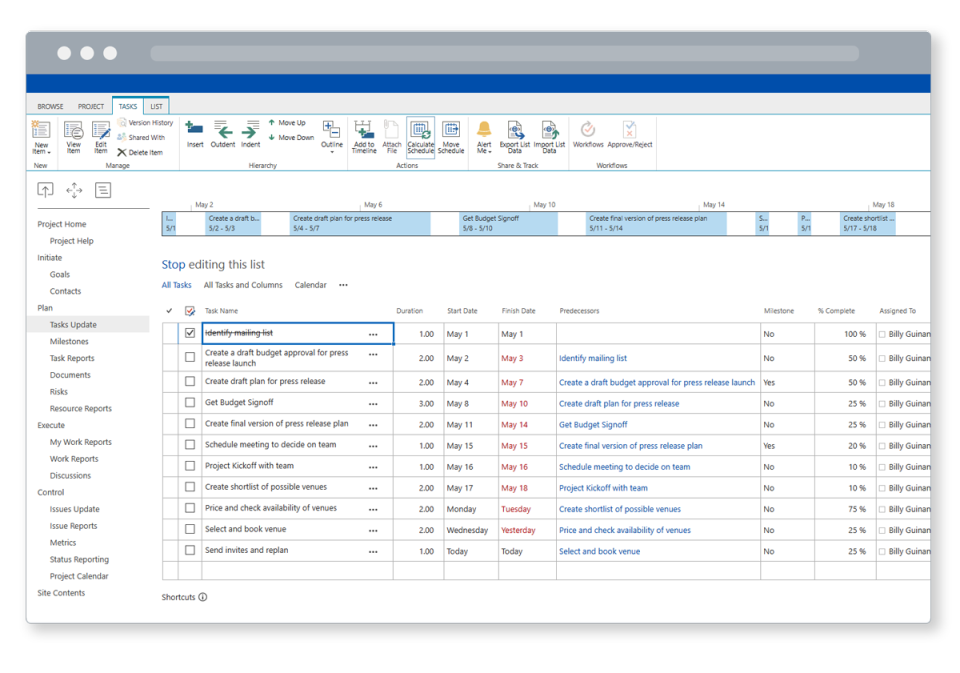
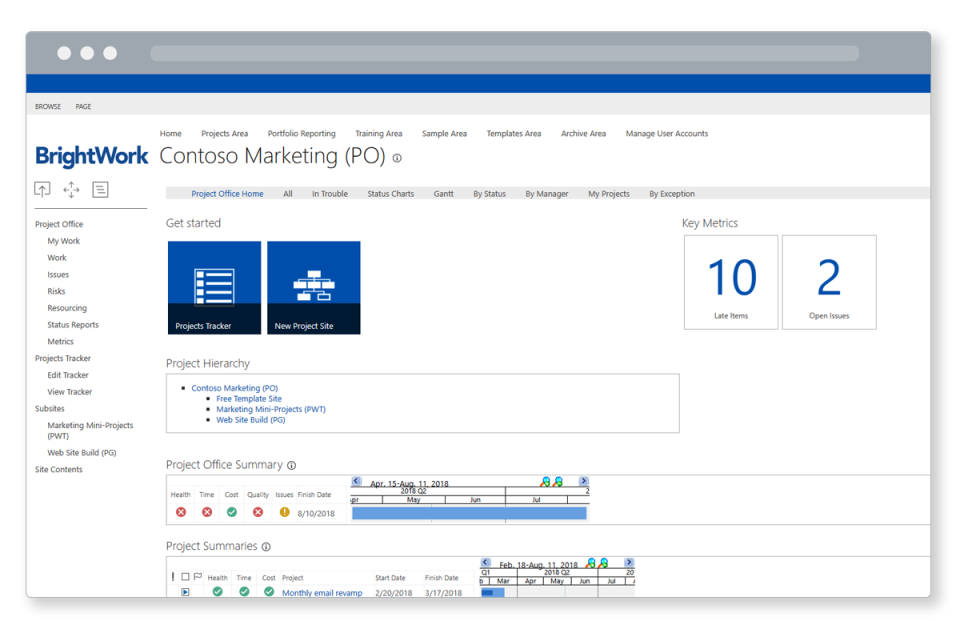
Description
BrightWork 365 is a project and portfolio management (PPM) platform built natively on Microsoft 365 and the Power Platform. It is designed for project management offices (PMOs) and enterprise teams that already run Microsoft 365 and want to manage projects, resources, and portfolios without leaving the Microsoft ecosystem. There is no separate app to install: BrightWork 365 runs inside SharePoint Online, Microsoft Teams, and Power BI.
What is BrightWork 365?
BrightWork 365 gives PMOs a configurable set of project templates, portfolio dashboards, resource management tools, and Power BI reporting that sit entirely within a Microsoft 365 tenant. Project managers use familiar SharePoint and Teams interfaces, IT teams manage data inside Microsoft Dataverse and Entra (formerly Azure AD), and executives view portfolio health through Power BI dashboards connected to live project data.
The platform covers project intake (request and approval workflows), project execution (templates, tasks, status reporting), and portfolio oversight (prioritization, resource allocation, Gantt views). It became a worker-owned cooperative in 2023 and has served enterprise clients including Crystal Group, Flow Control Group, and College La Cite.
BrightWork 365 Key Features
- Microsoft 365-native architecture: All data lives in the customer's own Microsoft 365 tenant. No data leaves to a third-party cloud service.
- Configurable project templates: Pre-built templates for IT, construction, change management, and more. Templates set the default tasks, stages, and fields for each project type.
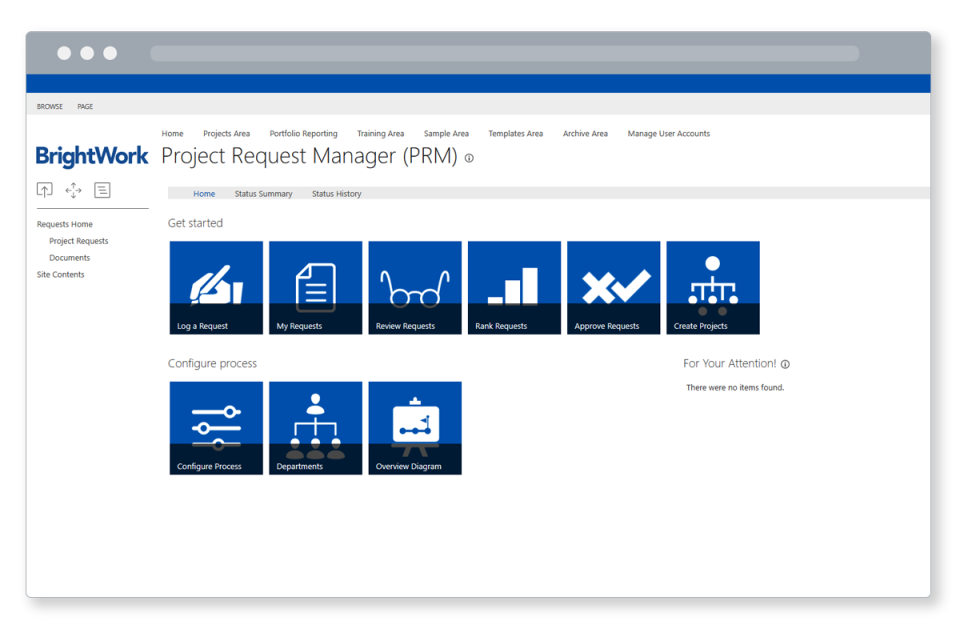
- Project intake and approval: Requestors submit project proposals through a structured form; the PMO scores, prioritizes, and approves them through a configurable workflow.
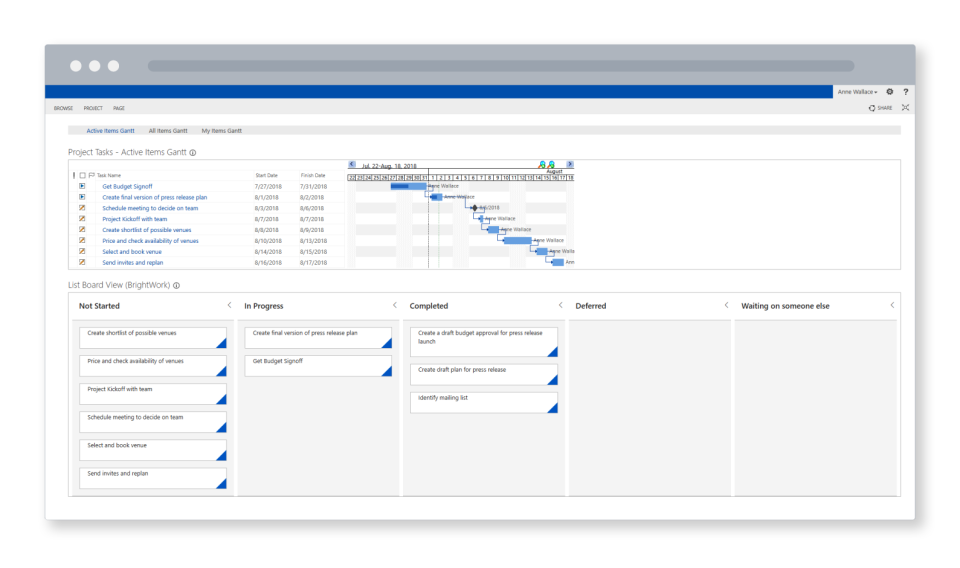
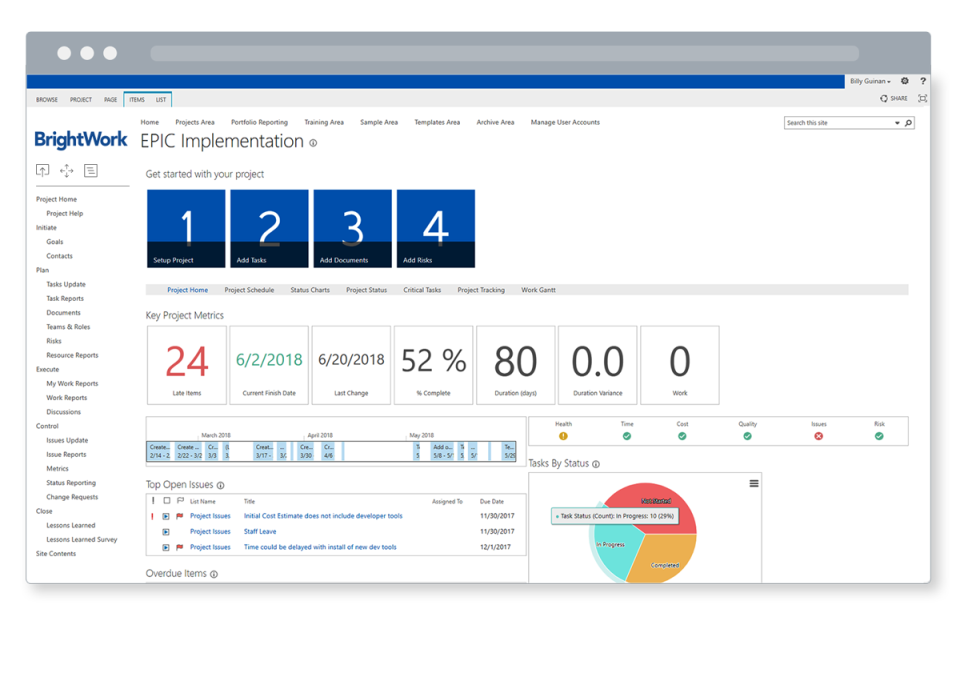
- Portfolio dashboards: Real-time views of all active projects showing status, budget, resources, and schedule in one place.
- Resource management: Assign resources to projects, view utilization across the portfolio, and identify capacity gaps.
- Power BI reporting: Pre-built Power BI reports connected to live BrightWork 365 data for executive and PMO-level analytics.
- Microsoft Teams integration: Project channels in Teams link to BrightWork 365 project workspaces, keeping communication and tracking in one place.
- Free tier: BrightWork 365 Free is available for basic project tracking without a paid subscription.
Who Should Use BrightWork 365?
BrightWork 365 is suited to organizations that:
- Already run Microsoft 365 and want PPM inside the existing Microsoft ecosystem
- Have a formal PMO or program management function that needs portfolio oversight and standardized project templates
- Operate in IT, manufacturing, healthcare, finance, or government where Microsoft 365 is the standard productivity platform
- Have 20 to 500 project contributors needing structured intake, tracking, and reporting
- Require data sovereignty: all project data stays within the organization's own Microsoft 365 tenant
- Need Power BI dashboards for executive portfolio reporting without a separate BI platform
BrightWork 365 is not suited to teams without Microsoft 365, organizations looking for a lightweight task-only tool, or companies that need Jira, Salesforce, or SAP integration as BrightWork 365 is a Microsoft-ecosystem-only product.
BrightWork 365 Pricing
BrightWork 365 is priced per user per month, billed annually as a single upfront payment. A mandatory Start Service onboarding package (40 hours) is required at purchase: USD 8,750 or EUR 6,500. A free tier is also available for basic project tracking.
- Free: Basic project tracking. No cost. Requires Microsoft 365.
- Teams (20-50 users): USD 17 per user per month, billed annually.
- Groups (51-100 users): USD 15 per user per month, billed annually.
- Departments (101-250 users): USD 13 per user per month, billed annually.
- Divisions (251-500 users): USD 11 per user per month, billed annually.
- Enterprise (500+ users): Contact Sales.
Pricing includes access to all BrightWork 365 features at the selected tier. Users who only submit project requests receive a free license. Visit brightwork.com/brightwork-365/pricing for current rates.
BrightWork 365 vs. Alternatives
Buyers evaluating project management software for enterprise PMOs have several distinct paths. BrightWork 365 is the Microsoft-native choice: all data stays in your own tenant, and the interface is SharePoint and Teams. For teams outside the Microsoft ecosystem, Eclipse PPM by Upland Software targets similar PMO and portfolio management needs for healthcare, education, and government without a Microsoft dependency. For professional services firms that need billing and invoicing alongside project management, ionBIZ combines PSA, CRM, and project control in one platform. For resource scheduling as a standalone layer, Float gives teams a lightweight visual scheduler. The broader project management category on SaaSRat covers tools from simple task boards to full enterprise PPM suites.
Real User Feedback
BrightWork 365 holds a 4.5 out of 5 rating on Capterra. Named client case studies on the vendor site include Crystal Group (manufacturing), Flow Control Group (industrial), Azured (technology), and College La Cite (education). Customer feedback consistently highlights the data-sovereignty benefit: project data stays inside the customer's own Microsoft 365 tenant rather than leaving to a third-party cloud, which is a significant compliance advantage for regulated industries. The mandatory onboarding package (USD 8,750) adds to the initial cost but also reduces implementation risk for organizations new to PPM tooling.
BrightWork 365 Integrations
- Microsoft Teams: Project channels and notifications
- SharePoint Online: Document storage and workspace
- Power BI: Pre-built and custom portfolio dashboards
- Power Apps and Power Automate: Custom workflow and form extensions
- Microsoft Dynamics 365: CRM and ERP data connection
- Microsoft Entra (Azure AD): Identity and access management
- Microsoft Dataverse: Underlying data platform for all BrightWork 365 data
BrightWork 365 does not publish integrations with Jira, Salesforce, SAP, or non-Microsoft platforms. Customers requiring those integrations should confirm availability before purchasing.
Mobile Access
BrightWork 365 does not have a dedicated iOS or Android app on the App Store or Google Play. Project team members access BrightWork 365 through the Microsoft Teams mobile app or a mobile browser. Since the platform runs inside Microsoft 365, any device with Microsoft Teams installed can access project information.
Security and Compliance
BrightWork 365 stores all data within the customer's own Microsoft 365 tenant. This means the customer controls data residency, retention, and access through their existing Microsoft security policies, including Microsoft Entra, Data Loss Prevention, and Microsoft Purview. BrightWork 365 is a Microsoft ISV Partner. No standalone SOC 2 or ISO 27001 certification for BrightWork as an organization was found in public documentation; data security is governed by the customer's Microsoft 365 tenant configuration.
Implementation and Onboarding
All BrightWork 365 purchases include a mandatory Start Service onboarding package (40 hours at USD 8,750 or EUR 6,500). This covers initial configuration, template setup, Power BI report connection, and team training. The onboarding ensures the platform is configured for the organization's project types and reporting needs before go-live. Additional professional services are available for complex deployments.
BrightWork 365 Support
BrightWork is headquartered in Galway, Ireland (Platform94, Mervue Business Park) with a US office in Boston, MA. Became a worker-owned cooperative in 2023. YouTube: youtube.com/@BrightWorkTV. LinkedIn: linkedin.com/company/brightwork. Twitter/X: @BrightWork_. Facebook: facebook.com/ManageProjectsOnSharePoint. Contact the vendor via brightwork.com for current support tier details.
What Real Buyers Report
Nirula Patel reviewed BrightWork 365 using the vendor's product documentation, pricing page at brightwork.com/brightwork-365/pricing, the integrations catalog, and the client case studies for Crystal Group and Flow Control Group. The platform's strongest differentiator is the data sovereignty model: unlike SaaS PPM tools that store project data in the vendor's own cloud, BrightWork 365 keeps everything in the customer's Microsoft 365 tenant. For regulated industries (healthcare, finance, government), this removes a class of compliance questions entirely: data never leaves the customer's existing security perimeter.
The mandatory USD 8,750 onboarding fee is the most common friction point in the purchasing process. Buyers should budget for it upfront rather than treating it as optional: the 40 hours cover the configuration decisions that determine whether the platform delivers value or becomes a shelved tool. For PMOs without Microsoft 365 experience, the onboarding is genuinely necessary to set up templates, intake workflows, and Power BI connections correctly.
Is BrightWork 365 Right for Your Business?
BrightWork 365 suits PMOs and enterprise project teams at Microsoft 365 organizations that need portfolio oversight, standardized project templates, and Power BI reporting inside their existing Microsoft tenant. It is the right call for regulated industries where data sovereignty is a requirement. It is not the right fit for teams outside the Microsoft ecosystem or organizations wanting lightweight project tracking without a PPM framework.
Buyers should also evaluate Eclipse PPM for PMO needs outside Microsoft, Twproject for a flexible on-premise or cloud PM platform with Gantt and Kanban, and Float for resource scheduling without PPM overhead. For broader task management tools, the SaaSRat task management category covers simpler options for teams not needing full PPM. The ERP software category covers platforms that include project management alongside finance, HR, and supply chain. Request a demo at brightwork.com/brightwork-365.
Verified on 2026-06-08 -- Content sourced from brightwork.com product and pricing pages, the integrations catalog, and case studies for Crystal Group, Flow Control Group, and College La Cite. Mandatory onboarding fee is USD 8,750 / EUR 6,500. Contact brightwork.com for enterprise pricing.
Frequently Asked Questions
Is there a free plan or free trial for BrightWork?
How much does BrightWork cost?
What does BrightWork integrate with?
Who is BrightWork best for?
What are the best alternatives to BrightWork?
Is BrightWork GDPR / SOC 2 compliant?
Does BrightWork have a mobile app?
What do real users say about BrightWork?
How does BrightWork compare to its top competitor?
Does BrightWork offer customer support?
Find Your Perfect Software
See how it can transform your workflow
- Personalized for your needs Tailored recommendations based on your unique requirements.
- Save time & resources Streamline your workflow and boost team productivity.
- Trusted by thousands Join 10,000+ businesses already growing with SaaSrat.
You're all set! 🎉
A specialist for will reach out within 1 business day with tailored recommendations for your needs.