

What is Zoho Desk?
Get Best Quote for Zoho Desk
Connect with SaaSrat experts to get the best quote for your business.
You're all set!
A specialist for Zoho Desk will reach out within 1 business day.
Zoho Desk Features
AI help desk
Multi-channel ticketing (email
Chat
Social
View All 40 Features
Zoho Desk Pricing Plans
Free
- 3 free agents forever
- Email ticketing
- Customer management
- Help center
- Private knowledge base
- Predefined SLAs
- Macros
- Multi-language help desk
- Mobile apps (iOS and Android)
- Customer happiness ratings
Express
- Annual billing rate
- Email, social media, and web form ticketing
- AI Agents
- Direct assignment
- Basic workflows
- Up to 5 light users included
- Help center with knowledge base
Standard
- Business messaging (WhatsApp, Instagram, Messenger, Telegram, WeChat, Line)
- Community forum
- Generative AI for response suggestions
- Public knowledge base
- Custom reports and dashboards
- 10 light users included
Professional
- Telephony with toll-free numbers
- Blueprints (drag-and-drop automation)
- Multi-department support
- Skill-based assignment
- Multilingual help center
- 25 light users included
Enterprise
- Answer Bot AI
- Live chat via Zoho SalesIQ
- Guided conversations
- Custom modules and validation rules
- Sandbox environment
- Multi-level IVR
- 50 light users included
Zoho Desk Resources
Zoho Desk Screenshots
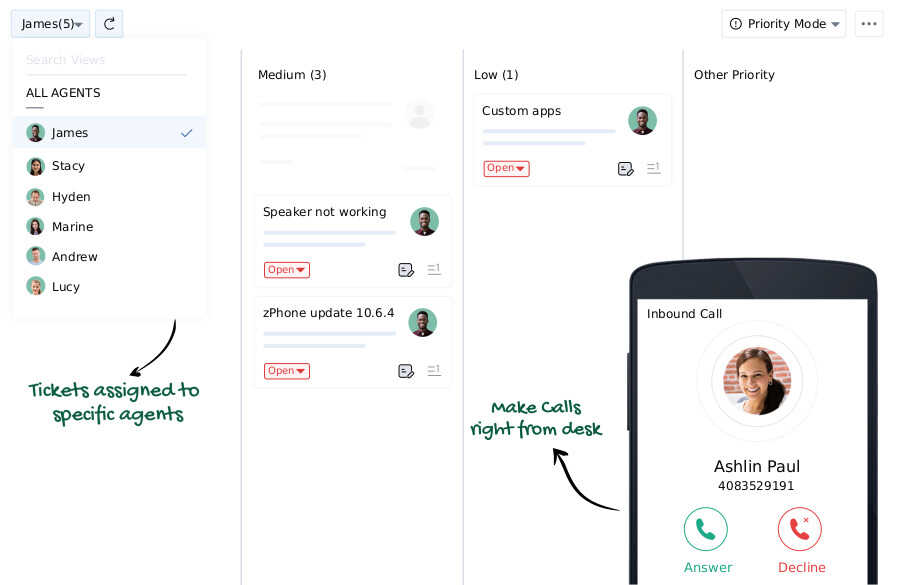
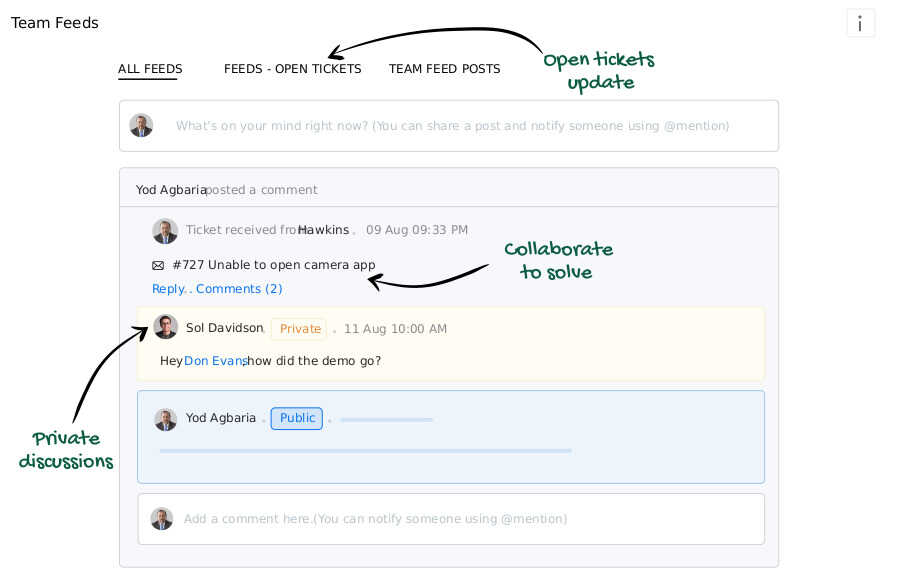
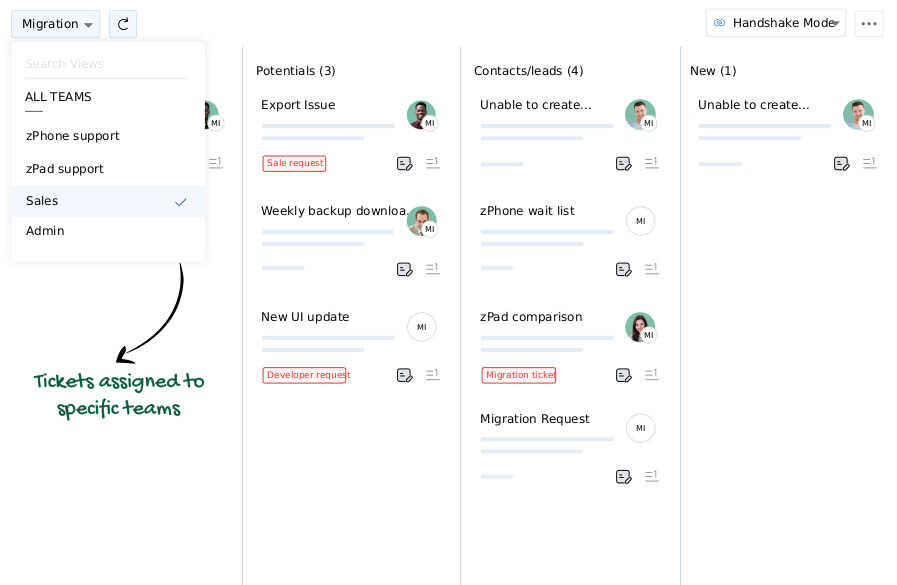
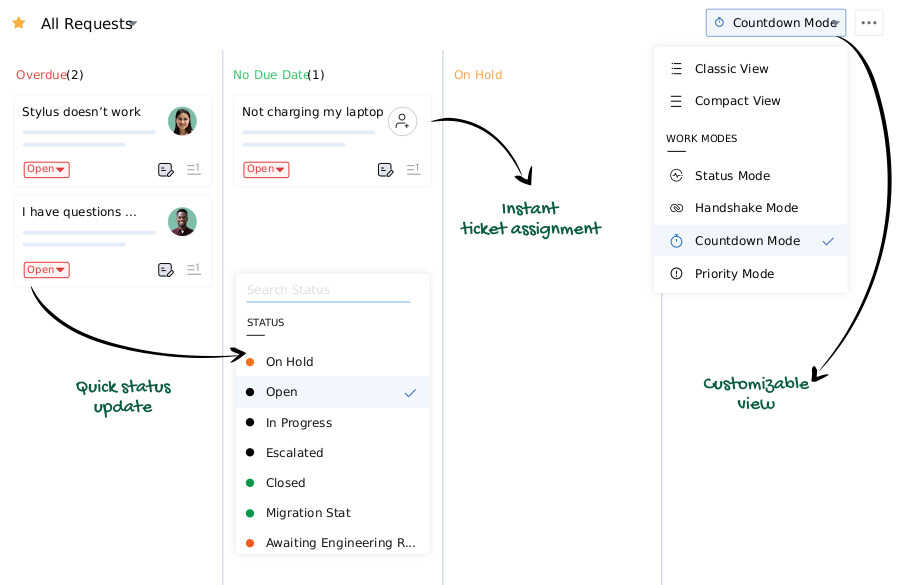
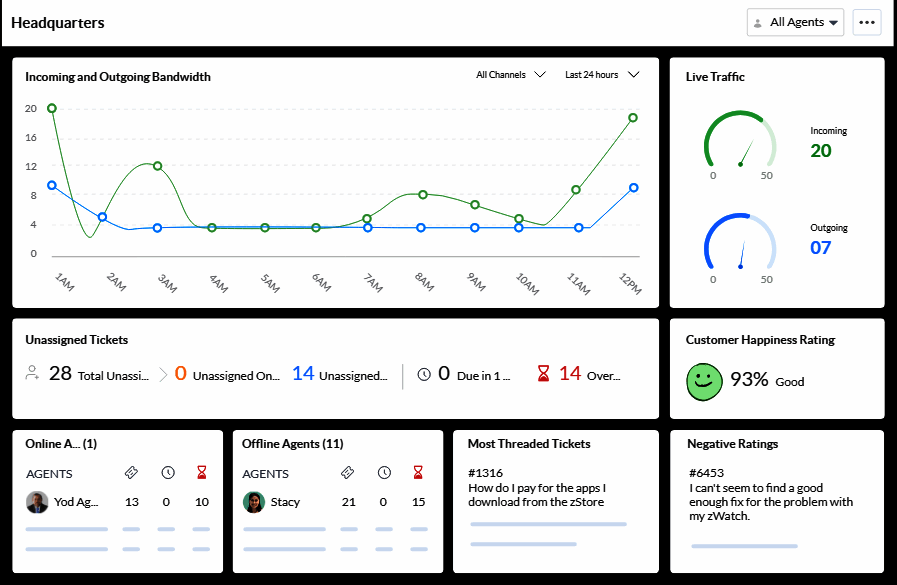
Description
Zoho Desk at a Glance
| Question | Quick answer |
|---|---|
| What it is | Zoho Corporation's cloud-only help desk, built for SMB to mid-market teams that want omnichannel ticketing without enterprise pricing. |
| Who it serves | Customer-support teams from 3 to 200 agents across email, social, WhatsApp, chat, and voice, especially buyers already on Zoho One. |
| Customer footprint | 125,000+ businesses globally (vendor verbatim). No public customer logo wall (vendor's /customers paths return 404). |
| Pricing posture | Published USD pricing from Free (3 users) through Enterprise at 40 USD per agent per month annual. Aggressive vs Zendesk Suite. |
| Headline differentiator | Free tier with 3 agents, Standard at 14 USD per agent, Zia AI bundled from Standard, native fit with 40+ Zoho apps. |
Customer questions never come through one channel anymore. Email, web form, live chat, WhatsApp, Instagram, Facebook Messenger, and inbound phone calls all hit support teams in parallel, and the average SMB stitches three or four tools together to keep up. Zoho Desk unifies those channels in a single ticket queue with AI-assisted triage, Blueprints workflow automation, and a free tier that lets a three-person team try the platform end to end before paying anything. It sits inside Zoho One next to Zoho Books, Bigin by Zoho CRM, and Zoho Payroll, which is the deciding factor for buyers already running Zoho apps. For everyone else shopping help desk software, Zoho Desk is the cost-conscious challenger to Zendesk and Freshdesk at a fraction of the per-agent price.
Pros and Cons of Zoho Desk
| Pros | Cons |
|---|---|
| Free 3-agent tier covers email ticketing, help center, and mobile apps; not a 14-day trial | No on-prem option; regulated buyers needing self-hosted ticketing must look elsewhere |
| Published pricing tops out at 40 USD per agent at Enterprise vs Zendesk Suite Enterprise at 115+ USD | No named customer logo wall (vendor /customers paths return 404); reference checks need direct sales engagement |
| Zia AI for reply suggestion, sentiment, and tagging bundled from Standard at 14 USD per agent | Blueprints and multi-department sit behind Professional at 23 USD per agent |
| Native integration with 40+ Zoho apps without third-party connector fees | Reporting is lighter than purpose-built BI; complex SLA dashboards usually need Zoho Analytics on top |
| Multilingual help center, iOS and Android mobile apps, live-chat handoff into SalesIQ | Telephony with toll-free, IVR, and skill-based routing sits at Professional and above |
Who Should Use Zoho Desk
Zoho Desk fits a clear segment: SMB to mid-market customer-support teams that want serious help desk capability at a per-agent rate that does not balloon over time.
Solo support teams and startups (1 to 3 agents) where every dollar matters. The Free tier covers email ticketing, help center, private knowledge base, mobile apps, and customer happiness ratings for 3 users at no charge. Most SMB competitors charge from day one or cap free at 14 days. For a bootstrapped SaaS or DTC startup, this is the rare credible free help desk.
Growth-stage support teams (5 to 50 agents) buying multi-channel ticketing. Standard at 14 USD per agent unlocks WhatsApp, Instagram, Messenger, Telegram, community forum, generative AI, and custom reports. At 25 agents the bill comes in at 350 USD per month annual, against Zendesk Suite Growth at roughly 1,375 USD per month for the same headcount.
Customer-support teams already on Zoho One or evaluating it. The native ecosystem story is where Zoho Desk scores strongest. Desk-to-CRM context flow, Books invoice context inside the ticket, FSM dispatch from a ticket, and Analytics dashboards across the stack do not need third-party connectors. Buyers already on Bigin by Zoho CRM get the most value.
Mid-market teams needing telephony, Blueprints, and multi-department. Professional at 23 USD per agent adds toll-free telephony, Blueprints automation, multi-department views, skill-based assignment, and multilingual help center. For 50-agent contact-centre teams this is the right tier; Enterprise at 40 USD adds Answer Bot and SalesIQ live chat.
Not the right fit: Enterprise IT teams that need ITIL change management and on-prem deployment (look at ManageEngine ServiceDesk Plus), regulated buyers that cannot run support on multi-tenant SaaS, buyers that need a public marquee logo wall for risk approval, and teams needing deep WFM and quality-monitoring tooling. Buyers seeking a no-code BPM platform that goes well beyond ticketing should also evaluate Creatio.
Zoho Desk Product Suite
Zoho Desk is one product with five tiers rather than a multi-module suite. The step-up at each tier reflects how Zoho segments SMB to mid-market.
Free tier (3 agents, no expiry)
Email ticketing, private knowledge base, help center, multi-language UI, mobile apps, customer happiness ratings. A real help desk rather than a stripped trial; most buyers pilot here before moving to Express or Standard.
Express and Standard (SMB tiers)
Express at 7 USD per agent adds social, web form, AI agents, and basic workflows. Standard at 14 USD per agent is where most buyers land: business messaging (WhatsApp, Instagram, Messenger, Telegram), community forum, Zia generative AI, custom reports, and a fuller knowledge base.
Professional and Enterprise (mid-market tiers)
Professional at 23 USD per agent adds toll-free telephony, Blueprints workflow automation, multi-department views, skill-based assignment, and multilingual help center. Enterprise at 40 USD per agent layers Answer Bot AI, live chat via Zoho SalesIQ, guided conversations, custom modules, sandbox, and multi-level IVR.
Zoho ecosystem connectors
Native links to Zoho CRM, FSM, Assist, BugTracker, Analytics, Books, and SalesIQ ship across all paid tiers. Third-party connectors include Slack, Microsoft Teams, Jira, Salesforce, Trello, Zapier, Intercom, Mailchimp, Pipedrive, HubSpot, Asana, Twilio, RingCentral, and Amazon Connect. The native Zoho pack is the real differentiator vs Zendesk and Freshdesk.
How Much Does Zoho Desk Cost
| Plan | Price (annual) | What unlocks | Typical buyer |
|---|---|---|---|
| Free | 0 USD for 3 users forever | Email ticketing, help center, KB, mobile apps, happiness ratings | 1 to 3-agent startups and pilots |
| Express | 7 USD per agent per month | Email, social, web form, AI agents, direct assignment | 3 to 10-agent SMB teams |
| Standard | 14 USD per agent per month | WhatsApp/Instagram/Messenger/Telegram, community forum, Zia AI, custom reports | 10 to 50-agent multi-channel teams |
| Professional | 23 USD per agent per month | Toll-free telephony, Blueprints automation, multi-department, skill-based assignment | 25 to 100-agent mid-market contact desks |
| Enterprise | 40 USD per agent per month | Answer Bot, SalesIQ live chat, guided conversations, custom modules, sandbox, multi-level IVR | 50 to 200-agent AI-deflection support orgs |
All paid tiers carry a 15-day free trial. Annual is the headline rate; monthly runs roughly 25 percent higher. Multi-currency at checkout (INR, EUR, GBP, JPY, SGD, AUD, AED).
Implementation Plan: Rolling Out Zoho Desk
Zoho Desk is one of the faster help desks to roll out. SMB deployments land in 5 to 10 business days; Professional or Enterprise rollouts run 4 to 8 weeks due to telephony, IVR, and Blueprints configuration.
Days 1 to 3: Account setup and channel wiring. Configure organisation profile, brand the help center, set business hours and SLAs, and connect email channels (support@ aliases, forwarding, IMAP). Standard-tier buyers add WhatsApp, Instagram, Messenger, and Telegram on day two or three.
Days 3 to 7: Agent onboarding and first tickets. Invite agents, assign roles (Light Agent, Agent, Supervisor, Admin), build the initial knowledge base with 20 to 50 articles, configure macros, and route the first batch of tickets. Most SMB rollouts go live by day seven.
Weeks 2 to 4 (Professional/Enterprise): Telephony, Blueprints, AI. Provision toll-free numbers, build IVR menus, design Blueprints for refund, escalation, and SLA-breach flows, and tune Zia AI against real ticket volume. Sandbox-based testing on Enterprise prevents production fallout.
Weeks 4 to 8 (Enterprise only): Answer Bot, custom modules, ecosystem integration. Stand up Answer Bot against the KB, configure guided conversations, build custom modules, and wire CRM, Books, FSM, or Analytics through native connectors.
Run-state: Weekly KB updates, monthly SLA review, quarterly Zia tuning. Most customers move up one tier within 12 to 18 months as volume and channel mix grow.
Hidden Costs and Contract Gotchas
Standard-to-Professional jump is the steepest. The 14 USD to 23 USD per agent gap is a 60+ percent increase, not linear growth. Buyers that need telephony or Blueprints should run 12-month TCO before signing Standard if telephony is on the roadmap.
Monthly vs annual billing premium. Monthly billing carries roughly a 25 percent premium against the published annual rate. The Express 7, Standard 14, Professional 23, and Enterprise 40 headlines assume annual prepay.
SalesIQ live chat included only at Enterprise. Buyers that need live chat at Standard or Professional must license SalesIQ separately. Standalone SalesIQ Free is genuinely free at 3 operators; Professional and Enterprise SalesIQ tiers add cost. Zoho One bundle often beats stacking Desk plus SalesIQ when 4+ Zoho apps are in scope.
No named customer logo wall. Zoho publishes the 125,000+ count but does not maintain a public customer-stories page (the URL paths return 404). Procurement teams that require reference logos for risk approval should ask Sales for under-NDA references. Zendesk has stronger public reference disclosure.
Cloud-only deployment. Regulated buyers (banks, healthcare, defence) that need self-hosted ticketing must look elsewhere; ManageEngine ServiceDesk Plus is the same-vendor on-prem alternative under the Zoho Corporation umbrella.
What Real Buyers Report
Public reviews on G2 and Capterra highlight five strengths: aggressive pricing vs Zendesk and Freshdesk at every tier, the genuinely free 3-agent plan that lets teams pilot for months not days, deep Zoho ecosystem integration (especially CRM and Books), Zia AI bundled from Standard rather than gated behind an AI SKU, and quick out-of-the-box setup for SMB teams. Buyers on Zoho One report ticket-to-CRM-to-invoice flows working in days rather than weeks.
Where buyers push back: support response time on lower-tier plans skews slower than Zendesk equivalents; Blueprints and multi-department sit behind Professional at 23 USD per agent (not Standard, where some buyers expect them); the reporting suite is lighter than Zoho Analytics or a dedicated BI tool; and the lack of a public customer-logo wall makes external risk approvals harder. Reviewers also flag that Zia AI quality, while improved, still trails Zendesk AI on complex multi-turn deflection.
Zoho Desk Alternatives
| If you are evaluating | Closest alternatives | Why |
|---|---|---|
| Zoho Desk for enterprise CX and stronger reference disclosure | Zendesk | Stronger named-customer disclosure, deeper AI and WFM tooling, mature partner ecosystem at higher per-agent cost |
| Zoho Desk for internal IT ticketing rather than customer support | ManageEngine ServiceDesk Plus | Same parent (Zoho Corp), full ITIL, on-prem option, per-technician pricing built for IT teams |
| Zoho Desk for low-code workflow beyond ticketing | Creatio | Composable no-code BPM that covers support, sales, and marketing under one builder |
| Zoho Desk for hiring-to-onboarding shared services | Workable | Best fit when support hiring volume is heavy and ATS plus onboarding matters more than help desk depth |
Bottom Line
Zoho Desk is the price-leader in help desk software for SMB to mid-market customer-support teams that want omnichannel ticketing without enterprise per-agent rates. The Free 3-agent tier and Standard at 14 USD per agent with Zia AI bundled is the strongest published-price combination in the category. Trade-offs: no on-prem option, no public customer-logo wall, and a notable price step from Standard to Professional. Enterprise IT buyers should pivot to ManageEngine ServiceDesk Plus from the same vendor; teams needing stronger named references and deeper AI should evaluate Zendesk. See the full CRM software guide if customer-experience scope reaches beyond ticketing.
Frequently Asked Questions
What is Zoho Desk and who is it for?
How much does Zoho Desk cost?
Is Zoho Desk really free?
How does Zoho Desk compare to Zendesk?
What integrations does Zoho Desk support?
Does Zoho Desk have mobile apps?
What certifications does Zoho Desk hold?
Who are Zoho Desk's named customers?
What is the difference between Zoho Desk and Zoho CRM ticketing?
Is Zoho Desk available on-premises?
Find Your Perfect Software
See how it can transform your workflow
- Personalized for your needs Tailored recommendations based on your unique requirements.
- Save time & resources Streamline your workflow and boost team productivity.
- Trusted by thousands Join 10,000+ businesses already growing with SaaSrat.
You're all set! 🎉
A specialist for will reach out within 1 business day with tailored recommendations for your needs.