

SolarWinds Web Help Desk
by SolarWinds Worldwide LLC.
What is SolarWinds Web Help Desk?
Get Best Quote for SolarWinds Web Help Desk
Connect with SaaSrat experts to get the best quote for your business.
You're all set!
A specialist for SolarWinds Web Help Desk will reach out within 1 business day.
SolarWinds Web Help Desk Features
Ticket management
Asset management
Knowledge base
Sla management
Email integration
Reporting and analytics
View All 29 Features
SolarWinds Web Help Desk Resources
SolarWinds Web Help Desk Screenshots
Description
SolarWinds Web Help Desk at a Glance
| Best for | Mid-market to enterprise IT operations teams already running SolarWinds observability products (NPM, SAM, Orion) plus regulated verticals needing on-premise help desk deployment |
|---|---|
| Deployment | On-premise (self-hosted) or hosted deployment; native integrations with SolarWinds Network Performance Monitor, Server & Application Monitor, and Orion Platform |
| Starting price | Contact Vendor (perpetual or subscription licensing; per-technician or asset-count pricing scoped by deployment) |
| Key strengths | Native SolarWinds portfolio integration, on-premise deployment option, IT asset management with automated discovery, change management, SLA tracking |
| Not ideal for | Small IT teams under 5 technicians, cloud-first organizations that want zero infrastructure to manage, or teams needing modern AI-first ITSM workflows |
SolarWinds Web Help Desk Overview
SolarWinds Web Help Desk (WHD) is IT help desk and asset management software from SolarWinds, sold as on-premise or hosted deployment.
The product covers ticket management, change management, IT asset tracking, service level management, and integrations with the wider SolarWinds observability portfolio (NPM, SAM, Orion).
WHD sits inside a broader SolarWinds IT operations portfolio; the value proposition is strongest for IT teams already running SolarWinds infrastructure monitoring who want unified ITSM plus observability data.
On-premise deployment remains available for regulated verticals or organizations with strict data residency requirements, which is unusual in the modern ITSM market that has largely moved to cloud-only.
Capabilities and Named Features
The SolarWinds Web Help Desk thesis is that IT teams already using SolarWinds observability products benefit from unified ITSM plus monitoring data in one operations stack rather than separate ticketing and observability tools.
On-premise deployment remains available which is unusual in the modern ITSM market; regulated verticals and organizations with strict data residency requirements can self-host on customer infrastructure. Hosted deployment is also available for teams that want the WHD feature set without self-managing infrastructure.
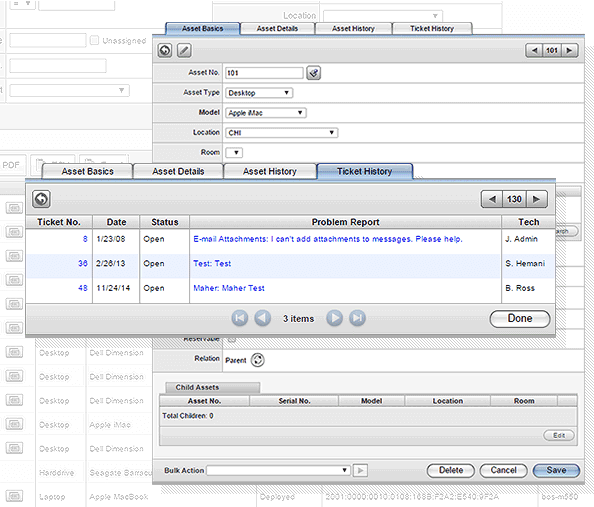
IT asset management with automated discovery ties ticket work to hardware and software inventory so technicians see the full context when triaging incidents. Software license management supports compliance workflows alongside the asset lifecycle.
Change management workflows with approval routing and impact analysis satisfy ITIL-aligned procurement requirements for organizations that need documented change control. This matters especially in regulated verticals where auditors expect a change history for every production system.
Integration with SolarWinds Network Performance Monitor, Server and Application Monitor, and the Orion Platform means observability alerts can flow into ticket workflows without third-party middleware. This is the primary reason existing SolarWinds observability customers pick Web Help Desk over cloud-first ITSM competitors.
LDAP and Active Directory user provisioning plus multi-technician role-based permissions round out the enterprise controls; ticket assignment, categorization, and prioritization are the standard operational workflows technicians work in every day.
Named feature list
- Ticket management with categorization, assignment, and prioritization
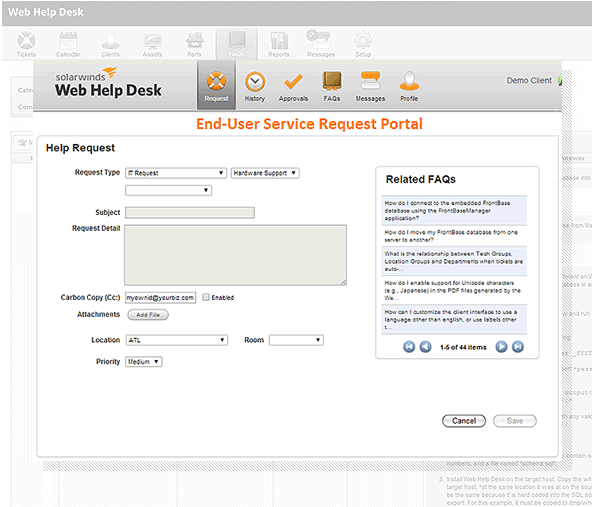
- Multi-channel ticket intake (email, web, self-service portal)
- Change management with approval routing and impact analysis
- IT asset management (ITAM) with automated discovery
- Software license management
- Configuration Management Database (CMDB)
- Service level management with SLA tracking and escalation
- Knowledge base for end-user self-service
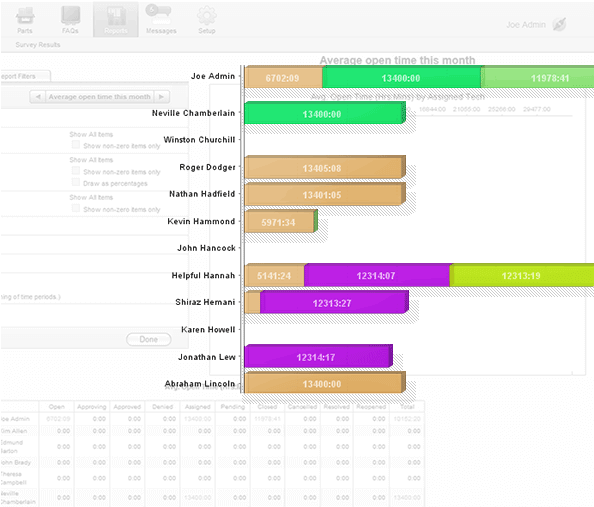
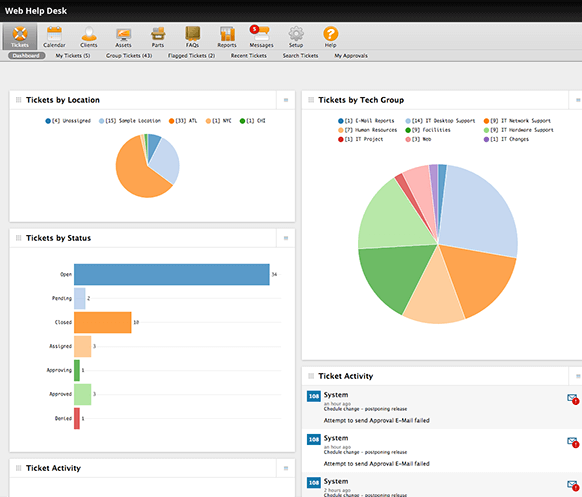
- Reporting and dashboards
- Self-service portal with request catalog
- Native integration with SolarWinds Network Performance Monitor (NPM)
- Native integration with SolarWinds Server & Application Monitor (SAM)
- Native integration with the SolarWinds Orion Platform
- Third-party integrations via API
- LDAP and Active Directory user provisioning
- On-premise deployment on customer infrastructure
- Hosted deployment option
- Perpetual or subscription licensing
- Multi-technician role-based permissions
Pricing and Plans
SolarWinds Web Help Desk does not publish public per-technician pricing on the vendor website.
Licensing options include perpetual and subscription models scoped by technician count and asset count under management.
Buyers request pricing through the SolarWinds Contact Sales flow; enterprise procurement typically includes deployment scoping and integration planning against existing SolarWinds infrastructure.
| Tier | Price | What is included |
|---|---|---|
| Web Help Desk (On-Premise) | Contact Vendor | On-premise deployment on customer infrastructure. Full feature set including ticketing, change management, IT asset management, SLA tracking, and native SolarWinds portfolio integration |
| Web Help Desk (Hosted) | Contact Vendor | SolarWinds-hosted deployment for teams that want the WHD feature set without self-managing infrastructure |
| Perpetual Licensing | Contact Vendor | Traditional perpetual license with annual maintenance. Suits organizations preferring capex over opex on IT software |
| Subscription Licensing | Contact Vendor | Modern subscription pricing scoped by technician count and asset count. Suits organizations preferring opex on IT software |
| Enterprise (Portfolio Bundle) | Contact Vendor | WHD bundled with SolarWinds observability products (NPM, SAM, Orion) for unified IT operations pricing |
Pros
- On-premise deployment remains a real option, which is unusual in the modern ITSM market that has largely moved cloud-only.
- Native integration with SolarWinds Network Performance Monitor, Server and Application Monitor, and Orion Platform means observability alerts flow into ticket workflows without third-party middleware.
- IT asset management with automated discovery gives technicians full hardware and software context when triaging incidents.
Cons and Trade-offs
- Modern AI-first ITSM features (autonomous agents, generative AI copilots) are lighter than SysAid, Freshservice, or ServiceNow.
- Value proposition is strongest for existing SolarWinds observability customers; new buyers evaluating standalone ITSM will find modern cloud-first alternatives more competitive.
- Quote-based pricing and perpetual/subscription complexity slow self-serve evaluation.
SolarWinds Web Help Desk vs Alternatives
| Capability | SolarWinds Web Help Desk | SolarWinds Service Desk | Freshservice |
|---|---|---|---|
| Deployment | On-premise or hosted | Cloud SaaS | Cloud SaaS |
| SolarWinds portfolio integration | Native (NPM, SAM, Orion) | SolarWinds Service Desk with cloud-native workflow | Freshworks ecosystem |
| IT asset management | Native ITAM with automated discovery | Native ITAM | Native ITAM |
| AI-first ITSM features | Limited | SolarWinds Service Desk with AI features | Freshworks Freddy AI |
| Best fit | Existing SolarWinds observability customers, regulated verticals | Cloud-first IT operations teams | SMB to mid-market with Freshworks alignment |
Who Should Choose SolarWinds Web Help Desk
Mid-market to enterprise IT operations teams already running SolarWinds observability products (Network Performance Monitor, Server and Application Monitor, Orion Platform) who want unified ITSM plus observability data.
Regulated verticals (healthcare, finance, public sector) with strict data residency requirements that need on-premise help desk deployment on customer infrastructure.
Not appropriate for small IT teams under 5 technicians, cloud-first organizations that want zero infrastructure to manage, or teams needing modern AI-first ITSM workflows.
Named Alternatives to SolarWinds Web Help Desk
- SolarWinds Service Desk. Cloud-native ITSM successor from SolarWinds. Chosen when the buyer wants SolarWinds ecosystem alignment plus cloud-first deployment.
- SysAid. AI-first ITSM with autonomous IT engineer. A better fit for teams modernizing ITSM with AI-driven automation.
- Freshservice. Freshworks ITSM with published per-agent pricing. Preferred when the buyer wants published pricing and cloud-first deployment.
- ManageEngine ServiceDesk Plus. Zoho-family ITSM with strong on-premise heritage. Chosen when the buyer wants competitive pricing plus on-premise flexibility.
- Jira Service Management. Atlassian ITSM inside the Jira ecosystem. A better fit when the buyer runs Jira and wants unified developer and IT-service workflows.
Implementation and Deployment
On-premise Web Help Desk deployments typically run 3-8 weeks depending on infrastructure setup, IT asset discovery scope, and integration with existing SolarWinds NPM, SAM, or Orion products.
Standard sequence: server provisioning, WHD installation and configuration, IT asset discovery run against customer infrastructure, integration with SolarWinds observability products, technician training, and phased go-live starting with incident management.
Hosted deployment reduces infrastructure setup time; feature parity with on-premise is maintained.
What Real Buyers Say About SolarWinds Web Help Desk
Operator discussions on Reddit r/sysadmin SolarWinds discussions and Reddit r/networking IT operations threads surface the following themes.
SolarWinds IT operations customers on r/sysadmin discuss Web Help Desk as the natural ITSM choice when the team already runs NPM, SAM, or Orion for observability.
The on-premise deployment option is frequently cited as a differentiator for regulated verticals that cannot use cloud-only ITSM.
Common critique in r/sysadmin: modern AI-first ITSM features are lighter than SysAid, Freshservice, or ServiceNow, so factor that into evaluation if AI automation is a priority.
Vendor references: SolarWinds Web Help Desk product overview, SolarWinds Service Desk cloud-native ITSM successor, SolarWinds Network Performance Monitor observability integration.
Related SolarWinds Web Help Desk Comparisons and Categories on SaaSRat
Explore related products and categories on SaaSRat to compare SolarWinds Web Help Desk against alternatives and see which vertical or feature comparison matches your buying criteria.
- Help Desk Software on SaaSRat
- IT Service Management on SaaSRat
- IT Asset Management on SaaSRat
- SysAid: AI-first ITSM
- ManageEngine ServiceDesk Plus
- Spiceworks Cloud Help Desk: free IT ticketing
The Bottom Line on SolarWinds Web Help Desk
SolarWinds Web Help Desk is a strong fit for existing SolarWinds observability customers (NPM, SAM, Orion) who want unified ITSM plus monitoring data in one operations stack.
On-premise deployment remains available which is unusual in the modern ITSM market; regulated verticals needing data residency benefit directly.
IT asset management with automated discovery plus change management workflows satisfy ITIL-aligned enterprise procurement requirements.
Cloud-first organizations wanting zero infrastructure to manage should evaluate SolarWinds Service Desk (the cloud-native successor) or Freshservice instead.
Teams needing modern AI-first ITSM workflows (autonomous agents, generative AI copilots) will find SysAid or Freshservice a closer feature match.
Verified on 2026-08-04 against vendor website.
Frequently Asked Questions
What is SolarWinds Web Help Desk?
Who is SolarWinds Web Help Desk best for?
How does Web Help Desk pricing work?
Can Web Help Desk be deployed on-premise?
What is the difference between Web Help Desk and SolarWinds Service Desk?
Does Web Help Desk integrate with SolarWinds observability tools?
Does Web Help Desk include IT asset management?
Does Web Help Desk support change management?
Where is SolarWinds headquartered?
Does SolarWinds offer a free trial for Web Help Desk?
Find Your Perfect Software
See how it can transform your workflow
- Personalized for your needs Tailored recommendations based on your unique requirements.
- Save time & resources Streamline your workflow and boost team productivity.
- Trusted by thousands Join 10,000+ businesses already growing with SaaSrat.
You're all set! 🎉
A specialist for will reach out within 1 business day with tailored recommendations for your needs.