

Todo
by Appigo
What is Todo?
Get Best Quote for Todo
Connect with SaaSrat experts to get the best quote for your business.
You're all set!
A specialist for Todo will reach out within 1 business day.
Todo Features
Free tier for evaluation.
Simple task creation.
Due dates and priorities.
Cross-device sync (phone + tablet + desktop).
No feature overload.
Reliable core to-do functionality.
View All 7 Features
Todo Pricing Plans
Free Tier
- Basic task management with due dates and priorities.
Pro Tier
- Advanced features and higher limits (specific offering depends on vendor).
Todo Screenshots
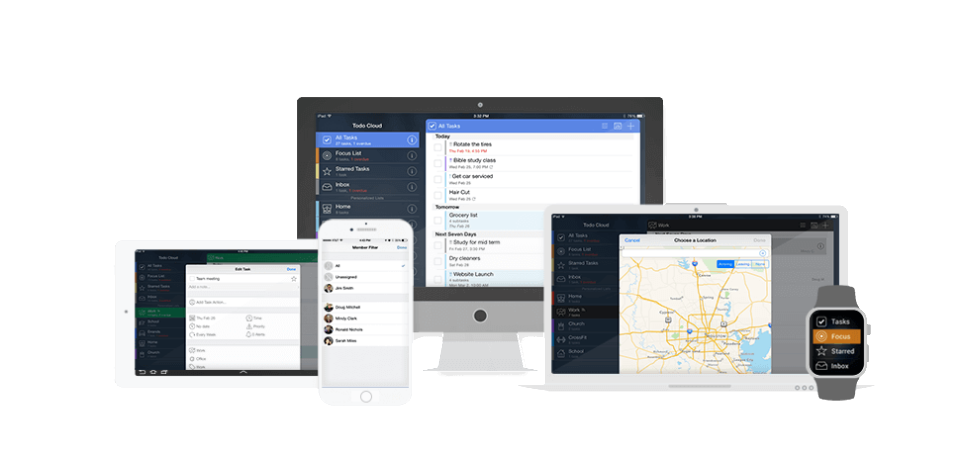
Description
What Is Todo and How Does It Work?
Todo is a straightforward task management app for individuals who want a reliable daily to-do list. It supports task creation, due dates, priorities, and syncing across devices without the overhead of a full project management tool.
The app fits users who want a focused personal to-do list rather than a feature-heavy project management platform. Cross-device sync keeps tasks consistent between phone, tablet, and desktop.
Todo at a Glance
| Best fit for | individuals wanting simple daily to-do management |
|---|---|
| Deployment | Cloud SaaS + mobile + desktop |
| Pricing model | Free tier + optional Pro |
| Free trial | Free tier available |
| Support | Standard support |
| Headquarters | International |
How Much Does Todo Cost in 2026?
Todo pricing depends on the specific vendor and Pro tier features. Contact vendor for current per-user rates.
A free tier is available for evaluation. Verify vendor identity before commitment as "Todo" is a generic app name across multiple products.
| Plan | Price | Includes |
|---|---|---|
| Free Tier | $0 | Basic task management |
| Pro Tier | Contact Vendor | Advanced features |
Todo Pros and Cons in 2026
Where Todo Stands Out
- Free tier for evaluation.
- Simple task creation.
- Due dates and priorities.
- Cross-device sync (phone + tablet + desktop).
- No feature overload.
- Reliable core to-do functionality.
- Individual-focused workflow.
Where Todo Falls Short
- Generic "Todo" brand name requires vendor verification.
- Feature depth lighter than mainstream task apps.
- No team collaboration on most Todo apps.
- Advanced features may require Pro subscription.
- Multiple products called "Todo" - confirm which one this profile references.
Who Should Use Todo?
Todo fits individuals who want a simple reliable daily to-do list with cross-device sync and no feature overload. Users who feel overwhelmed by Todoist/ClickUp complexity fit best.
Skip Todo if you need team collaboration (Asana, Trello) or advanced GTD features (OmniFocus, MyLifeOrganized).
Todo Alternatives Worth Comparing
Any.do. Simple cross-platform to-do list.
Google Tasks. Free minimal task manager.
Apple Reminders. Free Apple minimal task manager.
Microsoft To Do. Free Microsoft task manager.
What Real Buyers Report About Todo
Buyer discussions describe simple Todo apps as fitting users who want minimal task management. Verify specific vendor identity before commitment given the generic app name.
Frequently Asked Questions About Todo
How much does Todo cost in 2026?
Todo pricing depends on the specific vendor and Pro tier. Contact vendor for current rates. Note: "Todo" is a generic app name so verify vendor identity.
Is Todo free?
Most Todo apps offer a free tier with basic task management. Advanced features may require Pro subscription.
Does Todo sync across devices?
Yes. Most Todo apps sync across phone, tablet, and desktop.
Which Todo app should I choose?
Given multiple products called "Todo", verify vendor identity. Popular options include Microsoft To Do, Google Tasks, and Apple Reminders (all free).
What are alternatives to Todo?
Any.do, Google Tasks, Apple Reminders, and Microsoft To Do offer simple task management with cross-device sync.
What Top-Ranking Todo Reviews Cover
- Project Management category
- Construction Project Management category
- Workflow Management category
- Productivity Management category
- Task Management category
Related Todo Comparisons and Categories on SaaSRat
- Asana Task Management
- Chronos Workflow
- Tyasuite Project Management
- Visual Planning
- Proworkflow
- Todoist
- Copper Project Management
- Spitfire Project Management
Bottom Line: Is Todo Right for You?
Todo is a fit for individuals who want a simple reliable daily to-do list with cross-device sync and no feature overload.
Highlights: free tier, simple task creation, due dates and priorities, and cross-device sync.
Trade-offs: generic brand name requires vendor verification, lighter than mainstream task apps, no team features.
Consider Any.do for cross-platform simple to-do, Google Tasks for free minimal, Apple Reminders for Apple-native, or Microsoft To Do for Microsoft-native.
Verified on 2026-07-14 by the SaaSRat Editorial Team (Chirantan Patel, Senior SaaS Research Editor). Vendor facts cross-checked against the Todo website and community discussions on Reddit and industry LinkedIn groups. About our methodology.
Frequently Asked Questions
Is there a free plan or free trial for Todo?
How much does Todo cost?
What does Todo integrate with?
Who is Todo best for?
What are the best alternatives to Todo?
Is Todo GDPR / SOC 2 compliant?
Does Todo have a mobile app?
What do real users say about Todo?
How does Todo compare to its top competitor?
Does Todo offer customer support?
Find Your Perfect Software
See how it can transform your workflow
- Personalized for your needs Tailored recommendations based on your unique requirements.
- Save time & resources Streamline your workflow and boost team productivity.
- Trusted by thousands Join 10,000+ businesses already growing with SaaSrat.
You're all set! 🎉
A specialist for will reach out within 1 business day with tailored recommendations for your needs.