

Chronos Workflow Platform
by Chronos Systems
What is Chronos Workflow Platform?
Get Best Quote for Chronos Workflow Platform
Connect with SaaSrat experts to get the best quote for your business.
You're all set!
A specialist for Chronos Workflow Platform will reach out within 1 business day.
Chronos Workflow Platform Features
Document storage
Version control
Access control
Document search
Metadata management
Workflow automation
View All 45 Features
Chronos Workflow Platform Resources
Chronos Workflow Platform Screenshots
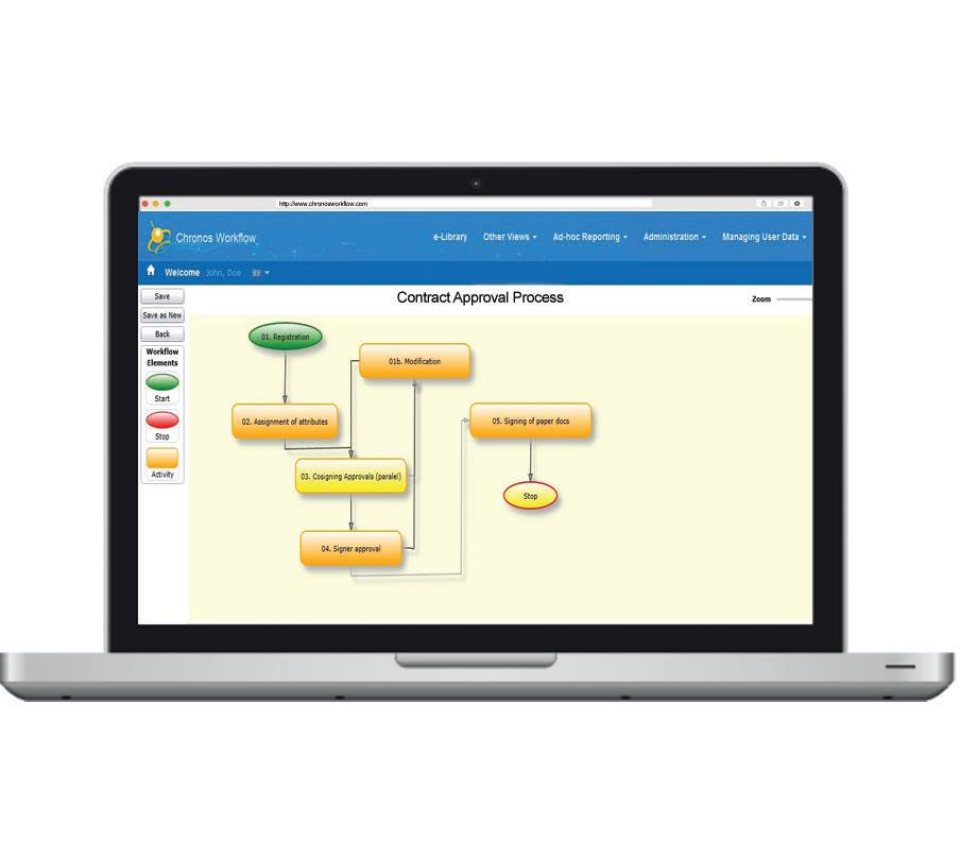
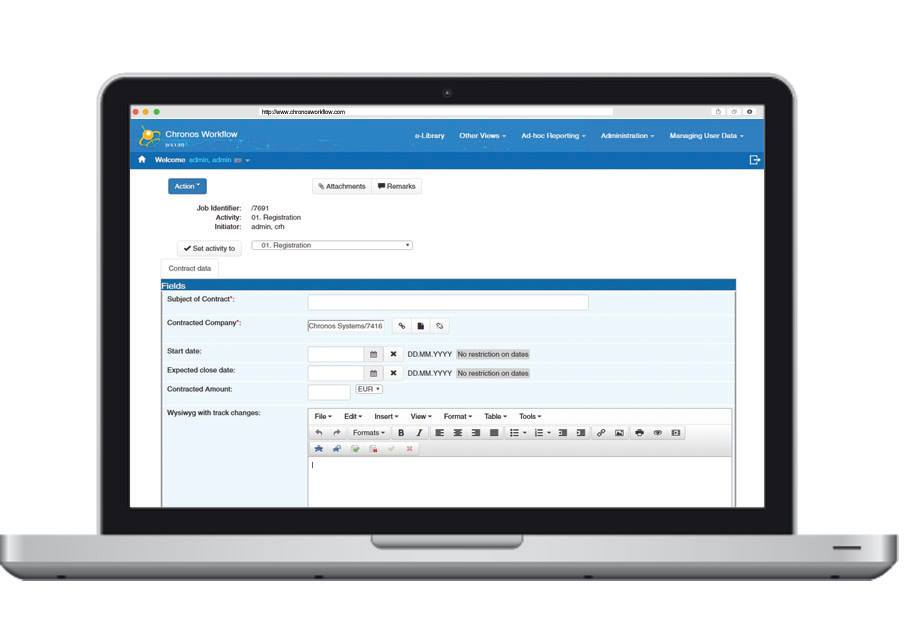
Description
Chronos Workflow Platform at a Glance
| Best for | Business teams (operations, HR, finance, admin) at growing and enterprise organizations wanting to move from paper and email to no-code automated workflows with self-service drag-and-drop design |
|---|---|
| Deployment | Web-based platform with self-service configuration; document automation alongside workflow automation |
| Starting price | Contact Vendor (Book a Demo or See Pricing through the vendor website; team-based pricing) |
| Key strengths | 131,000+ user adoption, no-code drag-and-drop process designer, self-service configuration, days-not-months deployment, auditable workflow tracking, document plus process automation together |
| Not ideal for | Very complex enterprise process automation needing Nintex, Appian, or Pega ecosystem depth, or teams wanting only workflow without document automation |
Chronos Workflow Platform Overview
Chronos Workflow Platform (CWP) is a web-based, self-service platform for designing, running, and tracking business processes and documents in one place.
The core value proposition is no-code business process automation: teams design and change workflows themselves with a drag-and-drop process designer rather than requiring developer resources.
Move from paper and email to automated, auditable workflows in days, not months captures the deployment speed positioning. Traditional business process automation projects consumed months of implementation; Chronos targets days-scale rollout.
The 131,000+ users at leading global organizations claim provides scale validation across enterprise business process automation deployments rather than aspirational positioning.
The self-service dimension matters strategically. Business teams can design and change workflows without dependency on IT resources or developer time, which historically bottlenecked process automation projects.
Capabilities and Named Features
The Chronos Workflow Platform thesis is that most business process automation projects fail because they require developer resources that business teams cannot access, and no-code drag-and-drop process design with self-service capabilities delivers real automation adoption at business team scale.
The web-based self-service dimension matters. Business teams design workflows themselves rather than filing tickets with IT to build them. This changes automation from an IT delivery bottleneck to a business team capability.
Drag-and-drop process designer means non-technical business users can create workflows visually rather than through code or complex form builders. The visual design matches how business teams think about their processes.
Move from paper and email to automated, auditable workflows in days addresses the specific deployment problem: business process automation historically consumed months of implementation time before delivering any value.
Auditable workflows matter for regulated organizations and internal governance. Every workflow execution is tracked, providing the audit trail that compliance and internal audit teams need.
Design, run, and track in one place unifies the workflow lifecycle. Teams do not switch between separate design tools, execution engines, and monitoring dashboards.
Documents alongside processes matters because most business processes involve documents (invoice approvals, HR onboarding, contract reviews). Chronos handles both together rather than requiring separate document automation vendors.
The 131,000+ user adoption at leading global organizations reflects real production use rather than aspirational positioning.
Named feature list
- No-code business process automation
- Web-based self-service platform
- Design, run, and track workflows
- Drag-and-drop process designer
- Document automation alongside workflows
- Auditable workflow tracking
- Days-not-months deployment
- Business team self-service
- No developer required
- Paper-and-email replacement
- Automated workflow execution
- Workflow monitoring
- Global user base
- 131,000+ users
- Custom form design
- Approval workflows
- Document routing
- Version control
- Integration capabilities
- Audit trail
Pricing and Plans
Chronos Workflow Platform does not publish public per-user pricing on the homepage.
Pricing is available on the See Pricing page or through Book a Demo for guided evaluation.
Team-based pricing scales with user count and configuration depth.
| Tier | Price | What is included |
|---|---|---|
| Standard | Contact Vendor | Base plan for teams wanting no-code drag-and-drop workflow design and document automation |
| Growth | Contact Vendor | Higher tier for expanding process automation adoption with additional users and configuration depth |
| Business | Contact Vendor | Full platform with document automation, expanded workflows, and integration capabilities |
| Enterprise | Contact Vendor | Enterprise plan for large deployments with custom integrations, priority support, and dedicated account management |
Pros
- No-code drag-and-drop process designer removes the developer bottleneck that hurt most business process automation projects historically.
- Self-service configuration lets business teams change workflows themselves rather than filing tickets with IT for every workflow adjustment.
- Days-not-months deployment addresses the specific pain point of business process automation projects that consumed months before delivering any value.
Cons and Trade-offs
- Not designed for very complex enterprise process automation needing Nintex, Appian, or Pega ecosystem depth.
- Teams wanting only workflow without document automation may find the platform breadth over-scoped.
- Quote-based pricing slows self-serve evaluation versus published-price competitors.
Chronos Workflow Platform vs Alternatives
| Capability | Chronos Workflow | Kissflow | Process Street |
|---|---|---|---|
| Core focus | No-code process automation plus document automation | Digital workflow platform | Process management platform |
| Drag-and-drop designer | Native | Kissflow visual builder | Process Street builder |
| Document automation | Native alongside workflows | Digital forms | Task-based workflow |
| Self-service configuration | Native | Kissflow no-code | Process Street no-code |
| Best fit | Teams wanting workflow plus document automation | Teams wanting Kissflow ecosystem | Teams wanting process management focus |
Who Should Choose Chronos Workflow Platform
Business teams (operations, HR, finance, admin) at growing and enterprise organizations wanting to move from paper and email to no-code automated workflows with self-service drag-and-drop design.
Regulated organizations needing auditable workflow tracking for compliance and internal audit benefit directly from the audit trail architecture.
Not appropriate for very complex enterprise process automation needing Nintex, Appian, or Pega ecosystem depth, or teams wanting only workflow without document automation.
Named Alternatives to Chronos Workflow Platform
- Kissflow. Digital workflow platform with strong SMB and mid-market presence. Chosen when the buyer wants Kissflow ecosystem integration.
- Process Street. Process management platform with strong SMB focus. A better fit when the buyer wants process documentation alongside execution.
- Zoho Creator. Low-code app platform inside Zoho ecosystem. Preferred for Zoho-heavy organizations.
- Nintex. Enterprise process automation platform. Chosen for very complex enterprise automation needs.
- Airtable. Flexible database plus workflow platform. A better fit when the buyer wants database-driven workflow.
Implementation and Deployment
Chronos Workflow Platform deployments target days-not-months rollout. Sign up, invite team members, design the first workflow with drag-and-drop, and start running automated processes without formal implementation projects.
Standard setup runs 1-4 weeks for teams doing a full automation rollout: platform configuration, first workflow design with drag-and-drop process designer, document template setup, integration with existing business systems if applicable, team onboarding for self-service workflow design, and pilot with a live process.
Larger enterprise deployments phase in additional business units sequentially with shared workflow governance and cross-team process visibility.
Regulated deployments layer on auditable workflow tracking configuration and compliance framework alignment.
What Real Buyers Say About Chronos Workflow Platform
Operator discussions on LinkedIn Business Automation community and Reddit r/sysadmin workflow threads surface the following themes.
Operations, HR, finance, and admin team leaders on LinkedIn business automation communities discuss Chronos Workflow Platform as an accessible no-code option when they want to move business processes off paper and email without developer resource dependencies.
The 131,000+ user adoption is frequently cited as decisive against newer no-code workflow platforms lacking production track records.
Operator discussions in business process automation communities highlight the days-not-months deployment as directly addressing the specific pain point of legacy business process automation projects.
Common critique from enterprise process automation buyers: Chronos is positioned for business team self-service; very complex enterprise automation typically prefers Nintex, Appian, or Pega for ecosystem depth.
The drag-and-drop process designer is repeatedly praised as delivering real business team self-service; other no-code platforms require more technical knowledge than business teams actually have.
Auditable workflows are frequently discussed as critical for regulated organizations; process automation without audit trails fails compliance review, and Chronos provides the audit trail architecture that regulated deployments require.
Regulated organizations frequently praise the auditable workflows architecture as decisive; process automation without audit trails fails compliance review, and Chronos provides the audit trail architecture that regulated deployments require.
The web-based self-service positioning is repeatedly discussed as removing the IT dependency that historically bottlenecked business process automation; business teams design their own workflows rather than filing tickets.
Vendor references: Chronos Workflow Platform overview, Chronos features catalog, Chronos pricing.
Related Chronos Workflow Platform Comparisons and Categories on SaaSRat
Explore related products and categories on SaaSRat to compare Chronos Workflow Platform against alternatives.
- Workflow Automation on SaaSRat
- Business Process Management on SaaSRat
- Nintex: enterprise process automation
- Airtable: database plus workflow
The Bottom Line on Chronos Workflow Platform
Chronos Workflow Platform is a strong fit for business teams (operations, HR, finance, admin) at growing and enterprise organizations wanting to move from paper and email to no-code automated workflows.
No-code drag-and-drop process designer removes the developer bottleneck that hurt most business process automation projects historically.
Days-not-months deployment plus auditable workflow tracking plus documents-alongside-processes make Chronos a mature production platform for business team self-service automation.
Very complex enterprise process automation should evaluate Nintex, Appian, or Pega for ecosystem depth.
Teams wanting only workflow without document automation may find the platform breadth over-scoped.
Verified on 2026-08-04 against vendor website.
Frequently Asked Questions
What is Chronos Workflow Platform?
Who is Chronos Workflow Platform best for?
How does Chronos pricing work?
Does Chronos require developers?
What can I automate with Chronos?
Does Chronos track workflow executions?
How long does Chronos deployment take?
How does Chronos compare to Kissflow?
How many users does Chronos serve?
Does Chronos handle documents?
Find Your Perfect Software
See how it can transform your workflow
- Personalized for your needs Tailored recommendations based on your unique requirements.
- Save time & resources Streamline your workflow and boost team productivity.
- Trusted by thousands Join 10,000+ businesses already growing with SaaSrat.
You're all set! 🎉
A specialist for will reach out within 1 business day with tailored recommendations for your needs.