

Quickbase
by Intuit Inc • Founded 2008
What is Quickbase?
Get Best Quote for Quickbase
Connect with SaaSrat experts to get the best quote for your business.
You're all set!
A specialist for Quickbase will reach out within 1 business day.
Quickbase Features
No-code app builder with templates
Relational tables with formula and lookup columns
Forms with conditional logic
Reports with filters charts and summaries
Role-based dashboards
Workflow automation no-code builder
View All 12 Features
Quickbase Pricing Plans
Team
- Minimum 20 users
- Core no-code app builder
- Relational tables formulas and reports
- Standard automation execution limits
- Email and community support
- Verified at quickbase.com/pricing on 2026-06-30
Business
- Minimum 40 users
- Advanced automation with higher execution limits
- Sandbox environment for safer changes
- HIPAA support with signed BAA
- Priority business-hours support
- Verified at quickbase.com/pricing on 2026-06-30
Enterprise
- Custom AI credits and Pipelines execution
- Advanced security and audit logging
- FedRAMP Moderate option for government
- Dedicated Customer Success Manager
- 24/7 priority support and named SA
- Verified at quickbase.com/enterprise on 2026-06-30
Quickbase Resources
Quickbase Screenshots
Description
Quickbase at a Glance
| Best fit for | Operations and IT teams in construction, manufacturing, field service, and dynamic project management |
|---|---|
| Industries | Construction, manufacturing, field service, logistics, professional services, energy, real estate |
| Core platform | App builder, Relational tables, Forms, Reports, Dashboards, Automation, Pipelines integration, Quickbase AI |
| Pricing model | Per-user monthly (Team $35 min 20, Business $55 min 40, Enterprise quote) |
| Mobile apps | iOS and Android (Quickbase mobile) |
| Compliance | SOC 2 Type II, ISO 27001, HIPAA on Business+, GDPR, FedRAMP Moderate available |
| Named customers | Amazon, P&G, Skanska, Schlumberger, Procter & Gamble (shown on quickbase.com) |
| Parent company | Quickbase, Inc. (privately held) |
| Headquarters | Boston, Massachusetts |
Quickbase Pros and Cons in 2026
Where Quickbase Stands Out
Citizen-developer app building is the category benchmark. Ops leads with no code background ship apps that would otherwise require a developer, which fits construction and manufacturing workflows that change quarterly.
Relational tables with formula columns scale beyond spreadsheets. Cross-table relationships and lookups handle complex business logic that breaks Excel and Google Sheets at moderate volume.
Pipelines (formerly Cloudpipes) integrates with hundreds of external systems. Native connectors plus a no-code integration builder handle the integration layer that custom-app projects usually need.
Audit trails and field-level permissions ship in the platform. Compliance-heavy industries (construction safety, manufacturing quality) get auditability without bolting on a separate governance tool.
Where Quickbase Falls Short
Per-user pricing with minimum seats deters small teams. Team tier minimum is 20 users; Business is 40. Pilot projects under those floors are hard to justify.
UI customization is workable but not pixel-perfect. Custom branding and styled forms have limits that polished SaaS apps do not.
Performance on very large databases lags warehouse-backed analytics. Tables over 1 million rows benefit from external BI layered on top.
Mobile UX is functional but lighter than category leaders. Strong for data entry and approvals; weaker for complex dashboards on small screens.
Who Should Use Quickbase?
Quickbase is the right pick for construction and manufacturing ops teams replacing spreadsheet workflows, field-service organizations managing dispatch and asset tracking, project portfolio teams needing custom-built status apps, and IT teams enabling citizen developers across business units. In the low-code platforms and project management categories, Quickbase lands as the best fit for dynamic operational workflows in regulated industries.
It is the wrong fit for consumer-facing apps needing pixel-perfect UI, very small teams under 20 users, and organizations needing a polished SaaS UX out of the box. Those buyers should compare Smartsheet, monday.com, or Airtable.
Quickbase Product Suite in 2026
App Builder
No-code interface for building custom apps with tables, fields, forms, reports, and dashboards. Templates jumpstart construction, manufacturing, and project management use cases.
Relational Tables and Formulas
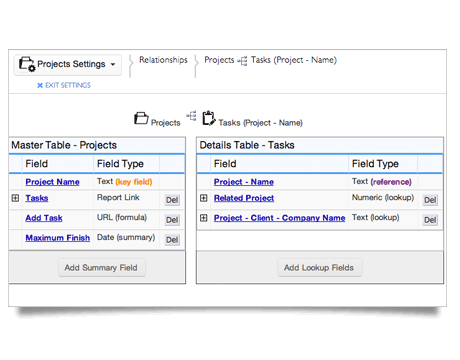
Cross-table relationships, lookups, summary calculations, and formula fields handle business logic without scripting. Field types cover text, number, date, checkbox, multi-select, user, file, formula, and several others.
Reports and Dashboards
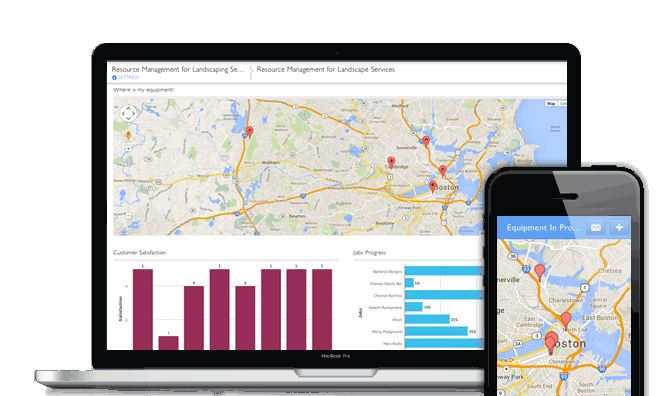
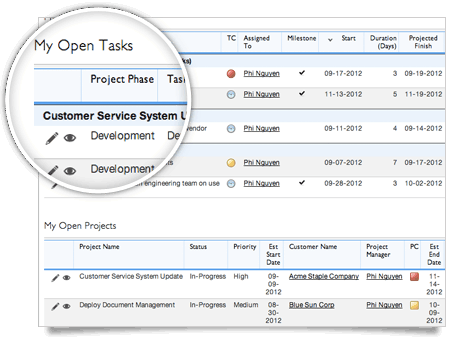
Reports filter and group table data with sorts, charts, and summary calculations. Dashboards combine report widgets, metric tiles, and embedded content into role-specific executive views.
Automation
No-code automation triggers on record changes, schedules, or webhooks. Actions include record creation, field updates, notifications, document generation, and outbound API calls.
Pipelines Integration
Visual integration builder formerly known as Cloudpipes. Connects Quickbase to hundreds of external systems (Salesforce, Slack, Box, OneDrive, NetSuite) without code.
Quickbase AI
2026 AI surface that drafts table schemas from natural language, generates report templates, and suggests automation rules. Permission-aware: never surfaces data the user cannot access.
How Much Does Quickbase Cost in 2026?
Three tiers. Team at $35 per user per month (annual) requires a 20-user minimum and includes core app building. Business at $55 per user per month requires 40 users and adds advanced automation, sandbox, and HIPAA. Enterprise is quote-based with custom AI credits, advanced security, audit logging, and dedicated CSM. FedRAMP Moderate available on government contracts.
What Drives the Cost
- User count and tier minimum: Team 20-user floor; Business 40-user floor.
- Pipelines integration usage: Higher tiers raise Pipelines execution limits.
- Sandbox and dev/test environments: Business and Enterprise add dedicated sandbox for safer changes.
- Compliance tier: HIPAA on Business; FedRAMP and advanced controls on Enterprise.
How to Get a Useful Quote
Inventory active app builders, citizen developers, and end-user app consumers to size the user license correctly. Benchmark Quickbase's quote against Smartsheet, monday.com, and Airtable before signing. Multi-year commitments unlock 15-25% discount.
Hidden Costs and Contract Gotchas to Watch For
- Minimum-seat floors cost more than headcount. 20-user Team minimum often exceeds actual citizen-developer headcount.
- Pipelines execution caps bind on heavy integration workflows. Budget for higher tier if integration volume scales.
- HIPAA requires Business. Team cannot ship healthcare workloads.
- FedRAMP is Enterprise-only. Government contracts require the federal tier.
- Sandbox absence on Team. Changes go straight to production; Business adds dev/test sandbox.
Quickbase Alternatives Worth Comparing
Smartsheet wins on spreadsheet familiarity and portfolio governance with Control Center. Lighter relational depth than Quickbase.
monday.com wins on visual customization and cross-product unity. Lighter custom app building than Quickbase.
Airtable wins on polished SaaS UX and bigger community. Lighter enterprise governance and audit trails.
Microsoft Power Apps wins for Microsoft 365 shops with bundled licensing. Steeper learning curve than Quickbase.
Caspio wins for database-first app building with stronger relational depth. Smaller integration ecosystem.
Retool wins for developer-led internal tools. Code-required; opposite end of the spectrum.
What Real Buyers Report About Quickbase
Reviewers on independent platforms (SoftwareAdvice, SelectHub) and IT communities (Reddit r/lowcode, CIO forums) consistently call out three patterns. Citizen-developer enablement is the lock-in factor; ops teams ship apps that would otherwise wait quarters for IT. Audit trails and field-level permissions are repeatedly cited as the reason regulated industries select Quickbase over polished SaaS alternatives. Pipelines integration removes the integration layer cost that custom-app projects usually incur.
The common critiques cluster around three points. Minimum-seat floors make pilot projects hard to justify. UI customization limits frustrate teams expecting pixel-perfect output. Performance at very large database scale needs external BI. For ops and IT teams in construction, manufacturing, and field service, Quickbase consistently rates as the architectural default for dynamic custom apps.
Bottom Line: Is Quickbase Right for You?
Quickbase is the right call for operations and IT teams in regulated industries that need custom apps around projects, workflows, and operational data. The relational depth, audit trails, and citizen-developer model fit construction, manufacturing, and field service workflows.
For polished SaaS UX with smaller teams, Airtable fits better. For spreadsheet familiarity with portfolio governance, Smartsheet is the safer pick. For Microsoft 365 shops with bundled licensing, Power Apps is the lower-friction option.
Verified on 2026-06-30 by the SaaSRat Editorial Team. Vendor facts cross-checked against quickbase.com (pricing, products, security pages), independent review aggregators, low-code community threads, and current 2025-2026 press cycles. About our methodology.
Frequently Asked Questions
What is Quickbase used for?
How much does Quickbase cost?
Is Quickbase a low-code platform?
What is Quickbase Pipelines?
Is Quickbase better than Smartsheet?
Does Quickbase support HIPAA?
Can Quickbase replace Excel spreadsheets?
How long does Quickbase implementation take?
Does Quickbase have an API?
What support does Quickbase offer?
Find Your Perfect Software
See how it can transform your workflow
- Personalized for your needs Tailored recommendations based on your unique requirements.
- Save time & resources Streamline your workflow and boost team productivity.
- Trusted by thousands Join 10,000+ businesses already growing with SaaSrat.
You're all set! 🎉
A specialist for will reach out within 1 business day with tailored recommendations for your needs.