

OmniFocus
by Omni Group
What is OmniFocus?
Get Best Quote for OmniFocus
Connect with SaaSrat experts to get the best quote for your business.
You're all set!
A specialist for OmniFocus will reach out within 1 business day.
OmniFocus Features
14-day free trial.
Perpetual license option (no forced subscription).
Deep Apple ecosystem integration (Shortcuts).
Projects
Areas
Tags
View All 11 Features
OmniFocus Pricing Plans
14-Day Free Trial
- Full evaluation.
Standard (perpetual)
- Mac or iOS one-time license.
Pro (perpetual)
- Mac + iOS Pro one-time license with custom perspectives.
Subscription
- All platforms + OmniFocus for the Web + updates.
OmniFocus Resources
OmniFocus Screenshots
Description
What Is OmniFocus and How Does It Work?
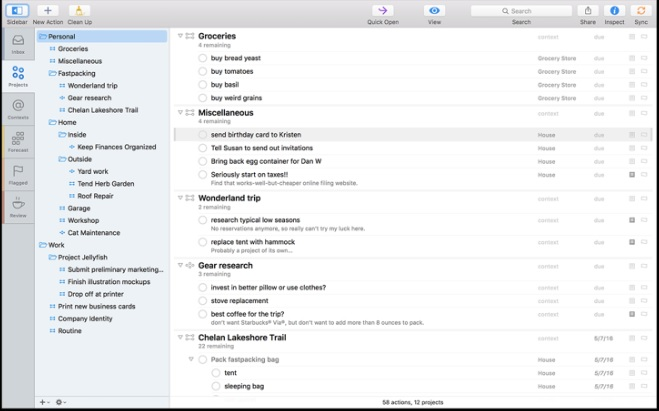
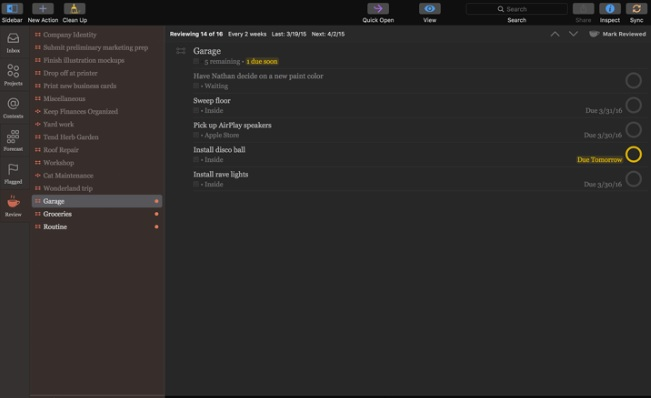
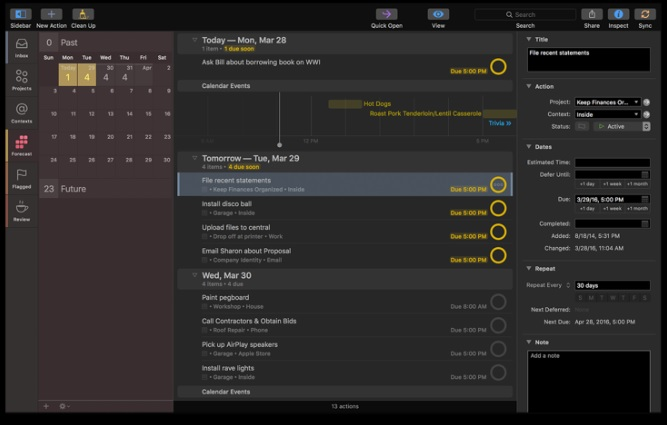
OmniFocus is a Mac and iOS task manager trusted by professionals who run complex personal systems. It supports projects, areas, tags, defer dates, custom perspectives, and Shortcuts integration for deep Apple ecosystem productivity.
Developed by The Omni Group, OmniFocus is the go-to GTD app on Apple platforms with a loyal power-user community.
OmniFocus at a Glance
| Best fit for | Apple ecosystem power users running GTD |
|---|---|
| Deployment | macOS + iOS + iPadOS + web (OmniFocus for the Web) |
| Pricing model | Perpetual license + Subscription (with web access) |
| Free trial | 14-day free trial |
| Support | Standard Omni Group support |
| Headquarters | Seattle, Washington, United States (Omni Group) |
How Much Does OmniFocus Cost in 2026?
OmniFocus offers Standard (Mac or iOS) and Pro (Mac + iOS + web) editions. Both are available as perpetual license (one-time purchase per platform) or Subscription (all platforms + web + updates). Contact The Omni Group for current perpetual and subscription rates at omnigroup.com/omnifocus.
| Plan | Price | Includes |
|---|---|---|
| 14-Day Free Trial | $0 | Full evaluation |
| Standard (perpetual) | Contact Omni Group | Mac or iOS one-time license |
| Pro (perpetual) | Contact Omni Group | Mac + iOS Pro one-time license |
| Subscription | Contact Omni Group | All platforms + web + updates |
OmniFocus Pros and Cons in 2026
Where OmniFocus Stands Out
- 14-day free trial.
- Perpetual license option (no forced subscription).
- Deep Apple ecosystem integration (Shortcuts).
- Projects, areas, tags, defer dates.
- Custom perspectives for advanced filtering.
- GTD power-user features.
- Standard + Pro tiers with clear feature difference.
- Long-standing Apple productivity vendor.
Where OmniFocus Falls Short
- Mac + iOS only (no Windows, Android, or Linux).
- Perpetual license per-platform (Mac and iOS separate).
- Learning curve for GTD newcomers.
- Interface density may overwhelm casual users.
- Custom perspectives require Pro edition.
Who Should Use OmniFocus?
OmniFocus fits Apple ecosystem power users who run GTD (Getting Things Done) and want deep task management with defer dates, custom perspectives, and Shortcuts automation. Mac + iPhone + iPad users get the most value.
Skip OmniFocus if you use Windows/Android (Todoist, TickTick fit better), need team collaboration (Asana, ClickUp), or are new to GTD (start with Todoist or Nirvana).
OmniFocus Alternatives Worth Comparing
Todoist. Cross-platform task manager with GTD compatibility.
Things 3. Elegant Mac and iOS task manager.
MyLifeOrganized (MLO). GTD power-user task manager.
Nirvana. GTD-focused task manager.
What Real Buyers Report About OmniFocus
Buyer discussions on Reddit r/gtd and Apple productivity communities describe OmniFocus as the go-to GTD app on Apple platforms. Trade-offs mentioned include Apple-only limitation and learning curve.
Frequently Asked Questions About OmniFocus
How much does OmniFocus cost in 2026?
OmniFocus offers Standard and Pro editions as perpetual license or Subscription. Contact The Omni Group for current rates.
Is OmniFocus available on Windows?
No. OmniFocus is Mac + iOS + iPadOS only. OmniFocus for the Web (part of Pro/Subscription) provides browser access.
What is the difference between OmniFocus Standard and Pro?
Pro adds custom perspectives, focus mode, and OmniFocus for the Web access on Subscription. Standard is enough for most personal GTD workflows.
Is there an OmniFocus free trial?
Yes. A 14-day free trial is available.
Where is Omni Group headquartered?
The Omni Group is headquartered in Seattle, Washington, United States.
What Top-Ranking OmniFocus Reviews Cover
- Project Management category
- Construction Project Management category
- Workflow Management category
- Productivity Management category
- Task Management category
Related OmniFocus Comparisons and Categories on SaaSRat
- Spitfire Project Management
- Proworkflow
- Copper Project Management
- Todo
- Chronos Workflow
- Asana Task Management
- Todoist
- Tyasuite Project Management
- Visual Planning
Bottom Line: Is OmniFocus Right for You?
OmniFocus is a fit for Apple ecosystem power users who run GTD and want deep task management with defer dates, custom perspectives, and Shortcuts automation.
Highlights: 14-day free trial, perpetual license option, deep Apple integration, GTD power features, and Standard + Pro tiers.
Trade-offs: Apple-only, perpetual license per-platform, and learning curve for GTD newcomers.
Consider Todoist for cross-platform GTD compatibility, Things 3 for elegant Apple task manager, MLO for Windows GTD, or Nirvana for GTD-focused cross-platform.
Verified on 2026-07-14 by the SaaSRat Editorial Team (Chirantan Patel, Senior SaaS Research Editor). Vendor facts cross-checked against the OmniFocus website and community discussions on Reddit and industry LinkedIn groups. About our methodology.
Frequently Asked Questions
Is there a free plan or free trial for OmniFocus?
How much does OmniFocus cost?
What does OmniFocus integrate with?
Who is OmniFocus best for?
What are the best alternatives to OmniFocus?
Is OmniFocus GDPR / SOC 2 compliant?
Does OmniFocus have a mobile app?
What do real users say about OmniFocus?
How does OmniFocus compare to its top competitor?
Does OmniFocus offer customer support?
Find Your Perfect Software
See how it can transform your workflow
- Personalized for your needs Tailored recommendations based on your unique requirements.
- Save time & resources Streamline your workflow and boost team productivity.
- Trusted by thousands Join 10,000+ businesses already growing with SaaSrat.
You're all set! 🎉
A specialist for will reach out within 1 business day with tailored recommendations for your needs.