

MobaXterm
by Mobatek
What is MobaXterm?
Get Best Quote for MobaXterm
Connect with SaaSrat experts to get the best quote for your business.
You're all set!
A specialist for MobaXterm will reach out within 1 business day.
MobaXterm Features
Enhanced terminal for Windows (tabbed)
Embedded X11 server (Fully configured Xorg-based)
Tabbed SSH client
RDP + VNC + FTP + MOSH + more network protocols
Unix commands: bash + ls + cat + sed + grep + awk + rsync
Automatic graphical SFTP browser on SSH connection
View All 10 Features
MobaXterm Pricing Plans
Home Edition
- Free download for personal use
- Enhanced terminal for Windows
- Embedded X11 server + tabbed SSH client
- SSH + X11 + RDP + VNC + FTP + MOSH + Unix commands
- Single portable exe (no install)
- Features comparison available vs Pro
Professional Edition
- Professional Edition for company use
- Much more features vs Home Edition
- Customizer software included
- Advanced remote computing capabilities
- Company license
Volume License
- Volume license for multi-user organisation deployment
- Enterprise-scale MobaXterm rollout
- Custom pricing
- Enterprise support
MobaXterm Screenshots
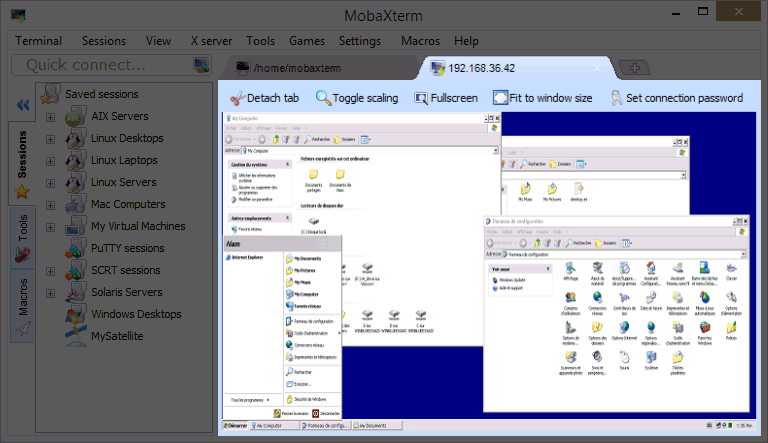
Description
What Is MobaXterm and How Does It Work?
MobaXterm is Enhanced terminal for Windows with X11 server tabbed SSH client network tools and much more. Embedded Xserver displays remote applications on Windows computer. Ultimate toolbox for remote computing single Windows application providing loads of functions customized for programmers webmasters IT administrators and users handling remote jobs. Provides all important remote network tools (SSH X11 RDP VNC FTP MOSH) and Unix commands (bash ls cat sed grep awk rsync) to Windows desktop in single portable exe file that works out of the box. All-In-One network application: when using SSH to connect to remote server graphical SFTP browser automatically pops up to directly edit remote files. Two editions: Home Edition (free) and Professional Edition (subscription for company use more features plus Customizer software). Actively developed by Mobatek since 2008.
The vendor positions on Ultimate toolbox for remote computing. Focus on proposing an intuitive user interface for efficiently accessing remote servers through different networks or systems. Actively developed and frequently updated by Mobatek. Key features include Embedded X server (Fully configured Xserver based on X.org) Easy DISPLAY exportation (DISPLAY exported from remote Unix to local Windows) X11-Forwarding.
MobaXterm Home Edition is free for personal use. Professional Edition subscription is required for company use. Professional Edition includes much more features plus the Customizer software. Vendor emphasizes simple aim: intuitive user interface for efficient remote server access through different networks or systems.
MobaXterm at a Glance
| Best fit for | Windows programmers, webmasters, IT administrators, and remote computing users wanting enhanced terminal + X11 server + SSH client + network tools in single portable Windows application |
|---|---|
| Vendor | Mobatek (French vendor) |
| Active since | 2008 |
| Home Edition | Free (personal use) |
| Professional Edition | Subscription (company use more features + Customizer software) |
| Deployment | Single portable exe file (works out of the box) |
| Network tools | SSH, X11, RDP, VNC, FTP, MOSH, and more |
| Unix commands available | bash, ls, cat, sed, grep, awk, rsync, and more |
| Key differentiator | Embedded X server (Xorg-based) |
| SSH extras | Graphical SFTP browser auto-appears on SSH connection |
| Editions comparison | Features comparison page available |
| Update frequency | Actively developed and frequently updated |
| Registered trademark | MobaXterm is a registered trademark of Mobatek |
| Headquarters | France |
MobaXterm Key Features and Capabilities
All-In-One Windows terminal is the vendor differentiator. Single portable exe file provides SSH X11 RDP VNC FTP MOSH plus Unix commands (bash ls cat sed grep awk rsync) plus embedded X server. Rather than installing separate SSH client (PuTTY) X server (Xming VcXsrv) SFTP client (WinSCP) and Cygwin/Git Bash for Unix commands MobaXterm consolidates in one application.
Embedded X server (Fully configured Xserver based on X.org) enables displaying remote Unix graphical applications on Windows desktop. DISPLAY exported from remote Unix to local Windows automatically. Meaningful for engineers running graphical Linux applications from Windows workstations.
Graphical SFTP browser auto-appears when SSH connects to remote server. Directly edit remote files without separate SFTP client. Reduces friction for SSH-first workflows.
Home Edition (free) vs Professional Edition (subscription) tier structure. Home Edition free for personal use. Professional Edition subscription for company use adds much more features plus Customizer software. Common freemium model for developer tools.
Single portable exe means no installation required. Works out of the box. Meaningful for IT administrators who need to run from removable media or locked-down corporate Windows environments where installation is restricted.
Since 2008 vendor Mobatek actively develops and frequently updates MobaXterm. Long-established Windows terminal option in the developer tools category.
- Enhanced terminal for Windows (tabbed)
- Embedded X11 server (Fully configured Xorg-based)
- Tabbed SSH client
- RDP + VNC + FTP + MOSH + more network protocols
- Unix commands: bash + ls + cat + sed + grep + awk + rsync
- Automatic graphical SFTP browser on SSH connection
- Easy DISPLAY exportation from Unix to Windows
- X11-Forwarding
- Single portable exe file (no install required)
- Home Edition (free personal use)
- Professional Edition (subscription company use + Customizer software)
- Screenshot demo available
- Actively developed by Mobatek since 2008
How Much Does MobaXterm Cost in 2026?
MobaXterm pricing structure: Home Edition (free for personal use download and use). Professional Edition (subscription for company use pricing scoped by license type single-user vs multi-user and organization size). Pricing page returned 404 during automated research refer to About us + Home License + Pro License pages on vendor site or Buy button.
Windows SSH client + terminal buyers should compare MobaXterm against PuTTY (established free SSH client) SecureCRT (VanDyke commercial SSH client) Termius (multi-platform SSH client with cloud sync) Windows Terminal (Microsoft native modern terminal) and WSL (Windows Subsystem for Linux). MobaXterm differentiators are embedded X11 server single portable exe file All-In-One consolidation (SSH + X11 + RDP + VNC + FTP + Unix commands) and automatic graphical SFTP browser on SSH.
| Plan | Price | Includes |
|---|---|---|
| Home Edition | $0 (Free personal use) | Free download + enhanced terminal + X11 server + SSH + RDP + VNC + FTP + Unix commands + portable exe |
| Professional Edition | Contact Vendor | Subscription for company use + much more features + Customizer software |
| Volume License | Contact Sales | Volume license + multi-user organisation deployment + enterprise support |
MobaXterm Pros and Cons in 2026
Where MobaXterm Stands Out
- All-In-One Windows terminal. Single portable exe consolidates SSH + X11 + RDP + VNC + FTP + MOSH + Unix commands. Reduces separate PuTTY + Xming + WinSCP + Cygwin/Git Bash installs.
- Embedded X server (Xorg-based). Rare capability for Windows terminal. Enables graphical Linux applications on Windows desktop.
- Free Home Edition. Removes evaluation friction for personal use. Full feature set for individual developers.
- Single portable exe (no install). Works out of the box. Meaningful for IT admins running from removable media or locked-down Windows environments.
- Automatic graphical SFTP browser on SSH. Directly edit remote files without separate SFTP client. Reduces workflow friction.
- Since 2008 with active development. Long-established with frequent updates. Rare longevity in Windows developer tools category.
Where MobaXterm Falls Short
- Windows-only. Mac and Linux users cannot use.
- Professional Edition pricing not published. Company use requires vendor engagement for subscription pricing.
- Home Edition restricted to personal use. Business use requires Professional Edition. Vendor licensing terms should be validated for buyer use case.
MobaXterm vs Top Competitors: Side-by-Side Comparison
Buyers evaluating MobaXterm typically shortlist 2 to 3 alternatives before signing.
| Feature | MobaXterm | PuTTY | Termius |
|---|---|---|---|
| Deployment | Windows portable exe | Windows exe | Multi-platform + cloud |
| Home / Free tier | Yes (personal use) | Yes (open source) | Yes |
| Embedded X11 server | Yes (Xorg-based) | No | No |
| All-In-One (SSH + X11 + RDP + VNC + FTP + Unix) | Yes | SSH-only | SSH + SFTP + cloud sync |
| Auto graphical SFTP on SSH | Yes | No | Manual |
| Professional subscription for company use | Yes | No (open source) | Yes |
| Best fit | Windows engineers wanting All-In-One terminal + X server + portable | Free open source Windows SSH client | Multi-platform SSH with cloud sync |
Who Should Use MobaXterm?
MobaXterm is the right pick for Windows programmers webmasters IT administrators and remote computing users wanting enhanced terminal + X11 server + SSH client + network tools in single portable Windows application. All-In-One consolidation (SSH + X11 + RDP + VNC + FTP + MOSH + Unix commands) reduces separate PuTTY + Xming + WinSCP + Cygwin/Git Bash installs.
Engineers running graphical Linux applications from Windows workstations benefit specifically from Embedded X server (Xorg-based) with automatic DISPLAY exportation. IT administrators running from removable media or locked-down Windows environments benefit from single portable exe (no install). SSH-first workflows benefit from automatic graphical SFTP browser on SSH connection.
MobaXterm is not the right fit for Mac or Linux users (Windows-only). Free open source Windows SSH client should compare PuTTY. Multi-platform SSH with cloud sync should compare Termius. VanDyke commercial SSH client compare SecureCRT. Microsoft native modern terminal compare Windows Terminal. Windows Subsystem for Linux compare WSL.
MobaXterm Alternatives Worth Comparing
PuTTY. Established free open source Windows SSH client. Compare for free open source Windows SSH client.
SecureCRT. VanDyke commercial SSH client. Compare for commercial SSH client alternative.
Termius. Multi-platform SSH client with cloud sync. Compare for multi-platform SSH with cloud sync.
Windows Terminal. Microsoft native modern terminal. Compare for Microsoft native terminal.
WSL (Windows Subsystem for Linux). Full Linux on Windows. Compare for full Linux environment on Windows.
MobaXterm Implementation and Onboarding
MobaXterm implementation begins with GET MOBAXTERM NOW download via mobaxterm.mobatek.net. Home Edition (free) is instant self-serve download and use. Professional Edition (subscription for company use) requires purchase via Buy button or Customer login.
Standard Windows deployment reaches production within same day (download + run portable exe). No installation required. SSH connection setup takes minutes. X11 server auto-configures. Automatic graphical SFTP browser on SSH connection provides immediate remote file editing capability. Enterprise volume license deployments extend to 1-2 weeks with license management across users.
What Real Buyers Report About MobaXterm
MobaXterm vendor positioning: Enhanced terminal for Windows with X11 server tabbed SSH client network tools and much more. Ultimate toolbox for remote computing. In a single Windows application it provides loads of functions that are customized for programmers webmasters IT administrators and pretty much all users who need to handle their remote jobs in a more simple fashion. Focus on proposing an intuitive user interface for efficiently accessing remote servers through different networks or systems. Actively developed and frequently updated by Mobatek since 2008.
For independent perspective search Reddit r/sysadmin r/linux r/programming r/homelab and IT admin communities for MobaXterm discussions. MobaXterm is often discussed alongside PuTTY SecureCRT Termius Windows Terminal and WSL in Windows SSH/terminal category. Long-time Windows developer communities discuss MobaXterm for embedded X server and portable exe positioning.
Frequently Asked Questions About MobaXterm
What is MobaXterm?
MobaXterm is Enhanced terminal for Windows with X11 server tabbed SSH client network tools and much more. Ultimate toolbox for remote computing customized for programmers webmasters IT administrators.
How much does MobaXterm cost?
Home Edition is free for personal use. Professional Edition is subscription-based for company use (much more features plus Customizer software). Contact vendor via Buy button on mobaxterm.mobatek.net for Professional Edition pricing.
Which network protocols does MobaXterm support?
SSH X11 RDP VNC FTP MOSH and more.
Does MobaXterm include Unix commands?
Yes. Provides bash ls cat sed grep awk rsync and more Unix commands to Windows desktop in single portable exe file.
What is the embedded X server?
Fully configured Xserver based on X.org that displays remote applications on Windows desktop. DISPLAY is exported from remote Unix to local Windows automatically.
What is the difference between Home and Professional Edition?
Home Edition is free for personal use with core features. Professional Edition is subscription-based for company use with much more features plus Customizer software.
Does MobaXterm require installation?
No. MobaXterm is a single portable exe file that works out of the box. Meaningful for locked-down Windows environments or removable media use.
Does MobaXterm auto-open SFTP on SSH?
Yes. When using SSH to connect to remote server a graphical SFTP browser automatically pops up to directly edit remote files.
Who develops MobaXterm?
Mobatek (French vendor). Actively developed and frequently updated since 2008. MobaXterm is a registered trademark of Mobatek.
How do I download MobaXterm?
GET MOBAXTERM NOW download via mobaxterm.mobatek.net.
What Top-Ranking MobaXterm Reviews Cover
Related MobaXterm Comparisons and Categories on SaaSRat
- Vyapin Ark Windows
- Reportserver
- Flexiserver
- Em Client
- Remotepc
- Clientwindow
- Clientbook
- Manageengine Remote
- Remote
- Remotepass
- Remoteview
- Client360 Cloud Erp
Bottom Line: Is MobaXterm Right for You?
MobaXterm is the right call for Windows programmers webmasters IT administrators and remote computing users wanting enhanced terminal + X11 server + SSH client + network tools in single portable Windows application. All-In-One consolidation (SSH + X11 + RDP + VNC + FTP + MOSH + Unix commands + automatic graphical SFTP browser on SSH) reduces separate PuTTY + Xming + WinSCP + Cygwin/Git Bash installs. Embedded X server (Xorg-based) is rare capability for Windows terminal. Since 2008 with active development from Mobatek.
For free open source Windows SSH client compare PuTTY. For commercial SSH client alternative compare SecureCRT. For multi-platform SSH with cloud sync compare Termius. For Microsoft native modern terminal compare Windows Terminal. For full Linux environment on Windows compare WSL.
GET MOBAXTERM NOW download via mobaxterm.mobatek.net. Home Edition (free for personal use) is instant self-serve. Professional Edition (subscription for company use) requires purchase via Buy button. Budget same-day deployment (download + run portable exe + SSH connection setup) and 1-2 weeks for enterprise volume license deployments with license management.
Verified on 2026-07-24 by the SaaSRat Editorial Team (Chirantan Patel, Senior SaaS Research Editor). Content and pricing scraped from the MobaXterm vendor website. About our methodology.
Frequently Asked Questions
Is there a free plan or free trial for MobaXterm?
How much does MobaXterm cost?
What does MobaXterm integrate with?
Who is MobaXterm best for?
What are the best alternatives to MobaXterm?
Is MobaXterm GDPR / SOC 2 compliant?
Does MobaXterm have a mobile app?
What do real users say about MobaXterm?
How does MobaXterm compare to its top competitor?
Does MobaXterm offer customer support?
Find Your Perfect Software
See how it can transform your workflow
- Personalized for your needs Tailored recommendations based on your unique requirements.
- Save time & resources Streamline your workflow and boost team productivity.
- Trusted by thousands Join 10,000+ businesses already growing with SaaSrat.
You're all set! 🎉
A specialist for will reach out within 1 business day with tailored recommendations for your needs.