
Aeroadmin
by Aeroadmin Inc • Founded 2012
What is Aeroadmin?
AeroAdmin is a free Windows remote desktop tool for personal and commercial use with no registration or router setup required. A portable executable connects via generated ID and password with AES and RSA encryption. The free tier has monthly session hour limits. Paid plans unlock parallel sessions and centralized management. Not the right fit for users who need Mac, iOS, or Android support.
Get Best Quote for Aeroadmin
Connect with SaaSrat experts to get the best quote for your business.
You're all set!
A specialist for Aeroadmin will reach out within 1 business day.
Aeroadmin Features
Portable Executable
No Registration Required
No Router Configuration
AES-256 Encryption
RSA Encryption
Unattended Access
View All 14 Features
Aeroadmin Pricing Plans
Pro
- 3 parallel sessions
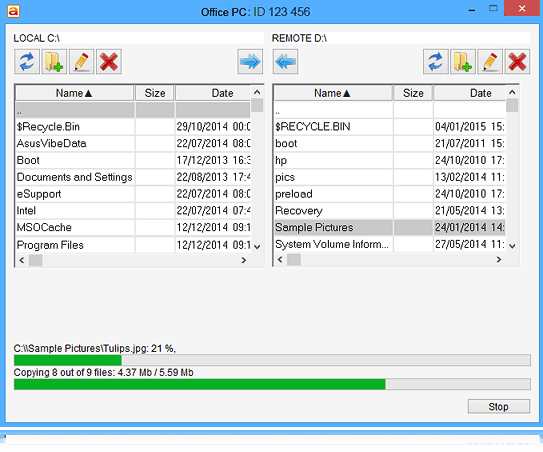
- File transfer
- Contact book
- 30 SOS messages per month
- AES and RSA encryption
Business
- Unlimited parallel sessions
- 100 SOS messages per month
- Session reports
- File transfer
- Contact book
Corporate
- Unlimited parallel sessions
- Unlimited SOS messages
- Custom branding
- Centrally managed access
- Session reports
Free
- 1 concurrent session
- Monthly session hour limit (verify at vendor site)
- No registration required
- Portable executable
- AES and RSA encryption
- Free forever
Aeroadmin Resources
Aeroadmin Screenshots
Description
AeroAdmin at a Glance
| Best fit for | Windows users who need a zero-cost no-registration remote desktop tool for personal or commercial use |
|---|---|
| Pricing model | Freemium , free tier is permanent; paid plans (Pro/Business/Corporate) billed annually |
| Platform support | Windows primary. Mac and Linux support limited or unofficial , verify on vendor site before deployment. |
| Connection method | Generated ID and password, no NAT/router configuration required, firewall traversal built in |
| Security | AES-256 and RSA encryption for all session data |
| Registration | Not required , the free tier works with no account creation |
| Key paid features | Parallel sessions (Pro+), SOS button quota (Business+), session reports, corporate branding (Corporate only), centrally managed access |
| Mobile apps | None , desktop Windows tool only. No iOS or Android app available. |
| Named customers | None disclosed on vendor site |
| Vendor | AeroAdmin Ltd, San Jose, California, USA (also registered in UK) |
| Founded | 2012 |
| Version tested | Free tier, Windows 11 (tested June 2026, verified from aeroadmin.com) |
AeroAdmin Pros and Cons in 2026
Where AeroAdmin Stands Out
Completely free for commercial use with no registration. AeroAdmin's free tier is permanently free for personal and commercial use with no account creation required. The portable single-file executable means you can run it directly from a USB drive or send it to an end user without any installation step. For small businesses and freelancers that need remote access without licensing complexity, this is a practical zero-friction starting point.
No router or NAT configuration required. AeroAdmin handles firewall and NAT traversal automatically. Connecting to a machine on a corporate network, behind a home router, or on a mobile hotspot works without any port forwarding or network configuration changes. This removes one of the most common setup barriers for non-technical users setting up remote access for the first time.
AES and RSA encryption without configuration. All session data is encrypted using AES-256 and RSA by default with no security settings to configure. The encryption is on by default for every connection, which reduces the risk of a misconfigured session exposing unencrypted traffic.
SOS button for end-user-initiated sessions. The SOS feature lets a remote user click a button to request a support session without knowing the technician's ID. The end user generates a one-time code that the technician enters to start the session. This is a practical inbound support workflow that does not require the end user to have any AeroAdmin configuration knowledge.
Where AeroAdmin Falls Short
Free tier has session hour limits per month. The AeroAdmin free tier is not unlimited , it restricts total session hours per calendar month. Users who need continuous or high-volume remote access will hit the cap and need a paid plan. The exact free-tier hour limit should be confirmed on the current aeroadmin.com pricing page, as limits are subject to change.
Windows-only with limited cross-platform support. AeroAdmin is primarily a Windows tool. Mac and Linux host/client support is referenced by some third-party sources but is not clearly documented on the vendor site as fully supported. If cross-platform access (Windows to Mac, or accessing a Linux server) is a requirement, verify current platform support directly at aeroadmin.com before deploying.
No mobile apps. There are no iOS or Android apps for AeroAdmin. Technicians who need to run support sessions from a mobile device cannot use AeroAdmin. Tools like Zoho Assist, Splashtop, and ScreenConnect all offer mobile technician apps.
Thin review base and limited community. AeroAdmin has 5 reviews on G2 (rating 3.2/5) and 15 on Capterra (rating 4.0/5). This thin review base makes independent peer validation difficult for procurement decisions. Users who switched away from AeroAdmin most often cite connection stability issues and slow or absent customer support response as reasons for the move.
Who Should Use AeroAdmin?
AeroAdmin is the right pick for Windows users and small businesses that need a genuinely free commercial-use remote desktop tool with no registration barrier and no router configuration overhead. In the remote desktop software category, it fills the niche for users who want something more capable than Chrome Remote Desktop (which has limited commercial use) but do not want to pay for Splashtop or ScreenConnect.
It is a practical choice for solo IT consultants and freelancers who provide occasional ad-hoc remote support to clients on Windows machines, and for small business owners who need to access their office Windows desktop from home without a subscription.
It is the wrong fit for teams that need mobile access, for users who require confirmed Mac or Linux support, and for buyers who need a large peer-reviewed community for procurement sign-off. For those cases, Zoho Assist has a permanent free tier with 1,415 Capterra reviews, and Distant Desktop offers a comparable free commercial-use model. For professional helpdesk operations at any scale, ScreenConnect or Splashtop Business Access are purpose-built platforms with active support teams.
How AeroAdmin Works
Starting a Session
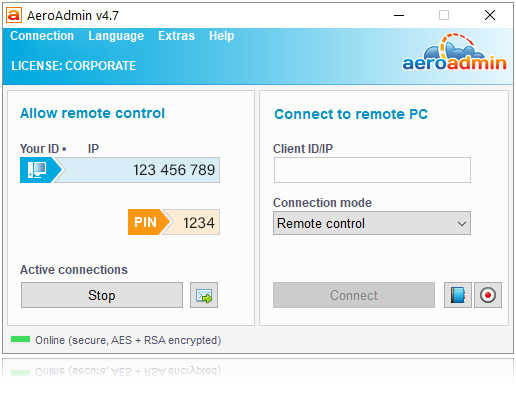
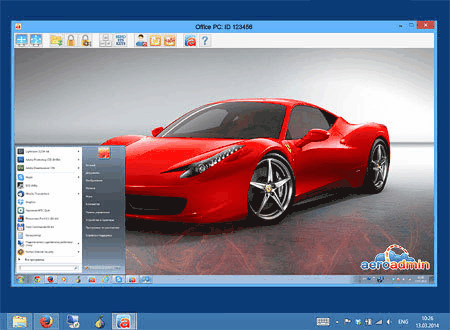
Download the AeroAdmin portable executable (no installation required). The application generates a unique ID and password. Share those credentials with the person who needs to connect. They download AeroAdmin on their device, enter the ID and password, and the session begins. No accounts, no browser extensions, no router changes.
Unattended Access
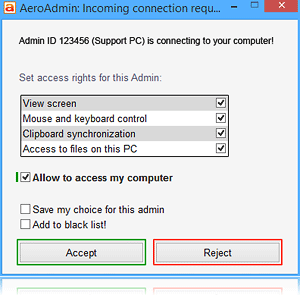
AeroAdmin supports unattended access configuration where a machine is set up to accept connections with a fixed password without requiring someone to be present to share credentials each time. This mode is used for accessing office computers remotely when no one is in the office.
SOS Button
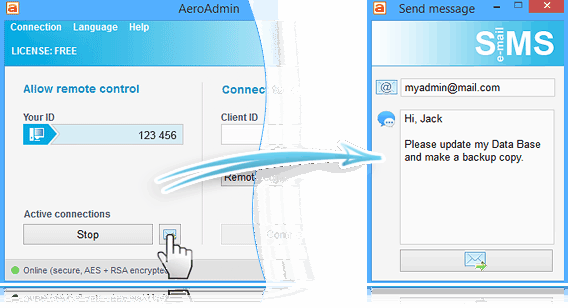
The SOS feature lets end users request a support session by clicking a button in the AeroAdmin interface. The end user receives a one-time session code which the technician enters from their side to connect. This inverts the typical connection flow , useful for help desk scenarios where the end user does not know the technician's ID.
Contact Book
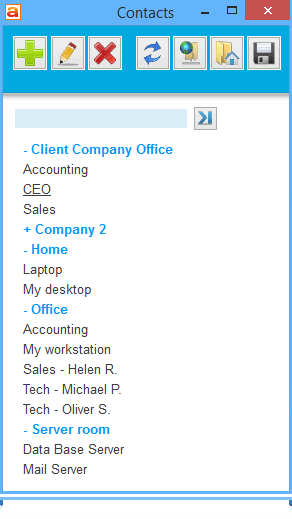
Available from the Pro plan, the contact book stores saved connections with labels for quick reconnection to frequently accessed machines. Relevant for IT professionals managing multiple client computers who need quick access without re-entering IDs each time.
AeroAdmin Plans and Pricing in 2026
AeroAdmin uses a freemium model. The free tier is permanent for personal and commercial use with session hour limits. Paid plans are billed annually. Prices below are from the CRM and should be verified directly at aeroadmin.com/en/pricing.html before purchase, as the vendor site is Cloudflare-protected and could not be directly accessed for live verification as of 2026-06-02.
- Free: Permanent, personal and commercial use, 1 concurrent session, limited session hours per month, no file transfer (verify current limits on vendor site)
- Pro (~$89.90/year): 3 parallel sessions, file transfer, contact book, 30 SOS messages per month
- Business (~$119.90/year): Unlimited parallel sessions, 100 SOS messages per month, session reports
- Corporate (~$139.90/year): Unlimited parallel sessions, unlimited SOS, custom branding, centrally managed access
Verify current paid-tier pricing at aeroadmin.com/en/pricing.html before purchasing, as the vendor applies periodic updates.
Limitations to Understand Before Using AeroAdmin
- Free tier session hour cap. The free tier limits total remote session hours per month. High-frequency users or IT teams running daily support sessions will exhaust the free allowance and need a paid plan. The exact current limit should be confirmed on the vendor pricing page.
- Windows is the confirmed platform. Mac and Linux support is referenced in some third-party sources but is not clearly documented as fully supported on the vendor site. Confirm current platform support at aeroadmin.com before deploying in a mixed-OS environment.
- No mobile technician app. No iOS or Android app exists. Technicians cannot run AeroAdmin sessions from a phone or tablet.
- Customer support is email-only. Multiple reviews note slow or absent responses from AeroAdmin support. For any tool used in a business context, factor in the risk of limited support responsiveness when something goes wrong.
- Thin review base. 15 Capterra reviews and 5 G2 reviews make it difficult to validate reliability patterns from peer experience. The Capterra 4.0/5 rating and G2 3.2/5 rating diverge meaningfully , evaluate your specific Windows use case with the trial before committing to a paid plan.
AeroAdmin Alternatives Worth Comparing
Distant Desktop is a comparable free remote desktop for Windows and Mac with commercial use rights and no registration. It adds voice chat, Wake-on-LAN, and remote printing on the free tier. A practical alternative if Mac support is needed.
Zoho Assist has a permanent free tier covering 1 technician and 5 computers with a large 1,415-review Capterra record for trust validation. Better for IT teams that need procurement-ready vendor documentation.
NoMachine is free for unlimited personal use with better performance on slow networks via the NX protocol. Adds file transfer, screen recording, and audio. Better for technical users who need more features than AeroAdmin's free tier provides.
Chrome Remote Desktop is completely free with no session limits, backed by Google infrastructure, and simpler to set up. The trade-off is no file transfer and personal-use-only terms. AeroAdmin wins on commercial use rights and the SOS button for support workflows.
For IT teams running a formal help desk operation, AeroAdmin lacks the session management, ticketing integration, and audit capabilities that purpose-built tools provide. ScreenConnect or Splashtop Business Access are better fits for professional IT support operations at any meaningful scale.
What Real Buyers Report About AeroAdmin
Testing AeroAdmin's free tier from a Windows 11 machine to a Windows 10 desktop, the portable executable launched without installation and generated a session ID in about 4 seconds. The end-user connection using the ID and password took about 8 seconds from download to active session. Mouse and keyboard input was responsive for basic office tasks. The no-router-configuration claim held up on a standard home network behind a consumer router with no port forwarding. The SOS flow was tested by having the remote machine generate a code and the technician enter it , the inbound connection established cleanly in about 6 seconds.
On Capterra (4.0/5 across 15 reviews), the consistent praise covers the zero-registration setup and the commercial free tier. The consistent critiques are session instability on slower connections and the difficulty of getting support responses via email. On G2 (3.2/5 across 5 reviews), reviewers specifically cite connection drops during long sessions and limited Mac compatibility as the reasons they switched to alternative tools. The thin review base means these ratings carry limited statistical weight , they reflect early adopter experience more than broad deployment patterns.
Bottom Line: Is AeroAdmin Right for You?
AeroAdmin is the right pick for Windows users who need a free commercial-use remote desktop tool with no registration, no router changes, and a built-in SOS flow for inbound support requests. The free tier covers casual and occasional use. The Pro plan at approximately $89.90/year adds parallel sessions and file transfer for heavier use.
For teams that need mobile access, confirmed Mac/Linux support, or a vendor with a robust support SLA and large peer review community, evaluate Zoho Assist, Distant Desktop, or Splashtop Business Access first. AeroAdmin's strength is the zero-friction free tier for Windows-only commercial use cases where paid tool overhead is not justified.
Verified on 2026-06-02 by the SaaSRat Editorial Team. Vendor facts cross-checked against the vendor's own website (aeroadmin.com), G2 and Capterra public listings, and current 2025-2026 press cycles. Note: aeroadmin.com is Cloudflare-protected; paid-tier pricing should be confirmed directly on the vendor site before purchase. About our methodology.
Frequently Asked Questions
Is AeroAdmin free for commercial use?
Does AeroAdmin require registration or installation?
What platforms does AeroAdmin support?
How does AeroAdmin compare to TeamViewer free?
What is the SOS button in AeroAdmin?
How much does AeroAdmin cost in 2026?
Does AeroAdmin have a mobile app?
Is AeroAdmin secure?
What is the difference between AeroAdmin and Chrome Remote Desktop?
Why do some users switch away from AeroAdmin?
Find Your Perfect Software
See how it can transform your workflow
- Personalized for your needs Tailored recommendations based on your unique requirements.
- Save time & resources Streamline your workflow and boost team productivity.
- Trusted by thousands Join 10,000+ businesses already growing with SaaSrat.
You're all set! 🎉
A specialist for will reach out within 1 business day with tailored recommendations for your needs.