

Intervals
by Pelago / Intervals • Founded 2000
What is Intervals?
Get Best Quote for Intervals
Connect with SaaSrat experts to get the best quote for your business.
You're all set!
A specialist for Intervals will reach out within 1 business day.
Intervals Features
Task management
Time tracking
Reporting
Document storage
Milestone tracking
Gantt charts
View All 165 Features
Intervals Pricing Plans
Basic
- Active Projects: 10
- Document Storage: 10 Gb
- Users Included: 10
- Includes all standard features
Professional
- Active Projects: 30
- Document Storage: 50 Gb
- Users Included: Unlimited
- Includes all standard features
Premium
- Active Projects: 50
- Document Storage: 100 Gb
- Users Included: Unlimited
- Includes all standard features
Unlimited
- Active Projects: Unlimited
- Document Storage: Unlimited
- Users Included: Unlimited
- Includes all standard features
Lite
- Active Projects: 3
- Document Storage: 5 Gb
- Users Included: 3
- Includes all standard features
Not so Basic
- Active Projects: 15
- Document Storage: 25 Gb
- Users Included: Unlimited
- Includes all standard features
Top Shelf
- Active Projects: 100
- Document Storage: 150 Gb
- Users Included: Unlimited
- Includes all standard features
Intervals Resources
Intervals Screenshots
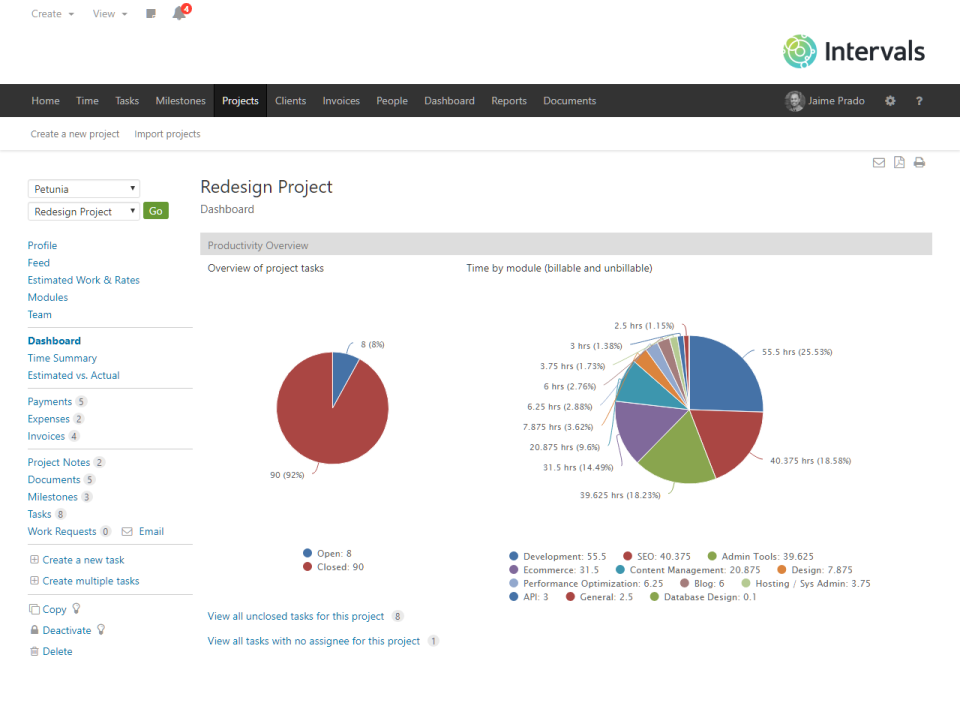
Description
Intervals at a Glance
| Best for | Professional services teams (web and software development companies, creative and marketing agencies, consulting firms, IT services, remote teams) that bill by time and want flat-rate pricing based on active project count rather than per-user seats |
|---|---|
| Deployment | Web-based SaaS with desktop, mobile, and web time tracking; QuickBooks and Freshbooks integrations |
| Starting price | Lite $29/mo (3 users, 3 projects); Basic $49/mo (unlimited users, 10 projects); Professional $99/mo (unlimited users, 30 projects); 14-day free trial no credit card required |
| Key strengths | Flat-rate pricing not per-user, unlimited users on Basic and Professional, time tracking plus PM plus invoicing unified, mature platform with substantial customer base, QuickBooks and Freshbooks integrations |
| Not ideal for | Teams that need per-user pricing structure, or organizations that need more than 30 active projects (Professional plan cap) without moving to enterprise arrangements |
Intervals Overview
Intervals is web-based time tracking and project management software from Pelago that combines time tracking, task management, invoicing, and reporting into one platform.
The distinctive pricing model is decisive for buyer selection: Intervals charges a flat monthly rate based on active project count rather than per-user seats. Basic and Professional plans include unlimited users, meaning cost does not scale with team growth.
The Lite plan at $29/month covers three included users and three active projects; Basic at $49/month adds unlimited users with ten active projects; Professional at $99/month scales to unlimited users with thirty active projects.
Target customer profile is professional services teams that bill by time: web and software development companies, creative and marketing agencies, consulting firms, IT services, and remote teams where time-based billing matters for revenue.
The platform operates as a mature offering with substantial customer base and hours tracked, positioned as unified functionality that removes the need to switch between separate time tracking, project management, and invoicing tools.
Capabilities and Named Features
The Intervals thesis is that professional services teams billing by time need time tracking plus project management plus invoicing in one platform, and pricing by active project count instead of per-user seats matches how service businesses actually think about capacity.
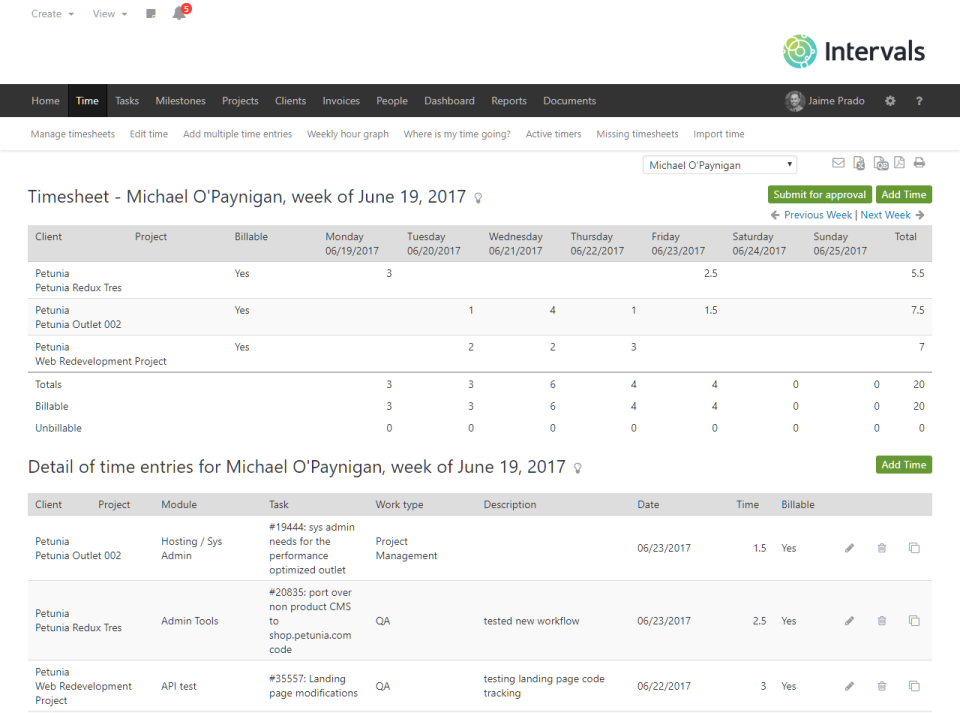
Web-based time tracking works across desktop, mobile, and web with daily time-logging reminders that address the specific compliance challenge service teams face where staff must consistently log time for billing.
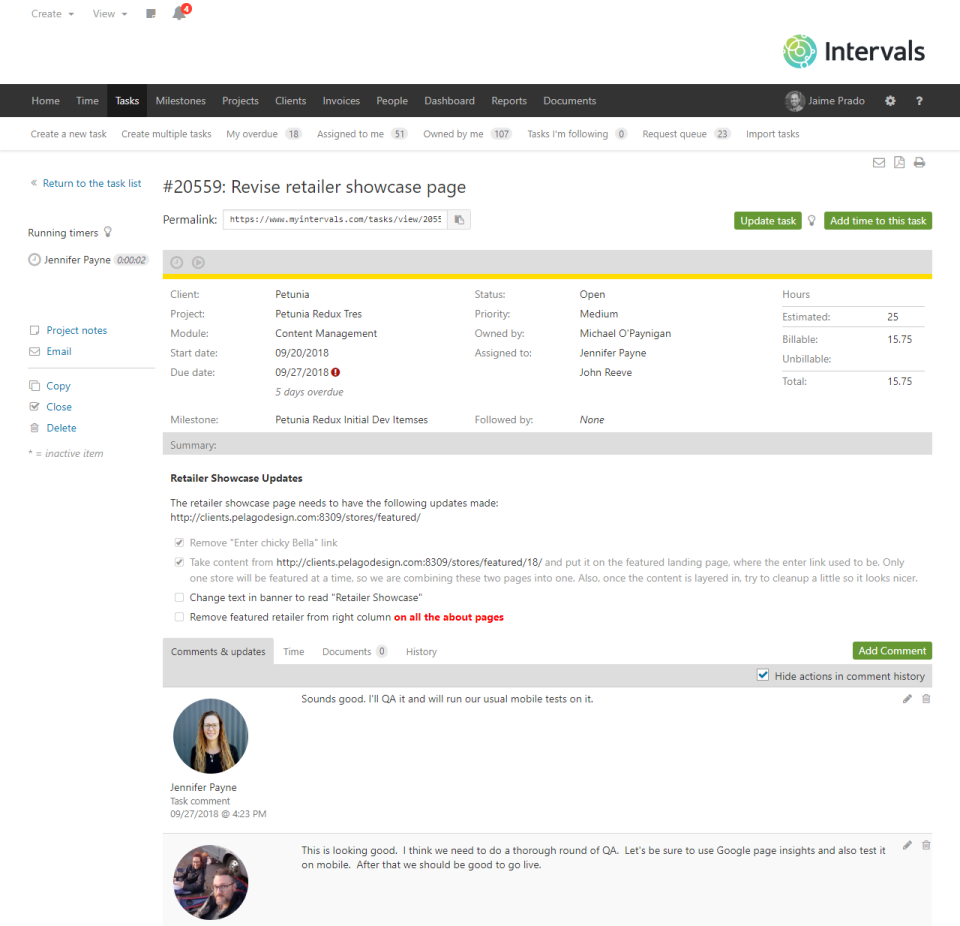
Task management with custom workflows covers the project management side rather than being time tracking only. Service teams need both time tracking and project execution in one tool.
Real-time budget monitoring and alerts protect the specific service business risk of scope creep silently eating margin. Alerts fire when projects approach budget rather than after overruns.
Automated invoicing from tracked time closes the service business revenue loop. Time entries flow directly to invoices without manual re-keying that hurts data quality.
QuickBooks and Freshbooks integrations connect Intervals to the accounting systems service businesses use most. Rather than forcing accounting migration, Intervals plugs into existing accounting infrastructure.
The flat-rate active-project pricing is genuinely decisive. Per-user pricing punishes team growth; flat-rate by project count matches how service businesses actually think about capacity , projects are the billable unit.
Unlimited users on Basic ($49/mo) and Professional ($99/mo) plans means adding staff does not increase software cost. Growing service teams frequently cite this as decisive against per-user competitors.
Named feature list
- Web-based time tracking
- Desktop time tracking
- Mobile time tracking
- Task management
- Custom workflows
- Real-time budget monitoring
- Budget alerts
- Automated invoicing
- Project management
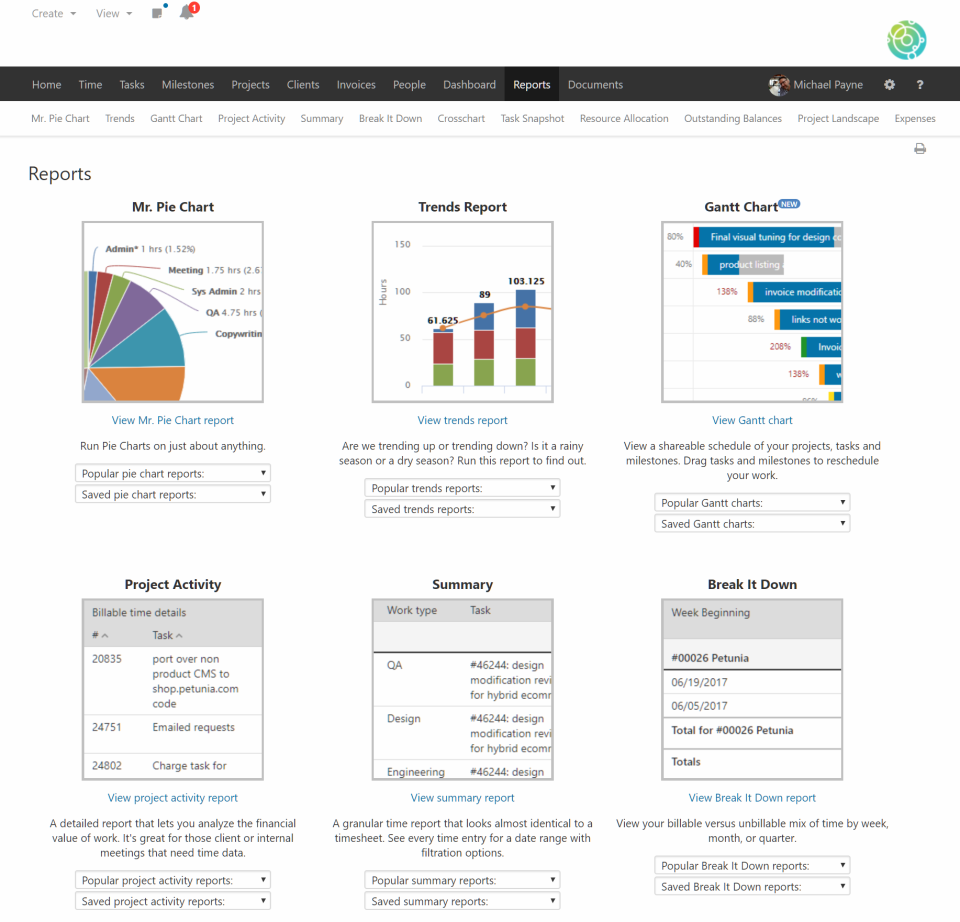
- Reporting and dashboards
- Milestones and sprints
- Client and contact management
- Document storage
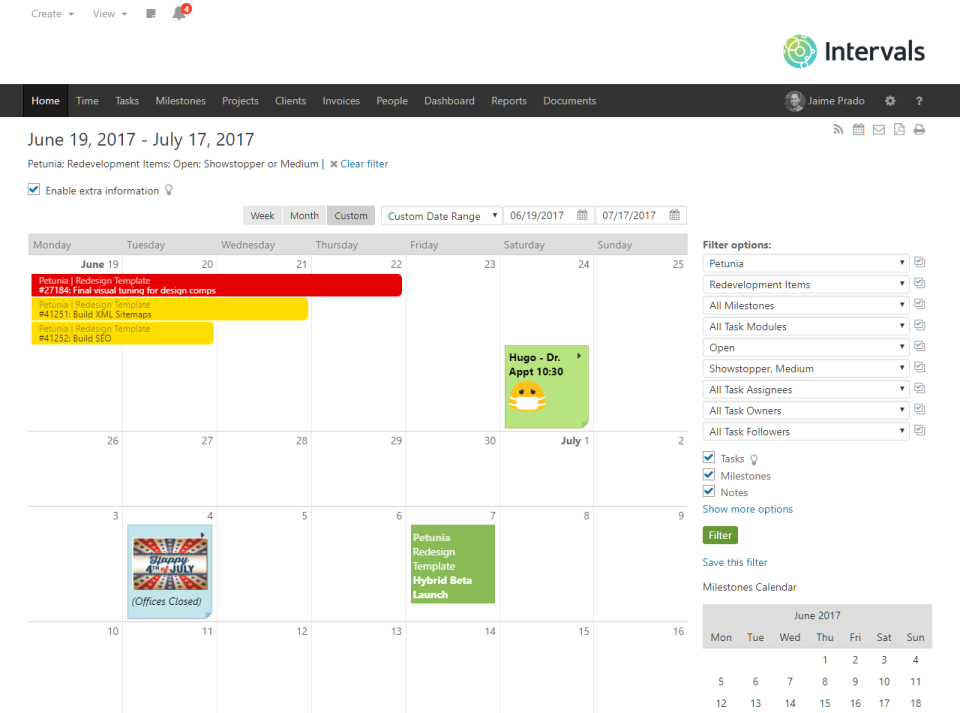
- Calendar with drag-and-drop
- QuickBooks integration
- Freshbooks integration
- API access
- Third-party integrations
- Unlimited users on Basic/Professional
- Flat-rate active-project pricing
Pricing and Plans
Intervals publishes three tiers scaled by active project count with flat monthly rate rather than per-user pricing.
Lite at $29/month includes 3 users and 3 active projects. Basic at $49/month adds unlimited users with 10 active projects. Professional at $99/month scales to unlimited users with 30 active projects.
Annual billing saves 20%. 14-day free trial available with no credit card required.
All plans include the same core features: time tracking, task management, project management, budgeting, reporting, invoicing, document storage, and integrations. Tiers scale on user count (Lite only) and active project count.
| Tier | Price | What is included |
|---|---|---|
| Lite | $29/mo | 3 users, 3 active projects, all core features including time tracking, PM, invoicing, and reporting |
| Basic | $49/mo | Unlimited users, 10 active projects, all core features; annual billing saves 20% |
| Professional | $99/mo | Unlimited users, 30 active projects, all core features; annual billing saves 20% |
| Free Trial | Free 14-day | Full feature access with no credit card required for evaluation |
| Enterprise | Contact Vendor | Custom enterprise arrangement for teams needing more than 30 active projects or dedicated support |
Pros
- Flat-rate active-project pricing means adding staff does not increase software cost. Basic and Professional plans include unlimited users.
- Time tracking plus project management plus invoicing unified in one platform removes the need to switch between separate tools for service business workflow.
- Mature platform operating since 2005 with substantial customer base and hours tracked provides platform stability that newer competitors cannot match.
Cons and Trade-offs
- Teams that need per-user pricing structure (where cost genuinely scales with seat count matters for chargeback) may prefer per-user competitors.
- The 30 active project cap on Professional means large agencies with many concurrent projects need to consolidate projects, prune, or move to custom enterprise arrangements.
- Feature depth on some specific advanced PM capabilities (resource forecasting, portfolio analytics) may not match dedicated enterprise PSA platforms.
Intervals vs Alternatives
| Capability | Intervals | Harvest | Kantata |
|---|---|---|---|
| Core focus | Time tracking + PM + invoicing unified | Time tracking with invoicing | Enterprise PSA |
| Pricing model | Flat-rate by active project count | Per-user | Per-user |
| Unlimited users | Yes on Basic/Professional | No | No |
| Starting price | $29/mo Lite | $13.75/user/mo | Contact Sales |
| Best fit | Service teams billing by project count | Freelancers plus small teams | Enterprise PSA |
Who Should Choose Intervals
Professional services teams (web and software development companies, creative and marketing agencies, consulting firms, IT services, remote teams) that bill by time and want flat-rate pricing based on active project count rather than per-user seats.
Growing service businesses that expect team headcount growth benefit directly from the unlimited-users pricing on Basic and Professional plans; per-user pricing punishes headcount growth.
Not appropriate for teams that need per-user pricing structure or organizations with more than 30 active concurrent projects without moving to enterprise arrangements.
Named Alternatives to Intervals
- Harvest. Time tracking with invoicing at per-user pricing. Chosen when the buyer wants Harvest ecosystem with per-user model.
- Kantata. Enterprise PSA with resource forecasting. A better fit for enterprise professional services organizations.
- Toggl Track. Time tracking with per-user pricing. Preferred for teams wanting Toggl ecosystem.
- Everhour. Time tracking with integrations to Asana, Basecamp, ClickUp. Chosen for teams already on those PM platforms.
- FreshBooks. Accounting-first with time tracking. A better fit when accounting is the primary need.
Implementation and Deployment
Intervals deployments typically run 1-4 weeks for professional services teams switching from spreadsheets or lightweight time trackers depending on team size, project inventory, and integration scope with QuickBooks or Freshbooks.
Standard sequence: sign up for the 14-day free trial, invite team members (unlimited on Basic and Professional), create initial project inventory matching active client work, configure time tracking categories and billing rates, connect QuickBooks or Freshbooks for invoicing sync, roll out to team with daily time-logging reminders enabled, and validate first billing cycle end-to-end.
Historical time data migration from prior tools typically requires CSV export from the source system and CSV import into Intervals.
Growing service teams often start on Lite for evaluation then move to Basic or Professional as project count grows past three or user count exceeds three.
What Real Buyers Say About Intervals
Operator discussions on LinkedIn Professional Services community and Reddit r/freelance time tracking threads surface the following themes.
Service business owners and operations leaders on LinkedIn professional services communities discuss Intervals as a distinctive time tracking plus PM option when they want flat-rate pricing that does not punish team growth.
The flat-rate active-project pricing is frequently cited as decisive; per-user pricing frustrates growing service teams because software cost scales with hiring, while Intervals cost stays flat as long as active project count fits the plan.
Operator discussions in freelancer and small agency communities highlight the unified time tracking plus PM plus invoicing as decisive against fragmented tool stacks; separate time tracking, PM, and invoicing tools create data reconciliation friction that Intervals eliminates.
Common critique from enterprise services buyers: Intervals is designed for small-to-mid service businesses; enterprise PSA needs (resource forecasting, revenue recognition, portfolio analytics) may push buyers to Kantata or Certinia.
The 20-year platform maturity is repeatedly praised as decisive against newer competitors; substantial customer base and hours tracked provide platform stability that newer time tracking startups cannot match.
QuickBooks and Freshbooks integrations are frequently cited as decisive for service teams already on those accounting platforms; native integration removes double-entry friction that hurts data quality.
Vendor references: Intervals product overview, Intervals pricing tiers, Intervals feature catalog.
Related Intervals Comparisons and Categories on SaaSRat
Explore related products and categories on SaaSRat to compare Intervals against alternatives.
- Time Tracking Software on SaaSRat
- Project Management on SaaSRat
- PSA on SaaSRat
- Harvest: time tracking with invoicing
- Kantata: enterprise PSA
- Toggl Track: time tracking
- Everhour: time tracking + PM integrations
- FreshBooks: accounting-first time tracking
The Bottom Line on Intervals
Intervals is a strong fit for professional services teams that bill by time and want flat-rate pricing based on active project count rather than per-user seats.
Unlimited users on Basic and Professional plans means adding staff does not increase software cost , genuinely decisive for growing service businesses.
Time tracking plus project management plus invoicing unified in one platform removes the need to switch between separate tools for service business workflow.
Teams needing per-user pricing structure should evaluate Harvest, Toggl Track, or Everhour.
Enterprise PSA needs (resource forecasting, revenue recognition, portfolio analytics) should evaluate Kantata or Certinia.
Verified on 2026-08-04 against vendor website.
Frequently Asked Questions
What is Intervals?
Who is Intervals best for?
How does Intervals pricing work?
Does Intervals charge per user?
What integrations does Intervals support?
Can I try Intervals free?
Does Intervals include invoicing?
How does Intervals compare to Harvest?
Where is Intervals headquartered?
What plan should I start with?
Find Your Perfect Software
See how it can transform your workflow
- Personalized for your needs Tailored recommendations based on your unique requirements.
- Save time & resources Streamline your workflow and boost team productivity.
- Trusted by thousands Join 10,000+ businesses already growing with SaaSrat.
You're all set! 🎉
A specialist for will reach out within 1 business day with tailored recommendations for your needs.