

iDashboards
by iDashboards
What is iDashboards?
Get Best Quote for iDashboards
Connect with SaaSrat experts to get the best quote for your business.
You're all set!
A specialist for iDashboards will reach out within 1 business day.
iDashboards Features
Real time data visualization
Interactive dashboards
Customizable templates
Drag and drop interface
Data source integration
Mobile accessibility
View All 47 Features
iDashboards Resources
iDashboards Screenshots
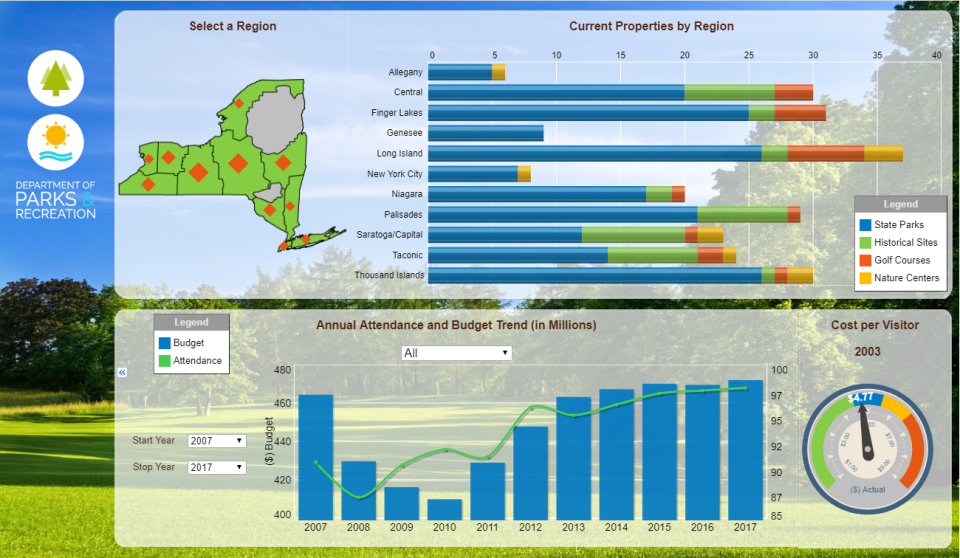
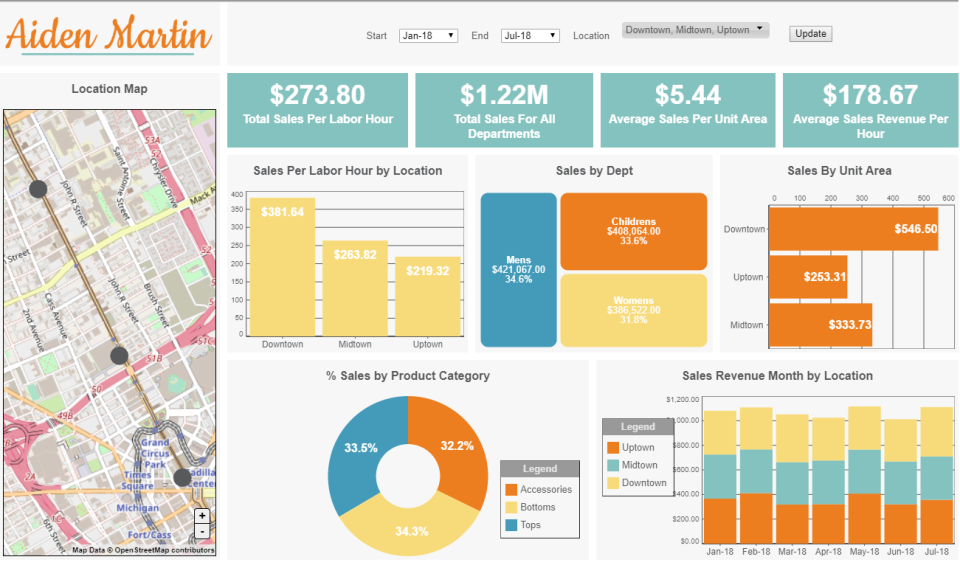
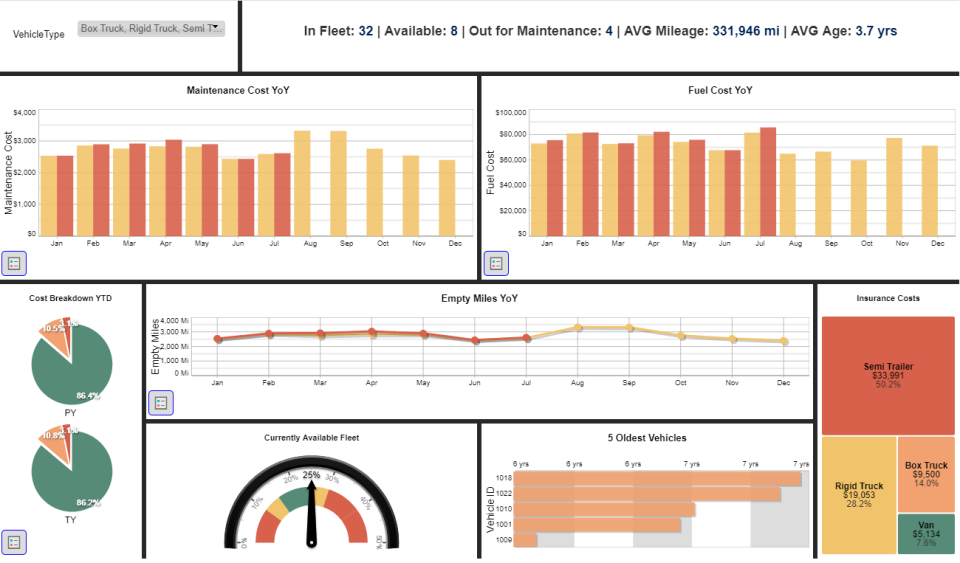
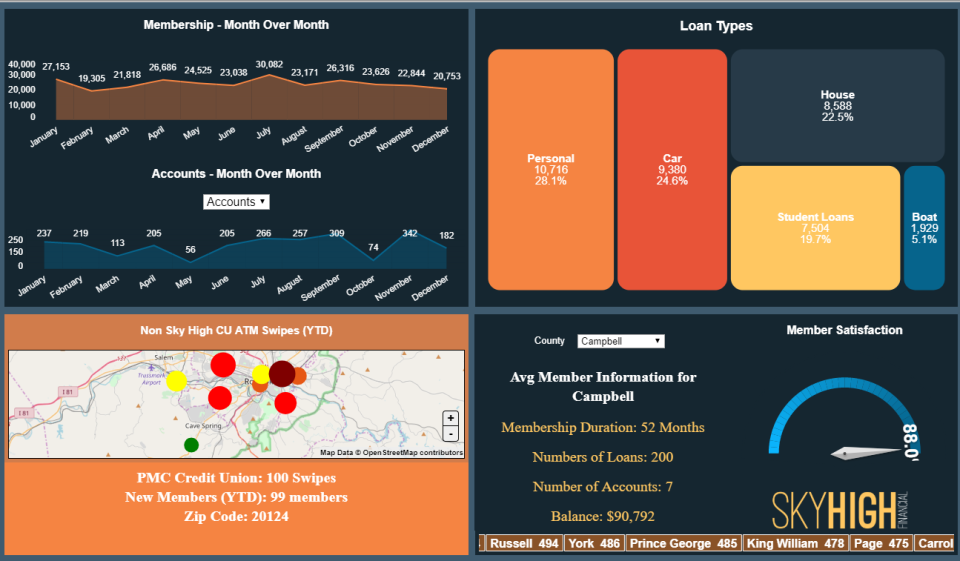
Description
iDashboards at a Glance
| Best for | Organizations across healthcare, financial services, manufacturing, education, nonprofits, and transportation and logistics needing AI-powered business intelligence with real-time dashboards, connected workflows for operational data capture, AI insights, and Data Hub ETL for flexible integrations |
|---|---|
| Deployment | Cloud AI-powered BI with real-time dashboards, connected workflows, AI insights, and Data Hub ETL; three editions: Small Business, Enterprise, and Operations Suite |
| Starting price | Contact Vendor (tiered editions Small Business, Enterprise, Operations Suite available on the vendor pricing page; enterprise pricing scoped by user count and edition selection) |
| Key strengths | AI-powered business intelligence, real-time dashboards for performance visibility, connected workflows capturing operational data directly, AI-powered insights identifying patterns and opportunities, Data Hub ETL for flexible integrations, three editions (Small Business, Enterprise, Operations Suite), named customers UPMC, NASA, Michigan Humane, Bradley Corporation, ExperiMetal, McWane Ductile |
| Not ideal for | Small teams wanting free open-source BI where community BI covers the workflow, or enterprises needing warehouse-first BI architecture with semantic layer modeling |
iDashboards Overview
iDashboards is an AI-powered business intelligence platform combining real-time dashboards, operational workflows, and intelligent insights. Rather than being generic BI, iDashboards adds Connected Workflows plus AI-powered insights to the traditional dashboards discipline.
The core value proposition centralizes data from multiple sources to replace spreadsheets and disconnected systems. Business teams typically manage data across spreadsheets and disconnected tools; iDashboards consolidates data into unified dashboards.
Real-time dashboards provide performance visibility across the business. Rather than requiring stale weekly or monthly reports, real-time dashboards keep stakeholders current with business performance as it happens.
Connected workflows capture operational data and feed into reporting. This is a distinctive iDashboards capability beyond generic BI; the platform captures operational data directly rather than requiring separate operational systems that feed BI via ETL.
AI-powered insights identify patterns and opportunities. Rather than requiring analysts to explore data manually, AI surfaces significant patterns automatically.
Data Hub ETL provides flexible integrations. Rather than being limited to specific data sources, Data Hub ETL supports flexible integration configurations across enterprise data sources.
Multiple editions serve distinct scale needs: Small Business, Enterprise, and Operations Suite. Rather than one-size-fits-all pricing, tiered editions match the specific organizational scale and capability needs.
Cross-vertical industry coverage spans healthcare, financial services, manufacturing, education, nonprofits, and transportation and logistics. Named customers include UPMC (healthcare), NASA (aerospace/government), Michigan Humane (nonprofit), Bradley Corporation, ExperiMetal, and McWane Ductile (manufacturing).
Capabilities and Named Features
The iDashboards thesis is that BI requires connected operational workflows plus AI insights beyond traditional dashboards, and combining real-time dashboards with workflows and AI delivers real operational value against dashboards-only BI alternatives.
The Connected Workflows capability is genuinely distinctive. Traditional BI captures data via ETL from separate operational systems; iDashboards Connected Workflows capture operational data directly, tightening the loop between operational execution and analytical reporting.
Real-time dashboards for performance visibility address the specific operational reality where daily or hourly performance monitoring matters. Weekly or monthly reports arrive too late for operational response; real-time dashboards enable timely response.
AI-powered insights identifying patterns and opportunities address the specific analyst capacity reality where manual data exploration cannot scale. AI surfaces significant patterns automatically, letting analysts focus on interpretation rather than pattern discovery.
Data Hub ETL provides flexible integrations across enterprise data sources. Rather than being limited to specific integrations, Data Hub ETL supports the varied data sources enterprises actually use.
Multiple editions (Small Business, Enterprise, Operations Suite) address distinct scale needs. Small Business fits SMB analytics needs; Enterprise fits enterprise BI with expanded capabilities; Operations Suite adds the connected workflows capability for operational focus.
Cross-vertical industry coverage (healthcare, financial services, manufacturing, education, nonprofits, transportation and logistics) reflects the specific BI market breadth where organizations across many verticals need dashboards, workflows, and AI insights.
Named customer breadth (UPMC healthcare, NASA aerospace/government, Michigan Humane nonprofit, Bradley Corporation manufacturing, ExperiMetal manufacturing, McWane Ductile manufacturing) demonstrates cross-vertical BI adoption at recognizable enterprise scale.
Named feature list
- AI-powered business intelligence
- Real-time dashboards
- Performance visibility
- Connected workflows
- Operational data capture
- AI-powered insights
- Pattern identification
- Opportunity identification
- Data Hub ETL
- Flexible integrations
- Small Business edition
- Enterprise edition
- Operations Suite edition
- Healthcare vertical
- Financial services vertical
- Manufacturing vertical
- Education vertical
- Nonprofit vertical
- Transportation vertical
- Multi-source consolidation
Pricing and Plans
iDashboards does not publish specific per-user pricing on the homepage; tiered editions are available on the vendor pricing page.
Three editions match distinct scale needs: Small Business for SMB analytics, Enterprise for expanded enterprise BI, and Operations Suite adding connected workflows for operational focus.
Enterprise pricing is scoped based on user count, edition selection, and integration configuration.
Prospective buyers request pricing through the vendor pricing page or contact sales for specific quotes.
| Tier | Price | What is included |
|---|---|---|
| Small Business | Contact Vendor | Small Business edition for SMB analytics with core AI-powered BI capabilities |
| Enterprise | Contact Vendor | Enterprise edition with expanded BI capabilities for larger organizations |
| Operations Suite | Contact Vendor | Operations Suite adding connected workflows for operational data capture and reporting |
| Data Hub ETL | Included | Data Hub ETL flexible integrations included with tiered editions |
| Enterprise Custom | Contact Vendor | Custom enterprise deployment with expanded scale and dedicated support |
Pros
- Connected Workflows capturing operational data directly plus AI-powered insights identifying patterns deliver operational BI depth that dashboards-only alternatives cannot match.
- Three-edition tiering (Small Business, Enterprise, Operations Suite) matches distinct scale needs rather than being one-size-fits-all pricing.
- Named customers (UPMC, NASA, Michigan Humane, Bradley Corporation, ExperiMetal, McWane Ductile) demonstrate cross-vertical BI adoption at recognizable enterprise scale across healthcare, aerospace, nonprofit, and manufacturing.
Cons and Trade-offs
- Small teams wanting free open-source BI will find iDashboards over-scoped; community BI like Metabase covers simpler workflows better.
- Enterprises needing warehouse-first BI architecture with semantic layer modeling may prefer enterprise BI alternatives like Looker or Cube.dev.
- Quote-based pricing across all editions slows self-serve evaluation versus published-price competitors.
iDashboards vs Alternatives
| Capability | iDashboards | Domo | Sisense |
|---|---|---|---|
| Core focus | AI BI + connected workflows + Data Hub | Enterprise BI + data platform | Enterprise BI + embedded analytics |
| Connected workflows | Native operational capture | Not primary | Not primary |
| AI-powered insights | Native pattern identification | Domo AI | Sisense AI |
| Three editions | SMB/Enterprise/Ops Suite | Domo tiers | Sisense tiers |
| Best fit | Cross-vertical BI with operational workflows | Enterprises wanting Domo ecosystem | Enterprises wanting embedded BI |
Who Should Choose iDashboards
Organizations across healthcare, financial services, manufacturing, education, nonprofits, and transportation and logistics needing AI-powered business intelligence with real-time dashboards, connected workflows for operational data capture, AI insights, and Data Hub ETL for flexible integrations.
Operations-focused organizations benefit directly from the Connected Workflows capability; capturing operational data directly rather than via separate ETL from operational systems tightens the loop between execution and reporting.
Not appropriate for small teams wanting free open-source BI or enterprises needing warehouse-first BI architecture with semantic layer modeling.
Named Alternatives to iDashboards
- Domo. Enterprise BI and data platform. Chosen for enterprises wanting Domo ecosystem breadth.
- Sisense. Enterprise BI with embedded analytics. A better fit for enterprises wanting embedded analytics capabilities.
- Tableau. Enterprise BI with visualization depth. Preferred for organizations wanting Tableau ecosystem.
- Power BI. Microsoft ecosystem BI. Chosen for Microsoft-heavy organizations wanting Power BI ecosystem.
- Metabase. Modern open-source BI. A better fit for teams wanting free open-source BI.
Implementation and Deployment
iDashboards deployments typically run 4-16 weeks depending on edition selection (Small Business, Enterprise, or Operations Suite), user count, data source variety, and connected workflows configuration.
Standard sequence: BI operational assessment, iDashboards edition selection (Small Business for SMB, Enterprise for expanded, or Operations Suite for connected workflows), initial data source connection via Data Hub ETL, real-time dashboard configuration for the specific business performance patterns, connected workflows setup for operational data capture (Operations Suite specifically), AI-powered insights configuration for pattern identification, staff training focused on the AI BI workflow, and phased rollout across business teams.
Multi-vertical enterprise deployments configure additional dashboards sequentially with shared Data Hub ETL governance.
Operations Suite deployments layer on operational workflow capture beyond dashboards-only Small Business and Enterprise editions.
What Real Buyers Say About iDashboards
Operator discussions on LinkedIn Business Intelligence community and Reddit r/BusinessIntelligence threads surface the following themes.
BI directors and operations leaders on LinkedIn business intelligence community discussions cite iDashboards as decisive when they need AI-powered BI with connected operational workflows rather than dashboards-only BI alternatives.
The named customers (UPMC, NASA, Michigan Humane, Bradley Corporation, ExperiMetal, McWane Ductile) are frequently cited during BI procurement conversations; enterprise BI procurement trusts references from actual peer organizations across healthcare, aerospace, nonprofit, and manufacturing verticals.
Operator discussions in BI communities highlight the Connected Workflows as decisive against dashboards-only BI; capturing operational data directly rather than via separate ETL tightens the loop between operational execution and analytical reporting.
Common critique from open-source BI buyers: iDashboards is commercial BI focused; teams wanting free open-source BI typically prefer Metabase or similar community BI.
Three-edition tiering (Small Business, Enterprise, Operations Suite) is repeatedly praised as matching distinct scale needs; one-size-fits-all pricing does not fit the varied BI market scale requirements.
AI-powered insights identifying patterns and opportunities are frequently discussed as decisive against traditional dashboards; AI surfaces significant patterns automatically, letting analysts focus on interpretation.
Vendor references: iDashboards AI-powered BI overview, iDashboards cross-vertical customers, iDashboards tiered edition pricing.
Related iDashboards Comparisons and Categories on SaaSRat
Explore related products and categories on SaaSRat to compare iDashboards against alternatives.
- Business Intelligence on SaaSRat
- Dashboards Software on SaaSRat
- Domo: enterprise BI + data platform
- Sisense: embedded analytics
- Tableau: visualization depth
- Power BI: Microsoft ecosystem
- Metabase: open-source BI
The Bottom Line on iDashboards
iDashboards is a strong fit for organizations across healthcare, financial services, manufacturing, education, nonprofits, and transportation and logistics needing AI-powered business intelligence with real-time dashboards, connected workflows, AI insights, and Data Hub ETL.
Connected Workflows capturing operational data directly plus AI-powered insights identifying patterns plus three-edition tiering (Small Business, Enterprise, Operations Suite) deliver operational BI depth dashboards-only BI cannot match.
Named customers (UPMC, NASA, Michigan Humane, Bradley Corporation, ExperiMetal, McWane Ductile) demonstrate cross-vertical BI adoption at recognizable enterprise scale.
Small teams wanting free open-source BI should evaluate Metabase or similar community BI.
Enterprises needing warehouse-first BI architecture should evaluate Looker or Cube.dev.
Verified on 2026-08-04 against vendor website.
Frequently Asked Questions
What is iDashboards?
Who is iDashboards best for?
How does iDashboards pricing work?
What are Connected Workflows?
What is Data Hub ETL?
What editions does iDashboards offer?
Which named customers does iDashboards have?
How does iDashboards compare to Domo?
Where is iDashboards headquartered?
What industries does iDashboards serve?
Find Your Perfect Software
See how it can transform your workflow
- Personalized for your needs Tailored recommendations based on your unique requirements.
- Save time & resources Streamline your workflow and boost team productivity.
- Trusted by thousands Join 10,000+ businesses already growing with SaaSrat.
You're all set! 🎉
A specialist for will reach out within 1 business day with tailored recommendations for your needs.