

Gmelius
by Gmelius
What is Gmelius?
Get Best Quote for Gmelius
Connect with SaaSrat experts to get the best quote for your business.
You're all set!
A specialist for Gmelius will reach out within 1 business day.
Gmelius Features
Email tracking
Email scheduling
Email templates
Campaigns
Sequences
Mail merge
View All 25 Features
Gmelius Resources
Gmelius Screenshots
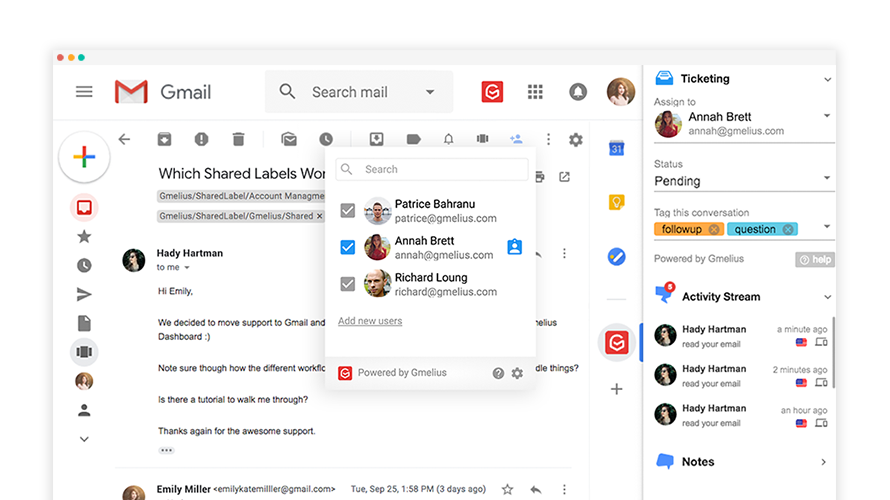
Description
Gmelius at a Glance
| Category | Gmail and Google Workspace shared inbox + Team collaboration + AI assistant |
|---|---|
| Best for | Google Workspace teams wanting shared inbox and collaboration features inside Gmail without switching to a separate mail tool |
| Deployment | Gmail browser extension, Chrome, Edge, Firefox, plus iOS and Android mobile apps |
| Google Workspace integration | Gmail, Google Calendar, Google Meet, Google Contacts native integration |
| AI assistant | Meli for drafting replies, sorting email, scheduling meetings, handling follow-ups |
| Views | Kanban board views on Gmail labels; custom email views by team, project, priority |
| Automation | Rules with webhooks and routing; email tagging plus assignment workflows |
| Integrations | Slack, Zapier, Make, HubSpot, Salesforce, Nicereply |
| Certifications | SOC 2 Type II, GDPR, CCPA compliant |
| HQ | Geneva, Switzerland |
Gmelius Overview
Gmelius is a Geneva-headquartered Gmail and Google Workspace collaboration platform that turns a Gmail label or shared inbox into a team workspace with assignments, notes, Kanban board views, and automation. The unusual architectural choice is running entirely inside Gmail rather than replacing it: users keep the familiar Gmail interface and get team collaboration features layered on top through a browser extension, mobile apps, and Google Workspace integration.
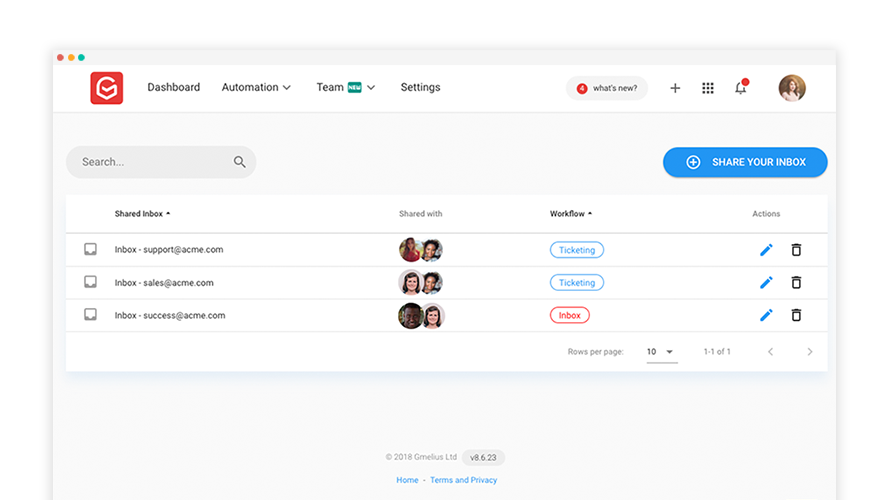
The core value proposition is the Gmail-native shared inbox: teams create a shared label or use a shared address (support@, sales@) that multiple team members work from together with conversation assignments, internal notes with @mentions, Kanban board views on the label content, and automation rules that route incoming email based on sender, subject, or content. This model fits teams that already run Google Workspace and do not want to migrate to a separate shared inbox tool.
Gmelius ships Meli, the AI assistant, for drafting replies, sorting emails, scheduling meetings, and handling follow-ups directly inside Gmail. Additional features include shared email templates with attachments, email analytics and SLA reporting, automation rules with webhooks and routing, and integrations with Slack, Zapier, Make, HubSpot, Salesforce, and Nicereply. Certifications include SOC 2 Type II plus GDPR and CCPA compliance. The 7-day free trial of Growth plan is available at signup.
Capabilities and Named Features
Gmelius is built around the shared Gmail label or shared address as the team collaboration primitive: teams create a shared label (Sales, Support, Billing) or use a group address that multiple team members work from together. Every conversation gets assignments, internal notes with @mentions, Kanban board views showing the label content as a workflow board, and automation rules that route incoming email to the right team member based on rules. The Meli AI assistant sits alongside for reply drafting, sorting, and meeting scheduling. This Gmail-native model fits teams that value not switching mail clients to add team collaboration features.
Named feature list
- Shared inboxes on Gmail labels or shared addresses with team assignment and internal notes
- Meli AI assistant for drafting replies, sorting emails, scheduling meetings, and handling follow-ups
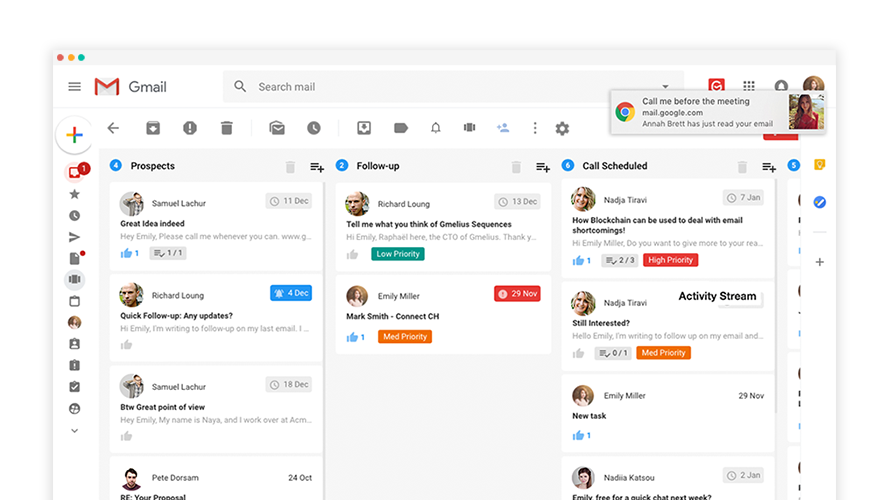
- Kanban board views on Gmail labels with drag-and-drop workflow progression
- Custom email views by team, project, priority, or status
- Shared email templates with attachments for repeated response patterns
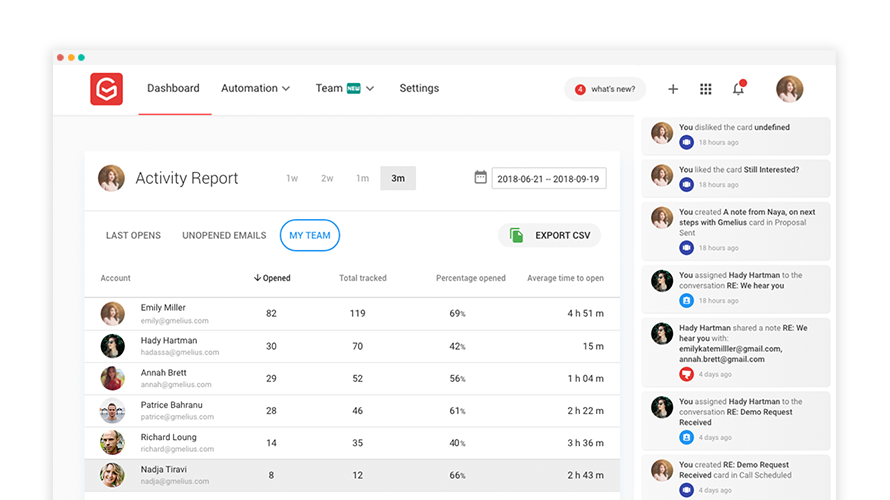
- Email analytics and SLA reporting for team performance and response time metrics
- Automation rules with webhooks and routing for incoming email workflow
- Real-time email notes with @mentions for team collaboration on the message thread
- Email tagging plus assignment workflows for conversation ownership
- Google Workspace native integration: Gmail, Google Calendar, Google Meet, Google Contacts
- Slack integration for cross-team notifications and thread sharing
- Zapier and Make integration for custom workflow automation
- HubSpot and Salesforce integration for CRM contact data enrichment
- Nicereply integration for customer satisfaction survey collection
- iOS and Android mobile apps plus browser extension for cross-device access
- SOC 2 Type II certified with GDPR and CCPA compliance
- 7-day free trial of Growth plan at signup
- Enterprise tier with bespoke AI assistants, no usage caps, and white-glove support
Pricing and Plans
Gmelius publishes four tiers with yearly billing: Meli at 19 USD per user per month for personal AI assistant features; Growth at 25 USD per user per month for team collaboration with unlimited shared inboxes; Pro at 40 USD per user per month for advanced automation, CRM integrations, and webhooks; and Enterprise at custom quote for bespoke AI assistants, no usage caps, and white-glove support.
The Meli tier is the entry point for individuals wanting the AI assistant without team collaboration features. Growth is the team collaboration tier at 25 USD per user per month, which is competitive with Front and Missive per-seat pricing. Pro at 40 USD per user per month adds advanced automation with webhooks and deep CRM integration for sales teams needing HubSpot or Salesforce contact data enrichment.
Enterprise pricing includes bespoke AI assistants trained on organization-specific data, no usage caps on Meli AI interactions, and white-glove support with dedicated Customer Success Manager. Ask the vendor to break out per-user pricing at team size, admin console features, SSO integration, custom AI assistant setup fees, and any implementation services separately in the proposal. Annual commitment discounts are typically negotiated per team contract.
| Tier | Price | What is included |
|---|---|---|
| Meli | $19 per user per month (yearly) | Personal AI assistant features for individual use |
| Growth | $25 per user per month (yearly) | Team collaboration with unlimited shared inboxes |
| Pro | $40 per user per month (yearly) | Advanced automation, CRM integrations, webhooks |
| Enterprise | Custom quote | Bespoke AI assistants, no usage caps, white-glove support |
| 7-day free trial | Growth plan free trial | Team collaboration features trial at signup |
| Annual commitment | Included in yearly billing | Yearly billing versus monthly for tier discount |
Pros
- Gmail-native architecture means teams keep the familiar Gmail interface without migrating to a separate shared inbox tool
- Kanban board views on Gmail labels turn email into a workflow board for support, sales, and operations teams
- Meli AI assistant covers reply drafting, email sorting, meeting scheduling, and follow-up handling inside Gmail
- Shared templates with attachments accelerate repeated response patterns for support and sales teams
- Email analytics and SLA reporting show team performance metrics without requiring a separate reporting tool
- SOC 2 Type II plus GDPR plus CCPA compliance certifications meet enterprise procurement requirements
- Deep integrations with Slack, Zapier, Make, HubSpot, Salesforce, and Nicereply cover common team workflows
- iOS and Android mobile apps plus browser extension give consistent access across devices
Cons and Trade-offs
- Gmail-native architecture means teams on Outlook or non-Google mail providers cannot use Gmelius
- Pro tier at 40 USD per user per month is expensive for teams comparing against alternatives like Missive or Help Scout at lower per-seat cost
- Reddit r/googleworkspace threads note that browser extension stability depends on Chrome, Edge, and Firefox update cadence; occasional extension pauses required
- Meli AI assistant cost is embedded in the Meli tier at 19 USD per user per month; teams wanting AI-only features pay for the personal tier rather than a la carte
- Enterprise tier custom quote requires a sales conversation for bespoke AI assistant configuration
- Team analytics and SLA reporting are lighter than dedicated customer support platforms like Zendesk or Freshdesk
- Kanban view usage requires user training for teams unfamiliar with Kanban workflow patterns
- Public case studies with detailed named enterprise customer stories are less prominent than Front or Help Scout customer libraries
Gmelius vs Alternatives
| Vendor | Best for | Client model | AI features | Notable strength |
|---|---|---|---|---|
| Gmelius | Google Workspace teams wanting shared inbox inside Gmail | Gmail browser extension plus mobile apps | Meli AI for drafting, sorting, scheduling, follow-ups | Gmail-native shared inbox with Kanban board views |
| Missive | Team-shared inbox with internal chat threading | Native cross-platform desktop and mobile client | Missive AI features | Combined shared inbox plus internal team chat |
| Front | Enterprise shared inbox for customer support and sales | Native cross-platform desktop and mobile client | Front AI for reply drafting | Enterprise shared inbox with deepest integration marketplace |
| Help Scout | SMB and mid-market customer support | Web plus mobile app | Help Scout AI features | SMB-friendly customer support with content marketing focus |
| Hiver | Google Workspace shared inbox competitor | Gmail extension plus mobile | Hiver AI features | Direct Gmelius competitor with focus on customer support use cases |
| Streak | Gmail-based CRM for solo and small teams | Gmail extension | Streak AI features | CRM inside Gmail for pipeline tracking |
Who Should Choose Gmelius
Google Workspace teams (support, sales, billing, operations) wanting shared inbox and team collaboration features inside Gmail without switching to a separate mail tool.
SMB and mid-market customer support teams (5 to 50 people) needing Kanban board views on Gmail labels for workflow visualization plus SLA reporting for response time metrics.
Sales teams needing Meli AI reply drafting plus HubSpot or Salesforce integration for CRM contact data enrichment without leaving Gmail.
Google Workspace multi-department deployments where support, sales, and operations teams each need their own shared inbox with per-team automation and workflow rules.
Distributed teams wanting cross-device access (browser extension plus iOS plus Android) with real-time collaboration on the same conversation across time zones.
SOC 2 Type II plus GDPR plus CCPA compliance-driven organizations needing a shared inbox vendor with certifications matching enterprise procurement requirements.
Named Alternatives to Gmelius
- Missive. Team-shared inbox with combined internal team chat
- Front. Enterprise shared inbox with deepest integration marketplace
- Help Scout. SMB-friendly customer support with content marketing focus
- Hiver. Direct Google Workspace shared inbox competitor for customer support
- Streak. Gmail-based CRM for solo and small teams
- HubSpot Service Hub. HubSpot ecosystem customer support with CRM integration
- Freshdesk. SMB and mid-market customer support in the Freshworks ecosystem
- Helpmonks. Shared team inbox with unlimited users per plan
Implementation and Deployment
Team signup and installation takes 15 to 30 minutes: create an account, install the browser extension on Chrome, Edge, or Firefox, connect Google Workspace account via OAuth, and start using during the 7-day Growth free trial.
Shared label setup for support, sales, or billing team takes 30 to 60 minutes including label configuration, team member invitation, initial template creation, and Kanban board view design.
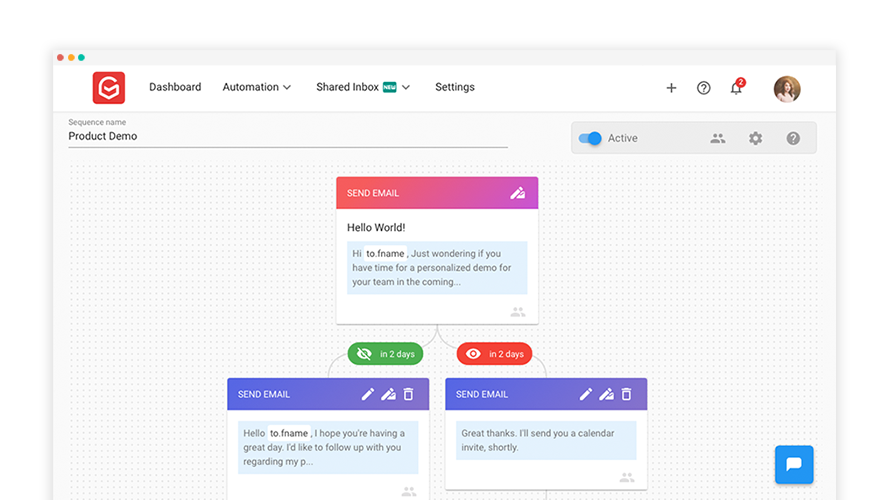
Automation rule configuration with webhooks and routing takes 1 to 2 hours per team including rule design, testing, and refinement based on actual incoming email patterns.
CRM integration (HubSpot, Salesforce) setup takes 30 to 60 minutes including OAuth authorization, contact sync mapping, and customer profile enrichment configuration.
Meli AI assistant configuration works out of the box on Meli, Growth, and Pro tiers; Enterprise bespoke AI assistant setup runs 2 to 6 weeks depending on organization-specific training data preparation.
Team deployment (5 to 50 users) commonly runs 1 to 3 weeks including per-user provisioning, workflow rule tuning, and analytics dashboard configuration. Enterprise deployment (50+ users) runs 4 to 8 weeks depending on SSO integration and admin console customization.
What Real Buyers Say About Gmelius
A Reddit r/googleworkspace thread from mid-2025 titled 'Gmelius vs Hiver vs Front for a Google Workspace support team' captured the recurring buyer trade-off: Gmelius wins on Kanban board views inside Gmail plus deeper Meli AI assistant plus Google Workspace native integration; Hiver wins as a direct Gmelius competitor with customer support focus; Front wins on enterprise integration marketplace but requires migrating from Gmail-native workflow. Additional context: r/googleworkspace threads on Gmail shared inbox, Gmelius on LinkedIn, r/gmail threads on team collaboration.
LinkedIn posts by Google Workspace administrators highlight the browser extension architecture as the reason support and sales teams standardize on Gmelius: teams keep the familiar Gmail interface, add collaboration features on top, and avoid the workflow disruption of migrating to a separate mail tool.
SoftwareAdvice and SelectHub reviews consistently rank Gmelius in the top three Google Workspace shared inbox tools alongside Hiver and Missive, with the strongest positioning for SMB and mid-market teams valuing Gmail-native workflow and Kanban board views for support and sales operations.
Reddit r/googleworkspace threads warn buyers that browser extension stability depends on Chrome, Edge, and Firefox update cadence; occasional extension pauses required after browser updates. Enterprise buyers should validate extension compatibility with the latest browser release during evaluation and factor in browser update review workflow.
Vendor references: Gmelius product overview and Google Workspace integration, Gmelius pricing tiers including Meli, Growth, Pro, Enterprise, Gmelius SOC 2 Type II plus GDPR plus CCPA compliance.
The Bottom Line on Gmelius
Gmelius is the default short-list candidate for Google Workspace teams (support, sales, billing, operations) wanting shared inbox and team collaboration features inside Gmail without switching to a separate mail tool. Kanban board views on Gmail labels plus Meli AI assistant plus deep Google Workspace native integration are the strongest differentiators versus cross-provider competitors like Missive and Front.
SMB and mid-market customer support teams (5 to 50 people) needing Kanban workflow visualization plus SLA reporting are the strongest segment fits. Sales teams needing HubSpot or Salesforce integration plus AI reply drafting fit particularly well. SOC 2 Type II plus GDPR plus CCPA certifications meet enterprise procurement requirements.
Watch the platform commitment carefully: Gmail-native architecture is a hard constraint. Teams on Outlook, Microsoft 365, or other mail providers cannot use Gmelius. Pro tier at 40 USD per user per month is expensive versus lower-cost alternatives; evaluate whether Kanban views plus Meli AI plus deep CRM integration justify the per-seat premium.
Alternatives to shortlist alongside Gmelius: Hiver as direct Google Workspace shared inbox competitor for customer support, Missive for combined shared inbox plus internal team chat with cross-provider support, Front for enterprise integration marketplace, Help Scout for SMB customer support with content marketing focus, HubSpot Service Hub for CRM plus service integration, Freshdesk for Freshworks ecosystem, Helpmonks for unlimited users per plan pricing, and Streak for Gmail-based CRM.
Verified on 2026-08-04 against vendor website.
Frequently Asked Questions
How much does Gmelius cost in 2026?
Does Gmelius work outside Google Workspace?
Who is Gmelius a fit for?
How does Gmelius compare to Hiver, Missive, and Front?
What is Meli?
Which integrations does Gmelius support?
How long does Gmelius implementation take?
What are the biggest complaints about Gmelius?
Does Gmelius offer Kanban board views?
Is Gmelius SOC 2 Type II certified?
Find Your Perfect Software
See how it can transform your workflow
- Personalized for your needs Tailored recommendations based on your unique requirements.
- Save time & resources Streamline your workflow and boost team productivity.
- Trusted by thousands Join 10,000+ businesses already growing with SaaSrat.
You're all set! 🎉
A specialist for will reach out within 1 business day with tailored recommendations for your needs.