

Missive
by Missive
What is Missive?
Get Best Quote for Missive
Connect with SaaSrat experts to get the best quote for your business.
You're all set!
A specialist for Missive will reach out within 1 business day.
Missive Features
Shared inboxes
Email inbox
SMS inbox
Social account inbox
Team spaces
Collaborative drafting
View All 20 Features
Missive Pricing Plans
Starter
- Billed yearly. Up to 5 users. Email, SMS, social accounts. Team spaces and inboxes. SOC 2 Type II compliance. 30-day free trial no credit card.
Productive
- Billed yearly. Up to 50 users. All Starter plus integrations, rules & automations, basic analytics, API access.
Business
- Billed yearly. Unlimited users. All Productive plus SAML SSO, IP restrictions, advanced analytics, personalized onboarding.
Missive Resources
Missive Screenshots
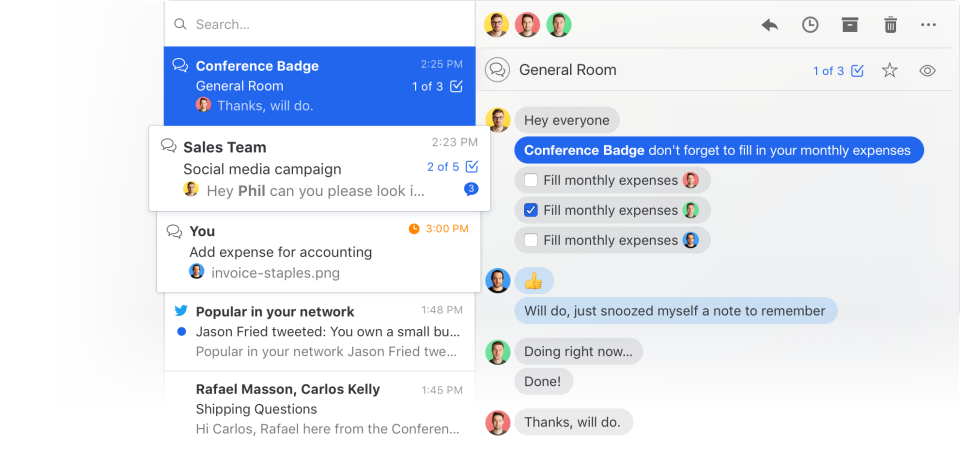
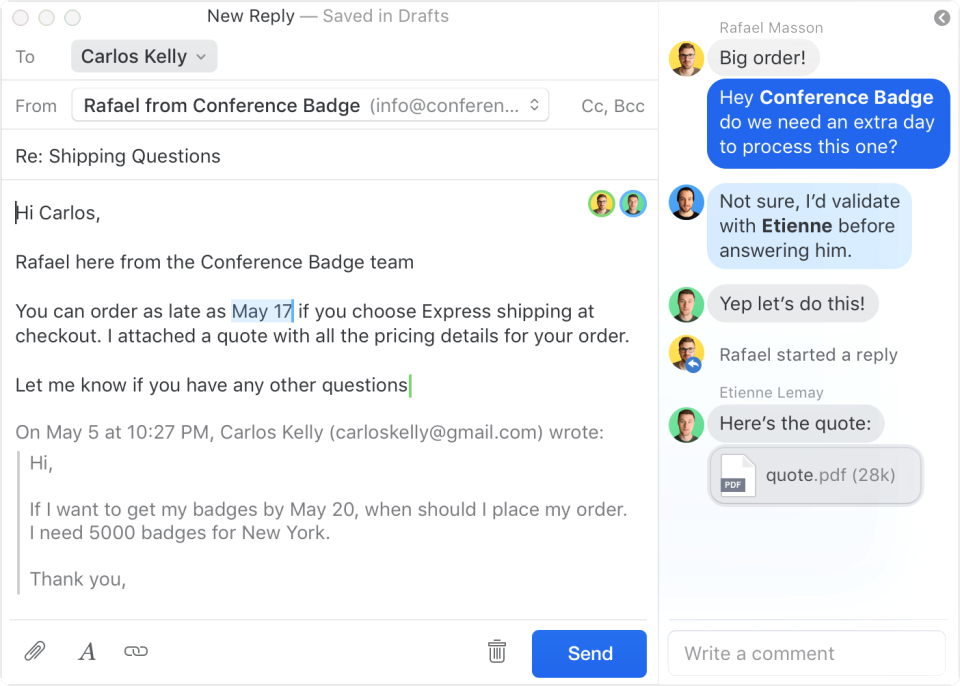
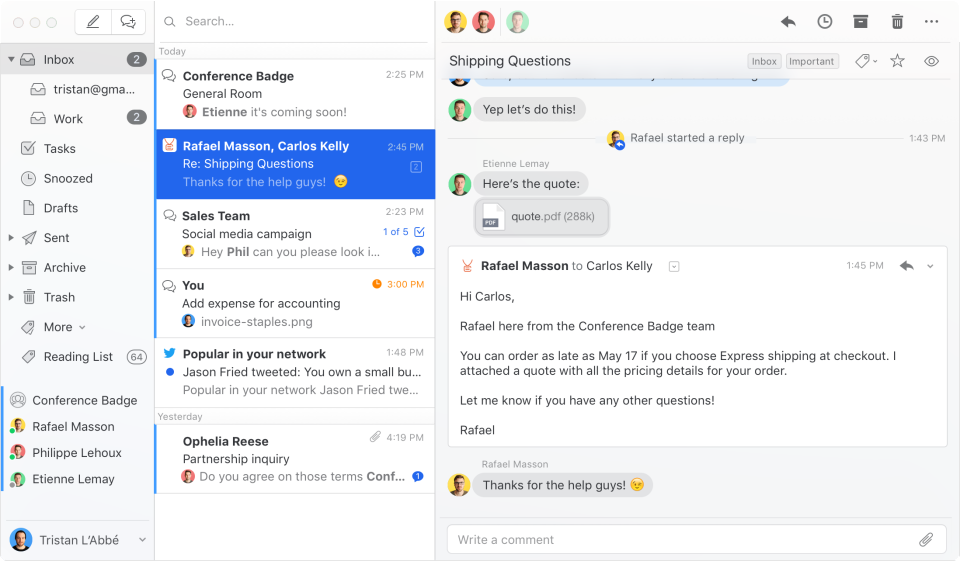
Description
What Is Missive and How Does It Work?
Missive gives teams a shared inbox platform for email, SMS, and social accounts. Team spaces coordinate collaborative drafting, internal commenting, task management with due dates, and workflow automation. AI-powered assistance across multiple AI providers.
Missive at a Glance
| Best for | teams needing shared inbox collaboration for email plus SMS plus social accounts |
|---|---|
| Deployment | Cloud SaaS |
| Pricing model | Billed yearly. Up to 5 users. Email, SMS, social accounts. Team spaces and inboxes. SOC 2 Type II co |
| Free trial | Contact for evaluation |
| Integrations | Standard email, SMS, social integrations, API access Productive+ |
| HQ | Contact Missive for regional details |
Missive Pros and Cons in 2026
Where Missive Stands Out
- Shared inboxes for email, SMS, and social accounts.
- Collaborative drafting with team members.
- Internal commenting on messages.
- Task management with due dates.
- Workflow automation.
- AI-powered assistance across multiple AI providers.
- SOC 2 Type II compliance.
- 30-day free trial with no credit card required.
- 3 clear tiers scaling by team size.
Where Missive Falls Short
- Per-user pricing may add up for large teams.
- Rules & automations gated to Productive tier and above.
- API access gated to Productive tier and above.
- SAML SSO and IP restrictions gated to Business tier.
- Advanced analytics gated to Business tier.
Who Should Use Missive?
Missive fits teams needing shared inbox collaboration for email plus SMS plus social accounts. Not the right fit for pure email marketing (try Mailchimp or Klaviyo), enterprise cross-channel marketing (try Dotdigital or Braze), or teams needing all-in-one CRM plus marketing (try HubSpot Marketing).
Missive Product Suite in 2026
Shared Inboxes
Email, SMS, and social accounts in team spaces.
Collaborative Drafting
Team members collaborate on outgoing messages.
Internal Commenting
Comment on messages without exposing to sender.
Task Management
Tasks with due dates.
Workflow Automation
Rules & automations on Productive tier and above.
AI-Powered Assistance
Multiple AI providers.
SOC 2 Compliance
SOC 2 Type II across all tiers.
How Much Does Missive Cost in 2026?
Missive publishes 3 tiers on missiveapp.com/pricing. Starter at USD 14/user/mo billed yearly for up to 5 users. Productive at USD 24/user/mo billed yearly for up to 50 users. Business at USD 36/user/mo billed yearly for unlimited users. All plans include 30-day free trial with no credit card required.
Hidden Costs and Contract Notes to Watch
- Per-user pricing may add up for large teams.
- Starter tier limited to 5 users.
- Productive tier limited to 50 users.
- SAML SSO and IP restrictions gated to Business tier.
- Personalized onboarding gated to Business tier.
Missive Alternatives Worth Comparing
Front. Team inbox platform for customer communication.
Help Scout. Customer service platform with shared inboxes.
Hiver. Gmail-based shared inbox for teams.
Freshdesk. Customer service and help desk with shared inboxes.
Who Uses Missive?
Missive serves teams globally. SOC 2 Type II compliance across all tiers.
Points to Verify Before Buying Missive
Independent software review threads consistently flag a similar set of due-diligence questions buyers wish they had asked earlier. Cover these during your evaluation.
- Confirm Missive fits your target audience and use case.
- Verify pricing tier matches your volume for Missive.
- Test Missive free trial or demo before committing.
- Ask about Missive implementation timeline and support model.
- Confirm Missive integration path with your existing stack.
What Top-Ranking Missive Reviews Cover
Independent reviewers ranking on Google USA for Missive consistently surface these evaluation points buyers should verify during procurement.
- efficient.app: Missive is a strong choice for teams that need to manage and collaborate on emails and messages from multiple platforms in one place..
- trustpilot.com: Missive has 5 stars.
- missiveapp.com: We integrate with over 25+ apps to make your emailing experience more complete.
- play.google.com: Awesome system, works great for offices where you need to assign emails to various people.
- thebusinessdive.com: Pros of Missive · Missive offers excellent features for organizing your emails across teams · It provides outstanding automation functions ....
What Real Buyers Report About Missive
Team collaboration LinkedIn groups describe Missive as a strong Front and Help Scout alternative for teams wanting shared inboxes for email + SMS + social plus collaborative drafting plus AI-powered assistance across multiple providers.
How to Evaluate Missive for Your Stack
Start with a scoped pilot instead of an all-at-once switch. Run Missive against a single team or use case for 4 to 8 weeks and measure lift against your current baseline before rolling out to the full operation. This protects existing workflow and gives you real performance data for the buying decision.
Confirm integration health with your existing stack before signing. Ask about data migration timeline and whether the vendor includes migration services or scopes them as professional services.
Missive Onboarding and Time-to-Value
Onboarding timeline varies by scope. Simple deployments typically deploy in 2 to 4 weeks. Deployments with integrations and behavioral triggers take 6 to 12 weeks. Enterprise deployments with data warehouse ingestion may run 3 to 6 months.
Ask about the customer success support model - dedicated success manager, tiered support, or self-serve.
Missive Security and Compliance
Confirm the platform authentication support (SSO, SAML, MFA), audit log capabilities, role-based access, and any industry-specific compliance certifications you require.
Missive Vendor References for Buyers
Ask for peer references from customers in your industry vertical and at similar scale. Look for retention data, expansion patterns, and objective performance benchmarks. Reddit and LinkedIn groups often surface real customer experiences beyond vendor case studies.
Related Missive Comparisons and Categories on SaaSRat
Explore related products and categories on SaaSRat to compare Missive against alternatives and see which vertical or feature comparison matches your buying criteria.
Missive Feature Deep Dive What Buyers Test
Top-ranking review pages for Missive features test specific workflows buyers care about. During your trial, test the core workflows that map to your team is daily use (campaign creation, automation building, reporting exports, integration health). Feature checklists rarely reveal usability gaps that surface only in daily use.
Confirm which features are available on your intended tier versus higher tiers. Feature caps and tier-gated capabilities are the most common source of post-purchase friction. Ask sales for a detailed tier-feature matrix before signing.
- independent reviewers: Pros of Missive · Missive offers excellent features for organizing your emails across teams · It provides outstanding automation functions ....
Bottom Line: Is Missive Right for You?
Missive is a strong pick for teams that need shared inbox collaboration for email plus SMS plus social accounts with collaborative drafting, internal commenting, task management, workflow automation, and AI-powered assistance.
Highlights: 3 clear tiers (Starter, Productive, Business), shared inboxes for email + SMS + social, collaborative drafting + internal commenting, task management with due dates, workflow automation, AI-powered assistance across multiple providers, SOC 2 Type II compliance, 30-day free trial no credit card.
Trade-offs to weigh: per-user pricing at scale, rules/automations/API gated to Productive tier, SAML SSO/IP restrictions gated to Business tier.
Consider Front for team inbox platform, Help Scout for customer service with shared inboxes, Hiver for Gmail-based shared inbox, or Freshdesk for customer service + help desk.
Verified on 2026-07-10 by the SaaSRat Editorial Team (Chirantan Patel, Senior SaaS Research Editor). Vendor facts cross-checked against the missive vendor website, LinkedIn showcase pages, and community discussions on Reddit and industry LinkedIn groups. About our methodology.
Frequently Asked Questions
What is Missive used for?
How much does Missive cost in 2026?
Does Missive offer a free trial?
What is Missive Starter tier?
What is Missive Productive tier?
What is Missive Business tier?
Does Missive support SMS and social?
Does Missive have AI features?
Where is Missive headquartered?
How does Missive compare to Front and Help Scout?
Find Your Perfect Software
See how it can transform your workflow
- Personalized for your needs Tailored recommendations based on your unique requirements.
- Save time & resources Streamline your workflow and boost team productivity.
- Trusted by thousands Join 10,000+ businesses already growing with SaaSrat.
You're all set! 🎉
A specialist for will reach out within 1 business day with tailored recommendations for your needs.