

Streak
by Rewardly Inc.
What is Streak?
Get Best Quote for Streak
Connect with SaaSrat experts to get the best quote for your business.
You're all set!
A specialist for Streak will reach out within 1 business day.
Streak Features
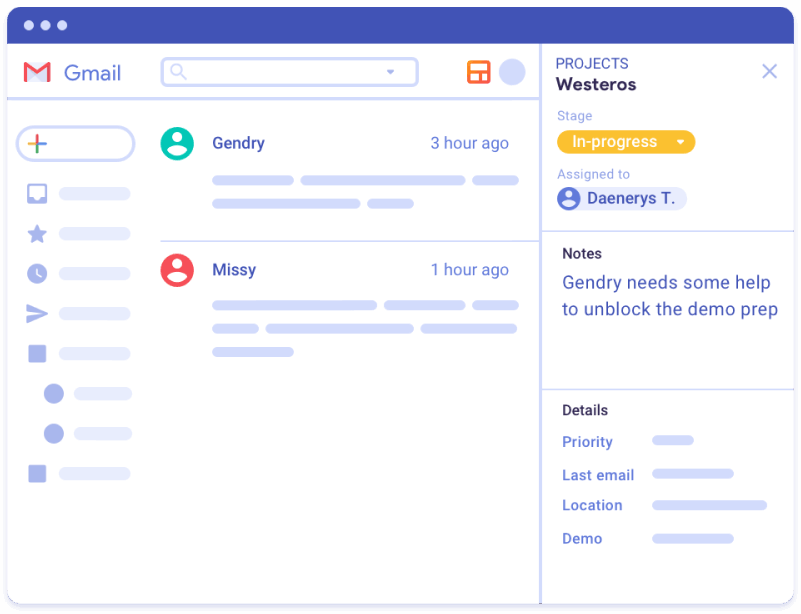
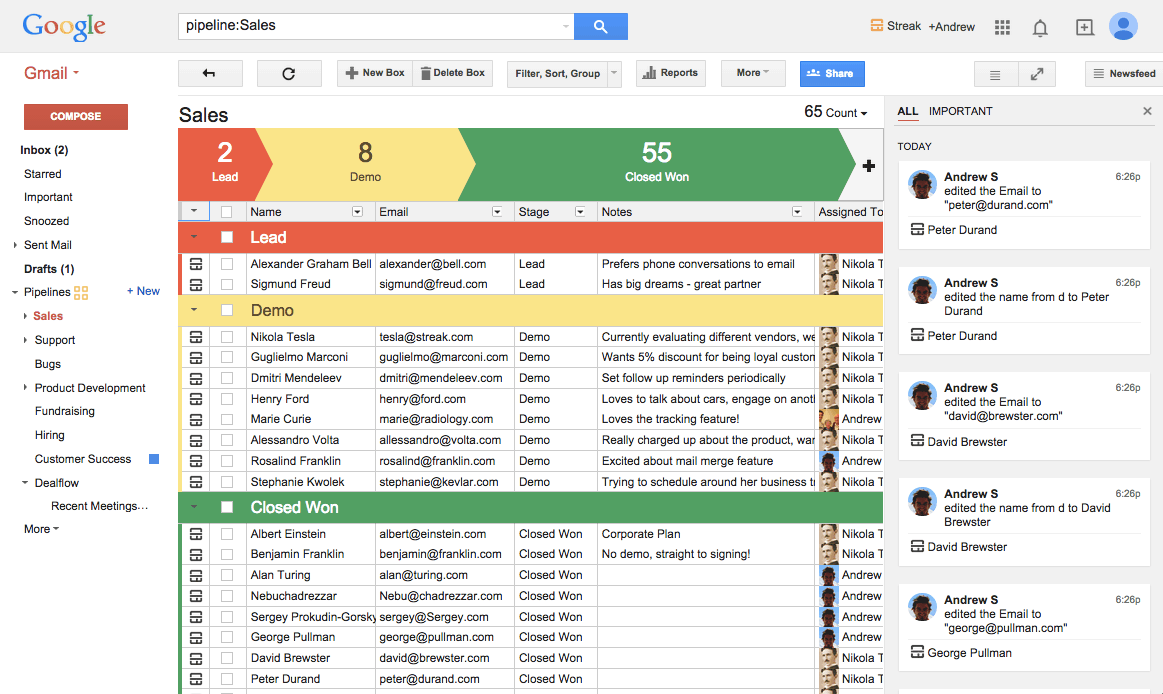
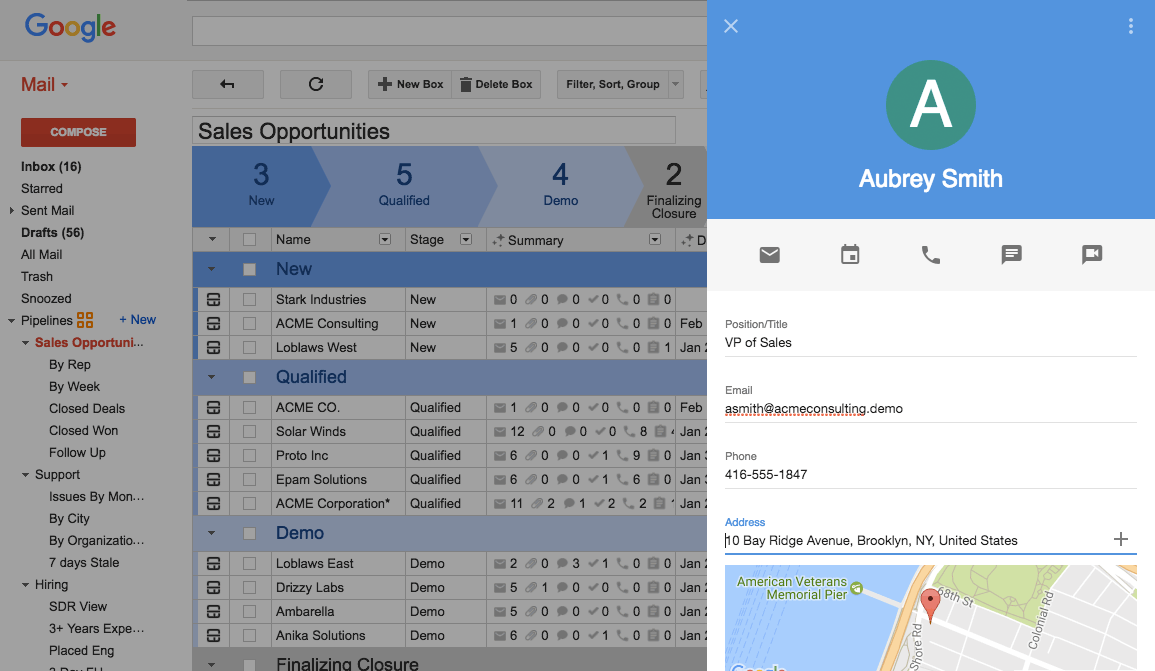
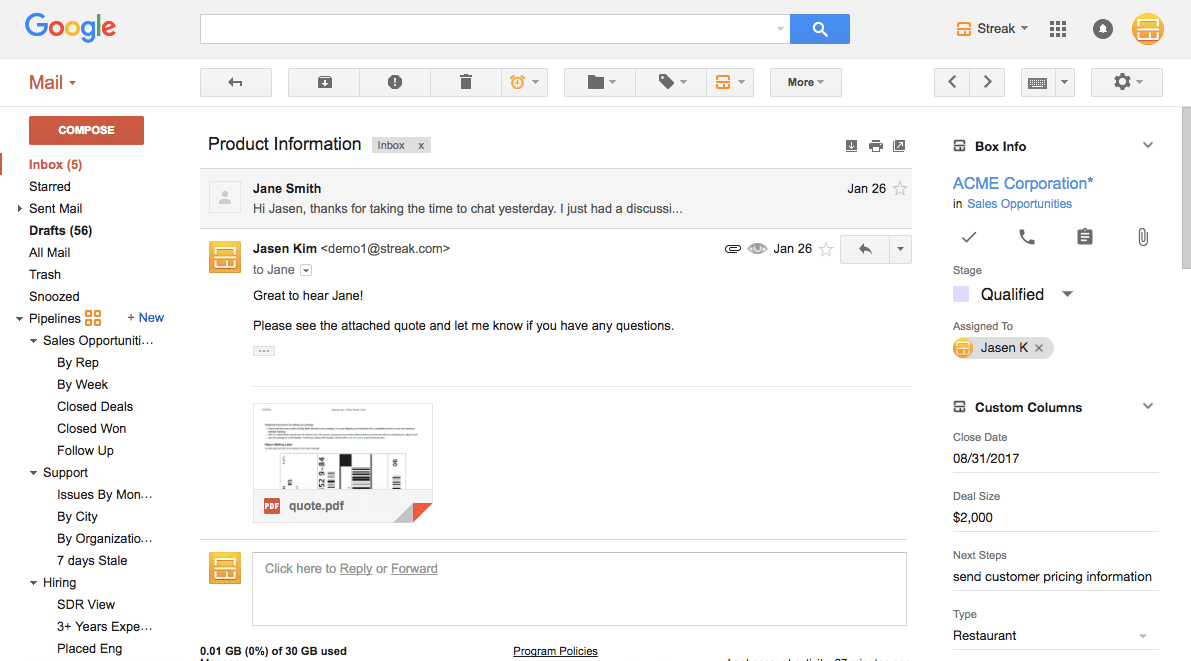
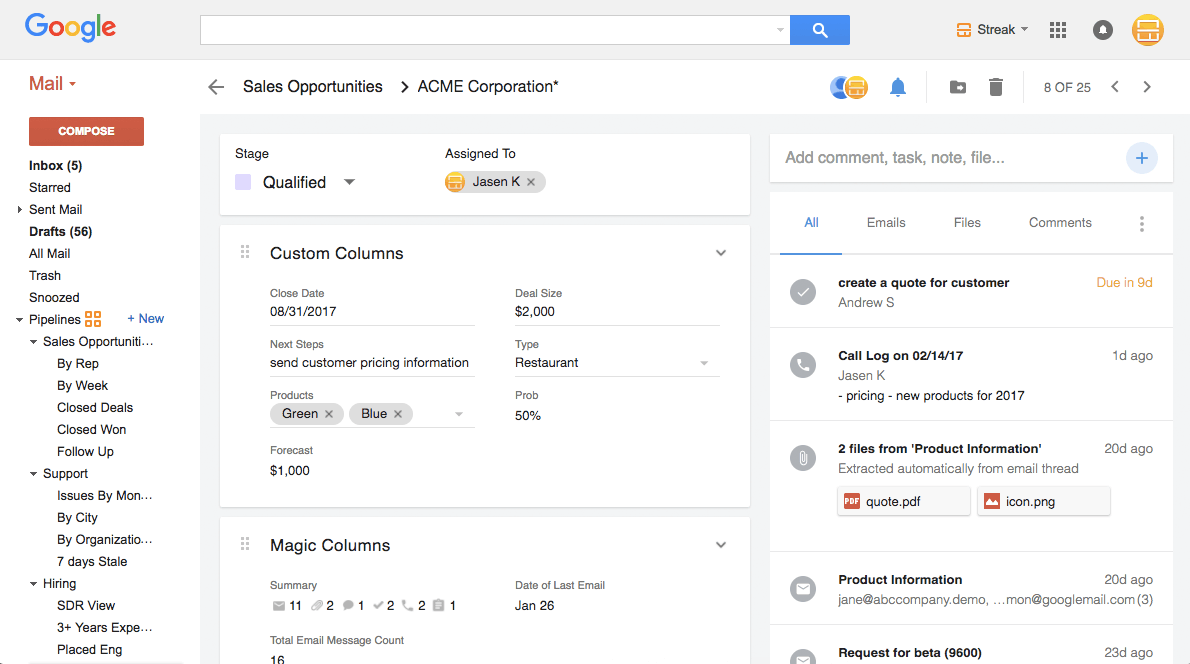
Pipelines and stages built directly into Gmail interface
Boxes that contain emails contacts files and deal data
Email power tools (tracking snippets mail merge thread splitter) free on every plan
Native Gmail and Google Workspace integration
Shared inbox views with team collaboration
Mobile apps for iOS and Android
View All 14 Features
Streak Pricing Plans
Free Power Tools
- Email tracking snippets mail merge (50/day limit) Streak Share thread splitter
- No CRM pipelines on free
- Permanent free tier
- Verified on 2026-06-18
Pro
- Full CRM with pipelines for any-size team
- Unlimited boxes and emails
- Native Gmail collaboration
- 20% off annual billing
- Verified on 2026-06-18
Pro+ (Most Popular)
- Adds automations and reports for sophisticated teams
- API access
- Advanced analytics
- 20% off annual billing
- Verified on 2026-06-18
Enterprise
- For large teams managing access and data quality
- Advanced permissions and audit logs
- Dedicated success management
- 20% off annual billing
- Verified on 2026-06-18
Mixed Tiers
- All users on your team must be on the same plan
- No mixed Pro and Pro+ on one account
- Verified on 2026-06-18
Streak Resources
Streak Screenshots
Description
Streak launched in 2011 in San Francisco with a simple idea: most teams work in Gmail, so the CRM should live there too. By 2026 Streak serves agencies, B2B sales teams, recruiters, fundraising teams, customer success teams, and a long tail of operators who use Gmail as their primary workspace. The product is unusual in the CRM market because it has no separate web app for the core experience; Streak is Gmail with pipeline overlays.
Who Streak is right for
This is a vertical product by tool stack rather than industry. The clearest fit in 2026 is teams that work primarily in Gmail and want CRM without leaving their inbox. Strongest fits are agencies and consultancies managing client relationships through email, small B2B sales teams, recruiters tracking candidates, fundraising teams managing donors, customer success teams managing accounts, and any operator running a structured process through email conversations. Streak is the wrong choice for Microsoft 365 shops (Dynamics or HubSpot fit), e-commerce-only teams (Klaviyo, Drip fit), or organizations needing the largest third-party CRM ecosystem.
Streak pricing in 2026
| Tier | Per user / month | What you get |
|---|---|---|
| Free Power Tools | $0 | Email tracking, snippets, mail merge (50/day), Streak Share, Thread Splitter; no CRM pipelines |
| Pro | $49 | Full CRM with pipelines, unlimited boxes, native Gmail collaboration |
| Pro+ (Most Popular) | $69 | + Automations, reports, API access for sophisticated teams |
| Enterprise | $129 | + Advanced permissions, audit logs, dedicated success management |
Verified on 2026-06-18 against the official Streak pricing page. Annual billing saves 20 percent across all tiers. All users on one team must be on the same plan.
Hidden costs to know about
Two watch-outs. First, all users must be on the same tier; if one user needs Pro+ API access, everyone upgrades. For a 10-person team that pushes the bill from $490/month on Pro to $690/month on Pro+. Second, the free Power Tools are excellent but do not include the CRM Boxes or pipelines; budgeting for Pro at minimum is required for actual CRM functionality.
Streak vs alternatives at a glance
| Tool | Best for | Per-user starting | Why pick it |
|---|---|---|---|
| Streak | Gmail-native teams | $0 free / $49 paid | Lives entirely in Gmail, no context switch |
| Copper CRM | Google Workspace service businesses | $23/seat | Google-recommended, separate UI + Gmail extension |
| HubSpot CRM | Marketing-aligned SMBs | $0 free / $20+ paid | Broader marketing ecosystem |
| Pipedrive | Sales-only SMBs | $14/mo | Cheaper pipeline-first option |
| Folk CRM | Modern design-focused teams | $20/mo | Cleaner UI, lighter feature set |
Integrations
Native Gmail and Google Workspace (Calendar, Contacts, Drive, Sheets). Chrome extension for non-Gmail web pages including LinkedIn. Zapier and Make for the long tail of automations. REST API on Pro+ and above for custom integrations. Streak supports common email clients, file management, and productivity tools through the Google Workspace ecosystem.
Pros and cons
What works: Inbox-native experience is unmatched for Gmail-heavy teams. Free Power Tools (email tracking, snippets, mail merge) are widely used independently of the paid CRM. Pipelines are flexible enough to handle non-sales workflows (hiring, fundraising, customer success). Mobile apps work for road work. Annual billing discount is straightforward at 20 percent.
Where it strains: Mixed-tier teams not supported. No Microsoft 365 native integration. Reporting depth lighter than HubSpot or Salesforce. Per-user pricing climbs fast at Pro+ ($69) and Enterprise ($129) tiers. Smaller third-party app ecosystem than horizontal CRMs.
What real buyers say
Operator reviews on SoftwareAdvice, SelectHub, and the r/CRM subreddit consistently cite three wins: inbox-native experience eliminates the CRM compliance problem most teams face, free Power Tools alone justify the install even without paid CRM, and Pipelines are flexible enough for any structured process not just sales. Common pushback is on the same-tier-for-all-users requirement, the Gmail-only ceiling, and pricing climb at Pro+ and Enterprise.
Field guide
| Field | Detail |
|---|---|
| Headquarters | San Francisco, California, United States |
| Founded | 2011 |
| Primary platform | Gmail and Google Workspace |
| Mobile | Native iOS and Android |
| Free plan | Yes, Power Tools permanent (no CRM) |
| Free trial | 14 days on paid tiers |
| API | Pro+ and Enterprise tiers |
| Same-tier rule | All users on one team must use same plan |
Buyer action plan
Install the free Power Tools first. Use email tracking and snippets in your daily workflow for a week. If your team works heavily in Gmail and would benefit from pipelines, sign up for the 14-day Pro trial. Build one pipeline (sales, hiring, customer success, or whatever fits). Run real work through it for two weeks. Decide between Pro, Pro+, and Enterprise based on automation, reporting, and permission needs. Remember the same-tier rule applies to budgeting.
2026 updates
Streak has continued AI investment with email drafting and summarization features, refined the Chrome extension, expanded mobile capabilities, and improved the Pro+ tier's automation builder. The product remains tightly Gmail-focused; Microsoft 365 support is not on the roadmap.
Security and compliance
Cloud platform with TLS in transit, encryption at rest, Google OAuth-based authentication, GDPR and CCPA support, SOC 2 Type II. Data lives inside Google's infrastructure for Gmail data plus Streak's own infrastructure for box data. Two-factor authentication available across all tiers. Enterprise tier adds audit logs and advanced permissions.
Customer support
Email, in-app live chat, knowledge base, and the Streak Help Center community. Response times during US business hours are fast. The r/CRM and r/gsuite subreddits have active peer-support discussions among Streak users.
Who can use Streak
Best fit: Gmail-native teams of any size needing CRM without context-switching. Reasonable fit: any Google Workspace team running structured email workflows. Not a fit: Microsoft 365 organizations, e-commerce-only operators, teams needing maximum customization, or organizations under the same-tier rule with mixed-need users.
Mobile app
Native iOS and Android apps that mirror the Gmail-side workflow. Pipeline visibility, box management, email tracking, and team collaboration work on mobile. Sync happens via Google's infrastructure. The mobile experience is functional for daily use; deep configuration happens on desktop.
How to get started with Streak
Install the free Power Tools at the official Streak website. Connect Gmail via OAuth. Use email tracking for a week. If you need pipelines, start the 14-day Pro trial. Build one pipeline matching your real workflow. Add team members. Run real work through it. Decide on Pro, Pro+, or Enterprise based on automation, API, and permission needs. Implementation is typically self-serve.
Top alternatives to Streak
Copper CRM is the Google-recommended alternative with a separate desktop UI and Gmail extension. HubSpot CRM Free is the broader-marketing alternative with deeper feature set. Pipedrive is the sales-only SMB alternative. Folk CRM is the modern design-focused alternative. Mailbutler offers similar email power tools for Outlook users. Front is the team-inbox alternative without CRM pipelines.
How to cancel Streak
Cancellation is self-serve from account settings. Monthly subscriptions cancel at end of billing period. Annual subscriptions cancel at renewal with prorated refund where applicable. Free Power Tools can remain installed after paid cancellation. Data export available via REST API on Pro+ and Enterprise.
Bottom line
Streak is the right pick for a Gmail-native team that wants CRM without context-switching to a separate platform. The free Power Tools alone are worth the install. Pipelines are flexible enough for sales, hiring, fundraising, customer success, and any structured email workflow. The same-tier requirement and Gmail-only ceiling are real constraints to budget around. For Microsoft 365 organizations, look elsewhere. For Gmail-heavy teams, Streak is hard to beat on inbox-native depth.
Verified on 2026-06-18. Pricing verified from the official Streak pricing page.
Frequently Asked Questions
What is Streak used for?
How much does Streak cost in 2026?
Are the email Power Tools really free?
Who is Streak best for?
Is there a free trial?
Can my team be on different Streak plans?
Does Streak work outside Gmail?
How does Streak compare to Copper CRM?
Does Streak have AI features?
Does Streak have an API?
Find Your Perfect Software
See how it can transform your workflow
- Personalized for your needs Tailored recommendations based on your unique requirements.
- Save time & resources Streamline your workflow and boost team productivity.
- Trusted by thousands Join 10,000+ businesses already growing with SaaSrat.
You're all set! 🎉
A specialist for will reach out within 1 business day with tailored recommendations for your needs.