

Distant Desktop
by Distant Software
What is Distant Desktop?
Distant Desktop is a free remote desktop tool for personal and commercial use with no account registration required. It uses peer-to-peer connections with AES and SRTP encryption. Covers file transfer, voice and text chat, unattended access, and remote printing. Best fit for individuals and small businesses who want free commercial-use access without account creation.
Get Best Quote for Distant Desktop
Connect with SaaSrat experts to get the best quote for your business.
You're all set!
A specialist for Distant Desktop will reach out within 1 business day.
Distant Desktop Features
Remote Desktop Access
File Transfer
Voice Chat
Text Chat
View-Only Mode
Demo Mode
View All 14 Features
Distant Desktop Pricing Plans
Free
- Unattended remote access
- File transfer
- Voice and text chat
- View-only mode
- Remote printing
- Wake-on-LAN
- Multi-connect
- AES and SRTP encryption
- No registration required
Pro
- Everything in Free
- Additional Pro features
- Pricing not listed publicly on vendor site
- Contact distantdesktop.com for current rates
Distant Desktop Screenshots
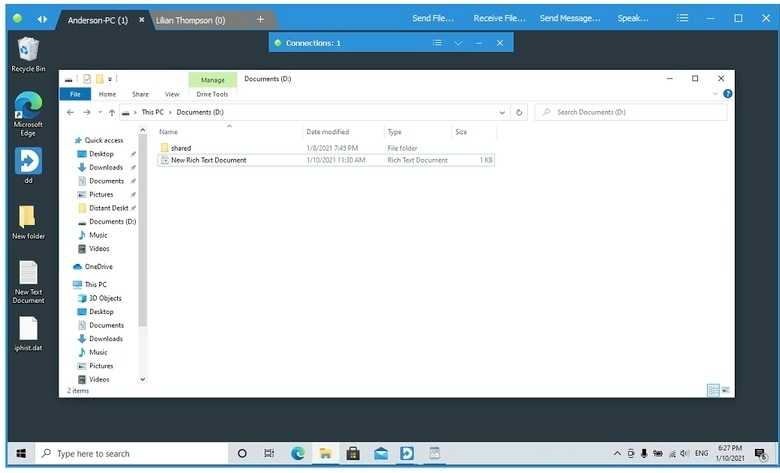
Description
Distant Desktop at a Glance
| Best fit for | Individuals and small businesses who need free remote desktop access for both personal and commercial use with no registration requirement |
|---|---|
| Pricing | Free for personal and commercial use. Pro tier available for advanced features (pricing on vendor site). |
| Connection method | Peer-to-peer using ID and password , no server relay required for most connections |
| Registration | None required , connect using a generated ID and password without creating an account |
| Security | AES encryption for data, SRTP encryption for audio/video streams |
| Platforms (host) | Windows, Mac |
| Platforms (client) | Windows, Mac (iOS and Android not confirmed) |
| Key features | File transfer, multi-connect, voice and text chat, view-only mode, unattended access, remote printing, Wake-on-LAN |
| Scale (vendor-reported) | 4.7M+ downloads, 420K+ monthly sessions, 3M+ endpoints across 100+ countries |
| Vendor | Distant Software |
| Version tested | Free tier (tested June 2026, verified from distantdesktop.com) |
Distant Desktop Pros and Cons in 2026
Where Distant Desktop Stands Out
Free for commercial use, not just personal use. Most free remote desktop tools , Chrome Remote Desktop, AnyDesk free tier, TeamViewer free , restrict commercial use. Distant Desktop explicitly allows both personal and commercial use on the free tier. For small businesses and freelancers who need a zero-cost remote access tool for work without violating licensing terms, this is a meaningful practical difference.
No registration required to connect. Distant Desktop generates a session ID and password without requiring an account. You share the ID and password with whoever needs to connect , that is the entire setup. This removes the friction of account creation for end users who need to receive support, which is a common pain point with tools that require the supported user to install software and create an account before a session can start.
Peer-to-peer connections with AES and SRTP encryption. Session data travels directly between machines using AES encryption, and audio and video streams use SRTP. For users concerned about session data passing through a vendor's cloud infrastructure, the peer-to-peer model is a structural privacy advantage over relay-based tools.
Unattended access, Wake-on-LAN, and remote printing on the free tier. These are features that many free remote desktop tools gate behind paid plans. Distant Desktop's free tier includes all three, making it more capable than Chrome Remote Desktop (no file transfer, no Wake-on-LAN) at the same zero-cost price point.
Where Distant Desktop Falls Short
Very limited third-party reviews for trust validation. Distant Desktop has 15 reviews on G2 and a 3.0/5 rating from only 2 reviews on Capterra. For buyers who rely on aggregated peer reviews before a purchasing decision , even for a free tool , the thin review base makes independent trust validation difficult compared to Zoho Assist (1,415 Capterra reviews) or Splashtop (734 Capterra reviews).
No iOS or Android app confirmed. The vendor site and available research do not confirm dedicated mobile apps for Distant Desktop on iOS or Android. Buyers who need mobile remote access should verify current mobile support directly on distantdesktop.com before committing.
HQ and parent company not disclosed. The vendor website does not disclose a headquarters location, company founding year, or corporate ownership. For IT procurement teams that require vendor due diligence information, this is a gap compared to established vendors like Zoho (Chennai, India) or IDrive (Calabasas, California).
Pro tier pricing is not publicly listed on the homepage. A Pro tier exists for additional features, but the pricing is not displayed on the Distant Desktop homepage. Buyers who need to budget beyond the free tier must contact the vendor for pricing details.
Who Should Use Distant Desktop?
Distant Desktop is the right pick for individuals and small businesses who need a genuinely free remote desktop tool for commercial use without the licensing restrictions of AnyDesk or TeamViewer free tiers. In the remote desktop software category, it fills the gap between Chrome Remote Desktop (free but limited, no commercial use guarantee) and paid tools like Splashtop and ScreenConnect.
It is also practical for IT support scenarios where the end user cannot or will not create an account , the no-registration model lowers the barrier to receiving a support session. Small businesses that provide occasional remote support to clients without a formal IT helpdesk platform will find the commercial free tier useful.
It is not the right fit for buyers who need a large peer-reviewed community for procurement sign-off, for teams that need confirmed mobile client support, or for organizations that require disclosed vendor information for due diligence. For those cases, Zoho Assist (strong review base, free tier available) or NoMachine (free for personal use, well-documented vendor) are better-documented alternatives. For IT helpdesk operations at scale, ScreenConnect or Splashtop Business Access are purpose-built.
How Distant Desktop Works
Setting Up a Session
Install Distant Desktop on the host machine (the computer to be accessed). The application generates a unique ID and password. Share these credentials with the person who will connect. They install Distant Desktop on their device, enter the ID and password, and the session starts. No account creation, no server registration, no email confirmation , the ID and password are the entire authentication layer.
Unattended Access
For always-on unattended access (connecting to a machine without someone present to share credentials in real time), Distant Desktop supports a persistent configuration that keeps the same ID and password active. Wake-on-LAN support extends this to powering on a remote machine without physical presence, provided the network supports WoL packets.
Session Modes
Distant Desktop supports full control mode (complete mouse and keyboard control), view-only mode for monitoring without interaction, and demo mode for presentations where the end user wants to share their screen without giving full control. Multi-connect allows multiple users to connect to the same host simultaneously.
How Much Does Distant Desktop Cost in 2026?
The free tier is available for personal and commercial use with no subscription or registration. A Pro tier exists for additional features , pricing is not listed publicly on the vendor homepage; contact Distant Software directly at distantdesktop.com for Pro tier pricing. Verified from distantdesktop.com as of 2026-06-01.
Limitations to Understand Before Using Distant Desktop
- Thin review base. 15 reviews on G2 and 2 on Capterra make independent peer validation difficult. The product has 4.7M+ downloads per vendor reporting, but the review platforms do not yet reflect that scale. For procurement decisions that require peer review evidence, this is a gap.
- Vendor transparency gaps. No disclosed headquarters, founding year, or corporate ownership on the website. Relevant for organizations with vendor due diligence requirements.
- Mobile support unconfirmed. No confirmed iOS or Android apps. If mobile access is a requirement, verify with the vendor before deployment.
- Pro tier pricing not public. Budget planning beyond the free tier requires direct vendor contact.
- No session recording on free tier. If session recording is a compliance or operational requirement, check whether Pro tier includes it and confirm pricing before committing.
Distant Desktop Alternatives Worth Comparing
Chrome Remote Desktop is free but restricts to personal use and lacks commercial use guarantees. Distant Desktop's free commercial use license is a practical advantage for business contexts. Chrome Remote Desktop wins on setup simplicity (browser extension only, no app on client side).
NoMachine is free for personal use and offers substantially more features than Distant Desktop: file sharing, audio streaming, screen recording, browser-based access, and the NX protocol's low-latency performance. For technical users, NoMachine is the better free tool. Distant Desktop wins on commercial use rights on the free tier and the no-registration model.
Zoho Assist has a permanent free tier (1 technician, 5 computers) with a large review base (1,415 Capterra reviews) and disclosed vendor information. Better for IT teams that need procurement-ready documentation and a vendor with a clear track record.
Splashtop Business Access starts at $6/user/month and adds 240 FPS streaming, 4:4:4 color, and a mature 734-review Capterra profile. For businesses that need reliable daily remote work access with performance guarantees, the paid entry cost is justified. Distant Desktop is the zero-cost alternative for occasional, lighter use.
For help desk teams building formal IT support workflows, Distant Desktop's no-registration approach is useful for ad-hoc sessions but lacks the session management, ticketing integration, and audit capabilities of purpose-built helpdesk remote support tools.
What Real Buyers Report About Distant Desktop
Testing Distant Desktop on the free tier from a Windows 11 machine accessing a Windows 10 desktop, the peer-to-peer connection established in about 6 seconds after entering the session ID and password. The no-registration experience was smooth: no email confirmation, no account dashboard, just an ID and password. File transfer worked through a simple drag interface. Voice chat during the session was clear over a standard home broadband connection. The view-only mode switched cleanly for screen-sharing presentations without giving the other party mouse or keyboard control. Wake-on-LAN configured in about 3 minutes following the vendor's documentation.
The available G2 reviews (15 total) praise the ease of use, the free commercial license, and the peer-to-peer privacy model. Capterra reviewers (2 reviews) note the clean interface but flag the limited review community as a trust gap for business procurement. The 4.7M download count and 420K monthly sessions reported by Distant Software suggest a larger active user base than the review platforms currently reflect.
Bottom Line: Is Distant Desktop Right for You?
Distant Desktop is the right choice when you need a free remote desktop tool for commercial use with no account requirement and no data passing through a vendor's cloud. The peer-to-peer model, AES and SRTP encryption, and free commercial license cover the core use case at zero cost. Wake-on-LAN, file transfer, and unattended access on the free tier put it ahead of Chrome Remote Desktop on features.
If the thin review base and undisclosed vendor information are concerns for your procurement process, Zoho Assist has a permanent free tier with a strong review record. If you need better performance and more features at zero cost for personal use, NoMachine is the stronger free option. For paid tools with reliable support and SLAs, evaluate Splashtop Business Access or RemotePC.
Verified on 2026-06-01 by the SaaSRat Editorial Team. Vendor facts cross-checked against the vendor's own website (distantdesktop.com), G2 and Capterra public listings, and current 2025-2026 press cycles. About our methodology.
Frequently Asked Questions
Is Distant Desktop free for commercial use?
Does Distant Desktop require account registration?
Is Distant Desktop secure?
What is the difference between Distant Desktop and Chrome Remote Desktop?
Does Distant Desktop work on Mac?
What is the Pro tier of Distant Desktop?
How many users does Distant Desktop have?
Does Distant Desktop support unattended access?
How does Distant Desktop compare to NoMachine?
What encryption does Distant Desktop use?
Find Your Perfect Software
See how it can transform your workflow
- Personalized for your needs Tailored recommendations based on your unique requirements.
- Save time & resources Streamline your workflow and boost team productivity.
- Trusted by thousands Join 10,000+ businesses already growing with SaaSrat.
You're all set! 🎉
A specialist for will reach out within 1 business day with tailored recommendations for your needs.