

Ganttic
by Ganttic • Founded 2010
What is Ganttic?
Get Best Quote for Ganttic
Connect with SaaSrat experts to get the best quote for your business.
You're all set!
A specialist for Ganttic will reach out within 1 business day.
Ganttic Features
Resource planning
Task management
Gantt charts
Drag and drop interface
Real time collaboration
Customizable views
View All 138 Features
Ganttic Pricing Plans
Pro 20
- Max 20 resources
- Unlimited users
- Full Features
- API
Pro 50
- Max 50 resources
- Unlimited users
- Full Features
- API
Pro 150
- Max 150 resources
- Unlimited users
- Full Features
- API
Pro 250
- Max 250 resources
- Unlimited users
- Full Features
- API
Pro 500
- Max 500 resources
- Unlimited users
- Full Features
- API
Pro 1000
- Max 1000 resources
- Unlimited users
- Full Features
- API
Pro 1500
- Max 1500 resources
- Unlimited users
- Full Features
- API
Max 2000
- Max 2000 resources
- Unlimited users
- Full Features
- API
Ganttic Resources
Ganttic Screenshots
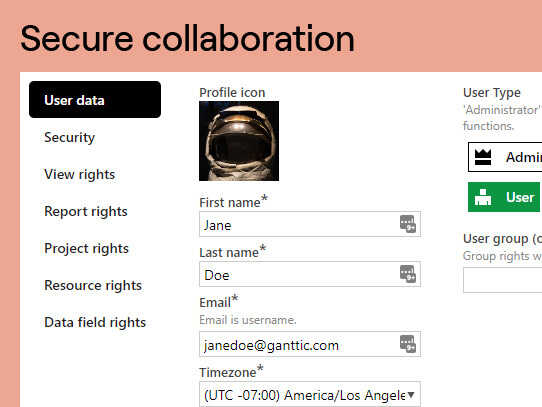
Description
Ganttic at a Glance
| Best for | Project-based organizations, consulting firms, engineering teams, agencies, and any team planning resources across multiple concurrent projects |
|---|---|
| Deployment | Cloud SaaS with visual Gantt-based planning interface; mobile access |
| Starting price | Contact Vendor (free trial available; per-resource subscription pricing) |
| Key strengths | Visual drag-and-drop resource planning, 700K+ projects planned, flexible design conforming to organizational specifics, different POV lenses on the same data |
| Not ideal for | Simple task management without resource-planning depth (Todoist or Trello fit better), or heavy enterprise project management needing Microsoft Project or Primavera |
Ganttic Overview
Ganttic is visual resource planning software helping organizations plan resources, tasks, and projects with precision and efficiency.
Over 700,000 projects have been planned on the platform, with the visual workflow adjusting to each organization specifics rather than forcing a fixed planning model.
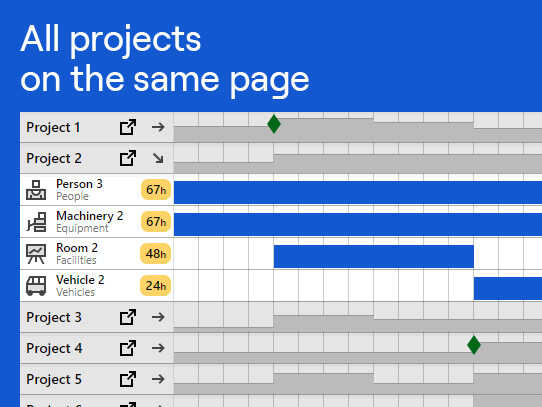
The planner is flexibly designed to conform to unique organizational and scheduling needs. Drag and drop new work, adjust in an instant when conflicts arise, and see data in a new light for clearer team planning.
Different POVs and insight let planners view the same data through different lenses (by resource, by project, by time) so teams meet deadlines and achieve goals without fighting the tool.
Capabilities and Named Features
The Ganttic thesis is that resource planning is a distinct problem from task management, and generic project tools treat it as an afterthought rather than the core.
Visual workflows of resources, tasks, and projects give planners a single view of who is doing what when, populated with organizational specifics rather than forcing a fixed planning template.
Drag and drop new work, adjust in an instant when conflicts arise. This immediacy matters because resource planning is dynamic; teams shift, projects change scope, deadlines move. Ganttic handles this reality directly rather than requiring recalculation.
The flexible design conforming to unique organizational and scheduling needs is a real differentiator. Consulting firms plan resources differently from engineering teams, and different design accommodates both without heavy configuration.
Different POVs and insight let planners view the same underlying data through different lenses: by resource utilization, by project timeline, by time-based capacity. Team members see the view relevant to their role rather than one shared universal dashboard.
The 700,000-plus projects planned on the platform reflect real market adoption across resource-planning use cases; the visual planning model has been battle-tested across diverse organizational structures.
Named feature list
- Visual drag-and-drop resource planning
- Flexible design conforming to organizational specifics
- Different POV lenses (by resource, by project, by time)
- Multi-project resource allocation
- Team capacity planning
- Conflict detection and instant resolution
- Gantt-based visual scheduling
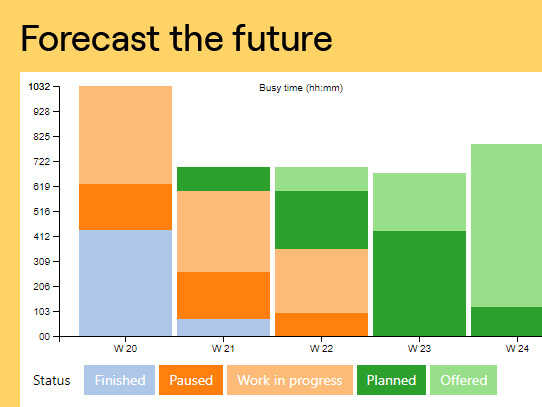
- Resource utilization reporting
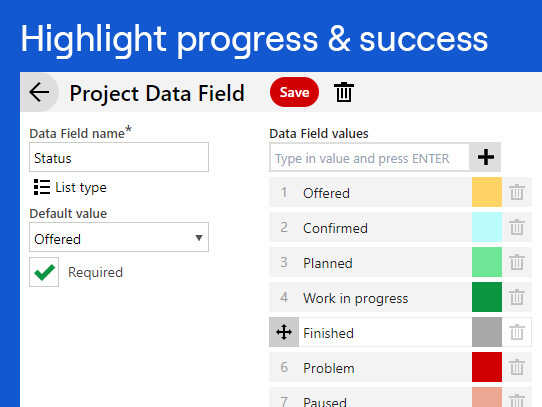
- Custom fields for resources and projects
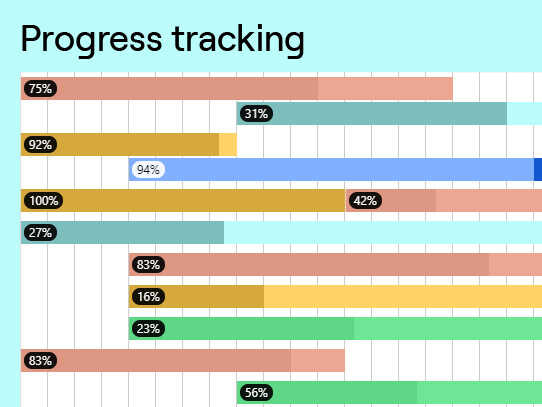
- Task and project tracking
- Multiple project view
- User roles and permissions
- API access for integration
- Integrations with common project management tools
- Cloud SaaS deployment
- Mobile access for planners
- Free trial for evaluation
- 700,000+ projects planned on the platform
- Different insight views for different team roles
- Data-driven resource decisions
Pricing and Plans
Ganttic offers a free trial as the primary evaluation path.
Paid tiers are quoted based on resource count (people, equipment, or other planned entities), user count, and feature bundle.
Contact the vendor for scoped pricing conversations after trial evaluation.
| Tier | Price | What is included |
|---|---|---|
| Free Trial | No cost | Take a tour and evaluate the platform before paid subscription. Full-feature access during trial period |
| Standard | Contact Vendor | Base tier for teams planning resources across multiple concurrent projects. Sized by resource count |
| Growth | Contact Vendor | Higher tier for growing organizations with more resources, expanded custom fields, and deeper reporting |
| Enterprise | Contact Vendor | Multi-team enterprise deployment with custom integrations, dedicated CSM, priority support, and quarterly business reviews |
Pros
- Visual resource planning with drag-and-drop is a genuine differentiator over generic project management tools that treat resource planning as an afterthought.
- Flexible design conforming to organizational specifics means consulting firms, engineering teams, and agencies all fit their existing planning models rather than being forced into a fixed template.
- 700,000-plus projects planned on the platform provides real market validation that the visual planning model has been battle-tested across diverse organizational structures.
Cons and Trade-offs
- Not designed for simple task management without resource-planning depth; teams needing just to-do lists should evaluate Todoist, Trello, or Asana instead.
- Enterprise project management needs (portfolio management, earned value, complex dependency scheduling) may require Microsoft Project or Primavera P6 depth that Ganttic does not primarily focus on.
- Quote-based paid pricing slows self-serve evaluation versus published-price project management competitors.
Ganttic vs Alternatives
| Capability | Ganttic | Float | Resource Guru |
|---|---|---|---|
| Core focus | Visual resource planning across projects | Team capacity and utilization tracking | Team scheduling and vacation tracking |
| Multi-project view | Native | Native | Native |
| Drag-and-drop scheduling | Yes with instant conflict resolution | Yes | Yes |
| Flexible design | Conforms to organizational specifics | Standard capacity model | Standard resource model |
| Best fit | Project-based organizations needing flexible resource planning | Agencies and consultancies tracking utilization | Teams needing simple resource scheduling |
Who Should Choose Ganttic
Project-based organizations, consulting firms, engineering teams, agencies, and any team planning resources across multiple concurrent projects.
Organizations where resource conflicts and capacity constraints drive project outcomes benefit from the visual drag-and-drop planning and instant conflict resolution.
Not appropriate for simple task management use cases without resource-planning depth (Todoist, Trello, or Asana fit better) or heavy enterprise project management needing Microsoft Project or Primavera P6.
Named Alternatives to Ganttic
- Float. Team capacity and utilization tracking. Chosen when the buyer wants dedicated capacity tracking with strong utilization analytics.
- Resource Guru. Team scheduling with vacation tracking. A better fit for simple team scheduling with clear resource-per-day allocation.
- Runn. Modern resource management for consulting and agencies. Preferred for consulting firms wanting modern UX with financial forecasting.
- Microsoft Project. Enterprise project management with heavy dependency scheduling. Chosen for enterprise IT projects needing MS Project ecosystem.
- Primavera P6. Enterprise portfolio and construction project management. A better fit for construction and engineering firms needing complex dependency scheduling.
Implementation and Deployment
Ganttic deployments run 1-4 weeks depending on resource count, project complexity, and integration scope with existing project management or CRM tools.
Standard sequence: resource setup (people, equipment, other planned entities), project template configuration, custom field configuration matching organizational specifics, user training on drag-and-drop workflow, and pilot planning cycle with one team before wider rollout.
Larger deployments layer on API integrations with existing project management tools, custom reporting, and multi-team visibility with role-based permissions.
Migration from spreadsheet-based resource planning is a common Ganttic starting point; the vendor supports mapping existing capacity models into the platform without forcing a rebuild of team planning conventions.
Custom field configuration matters because organizational specifics differ. Consulting firms plan billable resources by hour and client engagement, engineering teams plan by discipline and project phase, agencies plan by role and account. Ganttic accepts all of these without requiring workflow redesign.
What Real Buyers Say About Ganttic
Operator discussions on Reddit r/projectmanagement discussions and LinkedIn Project Management community surface the following themes.
Consulting firm operations leaders and engineering managers on LinkedIn project management communities discuss Ganttic as one of the leading visual resource planning platforms.
The flexible design conforming to organizational specifics is frequently cited as the reason for choosing Ganttic over fixed-template competitors like Float or Resource Guru.
The 700,000-plus projects planned figure is often referenced as evidence of market validation.
Common critique from enterprise buyers: portfolio management and earned value reporting are lighter than Microsoft Project or Primavera P6; buyers with those needs should evaluate against enterprise PPM platforms.
Agencies and engineering teams frequently cite the different POV lenses as a real productivity lever; the same planning data viewed by resource, by project, or by time surfaces conflicts that a single fixed view would hide.
The drag-and-drop instant conflict resolution is the specific feature most-cited when planners describe why they left spreadsheet-based resource planning; recalculating capacity manually every time a project slips or a team member takes leave was the pain that pushed teams to Ganttic.
Vendor references: Ganttic resource planning software overview, Ganttic customer stories, Ganttic product tour.
Related Ganttic Comparisons and Categories on SaaSRat
Explore related products and categories on SaaSRat to compare Ganttic against alternatives.
- Project Management on SaaSRat
- Resource Management on SaaSRat
- PSA Software on SaaSRat
- Float: team capacity tracking
- Resource Guru: simple team scheduling
- Runn: modern resource management
- Microsoft Project: enterprise PM
- Primavera P6: enterprise portfolio PM
The Bottom Line on Ganttic
Ganttic is a strong fit for project-based organizations, consulting firms, engineering teams, and agencies needing visual resource planning across multiple concurrent projects.
Visual drag-and-drop planning with instant conflict resolution and different POV lenses is a real differentiator over generic project management tools.
Flexible design conforming to organizational specifics means the platform adapts to how teams already plan rather than forcing a fixed template.
Simple task management use cases without resource-planning depth should look at Todoist, Trello, or Asana instead.
Enterprise project management needs (heavy dependency scheduling, portfolio management, earned value) may require Microsoft Project or Primavera P6.
Verified on 2026-08-04 against vendor website.
Frequently Asked Questions
What is Ganttic?
Who is Ganttic best for?
How does Ganttic pricing work?
What is different POVs in Ganttic?
How does drag-and-drop planning work?
Can Ganttic conform to my organizational specifics?
What integrations does Ganttic support?
How does Ganttic compare to Microsoft Project?
Where is Ganttic headquartered?
Does Ganttic offer a free trial?
Find Your Perfect Software
See how it can transform your workflow
- Personalized for your needs Tailored recommendations based on your unique requirements.
- Save time & resources Streamline your workflow and boost team productivity.
- Trusted by thousands Join 10,000+ businesses already growing with SaaSrat.
You're all set! 🎉
A specialist for will reach out within 1 business day with tailored recommendations for your needs.