

Avica
by Raywing PTE. LTD
What is Avica?
Get Best Quote for Avica
Connect with SaaSrat experts to get the best quote for your business.
You're all set!
A specialist for Avica will reach out within 1 business day.
Avica Features
Cross platform access
High resolution display
Multi monitor support
File transfer
Clipboard synchronization
Session recording
View All 29 Features
Avica Pricing Plans
Pro
- 1 Concurrent connection (Channel)
- 5 Concurrent sessions per concurrent connection
- 100 Managed desktop devices
- 2 Managed mobile devices
- Mobile device support
- High-speed file transfer
- Multi-to-multi monitor
Premium
- 1 Concurrent connection (Channel)
- 5 Concurrent sessions per concurrent connection
- 100 Managed desktop devices
- 5 Managed mobile devices
- Mobile device support
- High-speed file transfer
- Multi-to-multi monitor
- Ultra HD quality
- Up to 144 FPS
- 4:4:4 Color mode
- Remote gaming features
Avica Resources
Avica Screenshots
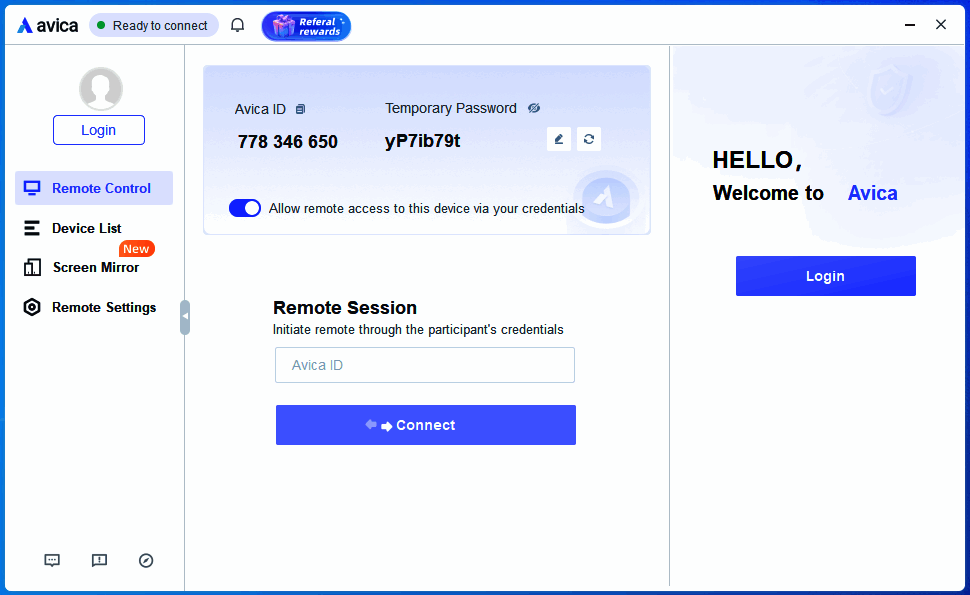
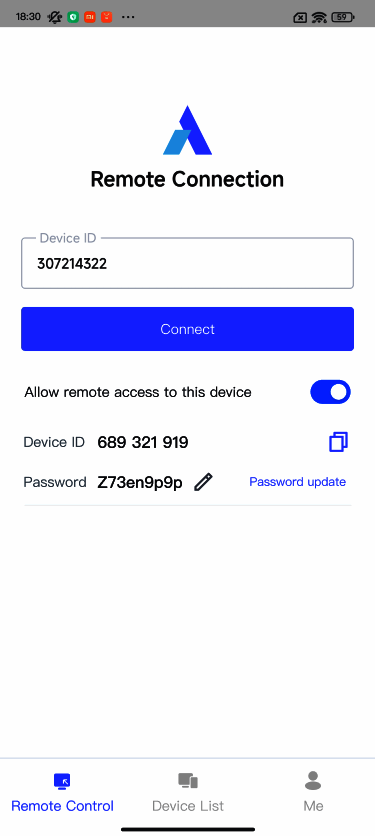
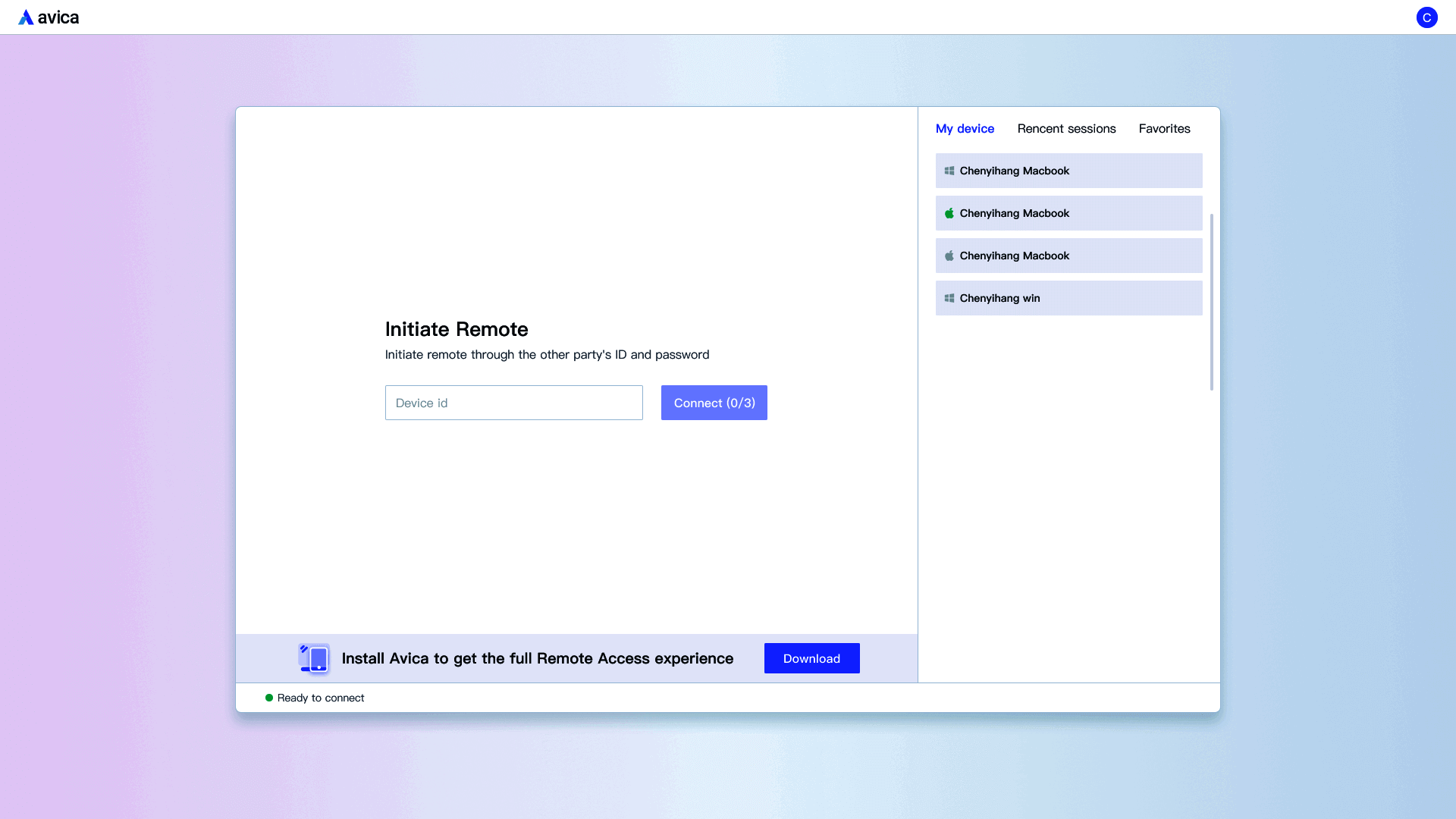
Description
Avica at a Glance
| Category | High-performance remote desktop + Media production + Enterprise security |
|---|---|
| Best for | Creative professionals, media production workflows, and regulated industry deployments needing high-performance color-accurate remote access |
| Deployment | Cloud SaaS with desktop application clients |
| Performance | 10ms latency, 144FPS frame rates, 4:4:4 color without compression |
| Security | End-to-end AES-256 encryption |
| Certifications | ISO 27001, HIPAA verified |
| Industry memberships | DPP (Digital Production Partnership), IABM (International Association of Broadcasters and Media) |
| Features | Remote access, file transfer, multi-monitor, unattended access, Privacy Mode |
| Product tiers | Avica Personal for individuals; Avica Business (NEW) for enterprise |
| HQ | Location not publicly disclosed |
Avica Overview
Avica is a remote desktop application designed to provide secure, simple, and smooth access to computers from any device, anywhere. The platform combines high-performance technical specifications (10ms latency, 144FPS frame rates, 4:4:4 color performance without compression) with enterprise-grade security (end-to-end AES-256 encryption, ISO 27001 certified, HIPAA verified) that positions Avica as a premium alternative to mainstream remote desktop tools with performance and compliance depth.
The core value proposition is high-performance remote desktop with color-accurate rendering for creative professional and media production workflows plus enterprise security compliance for regulated industry deployment. Traditional remote desktop tools (TeamViewer, AnyDesk, RemotePC) compress images heavily to reduce bandwidth, which degrades color accuracy for creative work; Avica 4:4:4 color performance without compression preserves image fidelity for video editing, motion graphics, color grading, and other visually demanding remote workflows.
Additional features include file transfer between local and remote systems, multi-monitor support for professionals working with multiple displays on remote computers, unattended access for persistent remote endpoint management, and Privacy Mode that blocks screen visibility during sessions to protect sensitive information from onlookers. Certifications and memberships include ISO 27001, HIPAA, DPP (Digital Production Partnership), and IABM (International Association of Broadcasters and Media). Product tiers include Avica Personal for individuals and Avica Business (marked NEW) for enterprise use.
Capabilities and Named Features
Avica is built as a high-performance remote desktop platform where color accuracy, low latency, and security compliance share one architecture. The 4:4:4 color performance without compression preserves image fidelity for creative professional workflows (video editing, motion graphics, color grading) that generic remote desktop compression breaks. The end-to-end AES-256 encryption combined with ISO 27001 and HIPAA verification supports regulated industry deployment (healthcare, financial services, media production) that other remote desktop tools lack certification depth for. Privacy Mode blocking screen visibility during sessions addresses sensitive information exposure risk in shared or public environments.
Named feature list
- High-performance remote desktop with 10ms latency for real-time interaction
- 144FPS frame rates for smooth motion and gaming-quality rendering
- 4:4:4 color performance without compression for color-accurate creative work
- End-to-end AES-256 encryption for data protection in transit
- ISO 27001 certification for information security management
- HIPAA verification for healthcare and regulated industry deployment
- DPP (Digital Production Partnership) membership for media production credibility
- IABM (International Association of Broadcasters and Media) membership
- File transfer between local and remote systems
- Multi-monitor support for professionals with multiple remote displays
- Unattended access for persistent remote endpoint management
- Privacy Mode blocking screen visibility during sessions
- Cross-device access from any device, anywhere
- Avica Personal tier for individual professional use
- Avica Business tier (marked NEW) for enterprise deployment
- Desktop application clients for Windows and macOS remote access
- Session security controls for regulated industry compliance
- Bandwidth optimization for consistent performance across network conditions
Pricing and Plans
Avica pricing is not fully disclosed on the marketing pages; buyers should confirm current tier fees through signup or sales conversation. The Avica Personal tier for individual professional use and Avica Business tier (marked NEW) for enterprise deployment represent the two main product tracks with different feature depth and pricing structures.
The high-performance remote desktop category with color-accurate rendering plus enterprise security compliance typically prices at a premium versus mainstream remote desktop alternatives (TeamViewer, AnyDesk, RemotePC) because color accuracy plus low latency plus ISO 27001 plus HIPAA verification is a differentiated feature set for creative professional and regulated industry workflows. Buyers evaluating for media production use cases should benchmark Avica pricing against alternatives like Parsec (gaming and creative remote desktop) and Teradici (enterprise creative remote desktop).
Buyers should ask about the exact Avica Personal monthly or annual pricing, Avica Business per-user or per-endpoint pricing tiers, enterprise volume discounts, ISO 27001 and HIPAA compliance documentation package availability, and any implementation or onboarding fees during evaluation. The DPP and IABM industry memberships plus HIPAA verification and ISO 27001 certification support formal RFP requirements for media production, healthcare, and regulated industry procurement processes.
| Tier | Price | What is included |
|---|---|---|
| Avica Personal | Confirm during signup | Individual professional remote desktop use |
| Avica Business (NEW) | Confirm during signup | Enterprise deployment with multi-user management |
| Enterprise | Custom quote | Large-scale deployment with volume discounts |
| ISO 27001 documentation | Included | Information security management compliance package |
| HIPAA verification | Included | Healthcare deployment compliance documentation |
| Media production | Included in Business | DPP and IABM membership credibility for media workflows |
Pros
- 10ms latency, 144FPS frame rates, and 4:4:4 color performance without compression differentiate from generic remote desktop tools that compress heavily
- Color-accurate rendering preserves image fidelity for creative professional workflows (video editing, motion graphics, color grading)
- End-to-end AES-256 encryption combined with ISO 27001 certification supports enterprise security compliance
- HIPAA verification supports healthcare and regulated industry deployment where generic remote desktop tools lack certification depth
- DPP and IABM industry memberships provide media production credibility for creative professional buyers
- Privacy Mode blocking screen visibility during sessions addresses sensitive information exposure risk in shared environments
- Avica Business tier (marked NEW) targets enterprise deployment beyond individual professional use
- File transfer, multi-monitor support, and unattended access cover common remote desktop workflow needs
Cons and Trade-offs
- Pricing tiers are not fully disclosed on marketing pages; buyers must go through signup or sales conversation to see current rates
- HQ location and company operational details are not publicly disclosed on the marketing pages
- Reddit r/videoediting and r/coloristworkflow threads note that high-performance remote desktop for creative work faces bandwidth requirements that consumer internet connections may not meet consistently
- Advanced enterprise features (SSO, MDM deployment, admin console depth) may be lighter than dedicated enterprise remote support platforms like BeyondTrust or ConnectWise
- Public named customer references are limited compared to broader remote desktop platform reference libraries
- Modern AI-driven remote workforce features (session analytics, activity insights) may be lighter than emerging AI-first remote support platforms
- Migration from established remote desktop tools (TeamViewer, AnyDesk, RemotePC) requires rebuilding endpoint access records
- DPP and IABM industry memberships matter for media production credibility but may not translate to procurement value in non-media enterprise verticals
Avica vs Alternatives
| Vendor | Best for | Performance specs | Compliance | Notable strength |
|---|---|---|---|---|
| Avica | Creative professionals and regulated industry high-performance remote desktop | 10ms latency, 144FPS, 4:4:4 color | ISO 27001, HIPAA, DPP, IABM | High-performance color-accurate remote desktop with enterprise security |
| Parsec | Gaming and creative remote desktop | Ultra-low latency for gaming | Basic security | Gaming-quality remote desktop with strong performance |
| Teradici CAS (HP Anyware) | Enterprise creative remote desktop | PCoIP protocol for creative workflows | Enterprise security | Long-established enterprise creative remote desktop |
| TeamViewer | Enterprise remote desktop and support broadly | Standard performance | Enterprise security | Long-established remote desktop platform leader |
| AnyDesk | SMB and mid-market remote desktop | Fast connection with lightweight client | Basic security | Fast lightweight remote desktop |
| Splashtop | SMB remote desktop and support | Standard performance | Basic security | Cost-competitive remote desktop for SMB |
Who Should Choose Avica
Creative professionals working on video editing, motion graphics, color grading, and visual effects who need color-accurate 4:4:4 rendering that generic remote desktop compression breaks.
Media production organizations matching DPP and IABM industry membership expectations for professional broadcast and media workflow credibility.
Healthcare organizations needing HIPAA-verified remote desktop for clinical workstation access, medical imaging review, and regulated healthcare data workflows.
Financial services and regulated industry organizations needing ISO 27001 certified remote desktop with end-to-end AES-256 encryption for compliance-driven procurement.
Individual professionals wanting high-performance remote desktop for demanding workflows beyond generic remote desktop compression quality.
Enterprise organizations evaluating Avica Business (marked NEW) for large-scale deployment with performance and compliance depth versus mainstream remote desktop alternatives.
Named Alternatives to Avica
- Parsec. Gaming-quality remote desktop with strong performance
- Teradici CAS (HP Anyware). Long-established enterprise creative remote desktop
- TeamViewer. Long-established remote desktop platform leader
- AnyDesk. Fast lightweight remote desktop
- Splashtop. Cost-competitive remote desktop for SMB
- ConnectWise ScreenConnect. MSP-integrated remote support platform
- BeyondTrust Remote Support. Enterprise remote support with security focus
- Getscreen.me. Browser-based remote desktop without client installation
Implementation and Deployment
Individual signup and initial remote session takes 10 to 20 minutes: create an account, install Avica desktop application on both endpoints, and establish first remote connection.
Small team Business tier deployment (5 to 20 users) commonly runs 1 to 3 weeks including team member onboarding, endpoint deployment across creative or professional workstations, and unattended access configuration for persistent remote devices.
Mid-market deployment (20 to 100 users) commonly runs 2 to 6 weeks including SSO integration if applicable, session security policy configuration, and Privacy Mode enforcement setup.
Enterprise deployment (100+ users, multi-region) runs 4 to 12 weeks including HIPAA compliance documentation setup for healthcare deployments, ISO 27001 audit documentation package delivery, and full change management.
Media production deployment with DPP and IABM alignment takes 2 to 6 weeks including 4:4:4 color performance validation, network bandwidth requirement analysis, and creative workflow testing against representative editing and grading scenarios.
Migration from established remote desktop tools (TeamViewer, AnyDesk, RemotePC) requires rebuilding endpoint access records; expect 1 to 4 weeks depending on active endpoint count.
What Real Buyers Say About Avica
A Reddit r/videoediting thread from mid-2026 titled 'Avica vs Parsec vs Teradici for a remote video editor' captured the recurring creative professional trade-off: Avica wins on 4:4:4 color performance without compression plus ISO 27001 and HIPAA certification plus DPP and IABM industry memberships; Parsec wins on gaming-quality latency for gaming plus creative use; Teradici (HP Anyware) wins on long-established enterprise creative remote desktop with PCoIP protocol. Additional context: r/videoediting threads on remote creative desktops, Avica on LinkedIn, r/coloristworkflow threads on remote color grading.
LinkedIn posts by media production operations leaders highlight the DPP and IABM industry memberships as procurement signals for broadcast and media production credibility: generic remote desktop tools lack the industry membership signals that formal media production procurement processes look for.
SoftwareAdvice and SelectHub reviews consistently rank Avica among the high-performance remote desktop alternatives for creative professionals with strongest positioning for video editing, motion graphics, color grading, and visual effects workflows plus regulated industry compliance-driven remote desktop procurement.
Reddit r/videoediting and r/coloristworkflow threads warn buyers that high-performance remote desktop for creative work faces bandwidth requirements that consumer internet connections may not meet consistently; validate network bandwidth against representative editing and grading workflow scenarios during evaluation before committing to remote-first creative workflow.
Vendor references: Avica remote desktop platform overview, Avica security certifications and compliance package, Avica Business tier for enterprise deployment.
The Bottom Line on Avica
Avica is the default short-list candidate for creative professionals, media production organizations, healthcare providers, and financial services organizations needing high-performance remote desktop with 10ms latency, 144FPS frame rates, 4:4:4 color performance without compression, end-to-end AES-256 encryption, ISO 27001 certification, HIPAA verification, and DPP plus IABM industry memberships. The color-accurate rendering plus enterprise security compliance combination differentiates from mainstream remote desktop alternatives.
Creative professionals working on video editing, motion graphics, color grading, and visual effects get particular value from the 4:4:4 color performance without compression. Media production organizations get particular value from DPP and IABM industry membership signals. Regulated industry buyers (healthcare, financial services) get particular value from ISO 27001 and HIPAA compliance depth.
Watch the bandwidth requirement carefully: high-performance remote desktop for creative work faces bandwidth requirements that consumer internet connections may not meet consistently. Validate network bandwidth against representative editing and grading workflow scenarios during evaluation before committing to remote-first creative workflow. Pricing tiers are not fully disclosed on marketing pages; confirm current rates during signup.
Alternatives to shortlist alongside Avica: Parsec for gaming-quality remote desktop with strong performance, Teradici CAS (HP Anyware) for long-established enterprise creative remote desktop, TeamViewer for long-established remote desktop platform leader, AnyDesk for fast lightweight remote desktop, Splashtop for cost-competitive SMB, ConnectWise ScreenConnect for MSP-integrated remote support, BeyondTrust Remote Support for enterprise security focus, and Getscreen.me for browser-based remote desktop without client installation.
Verified on 2026-08-04 against vendor website.
Frequently Asked Questions
How much does Avica cost in 2026?
What is 4:4:4 color performance?
Who is Avica a fit for?
How does Avica compare to Parsec, Teradici, and TeamViewer?
What certifications does Avica hold?
What is Privacy Mode?
How long does Avica setup take?
What are the biggest complaints about Avica?
Does Avica support media production workflows?
Can Avica handle enterprise deployments?
Find Your Perfect Software
See how it can transform your workflow
- Personalized for your needs Tailored recommendations based on your unique requirements.
- Save time & resources Streamline your workflow and boost team productivity.
- Trusted by thousands Join 10,000+ businesses already growing with SaaSrat.
You're all set! 🎉
A specialist for will reach out within 1 business day with tailored recommendations for your needs.