
Aloha POS
by AlohaEPOS
What is Aloha POS?
Get Best Quote for Aloha POS
Connect with SaaSrat experts to get the best quote for your business.
You're all set!
A specialist for Aloha POS will reach out within 1 business day.
Aloha POS Features
Order management
Inventory management
Customer management
Employee management
Reporting and analytics
Menu customization
View All 23 Features
Aloha POS Pricing Plans
Aloha Essentials
- Core POS and checkout
- Front-of-house ordering interface
- Kitchen display system
- Basic reporting
- Hardware bundle included (15" terminal, EMV/NFC device, cash drawer, receipt printer)
- Subscription-based
- Contact NCR Voyix for pricing
Advanced Add-ons
- Labor scheduling
- Advanced inventory management
- Multi-location centralized management
- Loyalty and gift card programs
- Online ordering integration
- Custom pricing based on location count and features
Aloha POS Resources
Aloha POS Screenshots
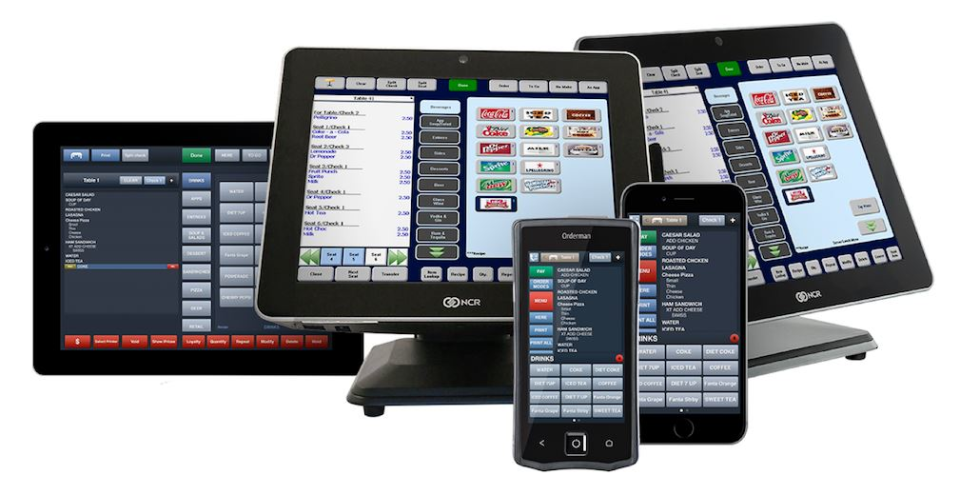
Description
Who Should Use Aloha POS?
Aloha POS is designed for restaurant operators who need a proven, enterprise-grade system with dedicated restaurant features. It fits:
- Full-service restaurants with table management, server sections, and course sequencing
- Fast casual and quick-service concepts that need high-speed ordering and kitchen display routing
- Multi-location restaurant brands that want centralized menu and pricing management
- Restaurant groups transitioning from legacy on-premise POS to a cloud-hosted system
- Operators who prefer subscription hardware to avoid large upfront capital outlays
- Restaurants that need guaranteed offline processing during network outages
Aloha POS Key Features
Aloha Cloud covers the operational demands of a restaurant from order entry through kitchen production to close-of-day reporting.
- Front-of-house ordering: An intuitive touchscreen interface handles dine-in table orders, counter service, and handheld tablet ordering on the floor. The same interface runs across POS terminals and mobile handhelds.
- Kitchen display system: Orders route from the POS to kitchen screens automatically, with timing indicators and course sequencing to keep the kitchen in sync during rush periods.
- Table management: Visual floor plan view shows table status, covers, and time seated. Servers manage their section from the POS with drag-and-drop table transfers and split-check processing.
- True offline mode: Aloha Cloud is engineered to keep accepting orders and payments when the internet is unavailable. Data syncs to the cloud once connectivity restores, with no lost transactions.
- Multi-location management: A centralized back office allows restaurant groups to push menu changes, pricing updates, and promotional items to all locations simultaneously. Each location's data rolls up into consolidated reports.
- Labor scheduling: Build weekly schedules, track clock-in and clock-out times, and monitor labor cost (see accounting software for restaurants) relative to sales volume from the back-office dashboard.
- Inventory management: Track ingredient usage against recipes, set par levels, and generate variance reports to monitor waste and shrinkage.
- Online ordering integration: Connect the POS to online ordering platforms so delivery and takeout orders route directly to the kitchen display, with no manual order entry.
- Loyalty and gift cards: Built-in customer recognition and loyalty tools that connect to Aloha's loyalty programs or third-party platforms.
- Subscription hardware: The monthly plan includes a 15-inch POS terminal, EMV and NFC payment device, cash drawer, and receipt printer. No separate hardware purchase required at launch.
Aloha POS Pricing Plans
Aloha Cloud is sold through a subscription model where hardware and software costs are bundled into a monthly fee rather than charged as a large upfront expense. Implementation costs vary based on the number of terminals and configuration complexity. Contact the NCR Voyix sales team at alohapos.com for a quote specific to your restaurant type, location count, and feature requirements.
- Aloha Essentials: Core POS, front-of-house ordering, kitchen routing, basic reporting, and hardware bundle. Pricing available upon request from the vendor.
- Advanced add-ons: Labor scheduling, advanced inventory management, multi-location reporting, and loyalty features are available as additions to the base subscription. Contact NCR Voyix for current add-on pricing.
How Does Aloha POS Compare?
Aloha POS is one of the most established names in restaurant technology, with decades of deployment across independent restaurants and large chains. Its offline-first architecture is a meaningful differentiator in markets where internet reliability is inconsistent, such as rural locations or high-volume venues with bandwidth strain. The bundled hardware subscription model also lowers the barrier for restaurants that cannot fund large capital purchases upfront.
The platform's depth comes with a learning curve. New operators accustomed to simpler tablet-based POS systems may find the initial configuration and staff training period longer than expected. The pricing, which is customized per site, requires working directly with a sales representative rather than checking a public pricing page, which makes early-stage budget comparisons harder for restaurateurs evaluating multiple platforms. Retailers looking for a general-purpose retail POS system may find platforms like Square POS or Shopify POS a faster path to go-live.
Aloha POS Integrations
Aloha Cloud integrates with major online ordering platforms including DoorDash, Uber Eats, and Grubhub through direct API connections, routing third-party orders to the kitchen display without manual entry. Reservation management systems and loyalty platforms can be connected through the NCR Voyix marketplace. For multi-unit operators, the back office connects to accounting systems for labor cost and sales data export. NCR Voyix also partners with payment processing providers for integrated card acceptance at negotiated rates.
Aloha POS Mobile App
Aloha Cloud supports tableside ordering through handheld POS devices for full-service restaurants. Staff carry a handheld terminal to the table, enter orders directly, and send them to the kitchen without returning to a fixed counter. The same interface used at the POS terminal runs on the handheld, which means no separate training for floor staff. Managers access reporting dashboards through a web-based back office, accessible from any browser without a dedicated app.
Aloha POS Customer Support
NCR Voyix provides 24/7 technical support for Aloha Cloud subscribers. Restaurant operations run around the clock, and the support team is staffed to respond to critical POS issues during peak service hours, including evenings and weekends. Dedicated implementation specialists assist with initial setup and staff training. The NCR Voyix knowledge base covers configuration guides, hardware troubleshooting, and best practices for common restaurant workflows.
Aloha POS Data Security
Aloha Cloud is PCI DSS compliant and processes card payments through EMV and NFC-certified payment devices. Card data is encrypted at the point of payment and not stored locally on the POS terminal. Cloud data is hosted with redundancy and backup protocols to protect against data loss. Two-factor authentication is available for back-office access. NCR Voyix has decades of experience processing restaurant payments at scale across the United States and internationally.
Aloha POS Ease of Setup
NCR Voyix handles the hardware installation and initial software configuration for new Aloha Cloud deployments. An implementation specialist works with the restaurant team to set up the menu, table layout, reporting preferences, and staff roles before go-live. Staff training is typically conducted on-site by the NCR Voyix team. The timeline from contract signing to go-live varies based on location count and menu complexity, but single-location deployments can typically launch within two to four weeks.
What Real Buyers Report About Aloha POS
Nirula Patel reviewed Aloha Cloud through its feature documentation, vendor case studies, and the restaurant operator community. The offline processing capability comes up consistently as the most valued feature among operators in locations where internet reliability is unpredictable: transactions process locally and sync to the cloud without any gap in the sales record. Multi-location restaurant brands highlight the centralized menu management as a time-saver, since updating a menu item once pushes the change to all locations without location-by-location edits. The pricing model with bundled hardware is appreciated by restaurant owners who prefer predictable monthly operating costs over large capital investments in equipment. The friction point most commonly raised is implementation timeline: setting up Aloha Cloud at a new location is not a self-service process, and operators who need a POS running quickly typically find the NCR Voyix deployment model slower than simpler tablet POS alternatives.
Aloha POS Pros and Cons
Pros:
- True offline processing protects revenue during network outages
- Hardware bundled into the subscription reduces upfront capital costs
- Centralized multi-location menu management for restaurant groups
- Decades of deployment experience across major restaurant chains
- 24/7 technical support staffed for restaurant operating hours
Cons:
- Pricing is not publicly listed; requires a sales quote
- Implementation requires NCR Voyix involvement; not self-service
- Longer setup timeline compared to tablet-first POS alternatives
- Feature depth can require more staff training time at launch
Is Aloha POS Worth It?
Aloha POS is worth evaluating for restaurant operators who need a proven platform with offline reliability, bundled hardware, and the depth to support multi-location operations. The subscription model makes the ongoing cost predictable, and the implementation support takes setup work off the operator's plate. For a small independent restaurant that needs a POS live within a week, simpler alternatives may fit the timeline better. For a growing restaurant brand with multiple locations, complex menus, and a need for centralized management, Aloha Cloud's track record and feature set justify the evaluation process.
Frequently Asked Questions
Is there a free plan or free trial for Aloha?
How much does Aloha cost?
What does Aloha integrate with?
Who is Aloha best for?
What are the best alternatives to Aloha?
Is Aloha GDPR / SOC 2 compliant?
Does Aloha have a mobile app?
What do real users say about Aloha?
How does Aloha compare to its top competitor?
Does Aloha offer customer support?
Find Your Perfect Software
See how it can transform your workflow
- Personalized for your needs Tailored recommendations based on your unique requirements.
- Save time & resources Streamline your workflow and boost team productivity.
- Trusted by thousands Join 10,000+ businesses already growing with SaaSrat.
You're all set! 🎉
A specialist for will reach out within 1 business day with tailored recommendations for your needs.