

Workzone
by Workzone LLC
What is Workzone?
Get Best Quote for Workzone
Connect with SaaSrat experts to get the best quote for your business.
You're all set!
A specialist for Workzone will reach out within 1 business day.
Workzone Features
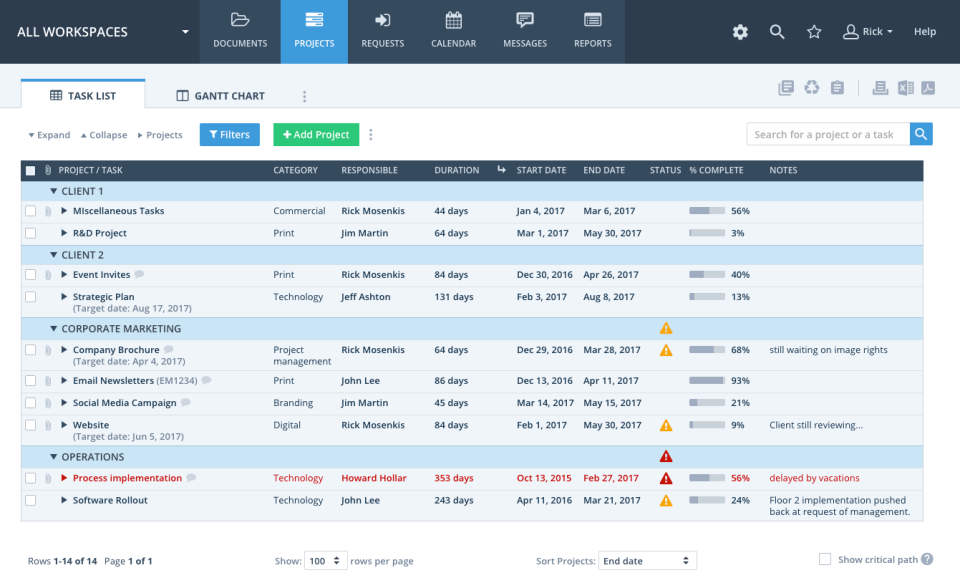
List Gantt and Kanban views
Portfolio dashboards with cross-project rollups
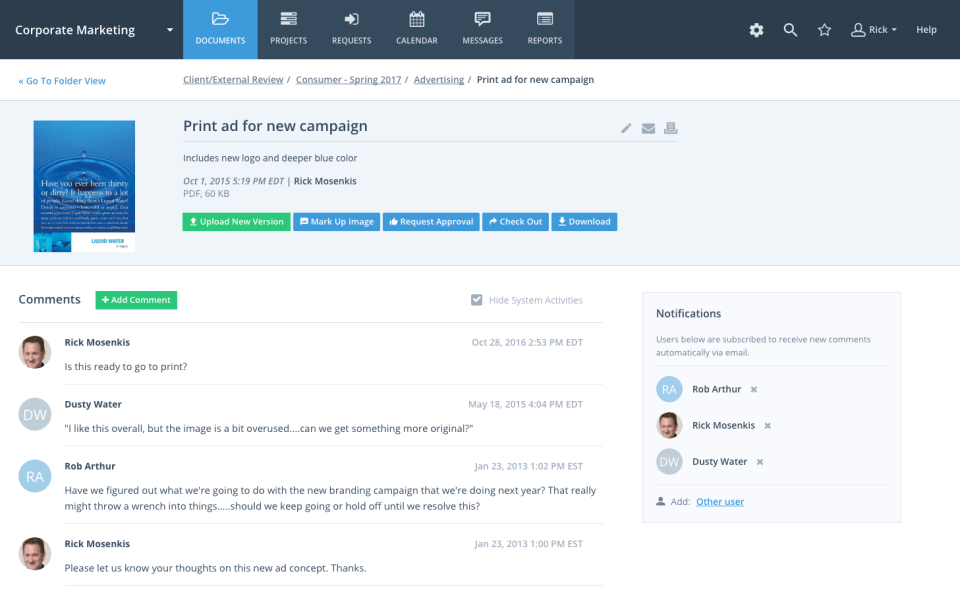
Proofing and markup with approvals
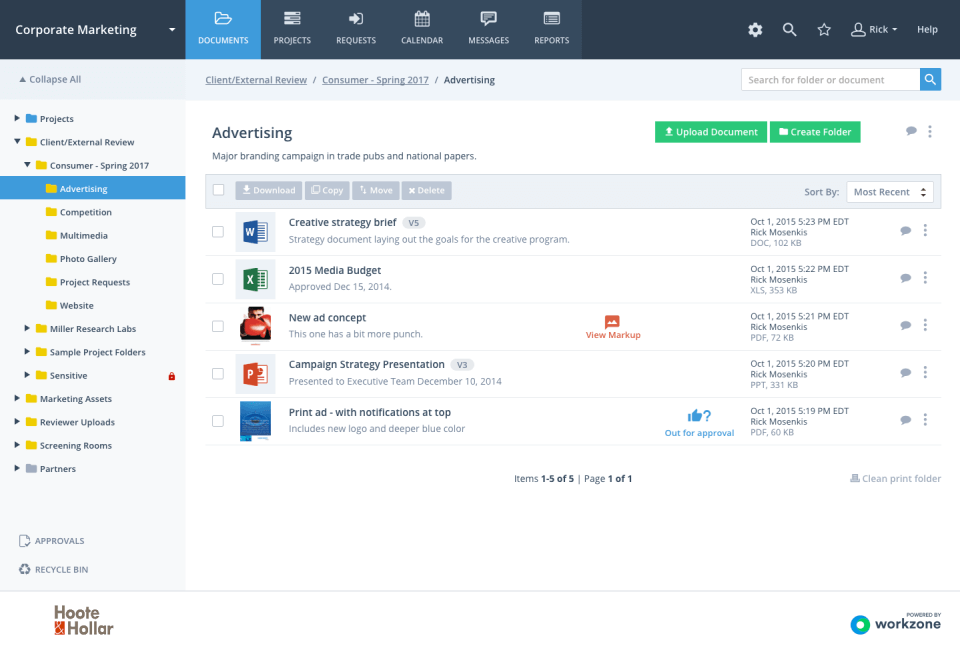
Document version control and approvals
Time and expense tracking
Workload planning with capacity view
View All 15 Features
Workzone Pricing Plans
Starter
- 1-25 users. List, Gantt, Kanban views. Up to 100 active projects. 5 custom templates. Basic reports. 250 GB storage. Unlimited human support and training included.
Team
- 5 to unlimited users. Everything in Starter plus unlimited projects, portfolio view, proofing and markups, document approvals, time and expense tracking, workload planning. 500 GB storage. Dedicated success manager.
Enterprise
- Pay only for core users (creators). 5 free collaborators per creator. Unlimited guest reviewers. Everything in Team plus advanced proofing, custom fields, critical path, cross-project dependencies, APIs, SSO with SAML and MFA, HIPAA and SOC 2 Type II. 1 TB+ storage.
Workzone Screenshots
Description
What is WorkZone?
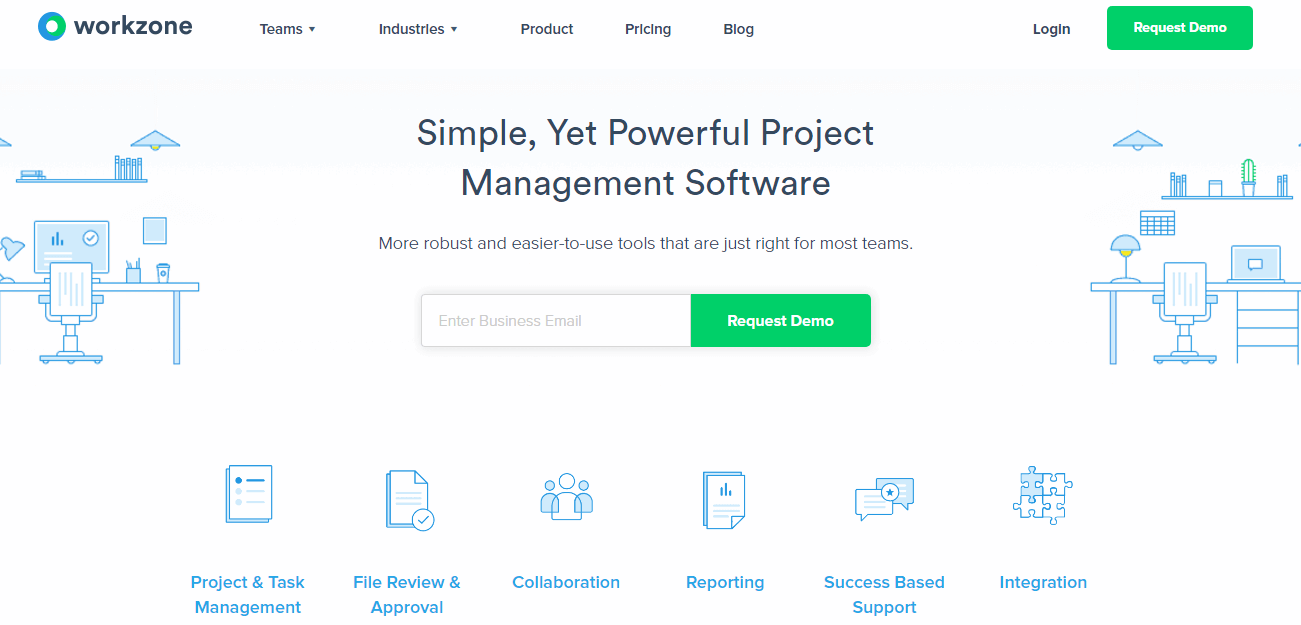
WorkZone is a US-based project management platform built in Philadelphia, Pennsylvania since 2000. The product sits in the middle of the PM spectrum: more capable than Asana or Trello for project structure, but easier to adopt than Microsoft Project or Smartsheet for non-PMP teams.
It is best known for two things: a feature footprint that combines projects, proofing, document approvals, and workload planning in one tool, and a customer-success model that includes unlimited human training and support on every paid plan. Marketing teams, agencies, and corporate PMOs are the dominant customer segments.
Who WorkZone is built for
WorkZone fits marketing operations teams (20 to 500 users) running multi-channel campaigns, corporate PMOs managing cross-functional projects, and creative agencies needing proofing and approval workflows alongside project tracking. Healthcare, financial services, manufacturing, and government are common verticals on the Enterprise tier.
The Starter plan covers small teams of 1-25 users. Team is the typical mid-size pick with 5 to unlimited users. Enterprise unlocks advanced proofing, cross-project dependencies, critical path, APIs, SSO/MFA, and HIPAA/SOC 2 Type II compliance.
It is less of a fit for engineering teams running Jira sprints, for small teams wanting the lightest tool (Trello or Asana free tier is simpler), or for organizations that already standardize on Smartsheet for spreadsheet-first execution.
WorkZone pricing plans
| Plan | Price (annual) | User range | Storage |
|---|---|---|---|
| Starter | $8 user/mo | 1-25 users | 250 GB |
| Team | $20 user/mo | 5 to unlimited | 500 GB |
| Enterprise | Quote-based | Pay only for creators, 5 free collaborators per creator | 1 TB+ |
All plans include unlimited human support and training at no additional cost, which is a meaningful differentiator from per-incident or self-service support models. Annual billing is standard; monthly billing typically carries a premium.
The Enterprise pricing model is distinctive: customers pay only for core users (creators), with 5 free collaborators per creator plus unlimited guest reviewers. This works well for marketing teams where one creative project manager coordinates 5-10 collaborators and reviews go to a much larger stakeholder pool that does not need full creator licenses.
WorkZone core capabilities
Projects are the spine. Each project has tasks, sub-tasks, assignees, dependencies, custom fields, file attachments, and discussion. List, Gantt, and Kanban views render the same project data differently. Cross-project task dependencies (Enterprise) link tasks across projects so a delay propagates to dependent work even when it lives in another project.
Portfolio dashboards aggregate multi-project status: which projects are on track, at risk, off track, behind schedule. Drill-down moves from portfolio to project to task. Custom dashboards combine charts, tables, and filtered task lists for executive reporting.
Proofing and markup
Proofing and markup tools (Team and up) let reviewers comment on PDFs, images, and video files with pin-point annotations. Approval workflows route deliverables through stakeholders with sign-off tracking. This is the differentiator for marketing teams approving creative work, agencies managing client review cycles, and design teams iterating on assets.
Advanced proofing (Enterprise) adds video frame-accurate review, side-by-side version comparison, and detailed approval audit trails for compliance-sensitive industries.
Time and expense tracking
Time entries log against tasks or projects via timer, timesheet, or quick-log. Expense tracking captures non-labor project costs (travel, materials, subcontractor fees). Approved time and expenses feed project budget burn (actual versus planned). The reporting layer rolls up time and expense across projects for executive financial visibility.
Workload planning
Workload planning shows each team member's assigned work by week or month with visual capacity indicators. Over-allocated team members flag for rebalancing. Skill or role tags help match work to the right person. This is deeper than what general PM tools like Trello or Asana base plans offer.
Workflow templates
Workflow templates define standard project structures with default task lists, dependencies, custom fields, and approval routes. A marketing team can define one template for "product launch campaign" and another for "webinar program" and roll either out in one click. Templates carry forward improvements as the team learns what works.
Document management
Document version control tracks each document version with check-in and check-out semantics. Approval workflows route documents through stakeholders. This is closer to a SharePoint-style document management workflow than a typical PM tool, useful for marketing teams managing creative assets with multiple iterations.
Integrations
Native integrations cover Microsoft Teams, Slack, Microsoft 365 (Outlook, OneDrive, SharePoint), Google Workspace (Drive, Calendar, Gmail), Salesforce, HubSpot, QuickBooks, Box, Dropbox, Zapier (1,000+ apps), and a REST API plus webhooks on Enterprise. The integration count is mid-range; smaller than Asana or Monday but covers the marketing-stack basics.
Mobile and offline
iOS and Android apps cover task management, time tracking, approvals, and document access. Mobile experience is functional for on-the-go updates. Offline edits queue and sync when reconnected. The web app is the primary work surface for most users.
Security and compliance
Starter and Team include SSL encryption, role-based permissions, and standard SaaS access management. Enterprise adds SSO with SAML, MFA, HIPAA compliance, and SOC 2 Type II controls. Cloud hosting uses AWS US infrastructure. Healthcare and financial services buyers in regulated industries pick Enterprise for the compliance posture.
WorkZone vs Asana
Asana is the global work management leader with broader integration, stronger consumer-grade UI, and per-user pricing that scales fast. WorkZone has deeper proofing and document management built in, plus the unlimited human support model. Pick Asana for cross-functional work management at scale. Pick WorkZone for marketing and creative teams needing proofing, approvals, and high-touch onboarding.
WorkZone vs Wrike
Wrike is the closest direct competitor for mid-market PM with proofing and workload planning. Wrike has the larger global presence; WorkZone has the more accessible support model and Enterprise pricing structure (pay only for creators). Pick Wrike for global mid-market PPM. Pick WorkZone for marketing-team-focused PM with unlimited support.
WorkZone vs Smartsheet
Smartsheet is the spreadsheet-first work execution platform with strong enterprise governance. WorkZone is project-centric with proofing and document workflows. Pick Smartsheet for spreadsheet-style execution with enterprise scale. Pick WorkZone for project-and-creative-workflow-focused teams.
WorkZone vs Monday.com
Monday is the visually configurable Work OS with broad use case flexibility. WorkZone is the more focused PM tool with deeper proofing and document features. Monday's flexibility comes with setup complexity; WorkZone is more opinionated about how projects should be structured. Pick Monday for configuration depth. Pick WorkZone for opinionated PM with proofing built in.
Buyer pitfalls to avoid
Three patterns hurt WorkZone rollouts. First, picking Starter when the team will exceed 25 users: the upgrade to Team is a tier change. Forecast 18-month team size. Second, skipping proofing setup: marketing teams that buy WorkZone for the proofing capability then never configure it miss the platform's strongest differentiator. Run a proofing pilot in week 2. Third, ignoring the unlimited support: many customers under-use the human training included on every plan; book onboarding sessions and ongoing strategy calls to maximize the value.
Implementation and time to value
Small team: 2-3 weeks. Mid-size rollout (50-200 users): 4-8 weeks including workflow customization, template setup, proofing configuration, and team training. Enterprise rollouts add SSO, custom integrations, and compliance setup, typically 8-12 weeks. WorkZone provides unlimited training included in every plan; Enterprise adds dedicated customer success.
Customer support
Every paid plan includes unlimited human support and training. Email, chat, and phone all available during US business hours. Team adds a dedicated success manager. Enterprise adds priority response SLAs and named customer success. The WorkZone Knowledge Center covers most setup tasks. The vendor commitment to unlimited training is one of the strongest in the PM category.
The Bottom Line on WorkZone
WorkZone is the right call for marketing operations teams, creative agencies, and corporate PMOs that want a project management tool with proofing, document approval, and workload planning built in, paired with unlimited human support and training on every plan.
Standout strengths: integrated proofing and markup with approval workflows, cross-project task dependencies and critical path on Enterprise, workload planning with capacity view, unlimited human support and training included on every paid plan, Enterprise pricing model where you pay only for creators with 5 free collaborators per creator.
Pricing fits mid-market budgets: Starter at $8/user/mo annual covers small teams of 1-25. Team at $20/user/mo annual is the typical mid-size pick. Enterprise is quote-based with the creator-plus-collaborators pricing structure. All plans include unlimited training.
Trade-offs to weigh: not the right tool for engineering agile sprints (Jira fits better). UI is functional but less visually configurable than Monday. Integration count is smaller than Asana or Monday. Enterprise compliance (HIPAA, SOC 2 Type II) is required for healthcare buyers, which means committing to the Enterprise tier.
Alternatives worth comparing: Asana for cross-functional work management, Wrike for global mid-market PPM, Smartsheet for spreadsheet-first execution, Monday for visually configurable Work OS, Project Insight for similar US mid-market positioning, ProjectManager.com for visual portfolio management. Pricing and capabilities verified on workzone.com/pricing on 2026-06-27.
Frequently Asked Questions
Is there a free plan or free trial for Workzone?
How much does Workzone cost?
What does Workzone integrate with?
Who is Workzone best for?
What are the best alternatives to Workzone?
Is Workzone GDPR / SOC 2 compliant?
Does Workzone have a mobile app?
What do real users say about Workzone?
How does Workzone compare to its top competitor?
Does Workzone offer customer support?
Find Your Perfect Software
Answer a few quick questions to get matched
You're all set!
A specialist for will reach out within 1 business day with tailored recommendations for your needs.