

Spendesk
by Spendesk
What is Spendesk?
Get Best Quote for Spendesk
Connect with SaaSrat experts to get the best quote for your business.
You're all set!
A specialist for Spendesk will reach out within 1 business day.
Spendesk Features
Automated expense reports
Virtual cards
Physical cards
Receipt capture
Approval workflows
Real time spend tracking
View All 30 Features
Spendesk Resources
Spendesk Screenshots
Description
Spendesk at a Glance
| Category | Spend management + Corporate cards + AP automation + Procurement |
|---|---|
| Best for | European mid-market and enterprise finance teams issuing cards, processing supplier invoices, and running procurement approvals |
| Deployment | Web (Chrome, Edge, Firefox, Safari), iOS + Android apps, Slack integration |
| Regulation | ACPR licensed payment institution (EEA #17518), FCA authorized (UK via Adyen #779800), FDIC-insured (US via Sutton Bank) |
| Card networks | Visa physical and virtual cards; unlimited card issuance included |
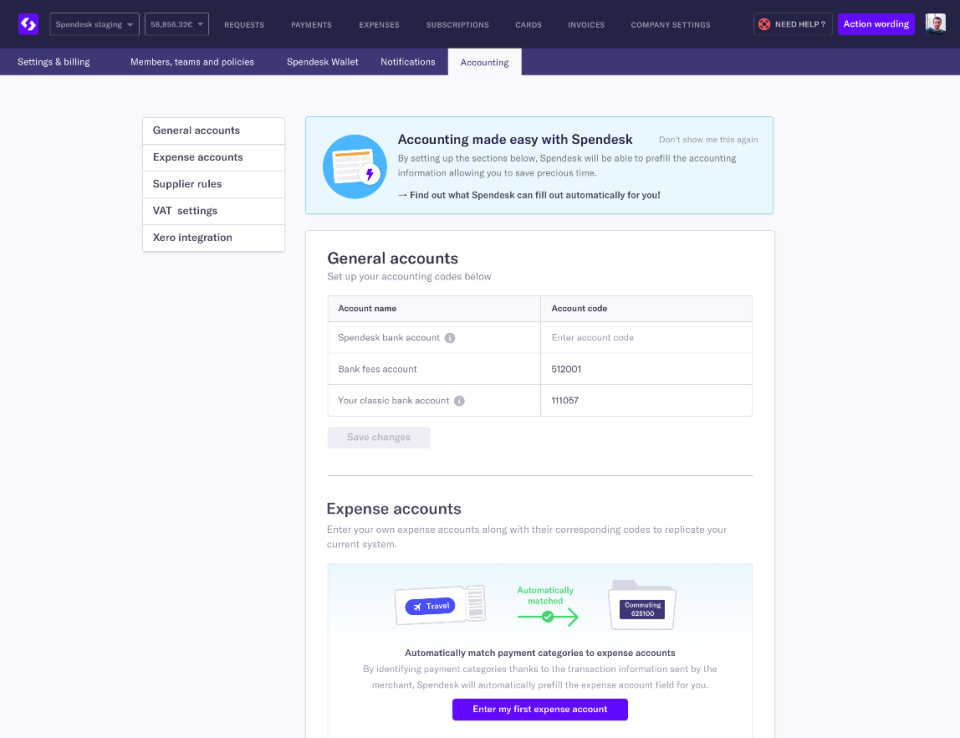
| ERP + accounting integrations | Xero, QuickBooks Online, Datev, Netsuite, Sage, Microsoft Dynamics, SAP, plus 40+ HRIS tools and open API |
| Multi-entity | Yes, group entities with consolidated reporting and per-entity approval rules |
| Languages | English, French, German, Spanish, Italian, Dutch |
| Support | Email, chat, phone, dedicated Customer Success Manager on Scale tier |
| HQ | Paris, France |
Spendesk Overview
Spendesk is a Paris-headquartered spend management platform that unifies employee expense claims, corporate card issuance, supplier invoice processing, and procurement approvals in a single browser and mobile workflow for finance teams. The platform replaces the manual pattern of card statements plus receipt trails plus supplier PDF invoices plus purchase-order spreadsheets with a policy-driven approval engine that captures the receipt at the moment of payment.
Spendesk issues unlimited physical Visa cards and virtual single-use, recurring, and multi-use cards through its licensed payment institution status in the EEA (ACPR license #17518), FCA authorization in the UK via Adyen (#779800), and Sutton Bank sponsorship in the US. Finance teams set spend rules per employee, team, project, or subscription, and every transaction flows into the reconciliation queue with the receipt already attached.
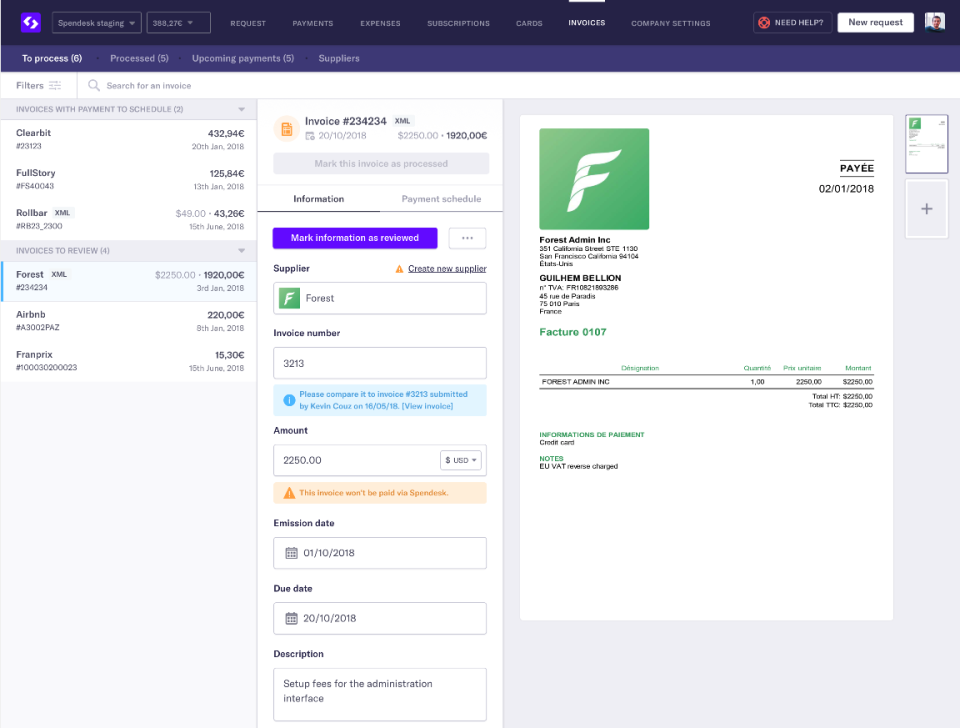
The AP automation module handles supplier invoice capture via email or drag-and-drop upload, OCR extraction of amounts and dates, three-way matching against purchase orders and delivery receipts, and multi-condition approval workflows. Named customers include Depop, BlaBlaCar, WeWork, SoundCloud, PayFit, Pigment, Sezane, Europcar, Silverfin, Zapp, and Bloom. Spendesk is owned by employees, founding team, and investors including Index Ventures, General Catalyst, and Eight Roads Ventures.
Capabilities and Named Features
Spendesk is built as three tightly connected modules: card issuance and expense capture, AP automation for supplier invoices, and procurement with approval workflows and budget guardrails. All three modules write to the same accounting export queue, so the finance team gets one coded ledger of employee spend, supplier invoices, and procurement commitments rather than three separate reconciliation cycles. Real-time budget dashboards let cost center owners see committed and uncommitted spend against the plan without waiting for month-end close.
Named feature list
- Unlimited physical Visa cards and virtual cards (single-use, recurring, and multi-use variants) for every employee and subscription
- Automatic OCR receipt capture through mobile app camera, email forwarding, and drag-and-drop upload
- Real-time expense tracking with policy enforcement and duplicate detection
- Supplier invoice AP automation with OCR data extraction, three-way matching, and payment scheduling
- Global supplier payments in multiple currencies (SEPA, SWIFT, local rails)
- Procurement workflow with purchase requests, purchase orders, and multi-condition approval rules
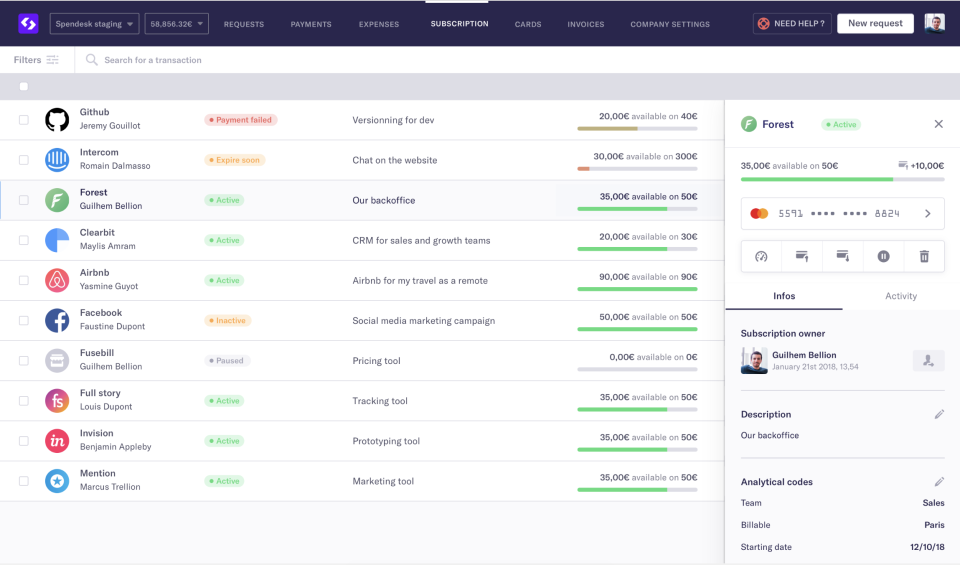
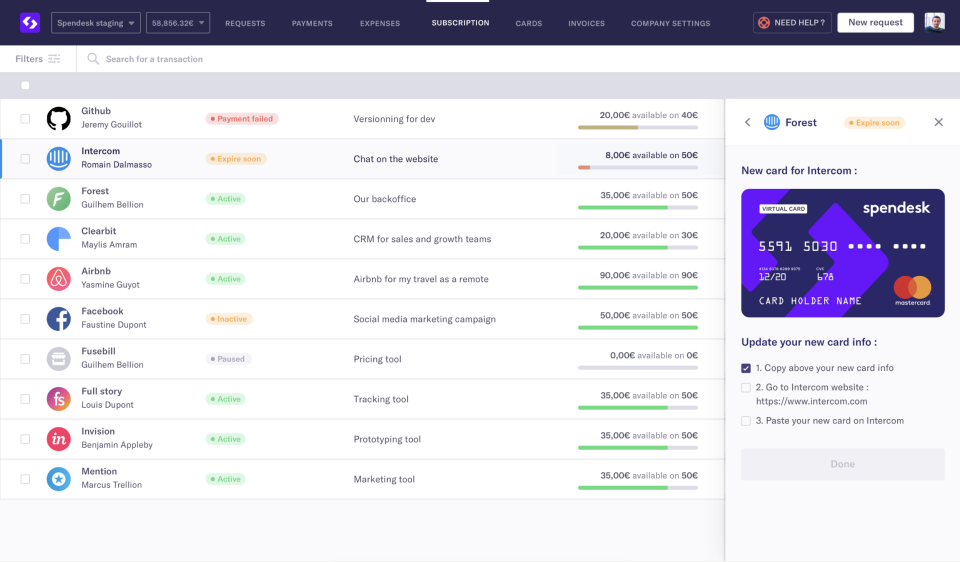
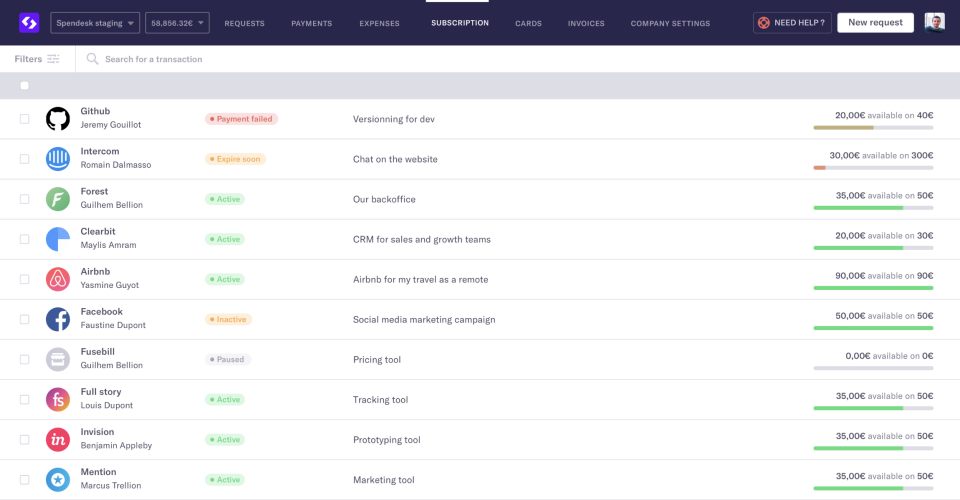
- Subscription management with virtual card assignment and expiration alerts
- Multi-condition approval workflows by amount, team, category, and project with dynamic approver roles
- Real-time budget monitoring with committed and available balance views per cost center
- 40+ HRIS and ERP integrations including Xero, QuickBooks, Datev, Netsuite, Sage, Microsoft Dynamics, and SAP
- SSO with SAML, Okta, Azure AD, Google Workspace, plus Slack notifications and approval routing
- Open API and Spendesk AI Connect (MCP) for custom spend data integration
- Reimbursement in local currency with automated SEPA or bank transfer payout to employees
- Multi-entity group management with consolidated reporting and per-entity approval rules
- Physical card ordering with same-day delivery in major European cities
- Team wallets and budget assignment with real-time top-up and freeze controls
- Compliance-ready audit log with GDPR export and role-based access controls
- Mobile apps for iOS and Android with offline receipt capture
Pricing and Plans
Spendesk uses a two-component pricing model that separates platform access from transaction usage: a fixed monthly subscription for platform features and a variable transaction-based fee for card purchases, invoice payments, and expense claims. There are no per-user, per-card, or per-seat fees; the finance team can issue a card to every employee without triggering a headcount charge.
Published plans are Starter (small teams testing spend management), Essentials (SMB and lower mid-market with growing supplier and card volume), and Scale (mid-market and enterprise with multi-entity operations, procurement, and dedicated success management). Exact platform fees and transaction rates are quoted by the vendor based on card issuance volume, invoice volume, and expense claim volume; buyers should ask for the fee schedule and the FX markup on multi-currency transactions in writing before signing.
The two-component model is designed to reward automation adoption: as the finance team consolidates more card, invoice, and procurement volume onto the platform, the per-transaction cost declines. Buyers evaluating against competitors should model twelve months of expected transaction volume rather than compare the headline monthly fee alone.
| Tier | Price | What is included |
|---|---|---|
| Starter | Custom quote | Small teams; cards, expenses, basic approvals, accounting sync |
| Essentials | Custom quote | Mid-market; adds AP automation, budget management, multi-currency, ERP export |
| Scale | Custom quote | Multi-entity groups; adds procurement, dedicated CSM, custom approval workflows |
| Custom | Quoted | Enterprise with SSO, SAML, custom fields, sandbox environment, priority support |
| AI Connect (MCP) | Included in Scale and above | AI spend data integration for reporting and forecasting agents |
Pros
- European finance-team focus with ACPR, FCA, and Sutton Bank regulatory footprints covering EEA, UK, and US operations
- Unlimited physical and virtual card issuance without per-card or per-user fees
- One platform for cards plus expense claims plus supplier invoice AP plus procurement avoids the multi-tool stitching tax
- 40+ native ERP and HRIS integrations plus open API cover most European accounting stacks (Xero, Datev, Netsuite, Sage, SAP)
- Real-time budget monitoring with committed and available balances gives finance visibility before month-end close
- Multi-entity group management with per-entity approval rules works for private-equity portfolio companies and multi-country groups
- Fixed-plus-variable pricing rewards automation adoption as card, invoice, and procurement volume scales
- Named enterprise customers include Depop, BlaBlaCar, WeWork, SoundCloud, PayFit, Pigment, Sezane, Europcar
Cons and Trade-offs
- Custom-quote pricing with no published fee schedule makes short-list comparison harder than published-fee competitors (Pleo, Payhawk, Ramp)
- US market presence is smaller than Ramp, Brex, and Divvy; multi-country groups with US-heavy footprint should compare Sutton Bank cardholder experience against domestic issuers
- FX markup on multi-currency card transactions is quoted per contract; get the exact percentage in writing before signing
- Procurement module is newer than the cards and expense modules; procurement-first buyers should compare against Coupa, Precoro, and Ivalua
- Reddit r/CFO threads note the AP automation OCR accuracy for non-French, non-English invoice languages varies; test with your top 20 supplier invoice formats
- Reimbursement to employees uses SEPA in EEA; non-SEPA payout speed depends on partner bank rails
- The two-component pricing model requires modeling twelve months of transaction volume rather than comparing headline monthly fees
Spendesk vs Alternatives
| Vendor | Best for | Card issuance | AP automation | Notable strength |
|---|---|---|---|---|
| Spendesk | European mid-market and enterprise finance teams | Unlimited physical + virtual Visa cards | Native OCR AP + three-way match + procurement | One platform across cards, expenses, AP, procurement with EEA + UK + US regulatory footprint |
| Pleo | European SMB and mid-market | Physical + virtual Mastercard cards, per-user pricing | Basic invoice module | Nordic-first UX with lightweight approval flows |
| Payhawk | European mid-market and enterprise | Visa physical + virtual cards, per-user tiers | Native AP module | Fastest procurement-plus-cards feature velocity in Europe |
| Ramp | US mid-market and enterprise | Unlimited Visa cards, no fees | AI-first Ramp Bill Pay | US card + AP + treasury with no software fees |
| Brex | US venture-backed startups and enterprise | Physical + virtual Mastercard cards | Brex Empower AP | Combined banking + cards + expense for VC-backed teams |
| SAP Concur | Global enterprise T&E | Not a card issuer; integrates with issuers | Concur Invoice | Global travel + expense + invoice at scale |
Who Should Choose Spendesk
European mid-market finance teams (100 to 1,000 employees) issuing corporate cards to every employee, capturing receipts at the moment of payment, and consolidating supplier invoice AP into one approval queue.
Multi-entity groups running consolidated cash management across France, Germany, UK, Spain, Italy, and the Netherlands who need per-entity approval rules and unified reporting.
Private-equity portfolio finance teams standardizing spend controls, card issuance, and AP automation across 5 to 30 portfolio companies with different ERP and HRIS stacks.
Fast-growing scale-ups replacing shared credit cards and reimbursement spreadsheets with virtual card issuance, real-time budgets, and Xero or Netsuite export.
Procurement teams in mid-market groups that want purchase requests, purchase orders, and three-way matching in the same workflow as cards and expense claims rather than a separate procurement tool.
Finance teams evaluating spend management with a Datev, Sage, or Cegid accounting stack that need native European ERP export rather than US-centric QuickBooks-first integrations.
Named Alternatives to Spendesk
- Pleo. Nordic-first European SMB cards with per-user pricing and lightweight approvals
- Payhawk. European mid-market alternative with fastest feature velocity in cards plus AP plus procurement
- Ramp. US mid-market with unlimited cards, no software fees, and AI-first Bill Pay
- Brex. US venture-backed startups and enterprise with combined banking, cards, and expense
- SAP Concur. Global enterprise T&E with the largest travel and airline booking network
- Emburse Spend. US enterprise T&E with policy-first controls and multi-brand card options
- Soldo. European SMB and mid-market with FCA-regulated Mastercard cards and multi-wallet budgeting
- Airwallex. Multi-currency treasury plus cards for global SaaS and e-commerce companies
Implementation and Deployment
SMB deployments (20 to 100 employees) typically go live in 2 to 4 weeks once the accounting export mapping is confirmed and the initial card issuance batch is delivered.
Mid-market deployments (100 to 500 employees) commonly run 4 to 8 weeks including SSO configuration, multi-approval workflow modeling, and ERP synchronization testing across two accounting periods.
Multi-entity group rollouts run 3 to 6 months when the group operates across 3+ countries with different VAT rules, multiple ERPs (Datev in Germany, Sage in France, Xero in UK), and per-entity approval hierarchies.
Card issuance takes 5 to 10 business days for physical cards and instant for virtual cards; expect a 2 to 3 week period of employee onboarding, expense policy training, and first-transaction validation.
Historical data migration is optional; most customers switch cutover on the first day of a new accounting month with legacy expense reports closed out in the prior system.
The vendor Customer Success team provides workshops for expense policy design, approval workflow modeling, and procurement onboarding on the Scale tier.
What Real Buyers Say About Spendesk
A Reddit r/CFO thread from mid-2025 titled 'Spendesk vs Payhawk for a French Series C' captured the recurring European buyer trade-off: Spendesk wins on procurement plus cards plus AP integration and Paris-based support hours; Payhawk wins on card issuance in more currencies and faster procurement feature velocity. Additional context: r/CFO threads on European spend management short-lists, Spendesk on LinkedIn, French ACPR payment institution registry.
LinkedIn posts by European CFO advisors highlight that the two-component fixed-plus-variable pricing model rewards teams that consolidate card, invoice, and procurement volume onto Spendesk rather than the headcount-based per-user model of Pleo and Ramp; the payback is faster for teams with high invoice volume per employee.
SoftwareAdvice and SelectHub reviews consistently rank Spendesk among the top three European spend management platforms for finance teams that need multi-entity consolidation across EEA, UK, and US regulatory footprints.
Reddit r/FinanceCareer threads warn buyers to model the FX markup on multi-currency card transactions and to negotiate the per-transaction fee schedule for high-volume months (November and December supplier invoice peaks); the fixed monthly platform fee is only half the cost picture.
Vendor references: Spendesk pricing and plan structure, Spendesk product suite, Spendesk regulatory licenses and security certifications.
The Bottom Line on Spendesk
Spendesk is the default short-list candidate for European mid-market and enterprise finance teams that want cards, expense claims, supplier invoice AP, and procurement on one platform with EEA, UK, and US regulatory footprints. The two-component fixed-plus-variable pricing rewards teams that consolidate transaction volume rather than reward headcount growth.
Multi-entity groups running consolidated cash management across France, Germany, UK, Spain, and the Netherlands get per-entity approval rules and native European ERP exports (Datev, Sage, Cegid) that US-centric competitors do not match at the same integration depth.
Watch the total cost of ownership carefully: the fixed platform fee is only half the picture. Model twelve months of expected card, invoice, and expense transaction volume plus FX markup on multi-currency transactions before signing. Get the fee schedule in writing.
Alternatives to shortlist alongside Spendesk: Pleo for Nordic SMB with per-user pricing, Payhawk for wider card currency support and faster procurement feature velocity, Ramp for US mid-market with no software fees, and SAP Concur for global enterprise T&E at scale.
Verified on 2026-08-04 against vendor website.
Frequently Asked Questions
How much does Spendesk cost in 2026?
Is Spendesk a licensed payment institution?
Who is Spendesk a fit for?
How does Spendesk compare to Pleo, Payhawk, and Ramp?
Which ERP and accounting systems does Spendesk export to?
Does Spendesk support multi-entity group operations?
How long does Spendesk implementation take?
What are the biggest complaints about Spendesk?
Does Spendesk have AI features?
Can Spendesk replace both an expense tool and a procurement tool?
Find Your Perfect Software
See how it can transform your workflow
- Personalized for your needs Tailored recommendations based on your unique requirements.
- Save time & resources Streamline your workflow and boost team productivity.
- Trusted by thousands Join 10,000+ businesses already growing with SaaSrat.
You're all set! 🎉
A specialist for will reach out within 1 business day with tailored recommendations for your needs.