

What is Ramp?
Ramp is a corporate card and spend management platform for US businesses. It combines no-fee corporate Visa cards with automated expense management, receipt capture, and real-time budget controls in one platform.
Get Best Quote for Ramp
Connect with SaaSrat experts to get the best quote for your business.
You're all set!
A specialist for Ramp will reach out within 1 business day.
Ramp Features
Corporate Cards (Physical and Virtual)
Expense Management
Receipt Capture
Accounts Payable Automation
Invoice Processing
Bill Pay
View All 15 Features
Ramp Pricing Plans
Free
- Unlimited corporate cards (physical and virtual)
- Basic expense management with receipt capture
- AP automation and invoice processing
- QuickBooks Online and Xero integration
- Real-time spend visibility
- Treasury services (no fees, no minimum deposits)
- Basic accounting rules and custom coding
- No annual card fees
Plus
- Everything in Free, plus:
- AI-driven expense review and policy insights
- Auto-coded AP line items
- NetSuite and Sage Intacct integration
- Budget tracking vs actuals
- Custom user roles and audit logs
- 24/7 priority phone support
- Automated batch payments
- AI approval recommendations
Enterprise
- Everything in Plus, plus:
- Dedicated account manager
- Workday and Oracle Financials integration
- Local currency card issuing (30+ countries)
- Custom implementation and training
- Advanced policy configuration
Ramp Resources
Ramp Screenshots
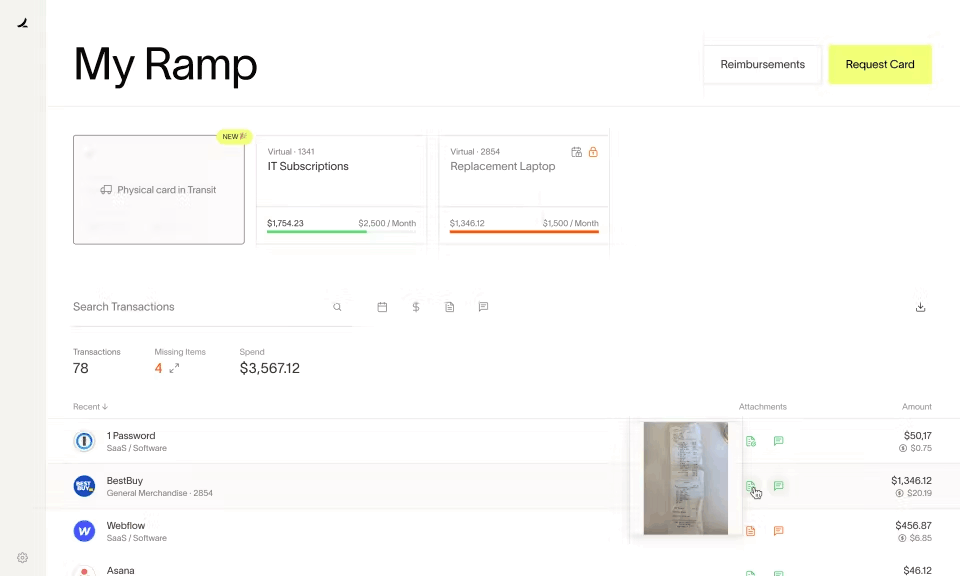
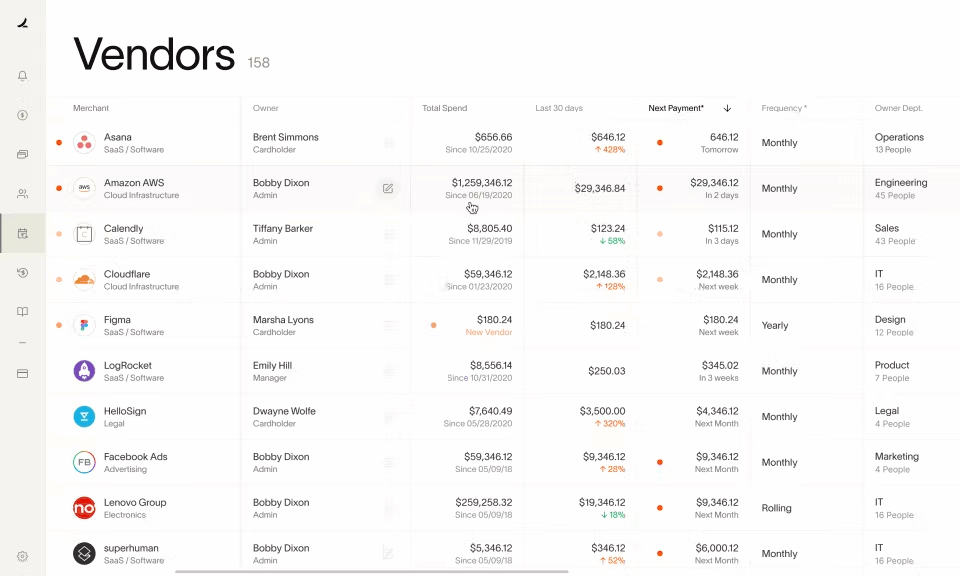
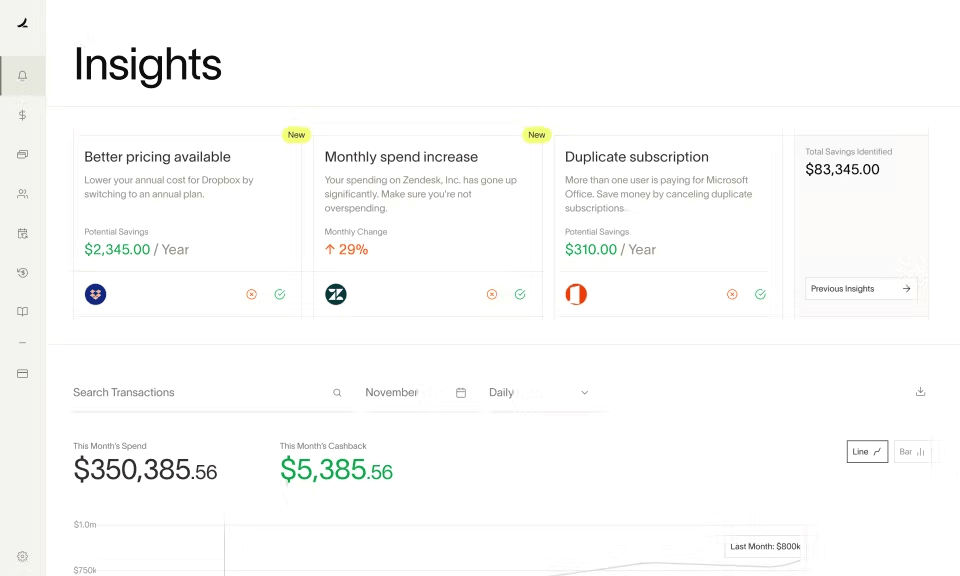
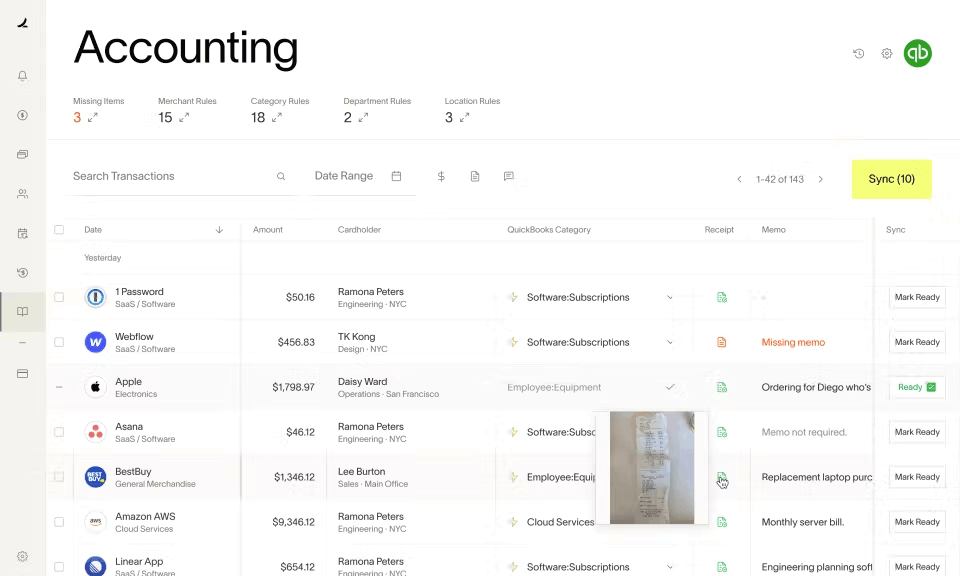
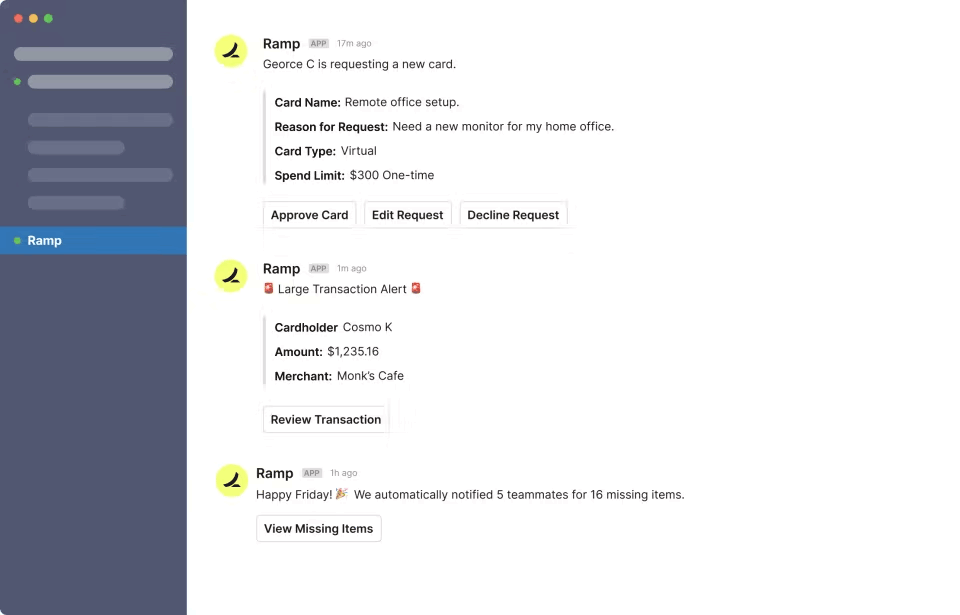
Description
Ramp at a Glance
| What it is | Corporate card and spend management platform with accounting automation (not a replacement for accounting software) |
|---|---|
| Best fit for | Companies with 5 to 2,000 employees that want automated expense management, corporate cards with spend controls, and automatic accounting sync |
| Starting price | Free for core features (corporate cards, expense management, basic reporting) |
| Ramp Plus price | $15/user/month for advanced controls, custom fields, and priority support |
| Accounting software | No; Ramp syncs to QuickBooks, NetSuite, Sage Intacct, Xero, and others |
| Bill pay | Yes, included in Ramp for AP automation |
| Receipt matching | Automatic, via email forwarding or mobile app upload |
| GL coding | Automatic, using AI-based categorization rules trained on your chart of accounts |
| Mobile app | Yes, iOS and Android |
Ramp Pros and Cons in 2026
Where Ramp Stands Out
Corporate cards with real spend controls. Ramp issues physical and virtual corporate cards to employees with configurable spend limits by category, vendor, amount, and time period. Cards can be locked, adjusted, or frozen instantly. For companies issuing cards to employees or contractors, the control layer prevents overspending and eliminates the month-end surprise of reviewing uncategorized purchases.
Automatic receipt matching. Ramp sends a text message to the employee after each transaction and matches uploaded receipts automatically. The system flags missing receipts before month-end rather than after. Finance teams that previously spent hours chasing receipts from employees report this alone saves significant time each month.
Automatic GL coding. Ramp learns your chart of accounts and categorizes transactions automatically based on vendor, amount, and spending patterns. Most categories are pre-filled before your accountant reviews. Custom coding rules let you set specific GL codes for recurring vendors. The result is that accounting sync from Ramp to QuickBooks or NetSuite requires review but not full re-entry.
Bill pay built in at no extra cost. Ramp includes accounts payable automation: upload or email vendor bills, approve through configurable workflows, and pay by ACH, check, or card. For companies processing 10 to 200 vendor bills per month, this eliminates a separate AP tool or manual check-writing process.
Free for the core product. The corporate card, expense management, receipt matching, GL coding, and accounting sync are all included at no monthly fee. Ramp earns revenue from interchange fees on card transactions. The free pricing model is genuine, not a limited trial, and most small to mid-size companies use Ramp without ever paying for Ramp Plus.
Where Ramp Falls Short
Not a replacement for accounting software. Ramp does not have a general ledger, accounts receivable, payroll, or financial reporting. It manages spend on the outflow side and syncs to your accounting system. You still need QuickBooks, Xero, NetSuite, or another accounting platform for your full financial picture. Ramp is a layer on top of accounting, not a replacement for it.
Requires a business bank account linkage. Ramp cards draw from a linked business bank account or a Ramp-provided credit line. Setting up funding and connecting your bank takes time at the start. Businesses without an established business banking relationship may face approval delays for the Ramp card program.
International card acceptance varies. Ramp cards work globally where Visa is accepted, but foreign transaction fees apply and some expense categories may not work as expected in all countries. Companies with heavy international travel should verify coverage before fully committing to Ramp for all corporate card spend.
Ramp Plus features require per-user payment. Advanced approval workflows, custom fields for project coding, custom user roles, and priority support are behind the $15/user/month Ramp Plus tier. For large teams that need these features, the cost adds up quickly and changes the pricing comparison against alternatives.
Who Should Use Ramp?
Ramp is the right fit for venture-backed startups, private-equity-backed businesses, and mid-market companies that want real-time spend visibility and automated expense management across a team. It works best when multiple employees carry corporate cards, when approval workflows matter, and when finance teams need GL coding automation to cut monthly close time. Technology companies, SaaS businesses, and professional services firms with 10 to 500 employees are the most common Ramp customers.
It is the wrong fit for sole proprietors, very small businesses without dedicated finance staff, or businesses that need a lending product alongside their card. Ramp's underwriting is based on company revenue and cash balance rather than personal credit, so businesses with less than $25,000 in a business bank account may not qualify. For businesses that need expense management plus personal liability cards or working capital, compare options in our expense management software guide.
Ramp Product Features
- Corporate cards: Physical and virtual Visa cards issued to employees and contractors. Set spend limits by category, merchant, and time period. Instant card issuance for virtual cards. Freeze or terminate cards immediately from the dashboard.
- Expense management: Employees submit expenses via mobile app or email forwarding. Managers approve through configurable approval workflows. Month-end expense reports are generated automatically from card transactions.
- Receipt matching: Ramp sends a text after each transaction requesting a receipt. Receipts are matched automatically to the corresponding card charge. The system flags missing receipts before close rather than during audit.
- GL coding and accounting sync: Transactions are auto-coded to your chart of accounts based on learned rules. Sync to QuickBooks Online, QuickBooks Desktop, NetSuite, Sage Intacct, Xero, Sage Accounting, and other accounting platforms via direct integration or CSV export.
- Bill pay: Upload vendor invoices by email, drag-and-drop, or direct integration. Route for approval through custom workflows. Pay by ACH, check, or Ramp card. Vendor payment history tracked in the platform.
- Vendor management: Centralized vendor directory with payment terms, contact info, and spend history. Duplicate vendor detection and 1099 payment tracking for year-end filing.
- Spend analytics: Real-time dashboard showing spend by category, department, employee, and vendor. Budget tracking with alerts when departments approach or exceed allocated spend. No manual report building required.
- Reimbursements: Employees submit out-of-pocket expenses for reimbursement. Approved reimbursements are paid via ACH directly to employee bank accounts.
- Travel: Ramp Travel for booking flights, hotels, and car rentals within policy. Spend on Ramp Travel automatically books to correct GL codes and links to Ramp cards.
- Procurement: Purchase request workflows for larger purchases that need approval before a card is issued or a PO is submitted to a vendor.
How Much Does Ramp Cost in 2026?
| Plan | Price | Key inclusions |
|---|---|---|
| Ramp (core) | Free | Corporate cards, expense management, receipt matching, GL coding, bill pay, accounting sync, spend analytics |
| Ramp Plus | $15/user/month | Adds advanced approval workflows, custom fields, custom user roles, priority support, and advanced integrations |
| Ramp Enterprise | Custom pricing | Dedicated support, SSO, advanced security controls, custom contract terms |
Ramp generates revenue from interchange fees on card transactions. There is no charge for issuing cards, processing payments, or using the core platform. The free pricing is not time-limited.
Hidden Costs to Watch For
- Foreign transaction fees: Ramp charges a foreign transaction fee on purchases made in non-US currencies. Check the current fee schedule if your team travels internationally or purchases from international vendors regularly.
- ACH payment timing: Standard ACH payments have a processing window. Same-day ACH and expedited payments may incur fees depending on the Ramp plan and payment amount.
- Ramp Plus for advanced workflows: If your finance team needs multi-level approval routing, custom project coding fields, or granular user roles, you need Ramp Plus at $15/user/month. For a 20-person finance team, this is $300/month in additional cost.
- You still need accounting software: Ramp does not replace your accounting platform. Budget for QuickBooks, Xero, NetSuite, or another accounting tool alongside Ramp. Ramp is the spend layer; the accounting platform is still required for the full financial picture.
Ramp vs the Alternatives
| Product | Best for | Key difference from Ramp |
|---|---|---|
| Brex | Venture-backed startups and tech companies wanting a combined card and expense tool | Brex has a similar model to Ramp; Ramp has a stronger reputation for accounting automation and GL sync quality |
| Expensify | Companies needing expense report management without corporate cards | Expensify is focused on expense reports and reimbursements; Ramp is centered on corporate cards with expense management built around that |
| Divvy (BILL Spend and Expense) | Companies wanting corporate cards with budgeting tools | Similar positioning to Ramp; Ramp is generally rated higher for accounting automation and integration quality |
| American Express Business | Companies that want points/rewards on business spend | Amex earns reward points; Ramp focuses on spend controls and accounting automation rather than rewards |
| QuickBooks Online | Small businesses needing accounting software with basic expense tracking | QuickBooks is accounting software with expense features; Ramp is a spend management layer that syncs into QuickBooks |
For a full comparison of tools that manage company expenses, see our expense management software guide.
What Real Buyers Report About Ramp
The most consistent praise from Ramp users is the time saved on month-end expense reconciliation. Finance teams that previously spent two to four days per month collecting receipts, coding transactions, and reconciling credit card statements report completing the same work in a few hours after switching to Ramp. The receipt auto-matching and pre-coded GL sync are the specific features that drive this time reduction.
Controllers and CFOs cite the real-time spend visibility as a significant improvement over traditional corporate card programs where spend was only visible after the monthly statement closed. With Ramp, finance can see what departments are spending against budget on any day of the month, not just at month-end.
The most common criticism is the lack of an accounts receivable or invoicing function. Companies that expected Ramp to replace their accounting software were disappointed. Ramp manages money going out; it has no tools for money coming in. This is not a limitation of Ramp's quality but rather a scope boundary that some buyers misunderstand before purchase.
Ramp Integrations and App Ecosystem
Ramp's accounting sync is one of its strongest features. Key integrations:
- Accounting: QuickBooks Online, QuickBooks Desktop, NetSuite, Sage Intacct, Xero, Sage Accounting, Microsoft Dynamics 365, and others via direct integration or CSV
- HRIS: BambooHR, Rippling, Gusto, Workday, and ADP for employee and department syncing, ensuring new hires get cards and terminated employees lose card access automatically
- ERP: NetSuite and Sage Intacct via direct two-way sync for GL coding and bill payment recording
- Travel: Ramp Travel (built-in) for flights, hotels, and car rentals; also integrates with Navan and TripActions for companies with existing travel platforms
- Slack and email: Receipt submission and expense approval notifications via Slack and email, reducing the need to log into the Ramp platform for routine approvals
Security and Compliance
- SOC 2 Type II certified: Annual independent audit of security, availability, processing integrity, and confidentiality controls
- PCI DSS compliant: Card data handling meets PCI DSS standards. Ramp is a Visa-issued card program with bank-grade payment security
- 256-bit TLS encryption in transit: All data transmitted between browser and Ramp servers is encrypted
- AES-256 encryption at rest: Transaction and financial data stored on encrypted servers
- Role-based access controls: Admin, manager, and employee permission tiers. Custom roles on Ramp Plus for granular access control
- Two-factor authentication: Required for all Ramp accounts
- FDIC-insured funds: Ramp funds stored with partner banks that carry FDIC insurance up to applicable limits
- SSO: Single sign-on via Google, Microsoft, Okta, and other identity providers. Required for Enterprise tier, optional on Plus
Bottom Line: Is Ramp Right for You?
Ramp is the strongest free option for mid-size companies that want corporate cards with real spend controls and automatic accounting sync. The core product, which costs nothing beyond interchange, handles expense management, receipt matching, GL coding, and bill pay better than most paid tools in this category.
The key thing to understand before adopting Ramp: it is not accounting software. You still need QuickBooks, Xero, NetSuite, or another accounting platform to run your books. Ramp sits on top of your accounting system and manages the spend side. If your current corporate card program is a standard business credit card with monthly statements that you manually reconcile, Ramp is a significant upgrade at no additional cost.
For businesses that want advanced approval workflows or custom GL coding fields beyond what the free tier offers, evaluate whether Ramp Plus at $15/user/month makes sense versus alternatives like Expensify or Divvy. For most companies in the 5 to 200 employee range, the free tier covers the core use case well.
Frequently Asked Questions
Is Ramp actually free?
What is the difference between Ramp Free and Plus?
Does Ramp replace my accounting software?
How does Ramp handle accounts payable?
Does Ramp integrate with NetSuite?
Can I set spending limits and controls on Ramp cards?
Does Ramp have a mobile app?
How does Ramp compare to Brex?
Is Ramp available for businesses outside the US?
Does Ramp offer cashback on card spend?
Find Your Perfect Software
See how it can transform your workflow
- Personalized for your needs Tailored recommendations based on your unique requirements.
- Save time & resources Streamline your workflow and boost team productivity.
- Trusted by thousands Join 10,000+ businesses already growing with SaaSrat.
You're all set! 🎉
A specialist for will reach out within 1 business day with tailored recommendations for your needs.