

Shoeboxed
by Shoeboxed
What is Shoeboxed?
Shoeboxed is a receipt capture and expense tracking service that helps small businesses and freelancers digitize physical receipts, extract expense data automatically, and organize records for tax preparation. It offers both a mobile scanning app and a physical mail-in envelope service for bulk receipt processing.
Get Best Quote for Shoeboxed
Connect with SaaSrat experts to get the best quote for your business.
You're all set!
A specialist for Shoeboxed will reach out within 1 business day.
Shoeboxed Features
Receipt scanning
Expense reporting
Business card management
Tax preparation
Mileage tracking
Document organization
View All 31 Features
Shoeboxed Resources
Shoeboxed Screenshots
Description
Shoeboxed at a Glance
| Best fit for | Small businesses, freelancers, and sole proprietors who need to track and organize receipts for tax deductions and expense reimbursement without a full expense management platform |
|---|---|
| Industries | Freelancers, consultants, real estate agents, tradespeople, healthcare practitioners, and any sole proprietor with high receipt volume |
| Core features | Receipt scanning (mobile app and mail-in), automatic data extraction (vendor, date, amount, category), expense reports, mileage tracking, business card scanning, and tax preparation exports |
| What it is NOT | Shoeboxed is not a full accounting system, payroll platform, or invoicing tool. It captures and organizes receipts but does not manage the general ledger. |
| Pricing model | Monthly or annual subscription by plan tier; lower plans have limits on receipts per month |
| Indicative pricing | Startup plan at $18/month (up to 600 receipts/year), Professional at $36/month (unlimited), Business at $54/month (multi-user) |
| Mobile app | iOS and Android with camera-based receipt capture and automatic OCR data extraction |
| Tax exports | Export expense data in formats compatible with TurboTax, H&R Block, and accountant-ready PDF reports |
Shoeboxed Pros and Cons in 2026
Where Shoeboxed Stands Out
Physical mail-in receipt processing. Shoeboxed's Magic Envelope service allows customers to stuff a prepaid envelope with physical receipts and mail them to Shoeboxed. The team scans and extracts data from every receipt and adds them to the customer's account. This service is unique in the market: most expense apps only process receipts you photograph yourself. For tradespeople, contractors, or anyone with large volumes of physical receipts that pile up in a drawer, the mail-in service eliminates the scanning backlog.
Very simple to use for non-accountants. Shoeboxed is designed for people who are not accountants and who do not want to learn accounting software. Taking a photo of a receipt, having it auto-categorized, and seeing it in an expense report requires no accounting knowledge. This simplicity is the primary reason freelancers and sole proprietors choose it over Expensify or Ramp, which have more features but also more complexity.
Human verification of extracted data. Unlike pure OCR tools that can misread receipt data, Shoeboxed has human reviewers verify the extracted vendor name, date, amount, and category before adding the receipt to the account. This reduces the error rate compared to fully automated extraction tools. For businesses that need clean expense data for tax preparation, the human review step is a meaningful quality assurance advantage.
Business card digitization. Shoeboxed includes a business card scanning feature that extracts contact information from physical business cards and adds them as contacts. This serves freelancers and consultants who collect business cards at networking events and want them in a searchable format without manual data entry.
IRS-accepted digital records. Shoeboxed stores digital images of original receipts that meet IRS requirements for substantiating business deductions. For small business owners concerned about losing physical receipts and the IRS audit risk that creates, Shoeboxed provides a defensible digital archive.
Where Shoeboxed Falls Short
Not a full expense management platform. Shoeboxed does not have approval workflows, corporate card reconciliation, policy enforcement, or multi-level team management. Businesses that need employees to submit expenses for manager approval before reimbursement need a dedicated expense management tool like Expensify or Ramp. See our expense management guide for full-featured alternatives.
Receipt limits on lower plans. The Startup plan limits to 600 receipts per year (50 per month). Businesses with higher receipt volume must upgrade to the Professional or Business plan. For high-volume businesses, the per-receipt economics should be compared against alternatives before committing.
No general ledger or accounting features. Shoeboxed does not replace accounting software. It captures expenses and can export to QuickBooks or Xero, but businesses still need a separate accounting system for invoicing, reconciliation, payroll, and reporting.
Limited team features on lower plans. Multi-user access is only available on the Business plan. For solo practitioners, this is not a limitation, but small businesses where multiple employees submit receipts need the higher-tier plan to consolidate everything into one account.
Who Should Use Shoeboxed?
Shoeboxed is the right fit for freelancers, sole proprietors, real estate agents, and small business owners who generate receipts they need to track for tax deductions but do not need a full expense management platform. It works best when physical receipt accumulation is the primary problem, when the business owner does not want to learn accounting software, or when you want to send an envelope of receipts to a professional service each month rather than photographing them yourself. The mail-in Magic Envelope service is the most compelling use case and has no direct equivalent among competitors.
Shoeboxed is the wrong fit for businesses with teams of employees who need expense approval workflows and corporate card reconciliation, for companies that need expense management integrated with accounting software without manual export steps, or for businesses that primarily deal with digital receipts (email confirmations from Amazon, airline, or hotel bookings) rather than physical paper receipts. For full expense management with team controls, see our expense management guide. For small business accounting, see our accounting software guide.
Shoeboxed Product Features
Mobile Receipt Scanning
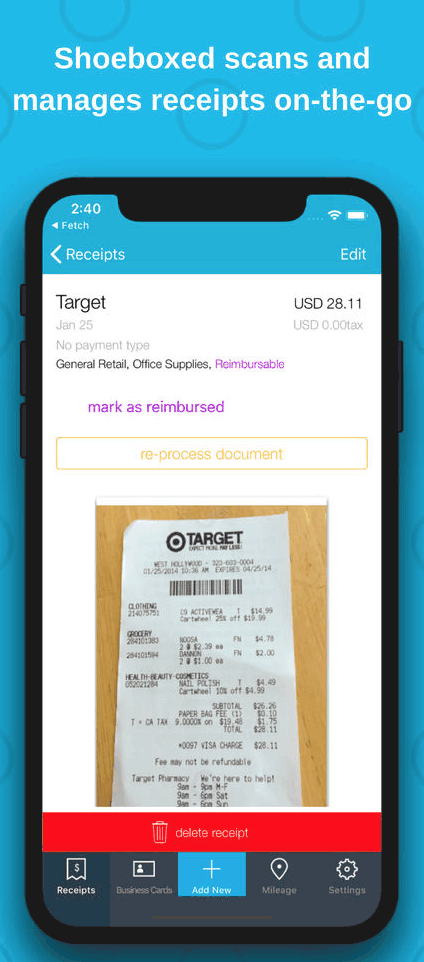
Photograph receipts with the Shoeboxed iOS or Android app. The app sends the image to Shoeboxed's extraction system, which reads the vendor name, date, total amount, and payment method. Extracted data is reviewed by a human before it is finalized in your account. Receipts are organized by month and can be tagged with custom categories. The original image is stored alongside the extracted data for IRS documentation purposes.
Magic Envelope Mail-In Service
Request prepaid envelopes from Shoeboxed, fill them with physical receipts, and mail them. Shoeboxed processes each receipt by scanning the image and extracting the data with human review, then adds all receipts to your account within a few business days. This service is available on Professional and Business plans. It is the primary differentiator from mobile-only apps: you do not need to photograph every receipt at the moment of purchase.
Expense Reports
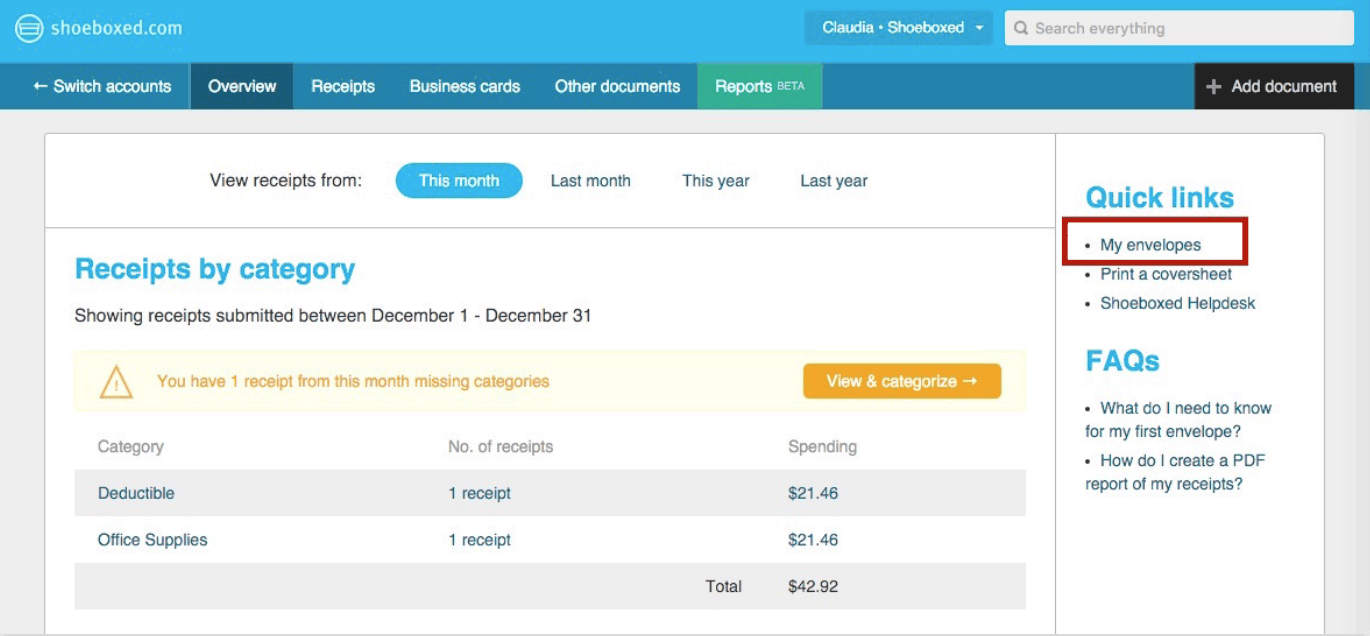
Generate categorized expense reports by date range, category, or vendor from your Shoeboxed receipt library. Reports can be exported as PDF or CSV. Accountant-ready summary reports list all expenses by category with totals, supporting what is needed for Schedule C or business tax deductions. Custom category mapping allows you to align Shoeboxed categories with your chart of accounts if you are exporting to QuickBooks or Xero.
Mileage Tracking
Log business mileage through the Shoeboxed mobile app by entering a start location, destination, and purpose. Mileage logs calculate reimbursement at the current IRS standard mileage rate. Mileage records are included in expense reports alongside receipts for a complete picture of deductible business expenses. GPS-based automatic mileage tracking is not included in Shoeboxed; trips must be logged manually.
Business Card Scanning
Photograph business cards with the Shoeboxed app to extract name, title, company, phone, email, and address. Contacts are stored in the Shoeboxed account and can be exported to CSV or synced to Google Contacts. For professionals who collect business cards regularly at conferences or client meetings, this eliminates the manual contact entry that would otherwise be required.
Accounting Software Integration
Export expenses directly to QuickBooks Online and Xero. Category mapping connects Shoeboxed categories to the corresponding accounts in your chart of accounts. Exported expenses appear as expenses in the accounting system without manual re-entry. For businesses that use QuickBooks or Xero for their full accounting, the Shoeboxed integration removes a manual step in the expense workflow. Evernote integration is also available for users who organize notes and receipts together.
How Much Does Shoeboxed Cost in 2026?
| Plan | Monthly Price | Annual Price | Receipt Limit | Key Features |
|---|---|---|---|---|
| Startup | $24/month | $18/month billed annually | 600 receipts/year | Mobile scanning, expense reports, basic integrations |
| Professional | $45/month | $36/month billed annually | Unlimited | All above plus Magic Envelope mail-in, mileage tracking |
| Business | $68/month | $54/month billed annually | Unlimited | All above plus up to 5 users, shared receipt library |
Annual billing provides a 25% discount over monthly rates. There is no free plan, but Shoeboxed offers a 30-day free trial. For most sole proprietors and freelancers, the Professional plan at $36/month covers all needed functionality including the mail-in envelope service.
Hidden Costs to Watch For
- Magic Envelope limits. The number of Magic Envelopes included per month varies by plan. If you mail in receipts frequently, confirm how many envelopes are included and what additional envelopes cost.
- Additional users. The Startup and Professional plans are single-user. The Business plan supports up to 5 users. If you need more than 5 users, Shoeboxed may not be the right platform for your business.
- Receipt limits on the Startup plan. At 600 receipts per year, the Startup plan works out to 50 per month. Businesses with higher receipt volume will need to upgrade to Professional. Track your monthly receipt count for one month before selecting a plan.
Shoeboxed vs the Alternatives
Expensify is the primary alternative for businesses that need full expense management with team approval workflows, corporate card reconciliation, and multi-level policy enforcement. Expensify is significantly more capable as a team expense management tool but is more complex and more expensive than Shoeboxed. For solo practitioners who just need to track and export receipts, Shoeboxed is simpler and cheaper. See our expense management guide for a full comparison.
Hubdoc is an alternative for digitizing financial documents including receipts, bills, and bank statements. Hubdoc is owned by Xero and is included with Xero subscriptions. For businesses already on Xero, Hubdoc may cover receipt digitization needs without an additional subscription. Hubdoc does not offer the mail-in envelope service that Shoeboxed provides.
Receipt Bank (Dext) is an alternative for accounting firms and their clients who need a document capture tool that integrates with QuickBooks, Xero, and Sage. Dext is more commonly used by accounting firms managing receipts for multiple clients than by individual business owners managing their own receipts.
QuickBooks Online receipt capture is built into QuickBooks as a basic feature on all plans. For businesses already using QuickBooks, the built-in receipt photo feature may be sufficient for low receipt volumes without paying for a separate Shoeboxed subscription.
What Real Buyers Report About Shoeboxed
Solo practitioners and freelancers who use Shoeboxed most commonly describe it as solving the "pile of receipts" problem -- a shoebox or drawer full of physical receipts that they dreaded dealing with at tax time. The Magic Envelope service is the most cited reason for choosing Shoeboxed specifically: users report mailing a full envelope and having everything in their account a few days later, ready for their accountant. The human verification step is also frequently mentioned: users who have tried purely automated OCR tools report that Shoeboxed's accuracy is meaningfully better for handwritten or low-quality receipts.
The most common complaints are about the mobile app's scan speed and the lack of automatic GPS mileage tracking. Users who need mileage logging report that the manual entry requirement is a friction point compared to apps like MileIQ that track mileage automatically. On G2 and Capterra, Shoeboxed holds a 4.2 to 4.4 out of 5.0 rating, with the receipt processing service rated highest and the mobile app user experience rated lower.
Shoeboxed Integrations and App Ecosystem
Shoeboxed integrates directly with QuickBooks Online and Xero for expense export. The QuickBooks integration syncs expense data with category mapping to the chart of accounts, allowing receipts captured in Shoeboxed to appear as categorized expenses in QuickBooks without manual entry. The Xero integration functions similarly. For businesses that use Wave Accounting, expense data can be exported as CSV and imported manually.
Evernote integration allows saving receipts and expense data to Evernote notebooks alongside other business notes. Google Drive integration supports exporting receipt images and data to Google Drive folders for archiving. For tax preparation, Shoeboxed exports in formats compatible with TurboTax and H&R Block, and produces a categorized PDF report that most CPAs can use directly for Schedule C preparation. See our accounting software guide for accounting platforms that integrate with Shoeboxed for complete small business financial management.
Security and Compliance
Shoeboxed stores all receipt images and extracted data on encrypted servers. Data is encrypted in transit with SSL/TLS and at rest using AES encryption. Receipt images are stored in IRS-compliant digital format, meeting the requirements for substantiating business expense deductions if original paper receipts are not retained. Role-based access on the Business plan allows account administrators to control which team members can view and export expenses. Shoeboxed's data retention policy stores receipt data and images for as long as the account is active, which supports multi-year tax audit preparation.
Bottom Line: Is Shoeboxed Right for You?
Shoeboxed is worth it for sole proprietors, freelancers, and small business owners who generate physical receipts regularly and want them organized and searchable without spending hours photographing them. The mail-in envelope service is the most compelling use case and has no close equivalent among competing apps. If you dread tax season because of a pile of receipts, Shoeboxed directly solves that problem at a price point ($36/month on the Professional plan) that is easy to justify against the time it saves.
If you primarily receive digital receipts by email, if you have a team of employees who need expense approval workflows, or if you already use QuickBooks with its built-in receipt capture and it is sufficient for your volume, Shoeboxed may be more than you need. Get the 30-day trial, mail in one envelope of receipts, and evaluate the accuracy and turnaround time before committing to an annual plan. See our expense management guide for team-level expense tools and our accounting software guide for full small business accounting platforms.
Frequently Asked Questions
Is there a free plan or free trial for Shoeboxed?
How much does Shoeboxed cost?
What does Shoeboxed integrate with?
Who is Shoeboxed best for?
What are the best alternatives to Shoeboxed?
Is Shoeboxed GDPR / SOC 2 compliant?
Does Shoeboxed have a mobile app?
What do real users say about Shoeboxed?
How does Shoeboxed compare to its top competitor?
Does Shoeboxed offer customer support?
Find Your Perfect Software
See how it can transform your workflow
- Personalized for your needs Tailored recommendations based on your unique requirements.
- Save time & resources Streamline your workflow and boost team productivity.
- Trusted by thousands Join 10,000+ businesses already growing with SaaSrat.
You're all set! 🎉
A specialist for will reach out within 1 business day with tailored recommendations for your needs.