

Sage Intacct
by Sage Intacct, Inc
What is Sage Intacct?
Sage Intacct is a cloud-native financial management platform built for mid-size businesses in sectors like nonprofits, SaaS, healthcare, and professional services. It handles multi-entity consolidations, ASC 606 revenue recognition, project accounting, and multi-currency reporting in one system, giving finance teams real-time visibility without manual workarounds or spreadsheet patches.
Get Best Quote for Sage Intacct
Connect with SaaSrat experts to get the best quote for your business.
You're all set!
A specialist for Sage Intacct will reach out within 1 business day.
Sage Intacct Features
General Ledger
Accounts Payable
Accounts Receivable
Multi-Entity Consolidation
Revenue Recognition
Project Accounting
View All 20 Features
Sage Intacct Pricing Plans
Base (Core GL + AP/AR)
- Indicative range: ,000 to ,000/year
- Single entity
- 3 to 5 users
- Core GL, AP, and AR modules
- Quote-based, contact a certified Sage Intacct partner
Mid-Market
- Indicative range: ,000 to ,000/year
- Multiple entities
- 10 to 20 users
- Revenue recognition or project modules
- Quote-based, contact a certified Sage Intacct partner
Complex Deployments
- Indicative range: ,000 to ,000+/year
- 30+ entities
- Advanced modules
- High transaction volumes
- Quote-based, contact a certified Sage Intacct partner
Sage Intacct Resources
Sage Intacct Screenshots
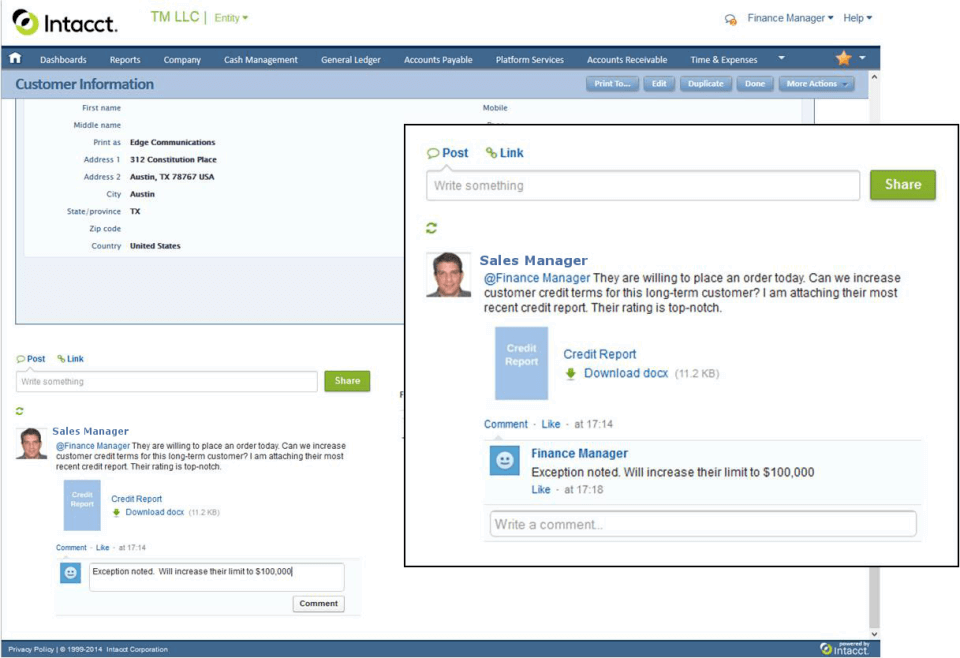
Description
Sage Intacct at a Glance
| Best fit for | Mid-market companies ($5M-$1B revenue) with multi-entity structures, complex revenue recognition, or project-based accounting needs |
|---|---|
| Company size | 50 to 2,500 employees; strongest fit at 100 to 1,000 |
| Deployment | Cloud, SaaS |
| Pricing model | Quote-based; indicative range $12,000 to $60,000+/year depending on modules and entities |
| Free trial | No public trial; demo available on request |
| AICPA endorsement | Yes, the only accounting software with formal AICPA endorsement |
| Multi-entity | Yes, supports thousands of entities with automated consolidation |
| Revenue recognition | ASC 606 and IFRS 15 built in, not an add-on |
| Mobile app | Limited: Sage Intelligent Time and Expense app only (no full accounting mobile app) |
Sage Intacct Pros and Cons in 2026
Where Sage Intacct Stands Out
AICPA-endorsed: the only accounting software with this distinction. The American Institute of CPAs has formally endorsed Sage Intacct as its preferred financial management solution. This matters if your auditors, board, or investors care about financial system credibility, particularly in non-profit and professional services sectors.
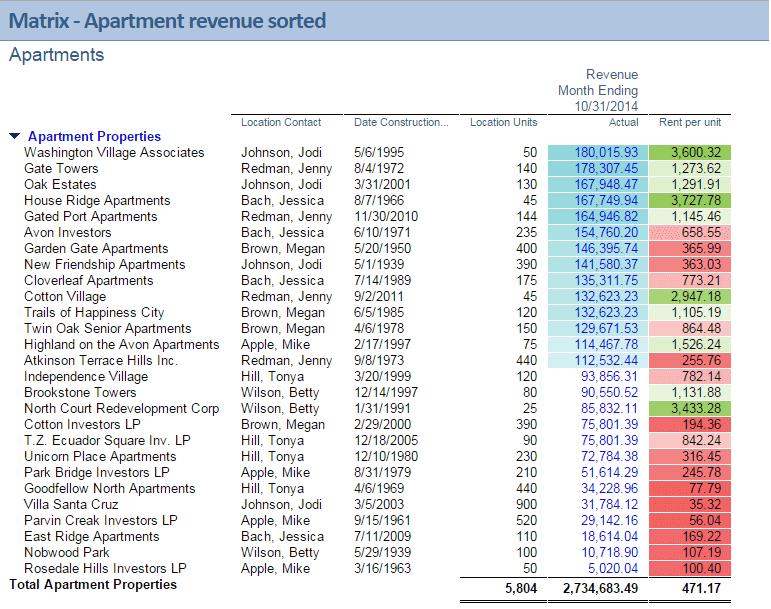
Dimensional general ledger. Instead of a rigid chart of accounts, Sage Intacct uses dimensions (department, location, project, customer, and custom attributes) to tag every transaction. You can then slice financial reports by any combination without rebuilding your chart of accounts. For companies running multiple business units or cost centers, this replaces the need for separate accounting books or tracking spreadsheets.
Multi-entity consolidation built in. Sage Intacct can manage thousands of legal entities with automated intercompany eliminations, currency translation, and consolidated reporting. Companies that have grown through acquisition or operate across multiple countries use this to close books faster than systems requiring manual consolidation in Excel.
Revenue recognition without a third-party module. ASC 606 and IFRS 15 compliance is built into the core product, not sold as an add-on. For SaaS companies, professional services firms, and any business with multi-element arrangements, this removes a significant implementation and compliance burden.
Project and grant accounting depth. Non-profits and professional services firms get fund accounting, grant tracking, and project-level profit and loss reporting out of the box. This is one reason Sage Intacct holds strong market share in healthcare, non-profit, and software sectors.
Where Sage Intacct Falls Short
No public pricing. Every contract is quoted individually. Budget conversations with vendors are required before you can assess fit. Independent research puts base contracts at $12,000 to $25,000/year, with mid-market deployments often running $50,000 to $200,000/year when you add modules and implementation services.
No general accounting mobile app. The only Sage Intacct mobile app is Sage Intelligent Time and Expense, which covers time entry and expense submission. You cannot view financial reports, approve journal entries, or run month-end tasks from a phone. If mobile accounting access matters, this is a gap.
Implementation takes months, not days. Most mid-market deployments take three to six months with a certified partner. The system requires significant configuration of dimensions, workflows, and approval rules. Budget for implementation services, which typically run 50 to 100 percent of the first-year software cost.
Not designed for companies under $5M revenue. The pricing and implementation complexity put it out of reach for small businesses. Companies in the $1M to $5M range are usually better served by QuickBooks Online Advanced or Xero until they need multi-entity or advanced revenue recognition.
Who Should Use Sage Intacct?
Sage Intacct is the right fit for mid-market organizations with 50 to 500 employees that need multi-entity consolidation, automated revenue recognition, and GAAP-compliant financial reporting at a level QuickBooks and Xero cannot support. It works best in software and SaaS businesses where ASC 606 revenue recognition is a requirement, nonprofits where fund accounting and grant management matter, healthcare organizations, and professional services firms that manage multiple business units. Intacct's AICPA preferred status makes it a common choice when the CFO or audit committee has specific reporting requirements.
It is the wrong fit for small businesses under $10 million in revenue, businesses that do not have a finance team to configure and maintain the system, or businesses looking for a quick-start accounting tool. Implementation takes weeks to months and typically requires a certified Sage Intacct partner. If you are currently on QuickBooks and outgrowing it but not yet at the size where Intacct makes sense, compare Xero and Zoho Books as interim options in our accounting software guide.
Sage Intacct Product Features
Sage Intacct covers financial management depth that most small-business accounting tools do not reach:
- General ledger with dimensions: Tag every transaction with up to 10 custom dimensions. Run any financial report by any combination of department, location, project, fund, or custom attribute without restructuring your chart of accounts.
- Accounts payable and receivable: Multi-currency AP/AR with automated approval workflows, early payment discounts, and electronic payment processing. Supports multiple payment methods and bank accounts across entities.
- Multi-entity management: Automate intercompany transactions, currency translation, and eliminations across hundreds or thousands of entities. Consolidated close processes that take weeks in Excel take days in Sage Intacct.
- Revenue recognition: ASC 606 and IFRS 15 compliant revenue scheduling and recognition across multiple performance obligations. Automates deferred revenue calculations, allocation, and reporting. No separate module required.
- Project accounting: Track project budgets, actual costs, billing milestones, and margins at the project level. Integrates with time entry and expense approval workflows for billable projects.
- Grant and fund accounting: Designed for non-profits with fund tracking, grant compliance reporting, and board-level dashboards. One of the main reasons Sage Intacct has strong non-profit market share.
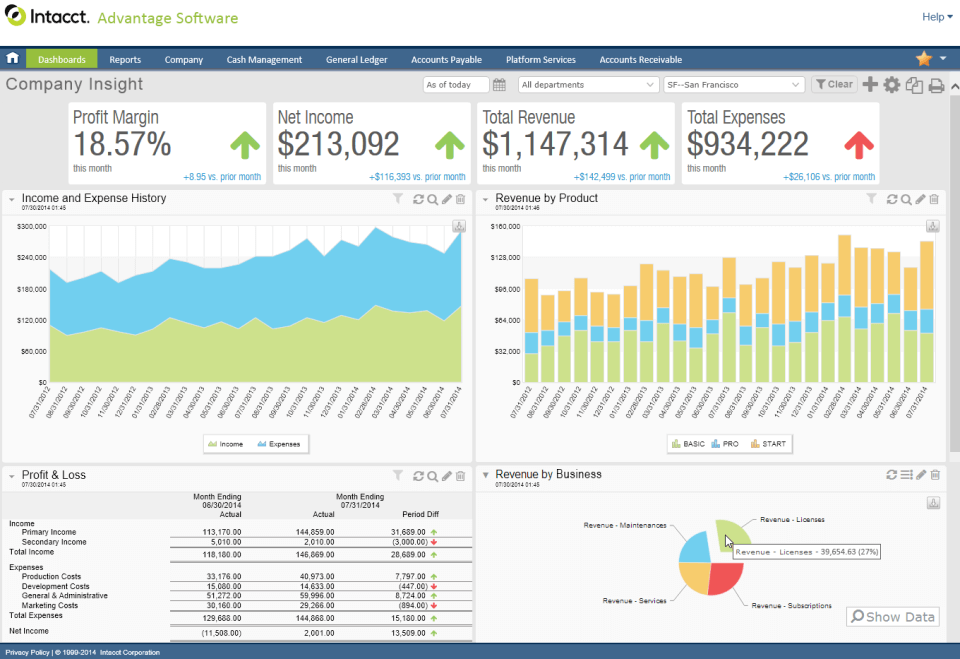
- Financial reporting and dashboards: Real-time dashboards with configurable KPI cards, role-based views, and drill-through from summary to transaction level. Custom report builder without needing a consultant for standard reports.
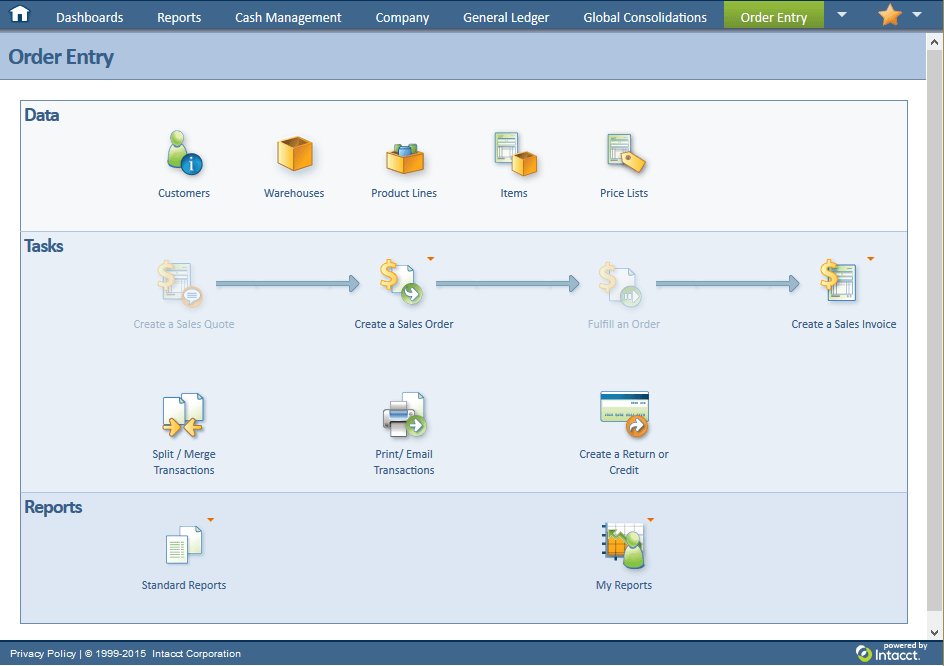
- Order management: Quote-to-cash workflows with inventory, purchase orders, and automated revenue triggering on fulfillment events.
- Inventory management: Basic inventory tracking with warehouse locations, costing methods, and purchase order integration. Not suited for complex manufacturing or multi-location distribution without add-ons.
- Fixed assets: Asset tracking, depreciation scheduling, and disposal with GAAP and IFRS depreciation methods supported out of the box.
- Cash management: Bank feeds, reconciliation, and treasury management across multiple accounts and entities. Supports positive pay and wire transfer controls.
- Payroll integration: Sage Intacct does not include payroll natively. Integrates with ADP, Gusto, Paychex, and other payroll providers via API or pre-built connectors.
How Much Does Sage Intacct Cost in 2026?
Sage Intacct does not publish pricing. Every contract is quoted based on the number of users, modules selected, entities managed, and transaction volumes. The figures below are based on independent research and partner estimates, not official published rates.
| Tier | Indicative Annual Cost | Typical Profile |
|---|---|---|
| Base (core GL + AP/AR) | $12,000 to $25,000/year | Single entity, 3 to 5 users, basic modules |
| Mid-market | $25,000 to $60,000/year | Multiple entities, 10 to 20 users, revenue recognition or project modules |
| Complex deployments | $60,000 to $200,000+/year | 30+ entities, advanced modules, high transaction volumes |
Sage Intacct is sold through certified reseller partners, not directly. Your final price depends on negotiation with the partner and Sage. Implementation costs are additional and typically run 50 to 100 percent of first-year software fees.
Hidden Costs to Watch For
- Implementation services: Almost all deployments require a certified Sage Intacct partner for setup, configuration, and training. Budget $10,000 to $100,000+ depending on complexity, on top of the software license.
- Module add-ons: Core pricing covers GL, AP, and AR. Revenue recognition, project accounting, inventory, fixed assets, and reporting packs are sold as separate modules. Each adds to the annual cost.
- User licenses: Pricing scales with named users. Adding finance team members or read-only report viewers each carries a license cost. Understand the exact user tier pricing before signing.
- Integration development: Pre-built connectors exist for major systems (Salesforce, HubSpot, ADP), but custom integrations require development work. Third-party connectors like Workato or Zapier add subscription costs.
- Training: Sage Intacct has a steep learning curve. Beyond partner-led training, Sage offers certification programs and Sage University courses, some included and some at extra cost.
- Annual renewal increases: Multi-year contracts often include 5 to 10 percent annual escalation clauses. Read renewal terms before signing the initial contract.
Sage Intacct vs the Alternatives
| Product | Best for | Key difference from Sage Intacct |
|---|---|---|
| NetSuite ERP | Companies needing full ERP (inventory, manufacturing, CRM + finance) | NetSuite is a broader ERP platform; Sage Intacct is deeper on pure financial management and multi-entity accounting |
| QuickBooks Online Advanced | Growing companies under $10M not ready for mid-market pricing | Simpler and less expensive; lacks multi-entity consolidation, dimensional GL, and revenue recognition depth |
| Microsoft Dynamics 365 Finance | Large enterprises already in the Microsoft ecosystem | Better for global enterprises with manufacturing; Sage Intacct is easier to implement and stronger on accounting specifically |
| Acumatica | Companies wanting consumption-based pricing with distribution or manufacturing needs | Acumatica charges by transaction volume, not users; Sage Intacct is stronger on financial management depth and AICPA endorsement |
| QuickBooks Desktop Enterprise | Companies that need on-premises accounting with stronger inventory | On-premises option with deeper inventory features; Sage Intacct is cloud-only with better multi-entity and reporting |
If your main criteria are multi-entity consolidation, revenue recognition, or AICPA compliance, Sage Intacct is the most direct fit. If you need manufacturing, supply chain, or a broader ERP, look at NetSuite or Dynamics. See our ERP software guide for a broader comparison of enterprise platforms.
What Real Buyers Report About Sage Intacct
Finance teams that have used Sage Intacct for two or more years consistently report the same pattern: the first six months are harder than expected (configuration, training, and process redesign take longer than vendors indicate), and the following years are faster than what they had before (month-end close times drop, consolidated reporting becomes self-service, and audit prep is faster).
Common positive feedback centers on dimensional reporting. Controllers who previously maintained 12 different cost center tracking spreadsheets now run the same analysis in a few clicks. Non-profit CFOs cite grant tracking and fund reporting as the features they could not find anywhere else at this price point.
Common complaints focus on customer support response times during year-end periods and the cost of adding modules after the initial contract. Several reviewers on G2 and Capterra note that getting simple report customizations done requires either a consultant or a support ticket with a longer-than-expected turnaround.
Sage Intacct Integrations and App Ecosystem
Sage Intacct connects to over 350 apps through its marketplace and open API. Key integration categories:
- CRM: Salesforce (pre-built, bidirectional sync of quotes, invoices, and revenue), HubSpot (via Workato or third-party connectors)
- Payroll: ADP, Gusto, Paychex, Rippling, and other payroll platforms via API
- Expense management: Expensify, Concur, and Divvy for expense report import and reimbursement processing. See our expense management software guide for tools that integrate with Sage Intacct.
- Banking: Major US banks via direct bank feeds for automated transaction import and reconciliation
- Procurement: Coupa, Procurify, and similar purchase order and approval workflow platforms
- Reporting: Fathom, Spotlight Reporting, and Vena for advanced financial modeling and board reporting beyond built-in dashboards
- eCommerce: Shopify (via connectors), Stripe for SaaS billing and subscription revenue. See our ecommerce software guide for platforms with Sage Intacct connectors.
- Professional services automation: Certinia (FinancialForce), Mavenlink, and similar PSA tools for project billing integration
Sage Intacct's API is well-documented and supports both REST and XML-based integrations. Most enterprise-grade integration platforms (MuleSoft, Workato, Boomi) have pre-built Sage Intacct connectors.
Security and Compliance
- SOC 1 Type II and SOC 2 Type II: Annual third-party audits covering security, availability, processing integrity, and confidentiality controls
- HIPAA-eligible: Sage Intacct supports HIPAA compliance for healthcare organizations. Requires a Business Associate Agreement (BAA) with Sage
- AICPA certified: The only accounting software with formal AICPA endorsement for financial management
- GDPR compliant: Data residency and processing controls for EU data subjects
- SSAE 16: Service Organization Controls reporting standard
- Role-based access controls: Granular user permissions at the entity, module, and transaction level. Supports segregation of duties requirements for audits
- Audit trail: Complete, immutable transaction history with user, timestamp, and change detail for every entry
- Encryption: TLS 1.2+ in transit, AES-256 at rest. Data hosted on AWS with geographic redundancy
Bottom Line: Is Sage Intacct Right for You?
Sage Intacct is the right choice for finance teams that have outgrown QuickBooks or Xero but are not ready for a full ERP. The specific cases where it wins clearly: multi-entity companies doing monthly consolidations in Excel, non-profits that need fund and grant accounting, and SaaS or services companies with complex revenue recognition under ASC 606.
It is not the right choice if you are under $5M in revenue, need manufacturing or supply chain management, or want a system you can configure without a partner. The implementation investment and annual cost are substantial. For companies that qualify, the payoff is typically a two to three day reduction in monthly close time and financial reporting that finance teams can run independently without IT support.
Before signing, confirm the total first-year cost including implementation services, all modules you actually need, and integration development. Get references from companies at your specific size and industry, not just generic case studies.
Frequently Asked Questions
Is Sage Intacct a good fit for small businesses?
How much does Sage Intacct cost?
What does the AICPA endorsement mean for Sage Intacct?
Does Sage Intacct handle multi-entity accounting?
Does Sage Intacct handle ASC 606 revenue recognition?
How long does Sage Intacct implementation take?
How does Sage Intacct compare to NetSuite?
Does Sage Intacct have a mobile app?
What industries use Sage Intacct the most?
Can Sage Intacct replace QuickBooks?
Find Your Perfect Software
See how it can transform your workflow
- Personalized for your needs Tailored recommendations based on your unique requirements.
- Save time & resources Streamline your workflow and boost team productivity.
- Trusted by thousands Join 10,000+ businesses already growing with SaaSrat.
You're all set! 🎉
A specialist for will reach out within 1 business day with tailored recommendations for your needs.