

SherpaDesk
by SherpaDesk
What is SherpaDesk?
Get Best Quote for SherpaDesk
Connect with SaaSrat experts to get the best quote for your business.
You're all set!
A specialist for SherpaDesk will reach out within 1 business day.
SherpaDesk Features
Help desk ticketing with assignment workflows
Time tracking with billable hours
Expense capture and tracking
Quoting and invoicing with online payment
Project management with task tracking
Knowledge base for internal and client use
View All 15 Features
SherpaDesk Pricing Plans
Single Agent
- Free forever with all core features: ticket management, time tracking, expenses, invoicing, quoting, reporting, projects, todos, knowledge base, mobile app. For solo techs and independent consultants.
Base Camp (annual)
- $40/user/month annual or $45/user/month monthly. Multi-technician support for help desk teams. Everything in Single Agent plus team workflow, assignment, supervisor view.
High Camp (annual)
- $50/user/month annual or $55/user/month monthly. Best for MSPs. Everything in Base Camp plus asset management for client environments, vanity URL, custom email domain.
Contractors License
- $10 per technician per month for occasional contractor access. For MSPs with rotating subcontractors or part-time staff who do not need full Base Camp or High Camp seats.
Remote Assistance add-on
- $7 per technician per month for screen-share-based remote support capability built into ticket workflow. Useful for MSPs providing remote helpdesk to non-RMM-managed clients.
SherpaDesk Screenshots
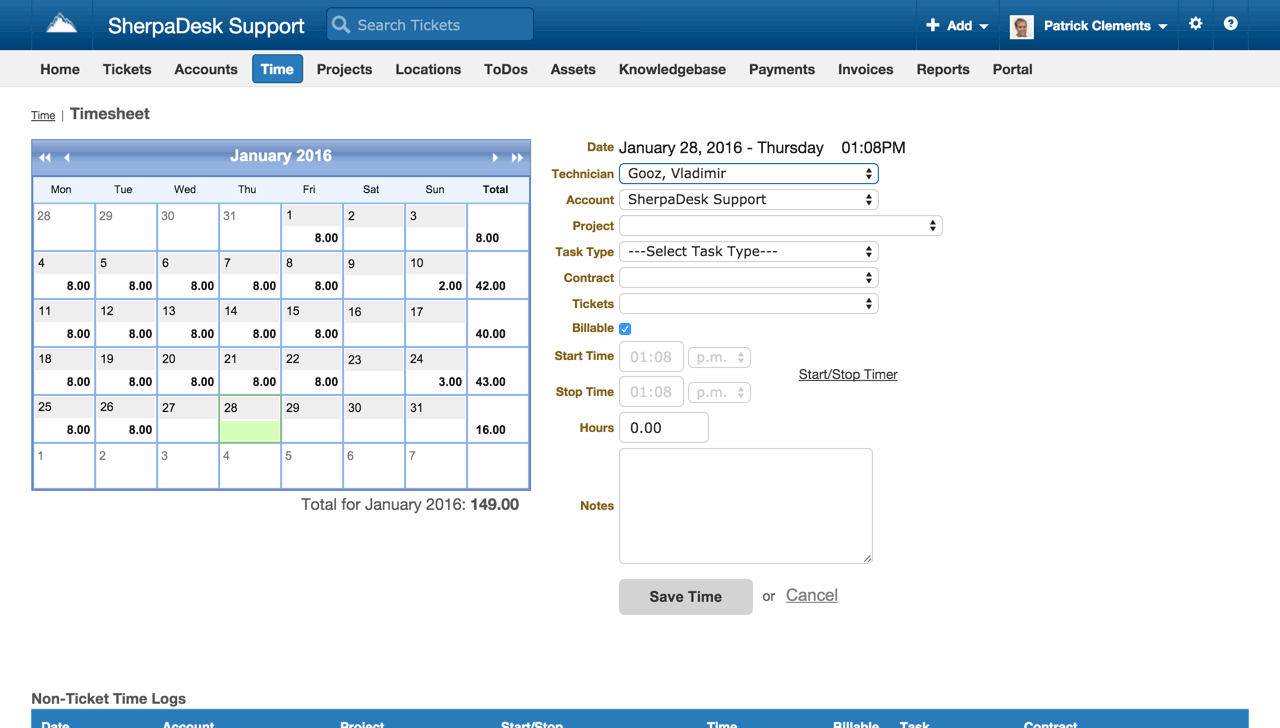
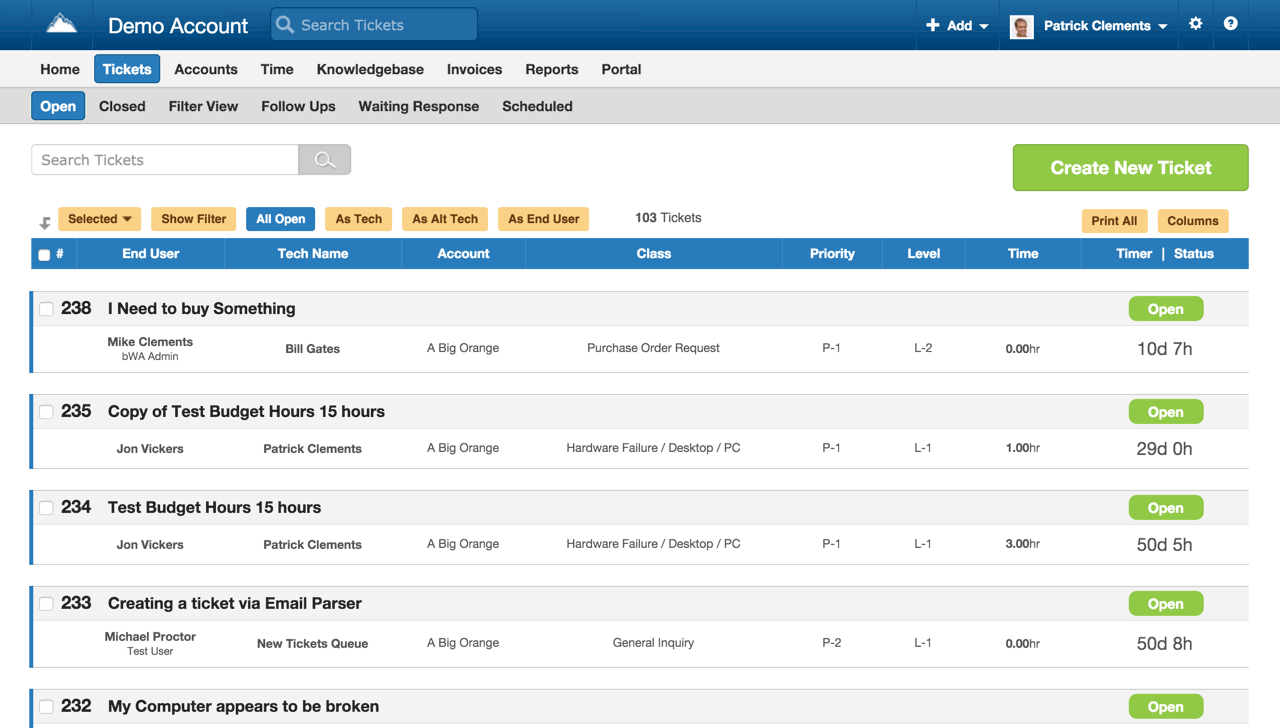
Description
What is SherpaDesk?
SherpaDesk is a US-built professional services automation (PSA) platform aimed at IT managed service providers, small consultancies, and professional services firms. The product was founded in 2009 and combines help desk ticketing, time tracking, expense management, quoting, invoicing, and project management in one tool.
The strongest positioning is a genuinely free Single Agent tier with all core features included. For solo IT consultants, independent technicians, and freelance professional services workers, the Free tier covers the full workflow without time limit or feature gates. Paid tiers add multi-technician support and MSP-specific features.
Who SherpaDesk is built for
SherpaDesk fits three buyer profiles. First, solo IT consultants and freelance technicians who bill clients for time and need ticketing plus invoicing in one tool. Second, small MSPs (2-50 technicians) supporting multiple SMB and mid-market clients. Third, small professional services firms (consulting, accounting, legal IT support) that bill by the hour and need project tracking alongside time and expense management.
The strongest fit is teams that have outgrown spreadsheet-based time tracking and email-based ticketing but find ConnectWise PSA, Autotask, and other MSP-grade PSAs too expensive or complex. SherpaDesk fills the gap between $0 free tools and $100+/tech/month enterprise PSAs.
It is less of a fit for general customer service operations (Zendesk or Freshdesk fit better without the PSA layer), for larger MSPs (50+ techs) where ConnectWise or Datto Autotask offer deeper integration ecosystems, or for non-billing-driven IT helpdesks where time tracking adds noise.
SherpaDesk pricing plans
| Plan | Monthly | Annual | Best for |
|---|---|---|---|
| Single Agent | $0 | $0 | Solo techs and consultants |
| Base Camp | $45 user/mo | $40 user/mo | Help desk support multi-tech teams |
| High Camp | $55 user/mo | $50 user/mo | MSPs with assets and custom domain |
The Single Agent tier is genuinely free with all core features: ticket management, time tracking, expenses, invoicing, quoting, reporting, projects, todos, knowledge base, and mobile app. For solo techs this covers the full workflow without payment.
Base Camp at $40-$45/user/month adds multi-technician support for teams. High Camp at $50-$55/user/month adds asset management, full vanity URL, and custom email domain for MSPs serving multiple clients with branded experience. Annual billing saves 9-11% versus monthly.
Optional add-ons: Contractors License at $10/tech (for occasional contractors), Vanity URL at $10/month (if not on High Camp), Custom Email Domain at $10/month (if not on High Camp), and Remote Assistance at $7 per tech (for screen-share-based remote support).
SherpaDesk core capabilities
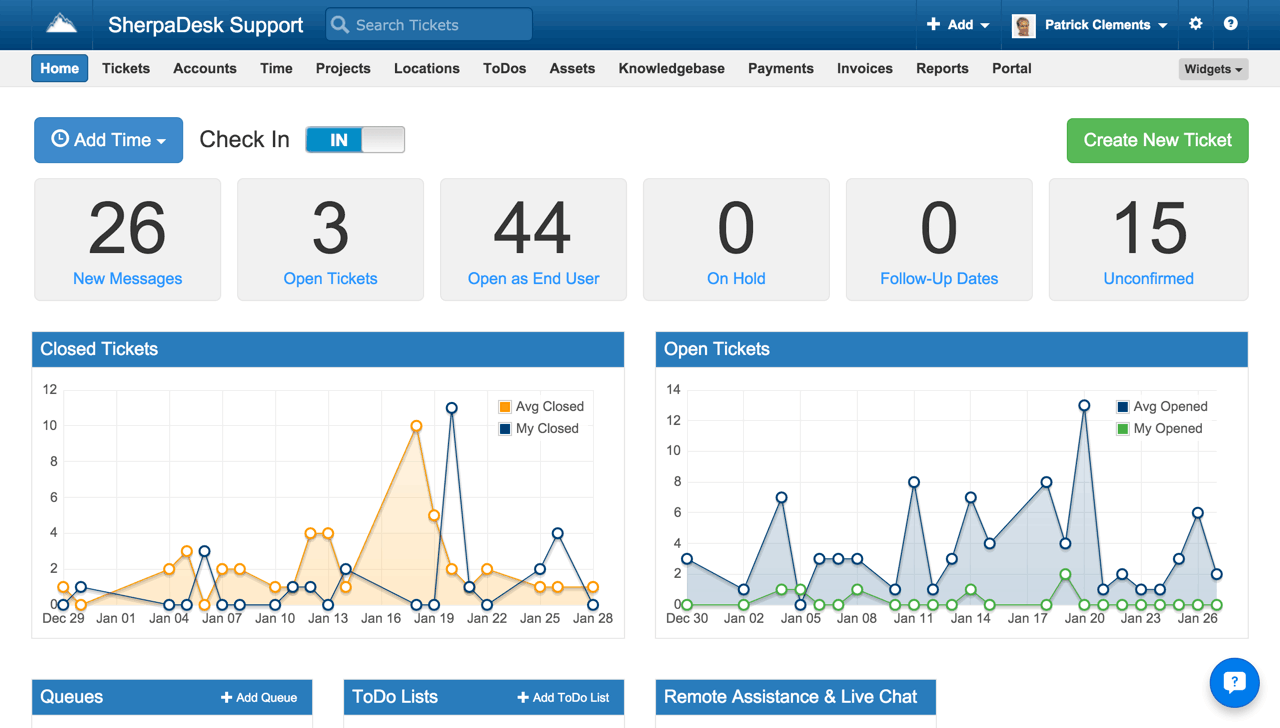
Tickets are the spine. Each ticket has a client, requestor, technician assignment, status (new, in progress, waiting on customer, resolved, closed), priority, time entries, attachments, and conversation history. Multi-channel intake handles email, web portal, mobile app, and API. Round-robin assignment distributes tickets across the team.
Custom workflows let MSPs model their own ticket lifecycle (intake, triage, work, billing, close) with status-based automation. SLA tracking monitors response and resolution time against client agreements.
Time tracking and billing
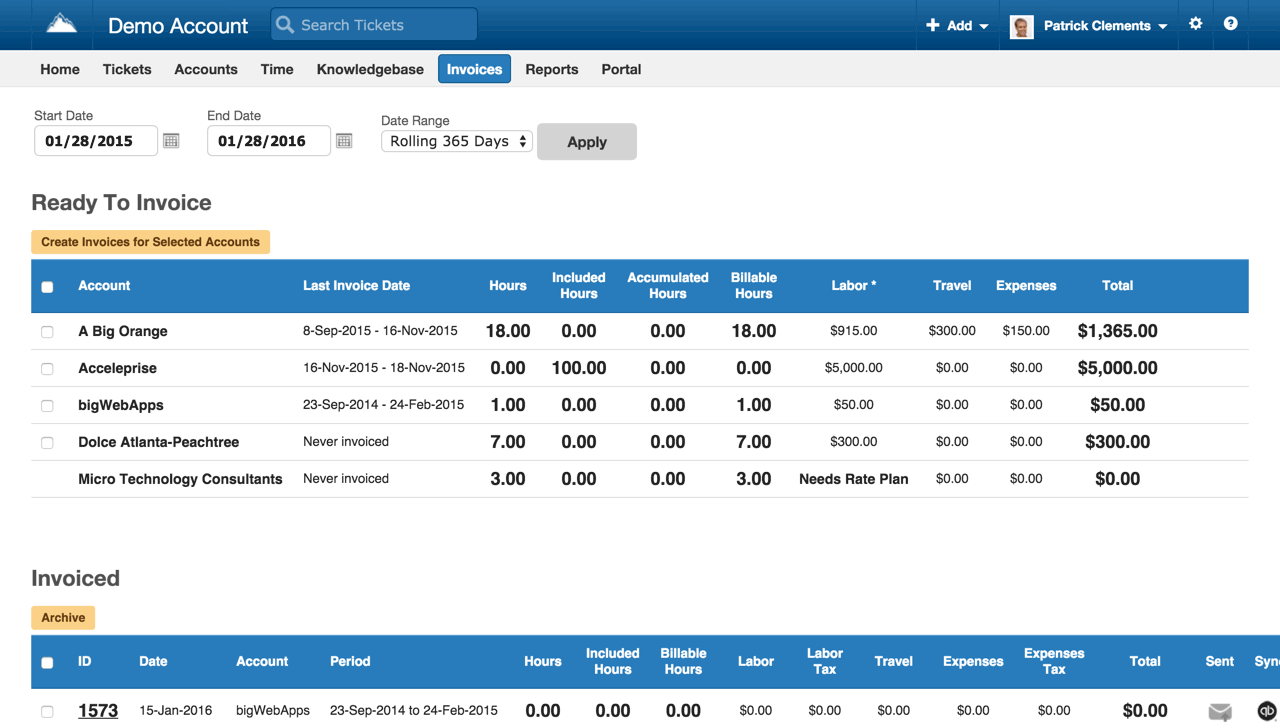
Time entries log against tickets, projects, or directly to clients. Timer runs in the background; manual entry covers worked hours not actively timed. Approved time entries roll into invoices with custom rate tables (technician rate, client rate, project rate). For MSPs billing per hour or per ticket, this end-to-end flow eliminates manual invoice assembly.
Expense capture handles non-labor project costs (travel, materials, subcontractor fees) with receipt photo upload. Expenses flow to invoices alongside time entries.
Quoting and invoicing
Quotes generate proposals for new project work with line items, rates, and discounts. Once accepted, the quote converts to a project with task structure and budget preserved. Invoices generate from completed tickets and projects with itemized line entries.
Online payment links accept credit card via Stripe integration. Invoice status (sent, viewed, paid) tracks within SherpaDesk and syncs to QuickBooks Online via integration.
Project management
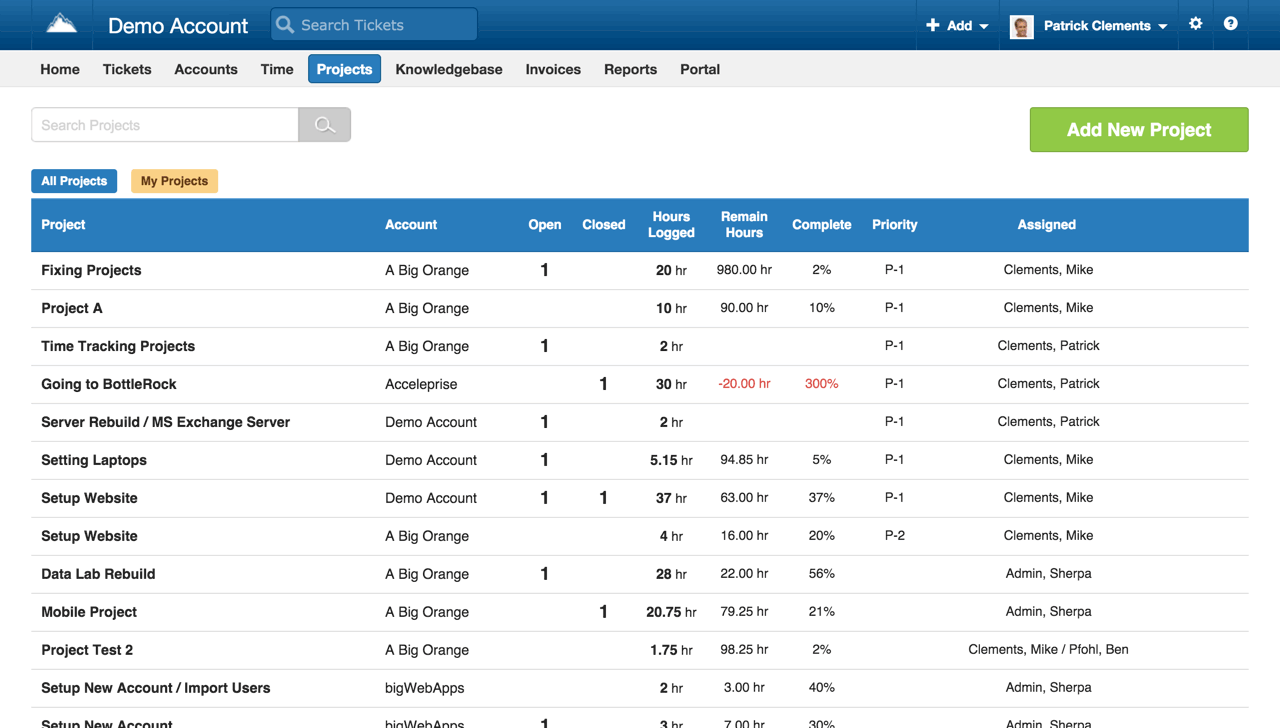
Projects group related work above the ticket level: a client implementation, a quarterly engagement, an annual retainer. Each project has tasks, milestones, budget, time entries, and discussion. For consultants managing multi-month engagements, project tracking provides the structure that pure ticketing tools lack.
Asset management on High Camp
High Camp adds asset management for tracking client hardware, software licenses, and infrastructure. Assets link to clients and locations, with custom fields per asset type. For MSPs managing client environments, asset tracking is essential for renewal management and compliance.
Custom branding on High Camp
High Camp also adds Vanity URL (e.g., support.acmemsp.com instead of generic SherpaDesk URL) and Custom Email Domain ([email protected] instead of generic). For client-facing MSPs where branding matters, this is one of the strongest reasons to upgrade from Base Camp.
Knowledge base
Internal knowledge base captures runbooks, technical documentation, and team SOPs. Client-facing knowledge base portal lets end-users search for solutions before submitting tickets. Self-service deflection (end-users solving issues from KB) reduces ticket volume.
Integrations
SherpaDesk integrates with QuickBooks Online (invoice and customer sync), Office 365, Google Workspace, Slack, Zapier (1,000+ apps), and a REST API for custom integrations. The integration directory is smaller than enterprise PSAs (ConnectWise, Autotask) but covers the SMB MSP stack.
Mobile and offline
iOS and Android apps cover ticket management, time tracking with timer, expense capture with receipt photos, and project lookup. Offline mode is limited; most workflows require a connection.
Security and compliance
SherpaDesk is hosted on US cloud infrastructure with encryption at rest and in transit. Standard SaaS security controls apply. Public SOC 2 or HIPAA certifications are not prominently disclosed; MSPs serving regulated client industries should verify specific compliance during evaluation.
SherpaDesk vs ConnectWise PSA and Autotask
ConnectWise PSA and Datto Autotask are the enterprise MSP PSA leaders with deep integration ecosystems and broad feature footprints. SherpaDesk is the SMB alternative at one tenth the cost. Pick ConnectWise or Autotask for established MSPs at 50+ techs needing deep RMM and tool integration. Pick SherpaDesk for solo techs and small MSPs (2-50 techs) needing core PSA without enterprise complexity.
SherpaDesk vs SyncroMSP
SyncroMSP is the closest direct competitor for SMB MSP all-in-one (PSA plus RMM in one product). SherpaDesk is PSA-only. Pick SyncroMSP for combined PSA plus RMM at a single vendor. Pick SherpaDesk for PSA-focused workflow with separate RMM (e.g., Atera, NinjaOne, ConnectWise Automate).
SherpaDesk vs HaloPSA
HaloPSA is the upmarket MSP PSA competitor with broader feature set than SherpaDesk. HaloPSA targets larger MSPs with more complex workflows. Pick HaloPSA for mid-market MSPs with complex billing. Pick SherpaDesk for smaller MSPs and solo techs.
SherpaDesk vs Freshdesk
Freshdesk is general customer service helpdesk without PSA features. SherpaDesk has time tracking, billing, and project management beyond ticketing. Pick Freshdesk for general SMB customer service. Pick SherpaDesk for billable IT and professional services work.
Buyer pitfalls to avoid
Three patterns hurt SherpaDesk rollouts. First, picking Base Camp when High Camp's branding matters: vanity URL and custom email domain are MSP differentiators. Asset management is also significant for tracking client environments.
Second, treating it as RMM: SherpaDesk is PSA (Professional Services Automation), not RMM (Remote Monitoring and Management). Teams needing both should pair SherpaDesk with Atera, NinjaOne, ConnectWise Automate, or another RMM.
Third, ignoring the Single Agent free tier: solo techs and side projects can run on Free indefinitely. Don't pay for Base Camp until the second technician joins.
Implementation and time to value
Solo tech: productive in 1 day. Small MSP (5-15 techs): 1-2 weeks for client import, ticket workflow setup, time and expense configuration, and QuickBooks integration. Mid-size MSP (25-50 techs): 3-6 weeks adding custom branding, asset management onboarding, knowledge base content, and team training. SherpaDesk provides email and chat support during onboarding.
Customer support
All plans include email and chat support during US business hours. High Camp adds priority response. The SherpaDesk Help Center covers most setup tasks. Documentation is in English. The user community is smaller than ConnectWise's but the support team is responsive.
The Bottom Line on SherpaDesk
SherpaDesk is the right call for solo IT consultants, small MSPs, and professional services firms that need help desk ticketing, time tracking, expenses, invoicing, and project management in one tool without paying enterprise PSA prices.
Standout strengths: genuinely free Single Agent tier with all core features, integrated quote-to-invoice workflow, time tracking with billable rates, asset management on High Camp, custom branding on High Camp (vanity URL, custom email domain), QuickBooks Online integration, mobile apps for field work.
Pricing fits SMB MSP budgets: Single Agent $0/forever (solo tech), Base Camp $40-$45/user/month (multi-tech), High Camp $50-$55/user/month (MSPs with assets and branding). Add-ons include Contractors at $10/tech, Vanity URL or Custom Domain at $10/month, Remote Assistance at $7/tech. Annual billing saves 9-11%.
Trade-offs to weigh: not the right tool for RMM (separate Atera, NinjaOne, or ConnectWise Automate required). Smaller integration directory than ConnectWise or Autotask. Public SOC 2 or HIPAA certifications not prominently disclosed. Brand presence smaller than enterprise PSA leaders. UI is functional but less polished than newer SaaS challengers.
Alternatives worth comparing: ConnectWise PSA for established MSPs at 50+ techs, Datto Autotask for similar enterprise MSP positioning, SyncroMSP for combined PSA plus RMM in one product, HaloPSA for upmarket MSP PSA, Atera for RMM-first PSA with AI features, Freshdesk for general SMB customer service, Zendesk for upper-mid-market support. Pricing and capabilities verified on sherpadesk.com/pricing on 2026-06-27.
Frequently Asked Questions
Is there a free plan or free trial for SherpaDesk?
How much does SherpaDesk cost?
What does SherpaDesk integrate with?
Who is SherpaDesk best for?
What are the best alternatives to SherpaDesk?
Is SherpaDesk GDPR / SOC 2 compliant?
Does SherpaDesk have a mobile app?
What do real users say about SherpaDesk?
How does SherpaDesk compare to its top competitor?
Does SherpaDesk offer customer support?
Find Your Perfect Software
See how it can transform your workflow
- Personalized for your needs Tailored recommendations based on your unique requirements.
- Save time & resources Streamline your workflow and boost team productivity.
- Trusted by thousands Join 10,000+ businesses already growing with SaaSrat.
You're all set! 🎉
A specialist for will reach out within 1 business day with tailored recommendations for your needs.