

RationalPlan
by RationalPlan • Founded 1997
What is RationalPlan?
Get Best Quote for RationalPlan
Connect with SaaSrat experts to get the best quote for your business.
You're all set!
A specialist for RationalPlan will reach out within 1 business day.
RationalPlan Features
Gantt chart with critical path and dependencies
Task scheduling with constraints and deadlines
Resource leveling across projects
Budget cost tracking by task and resource
Risk and issue management
Earned value analysis EVA
View All 15 Features
RationalPlan Pricing Plans
Single Project (desktop perpetual)
- One-time per-user license for solo PMs. Gantt scheduling, critical path, resource assignment, budget tracking, risk register, MS Project import/export. Windows, macOS, Linux.
Multi Project (desktop perpetual)
- One-time per-license for small teams. Everything in Single Project plus multi-project resource pool sharing, EVA (Earned Value Analysis), consolidated reporting across projects.
Cloud Beginner
- Entry-level cloud subscription with core Gantt scheduling. Hosted by RationalPlan with backups and updates included. Annual contract discounts available.
Cloud Master
- Mid-tier cloud subscription. Everything in Beginner plus multi-project, EVA, resource leveling, advanced reporting. For small to mid-sized teams.
Cloud Production / Server
- Top cloud tier. Multi-user Server with central database, workgroup features, timesheets, full feature set. $29/user/mo for teams up to 10, scaling to $19/user/mo at 1,000 users.
On-Premise Server
- Self-hosted Server license, one-time per-user perpetual. Installs on customer Windows, Linux, or macOS server. Full data residency for organizations with data sovereignty requirements.
RationalPlan Screenshots
Description
What is RationalPlan?
RationalPlan is a project management software suite from Stand By Soft, a Romanian software company founded in 2007. It is one of the few PM tools that still offers a one-time perpetual desktop license alongside modern cloud subscription, which makes it a notable pick for solo PMs and small teams that want to avoid recurring SaaS fees.
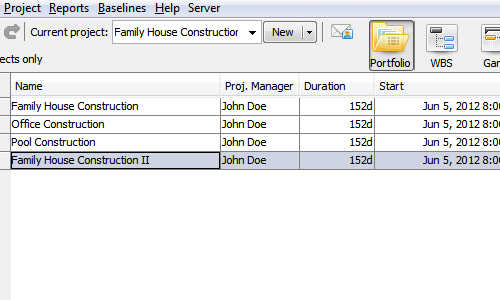
The product comes in three editions targeting different team sizes: Single Project for solo PMs, Multi Project for small teams handling multiple projects in parallel, and Server for organizations needing multi-user coordination with a shared central database.
Who RationalPlan is built for
RationalPlan fits three buyer profiles. First, solo project managers and freelancers who want a one-time desktop license without a monthly subscription. Second, small teams (3 to 25 users) running multiple parallel projects with shared resource pools. Third, mid-market and enterprise organizations needing on-premise self-hosted PM with full data residency.
It is a strong fit for engineering, construction, consulting, and IT services teams that already think in Gantt-and-WBS terms and want a tool that follows traditional PMI/PMBOK structure (critical path, EVA, resource leveling). It is less of a fit for marketing or creative teams that prefer Kanban (Trello, MeisterTask), for agile engineering teams (Jira), or for general-purpose work management (Asana, Monday).
RationalPlan pricing plans
| Edition | One-time desktop | Cloud subscription |
|---|---|---|
| Single Project | $145 per user one-time | $4/user/mo (Beginner) |
| Multi Project | $288 per license one-time | $12/user/mo (Master) |
| Server (On-Premise) | $94/user one-time perpetual | $19-$29/user/mo Cloud |
The desktop perpetual licenses (Single Project $145, Multi Project $288) are one-time purchases with no recurring fees. This is the strongest economic argument for RationalPlan versus modern SaaS-only PM tools. Free updates apply within the major version; major version upgrades are paid separately.
Cloud RationalPlan Server scales by team size: $29/user/mo for teams up to 10 users, $24/user/mo at 100 users, $19/user/mo at 1,000 users. The cloud version handles hosting and backups. The on-premise Server edition is a $94/user one-time license that organizations install on their own infrastructure.
RationalPlan core capabilities
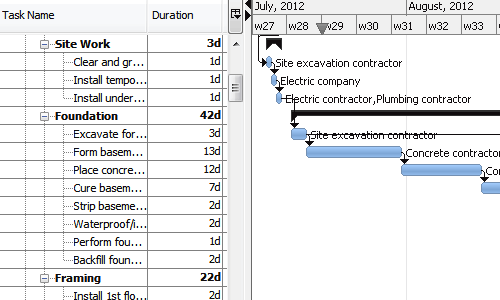
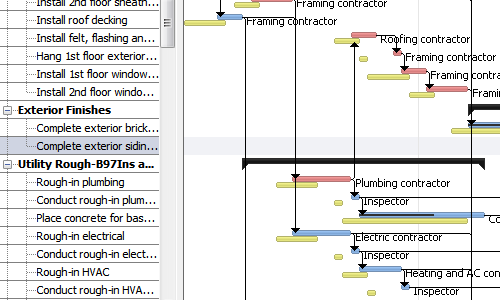
Projects are built around Gantt schedules with tasks, dependencies, durations, and assigned resources. The scheduling engine calculates critical path automatically and identifies tasks that drive the overall deadline. Constraint types (must start on, finish no later than, as soon as possible) handle complex scheduling rules.
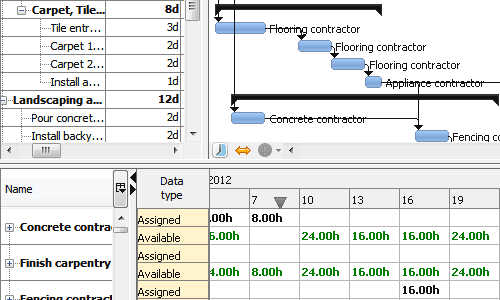
Resource leveling balances assignments across the team. Over-allocations are flagged. The leveling engine can automatically suggest rescheduling to resolve conflicts based on task priority and dependency order. Resource pools shared across multiple projects let small teams see their full workload across initiatives.
Budget and cost tracking
Budgets can be set at the project, task, or resource level. Cost types include labor (hourly rate by resource), materials, and fixed costs. Actual versus planned cost variance reports show where projects are running over or under budget.
Earned Value Analysis (EVA) is supported on Multi Project and Server. EVA metrics like Cost Performance Index (CPI), Schedule Performance Index (SPI), Estimated Cost at Completion (EAC), and Variance at Completion (VAC) help project managers forecast whether a project will finish on time and on budget.
Risk and issue management
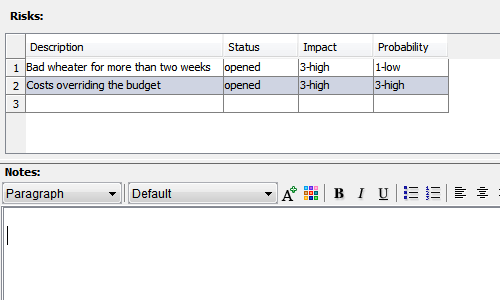
Risk register tracks identified risks with probability, impact, owner, and mitigation plan. Issue tracking handles problems that have actually materialized. This is a standard PMI/PMBOK approach and one of the things that makes RationalPlan appealing to formally trained project managers.
Microsoft Project compatibility
Microsoft Project (.MPP and .MPX) files import directly into RationalPlan with tasks, dependencies, resources, and assignments preserved. Export back to MS Project format works for sharing with stakeholders still on the Microsoft tool. This is the easiest migration path off legacy MS Project for buyers looking for a modern alternative without losing schedule history.
Server edition and multi-user coordination
The Server edition (cloud or on-premise) provides a shared central database where multiple PMs can collaborate on the same projects. Workgroup features include centralized timesheet entry, resource pool sharing across project managers, and consolidated reporting.
The on-premise Server runs on Windows, Linux, or macOS server hardware. Self-hosted deployment supports organizations with data residency requirements. The cloud Server is hosted by RationalPlan and handles updates and backups automatically.
Cross-platform desktop clients
RationalPlan runs as a desktop application on Windows, macOS, and Linux. Java-based architecture means the same interface works across all three operating systems. The desktop client connects to the Server edition for multi-user mode or runs standalone for single-user perpetual licenses.
Mobile and web
The Server edition includes a web client for browser-based access. The web client covers most planning workflows but is functional rather than polished compared to modern SaaS PM tools. There is no dedicated iOS or Android app; the web client works on mobile browsers.
Security and data ownership
On-premise Server deployments give full data ownership inside the customer environment. Cloud Server deployments run on RationalPlan's infrastructure with standard SaaS security controls. The compliance posture is lighter than enterprise PM tools; public SOC 2 or ISO certifications are not prominently attested.
RationalPlan vs Microsoft Project
Microsoft Project is the legacy enterprise PM tool with deep Gantt and resource leveling. RationalPlan is the affordable modern alternative with similar capability at much lower cost. MS Project Standard is $679 one-time or $10/user/mo Plan 1 on Microsoft 365. RationalPlan Single Project is $145 one-time. Pick MS Project for full Microsoft ecosystem integration. Pick RationalPlan for budget-tight teams wanting comparable traditional PM depth.
RationalPlan vs GanttProject
GanttProject is the open-source free alternative with basic Gantt scheduling. RationalPlan adds resource leveling, EVA, risk management, and multi-user Server edition. Pick GanttProject if free and basic is enough. Pick RationalPlan if you need professional-grade PM features at one-time prices.
RationalPlan vs ProjectLibre
ProjectLibre is another open-source MS Project alternative with desktop Gantt scheduling. RationalPlan has more polished UI, better resource leveling, and the Server edition for multi-user coordination. Pick ProjectLibre for free solo PM work. Pick RationalPlan for paid quality and the multi-user upgrade path.
RationalPlan vs Asana and Monday
Asana and Monday are modern cloud work management tools with strong reporting and visual UI. RationalPlan is traditional PM with Gantt-and-WBS depth. Pick Asana or Monday for cross-functional work management at scale with strong reporting. Pick RationalPlan for traditional waterfall PM with one-time pricing.
Buyer pitfalls to avoid
Three patterns hurt RationalPlan rollouts. First, picking Single Project when teams will grow: the upgrade path to Multi or Server requires re-purchase. Plan based on the 2-year team size. Second, ignoring the cloud option for distributed teams: desktop-only deployment frustrates remote workers; cloud Server is better for hybrid teams. Third, expecting modern UI: the interface is functional and traditional, not visually polished. Teams used to Asana or Monday may find it dated.
Implementation and time to value
Single Project is productive in a day. Multi Project takes 1-2 weeks for small teams to set up shared resource pools. Server edition implementations take 2-6 weeks including database setup, user training, and migration from legacy tools. On-premise Server adds infrastructure setup time. RationalPlan support handles direct customer questions; training videos are published on the vendor site.
Customer support
All paid customers get email support. The Server edition includes priority response for enterprise contracts. Documentation is published in English with localized interface available in multiple languages. The user community is moderately active on RationalPlan forums and software-review sites like ITQlick and Capterra.
The Bottom Line on RationalPlan
RationalPlan is the right call for solo PMs, small teams, and self-hosted enterprises that want traditional Gantt-based PM with resource leveling and EVA at one-time perpetual pricing rather than recurring SaaS fees.
Standout strengths: one-time perpetual desktop licensing ($145 Single, $288 Multi), traditional PMI/PMBOK structure with critical path, resource leveling, and EVA, cross-platform desktop clients (Windows, macOS, Linux), on-premise Server option for data residency, Microsoft Project MPP/MPX import and export.
Pricing fits a wide range: Single Project $145 one-time (or $4/user/mo cloud Beginner), Multi Project $288 one-time (or $12/user/mo Master), Server $94/user one-time on-premise or $19-$29/user/mo cloud depending on team size. Cloud pricing decreases per-user as team size scales up.
Trade-offs to weigh: UI is functional but traditional; teams used to modern SaaS UI may find it dated. Integration count is much smaller than Asana, Monday, or Wrike. Mobile is web-only with no dedicated app. Public compliance posture (SOC 2, ISO) is lighter. Reporting is solid for traditional PM but less polished than modern dashboarding tools.
Alternatives worth comparing: Microsoft Project for full Microsoft ecosystem fit, GanttProject for free open-source basic Gantt, ProjectLibre for free MS Project alternative, Asana or Monday for modern cloud work management, Wrike for mid-market PPM with billing, Smartsheet for spreadsheet-first execution. Pricing and capabilities verified via rationalplan.com and ITQlick 2026 listings on 2026-06-27.
Frequently Asked Questions
Is there a free plan or free trial for RationalPlan?
How much does RationalPlan cost?
What does RationalPlan integrate with?
Who is RationalPlan best for?
What are the best alternatives to RationalPlan?
Is RationalPlan GDPR / SOC 2 compliant?
Does RationalPlan have a mobile app?
What do real users say about RationalPlan?
How does RationalPlan compare to its top competitor?
Does RationalPlan offer customer support?
Find Your Perfect Software
See how it can transform your workflow
- Personalized for your needs Tailored recommendations based on your unique requirements.
- Save time & resources Streamline your workflow and boost team productivity.
- Trusted by thousands Join 10,000+ businesses already growing with SaaSrat.
You're all set! 🎉
A specialist for will reach out within 1 business day with tailored recommendations for your needs.