

Project Insight
by Project Insight
What is Project Insight?
Get Best Quote for Project Insight
Connect with SaaSrat experts to get the best quote for your business.
You're all set!
A specialist for Project Insight will reach out within 1 business day.
Project Insight Features
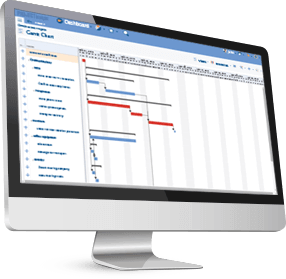
Intelligent scheduling with critical path
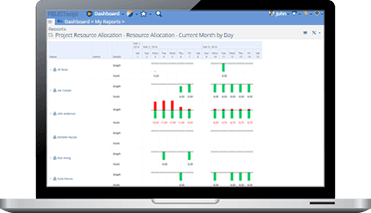
Capacity planning by person and role
Time tracking with timesheet approval
Portfolio reporting and dashboards
Budgeting billing and invoicing
Free tier for individuals and small teams
View All 15 Features
Project Insight Pricing Plans
Free
- Intelligent scheduling, capacity planning, time tracking, portfolio reporting, budgeting, billing, invoicing. Self-help, community support, weekly Office Hours webinars, full video tutorial library.
Pro
- Growth plan for small to midsize businesses. Everything in Free plus support ticket access, additional custom fields, advanced workflow options. Month-to-month billing.
Business
- Company plan for multiple teams. Everything in Pro plus multi-team coordination, advanced reporting, custom workflow templates, approval routing, integration depth.
Enterprise
- Organizational plan for many teams and locations. Dedicated support specialists, dedicated onboarding team, SSO with SAML, custom integrations, on-premise deployment option.
Project Insight Screenshots
Description
What is Project Insight?
Project Insight is a project portfolio management platform that has been on the market since 2002, built in Irvine, California. The product combines project scheduling, resource capacity planning, time tracking, and budget-to-billing in a single tool, which makes it a strong fit for professional services firms and IT PMOs that have been gluing together separate tools for each function.
It is one of the few PPM tools that maintains a no-time-limit Free tier covering individuals and small teams. Paid plans add multi-team coordination, advanced reporting, and on-premise deployment for Enterprise buyers with data residency requirements.
Who Project Insight is built for
Project Insight fits mid-market organizations (50 to 5,000 employees) that run formal projects with budgets, billable hours, and resource constraints. IT PMOs running multi-team programs, professional services firms billing client work, and engineering organizations managing R&D portfolios are common buyers.
The Free tier is genuinely useful for solo PMs and very small teams (3 to 10 users) doing project planning without budget pressure. Pro is the typical small-business entry point. Business unlocks the multi-team coordination layer. Enterprise adds on-premise deployment.
It is less of a fit for engineering teams running Jira sprints (Jira fits the agile workflow better), for very large enterprises with thousands of projects (Planview or Clarity is the bigger-lift fit), or for marketing and creative teams that prefer Asana or Monday's visual UI.
Project Insight pricing plans
| Plan | Price | Best for |
|---|---|---|
| Free | $0 forever | Individuals and small teams |
| Pro | $9 user/mo | Growth plan for small to midsize businesses |
| Business | $19 user/mo | Multiple teams across an organization |
| Enterprise | Quote-based | Many teams or locations, on-premise option |
All plans are month-to-month with the ability to change tier or cancel anytime, which is unusual for PPM vendors that typically require annual commitments. Nonprofit pricing is available at a discount. On-Premise deployment is Enterprise-only.
The Free tier is genuine: intelligent scheduling, capacity planning, time tracking, portfolio reporting, budgeting, billing, and invoicing all included. The limits are around team size and support model (community-only). Pro adds support ticket access. Business adds multi-team coordination. Enterprise adds dedicated success specialists, onboarding team, and the on-premise option.
Project Insight core capabilities
Projects are the spine. Each project has a schedule with dependencies, assigned team members, custom fields, a budget, time entries, and documents. The intelligent scheduling engine considers task dependencies and resource availability when calculating dates, so adding a task does not blindly push the deadline; it shows the actual impact based on who is available.
Capacity planning across projects shows each team member's workload by week or month, accounting for vacation, holidays, and part-time schedules. Over-allocations are flagged so PMs can rebalance before deadlines slip. This is one of the differentiators against simpler PM tools that show task assignments but not capacity.
Time tracking and billing
Time entries log directly on tasks via web or mobile. Timesheets aggregate weekly for manager approval. Approved time feeds project budget burn (actual versus planned) and downstream invoicing (billable hours grouped by project, client, and rate).
The invoicing module generates client invoices from approved billable time, with custom rate tables (project rate, role rate, person rate, client-specific rate) determining the dollar amount on each line. This level of billing detail is what professional services firms need; many generic PM tools punt billing to a separate accounting tool.
Portfolio reporting
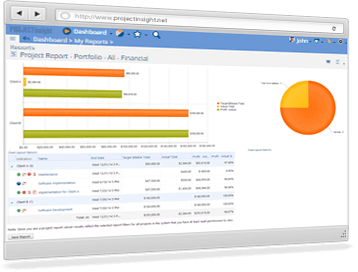
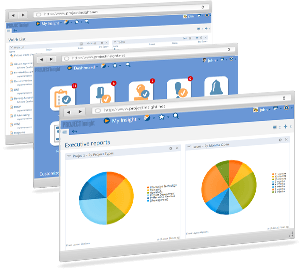
Portfolio dashboards aggregate multi-project status: which projects are on track, at risk, off track, over budget, behind schedule. Drill-down moves from portfolio to project to task. Custom reports build on a drag-and-drop field picker. CSV export and a REST API feed downstream BI tools (Power BI, Tableau, Looker).
Custom workflows and approvals
Workflow templates define standard project types: software release, marketing campaign, capital project, etc. Templates carry default task lists, custom fields, and approval routes so new projects start from a known-good baseline. Approval routing handles project kickoff approval, budget change approval, and timesheet approval with configurable approvers by role.
Integrations
Native connectors cover Microsoft Teams (project tabs in channels, deep links from messages), Slack (notifications and slash commands), Microsoft 365 (Outlook, OneDrive), Google Workspace (Drive, Calendar), Zapier (1,000+ apps via no-code automations), and a REST API plus webhooks for custom integrations. The integration count is mid-range; not as broad as Asana or Monday but covers the standard mid-market stack.
Mobile and offline
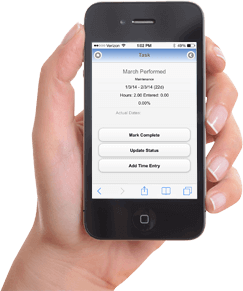
The mobile-responsive web interface works on phones and tablets without a dedicated mobile app. Time entries, task updates, document viewing, and approvals all work on small screens. Offline mode is limited; most workflows require a connection.
Security and compliance
Cloud deployments use AWS US infrastructure with encryption at rest and in transit, SOC 2 Type II controls, and standard SaaS access management. Multi-factor authentication is supported across all plans. Role-based permissions limit access by user role.
Enterprise on-premise deployment runs on customer infrastructure for organizations with data residency or air-gapped requirements. This is what attracts public sector, defense, and certain healthcare buyers.
Project Insight vs Asana
Asana is the global work management leader with broader integration and stronger UI polish. Project Insight is a PPM tool with deeper resource capacity planning, time tracking with billable rates, and budget-to-invoice integration. Pick Asana for cross-functional work management at scale. Pick Project Insight for professional services firms and IT PMOs needing financial-grade project tracking.
Project Insight vs Monday.com
Monday is the visually-configurable Work OS with broad use case coverage. Project Insight is the focused PPM tool with deeper financial controls. Monday's per-user pricing escalates faster at the higher tiers. Pick Monday for visually flexible work tracking. Pick Project Insight for PPM with billing built in.
Project Insight vs Smartsheet
Smartsheet is the spreadsheet-first work execution platform with strong enterprise governance. Project Insight is project-centric with capacity planning and billing native. Pick Smartsheet for spreadsheet-style project tracking with enterprise scale. Pick Project Insight for finance-grade project portfolio management.
Project Insight vs Wrike
Wrike is the closest mid-market PPM competitor with comparable capacity planning, time tracking, and portfolio reporting. Wrike has the larger global presence; Project Insight has flatter pricing and a more generous Free tier. Pick Wrike for established mid-market PPM. Pick Project Insight for budget-tight teams wanting comparable depth at lower cost.
Buyer pitfalls to avoid
Three patterns hurt Project Insight rollouts. First, picking Pro when Business is needed: multi-team coordination, advanced reporting, and richer custom fields live on Business; teams that outgrow Pro within 90 days waste setup effort. Second, skipping capacity planning setup: the resource leveling engine needs configured working hours, holidays, and skills to be useful; teams that ignore the setup get noise. Third, treating it as a simple PM tool: the financial features (billable rates, invoicing, budget burn) are the differentiator and the reason to pay for it over a cheaper tool.
Implementation and time to value
Solo users are productive in a day. Small teams: 1-2 weeks. Mid-market rollouts (100-500 users): 4-8 weeks including workflow customization, integration setup, and user training. Enterprise rollouts add SSO, custom integrations, and on-premise deployment, typically 3-6 months. Project Insight provides direct customer success on Pro and above; Enterprise gets a dedicated onboarding team.
Customer support
Free gets community support, weekly Office Hours webinars, and video tutorials. Pro and Business add support ticket access. Enterprise includes dedicated support specialists. The Project Insight knowledge base covers most setup tasks. Documentation is published in English.
The Bottom Line on Project Insight
Project Insight is the right call for mid-market PPMs, IT teams, and professional services firms that need project scheduling, resource capacity planning, time tracking with billable rates, and invoicing in a single tool rather than stitching multiple products together.
Standout strengths: genuine free tier with all core features, integrated time tracking through invoicing, capacity planning across projects, intelligent scheduling with dependency-aware date calculation, month-to-month billing with no annual lock-in, on-premise option on Enterprise.
Pricing fits mid-market budgets: Free covers individuals and small teams. Pro at $9/user/mo is one of the lower entry tiers in the PPM category. Business at $19/user/mo unlocks the multi-team coordination most growing teams need. Enterprise is quote-based with on-premise included. Nonprofit pricing available at a discount.
Trade-offs to weigh: UI is functional but less polished than Asana or Monday. No dedicated mobile app (mobile-responsive web only). Reporting is solid but does not match enterprise BI tools without Power BI or Tableau integration. Free tier support is community-only, which can frustrate larger free-tier teams.
Alternatives worth comparing: Asana for cross-functional work management, Monday for visually configurable Work OS, Smartsheet for spreadsheet-first PPM, Wrike for established mid-market PPM, Workzone for similar US mid-market positioning, ProjectManager.com for visual portfolio management. Pricing and capabilities verified on projectinsight.com/pricing on 2026-06-27.
Frequently Asked Questions
Is there a free plan or free trial for Project Insight?
How much does Project Insight cost?
What does Project Insight integrate with?
Who is Project Insight best for?
What are the best alternatives to Project Insight?
Is Project Insight GDPR / SOC 2 compliant?
Does Project Insight have a mobile app?
What do real users say about Project Insight?
How does Project Insight compare to its top competitor?
Does Project Insight offer customer support?
Find Your Perfect Software
See how it can transform your workflow
- Personalized for your needs Tailored recommendations based on your unique requirements.
- Save time & resources Streamline your workflow and boost team productivity.
- Trusted by thousands Join 10,000+ businesses already growing with SaaSrat.
You're all set! 🎉
A specialist for will reach out within 1 business day with tailored recommendations for your needs.