

InLoox
by InLoox, Inc
What is InLoox?
Get Best Quote for InLoox
Connect with SaaSrat experts to get the best quote for your business.
You're all set!
A specialist for InLoox will reach out within 1 business day.
InLoox Features
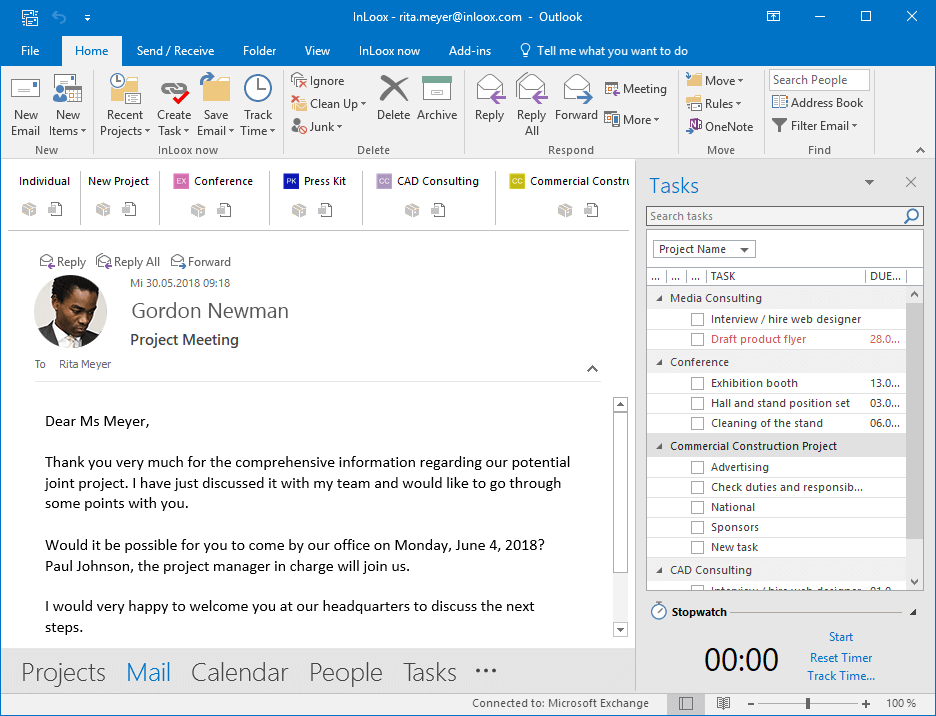
Native Microsoft Outlook integration for projects and tasks
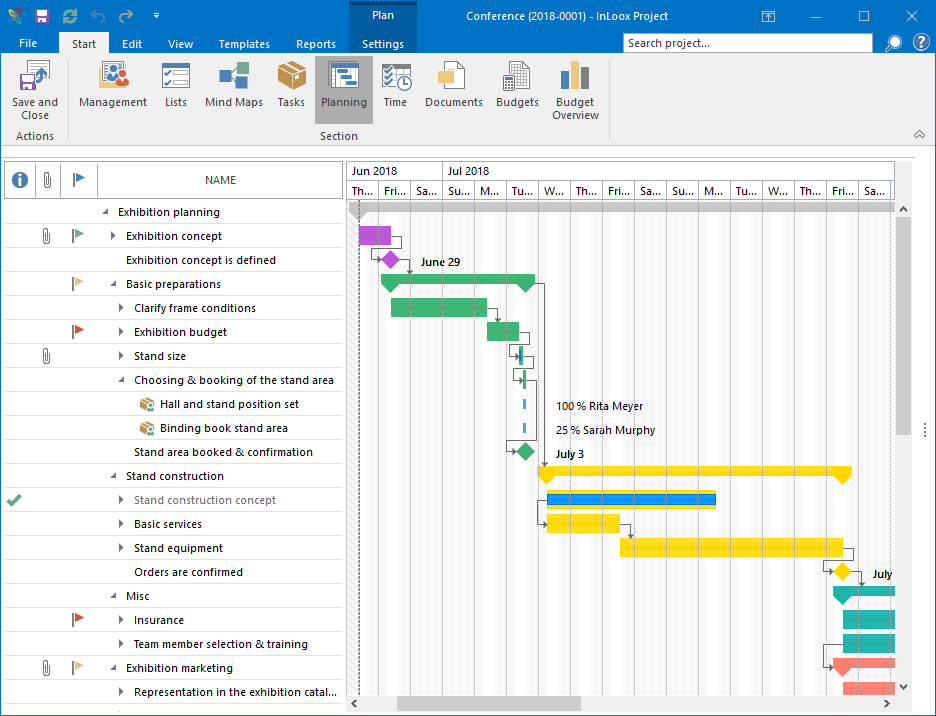
Gantt chart with critical path and dependencies
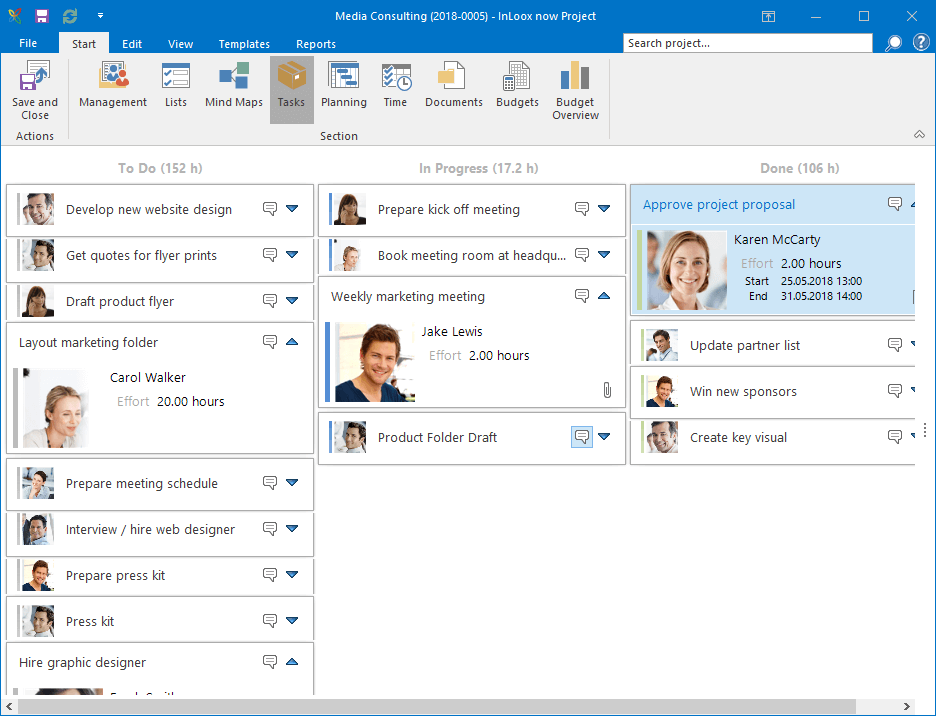
Kanban board view alongside Gantt
Resource planning with workload view
Time tracking and effort booking
Budget vs actual with cost types
View All 15 Features
InLoox Pricing Plans
Professional (cloud)
- Standard project management with Outlook integration, Gantt with critical path, Kanban view, task management, time tracking, document management, mobile apps, EU hosting
Business (cloud)
- Everything in Professional plus resource planning with workload view, advanced custom fields, custom reports, budget tracking with cost types, portfolio dashboards, Power BI integration
Enterprise (cloud)
- Everything in Business plus SSO with SAML, SCIM provisioning, custom workflows, dedicated customer success manager, priority response SLAs, custom contract terms
InLoox On-Premise
- Annual subscription for on-premise deployment on customer Windows Server infrastructure. Full data residency in the customer environment. For data-residency-sensitive buyers and air-gapped environments.
InLoox Screenshots
Description
What is InLoox?
InLoox is a project management platform built in Munich, Germany since 1999, with a distinctive Microsoft Outlook integration that turns Outlook into a project workspace. The product is sold in three editions (Professional, Enterprise, and InLoox On-Prem) and is the project management tool of choice for many DACH-region mid-market companies that standardize on Microsoft 365.
The Outlook-first design is the strongest differentiator. Tasks, projects, and resource assignments live inside Outlook alongside email and calendar, so users do not switch tools to update project status. A web app and mobile apps cover users who work outside Outlook, but the Outlook plugin is the daily home for most InLoox customers.
Who InLoox is built for
InLoox fits German, Austrian, and Swiss mid-market companies (100 to 5,000 employees) that run on Microsoft 365 and need a project management tool with EU data residency. Engineering, R&D, IT, manufacturing, and public sector buyers are common.
It is also a strong fit for global companies that need on-premise deployment for data residency or air-gapped environments. The On-Prem edition is one of the few mid-market PM tools still actively sold as a perpetual-license on-premise product alongside cloud.
It is less of a fit for organizations not on Microsoft 365 (the Outlook integration is the core value), for small teams that need a faster setup (Asana or Monday is more approachable), or for engineering teams running sprint-based agile work (Jira fits better).
InLoox pricing plans
| Edition | Price | Best for |
|---|---|---|
| Professional (cloud) | $29/user/mo (monthly or annual) | Standard project management with Outlook integration |
| Business (cloud) | $49/user/mo | Resource planning, advanced reporting, custom fields |
| Enterprise (cloud) | Quote-based | SSO, custom workflows, dedicated CSM |
| On-Premise | Quote-based annual | Data residency and air-gapped requirements |
Cloud editions are billed monthly or annually. Annual billing typically saves 10-20% versus monthly. EU customers see Euro pricing roughly equivalent (Professional around 24.95 EUR/user/month). On-Premise is annual subscription only, with quote-based pricing scaled to user count.
Professional covers standard PM needs: tasks, Gantt, time tracking, Outlook integration. Business adds resource planning workload views, advanced custom fields, and custom reports. Enterprise adds SSO, custom workflows, and dedicated customer success. On-Premise gives data residency with the trade-off of self-managed infrastructure.
InLoox core capabilities
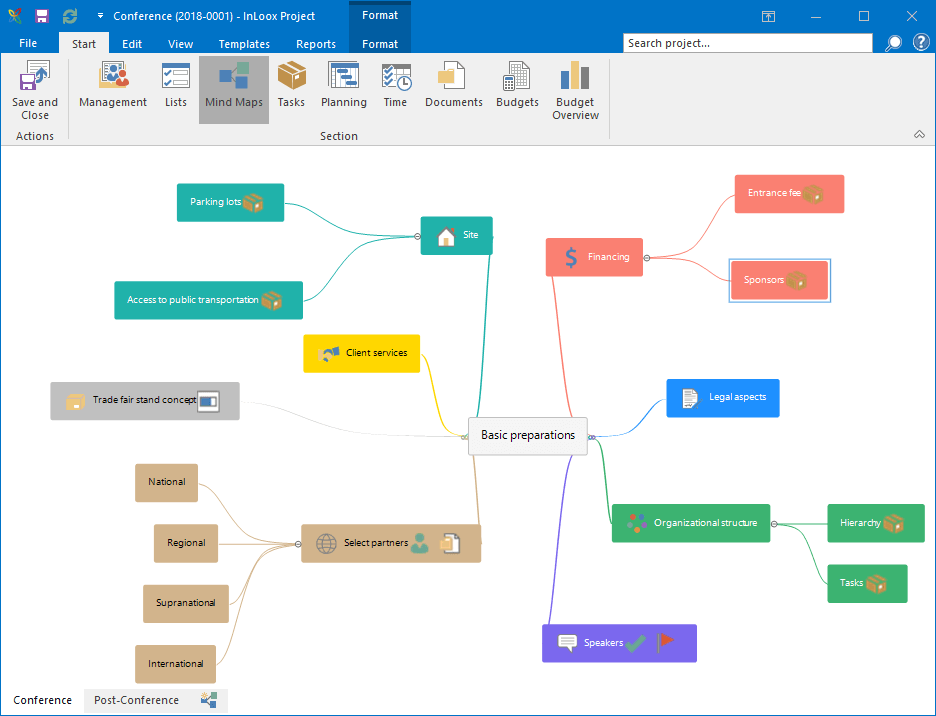
Projects are the spine. Each project has tasks, a Gantt schedule with dependencies and critical path, assigned team members, a budget, time entries, and a document library. The Kanban board view sits alongside the Gantt so teams can pick the right visualization for the work.
Tasks support subtasks, custom fields, due dates, priorities, and effort estimates. Dependencies link tasks (finish-to-start by default; other dependency types supported). The critical path automatically highlights the longest dependency chain so project managers see what is driving the deadline.
Microsoft Outlook integration
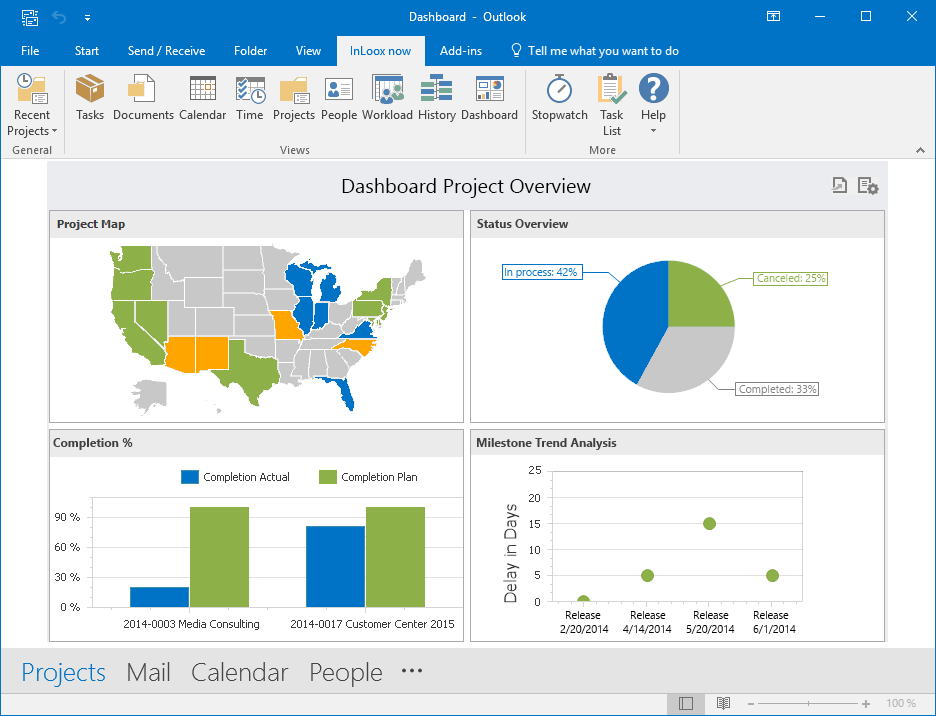
The Outlook plugin is the daily home for most InLoox users. Within Outlook, users see a project sidebar with their assigned tasks, a calendar view of project deadlines alongside personal calendar, and the ability to create tasks from emails (drag an email to InLoox to spawn a task).
For Microsoft 365 shops, this matters because the friction of opening a separate PM tool to log work is what makes most PM rollouts fail. InLoox keeps work logging inside the tool users already have open all day.
Resource planning and workload
Resource planning (Business and up) shows team members on a workload view by week or month. Over-allocated team members are flagged so project managers can rebalance assignments before deadlines slip. Skill tags help match tasks to the right resource.
The capacity model considers vacation time, holidays, and part-time schedules so the planned workload reflects actual availability. This is deeper than what general PM tools like Trello or Monday's base plans offer.
Time tracking and budgets
Time entries log against tasks directly from Outlook, the web app, or the mobile apps. A timer runs in the background for active work. Approved time feeds project budget reporting (actual versus planned hours, cost types separated, billable versus non-billable).
Cost types categorize expenses: labor, materials, travel, subcontractor. Budgets can be set at the project level or rolled up across a portfolio. This level of cost detail matters for engineering and consulting projects where margin tracking is critical.
Portfolio dashboards and reporting
Portfolio dashboards aggregate multi-project status: which projects are on track, which are at risk, which are over budget. Drill-down moves from portfolio to project to task without leaving the dashboard.
Power BI integration pushes InLoox data into BI dashboards for executive reporting. Custom reports build inside InLoox cover common needs (project status, resource utilization, budget burn) without requiring Power BI.
Microsoft 365 ecosystem fit
Beyond Outlook, InLoox integrates with Microsoft Teams (project tabs in channels, deep links to tasks), SharePoint and OneDrive (document storage), Microsoft Project (import legacy MS Project plans), and Power BI (data feed for BI dashboards). For Microsoft 365 shops, the ecosystem fit is one of the cleanest in the PM category.
Mobile and offline
iOS and Android apps cover task management, time tracking, and document access. The mobile experience handles updates and quick task creation on the go. Offline mode queues edits for sync when reconnected. The web app works on any browser for users who do not have the Outlook plugin installed.
Security and data residency
InLoox cloud is hosted in Frankfurt, Germany on Microsoft Azure with EU data residency for all customers by default. ISO 27001 and SOC 2 Type II controls are in place. GDPR compliance is built in.
On-Premise deployment runs on customer infrastructure (Windows Server) with full data residency in the customer's environment. This is what attracts public sector, healthcare, and defense buyers in the DACH region.
InLoox vs Microsoft Project
Microsoft Project is the legacy enterprise PM tool from Microsoft, with deep Gantt and resource planning capability. InLoox is the modern, cloud-and-Outlook-native alternative with much lighter setup. Pick MS Project for very complex traditional waterfall projects with hundreds of dependencies. Pick InLoox for everyday project management with Outlook integration and faster onboarding.
InLoox vs Asana
Asana is the global work management leader with broader integration, stronger reporting, and a cleaner consumer-grade UI. InLoox is the German Outlook-first alternative with deeper budget tracking and EU data residency. Pick Asana for cross-functional work management at scale. Pick InLoox for DACH-region mid-market with Microsoft 365 standardization and EU data residency requirements.
InLoox vs Monday.com
Monday is the visually-configurable Work OS with broad use case coverage. InLoox is the focused PM tool with Outlook native depth. Monday flexes wide; InLoox goes deep on PM specifically. Per-user pricing on Monday is comparable; on-premise option is only on InLoox. Pick Monday for flexibility. Pick InLoox for traditional PM with Outlook fit.
InLoox vs Wrike
Wrike is the closest direct competitor for mid-market PM with strong reporting and time tracking. Both have similar feature footprints. Wrike has the larger North American presence; InLoox has the stronger DACH and EU presence and the on-premise option. Pick Wrike for North American mid-market. Pick InLoox for European mid-market or on-premise needs.
Buyer pitfalls to avoid
Three patterns hurt InLoox rollouts. First, deploying without the Outlook plugin: the Outlook integration is what drives daily adoption; teams that use only the web app under-use the platform. Second, picking Professional when Business is needed: resource planning lives on Business, and most mid-market teams need it within the first three months. Third, ignoring custom workflow setup: out-of-the-box workflows are generic; investing two weeks in customizing workflows to your project types pays back in user adoption.
Implementation and time to value
Cloud deployments are productive in two to four weeks for small teams. Mid-market rollouts (200-1,000 users) take 6 to 12 weeks including workflow customization, training, and Outlook plugin deployment via Group Policy. On-Premise deployments add server installation and IT setup time, typically 3 to 6 months end-to-end. InLoox provides direct customer success or works through certified Solution Partners.
Customer support
All plans include email support during European business hours. Business and Enterprise add live chat. Enterprise includes a named customer success manager and priority response SLAs. The InLoox Help Center is published in English, German, French, and Spanish. The community is moderately active and the annual InLoox Insider conference brings customers together.
The Bottom Line on InLoox
InLoox is the right call for DACH-region and EU-based mid-market companies on Microsoft 365 that want project management with deep Outlook integration, EU data residency, and the option of on-premise deployment.
Standout strengths: native Microsoft Outlook integration that turns Outlook into a project workspace; Gantt with critical path and dependencies; resource planning with workload view on Business; budgets with cost types for engineering and consulting projects; on-premise edition for data residency; EU hosting on Frankfurt servers.
Pricing fits mid-market budgets: Professional at $29/user/mo, Business at $49/user/mo. Enterprise is quote-based. On-Premise is quote-based annual subscription. EU customers see roughly equivalent Euro pricing (Professional 24.95 EUR/user/mo). Annual billing saves 10-20% versus monthly.
Trade-offs to weigh: Outlook integration is the core value; teams not on Microsoft 365 miss most of the platform. UI is functional but less polished than Asana or Monday. Reporting is solid but does not match enterprise BI tools without Power BI. Brand presence outside DACH is lower, which can affect procurement preferences in North America.
Alternatives worth comparing: Microsoft Project for traditional enterprise PM with deep Gantt, Asana for cross-functional work management, Monday for visually configurable Work OS, Wrike for North American mid-market PM, MeisterTask for EU-hosted Kanban-first work, ClickUp for all-in-one breadth. Pricing and capabilities verified via inloox.com and Capterra 2026 listings on 2026-06-27.
Frequently Asked Questions
Is there a free plan or free trial for InLoox?
How much does InLoox cost?
What does InLoox integrate with?
Who is InLoox best for?
What are the best alternatives to InLoox?
Is InLoox GDPR / SOC 2 compliant?
Does InLoox have a mobile app?
What do real users say about InLoox?
How does InLoox compare to its top competitor?
Does InLoox offer customer support?
Find Your Perfect Software
See how it can transform your workflow
- Personalized for your needs Tailored recommendations based on your unique requirements.
- Save time & resources Streamline your workflow and boost team productivity.
- Trusted by thousands Join 10,000+ businesses already growing with SaaSrat.
You're all set! 🎉
A specialist for will reach out within 1 business day with tailored recommendations for your needs.