

HubSpot Service Hub
by HubSpot, Inc
What is HubSpot Service Hub?
Get Best Quote for HubSpot Service Hub
Connect with SaaSrat experts to get the best quote for your business.
You're all set!
A specialist for HubSpot Service Hub will reach out within 1 business day.
HubSpot Service Hub Features
Ticketing
Customer feedback
Knowledge base
Live chat
Conversational bots
Team email
View All 37 Features
HubSpot Service Hub Resources
HubSpot Service Hub Screenshots
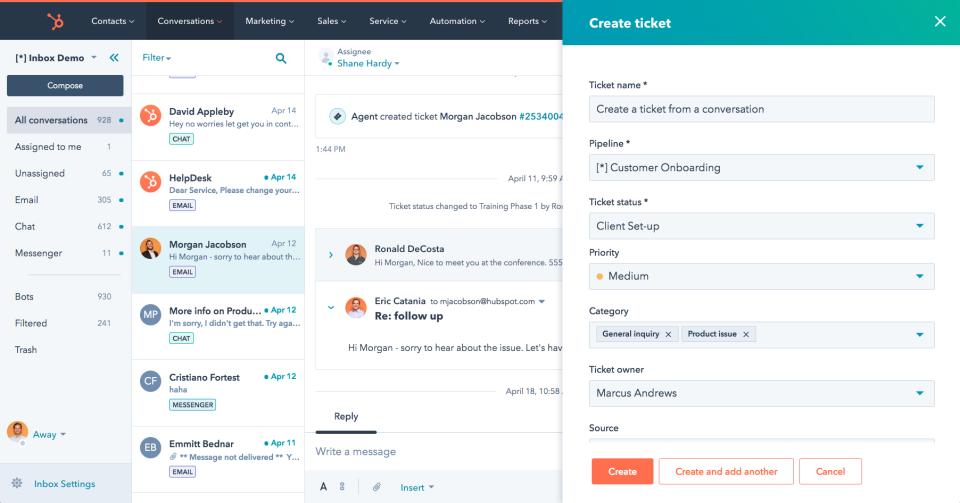
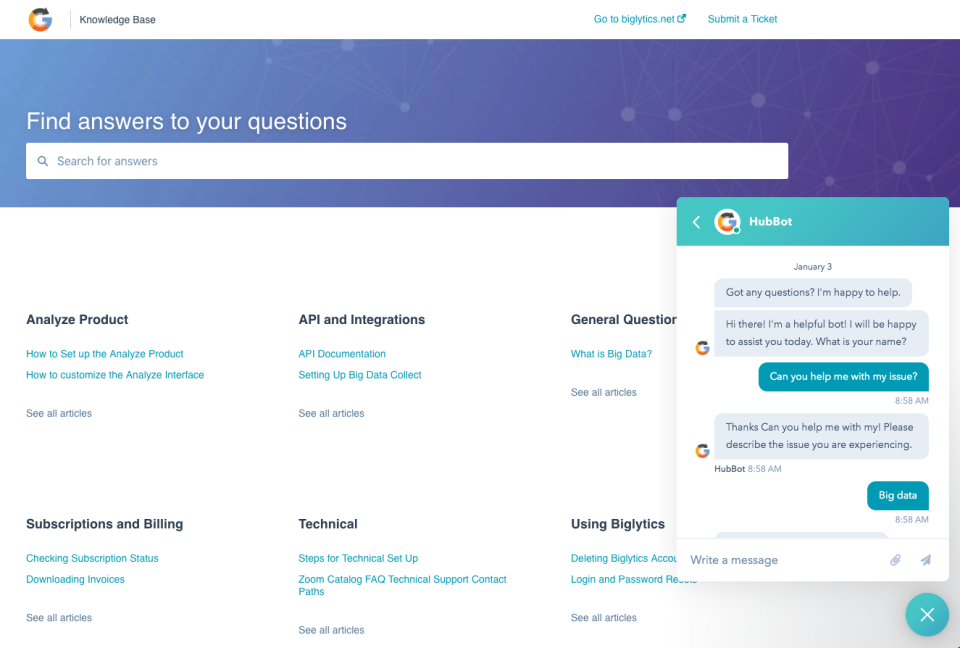
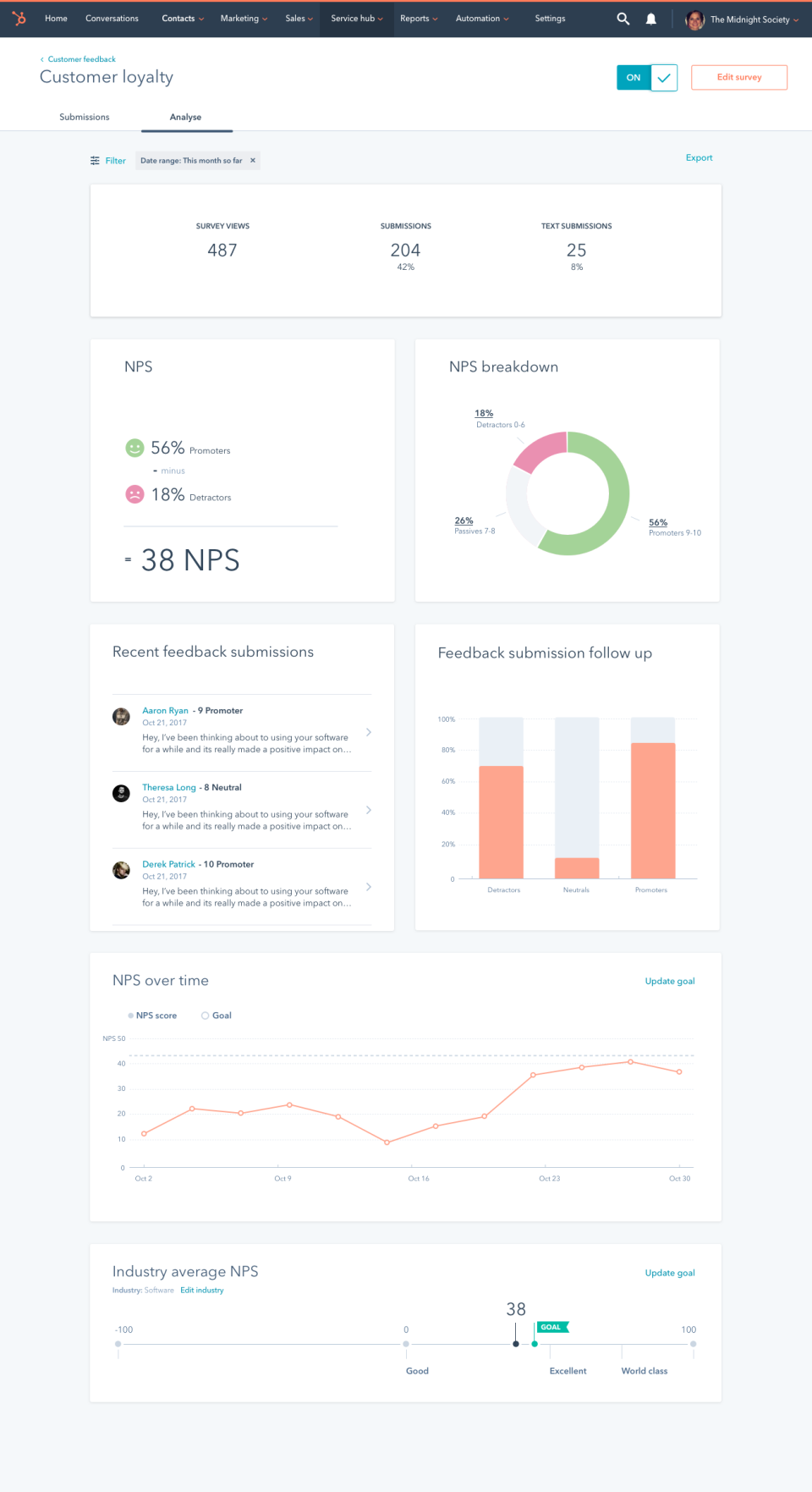
Description
HubSpot Service Hub at a Glance
| Best fit for | Customer service and success teams wanting AI-powered omni-channel customer service software connected to marketing and sales data on a unified Smart CRM foundation |
|---|---|
| Positioning | Customer service and retention, powered by AI. Service Hub is AI-powered, omni-channel, and connected to marketing and sales data on a unified customer platform |
| Free tier | Free with core service tools, ability to start supporting customers without a credit card |
| Starter tier | Essential customer service tools with per-seat pricing (monthly or annual billing, Pay Annually is BEST VALUE) |
| Professional tier | For teams effectively scaling omni-channel service, knowledge base, and reporting. Includes Core Seats plus additional per-seat pricing |
| Enterprise tier | Talk to Sales for pricing. Enterprise-grade omni-channel service and support scale |
| Free trial | 14-day free trial of HubSpot customer service tools, no credit card required |
| Multi-currency | Buyers globally see local currency at checkout (USD, INR, EUR, GBP, etc.) |
| Named platform breadth | Smart CRM, Marketing, Sales, Service, Content, Data, Revenue - Service Hub is one of many Hubs in the HubSpot Customer Platform |
| Named connected data | Marketing engagement history plus sales conversations plus service tickets on the same Smart CRM |
| Named AI capabilities | AI-powered support automation, scale support without adding headcount, drive customer retention through AI-augmented service |
| Evaluation | Get a demo or Start 14-day free trial |
| Headquarters | United States |
HubSpot Service Hub Overview
HubSpot Service Hub is Customer Service Software powered by AI to scale support and drive customer retention. The vendor positions on Customer service and retention, powered by AI. Service Hub is AI-powered, omni-channel, and connected to marketing and sales data on a unified customer platform.
The vendor positions on the unified customer platform advantage: because Service Hub sits on the HubSpot Smart CRM alongside Marketing Hub, Sales Hub, Content Hub, Data Hub, and Revenue Hub, customer service agents get full context on marketing engagement history and sales conversations rather than a siloed ticket view.
Named tier structure with real published tier pricing and multi-currency billing: Free (start with core service tools free), Starter (essential customer service tools with per-seat pricing), Professional (for teams effectively scaling omni-channel service, knowledge base, and reporting), and Enterprise (Talk to Sales for pricing). Named capabilities span ticketing, help desk, knowledge base, live chat, customer portal, feedback surveys, service analytics, and AI-powered support automation.
HubSpot Service Hub Capabilities and Named Features
AI-powered customer service connected to marketing and sales data is the vendor differentiator. Rather than a standalone ticketing tool that requires stitching to a CRM and marketing platform, HubSpot Service Hub sits on the HubSpot Smart CRM alongside Marketing Hub, Sales Hub, Content Hub, Data Hub, and Revenue Hub. Meaningful for customer service and success teams tired of losing customer context between marketing engagement, sales conversations, and support tickets.
Named tier structure with real published tier pricing and multi-currency billing is meaningful for teams evaluating customer service platforms globally. Free tier includes core service tools without a credit card. Starter is per-seat monthly or annual billing (Pay Annually is BEST VALUE). Professional includes Core Seats plus additional per-seat pricing for teams effectively scaling omni-channel service, knowledge base, and reporting. Enterprise (Talk to Sales) for enterprise-grade scale.
Omni-channel positioning means one platform for tickets, live chat, email, customer portal, and knowledge base rather than stitching separate channel tools. Meaningful for customer service teams that want to answer wherever the customer prefers to talk.
AI-powered support automation and driving customer retention are the vendor value proposition. Scale support without adding headcount by using AI to draft replies, suggest solutions, route tickets, and identify customer risk signals across the customer journey.
Connected marketing and sales data on the same Smart CRM means service agents see the marketing engagement history (email opens, form fills, ad clicks) and sales conversations (deal stage, meeting notes, past objections) alongside every support ticket. Meaningful for high-touch customer success workflow.
Named Customer Platform breadth (Marketing plus Sales plus Service plus Content plus Data plus Revenue Hubs) means buyers investing in Service Hub can grow into the connected platform without switching tools or losing data.
Named feature list
- AI-powered customer service software
- Omni-channel service (tickets + live chat + email + customer portal + knowledge base)
- Connected to marketing and sales data on Smart CRM
- Ticketing and help desk
- Knowledge base
- Live chat
- Customer portal
- Feedback surveys
- Service analytics
- AI-powered support automation
- Free tier with core service tools (no credit card required)
- Starter tier per-seat pricing (monthly or annual billing)
- Professional tier with Core Seats plus additional per-seat pricing
- Enterprise tier via Talk to Sales
- Multi-currency billing (local currency at checkout)
- 14-day free trial (no credit card required)
- Unified customer platform with Marketing, Sales, Content, Data, Revenue Hubs
- Scale support without adding headcount
- Drive customer retention through AI-augmented service
HubSpot Service Hub Pricing
HubSpot Service Hub publishes real transparent tier pricing on hubspot.com pricing with monthly and annual billing (annual is BEST VALUE) and multi-currency billing. Named tiers: Free (core service tools free, no credit card required, ability to start supporting customers), Starter (essential customer service tools with per-seat pricing, monthly or annual), Professional (for teams effectively scaling omni-channel service, knowledge base, and reporting, includes Core Seats plus additional per-seat pricing), Enterprise (Talk to Sales for pricing). Multi-currency billing means buyers globally see local currency at checkout.
Customer service software buyers should compare HubSpot Service Hub against Zendesk Support (established customer service standard), Freshdesk (Freshworks helpdesk standard), Intercom (messaging plus helpdesk), Salesforce Service Cloud (Salesforce ecosystem service), and Help Scout (SMB helpdesk with human-first approach). HubSpot Service Hub differentiators are the connected Smart CRM foundation shared with Marketing, Sales, Content, Data, and Revenue Hubs (service agents see marketing engagement history and sales conversations), real published transparent tier pricing with Free tier, multi-currency billing, and AI-powered support automation for scaling support without adding headcount.
| Tier | Price | What is included |
|---|---|---|
| Free | $0 | Core service tools + no credit card + basic ticketing + basic knowledge base + basic team inbox |
| Starter | Per seat monthly/annual | Ticketing + help desk + live chat + knowledge base + customer portal + feedback surveys |
| Professional (Best Value annual) | Contact Sales | Core Seats + omni-channel scale + advanced automation + service analytics + AI-powered support automation |
| Enterprise | Contact Sales | Enterprise-grade omni-channel + advanced automation + reporting + enterprise-grade support + full connected platform value |
HubSpot Service Hub Pros
- Connected Smart CRM foundation. Service Hub sits on the same Smart CRM as Marketing, Sales, Content, Data, and Revenue Hubs.
- Service agents see marketing engagement history and sales conversations. Full customer context on every ticket.
- Real published transparent tier structure. Free through Enterprise with multi-currency billing.
- Free tier with no credit card required. Start supporting customers immediately.
- AI-powered support automation. Scale support without adding headcount.
- Omni-channel from Starter tier. Ticketing + live chat + knowledge base + customer portal + feedback surveys.
- 14-day free trial no credit card required. Low evaluation friction.
- Multi-currency billing. Buyers globally see local currency at checkout.
HubSpot Service Hub Cons and Trade-offs
- Professional and Enterprise pricing via Talk to Sales. Only Free and Starter show public per-seat pricing on the public tier structure.
- Full connected platform value requires multiple Hubs. Service Hub alone does not deliver the full unified customer platform advantage without Marketing and Sales Hubs.
- Established competitors have deeper standalone helpdesk feature depth. Buyers wanting deep customer service specialization compare Zendesk or Freshdesk.
- Named AI capabilities are less specifically enumerated on the public page. AI-powered support automation is stated at platform level rather than in named per-tier features.
HubSpot Service Hub vs Alternatives
| HubSpot Service Hub | Zendesk Support | Freshdesk | |
|---|---|---|---|
| Connected Smart CRM foundation | Yes (native HubSpot Smart CRM) | Requires CRM integration | Requires CRM integration |
| Real published tier pricing | Free through Enterprise + multi-currency | Real published pricing | Real published pricing |
| Free tier with no credit card required | Yes | Free trial | Free tier |
| Omni-channel from entry tier | Yes (Starter includes live chat + knowledge base + portal) | Established omni-channel tiers | Established omni-channel tiers |
| Unified customer platform | Yes (Marketing + Sales + Service + Content + Data + Revenue) | Established customer service standard | Established Freshworks helpdesk standard |
| Best fit | Service and success teams wanting AI-powered omni-channel service connected to marketing and sales on Smart CRM | Established customer service standard | Established Freshworks helpdesk standard |
Who Should Choose HubSpot Service Hub
HubSpot Service Hub is the right pick for customer service and success teams wanting AI-powered omni-channel customer service software connected to marketing and sales data on a unified Smart CRM foundation. Service agents see marketing engagement history and sales conversations alongside every support ticket rather than working from a siloed ticket view.
Small service teams benefit from Free tier (core service tools free, no credit card required, basic ticketing plus basic knowledge base plus basic team inbox). Growing SMBs benefit from Starter tier per-seat pricing (ticketing plus help desk plus live chat plus knowledge base plus customer portal plus feedback surveys). Mid-market teams benefit from Professional tier (Core Seats plus additional per-seat, omni-channel service and knowledge base scale, advanced automation and workflows, service analytics, AI-powered support automation). Enterprise teams benefit from Enterprise tier (Talk to Sales for pricing, enterprise-grade omni-channel service scale, advanced automation and reporting, full connected customer platform value).
HubSpot Service Hub is not the right fit for buyers wanting established customer service standard (compare Zendesk Support). Established Freshworks helpdesk standard should compare Freshdesk. Messaging plus helpdesk compare Intercom. Salesforce ecosystem service compare Salesforce Service Cloud. SMB helpdesk with human-first approach compare Help Scout.
Named Alternatives to HubSpot Service Hub
- Zendesk Support. Established customer service standard. Compare for established customer service standard.
- Freshdesk. Established Freshworks helpdesk standard. Compare for Freshworks helpdesk standard.
- Intercom. Messaging plus helpdesk. Compare for messaging plus helpdesk focus.
- Salesforce Service Cloud. Salesforce ecosystem service. Compare for Salesforce ecosystem alignment.
- Help Scout. SMB helpdesk with human-first approach. Compare for SMB helpdesk human-first approach.
HubSpot Service Hub Implementation and Deployment
HubSpot Service Hub engagement begins with Get a demo or Start 14-day free trial via hubspot.com/products/service. Free tier is instant self-serve (no credit card required, core service tools). Starter tier activates after credit card entry with per-seat pricing (monthly or annual, annual is BEST VALUE). Professional and Enterprise activate via Talk to Sales.
Standard SMB deployment reaches production within 1 to 4 weeks including account setup, HubSpot Smart CRM configuration and contact import, Free tools activation, Starter capabilities configuration (ticketing, help desk, live chat, knowledge base, customer portal, feedback surveys), initial ticket routing setup, and agent training. Professional deployments extend to 2-8 weeks with omni-channel service scale, advanced automation and workflows, service analytics, and AI-powered support automation configuration. Enterprise deployments extend to 6-24 weeks with enterprise-grade omni-channel service scale, advanced automation, multi-team setup, custom integrations, and enterprise-grade support engagement.
What Real Buyers Say About HubSpot Service Hub
HubSpot Service Hub vendor positioning: Service Hub. Customer Service Software. Customer service software powered by AI to scale support and drive customer retention. Customer service and retention, powered by AI. Service Hub is AI-powered, omni-channel, and connected to marketing and sales data on a unified customer platform.
For independent perspective search Reddit r slash customersuccess r slash SaaS r slash HubSpot and customer service LinkedIn communities for HubSpot Service Hub discussions. HubSpot Service Hub is often discussed alongside Zendesk Support, Freshdesk, Intercom, Salesforce Service Cloud, and Help Scout in the customer service software category.
Sources
- vendor website, HubSpot Service Hub home + AI-powered customer service + connected Smart CRM + omni-channel positioning
- vendor website, HubSpot Service Hub pricing (Free + Starter per seat + Professional + Enterprise Contact Sales + multi-currency)
Frequently Asked Questions about HubSpot Service Hub
What is HubSpot Service Hub?
HubSpot Service Hub is Customer Service Software powered by AI to scale support and drive customer retention. AI-powered, omni-channel, and connected to marketing and sales data on a unified customer platform (HubSpot Smart CRM).
How much does HubSpot Service Hub cost?
Free (no credit card required, core service tools). Starter (per-seat pricing, monthly or annual, Pay Annually is BEST VALUE). Professional (Core Seats plus additional per-seat pricing, Talk to Sales for pricing). Enterprise (Talk to Sales for pricing).
What is included in the Free tier?
Core service tools free without a credit card. Ability to start supporting customers immediately with basic ticketing, basic knowledge base, and basic team inbox.
What is included in Starter?
Essential customer service tools with per-seat pricing. Ticketing plus help desk, live chat, knowledge base, customer portal, and feedback surveys.
What does Professional add over Starter?
Core Seats plus additional per-seat pricing. Effectively scale omni-channel service, knowledge base, and reporting. Advanced automation and workflows. Service analytics. Customer feedback insights. AI-powered support automation.
Is HubSpot Service Hub connected to marketing and sales data?
Yes. Service Hub sits on the HubSpot Smart CRM alongside Marketing Hub, Sales Hub, Content Hub, Data Hub, and Revenue Hub. Service agents see marketing engagement history and sales conversations alongside every support ticket.
Is there a free trial?
Yes. 14-day free trial of HubSpot customer service tools, no credit card required.
Does HubSpot Service Hub support multi-currency billing?
Yes. Buyers globally see local currency at checkout.
Where is HubSpot headquartered?
United States (Cambridge, Massachusetts).
How do I evaluate HubSpot Service Hub?
Get a demo or Start 14-day free trial via hubspot.com/products/service.
The Bottom Line on HubSpot Service Hub
HubSpot Service Hub is the right call for customer service and success teams wanting AI-powered omni-channel customer service software connected to marketing and sales data on a unified Smart CRM foundation. Service agents see marketing engagement history and sales conversations alongside every support ticket rather than working from a siloed ticket view. Real published transparent tier structure (Free through Enterprise), multi-currency billing, and Free tier with no credit card required meaningful for evaluation. AI-powered support automation scales support without adding headcount.
For established customer service standard compare Zendesk Support. For established Freshworks helpdesk standard compare Freshdesk. For messaging plus helpdesk focus compare Intercom. For Salesforce ecosystem alignment compare Salesforce Service Cloud. For SMB helpdesk human-first approach compare Help Scout.
Get a demo or Start 14-day free trial via hubspot.com/products/service. Budget 1-4 weeks for standard SMB deployment (account + Smart CRM + contact import + Free tools + Starter capabilities + ticket routing + agent training) and 2-8 weeks for Professional deployments with omni-channel scale, advanced automation and workflows, service analytics, and AI-powered support automation. Enterprise deployments extend to 6-24 weeks with enterprise-grade omni-channel scale, multi-team setup, custom integrations, and enterprise-grade support engagement.
Verified on 2026-08-01 against vendor website.
Frequently Asked Questions
Is there a free plan or free trial for HubSpot Service Hub?
How much does HubSpot Service Hub cost?
What does HubSpot Service Hub integrate with?
Who is HubSpot Service Hub best for?
What are the best alternatives to HubSpot Service Hub?
Is HubSpot Service Hub GDPR / SOC 2 compliant?
Does HubSpot Service Hub have a mobile app?
What do real users say about HubSpot Service Hub?
How does HubSpot Service Hub compare to its top competitor?
Does HubSpot Service Hub offer customer support?
Find Your Perfect Software
See how it can transform your workflow
- Personalized for your needs Tailored recommendations based on your unique requirements.
- Save time & resources Streamline your workflow and boost team productivity.
- Trusted by thousands Join 10,000+ businesses already growing with SaaSrat.
You're all set! 🎉
A specialist for will reach out within 1 business day with tailored recommendations for your needs.