
ExpenseTron
by Anaek • Founded 2017
What is ExpenseTron?
Get Best Quote for ExpenseTron
Connect with SaaSrat experts to get the best quote for your business.
You're all set!
A specialist for ExpenseTron will reach out within 1 business day.
ExpenseTron Features
Slack-first expense reporting (Add to Slack)
Microsoft Teams support (Add to Teams)
Mileage expensing (specify distance convert to $)
Receipt forwarding (snap picture or forward email)
Multiple currency with realtime conversion
Auto-categorize expenses in tax-friendly categories
View All 9 Features
ExpenseTron Pricing Plans
Free 14-Day Trial
- 14-day free trial no credit card required
- Cancel anytime
- Full ExpenseTron platform
- Add to Slack or Add to Teams
- Live chat and email support
Standard (post-trial)
- Slack-first expense reporting
- Microsoft Teams support
- Mileage expensing + receipt forwarding
- Multiple currency with realtime conversion
- Auto-categorize expenses in tax-friendly categories
- Approval workflows (up to 3 manager levels)
- Advanced dashboard
- Live chat and free email support
Enterprise
- Multi-team enterprise deployment
- Advanced approval workflows
- Custom integrations
- Dedicated success support
ExpenseTron Resources
ExpenseTron Screenshots
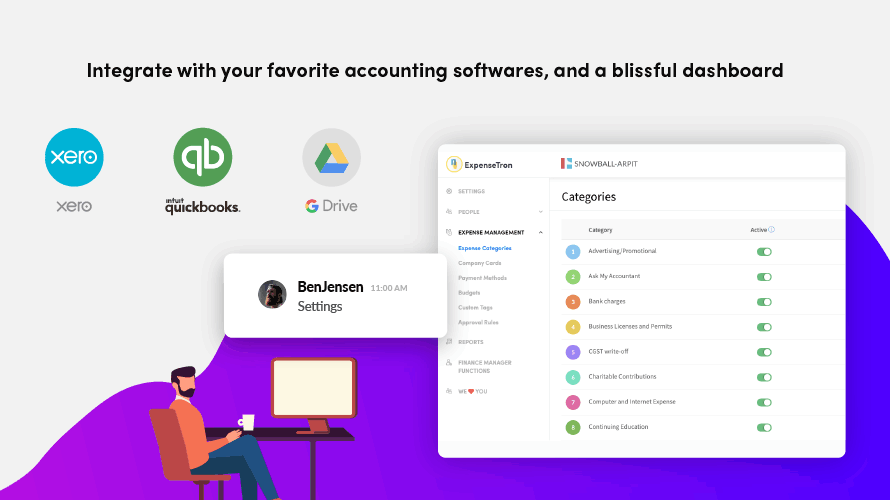
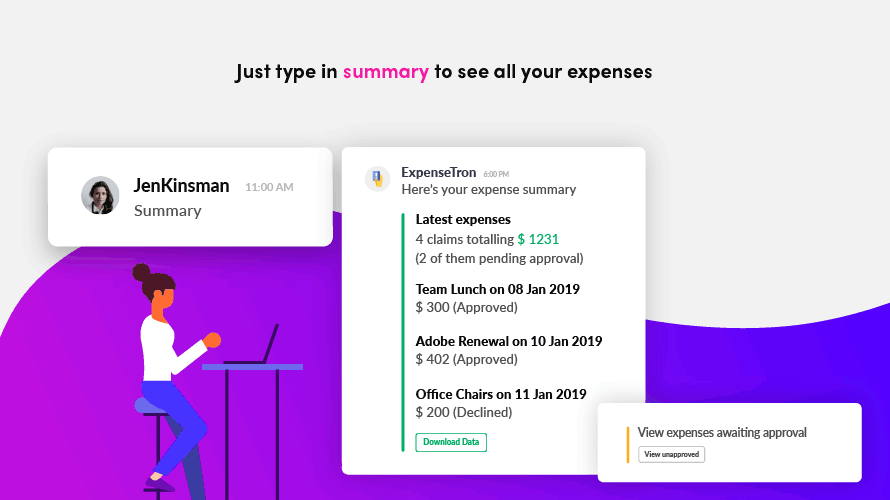
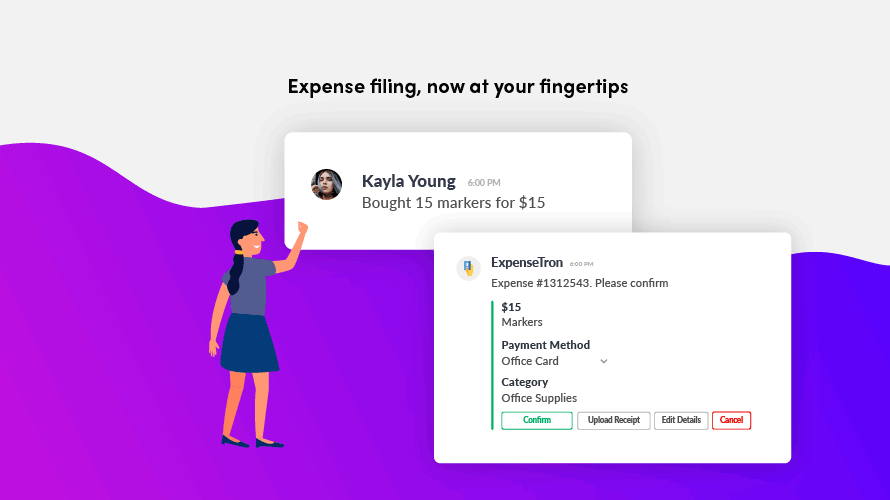
Description
What Is ExpenseTron and How Does It Work?
ExpenseTron is Slack-first expense reporting and management app. Also available for Microsoft Teams. 14-day free trial no credit card required cancel anytime. Simple expense reporting on Slack takes over mundane tasks related to filing expenses. Multiple currency support with realtime conversion rates. Mileage expensing (specify distance and convert to $ amount). Receipt forwarding (snap picture or forward email receipt). Auto-categorize expenses in tax-friendly categories. Customizable real-time expense reporting. Approval workflows with up to three levels of managers. Made by Anaek Inc (also makes AttendanceBot and OfficeAmp).
The vendor positions on Simple expense reporting on Slack Slack app to track and reimburse your team expenses. ExpenseTron works on Slack and takes over all mundane tasks related to filing expenses. Eliminate manual data entry say goodbye to manual data entry and keep your books updated with realtime expense filings approvals and reimbursements.
Named customer testimonials with real names: Matt K. (Nonprofit Organization Management Great add for our staff to simplify expense tracking). W Reid S. (Religious Institution We have loved ExpenseTron so far as a simple and easy to use alternative to Expensify and in Slack). Annette P. (E-Learning Getting reports and summaries has never been that easy). 4/5 average rating on peer review sites.
ExpenseTron at a Glance
| Best fit for | Slack and Microsoft Teams organizations wanting simple in-chat expense reporting without separate portal |
|---|---|
| Platforms | Slack (primary) and Microsoft Teams |
| Free trial | 14-day no credit card required cancel anytime |
| Multi-currency | Realtime currency conversion rates |
| Mileage | Specify distance, convert to $ amount |
| Receipt | Snap picture on Slack or forward email receipt |
| Approval levels | Up to three levels of managers |
| Customer rating | 4/5 on peer review sites |
| Named customers | Matt K. (Nonprofit), W Reid S. (Religious Institution), Annette P. (E-Learning) |
| Positioning | Alternative to Expensify (per W Reid S. testimonial) |
| Support | Live chat and free email support across all plans |
| Sister apps | AttendanceBot, OfficeAmp |
| Vendor | Anaek, Inc. |
| Headquarters | United States |
ExpenseTron Key Features and Capabilities
Slack-first ChatOps positioning is the vendor differentiator. Employees file expenses through Slack messages no separate portal to log into. Reduces adoption friction typical of standalone expense management portals (Expensify Concur SAP Concur Ramp).
Mileage expensing (simply specify the distance traveled and convert to $ amount) eliminates the need for manual mileage log. Common pain point for field-heavy employees (sales reps consultants field service).
Receipt forwarding (snap a picture on Slack or forward the email receipt) captures receipts at moment of expense rather than accumulating in email inbox for later processing.
Multiple currency support with realtime conversion file expenses in the currency of your invoice ExpenseTron automatically converts it in the currency of your accounting software with realtime currency conversion rates. Meaningful for international business travelers and multi-currency operations.
Auto-categorize expenses in tax-friendly categories to make tax filing super easy. Removes all tax-related filing complexities. Approval workflows for any kind of approval policy three levels of managers no problem selective manager notification supported. Advanced dashboard for company-wide spending patterns trend identification and high-expenditure area analysis.
- Slack-first expense reporting (Add to Slack)
- Microsoft Teams support (Add to Teams)
- Mileage expensing (specify distance convert to $)
- Receipt forwarding (snap picture or forward email)
- Multiple currency with realtime conversion
- Auto-categorize expenses in tax-friendly categories
- Customizable real-time expense reporting
- Approval workflows (up to 3 manager levels)
- Advanced dashboard for spending patterns
- Integrates with all major accounting software
- 14-day free trial no credit card required
- Live chat and free email support
- Chat first approach (mobile-friendly)
How Much Does ExpenseTron Cost in 2026?
ExpenseTron does not publish public per-user pricing on the scraped home page. 14-day free trial no credit card required cancel anytime is the primary evaluation entry point. Vendor uses trial-first flow with pricing displayed after signup or via Pricing page (contact vendor for current tier structure).
Slack-first expense reporting buyers should benchmark ExpenseTron against Expensify (established expense management) Ramp (corporate cards + expense) Brex (corporate cards + expense) Concur (enterprise T&E) SAP Concur and Divvy (Bill.com). ExpenseTron differentiators are Slack/Teams native ChatOps positioning simple positioning and Anaek Inc sister app ecosystem (AttendanceBot for time off and OfficeAmp).
| Plan | Price | Includes |
|---|---|---|
| Free 14-Day Trial | $0 | 14-day free trial + no credit card + Slack + Teams + full platform + live chat + email support |
| Standard (post-trial) | Contact Sales | Slack + Teams expense reporting + mileage + receipt forwarding + multi-currency + auto-categorize + approval workflows |
| Enterprise | Contact Sales | Multi-team enterprise + advanced approval workflows + custom integrations + dedicated support |
ExpenseTron Pros and Cons in 2026
Where ExpenseTron Stands Out
- Slack + Teams native ChatOps positioning. No separate portal to log into. Employees file expenses through Slack or Teams messages same tools they already use daily. Adoption friction fundamentally reduced.
- 14-day free trial no credit card required. Removes evaluation friction. Buyers can try before committing.
- Multiple currency with realtime conversion. Meaningful for international business travelers and multi-currency operations. File expenses in invoice currency and auto-convert to accounting software currency.
- Named customer references across verticals. Matt K. (Nonprofit), W Reid S. (Religious Institution), Annette P. (E-Learning) suggest broad SMB reference base. W Reid S. explicitly names ExpenseTron as alternative to Expensify.
- Anaek Inc sister app ecosystem. AttendanceBot (time off + time tracking + roster in Slack/Teams) and OfficeAmp share the same Slack-first design philosophy. Buyers wanting integrated ChatOps HR + expense stack get natural bundling.
Where ExpenseTron Falls Short
- No public pricing. Only 14-day free trial ($0) is published. Post-trial pricing requires vendor contact.
- Requires Slack or Teams. Organizations not on Slack or Teams cannot use ExpenseTron. Not a fit for organizations still using email + Excel for expense reporting.
- AI-generated content disclaimer. Vendor site notes AI-generated responses may occasionally contain inaccuracies. Please verify important information before relying on it suggests AI usage in customer interactions.
ExpenseTron vs Top Competitors: Side-by-Side Comparison
Buyers evaluating ExpenseTron typically shortlist 2 to 3 alternatives before signing.
| Feature | ExpenseTron | Expensify | Ramp |
|---|---|---|---|
| Slack/Teams native ChatOps | Yes (core) | Slack integration | Slack integration |
| Free trial | 14-day no credit card | Free tier available | Free (with corporate card) |
| Multi-currency realtime | Yes | Yes | Yes |
| Corporate cards | No (expense reporting only) | No | Yes (core) |
| Mileage expensing | Yes | Yes | Yes |
| Sister apps | AttendanceBot, OfficeAmp | Concur (SAP) | Ramp Bill Pay + Corporate Card |
| Best fit | Slack/Teams orgs wanting simple in-chat expense reporting | Established SMB expense management | Corporate cards + expense unified |
Who Should Use ExpenseTron?
ExpenseTron is the right pick for Slack and Microsoft Teams organizations wanting simple in-chat expense reporting without a separate portal. Employees file expenses through Slack or Teams messages same tools they already use daily. Adoption friction fundamentally reduced versus standalone expense portals (Expensify Concur SAP Concur).
SMB and mid-market teams get value from 14-day free trial no credit card required evaluation flow. International business travelers benefit from multiple currency with realtime conversion. Field-heavy employees (sales consultants field service) benefit from mileage expensing (specify distance convert to $).
ExpenseTron is not the right fit for organizations not on Slack or Teams (requires the ChatOps platform). Buyers wanting corporate cards + expense unified should compare Ramp or Brex. Enterprise T&E with corporate card programs should compare Concur (SAP Concur). Established SMB expense management with broader accounting integration should compare Expensify.
ExpenseTron Alternatives Worth Comparing
Expensify. Established SMB expense management with broader accounting integrations. Compare for buyers wanting established expense management vendor.
Ramp. Corporate cards + expense management unified. Compare for buyers wanting corporate card + expense in one platform.
Brex. Corporate cards + expense management. Compare as Ramp alternative for corporate card ecosystem.
Concur (SAP Concur). Enterprise T&E (travel and expense). Compare for enterprise buyers wanting full T&E platform.
Divvy (Bill.com). SMB corporate cards + expense management. Compare for SMB corporate card ecosystem.
ExpenseTron Implementation and Onboarding
ExpenseTron implementation is fast: click Add to Slack or Add to Teams (14-day free trial no credit card required cancel anytime). Bot connects to Slack workspace or Teams tenant. Admin configures expense categories approval workflows and accounting software integration. Employees start filing expenses through Slack/Teams messages within existing workflow.
Standard SMB deployment reaches production within 1 to 3 days. Mid-market deployments (25+ users) may take 1 to 2 weeks including expense category configuration approval workflow design (up to 3 manager levels) accounting software integration setup and end-user training. Multi-currency operations extend setup slightly with realtime conversion rate configuration and accounting software currency mapping.
What Real Buyers Report About ExpenseTron
ExpenseTron vendor site emphasizes: Chat first approach we go where your work goes. Get work done even when you are on the move and across web and mobile. World class customer support we succeed if you do. Our secret sauce is our stellar customer support. We provide live chat and free email support across all plans. Named customer testimonials: Matt K. (Nonprofit Organization Management), W Reid S. (Religious Institution as a simple and easy to use alternative to Expensify), Annette P. (E-Learning). 4/5 rating on peer review sites.
For independent buyer perspective search Reddit r/slackapp r/microsoftteams r/nonprofit r/expensify for Slack/Teams expense reporting discussions. ExpenseTron is often discussed alongside Expensify Ramp Brex Concur and Divvy. Slack App Directory and Microsoft Teams AppSource show real user reviews. Anaek Inc sister apps (AttendanceBot OfficeAmp) suggest integrated ChatOps stack option.
Frequently Asked Questions About ExpenseTron
What is ExpenseTron?
ExpenseTron is Slack-first expense reporting and management app. Also available for Microsoft Teams. Simple expense reporting on Slack takes over mundane tasks related to filing expenses. Multiple currency support mileage expensing receipt forwarding auto-categorize and approval workflows.
How much does ExpenseTron cost?
14-day free trial no credit card required cancel anytime. Post-trial pricing not published on homepage contact vendor via Pricing page.
Does ExpenseTron work with Slack?
Yes. Slack-first expense reporting app. Add to Slack for native Slack integration.
Does ExpenseTron work with Microsoft Teams?
Yes. Add to Teams for Microsoft Teams integration.
What is Mileage expensing?
Simply specify the distance traveled and ExpenseTron converts it to a $ amount for expenses. No more need to keep a manual mileage log.
Can I forward receipts to ExpenseTron?
Yes. Snap a picture of your receipt and send it over Slack. Or just forward the email receipt.
Does ExpenseTron support multiple currencies?
Yes. File expenses in the currency of your invoice. ExpenseTron automatically converts it in the currency of your accounting software with realtime currency conversion rates.
How many approval levels does ExpenseTron support?
Three levels of managers. Any kind of approval workflow to suit your company policy. Selective manager notification supported.
Who makes ExpenseTron?
Anaek, Inc. also makes AttendanceBot (time off + time tracking + roster) and OfficeAmp.
How do I contact ExpenseTron?
Add to Slack or Add to Teams for 14-day free trial via expensetron.com. Also Schedule a Demo option.
What Top-Ranking ExpenseTron Reviews Cover
Related ExpenseTron Comparisons and Categories on SaaSRat
- Tyasuite Project Management
- Teamsupport
- Concur Expense
- Sutiexpense
- Zoho Expense
- Asana Task Management
- Nyggs Construction Management
- Easy Expense
- Gorilla Expense
Bottom Line: Is ExpenseTron Right for You?
ExpenseTron is the right call for Slack and Microsoft Teams organizations wanting simple in-chat expense reporting without a separate portal. Employees file expenses through Slack/Teams messages same tools they already use daily. 14-day free trial no credit card required removes evaluation friction. Multiple currency realtime conversion mileage expensing and receipt forwarding cover common expense reporting pain points.
For established SMB expense management with broader accounting integrations compare Expensify. For corporate cards + expense unified compare Ramp or Brex. For enterprise T&E with corporate card programs compare Concur (SAP Concur). For SMB corporate cards + expense compare Divvy (Bill.com).
Add to Slack or Add to Teams for 14-day free trial via expensetron.com. Budget 1 to 3 days for SMB deployment and 1 to 2 weeks for mid-market rollout with expense category configuration approval workflow design (up to 3 manager levels) and accounting software integration.
Verified on 2026-07-24 by the SaaSRat Editorial Team (Chirantan Patel, Senior SaaS Research Editor). Content and pricing scraped from the ExpenseTron vendor website. About our methodology.
Frequently Asked Questions
Is there a free plan or free trial for ExpenseTron?
How much does ExpenseTron cost?
What does ExpenseTron integrate with?
Who is ExpenseTron best for?
What are the best alternatives to ExpenseTron?
Is ExpenseTron GDPR / SOC 2 compliant?
Does ExpenseTron have a mobile app?
What do real users say about ExpenseTron?
How does ExpenseTron compare to its top competitor?
Does ExpenseTron offer customer support?
Find Your Perfect Software
See how it can transform your workflow
- Personalized for your needs Tailored recommendations based on your unique requirements.
- Save time & resources Streamline your workflow and boost team productivity.
- Trusted by thousands Join 10,000+ businesses already growing with SaaSrat.
You're all set! 🎉
A specialist for will reach out within 1 business day with tailored recommendations for your needs.