
Bean Cruncher
by Bean Cruncher Cloud Accounting Software
What is Bean Cruncher?
Get Best Quote for Bean Cruncher
Connect with SaaSrat experts to get the best quote for your business.
You're all set!
A specialist for Bean Cruncher will reach out within 1 business day.
Bean Cruncher Features
General ledger
Accounts payable
Accounts receivable
Bank reconciliation
Budgeting
Financial reporting
View All 24 Features
Bean Cruncher Pricing Plans
Basic
- Accounts Receivable
- Accounts Payable
- General Ledger
- Banking & Tax
- Sales Order Management
- Estimating & Quoting
- Inventory Management
- Time & Billing
- CRM
- Manufacturing
Private Cloud
- Basic +
- Real-time pivot table reports.
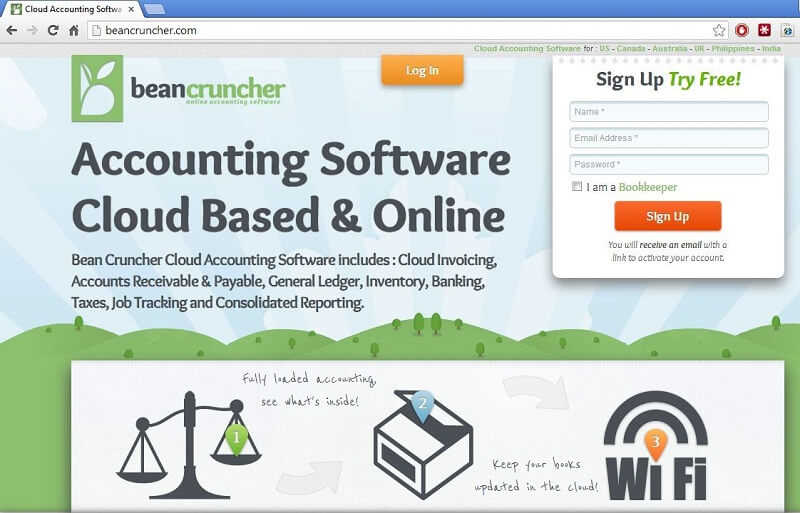
Bean Cruncher Screenshots
Description
Bean Cruncher is a cloud-based accounting software launched in 2018 by Bean Cruncher Inc., a financial technology company headquartered in Austin, Texas. Designed as a modern alternative to legacy desktop accounting tools, the platform delivers core bookkeeping, invoicing, and reporting capabilities through a web-based interface accessible from any device.
The software serves over 15,000 active users primarily across the United States and Canada, with concentrated adoption among freelancers, consultants, and service-based small businesses in creative, professional services, and retail sectors. Bean Cruncher positions itself in the mid-market accounting software space between basic invoicing apps and full-featured enterprise platforms.
Core Features of Bean Cruncher
The invoicing module allows users to create customized invoices, set up recurring billing schedules, and accept online payments through integrated Stripe and PayPal gateways. Automated payment reminders reduce late payments by sending scheduled follow-ups to clients, with customizable email templates and escalation rules for overdue accounts.
Financial reporting includes real-time profit and loss statements, balance sheets, and cash flow projections with visual trend analysis. The platform's plain-language report summaries translate financial data into actionable insights for non-accountants, explaining what metrics mean and flagging potential issues like declining margins or cash shortfalls.
Expense management features automatic bank feed imports from over 12,000 financial institutions, with AI-powered categorization that learns user patterns over time. The system includes receipt capture via mobile upload, mileage tracking with IRS-compliant logs, and vendor management tools that organize supplier information and payment history for efficient accounts payable workflows.
Key Highlights
- Market Position: Serves 15,000+ small businesses with a 4.3/5 average rating across software review platforms as of early 2025.
- Target Users: Freelancers, solopreneurs, and small businesses with 1-20 employees, particularly those without dedicated accounting staff.
- Deployment: Cloud-based SaaS accessible via web browsers on desktop and mobile, with offline mode for expense entry and invoice creation.
- Standout Feature: Guided tax estimation calculator that projects quarterly tax obligations based on income patterns and automatically sets aside recommended amounts.
- Integrations: 35+ integrations including Stripe, PayPal, Shopify, Square, Gusto payroll, and major US/Canadian banks via Plaid connectivity.
- Pricing Model: Three tiers?Starter ($15/month), Professional ($35/month), Premium ($60/month)?with 14-day free trial and 20% annual discount.
- Support: Email support for all tiers, live chat for Professional and above, phone support for Premium, plus comprehensive help documentation and video tutorials.
- Compliance & Security: Bank-level 256-bit SSL encryption, SOC 2 Type II certified, supports 1099 contractor reporting and sales tax calculations for US jurisdictions.
Who Should Use Bean Cruncher
Bean Cruncher is purpose-built for businesses with annual revenue under $1 million that need more than basic invoicing but don't require multi-entity consolidation or advanced inventory management. Ideal users include independent consultants, creative agencies with 3-10 team members, service contractors, and retail shops that primarily handle straightforward income and expense transactions rather than complex manufacturing or wholesale distribution workflows.
A typical use case involves a freelance marketing consultant managing 15-20 active clients, tracking project-based billable hours, categorizing business expenses for tax deductions, and generating quarterly financial reports for tax preparation. The consultant uses automated recurring invoices for retainer clients, monitors outstanding receivables through the dashboard, and leverages the tax estimation feature to avoid year-end surprises without hiring a bookkeeper.
Integrations & Ecosystem
Bean Cruncher connects with 35+ third-party platforms through native integrations and Zapier webhooks, including payment processors (Stripe, Square, PayPal), e-commerce platforms (Shopify, WooCommerce), payroll services (Gusto, ADP), and project management tools (Asana, Trello). The platform offers a REST API for custom integrations, enabling developers to build automated workflows between Bean Cruncher and proprietary business systems or industry-specific applications not covered by standard connectors.
Pricing & Plans
The Starter plan at $15/month supports unlimited invoices and up to 5 expense categories, suitable for very simple businesses or side hustles. Professional ($35/month) adds unlimited expense categories, recurring billing automation, multi-currency support, and financial reporting with up to 2 team member seats. Premium ($60/month) includes everything in Professional plus advanced reporting, priority support, automated sales tax calculation, and unlimited team seats?positioned for growing service businesses with multiple staff members handling finances.
Pros & Cons
Pros
- Non-Accountant Friendly: Plain-language explanations and guided workflows eliminate the need for extensive accounting knowledge, making it accessible to business owners who handle their own books. The interface uses everyday terminology instead of technical jargon, with contextual help tooltips explaining financial concepts.
- Tax Preparation Features: Built-in quarterly tax estimator and automated 1099 preparation save significant time during tax season compared to platforms requiring manual calculations. The system tracks deductible expenses throughout the year and generates tax-ready reports that accountants can use directly.
- Responsive Customer Support: Users consistently report quick response times from the support team, with most email inquiries answered within 4 hours and live chat available during extended business hours for paid plans. The video tutorial library covers common setup scenarios specific to different business types.
Cons
- Limited Inventory Management: The platform lacks robust inventory tracking features, making it unsuitable for product-based businesses that need lot tracking, warehouse management, or manufacturing bill-of-materials functionality. Retail users managing extensive SKU catalogs should consider alternatives.
- No Mobile App: While the web interface is mobile-responsive, Bean Cruncher does not offer dedicated iOS or Android applications, limiting offline functionality and making receipt capture less convenient than competitors with native camera integration and push notifications.
Our Expert Take
Bean Cruncher excels as a first real accounting system for freelancers and service businesses graduating from spreadsheets, offering the right balance of capability and simplicity without overwhelming new users. Its guided tax features and plain-language reporting make it particularly valuable for solo entrepreneurs handling their own bookkeeping, and the pricing remains accessible even as businesses scale to small team sizes.
Product-based businesses with inventory needs should skip Bean Cruncher and evaluate QuickBooks Online or Xero instead, which offer comprehensive stock management and purchase order workflows. Similarly, companies requiring robust project costing, multi-entity consolidation, or advanced manufacturing capabilities will outgrow the platform quickly and should start with mid-market ERP solutions designed for operational complexity rather than retrofitting a tool built for simpler use cases.
Frequently Asked Questions
Is there a free plan or free trial for Bean Cruncher?
How much does Bean Cruncher cost?
What does Bean Cruncher integrate with?
Who is Bean Cruncher best for?
What are the best alternatives to Bean Cruncher?
Is Bean Cruncher GDPR / SOC 2 compliant?
Does Bean Cruncher have a mobile app?
What do real users say about Bean Cruncher?
How does Bean Cruncher compare to its top competitor?
Does Bean Cruncher offer customer support?
Find Your Perfect Software
See how it can transform your workflow
- Personalized for your needs Tailored recommendations based on your unique requirements.
- Save time & resources Streamline your workflow and boost team productivity.
- Trusted by thousands Join 10,000+ businesses already growing with SaaSrat.
You're all set! 🎉
A specialist for will reach out within 1 business day with tailored recommendations for your needs.