

AccountMate
by AccountMate
What is AccountMate?
Get Best Quote for AccountMate
Connect with SaaSrat experts to get the best quote for your business.
You're all set!
A specialist for AccountMate will reach out within 1 business day.
AccountMate Features
General ledger
Accounts payable
Accounts receivable
Bank reconciliation
Payroll
Inventory control
View All 33 Features
AccountMate Resources
AccountMate Screenshots
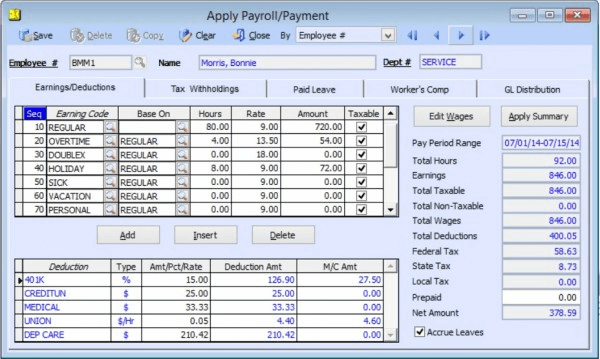
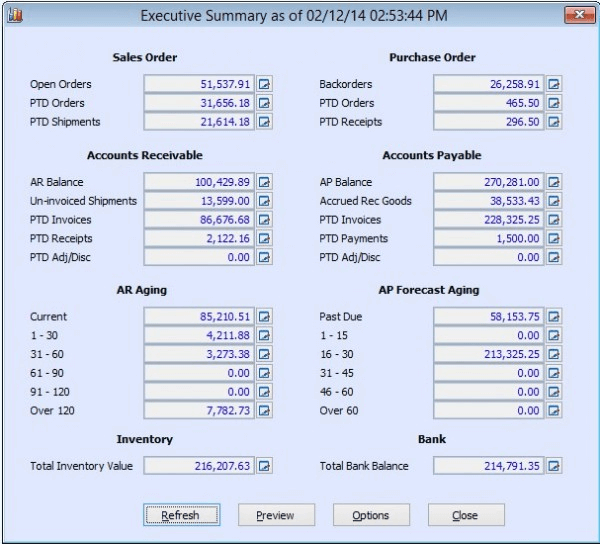
Description
AccountMate is a modular accounting and enterprise resource planning (ERP) software built on an open SQL database architecture, available in both cloud-hosted and on-premise deployment models. Developed by AccountMate Software Corporation, the solution has served small to mid-sized businesses since its founding in 1984, making it one of the longest-standing accounting platforms in the market.
The software primarily serves growing companies across manufacturing, distribution, nonprofit, and service industries throughout North America, with particular strength among businesses requiring customizable financial systems. AccountMate supports organizations typically ranging from 5 to 500 employees that have outgrown basic accounting tools but need alternatives to complex enterprise ERP systems.
Core Features of AccountMate
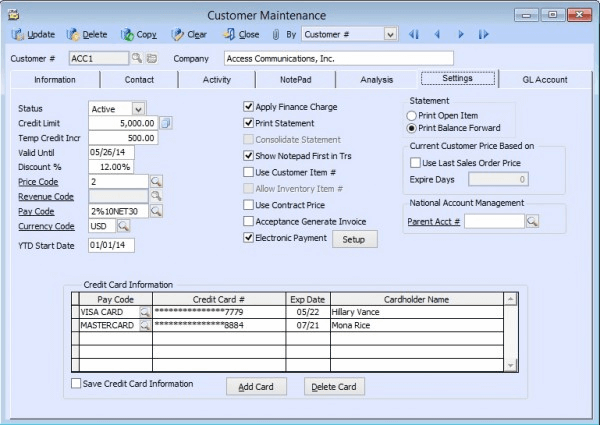
AccountMate's invoicing and accounts receivable modules offer unlimited custom invoice templates with automated payment reminders, batch invoicing for recurring clients, and integrated credit card processing. The system tracks customer payment history, manages deposits and prepayments, and generates aging reports with drill-down capabilities to individual transactions.
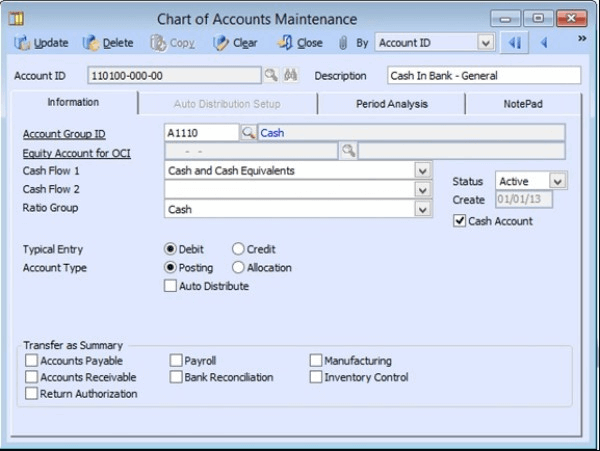
The general ledger provides real-time financial consolidation across multiple companies or locations, with unlimited account segments for departmental tracking that exceeds standard chart-of-account structures. Users build custom financial statements without IT assistance, applying dynamic filtering by department, project, or location directly within the dashboard interface.
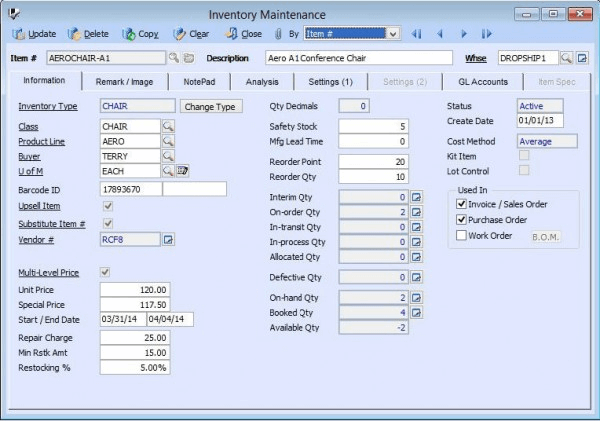
AccountMate includes comprehensive inventory management with lot tracking, serial number control, and multi-location warehouse transfers with landed cost allocation. The purchase order module automates three-way matching between purchase orders, receipts, and vendor invoices, while the job cost accounting module tracks profitability across projects with phase-level budget comparisons and work-in-progress reporting.
Key Highlights
- Market Position: Over 40 years in business serving 100,000+ users globally with specialized versions for LandMark and SQL platforms.
- Target Users: Small to mid-sized manufacturers, distributors, nonprofits, and service companies needing customizable accounting beyond QuickBooks capabilities.
- Deployment: Cloud-hosted, on-premise Windows server, or hybrid configurations with remote desktop access and offline capabilities.
- Standout Feature: Direct SQL database access allowing unlimited custom report development and third-party integration without API limitations.
- Integrations: 50+ pre-built connectors including Shopify, WooCommerce, Salesforce, Microsoft Office, FedEx/UPS shipping, and major payroll providers.
- Pricing Model: Perpetual licenses start at $995 per module with optional cloud hosting from $50/month; includes first-year support and maintenance.
- Support: Phone and email support during business hours, extensive knowledge base, remote training sessions, and certified implementation partner network.
- Compliance & Security: SOC 2 Type II certified cloud hosting, role-based security controls, audit trail logging, and industry-specific compliance for nonprofits and government contractors.
Who Should Use AccountMate
AccountMate best serves businesses with 10-200 employees in manufacturing, wholesale distribution, and nonprofit sectors where controllers and CFOs require deep customization of financial workflows. Companies operating multiple legal entities or locations benefit from its consolidation capabilities, while organizations with unique reporting requirements leverage the open database structure.
A 30-person manufacturing company tracking job costs across custom fabrication projects uses AccountMate to allocate materials, labor, and overhead by work order phase, generating client profitability reports that combine inventory consumption with project milestone billing. The system's perpetual licensing model appeals to businesses preferring capital expenditure over recurring SaaS subscriptions.
Integrations & Ecosystem
AccountMate connects to over 50 third-party applications through Direct Link technology, covering e-commerce platforms like Shopify and Magento, CRM systems including Salesforce, and shipping solutions from FedEx and UPS. The open SQL architecture enables custom API development, while AccountMate's Developer Network provides tools for authorized partners to build industry-specific add-ons unavailable in competing closed-platform accounting systems.
Pricing & Plans
AccountMate uses perpetual module licensing starting at $995 per module for desktop versions and $1,295 for SQL editions, with no monthly fees beyond optional annual support contracts at 18% of license value. Cloud hosting adds $50-$150 per user monthly depending on module selection and concurrent user count. Most implementations require 5-10 modules, resulting in typical total costs between $8,000-$25,000 plus hosting or server expenses.
Pros & Cons
Pros
- True Database Ownership: SQL-based architecture grants direct access to modify reports, extract data, and integrate systems without proprietary API restrictions that limit customization in cloud-only competitors.
- Perpetual Licensing Option: Businesses can purchase licenses outright and avoid mandatory subscription fees, reducing long-term total cost of ownership for companies planning 5+ year software lifecycles.
- Unlimited Customization Depth: Form layouts, workflow automation, and business logic can be modified by internal IT teams or consultants without vendor permission, supporting unique operational requirements.
Cons
- Steeper Learning Curve: The extensive customization options and legacy interface design require more training time compared to modern cloud accounting platforms with guided onboarding workflows.
- Limited Mobile Functionality: No native mobile apps exist; users must access the system through remote desktop connections, reducing convenience for field teams requiring smartphone-based approval or data entry capabilities.
Our Expert Take
AccountMate represents the optimal choice for established SMBs with dedicated accounting staff who need ownership of their financial database and deep customization without ongoing SaaS constraints. Manufacturers tracking complex job costs, distributors managing multi-warehouse inventory, and nonprofits requiring fund accounting will find the modular architecture and perpetual licensing model deliver superior long-term value.
Startups under 10 employees, companies prioritizing mobile access, or teams without IT resources should avoid AccountMate's complexity and consider Xero or QuickBooks Online instead. Businesses expecting modern UX design and automatic feature updates will find the interface dated compared to contemporary cloud-native platforms, making AccountMate better suited for organizations valuing stability and control over cutting-edge user experience.
Frequently Asked Questions
Is there a free plan or free trial for AccountMate?
How much does AccountMate cost?
What does AccountMate integrate with?
Who is AccountMate best for?
What are the best alternatives to AccountMate?
Is AccountMate GDPR / SOC 2 compliant?
Does AccountMate have a mobile app?
What do real users say about AccountMate?
How does AccountMate compare to its top competitor?
Does AccountMate offer customer support?
Find Your Perfect Software
See how it can transform your workflow
- Personalized for your needs Tailored recommendations based on your unique requirements.
- Save time & resources Streamline your workflow and boost team productivity.
- Trusted by thousands Join 10,000+ businesses already growing with SaaSrat.
You're all set! 🎉
A specialist for will reach out within 1 business day with tailored recommendations for your needs.