

Salesflare
by Salesflare • Founded 2014
What is Salesflare?
Get Best Quote for Salesflare
Connect with SaaSrat experts to get the best quote for your business.
You're all set!
A specialist for Salesflare will reach out within 1 business day.
Salesflare Features
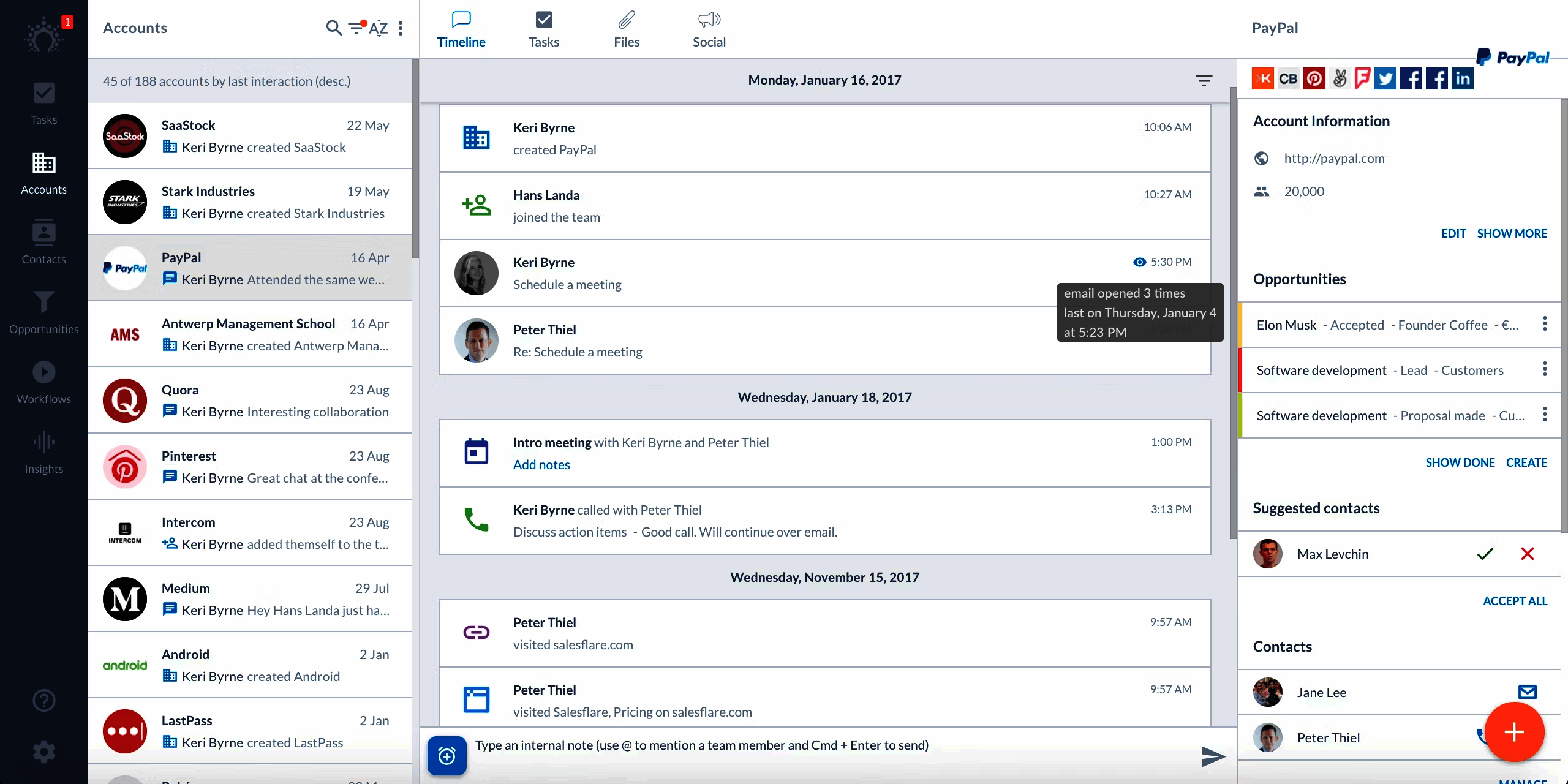
Automatic contact and account creation from email and calendar
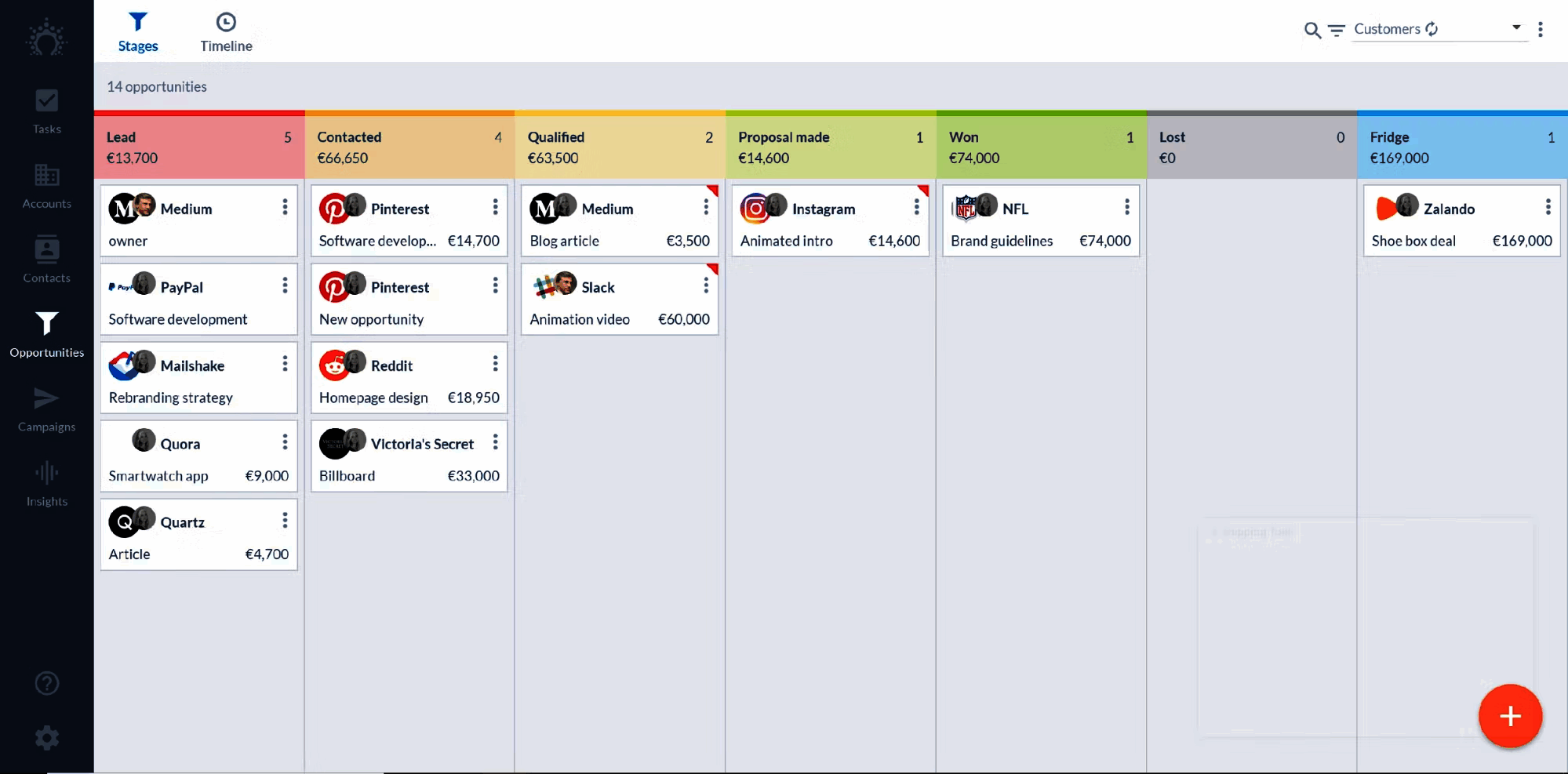
Drag-and-drop deal pipelines
Email tracking with open and click reporting
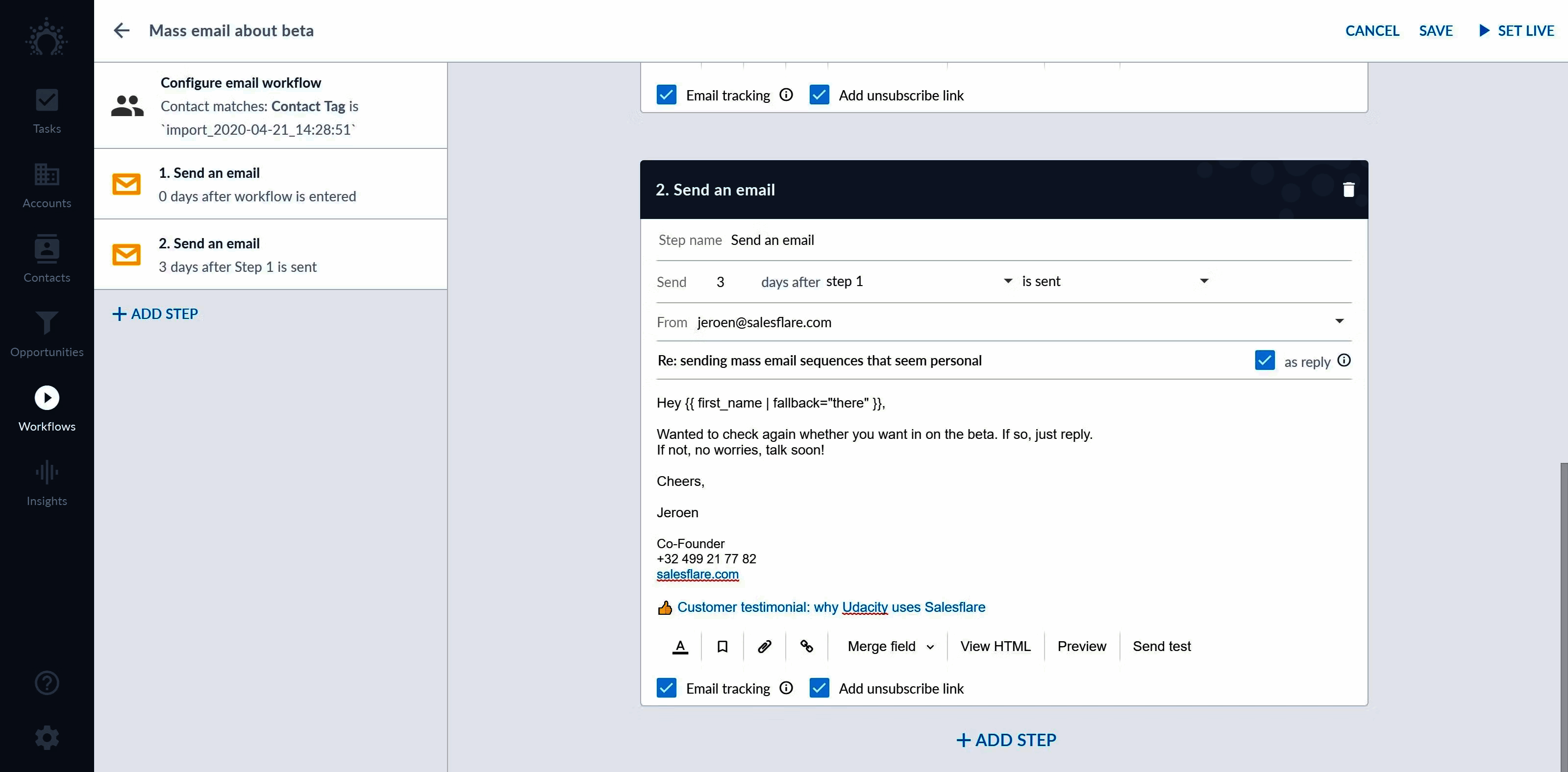
Multi-step email sequences with branching
LinkedIn Chrome extension for one-click adds
Meeting scheduler with calendar conflict detection
View All 12 Features
Salesflare Pricing Plans
Pro
- Automatic contact and account creation
- Email tracking and multi-step sequences
- Drag-and-drop pipeline with custom stages
- LinkedIn Chrome extension
- Native iOS and Android apps
- Verified at salesflare.com/pricing on 2026-06-30
Pro+
- Everything in Pro plus advanced workflow automation
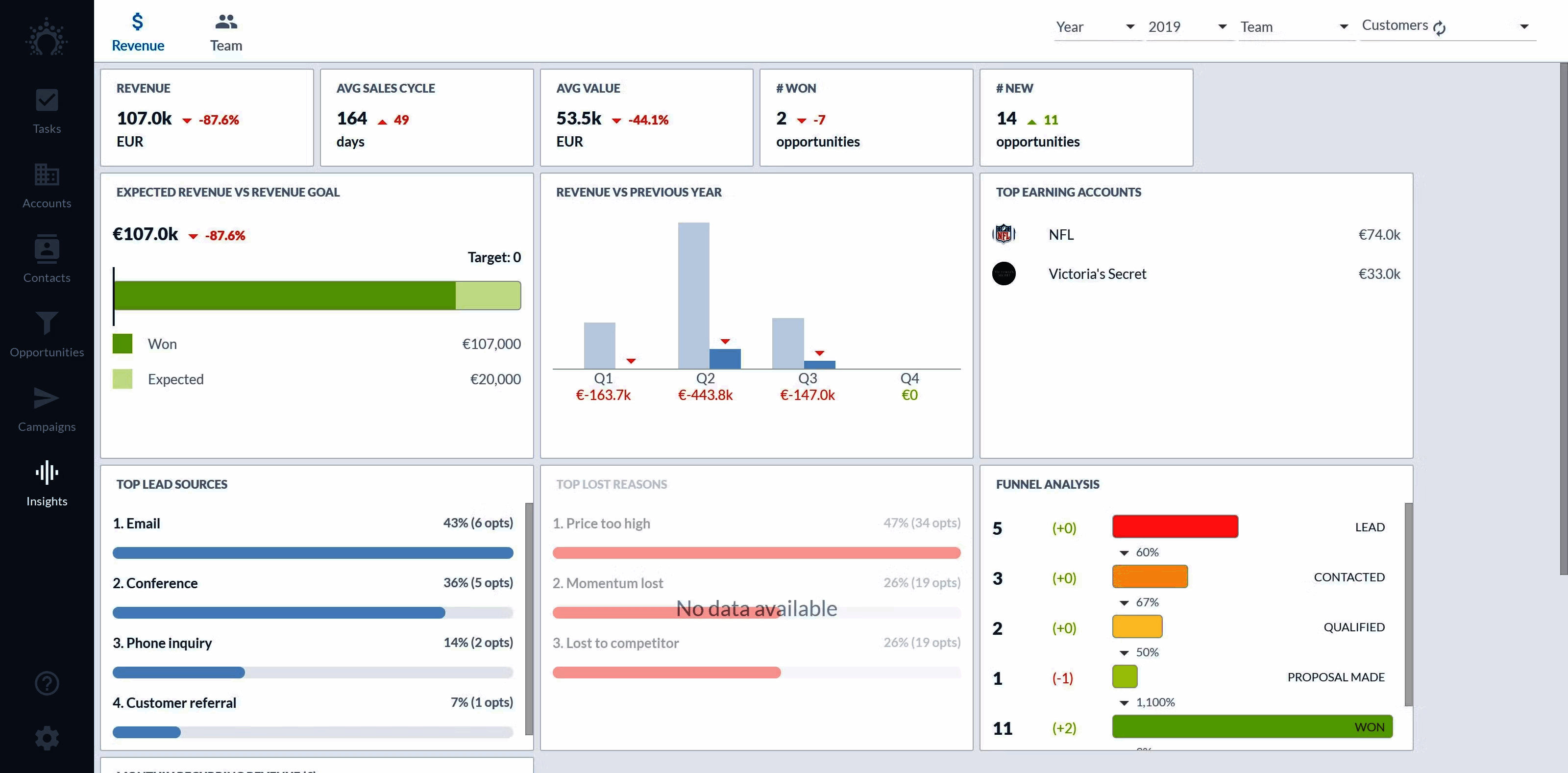
- Custom dashboards and reports
- Higher email send and sequence limits
- Multi-pipeline support
- Priority email and chat support
- Verified at salesflare.com/pricing on 2026-06-30
Enterprise
- Everything in Pro+ plus dedicated CSM
- Custom training and onboarding
- Priority 24/5 support
- Custom integration support
- Annual contract minimum
- Verified at salesflare.com/pricing on 2026-06-30
Salesflare Resources
Salesflare Screenshots
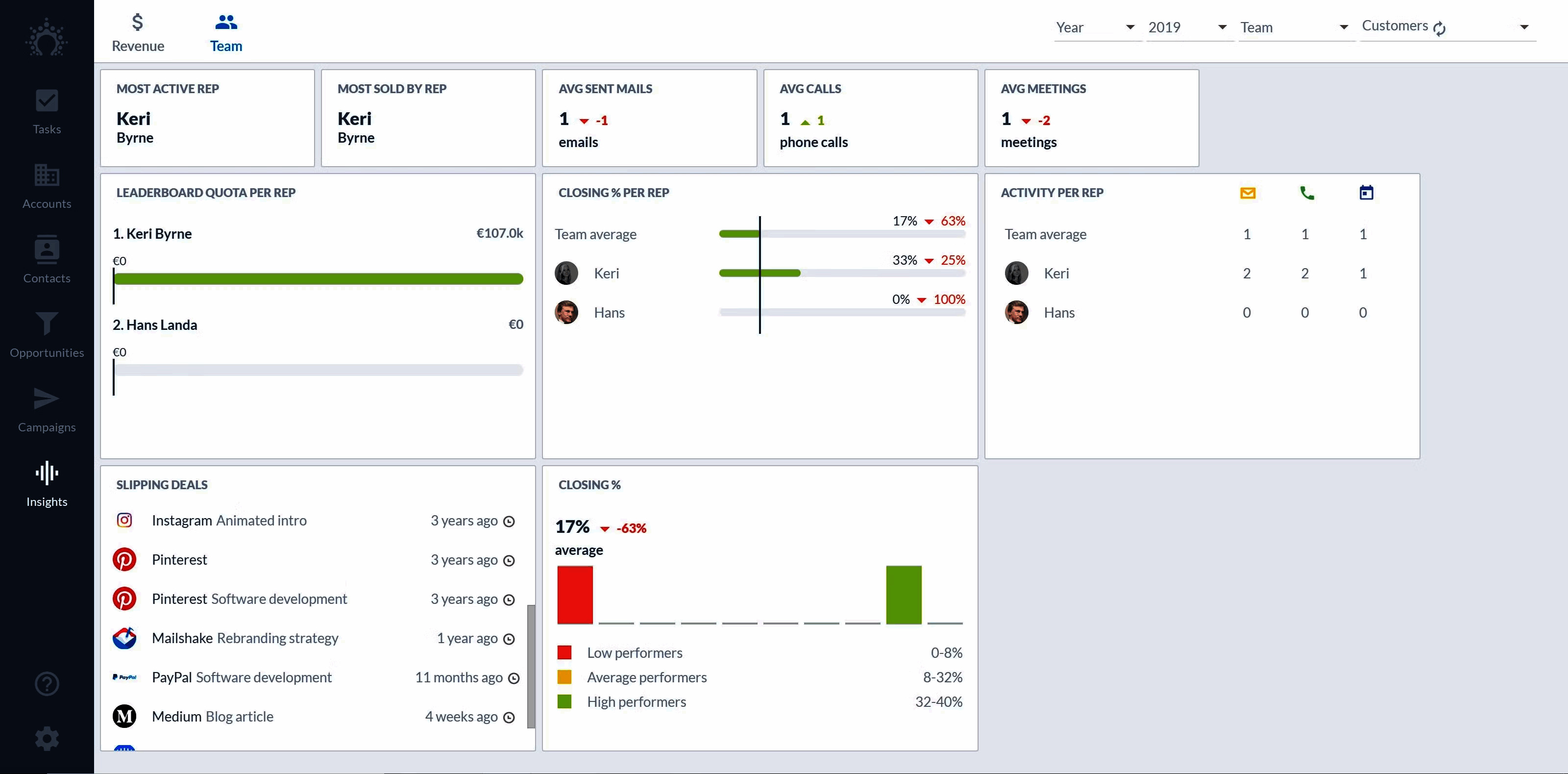
Description
Salesflare at a Glance
| Best fit for | Small B2B sales teams (1 to 25 reps), agencies, consultancies, founder-led sales, account-based marketing teams |
|---|---|
| Industries | SaaS, agencies, consulting, professional services, B2B services, technology |
| Core platform | Auto-built contacts and accounts, Pipeline and deal tracking, Email tracking, Email sequences, Meeting scheduler, Workflow automation |
| Pricing model | Per-user monthly (Pro, Pro+, Enterprise), annual or monthly billing |
| Mobile apps | iOS and Android (native, full CRM functionality) |
| Compliance | SOC 2 Type II, ISO 27001, GDPR, CCPA |
| Named customers | Doodle, Adyen, Tribe Dynamics, Devops Group (shown on salesflare.com) |
| Parent company | Salesflare BV (independently held) |
| Headquarters | Antwerp, Belgium |
Salesflare Pros and Cons in 2026
Where Salesflare Stands Out
Automatic data capture removes the manual-entry tax. Salesflare reads inbox, calendar, email signatures, and meeting attendees to auto-build contact, account, and deal records, which closes the data-quality gap that kills most SMB CRM rollouts.
Email tracking and sequences are built-in. Open/click tracking, send-later, and multi-step sequences ship in the base product without a separate sales-engagement vendor.
LinkedIn integration through the Chrome extension is the deepest in SMB CRM. Reps add prospects to Salesflare from LinkedIn profiles with one click, with enrichment pulling firmographic data automatically.
Mobile apps are first-class. iOS and Android cover the full CRM, not a stripped-down read-only view, which fits founder-led and field-based sales motions.
Where Salesflare Falls Short
Designed for small teams; lacks deep enterprise governance. Forecast hierarchies, complex permissions, and territory management are thinner than Salesforce or HubSpot for orgs over 50 reps.
Reporting depth is solid but not BI-grade. Standard pipeline and activity reports cover most needs; deep cohort and revenue-attribution analysis requires export to a warehouse.
Integration ecosystem is narrower than HubSpot. Native integrations cover the essentials (Slack, Gmail, Outlook, Zapier, Pipedrive, LinkedIn) but long-tail tools live behind Zapier or the API.
Pricing per user adds up with team growth. Pro at $35 and Pro+ at $55 per user per month are competitive at small headcount but stack against larger teams.
Who Should Use Salesflare?
Salesflare is the right pick for small B2B sales teams that resist manual CRM logging, agencies and consultancies running account-based outreach, founder-led sales motions where data hygiene matters, and B2B services firms with LinkedIn-driven prospecting. In the CRM and sales engagement categories, Salesflare lands as the best fit for sub-25-rep teams that want a CRM that fills itself.
It is the wrong fit for enterprise sales orgs over 50 reps needing deep forecasting, B2C sales models, and companies already on Salesforce or HubSpot that need cross-product expansion. Those buyers should compare Nimble, SugarCRM, or Keap.
Salesflare Product Suite in 2026
Contacts and Accounts
Auto-built from inbox, calendar, and email signatures. Manual additions supported but rare. Enrichment pulls firmographic data on account creation.
Pipeline and Deals
Drag-and-drop deal pipeline with custom stages. Deal scoring and won/lost reasons. Multi-pipeline support for separate sales motions.
Email Tracking and SequencesOpen/click tracking, send-later, signature templates, and multi-step sequences with branching. Sequence performance reports track open, reply, and meeting rates.Meeting Scheduler
Embedded scheduling link in email signatures. Calendar conflict detection across multiple connected calendars. Round-robin booking for team availability.
Workflow Automation
No-code automation triggered on deal stage changes, contact additions, or custom events. Actions include task creation, email send, field update, and webhook to external systems.
Mobile and API
Native iOS and Android apps with full CRM functionality including pipeline drag, email send, and call logging. REST API and webhooks for custom integrations beyond the native catalog.
How Much Does Salesflare Cost in 2026?
Three tiers, all per-user billing. Pro at $35 per user per month (annual) covers automatic contact/account creation, email tracking, sequences, and pipeline reporting. Pro+ at $55 per user per month adds advanced workflow automation, custom dashboards, and increased usage limits. Enterprise at $99 per user per month adds dedicated CSM, custom training, and priority support.
What Drives the Cost
- User count: Per-user pricing scales linearly. Inactive users should be removed quarterly.
- Tier upgrade triggers: Pro to Pro+ usually when workflow automation needs increase. Pro+ to Enterprise rare for sub-25-rep teams.
- Email send volume: Higher tiers raise daily send and sequence limits.
- Integration depth: Custom workflows beyond Zapier may need API work.
How to Get a Useful Quote
Most small teams self-serve via Pro or Pro+ from the website. Enterprise quotes start with a discovery call. Benchmark Salesflare's quote against Nimble, Keap, and HubSpot Sales Starter before signing annual contracts.
Hidden Costs and Contract Gotchas to Watch For
- Annual billing required for headline rates. Monthly billing carries a 20% surcharge over annual.
- LinkedIn extension limits. LinkedIn's anti-automation throttles can rate-limit prospecting at high volume.
- Email sequence send caps per tier. Pro has lower daily send limits than Pro+.
- Workflow automation requires Pro+ for advanced rules. Pro has basic automation only.
- No native phone dialer. Click-to-call works through CRM but the dialer comes from a separate vendor.
Salesflare Alternatives Worth Comparing
Nimble wins on social-profile enrichment and unified contact management. Lighter sales sequencing than Salesflare.
Pipedrive wins on visual pipeline UX and broad SMB adoption. Manual data entry burden higher than Salesflare.
HubSpot Sales Starter wins on cross-product (Marketing, Service) ecosystem at scale. Heavier than Salesflare for small teams.
Close wins on call-first SMB sales with built-in dialer. Lighter automatic data capture.
SugarCRM wins for mid-market B2B with deeper customization. Heavier and pricier than Salesflare for small teams.
Keap wins for solopreneurs combining CRM with email marketing automation. Lighter sales pipeline depth.
What Real Buyers Report About Salesflare
Reviewers on independent platforms (SoftwareAdvice, SelectHub) and small business communities (Reddit r/smallbusiness, IndieHackers, Twitter B2B threads) consistently call out three patterns. Automatic data capture is the lock-in factor; users name it as the reason they stay through trial after dropping competitors. LinkedIn Chrome extension is repeatedly cited as deepest in SMB CRM. Mobile apps with full CRM functionality fit founder-led sales motions better than read-only competitor mobile experiences.
The common critiques cluster around three points. Enterprise governance is thinner than Salesforce or HubSpot. Reporting depth requires export to BI for cohort analysis. Per-user pricing stacks against larger teams. For small B2B sales teams under 25 reps, Salesflare consistently rates as the cleanest auto-CRM choice.
Bottom Line: Is Salesflare Right for You?
Salesflare is the right call for small B2B sales teams that resist manual CRM logging and want a CRM that builds itself from email and calendar data. Pro at $35 per user per month covers most small-team needs; Pro+ adds the workflow depth that growing teams hit.
For enterprise sales orgs over 50 reps, evaluate Salesforce, HubSpot, or SugarCRM. For social-profile-driven contact management, Nimble fits better. For solopreneurs combining CRM with marketing automation, Keap is the leaner adjacent tool.
Verified on 2026-06-30 by the SaaSRat Editorial Team. Vendor facts cross-checked against salesflare.com (pricing, features, integrations pages), independent review aggregators, B2B sales community threads, and current 2025-2026 press cycles. About our methodology.
Frequently Asked Questions
What is Salesflare used for?
How much does Salesflare cost?
Is Salesflare better than Pipedrive?
Does Salesflare integrate with LinkedIn?
Does Salesflare have email sequences?
Is Salesflare HIPAA compliant?
What is the difference between Salesflare Pro and Pro+?
Can Salesflare be used on mobile?
Does Salesflare have an API?
What support does Salesflare offer?
Find Your Perfect Software
See how it can transform your workflow
- Personalized for your needs Tailored recommendations based on your unique requirements.
- Save time & resources Streamline your workflow and boost team productivity.
- Trusted by thousands Join 10,000+ businesses already growing with SaaSrat.
You're all set! 🎉
A specialist for will reach out within 1 business day with tailored recommendations for your needs.