

FleetDeck
by FleetDeck
What is FleetDeck?
Get Best Quote for FleetDeck
Connect with SaaSrat experts to get the best quote for your business.
You're all set!
A specialist for FleetDeck will reach out within 1 business day.
FleetDeck Features
Real time remote control
Multi monitor support
File transfer
Session recording
Chat functionality
Clipboard synchronization
View All 26 Features
FleetDeck Pricing Plans
Standard
- Remote Desktop
- Virtual Terminal
- Customized deployments
- Unlimited concurrent sessions
FleetDeck Resources
FleetDeck Screenshots
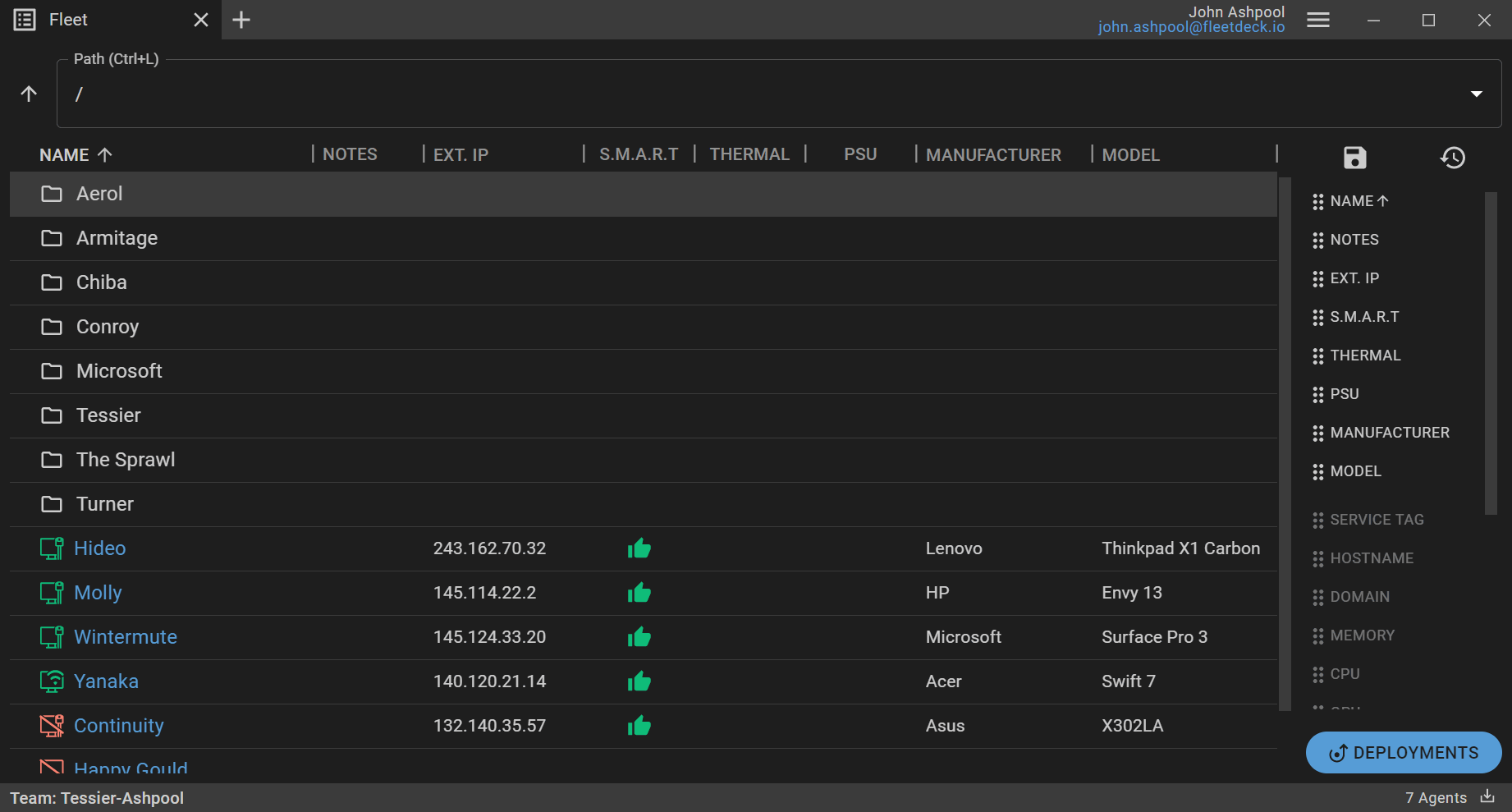
Description
FleetDeck at a Glance
| Best fit for | MSPs and internal IT techs securely managing large fleets of Windows computers with fast Remote Desktop and Virtual Terminal sessions |
|---|---|
| Starting price | Nine dollars per month for one tech + fifty computers |
| Named security | HIPAA eligible, PCI DSS compliant, end-to-end encryption with ephemeral private keys, two-factor authentication, risk-based adaptive authentication |
| Named Remote Desktop features | Custom video streaming codec, low-bandwidth optimized, unlimited concurrent sessions, copy and paste, Ctrl + Alt + Del, ask for consent popup, multi-monitor support |
| Named Virtual Terminal features | Powershell, unattended access, unlimited concurrent sessions, run as SYSTEM, copy and paste |
| Named RMM features | Export to CSV, service tag discovery, monitoring, reboot to safe mode, organize with directories, notes |
| Named collaboration | Team management, shareable links, multiple teams |
| Named deployment options | Customizable installers, silent installer, ask for name during installation, use hostname as name, Active Directory MSI deployments |
| Named OS support | Windows 8, Windows 8.1, Windows 10, Windows 11, Windows Server 2012, 2012 R2, 2016, 2019, 2022 (Linux and macOS to come) |
| Evaluation | Get started with the published tier |
| Headquarters | Global (fleetdeck.io) |
FleetDeck Overview
FleetDeck is Command and Control. A Remote Desktop and Virtual Terminal solution built for techs to securely manage large fleets of computers. Rather than a general-purpose remote desktop repurposed for tech support, the vendor positions on a video codec and netcode purpose-built for Remote Desktop with high frame rate and interactivity prioritized over image quality, so techs can get in and out quickly.
The vendor positions on Security Through Simplicity. True end-to-end encryption with ephemeral private keys that never leave the devices, so there is no eavesdropping. Two-factor support for all authentication apps, plus advanced auditing with real-time alerts for suspicious activity on the account.
Real published pricing at nine dollars per month for one tech and fifty computers is unusually transparent in the tech-support remote desktop category. The plan includes Remote Desktop with unlimited concurrent sessions, Virtual Terminal (Powershell, unattended access, run as SYSTEM), and lightweight RMM (export to CSV, service tag discovery, monitoring, reboot to safe mode, organize with directories, notes).
FleetDeck Capabilities and Named Features
Purpose-built video codec is the vendor differentiator. Rather than a general-purpose remote desktop codec, FleetDeck built a video codec and netcode purpose-built for Remote Desktop. High frame rate and interactivity is prioritized over image quality, so techs get in and out quickly. Handles high latency and low bandwidth conditions better than competing solutions.
Security Through Simplicity design: true end-to-end encryption with ephemeral private keys that never leave devices (no eavesdropping), two-factor authentication for all authentication apps, risk-based adaptive authentication, advanced auditing with real-time alerts for suspicious activity, HIPAA eligible and PCI DSS compliant, and security email notifications.
Remote Desktop capability includes unlimited concurrent sessions, copy and paste between local and remote, Ctrl + Alt + Del key sequence, ask-for-consent popup for user-consented sessions, and multi-monitor support. Meaningful for techs on multi-screen setups managing multi-monitor endpoints.
Virtual Terminal capability includes Powershell access, unattended access for after-hours maintenance, unlimited concurrent sessions, and run-as-SYSTEM privilege. Meaningful for scripted remediation and automated tasks that do not need a GUI session.
Lightweight RMM capability: export to CSV for reporting, service tag discovery for asset tracking, monitoring, reboot to safe mode, organize computers with directories, and notes on each computer. Rather than a full RMM stack, meaningful for techs who need lightweight fleet organization alongside Remote Desktop.
Deployment automation includes customizable installers, silent installers for background rollout, ask-for-name during installation, use-hostname-as-name option, and Active Directory MSI deployments. Meaningful for enrolling large fleets without touching each machine.
Named feature list
- Remote Desktop with custom video streaming codec
- Low-bandwidth optimized codec
- Unlimited concurrent Remote Desktop sessions
- Copy and paste between local and remote
- Ctrl + Alt + Del sequence
- Ask for consent popup
- Multi-monitor support
- Virtual Terminal with Powershell
- Unattended access
- Run as SYSTEM
- RMM (export to CSV, service tag discovery, monitoring, reboot to safe mode, directories, notes)
- End-to-end encryption with ephemeral private keys
- Two-factor authentication for all authenticator apps
- Risk-based adaptive authentication
- Advanced auditing (real-time suspicious activity alerts)
- HIPAA eligible
- PCI DSS compliant
- Zero-conf automatic updates
- Team management + shareable links + multiple teams
- Silent installer + AD MSI deployments
- Windows 8 through Windows 11
- Windows Server 2012 through Windows Server 2022
FleetDeck Pricing
FleetDeck publishes real transparent pricing at nine dollars per month for one tech and fifty computers. The plan includes the full Remote Desktop, Virtual Terminal, and RMM feature set with HIPAA-eligible + PCI DSS-compliant security, end-to-end encryption with ephemeral private keys, unlimited concurrent sessions, and all named deployment automation features. Tech and computer counts scale from this baseline.
Remote desktop and MSP tooling buyers should compare FleetDeck against ScreenConnect (ConnectWise Control - established MSP remote support standard), Splashtop Remote Support (established MSP remote support alternative), TeamViewer (general-purpose remote support standard), AnyDesk (fast remote desktop for MSPs), NinjaOne (broader RMM + remote access), and Atera (integrated RMM + PSA for MSPs). FleetDeck differentiators are the transparent nine dollars per month starting price, the purpose-built Remote Desktop video codec optimized for high frame rate and low bandwidth, HIPAA + PCI DSS compliance at the entry tier, and end-to-end encryption with ephemeral private keys that never leave the devices.
| Tier | Price | What is included |
|---|---|---|
| Starting tier | $9/mo | One tech + fifty computers + full Remote Desktop + Virtual Terminal + RMM + HIPAA + PCI DSS |
| Scaled deployment | Contact Vendor | Same feature set, additional techs and computers, multi-team organization |
FleetDeck Pros
- Transparent published pricing. Starts at nine dollars per month for one tech + fifty computers.
- Purpose-built Remote Desktop video codec. High frame rate and interactivity prioritized over image quality. Handles high latency and low bandwidth better than competing solutions.
- End-to-end encryption with ephemeral private keys. Keys never leave devices, no eavesdropping.
- HIPAA eligible + PCI DSS compliant. At the entry tier, not gated to Enterprise.
- Unlimited concurrent sessions. No per-session cost surprise.
- Lightweight RMM alongside Remote Desktop. Export, monitoring, service tag discovery, safe-mode reboot, directories, notes.
- Active Directory MSI + silent installer. Fleet rollout without touching each machine.
- Broad Windows support. Windows 8 through Windows 11 and Windows Server 2012 through 2022.
FleetDeck Cons and Trade-offs
- Windows-only currently. Linux and macOS support noted as coming, not yet shipped.
- Lightweight RMM only. Full RMM stacks (patch management, remote scripting library, ticketing integration) require dedicated RMM tools (NinjaOne, Atera, ConnectWise Automate).
- Fewer public integration marketplace listings than category standards. Buyers relying on deep PSA or ticketing integrations should validate during evaluation.
FleetDeck vs Alternatives
| FleetDeck | ScreenConnect | Splashtop Remote Support | |
|---|---|---|---|
| Real published starting price | $9/mo for 1 tech + 50 computers | Established MSP tiered pricing | Established MSP tiered pricing |
| Purpose-built Remote Desktop codec | Yes (high frame rate + low bandwidth) | Established codec | Established codec |
| End-to-end encryption with ephemeral private keys | Yes | Yes | Yes |
| HIPAA + PCI DSS compliance at entry | Yes | Yes | Yes |
| Unlimited concurrent sessions | Yes | Yes | Yes |
| Lightweight RMM built in | Yes (export, discovery, monitoring, safe-mode reboot) | ScreenConnect Support standalone | Splashtop Remote Support standalone |
| macOS + Linux support | Coming | Yes | Yes |
| Best fit | Small to mid-size MSPs and internal IT techs on Windows fleets wanting fast codec + transparent pricing | Established ConnectWise ecosystem MSP standard | Established Splashtop MSP standard |
Who Should Choose FleetDeck
FleetDeck is the right pick for MSPs and internal IT techs securely managing large fleets of Windows computers with fast Remote Desktop and Virtual Terminal sessions. Purpose-built video codec optimized for high frame rate and low bandwidth is meaningful for techs on high-latency or bandwidth-constrained connections. Transparent nine dollars per month starting price removes budget approval friction for small MSPs and internal IT teams.
Small MSPs benefit from the entry tier (one tech + fifty computers) with the full feature set. Growing MSPs benefit from scaled deployments with multiple teams and additional techs and computers. Compliance-sensitive verticals (healthcare, retail) benefit from HIPAA eligible and PCI DSS compliance at the entry tier, not gated to Enterprise. Internal IT teams benefit from Active Directory MSI deployments and silent installers for large fleet rollouts.
FleetDeck is not the right fit for Linux or macOS-first environments today (Linux and macOS support is stated as coming). Full RMM stack should compare NinjaOne or Atera. Established ConnectWise ecosystem MSP standard compare ScreenConnect (ConnectWise Control). Established Splashtop MSP standard compare Splashtop Remote Support. General-purpose remote support standard compare TeamViewer. Fast remote desktop alternative compare AnyDesk.
Named Alternatives to FleetDeck
- ScreenConnect (ConnectWise Control). Established ConnectWise ecosystem MSP standard. Compare for ConnectWise ecosystem alignment.
- Splashtop Remote Support. Established Splashtop MSP standard. Compare for Splashtop MSP standard.
- TeamViewer. General-purpose remote support standard. Compare for general-purpose remote support.
- AnyDesk. Fast remote desktop for MSPs. Compare as a fast remote desktop alternative.
- NinjaOne. Broader RMM + remote access. Compare for full RMM stack + remote access.
FleetDeck Implementation and Deployment
FleetDeck implementation begins with signup on fleetdeck.io using the published nine dollars per month starting tier. The plan is instant self-serve with team creation, computer enrollment via silent or customizable installer, two-factor setup, and Remote Desktop or Virtual Terminal session testing.
Standard MSP or internal IT deployment reaches production within a couple of days including account setup, team creation, silent installer or Active Directory MSI package build for fleet enrollment, two-factor authentication rollout, risk-based adaptive authentication setup, HIPAA or PCI DSS posture confirmation, and tech training on the Remote Desktop codec + Virtual Terminal + lightweight RMM features. Larger fleets extend to 1-3 weeks with directory-based organization, multi-team setup, and shareable link workflows.
What Real Buyers Say About FleetDeck
FleetDeck vendor positioning: Command and Control. FleetDeck is a new Remote Desktop and Virtual Terminal solution, built for techs to securely manage large fleets of computers. Starting at nine dollars monthly. Security Through Simplicity. No eavesdropping. True end-to-end encryption with ephemeral private keys that never leave your devices. Strong authentication. Two-factor support for all authentication apps. Advanced auditing. Get alerts for suspicious activity on your account in real-time. New Technology. Built for tech support. Video codec and netcode purpose built for Remote Desktop. Get in and out quick. High frame rate and interactivity prioritized over image quality. Reliable video streaming. Handles high latency and low bandwidth conditions better than competing solutions.
For independent perspective search Reddit r slash msp r slash sysadmin r slash techsupport and MSP LinkedIn communities for FleetDeck discussions. FleetDeck is often discussed alongside ScreenConnect (ConnectWise Control), Splashtop Remote Support, TeamViewer, AnyDesk, NinjaOne, and Atera in the MSP remote support and RMM category.
Sources
- vendor website, FleetDeck home + Remote Desktop + Virtual Terminal + Command and Control positioning
- vendor website, FleetDeck pricing (Starting at nine dollars per month for one tech + fifty computers)
Frequently Asked Questions about FleetDeck
What is FleetDeck?
FleetDeck is a Remote Desktop and Virtual Terminal solution built for techs to securely manage large fleets of computers. Includes lightweight RMM features (export to CSV, service tag discovery, monitoring, reboot to safe mode).
How much does FleetDeck cost?
Real published pricing starts at nine dollars per month for one tech and fifty computers. Full feature set at the entry tier, no HIPAA or PCI DSS gating to Enterprise. Additional techs and computers scale from this baseline.
What is included in the starting tier?
One tech + fifty computers. Full Remote Desktop with custom video streaming codec. Virtual Terminal with Powershell + unattended access + run as SYSTEM. RMM features. End-to-end encryption + two-factor authentication + HIPAA eligible + PCI DSS compliant. Unlimited concurrent sessions. Multi-monitor support.
Does FleetDeck work on macOS or Linux?
Linux and macOS support are noted as coming. Windows 8 through Windows 11 and Windows Server 2012 through Windows Server 2022 are supported today.
Is FleetDeck HIPAA and PCI DSS compliant?
Yes. HIPAA eligible + PCI DSS compliant at the entry tier, not gated to Enterprise.
What is the Remote Desktop codec?
A video codec and netcode purpose-built for Remote Desktop. High frame rate and interactivity prioritized over image quality. Handles high latency and low bandwidth conditions better than competing solutions.
What RMM features are included?
Export to CSV, service tag discovery, monitoring, reboot to safe mode, organize computers with directories, and notes.
How does FleetDeck deploy to a large fleet?
Customizable installers, silent installer, ask-for-name during installation, use-hostname-as-name option, and Active Directory MSI deployments.
Where is FleetDeck headquartered?
Global (fleetdeck.io).
How do I evaluate FleetDeck?
Sign up on fleetdeck.io using the published nine dollars per month starting tier.
The Bottom Line on FleetDeck
FleetDeck is the right call for MSPs and internal IT techs securely managing large fleets of Windows computers with fast Remote Desktop and Virtual Terminal sessions. Purpose-built video codec optimized for high frame rate and low bandwidth is meaningful for techs on high-latency or bandwidth-constrained connections. Transparent nine dollars per month starting price for one tech + fifty computers removes budget approval friction. End-to-end encryption with ephemeral private keys, HIPAA eligible, and PCI DSS compliant at the entry tier validates the security posture. Lightweight RMM features (export, service tag discovery, monitoring, safe-mode reboot, directories, notes) complement Remote Desktop for fleet organization.
For established ConnectWise ecosystem MSP standard compare ScreenConnect (ConnectWise Control). For established Splashtop MSP standard compare Splashtop Remote Support. For general-purpose remote support standard compare TeamViewer. For fast remote desktop alternative compare AnyDesk. For full RMM stack + remote access compare NinjaOne. For integrated RMM + PSA for MSPs compare Atera.
Sign up on fleetdeck.io using the published nine dollars per month starting tier. Budget a couple of days for standard MSP or internal IT deployment (account + team + silent installer + two-factor + testing) and 1-3 weeks for larger fleets with directory-based organization, multi-team setup, and shareable link workflows.
Verified on 2026-08-01 against vendor website.
Frequently Asked Questions
Is there a free plan or free trial for FleetDeck?
How much does FleetDeck cost?
What does FleetDeck integrate with?
Who is FleetDeck best for?
What are the best alternatives to FleetDeck?
Is FleetDeck GDPR / SOC 2 compliant?
Does FleetDeck have a mobile app?
What do real users say about FleetDeck?
How does FleetDeck compare to its top competitor?
Does FleetDeck offer customer support?
Find Your Perfect Software
See how it can transform your workflow
- Personalized for your needs Tailored recommendations based on your unique requirements.
- Save time & resources Streamline your workflow and boost team productivity.
- Trusted by thousands Join 10,000+ businesses already growing with SaaSrat.
You're all set! 🎉
A specialist for will reach out within 1 business day with tailored recommendations for your needs.