

novaPDF
by Softland
What is novaPDF?
Get Best Quote for novaPDF
Connect with SaaSrat experts to get the best quote for your business.
You're all set!
A specialist for novaPDF will reach out within 1 business day.
novaPDF Features
Virtual printer driver PDF creator
PDF security (passwords
Permissions)
Digital signatures (Pro)
PDF/A archival (Pro)
Bookmark generation
View All 15 Features
novaPDF Pricing Plans
novaPDF Home
- Home edition per novapdf.com
- Basic PDF creation for personal use
- Verified via Playwright screenshot at novapdf.com on 2026-07-05 (pricing page 404)
novaPDF Personal
- Personal edition per novapdf.com
- Individual use with additional features
- Verified via Playwright screenshot at novapdf.com on 2026-07-05
novaPDF Pro
- Pro edition per novapdf.com
- Professional and business use with full features
- PDF/A archival + digital signatures + network deployment
- Verified via Playwright screenshot at novapdf.com on 2026-07-05
novaPDF Home
- Home edition per novapdf.com
- Basic PDF creation for personal use
novaPDF Personal
- Personal edition per novapdf.com
- Individual use with additional features
novaPDF Pro
- Pro edition per novapdf.com
- Professional and business use with full features
- PDF/A archival + digital signatures + network deployment
novaPDF Resources
novaPDF Screenshots
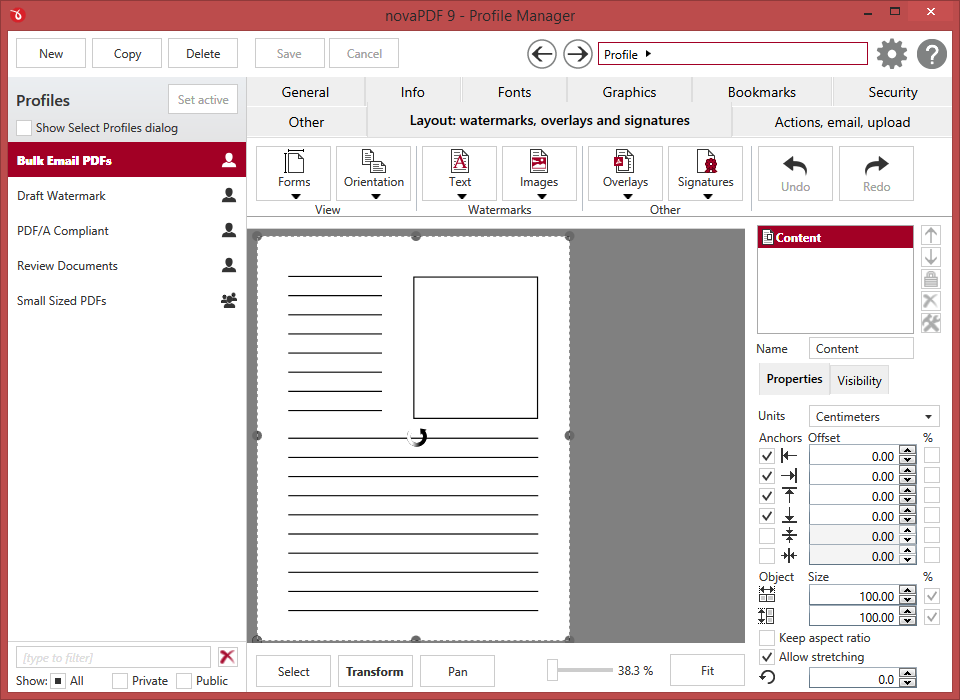
Description
What Is novaPDF and How Does It Work?
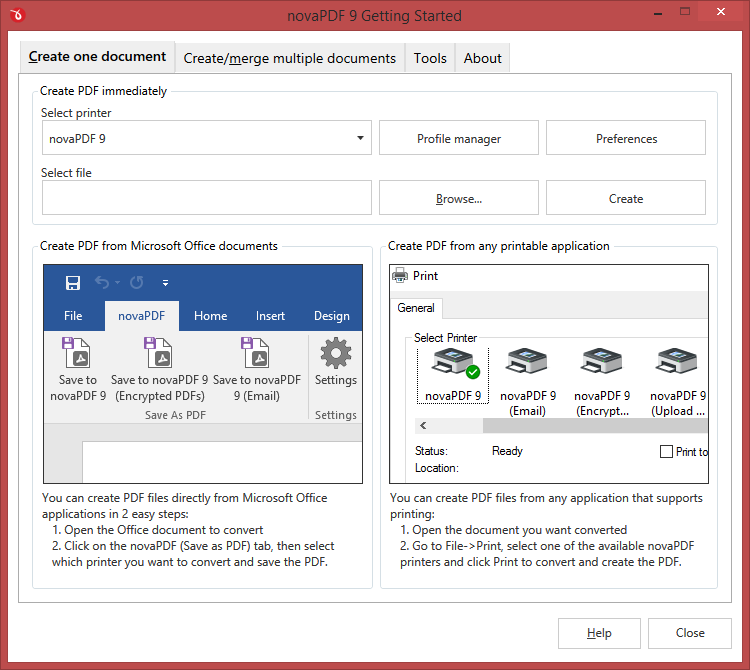
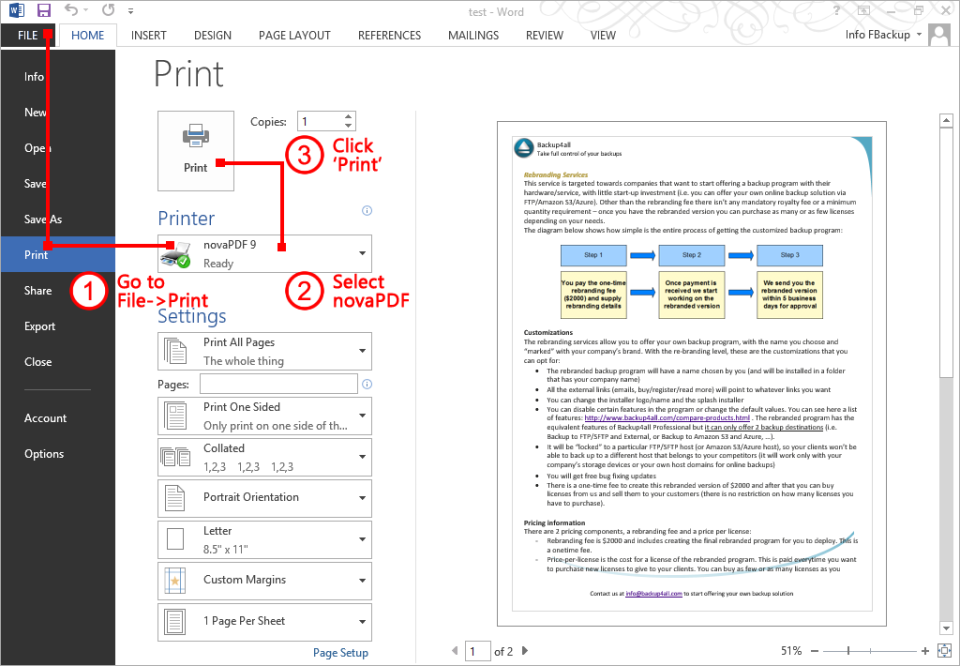
novaPDF by Softland is a PDF creator that installs as a virtual printer driver on Windows. Individuals and businesses use novaPDF to create PDF files from any Windows application by selecting novaPDF as the printer, plus configuring options for security, watermarks, digital signatures, and bookmark generation.
The typical novaPDF deployment covers PDF creation from any Windows application, PDF security including passwords and permissions, digital signatures, and PDF/A archival compliance. Three editions (Home, Personal, Pro) target different user needs.
novaPDF competes against Adobe Acrobat, PDFCreator, and other PDF creation tools.
novaPDF at a Glance
| Best for | Individuals + businesses needing Windows PDF creation |
|---|---|
| Deployment | Windows desktop (virtual printer driver) |
| Pricing model | Perpetual license + subscription options |
| Free trial | Free trial available |
| Signature capability | Windows virtual printer PDF creator with 3 editions |
| Compliance | PDF/A archival |
| HQ | Softland (Romania) |
novaPDF Pros and Cons in 2026
Where novaPDF Stands Out
- Virtual printer driver architecture lets any Windows application create PDFs by printing to novaPDF.
- Three editions (Home, Personal, Pro) fit different user needs and budgets.
- PDF security including passwords, permissions, and digital signatures.
- PDF/A archival format support.
Where novaPDF Falls Short
- Windows-only limits Mac and Linux users.
- Perpetual license model less familiar to modern SaaS buyers.
- Modern SaaS UX polish trails newer cloud-first PDF tools.
- Public pricing may vary; check novapdf.com for current editions.
Who Should Use novaPDF?
Windows users needing PDF creation from any Windows application should evaluate novaPDF. Individuals with light needs choose Home; personal use choose Personal; professional and business use choose Pro.
Mac and Linux users should look at alternative PDF creators.
novaPDF Product Suite in 2026
PDF creator
Virtual printer driver for Windows.
PDF security
Password protection, permissions, encryption.
Digital signatures
Sign PDFs digitally.
PDF/A archival
Create PDF/A compliant archives.
Bookmark generation
Automatic bookmarks from document structure.
novaPDF Deep Dive: Windows Virtual Printer PDF Creator Deep Dive
Virtual printer driver architecture
novaPDF installs as a virtual printer on Windows. Any Windows application that can print (Word, Excel, browser, etc.) can create PDFs by printing to novaPDF.
Three editions
Home for basic use, Personal for individual use, Pro for professional and business use. Editions differ in features (security, digital signatures, PDF/A, network deployment).
PDF security depth
Password protection, permission controls, and encryption ensure sensitive PDFs remain secure.
PDF/A compliance
PDF/A archival format supports long-term document retention for regulatory compliance.
How Much Does novaPDF Cost in 2026?
novaPDF pricing is perpetual license with subscription options. Visit novapdf.com for current Home, Personal, and Pro edition pricing.
Hidden Costs and Contract Notes to Watch
- Annual maintenance may be required for major version updates.
- Enterprise volume licensing requires Contact Sales.
- Mac and Linux not supported.
novaPDF Alternatives Worth Comparing
Adobe Acrobat Pro. Industry-standard PDF creation and editing.
PDFCreator. Free open-source PDF creator.
Foxit PDF. PDF suite alternative.
Who Uses novaPDF?
novaPDF supports individuals and businesses on Windows. Customer references live on novapdf.com. Softland is headquartered in Romania.
How novaPDF Compares to Adobe Acrobat Pro
| Dimension | novaPDF | Adobe Acrobat Pro |
|---|---|---|
| Platform | Windows only | Mac + Windows |
| Pricing model | Perpetual license | Subscription-only |
| Architecture | Virtual printer driver | Native PDF app |
| Editions | Home + Personal + Pro | Standard + Pro |
| Best-fit buyer | Windows PDF creators | Adobe ecosystem professionals |
Buyers evaluating novaPDF versus Adobe Acrobat Pro typically weigh these dimensions during procurement. Neither is universally better; the fit depends on document volume, industry regulatory requirements, existing enterprise stack, and whether the primary constraint is capture speed, retrieval accuracy, records-retention compliance, or workflow automation.
Points to Verify Before Buying novaPDF
Independent software review threads consistently flag a similar set of due-diligence questions buyers wish they had asked earlier. Cover these during your evaluation.
- Confirm Windows version compatibility.
- Ask about which edition (Home/Personal/Pro) fits your use case.
- Verify PDF/A compliance requirements if archival is needed.
- Test digital signature workflow if needed.
- Ask about enterprise volume licensing for team deployments.
What Real Buyers Report About novaPDF
Windows PDF creators evaluate novaPDF on virtual printer driver simplicity and edition flexibility.
Bottom Line: Is novaPDF Right for You?
novaPDF is a solid pick for Windows users needing PDF creation from any Windows application via virtual printer driver.
Three editions plus perpetual license option cover individual to professional use cases.
Trade-off: Windows-only limits Mac and Linux users.
Alternatives worth pricing: Adobe Acrobat Pro for cross-platform and PDFCreator for free open-source alternative.
Verified on 2026-07-05 by the SaaSRat Editorial Team (Chirantan). Vendor facts cross-checked against the novapdf vendor website, LinkedIn showcase pages, and community discussions on Reddit and industry LinkedIn groups. About our methodology.
Frequently Asked Questions
What is novaPDF?
Which platforms does novaPDF support?
What editions are available?
Does novaPDF publish pricing?
Does novaPDF support PDF/A?
Where is Softland headquartered?
Does novaPDF support digital signatures?
Is a free trial available?
How does novaPDF compare to Adobe Acrobat Pro?
Can I encrypt PDFs?
Find Your Perfect Software
See how it can transform your workflow
- Personalized for your needs Tailored recommendations based on your unique requirements.
- Save time & resources Streamline your workflow and boost team productivity.
- Trusted by thousands Join 10,000+ businesses already growing with SaaSrat.
You're all set! 🎉
A specialist for will reach out within 1 business day with tailored recommendations for your needs.