

Splitwise
by Splitwise, Inc. • Founded 2011
What is Splitwise?
Get Best Quote for Splitwise
Connect with SaaSrat experts to get the best quote for your business.
You're all set!
A specialist for Splitwise will reach out within 1 business day.
Splitwise Features
Expense tracking
Group expenses
Bill splitting
Debt simplification
Multi currency support
Recurring expenses
View All 24 Features
Splitwise Resources
Splitwise Screenshots
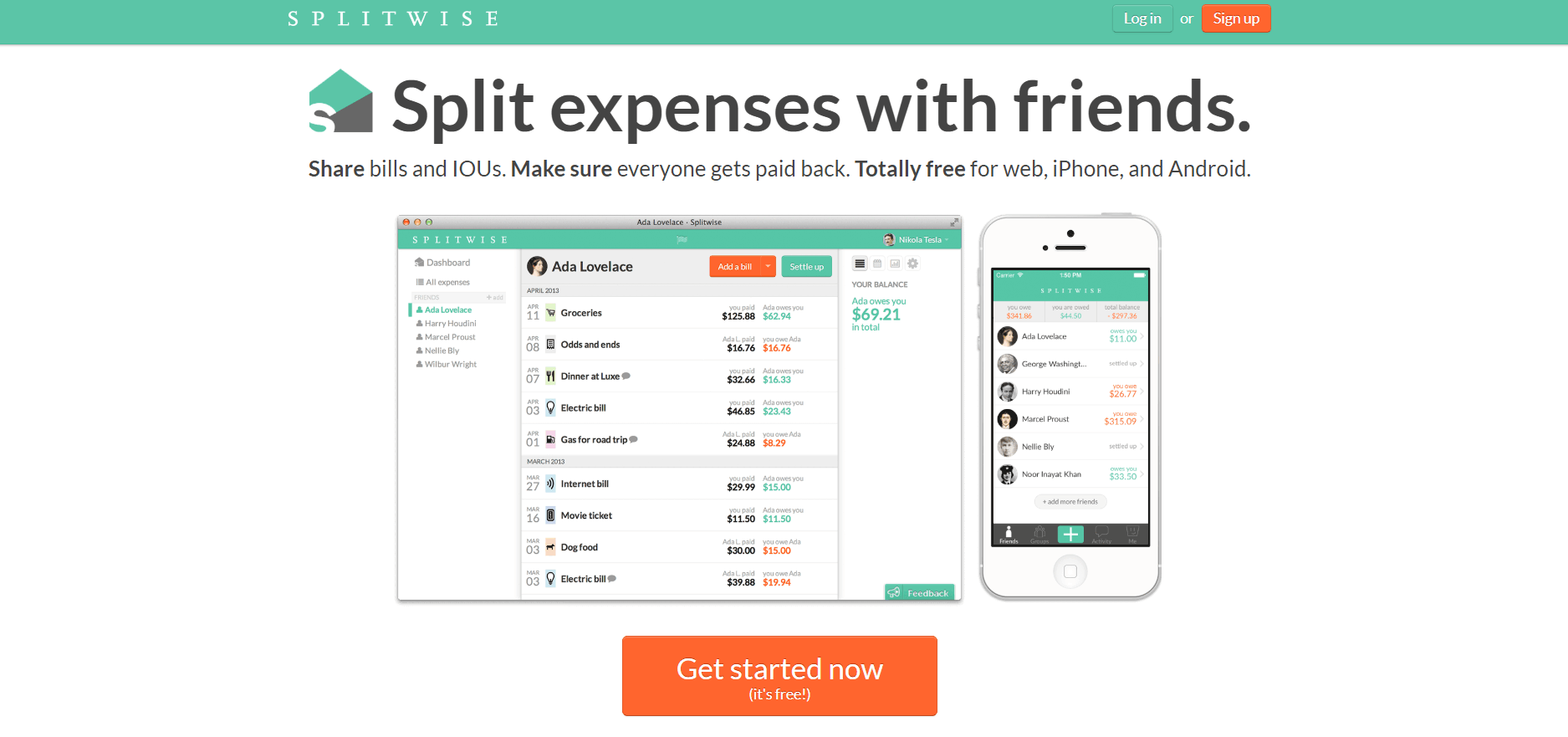
Description
Splitwise at a Glance
| Best for | Individuals and groups managing shared expenses across housemates, trips, friends, family, and small groups needing simple expense tracking without complex accounting software |
|---|---|
| Deployment | Free apps for iPhone, Android, and web with cloud sync; offline mode supported |
| Starting price | Free forever on iPhone, Android, and web; Splitwise PRO paid tier for power users |
| Key strengths | Free on all major platforms, simple expense tracking, equal or unequal splits, 100+ currencies, 7+ languages, offline mode, cloud sync, unlimited expenses |
| Not ideal for | Business accounting where dedicated accounting software fits better, or organizations needing enterprise expense management with policy enforcement and reimbursement workflows |
Splitwise Overview
Splitwise is a shared expense tracking app that helps people keep track of shared expenses and balances with housemates, trips, groups, friends, and family.
The core value is simple: track balances (who owes who), organize expenses (split any group), add expenses easily (on the go before forgetting who paid), and pay friends back (settle up with cash or online payment).
The platform is Free for iPhone, Android, and web, making it accessible to individuals and groups without procurement friction. This zero-cost entry point drove the product to broad consumer adoption.
Splitwise PRO extends the platform with power-user features: receipt scanning (automatically capture expense details), charts and graphs (visualize spending patterns), currency conversion (100+ currencies), and other advanced capabilities that matter for frequent users, international groups, and detailed expense tracking.
The unified feature set covers everyday shared-expense scenarios: add groups and friends, split expenses and record debts, equal or unequal splits, split by percentage or shares, calculate total balances, simplify debts, recurring expenses, offline mode, cloud sync, 7+ languages, 100+ currencies, payment integrations, and unlimited expenses.
Capabilities and Named Features
The Splitwise thesis is that everyday shared expenses (housemate rent and utilities, trip costs, group dinners, family expenses) create ongoing tracking friction that spreadsheets and mental math cannot solve well, and a purpose-built app removes that friction.
Track balances captures the core productivity win: knowing who owes who without having to reconstruct months of shared purchases from memory.
Organize expenses across any group (trips, housemates, friends, family) means Splitwise handles overlapping group memberships without requiring separate tools per group.
Add expenses on the go before forgetting who paid addresses the memory decay problem. Expenses captured in the moment have accurate details; expenses captured a week later miss context.
Pay friends back with cash or online payment recording closes the loop. Splitwise tracks not just who owes who, but also when debts get settled.
The Splitwise PRO tier addresses power users: receipt scanning removes manual entry, charts and graphs visualize spending patterns, and currency conversion serves international trips and multi-currency groups.
Free-first pricing on iPhone, Android, and web enables broad consumer adoption. Individuals evaluate the app at zero cost and upgrade to PRO when they value the power-user features.
The whole feature set (equal or unequal splits, split by percentage or shares, calculate total balances, simplify debts, recurring expenses, offline mode, cloud sync, spending totals, categorize expenses, 7+ languages, 100+ currencies, payment integrations, unlimited expenses, transaction import) reflects a mature product that has evolved with user needs.
Named feature list
- Track shared expenses and balances
- Housemate expense management
- Trip expense tracking
- Group expense organization
- Friends and family expense splits
- Free for iPhone
- Free for Android
- Free for web
- Add expenses on the go
- Pay friends back with recording
- Equal or unequal splits
- Split by percentage or shares
- Calculate total balances
- Simplify debts
- Recurring expenses
- Offline mode
- Cloud sync
- 7+ languages
- 100+ currencies
- Splitwise PRO with receipt scanning
Pricing and Plans
Splitwise is Free for iPhone, Android, and web with unlimited expenses and core shared-expense features.
Splitwise PRO is the paid tier adding receipt scanning, charts and graphs, currency conversion, and other power-user features.
Pricing for Splitwise PRO scales by billing period; the free tier serves the majority of consumer use cases.
| Tier | Price | What is included |
|---|---|---|
| Free | Free | Free for iPhone, Android, and web with unlimited expenses, equal or unequal splits, offline mode, cloud sync, 7+ languages, and 100+ currencies |
| Splitwise PRO | Vendor Published | Paid tier adding receipt scanning, charts and graphs, currency conversion with rates, and other advanced features for power users |
| Trip Splits | Free | Trip-focused shared expense tracking for travel groups |
| Group Splits | Free | Group-focused shared expense tracking for ongoing groups (housemates, families, friend groups) |
Pros
- Free on iPhone, Android, and web removes procurement friction; individuals and groups adopt Splitwise at zero cost and get real value without commitment.
- Equal or unequal splits, split by percentage or shares, and calculate total balances handle the actual variety of shared expense scenarios rather than forcing everyone into equal splits.
- Offline mode, cloud sync, and 100+ currencies serve international trips and multi-currency groups that other expense apps handle poorly.
Cons and Trade-offs
- Not designed for business accounting; small businesses should evaluate QuickBooks Online, Xero, or QuickBooks Self-Employed instead.
- Not suitable for enterprise expense management with policy enforcement, reimbursement workflows, or approval chains.
- The consumer-focused positioning means enterprise features (SSO, admin controls, integration marketplaces) are limited.
Splitwise vs Alternatives
| Capability | Splitwise | Venmo | Zeta |
|---|---|---|---|
| Core focus | Shared expense tracking for groups | Peer-to-peer payments | Couples finance management |
| Free tier | Free with unlimited expenses | Free peer payments | Free tier |
| Multi-currency | 100+ currencies | US-focused | Consumer finance focus |
| Offline mode | Native | Payment-focused | Consumer app |
| Best fit | Groups needing shared expense tracking | Sending payments between friends | Couples managing shared finances |
Who Should Choose Splitwise
Individuals and groups managing shared expenses across housemates, trips, friends, family, and small groups needing simple expense tracking without complex accounting software.
International groups and travelers benefit directly from 100+ currency support and 7+ language coverage.
Not appropriate for business accounting or enterprise expense management with policy enforcement and reimbursement workflows.
Named Alternatives to Splitwise
- Venmo. Peer-to-peer payments with strong US consumer presence. Chosen when actual payment sending is the primary need alongside light expense tracking.
- Zeta. Couples finance management with joint account features. A better fit for couples managing shared finances beyond just expense splitting.
- Cash App. Peer-to-peer payments with strong US consumer presence. Preferred for sending payments between friends.
- Tricount. European shared expense tracking app. Chosen for European users wanting a regional Splitwise alternative.
- Settle Up. Group expense management app. A better fit for users wanting alternative UI to Splitwise.
Implementation and Deployment
Splitwise deployments are essentially instant. Download the app on iPhone or Android (or use the web app), sign up, and start adding shared expenses without any implementation project.
Standard setup takes a few minutes: create the group (housemates, trip, or friends group), invite members via email or phone number, add the first shared expense, and start tracking balances.
Splitwise PRO upgrade adds receipt scanning setup, currency conversion preferences, and advanced charting configuration.
International trip setup adds currency preferences and time zone configuration for accurate multi-currency expense tracking.
What Real Buyers Say About Splitwise
Operator discussions on Reddit r/personalfinance discussions and Reddit r/travel group trip threads surface the following themes.
Housemates and roommates on Reddit r/personalfinance and Reddit r/roommates discuss Splitwise as the default tool for tracking shared rent, utilities, groceries, and household expenses without spreadsheet overhead.
Travel groups on Reddit r/travel and Reddit r/solotravel frequently cite Splitwise as decisive for group trips; 100+ currencies plus offline mode plus equal or unequal splits handle the reality of international group travel.
The Free tier with unlimited expenses is repeatedly praised as removing procurement friction; individuals adopt Splitwise without commitment and upgrade to PRO when they value the power-user features.
Common critique from business finance teams: Splitwise is consumer-focused; small businesses and enterprises need dedicated business accounting or expense management platforms.
The simplify debts feature is frequently discussed as saving group friction; rather than everyone owing everyone, Splitwise minimizes the total transactions required to settle up.
Offline mode is repeatedly praised by international travelers who need to add expenses during trips before connectivity returns.
Vendor references: Splitwise shared expense tracker overview, Splitwise product blog, Splitwise PRO features.
Related Splitwise Comparisons and Categories on SaaSRat
Explore related products and categories on SaaSRat to compare Splitwise against alternatives.
- Personal Finance on SaaSRat
- Expense Tracking on SaaSRat
- Consumer Apps on SaaSRat
- Venmo: P2P payments
- Zeta: couples finance
- Cash App: P2P payments
- Tricount: European expense app
- Settle Up: group expense app
The Bottom Line on Splitwise
Splitwise is a strong fit for individuals and groups managing shared expenses across housemates, trips, friends, family, and small groups.
Free on iPhone, Android, and web with unlimited expenses removes procurement friction and lets groups adopt Splitwise at zero cost.
100+ currencies, 7+ languages, offline mode, and cloud sync serve international groups and travelers that other expense apps handle poorly.
Business accounting should use dedicated tools like QuickBooks Online, Xero, or QuickBooks Self-Employed.
Enterprise expense management needs dedicated platforms with policy enforcement, reimbursement workflows, and approval chains.
Verified on 2026-08-04 against vendor website.
Frequently Asked Questions
What is Splitwise?
Who is Splitwise best for?
How does Splitwise pricing work?
Is Splitwise really free?
Can Splitwise split expenses unequally?
Does Splitwise work offline?
How many currencies does Splitwise support?
How does Splitwise compare to Venmo?
Where is Splitwise headquartered?
What is Splitwise PRO?
Find Your Perfect Software
See how it can transform your workflow
- Personalized for your needs Tailored recommendations based on your unique requirements.
- Save time & resources Streamline your workflow and boost team productivity.
- Trusted by thousands Join 10,000+ businesses already growing with SaaSrat.
You're all set! 🎉
A specialist for will reach out within 1 business day with tailored recommendations for your needs.